DIGITAL POWER AMPLIFIERPOWER
ZONE 1
ZONE 2 ZONE 3 ZONE 4 ZONE 5 ZONE 6 ZONE 7 ZONE 8
DX1250
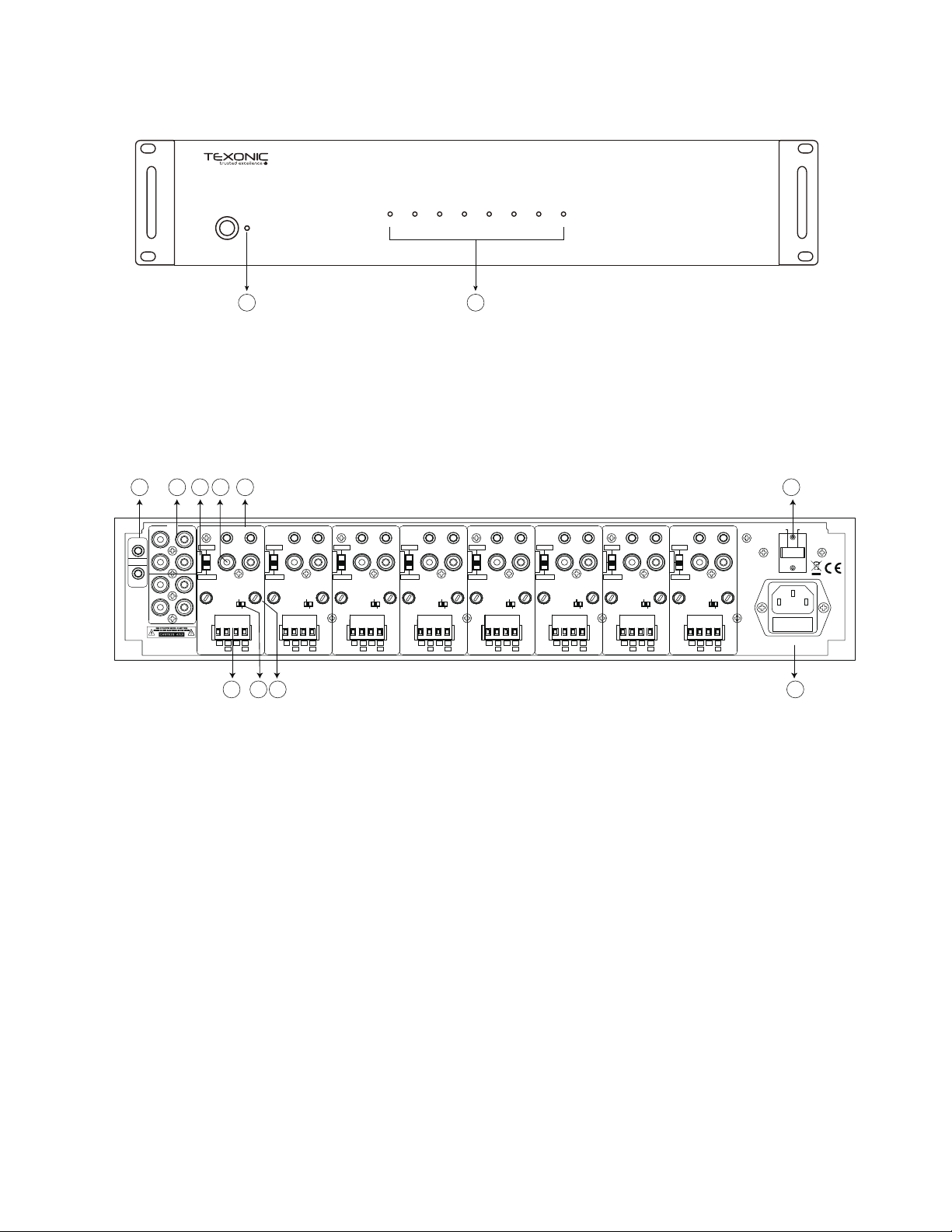
FRONT PANEL
REAR PANEL
1
2
1. Power/Standby LED
This LED lights red when any zone is active or
the amplifier is in standby mode.
1. Bus 12VDC Trigger In/Out
The Bus 12VDC Trigger In is used to activate all zones
that are using the Bus Input and disables other zone
triggers or signal sensing on those zones when it is used.
When the Bus 12VDC Trigger is used, all Bus-controlled
zone LEDs will be blue and active.
If the Bus Trigger In has 12V applied to it, only the 12V
Bus Trigger Out will have 12V and the Zone Trigger
Outputs will not.
2. Bus Inputs/Outputs
The Bus Line Inputs are optional inputs that can be used
to connect a single source to multiple zones. The Bus
Line Outputs are passive pass through the
corresponding of the Bus Inputs and can be used to
daisy chain the source to other amplifiers in the system.
3. Line/Bus Switch
Switches the zone input to the Line Input, Bus Input 1 or
Bus Input 2.
4. Line Input
The Line audio input for each zone is a dedicated
sensing input that will activate the zone when an audio
signal from a source is present.
2. Zone LED
Blue: the corresponding zone is powered on.
OFF: the corresponding zone is off (standby mode).
Red/Blue: A short circuit happens on the speaker outputs.
5. 12VDC Trigger In/Out (Each Zone)
The Zone 12V Trigger In is used to activate a specific zone. The
Zone Trigger Out can be used to trigger other 12V devices. The
delay and audio sensing are bypassed when the 12V Zone Trigger
Input is used. When a Zone Trigger is active, the zone LED will be
blue. If no voltage is present in the Zone Trigger, the Zone LED will
be off. Standby Mode The amplifier will go into Standby mode
when audio signal or trigger is not present after 3 munites.
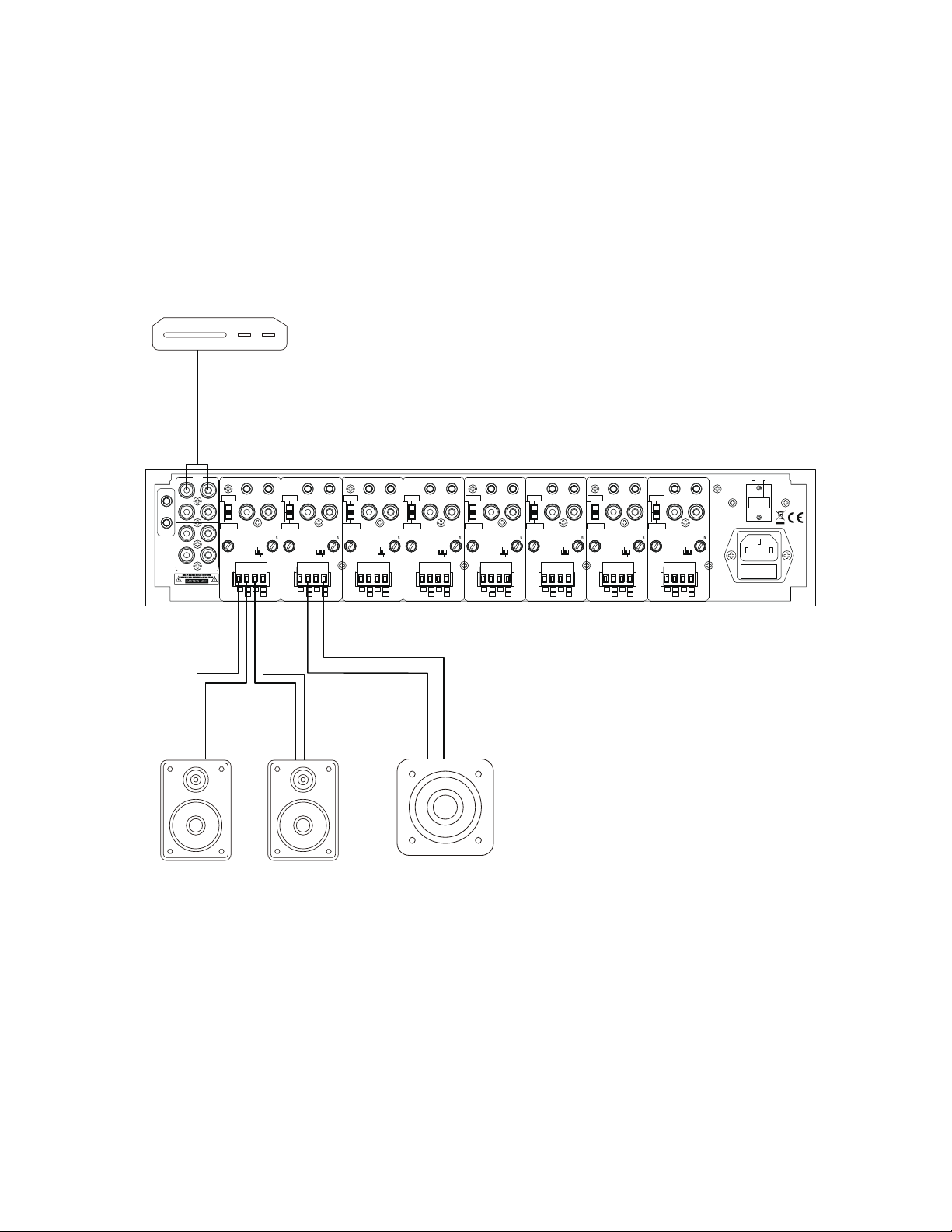
6. Speaker Outputs
The minimum speaker impedance is 4 ohms for Stereo Mode and 8
ohms for Bridge Mode.
7. Stereo/Bri dg e Switc h
Selects the output mode of each zone for stereo or Bridge
operation.
8. Gain Controls
Left and Right gain controls for each zone adjust the sound level
independently.
Only using Left control to adjust the sound level when used in
Bridge Mode.
9. Voltage Switch
AC 115V or AC 230V dual voltage selector.
10. AC Input
Apply the correct voltage before operate the amplifier.
4
1
2
3 4 5
6 7 8
9
10
Bridge
Trigger
In Out
Vol.Le �Vol.Ri ght
Line
In
R L
Stereo
Br id ge
L+
L- R-R+
+ -
Line In
Bus In 2
Bus In 1
AC 115V~
Trigger
AC 230V~
In In1
Out1
In2
Out2
Out
12 0V~6 0Hz ,120 0W FU SE T1 0AL,25 0V
23 0V~5 0Hz ,120 0W FU SE T5 AL,250 V
Bus
Bridge
Trigger
In Out
Vol.Le �Vol.Ri ght
Line
In
R L
Stereo
Br id ge
L+
L- R-R+
+ -
Line In
Bus In 2
Bus In 1
Bridge
Trigger
In Out
Vol.Le �Vol.Ri ght
Line
In
R L
Stereo
Br id ge
L+
L- R-R+
+ -
Line In
Bus In 2
Bus In 1
Bridge
Trigger
In Out
Vol.Le �Vol.Ri ght
Line
In
R L
Stereo
Br id ge
L+
L- R-R+
+ -
Line In
Bus In 2
Bus In 1
Bridge
Trigger
In Out
Vol.Le �Vol.Ri ght
Line
In
R L
Stereo
Br id ge
L+
L- R-R+
+ -
Line In
Bus In 2
Bus In 1
Bridge
Trigger
In Out
Vol.Le �Vol.Ri ght
Line
In
R L
Stereo
Br id ge
L+
L- R-R+
+ -
Line In
Bus In 2
Bus In 1
Bridge
Trigger
In Out
Vol.Le �Vol.Ri ght
Line
In
R L
Stereo
Br id ge
L+
L- R-R+
+ -
Line In
Bus In 2
Bus In 1
Bridge
Trigger
In Out
Vol.Le �Vol.Ri ght
Line
In
R L
Stereo
Br id ge
L+
L- R-R+
+ -
Line In
Bus In 2
Bus In 1
R L
ZONE 1
ZONE 2
ZONE 3
ZONE 4
ZONE 5
ZONE 6
ZONE 7
ZONE 8