
Time Tech F10 Manuale utente

Fingerscanner Technology for Time Attendance & Access Controller
1
TIME TECH
The Best Manufacturer and Designer of Biometric Technology
Adopts advance & reliable technology
Ma e technology to be user-friendly & easy to use
HARDWARE MANUAL

Fingerscanner Technology for Time Attendance & Access Controller
2
INDEX
Preamble …………………………………………………………………….. 3
1. Terminal / Machine Package……………………………………………… 4
2. Buttons & Functions……………………………………………………….. 4
3. S ecification………………………………………………………………… 6
4. Installation……………………………………………………………………6
5. Dis lay………………………………………………………………………. 8
6. Menu………………………………………………………………………….8
6.1. Register…………………………………………………………………….9
6.2. Delete……………………………………………………………………….11
6.3 Set Comm…………………………………………………………………...11
6.4. Set Time…………………………………………………………………….12
6.5. Advanced……………………………………………………………………12
6.6. View Info…………………………………………………………………….15
7. Usage and Safety Regulations ……………………………………………..16

Fingerscanner Technology for Time Attendance & Access Controller
3
Preamble
Res ected users, sincerely thank you for choosing Time Tech
Fingerscanner Terminal for your time attendance or access controller
equi ment. Please read the manual and understand the basic structure of the
roduct, erformance, function and master installation, using and maintenance
and management of basic knowledge before using the roduct.
Time Tech terminals are using the ARM9 terminal hardware latforms,
with ATMEL rocessor which rovide better stability and much higher working
s eed. It ado ts the Stand Alone working mode, which brings convenient in
every a lications.
Several models are available with several different functions and looks,
but with similar major functions. Verification is im lemented by using finger rint,
and/or assword, some models also equi ed with internal RF card
verification methods, external wiegand communication.
Terminals use standard TCP network rotocol, and su ort the U-disk
storage of data transmission, meet user in the network environment or without
network. Data transmission also ossible to do via internet (using ublic IP),
that gives no border across cities or countries to do data transmission.
Design and construction are made by rofessionals, which ut quality as
first riority without neglecting the attractive and elegant design. All machines
should have high erformance, robust design and long live of usage for heavy
duty condition.
Fingerscanner Technology for Time Attendance & Access Controller
4
1. Terminal / Machine Package
Each machine will come u with:
1. Terminal (machine)
2. Attached bracket (for wall hanging)
3. Screws (for wall hanging)
4. Deskto board (to ut the machine on desk)
5. Cable dataAda tor 100-240V, 50/60Hz.
6. CD (contains software and manuals)
2. Buttons & Functions
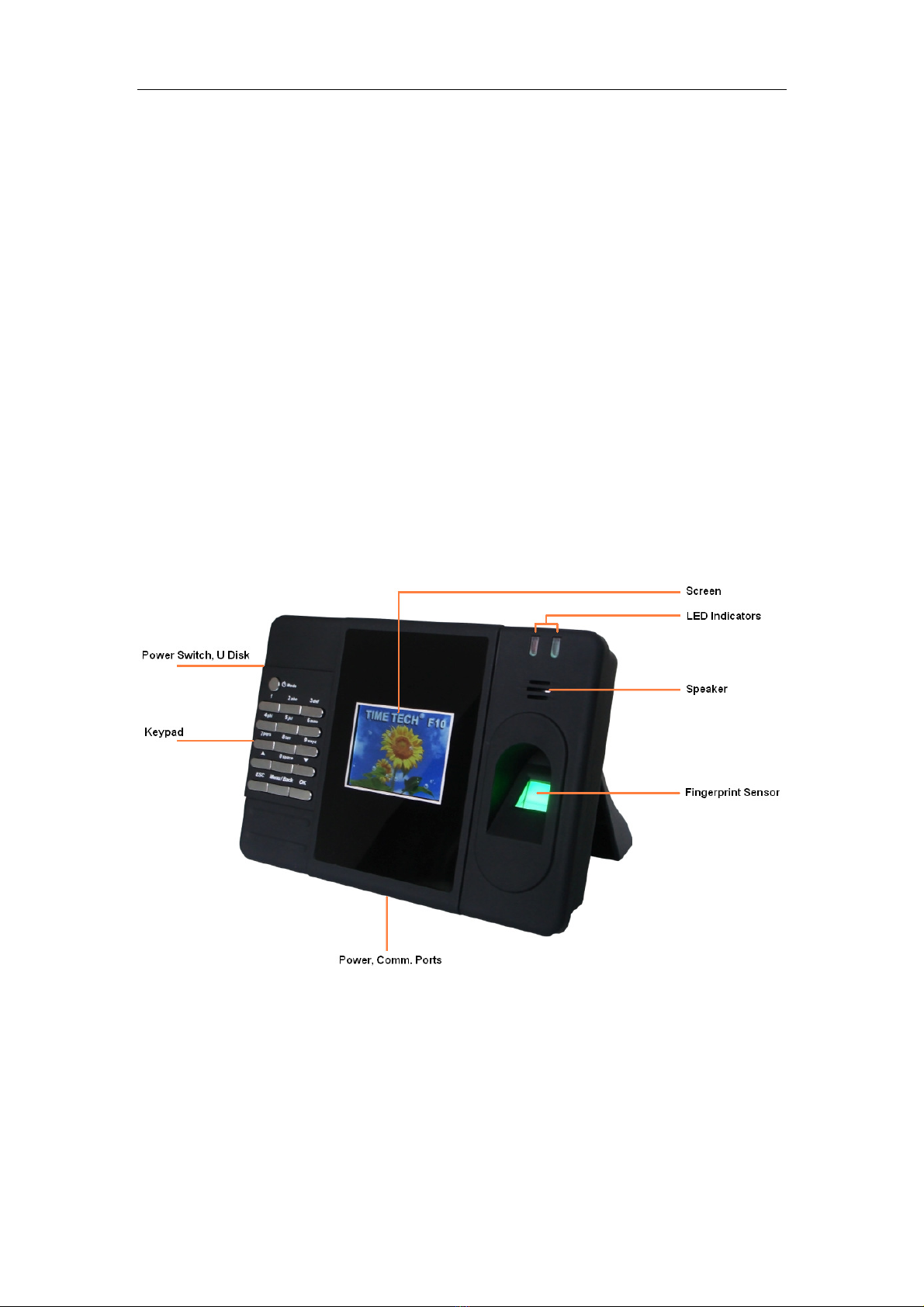
Front view (for different models, key ad might be on below the screen)
Fingerscanner Technology for Time Attendance & Access Controller
5
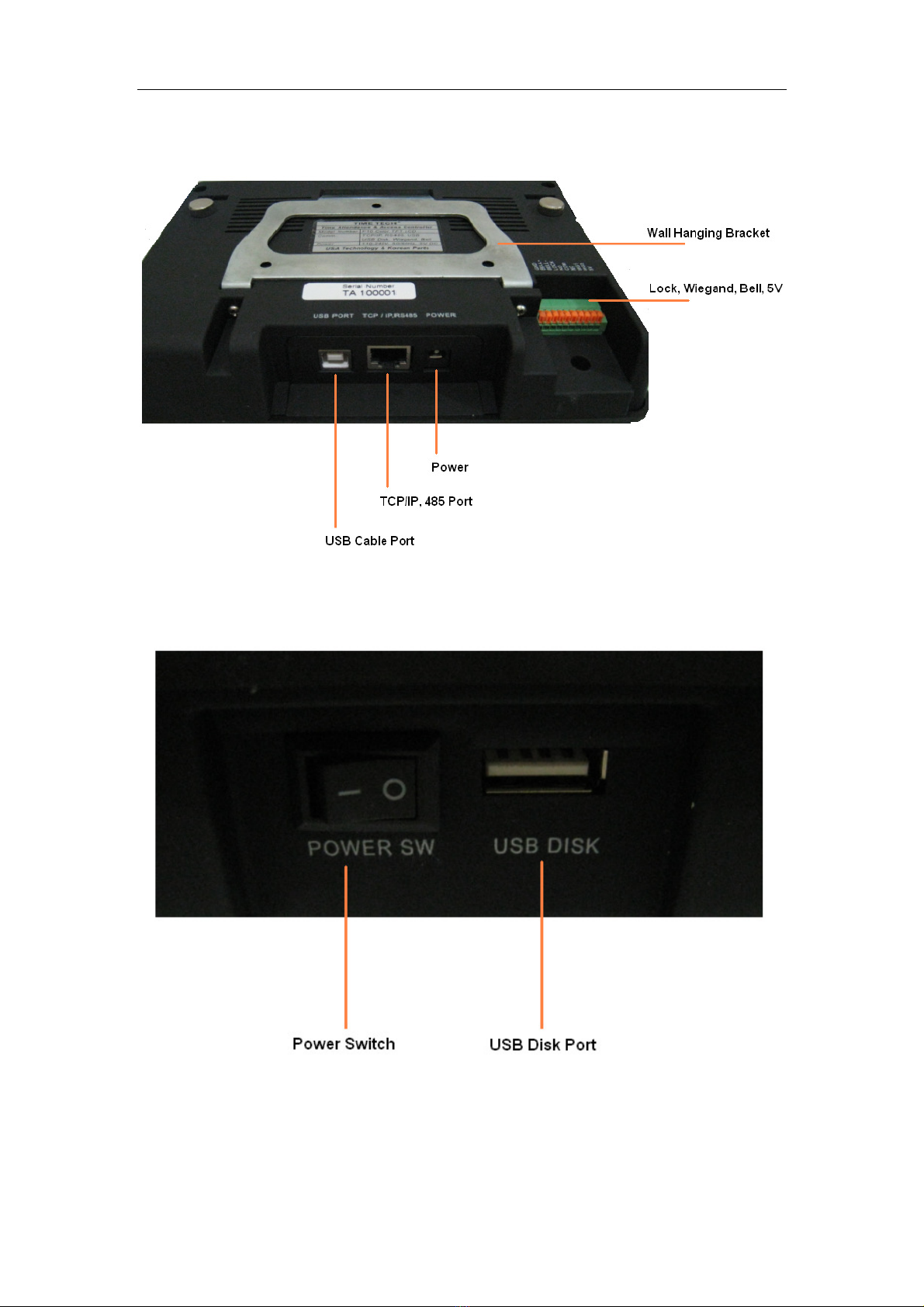
Rear View (Some models might not have Lock, Wiegand, Bell, 5V Ports)
Left Side View
Fingerscanner Technology for Time Attendance & Access Controller
6
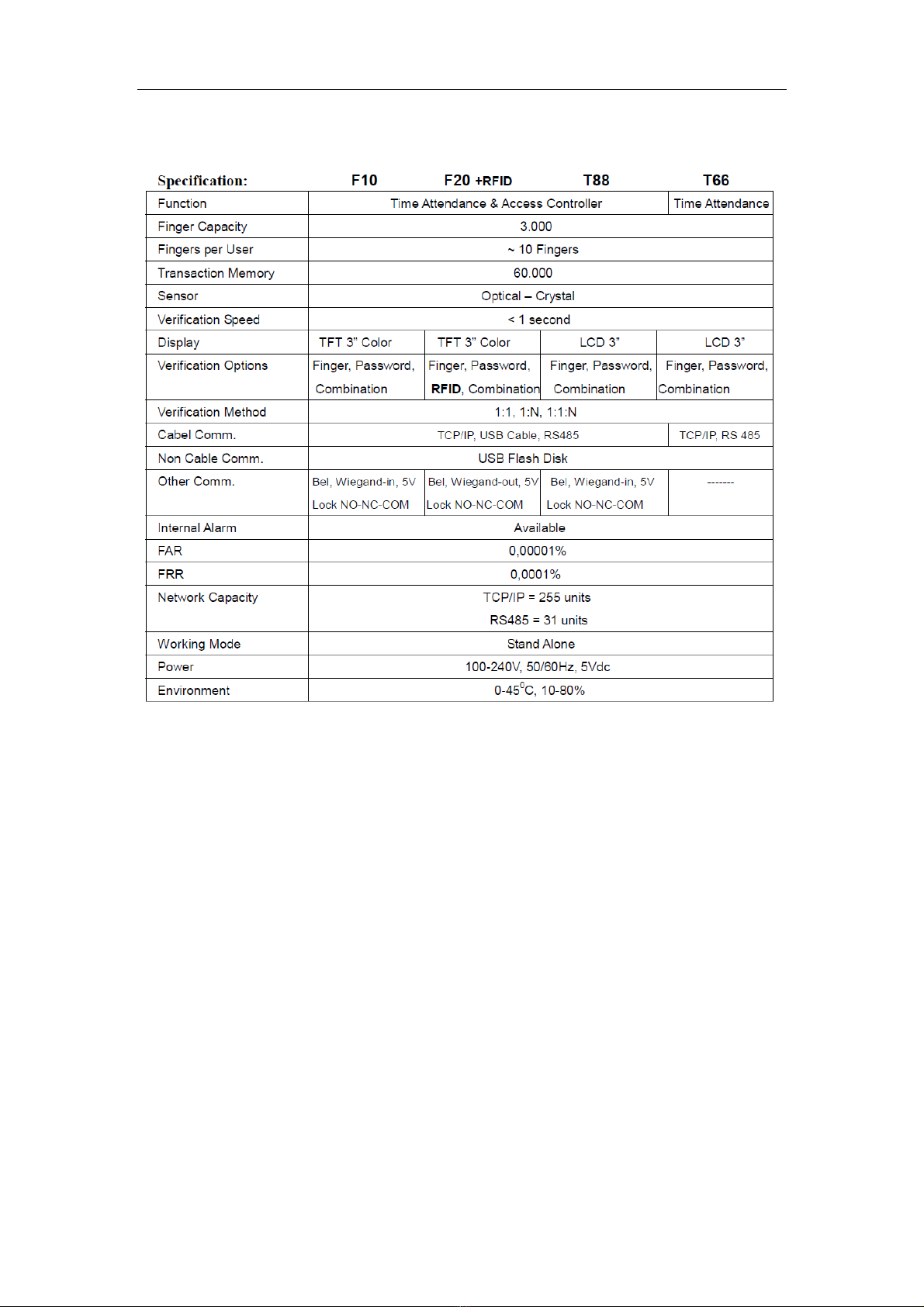
3. S ecifications
4. Installation
There are 2 installations methods are available:
1. Deskto Installation
Please use the Deskto Board and screw the board to the machine, lease
the machine always in flat surface.
2. Wall Hanging Installation
Please take off the metal bracket on the back of the machine by un-screw
the left and right screws, ut and install the metal bracket on to the wall
firmly (using the screws and fishers inside the ackage).
Attached the machine into the bracket (has been firmly attached to wall)
and firmly screw back the machine with the metal bracket (left and right).
Fingerscanner Technology for Time Attendance & Access Controller
7
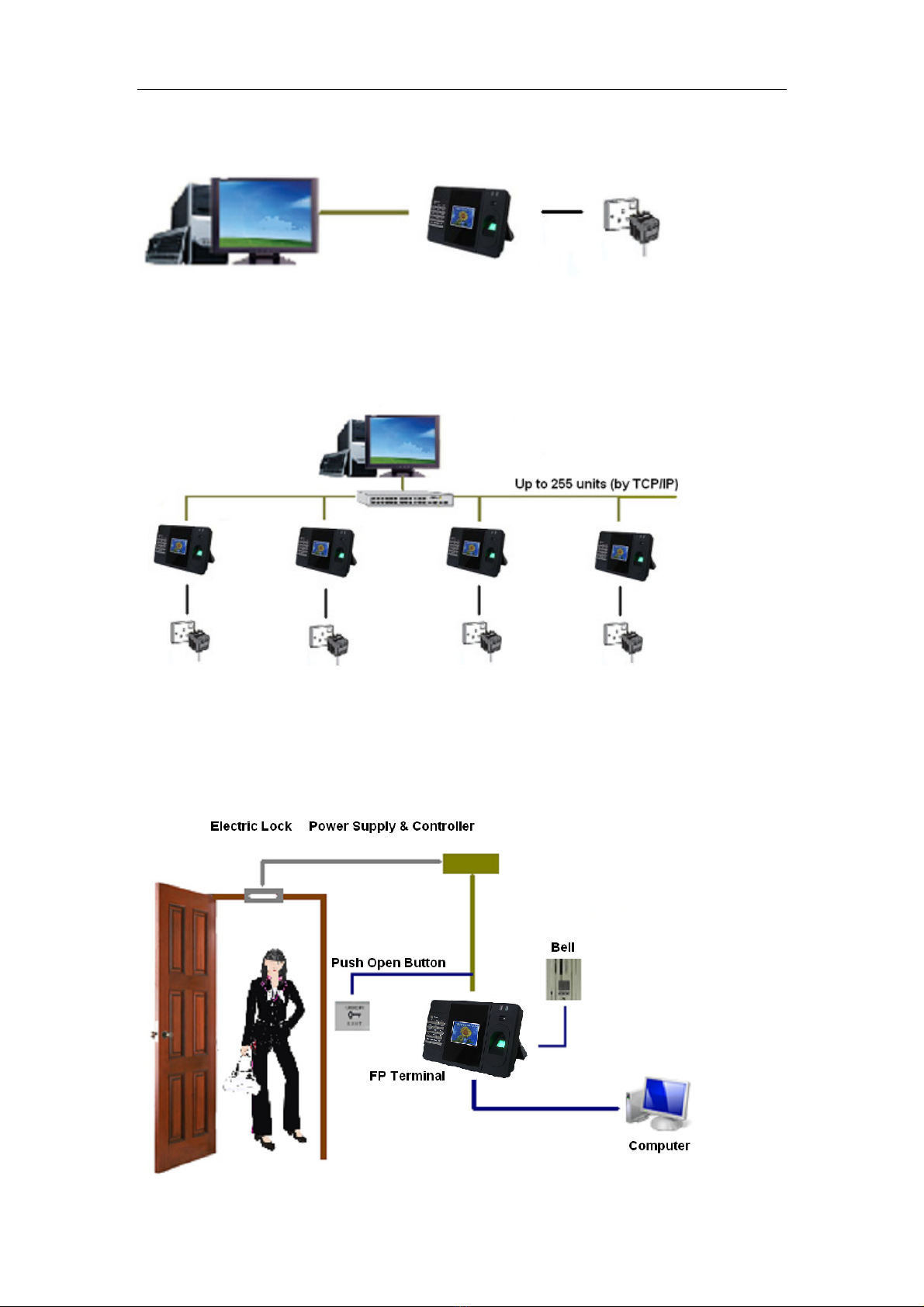
Direct Connection Illustration:
Networ Connection Illustration:
Electric Loc Connection Illustration:

Fingerscanner Technology for Time Attendance & Access Controller
8
5. Dis lay
The main dis lay and indicators :
6. Menu
Press the Menu Button, machine will a ears 6 major o tions:
1. Register
2. Delete
3. Set Comm
4. Set Time

Fingerscanner Technology for Time Attendance & Access Controller
9
5. Advance
6. View Info
1. Register
O tion related to registration of user and administrator.
1.1 User
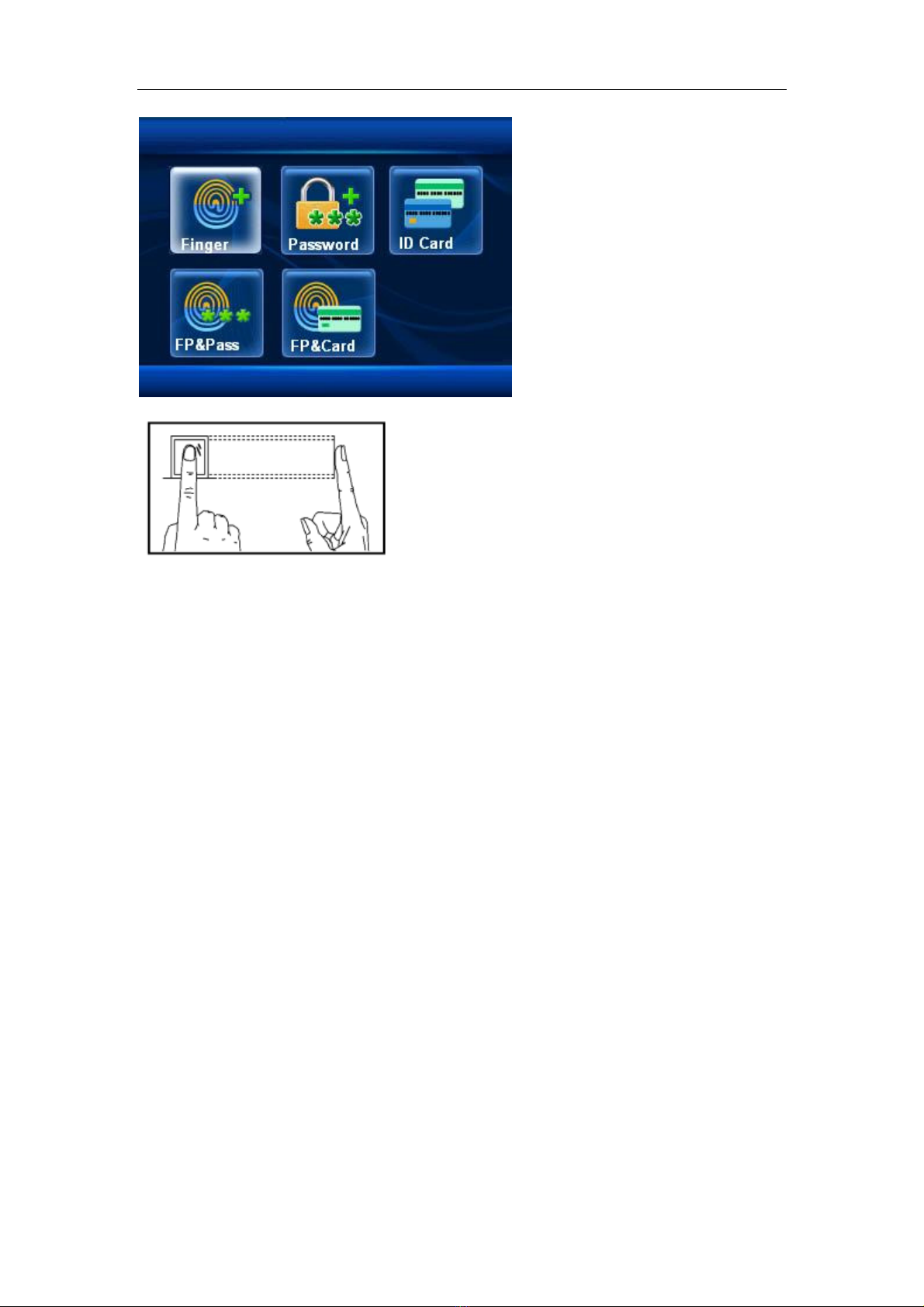
To register New User or to Back U (register more data for the same erson)
Proceed to register the data you want to use (Finger, Password, ID Card,
Finger & Password, Finger & Card). Note: Only machine equi ed with RF
module or wiegand can do the ID Card)
Note: Finger osition should be flat and on the center of the sensor. Please
clean and dry the finger before usage.
Fingerscanner Technology for Time Attendance & Access Controller
1
1.2 Admin
Administrator registration will be giving restriction for un-authorized ersons to
enter the machine’s menu. Registration method is the same as user
registration.
1.3 Ver. Mode
Verification Mode, might be selected by: 1:1, 1:N, 1:1:N, and giving the o tion
for verification sensitivity.
1:1 Verify = To set the verification sensitivity er user for 1:1 condition
verification. Range is between 0 – 50. The bigger numbers means more
sensitive.
Init.1:1 = To set the sensitivity of all users for 1:1 condition verification.
Range is between 0 – 50. The bigger numbers means more sensitive.
1:N Identify= To set the sensitivity of all users for 1:N condition verification.
Range is between 1 – 4. The bigger numbers means more sensitive.
1.4 U-Upload
Questo manuale è adatto per i seguenti modelli
3
Indice
Manuali Sistema di sicurezza popolari di altre marche


EDM
EDM Solution 6+6 Wireless-AE Manuale utente

Highway Safety Group
Highway Safety Group EA401 Manuale utente

Siren
Siren LED GSM Manuale utente

Detection Systems
Detection Systems 7090i Istruzioni per il montaggio

Se-Kure Controls
Se-Kure Controls MicroMini SK-4841 Manuale utente

Siemens
Siemens FDM273 Manuale utente