
TIMEMORE BLACK MIRROR nano Manuale utente

User Manual
TIMEMORE BLACK MIRROR nano
COFFEE WEIGHING PANEL
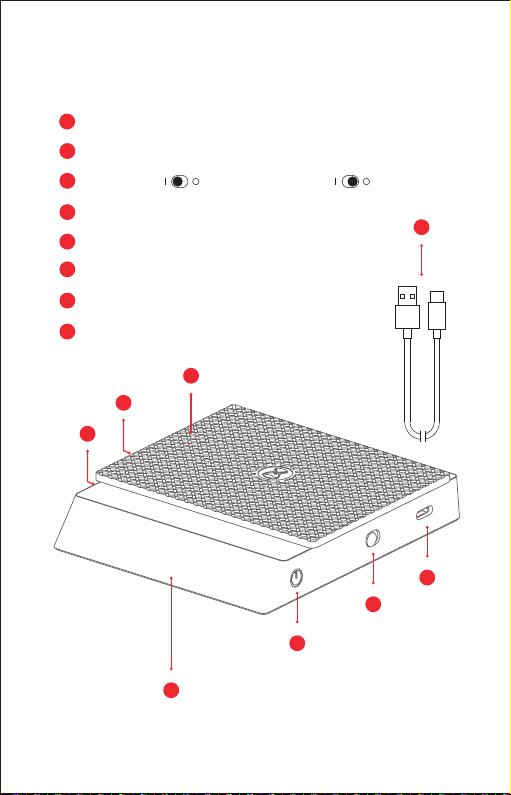
Parts & Functions
Base × 1
Standby / Tare Button
Power Button / Power o completely
TYPE-C Charging Port
Timer Button
Flow Rate Button
Silicone Pad × 1
TYPE-C Cable× 1
A
B
C
D
E
F
G
H
H
C
B
A
D
E
F
G
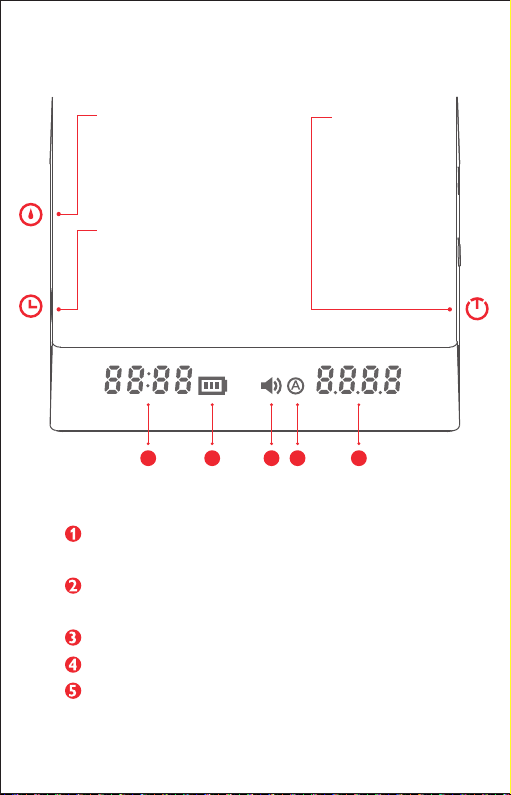
PS: The operation label shows each function and description of each
button. It can be removed after you are familiar with the operations.
Timer/ Flow rate: To record time (Max. 59min 59s)
To show flow rate (Max. 99.9g/s)
Battery indicator: Indicates the current power
( please charge in time when power is low)
Sound indicator: Indicates the sound prompt is on
Auto timing mode indicator: indicates Auto timing mode is currently on
Weight: Max. 2kg
Flow Rate Button:
Quick press to turn on Flow
Rate display
Timer Button:
Quick press to turn on or pause timing
Press for 1s to reset timing
Long Press for 5s to turn on/ o sound
Quick press 3 times, the cycle
Sequence will be Pour-over timing
Mode, Espresso Mode and Regular
Mode
Standby/Tare Button:
Quick press to power
on
Quick Press to Tare
Long Press to standby
1 2 3 4 5
Button Introduction
Display Introduction:
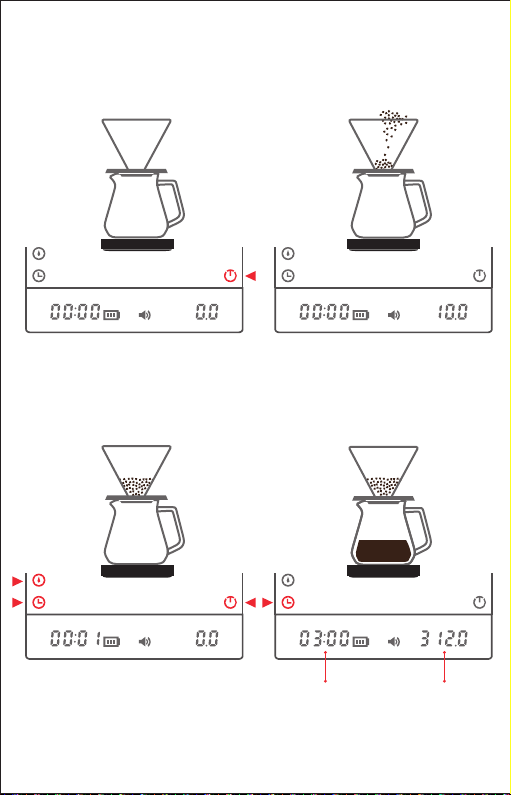
How to use
The following reference uses examples and actual operation will vary according to
your workflow.
When brewing finishes, quick press the
timer button to pause timing and the
weighing panel will display your brewing
data.
Total brewing
time
Total weight
of water
Put a brewer on the scale and saturate the
paper filter. Turn it on and quick press to
tare.
Tare again and quick press the timer
button. Now start to brew. The timer can
help you control the timing of the bloom
and pour. Quick press the flow rate button
to check the flow rate without pausing the
timer.
Add ground coee to reach the desired
weight.
01 02
03 04
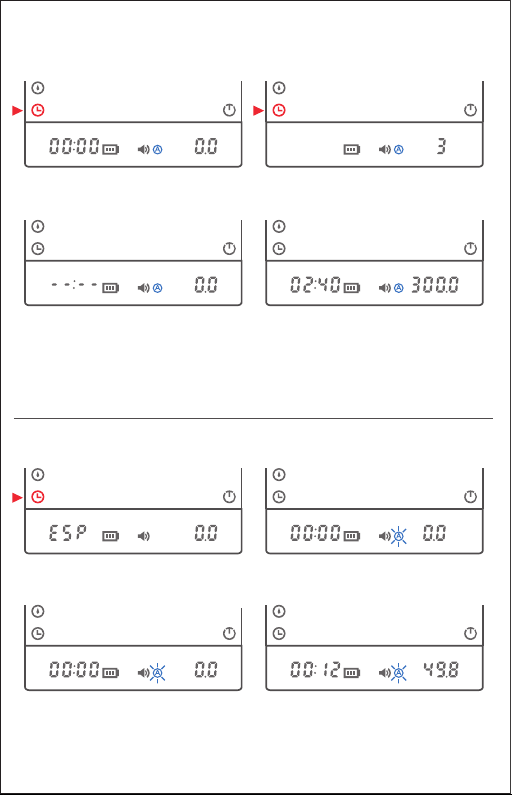
The cycle Sequence will be Regular Mode, Pour-over timing Mode and Espresso Mode.
Pour-over Timing Mode
Must be in Pour-over timing Mode to turn on
Must be in Regular Mode to turn on
The cycle Sequence will be Regular Mode, Pour-over timing Mode and Espresso Mode.
Espresso Timer Mode
After the countdown is over, the weight
value will auto-tare and you can start
brewing. Timing starts as soon as the
weight begins to change (the record is
valid when more than 40s is recorded)
If the brewer is removed, the timer will stop
and the brewing time will flash. At this time, if
you put the brewer back and quick press the
timer button, it will continue weighing and
timing. Then you can quick press the timer
button again to end recording. Long press the
timer to enter standby mode.
Quick press the timer button 3 times until
an audible beep and the Auto Timing Mode
indicator lights up.
Place a brewer on the panel and add
ground coee. Then quick press the timer
and wait for a 3-second countdown.
Quick press the timer button 3 times to
start Espresso Mode. The timer zone will
display ESP.
The Auto-brewing mode indicator A will
flash slowly for 1 second.
When you put a cup on the scale, it will
tare automatically. When the scale
detects coee droplets landing in the cup,
timing will start automatically.
When brewing is over and the cup is
removed, timing and weighing both stop
automatically and the recorded values will
flash. The values will then automatically
clear and return to the initial state of
displaying ESP and 0.0.

Specification
Note
01. Product Name: TIMEMORE BLACK MIRROR nano Coee Weighing Panel
02. Measure range: 0.2g-2000g
03. Storage temperature: -10℃to 55℃
04. Use temperature: Surface -10℃to 60℃With Silicone pad : -20℃to 100℃
05. Button: Capacitive touch ( no need to press hard )
06. Assistive indicator: Built-in buzzer
07. Battery: Built-in 900mAh Lithium rechargeable battery
Standard Voltage: 3.7V Voltage range: 3.4V - 4.25V
08. Charging way: Chargeable Lithium battery 5V DC/1A with TYPE-C cable
A charger is not included.
Charger info: 220V AC/110V AC Output:5V/1A
For fast charge, please use DC 5V/ 2A charger.
These notes must be followed or the device may break and/or give inaccurate
data and will not be covered by warranty.
1. DO NOT use a quick charger. DO use a 5V/1A charger.
2. Place the scale on a horizontal and smooth surface.
3. Do not attempt to weigh while charging.
4. This device is powered by a lithium battery. DO NOT wait until the scale battery dies
to charge it, instead, charge it in time after you use it.
5. When timing is o, the scale will shut down automatically after 3 minutes.
6. Only the scale surface is waterproof. DO NOT get liquid in the gap between the
shell and charging port.
7. Uninstalling internal equipment will void the warranty.
8. This device is 1 year limited warranty. Dismantling or man-made damage is not
included.
9. This scale is an accessory for coee brewing only and is not legal for trade.
If the brewer is removed, the timer will stop
and the brewing time will flash. At this time, if
you put the brewer back and quick press the
timer button, it will continue weighing and
timing. Then you can quick press the timer
button again to end recording. Long press the
timer to enter standby mode.
Replace&Refund
WARRANTY CARD
Thanks for purchasing TIMEMORE products . it's one year
warranty and available to replace or refund within 7 days since
you receive it if it's not deliberately damaged or used.
Designed by TIMEMORE in China, Made in China
2022@ShanghaiTIMEMORE Coee Equipment CO.,LTD.All rights reserved.
Manuel de l'utilisateur
TIMEMORE BLACK MIRROR nano
Balance à café
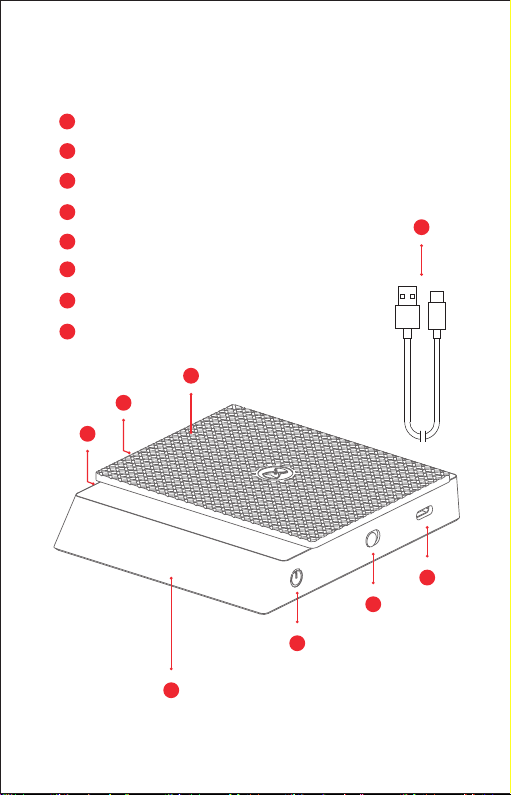
Pièces et fonctions
Base × 1
Bouton veille / Tare
Bouton pour allumer ou éteindre la balance
Port de charge de type C
Bouton minuteur
Bouton débit
Tapis en silicone x 1
Câble de type C × 1
A
B
C
D
E
F
G
H
H
C
B
A
D
E
F
G
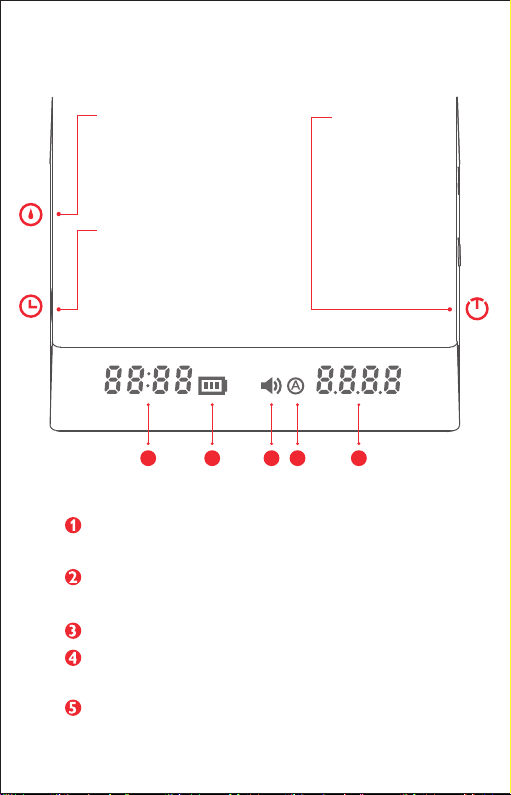
PS: l'étiquette d'opération ache chaque fonction et description de chaque bouton. Une fois
que vous vous êtes familiarisé avec l'opération, vous pouvez l'enlever.
Minuterie / taux de débit : Pour enregistrer le temps (59 Min 59 s Max.)
Acher le taux de débit (99,9g / s Max.)
Indicateur de batterie: indique la puissance actuelle
(S'il vous plaît, veuillez charger lorsque la puissance est faible)
Indicateur sonore: indique lorsque le son est actif
Indicateur de mode de synchronisation automatique: indique que le mode de
synchronisation automatique est actuellement allumé
Poids: Max. 2kg
Bouton débit:
Appuyez rapidement pour
activer l'achage du débit
Bouton minuteur:
Appuyez rapidement pour activer ou
arrêter le timing
Appuyez pendant 1 seconde pour
réinitialiser le timing
Appuyez pendant 5 secondes pour
activer / désactiver le son
Appuyez 3 fois rapidement pour
accéder aux modes Pour-over (pour
filtre / Slow coee), Expresso et le
mode normal.
Bouton veille / Tare
Appuyez rapidement
pour allumer la
balance
Appuyez rapidement
pour la fonction Tare
Appuyez et maintenez
pour la fonction Veille
1 2 3 4 5
Description du bouton:
Description du bouton:
Indice
Lingue:
Altri manuali TIMEMORE Scala


