Toa TS-770 Manuale utente

OPERATING INSTRUCTIONS
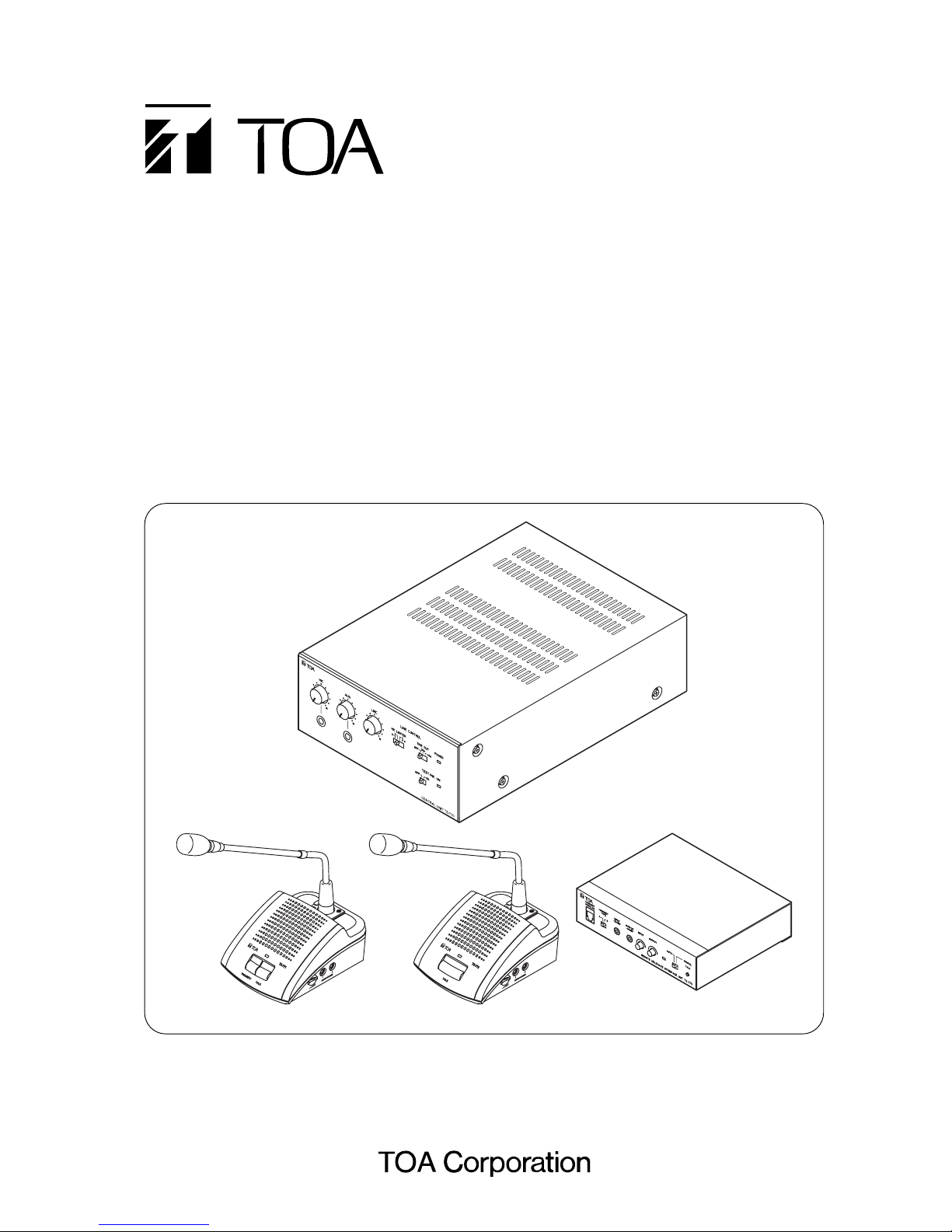
CONFERENCE SYSTEM TS-770 SERIES
TS-770
TS-771 TS-772 TS-775
Thank you for purchasing TOA's Conference system.
Please carefully follow the instructions in this manual to ensure long, trouble-free use of your equipment.
TS-770 (CENTRAL UNIT)
TS-771 (CHAIRMAN UNIT)
TS-772 (DELEGATE UNIT)
TS-773 (MICROPHONE)
TS-774 (MICROPHONE)
TS-775 (REMOTE DELEGATE INTERFACE UNIT)
YR-770-2M (2 m EXTENSION CORD)
YR-770-10M (10 m EXTENSION CORD)

2
TABLE OF CONTENTS
1. IMPORTANT SAFETY INSTRUCTIONS ..................................................... 3
2. SAFETY PRECAUTIONS ................................................................................. 4
3. GENERAL DESCRIPTION .............................................................................. 6
4. FEATURES ........................................................................................................... 6
5. NOMENCLATURE AND FUNCTIONS
5.1. TS-770 Central Unit ........................................................................................... 7
5.2. TS-771 Chairman Unit and TS-772 Delegate Unit ............................................. 9
5.3. TS-775 Remote Delegate Interface Unit .......................................................... 11
6. OPERATING CHAIRMAN AND DELEGATE UNITS
6.1. Making Speech ................................................................................................ 12
6.2. Making Priority Speech (Chairman Unit TS-771 Only) ..................................... 13
7. HOLDING REMOTE CONFERENCES
7.1. Remote Conference Procedures ...................................................................... 14
7.2. Speech Operation When the Remote Delegate Interface Unit
Is Set to AUTO Mode ....................................................................................... 14
7.3. Speech Operation When the Remote Delegate Interface Unit
Is Set to MANUAL Mode .................................................................................. 15
7.4. Setting Examples ............................................................................................. 15
8. FUNCTION SETTINGS
8.1. Speaker Restriction Function
8.1.1. Setting procedure ................................................................................... 16
8.1.2. Restricted number of simultaneously operable Delegate units
and each conference unit's operation .................................................... 16
8.2. Automatic Mic-Off Function .............................................................................. 17
8.3 All Mic-On Function ........................................................................................... 17
9. RECORDING
9.1. Recording with the Central Unit ....................................................................... 18
9.2. Recording with the Chairman Unit or Delegate Unit ........................................ 18
10. INSTALLATION AND CONNECTION
10.1. Connection Example ...................................................................................... 19
10.2. Installation Procedures ................................................................................... 20
10.3. Basic System Installation and Adjustment
10.3.1. Connecting the Chairman and Delegate units to the Central unit ...... 21
10.3.2. Setting functions and adjusting Chairman and Delegate units
sound output volume .......................................................................... 23
11. IF USING MULTIPLE CENTRAL UNITS: .................................................. 25
12. WHEN HOLDING REMOTE CONFERENCES: ...................................... 26
13. BLOCK DIAGRAMS
13.1. TS-770 Central Unit ....................................................................................... 29
13.2. TS-771 Chairman Unit ................................................................................... 29
13.3. TS-772 Delegate Unit ..................................................................................... 30
13.4. TS-775 Remote Delegate Interface Unit ........................................................ 30
14. SPECIFICATIONS
14.1. TS-770 Central Unit ....................................................................................... 31
14.2. TS-771 Chairman Unit and TS-772 Delegate Unit ......................................... 31
14.3. TS-773 and TS-774 Microphones .................................................................. 32
14.4. TS-775 Remote Delegate Interface Unit ........................................................ 32
14.5. YR-770-2M 2 m Extension Cord and YR-770-10M 10 m Extension Cord ..... 32

3
1. IMPORTANT SAFETY INSTRUCTIONS
• Read these instructions.
• Keep these instructions.
• Heed all warnings.
• Follow all instructions.
• Do not use this apparatus near water.
• Clean only with dry cloth.
• Do not block any ventilation openings. Install in accordance with the manufacturer's instructions.
• Do not install near any heat sources such as radiators, heat registers, stoves, or other apparatus (including
amplifiers) that produce heat.
• Do not defeat the safety purpose of the polarized or grounding-type plug. A polarized plug has two blades
with one wider than the other. A grounding type plug has two blades and a third grounding prong. The wide
blade or the third prong is provided for your safety. If the provided plug does not fit into your outlet, consult
an electrician for replacement of the obsolete outlet.
• Protect the power cord from being walked on or pinched particularly at plugs, convenience receptacles, and
the point where they exit from the apparatus.
• Only use attachments/accessories specified by the manufacturer.
• Use only with the cart, stand, tripod, bracket, or table specified by the manufacturer,
or sold with the apparatus. When a cart is used, use caution when moving the
cart/apparatus combination to avoid injury from tip-over.
• Unplug this apparatus during lightning storms or when unused for long periods of time.
• Refer all servicing to qualified service personnel. Servicing is required when the apparatus has been
damaged in any way, such as power-supply cord or plug is damaged, liquid has been spilled or objects have
fallen into the apparatus, the apparatus has been exposed to rain or moisture, does not operate normally, or
has been dropped.

4
When Installing the Unit
• Do not expose the unit to rain or an environment
where it may be splashed by water or other liquids,
as doing so may result in fire or electric shock.
• Use the unit only with the voltage specified on the
unit. Using a voltage higher than that which is
specified may result in fire or electric shock. (TS-
770 only)
• Do not cut, kink, otherwise damage nor modify the
power supply cord. In addition, avoid using the
power cord in close proximity to heaters, and never
place heavy objects -- including the unit itself -- on
the power cord, as doing so may result in fire or
electric shock. (TS-770 only)
• Avoid installing or mounting the unit in unstable
locations, such as on a rickety table or a slanted
surface. Doing so may result in the unit falling
down and causing personal injury and/or property
damage.
• Since the unit is designed for in-door use, do not
install it outdoors. If installed outdoors, the aging of
parts causes the unit to fall off, resulting in personal
injury. Also, when it gets wet with rain, there is a
danger of electric shock.
When the Unit is in Use
• Should the following irregularity be found during
use, immediately switch off the power, disconnect
the power supply plug from the AC outlet and
contact your nearest TOA dealer. Make no further
attempt to operate the unit in this condition as this
may cause fire or electric shock.
· If you detect smoke or a strange smell coming
from the unit.
· If water or any metallic object gets into the unit
· If the unit falls, or the unit case breaks
· If the power supply cord is damaged (exposure of
the core, disconnection, etc.) (TS-770 only)
· If it is malfunctioning (no tone sounds.)
• To prevent a fire or electric shock, never open nor
remove the unit case as there are high voltage
components inside the unit. Refer all servicing to
qualified service personnel.
• Do not place cups, bowls, or other containers of
liquid or metallic objects on top of the unit. If they
accidentally spill into the unit, this may cause a fire
or electric shock.
• Do not insert nor drop metallic objects or
flammable materials in the ventilation slots of the
unit's cover as this may result in fire or electric
shock.
• Do not touch a power supply plug during thunder
and lightning, as this may result in electric shock.
(TS-770 only)
• The apparatus shall be connected to a mains
socket outlet with a protective earthing connection.
(TS-770 only)
• The socket-outlet shall be installed near the
equipment and the plug (disconnecting device)
shall be easily accessible. (TS-770 only)
2. SAFETY PRECAUTIONS
• Before installation or use, be sure to carefully read all the instructions in this section for correct and safe
operation.
• Be sure to follow all the precautionary instructions in this section, which contain important warnings and/or
cautions regarding safety.
• After reading, keep this manual handy for future reference.
Safety Symbol and Message Conventions
Safety symbols and messages described below are used in this manual to prevent bodily injury and property
damage which could result from mishandling. Before operating your product, read this manual first and
understand the safety symbols and messages so you are thoroughly aware of the potential safety hazards.
WARNING
Indicates a potentially hazardous situation which, if mishandled, could
result in death or serious personal injury.
Indicates a potentially hazardous situation which, if mishandled, could
result in moderate or minor personal injury, and/or property damage.
WARNING
CAUTION

5
CAUTION
When Installing the Unit
• Never plug in nor remove the power supply plug
with wet hands, as doing so may cause electric
shock. (TS-770 only)
• When unplugging the power supply cord, be sure
to grasp the power supply plug; never pull on the
cord itself. Operating the unit with a damaged
power supply cord may cause a fire or electric
shock. (TS-770 only)
• When moving the unit, be sure to remove its power
supply cord from the wall outlet. Moving the unit
with the power cord connected to the outlet may
cause damage to the power cord, resulting in fire or
electric shock. When removing the power cord, be
sure to hold its plug to pull. (TS-770 only)
• Do not block the ventilation slots in the unit's cover.
Doing so may cause heat to build up inside the unit
and result in fire. Also, periodically clean the
ventilation slots of dust. (TS-770 only)
• Avoid installing the unit in humid or dusty locations,
in locations exposed to the direct sunlight, near the
heaters, or in locations generating sooty smoke or
steam as doing otherwise may result in fire or
electric shock.
When the Unit is in Use
• Contact your TOA dealer as to the cleaning. If dust
is allowed to accumulate in the unit over a long
period of time, a fire or damage to the unit may
result. (TS-770 only)
• If dust accumulates on the power supply plug or in
the wall AC outlet, a fire may result. Clean it
periodically. In addition, insert the plug in the wall
outlet securely. (TS-770 only)
• Switch off the power, and unplug the power supply
plug from the AC outlet for safety purposes when
cleaning or leaving the unit unused for 10 days or
more. Doing otherwise may cause a fire or electric
shock. (TS-770 only)
The lighting flash with arrowhead symbol, within an equilateral triangle, is intended to alert the user
to the presence of uninsulated "dangerous voltage" within the product's enclosure that may be of
sufficient magnitude to constitute a risk of electric shock to persons.
The exclamation point within an equilateral triangle is intended to alert the user to the presence of
important operation and maintenance (servicing) instruction in the literature accompanying the
appliance.

6
3. GENERAL DESCRIPTION
The TS-770 Series conference system is designed for quick and easy installation and storage.
The system can be installed by merely connecting conference units* to the TS-770 Central unit.
The use of the Remote Delegate Interface unit permits a party in remote location to participate in the
conference.
* Collective name of the following 3 models: TS-771 Chairman Unit, TS-772 Delegate Unit, and TS-775
Remote Delegate Interface Unit.
4. FEATURES
• Conference speech can be amplified by simply connecting the Chairman and Delegate units to the Central
unit.
• Connecting the Remote Delegate Interface unit to the system allows conferences to be held between remote
locations via telephone lines or PCs.
• Up to 70 conference units can be connected per Central unit. (35 units per line x 2 lines.)
• Up to 3 Central units and up to 210 conference units can be connected per system.
• Optional 2-meter and 10-meter extension cables allow wiring suitable to local installation conditions.
• Either the TS-773 or TS-774 Microphone can be used with the TS-771 Chairman unit and the TS-772
Delegate unit.
• Because the microphone for both the Chairman and Delegate units is detachable, both units can be stored
without taking up much space.
• Test function allows easy confirmation of connections between conference units.
• The number of simultaneously operable Delegate units can be limited using the Speaker Restriction
function. (Can be set to 0, 1, 3 or 6 units.)
• Even if the speaker forgets to turn off his or her microphone after speech completion, the Automatic Mic-Off
function automatically switches off the microphone after a preset interval elapses. (Can be set to OFF, 20 or
40 seconds.)
• Conference contents can be recorded using a recording equipment.
• All Mic-On function allows conferences to be held without requiring talk key operation. (A dedicated function
for conference recording.)

7
CENTRAL UNIT TS-770
1
2 3 4 5 6
7 8 9
10
5. NOMENCLATURE AND FUNCTIONS
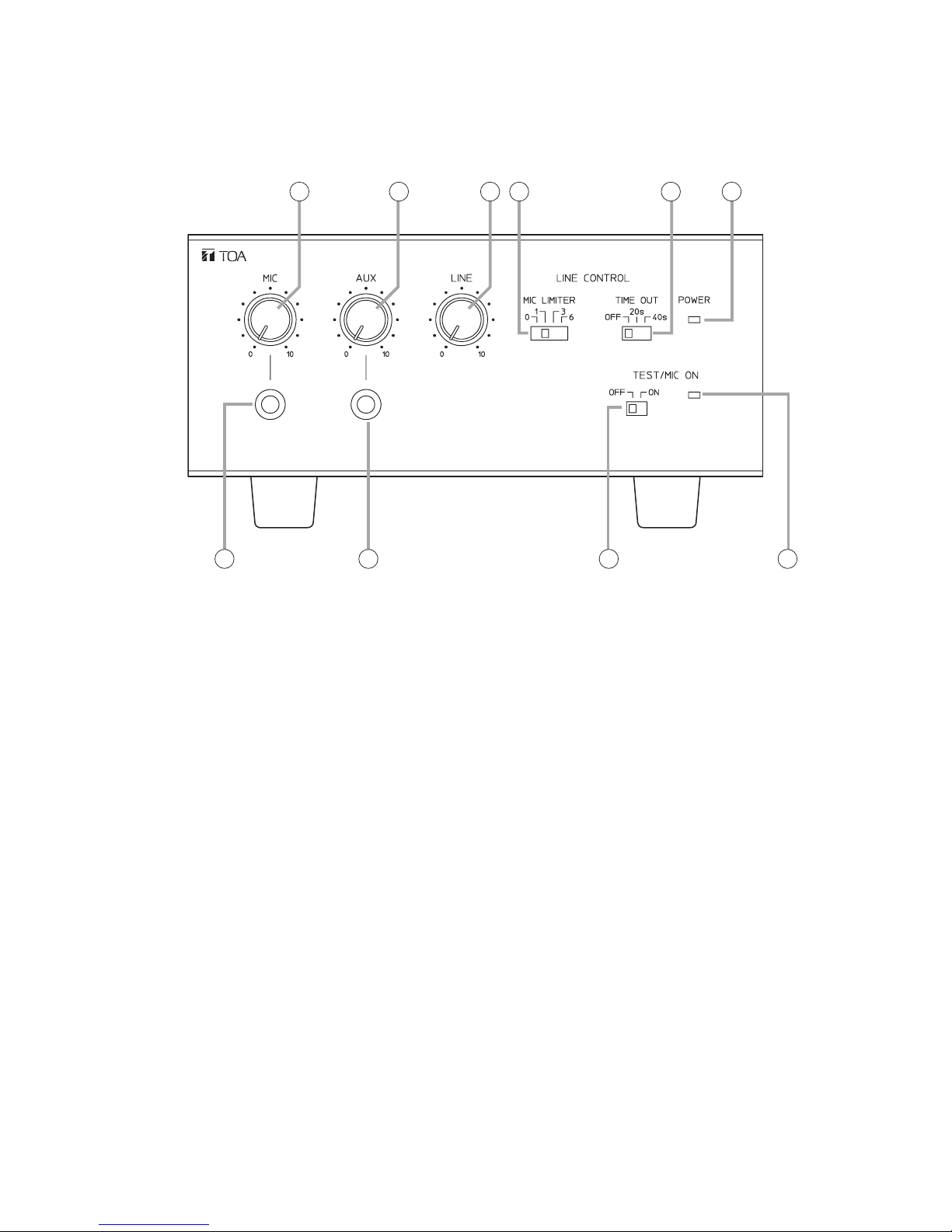
5.1. TS-770 Central Unit
[Front]
1. Power indicator [POWER]
Lights when the power switch (11) on the rear
panel is set to the ON position.
2. Microphone volume control [MIC]
Adjusts the volume of the microphone connected
to the microphone input jack (7).
3. AUX volume control [AUX]
Adjusts the volume of equipment connected to
AUX input jack (8).
4. Line volume control [LINE]
Adjusts the volume of the conference unit's built-in
speaker.
5. Speaker restriction switch [MIC LIMITER]
Sets the number of delegate units that can be
used simultaneously.
6. Automatic mic-off setting switch [TIME OUT]
It is possible to set the conference unit's
microphone to be automatically turned off after
speech completion.
7. Mic input jack [MIC]
Connects to a microphone.
(600 Ω, –60 dB*, unbalanced)
8. AUX input jack [AUX]
Connects to a CD or cassette deck.
(10 kΩ, –20 dB*, unbalanced)
9. Test/All Mic-On Switch [TEST/MIC ON]
Setting this switch to the ON position turns on
the microphones of all conference units. This
switch is intended for testing purposes during
installation, as well as for open conferences in
which speech can be made freely from any
conference unit.
10. Test/All Mic-On Indicator
Lights when the Test/All Mic-On switch is set to
the ON position.
* 0 dB = 1 V

8
12 13 14 15 16 17
11 18 19 20 21
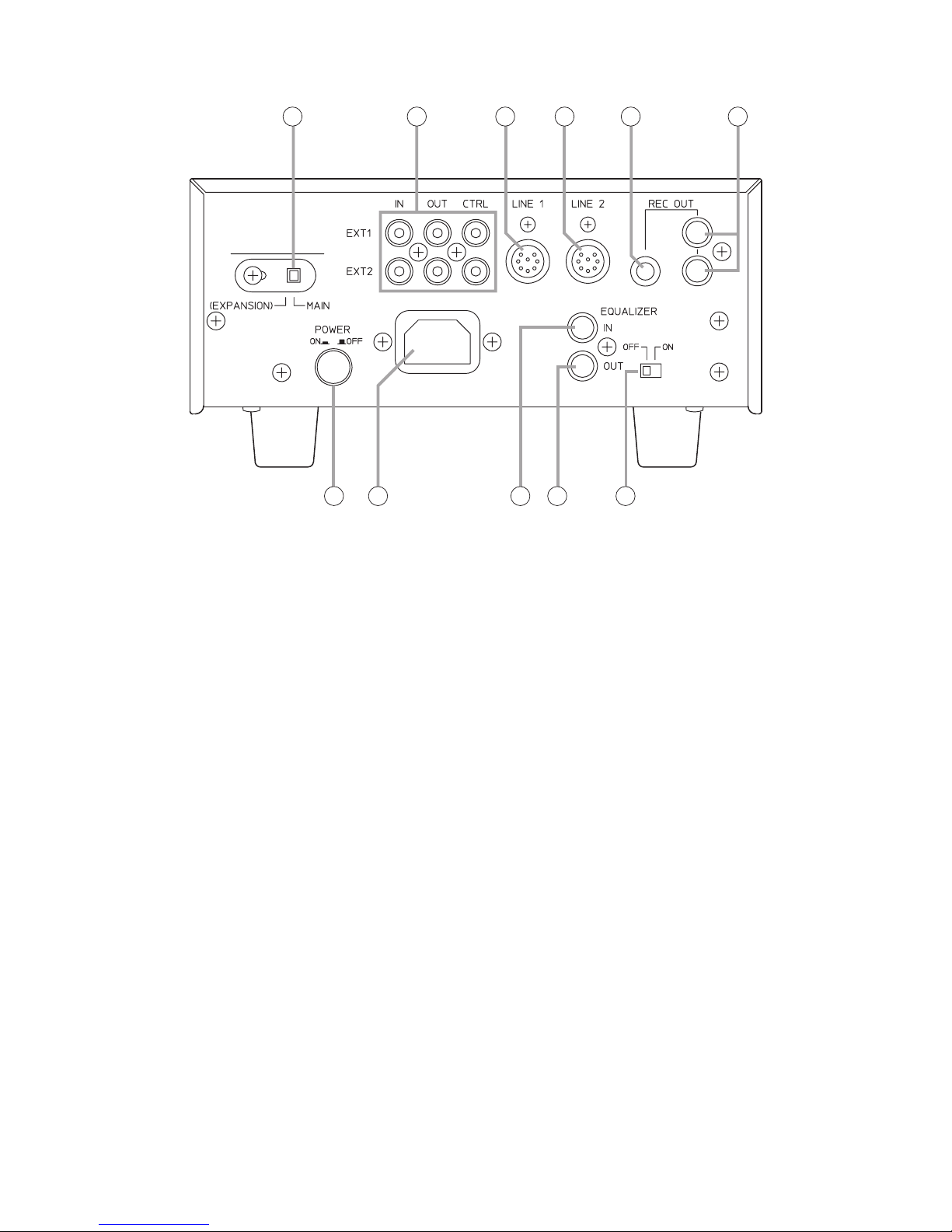
[Rear]
11. Power switch [POWER]
Power is switched on and off with each
depression of this switch.
12. Expansion Switch [EXPANSION/MAIN]
Used when expanding the Central unit.
(Equipped with a lock mechanism.) Set this
switch to the EXPANSION position if expanded.
13. Expansion IN/OUT terminals [EXT 1/2]
Connect to the Central unit(s) to be expanded.
14. LINE 1 connection terminal [LINE 1]
Connects to the conference unit. Up to 35
conference units can be connected per line.
15. LINE 2 connection terminal [LINE 2]
Connects to the conference unit. Up to 35
conference units can be connected per line.
16. Recording output terminal [REC OUT]
(Phone jack)
Connects to an Alternating cassette recorder,
etc. (10 kΩ, –20 dB*, unbalanced)
17. Recording output terminals [REC OUT]
(RCA jack)
Connect to a recording machine.
(10 kΩ, –20 dB*, unbalanced)
18. AC inlet
Connects to the supplied power cord.
19. Equalizer insertion input terminal
[EQUALIZER IN]
Connects to the output terminal of equalizer.
(10 kΩ, –20 dB*, unbalanced)
20. Equalizer insertion output terminal
[EQUALIZER OUT]
Connects to the input terminal of equalizer.
(10 kΩ, –20 dB*, unbalanced)
21. Equalizer insertion switch
[EQUALIZER ON/OFF]
Set to the ON position when using the equalizer.
* 0 dB = 1 V

9
TS-771
PRIORITY TALK
TS-772
TALK
12
3
4
5 6
12
3
4
6
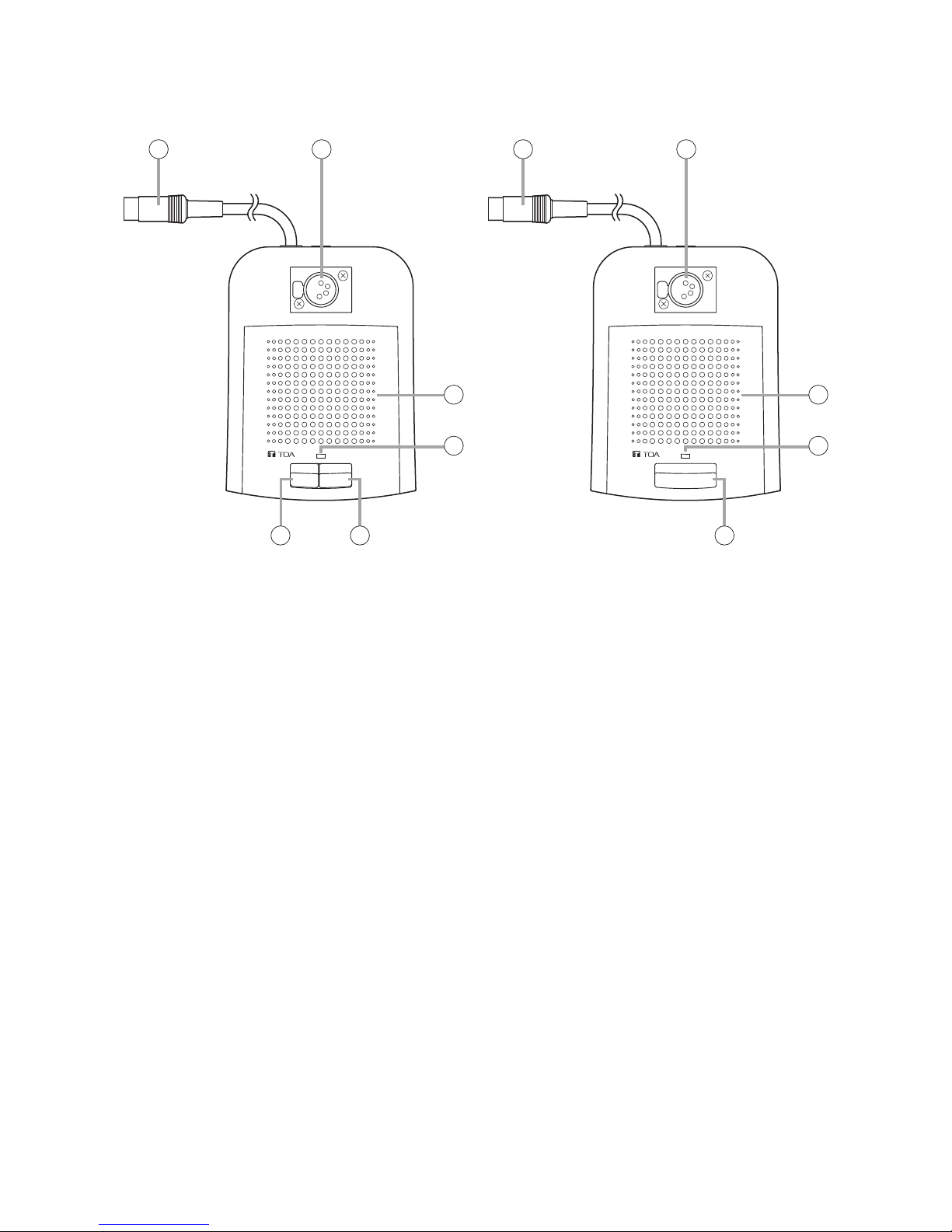
5.2. TS-771 Chairman Unit and TS-772 Delegate Unit
[TS-771 Top] [TS-772 Top]
1. Line connection cord
Connect this cord to the Line Connection terminal
of the Central unit or that of the next preceding
linked conference unit.
2. Microphone connection connector
Connects to the TS-773 or TS-774 Microphone.
3. Speaker
Outputs other speakers' voices. Adjust the volume
with the TS-770 Central unit's line volume control.
The built-in speaker is temporarily disabled while
speech is made using this unit.
4. Microphone in-use indicator
Lights when the microphone can be used.
5. Priority key [PRIORITY] (TS-771 only)
While this key is pressed, the microphone in-use
indicator remains lit, allowing priority speech to go
through. In this case, no other conference units
can be used. Pressing this key causes a single
tone chime to sound at the remaining conference
units.
6. Talk key [TALK]
Press this key to speak. The microphone in-use
indicator lights. Press this key again to turn off the
microphone. The microphone in-use indicator
extinguishes.

10
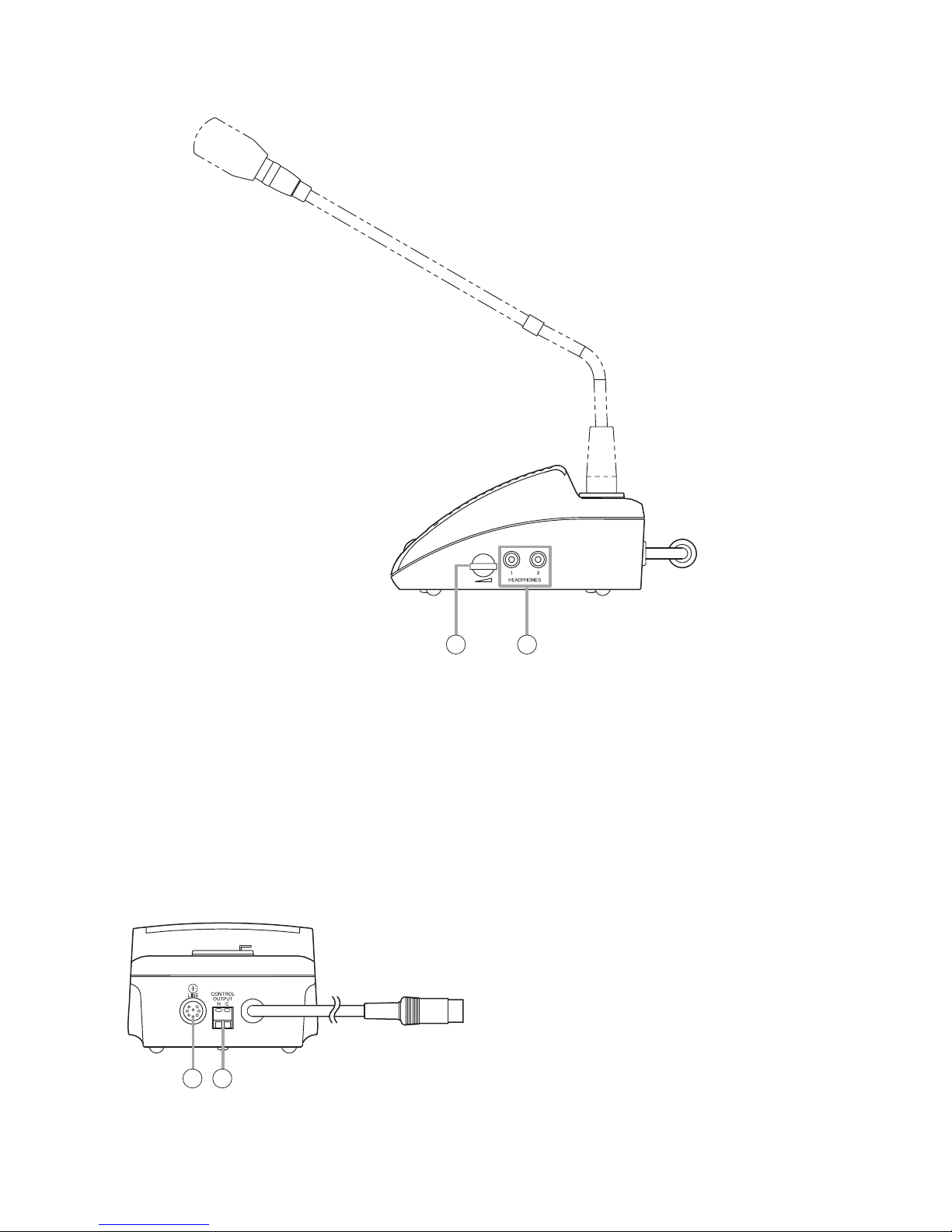
[TS-771/TS-772 Side]
7 8
7. Volume control
Adjusts the sound volume from the
Recording/Headphone Output Terminal.
Note
Use the volume control of the TS-770 Central unit
to adjust the sound output volume from the
internal speaker (3).
8. Recording/Headphone output terminals
[HEADPHONES]
Connect recording equipment or headphones to
these terminals. No sound is output from the
internal speaker (3) while this terminal is in use.
[TS-771/TS-772 Rear]
9
10
9. Line connection terminal [LINE]
Connect the following linked conference unit's
line connection cord to this terminal.
10. Control output terminal
[CONTROL OUTPUT]
This terminal is an open collector output
interlocked with the Microphone in-use indicator,
and is enabled when in speech mode.
(24 V DC, Max. 50 mA)
Altri manuali per TS-770
1
Questo manuale è adatto per i seguenti modelli
7
Indice
Altri manuali Toa Sistema di conferenza

Toa
Toa TS-700 Manuale utente

Toa
Toa AM-1 Manuale utente

Toa
Toa TS-920 Series Manuale utente

Toa
Toa TS-911 Manuale utente

Toa
Toa TS-D1000 Series Manuale utente

Toa
Toa TS-700 Manuale del proprietario

Toa
Toa TS-910 Series Manuale utente

Toa
Toa TS-910 Series Manuale utente

Toa
Toa YW-1022 Manuale utente

Toa
Toa IP-1000 Series Manuale utente
Manuali Sistema di conferenza popolari di altre marche

Kramer
Kramer VIA GO Manuale utente

AVT
AVT MAGIC AC1 Go Manuale utente

ProSoft Technology
ProSoft Technology AN-X4-AB-DHRIO Manuale utente

Sony
Sony PCS-I150 Manuale utente

Middle Atlantic Products
Middle Atlantic Products VTC Series Manuale utente

Prentke Romich Company
Prentke Romich Company Vanguard Plus Guida