
Tomoloo EAGLE V2 Manuale utente

Shenzhen Tomoloo Technology Industrial Co.,Ltd
Address:5th Floor,Building 28,Yongfa Science Park,Shajing Street,Baoan Disrict,Shenzhen.
Web: www.tomoloo.com
Email: [email protected]
Shenzhen Tomoloo Technology Industrial Co.,Ltd Supports After-Sell Service
EAGLE V2 SCOOTER
OPERATION MANUAL

- 01 - - 02 -
· The operating temperature range of the charger is 32°-104°F (0°-40°C)
· The operating temperature range of the V2 is 32°-104°F(0°-40°C).
· Do not ride on icy or slippery surfaces.
· Read the user manual before riding.
· Store the V2 in a dry, ventilated environment.
· When transporting the V2, avoid violent crashes or impact.
· When the device displays low battery or no power placed for more than 3 months, the battery will
enter sleep mode and can’t be charged anymore. We suggest to charge the device each month.
· After leaving your device for more than 15 minutes and without any operation, the device will
automatically shut down.
LOW TEMPERATURE WARNING
Low temperature will affect the lubrication of moving parts inside the V2 Scooter , increasing
internal resistance. At the same time, in low temperatures, the discharge capacity and the capacity
itself of the battery will significantly decreased. Do not ride the V2 violently in low temperatures
around or below 32° F (0℃).
SAFETY INSTRUCTIONS
· Keep the device away from heat sources, direct sunlight, humidity, and prolonged exposure to
water.
· Do not operate the device if it has been exposed to water, moisture or any other liquids to prevent
against electric shock, explosion and/or injury to yourself and damage to the device.
· Do not use the device if it has been dropped or damaged in any way.
· Repairs to electrical equipment should only be performed by a qualified electrician. Improper
repairs may place the user at serious risk.
· Do not puncture or harm the exterior surface of the product in any way.
· Keep the device free from dust, lint, etc.
· Do not use this device for anything other than its intended use or purpose. Doing so may damage
the device.
· This product is not a toy. Keep out of reach of children.
· Do not expose batteries, battery pack, or batteries installed to excessive heat, such as direct
sunlight, or open flame.
ATTENTION & SAFETY INSTRUCTIONS

Catalogue
- 03 -
ATTENTION & SAFETY INSTRUCTIONS 01
CATALOGUE 03
Chapter 1: ABOUT THIS MANUAL 05
Chapter 2: PRODUCT INTRODUCTION
2-1.PACKAGE CONTAINS 06
2-2.FEATURES/PARTS 07
2-3.OPERATING PRINCIPALS 08
2-4.SPECIFICATIONS 09
2-5.CONTROLS AND DISPLAY 10
2-6.BLUETOOTH SPEAKER 11
2-7.SMARTPHONE APP 13
Chapter 3: RIDING YOUR V2
Chapter 4: PRODUCT WARNINGS 23
Chapter 5: SAFE RIDING 25
Chapter 6: DAILY USE & MAINTAINS 26
Chapter 7: WARRANTY 28
2-8.CHARGING YOUR V2 16
3-1.OPERATING YOUR DEVICE 17
3-2.WEIGHT AND SPEED LIMITATIONS 21
3-3.OPERATING RANGE 22
3-4.BALANCE & CALIBRATION 23
- 04 -

PLEASE READ THE USER MANUAL THOROUGHLY. Failure to follow the basic instructions and safety precautions
listed in the user manual may damage your device or cause body injury.
Thank you for purchasing the TOMOMLOO V2 Scooter. Please read all instructions carefully before using and
retain this manual for future use and reference.
This manual applies to the TOMOLOO V2 Scooter.
· In order to avoid dangers that caused by collisions, falls, and loss of control, please learn how to ride safely.
· You can learn operating skills by reading the product manual.
· This manual includes all operating instructions and precautions, and users must read it carefully and follow the
instructions.
· All users are responsible for any consequences caused by violating warning contents or prompt operations.
ABOUT THIS MANUAL
Chapter 1
PRODUCT INTRODUCTION
Chapter 2
The TOMOLOO V2 is a personal transporter. Our technology and production processes are
developed with strict testing for each TOMOLOO Scooter. Driving without following the
contents of this manual may lead to damage to your device, or may cause bodily injury.
This manual is designed to give you the information you need for the safe operation and
maintenance of your new V2. Please read it thoroughly before riding your V2.
· TOMOLOO V2 Scooter
· 3-pin Charge Cable
· Operation Manual
(29.63lb/13.44 kg)
2-1.PACKAGE CONTAINS
- 05 - - 06 -

The device uses digital electronic gyroscopes and acceleration sensors to control balance
and motion, depending on the user's center of gravity. The device also uses a control system
to drive the motors that are located within the wheels. The device has a built-in inertia
dynamic stabilization system that can help assist with balance when moving forward and
backwards, but not while turning.
TIP - To increase your stability, you should keep your body be balanced in order to overcome
the centrifugal force during turns, especially when entering a turn at higher speeds.
1. Fender
2. Left Foot Mat
3. Status LED Indicator
4. Power/Battery Indicator
5. Right Foot Mat
6. LED Light
7. Power Button (Located in rear)
8. Charge Port (Located in rear)
- 07 - - 08 -
2-2.FEATURES/PARTS 2-3.OPERATING PRINCIPALS
Any V2 Scooter that does not work
properly can cause you to lose control
and fall. Check the entire device
thoroughly before every riding, and
do not ride it until any problems have
been corrected.

2-4.SPECIFICATIONS
Model:
Net Weight:
Load:
Max Speed:
Max Distance Range:
Max Climbing Angle:
Minimum Turning Radius:
Battery Type:
Battery Voltage:
Battery Capacity:
Power Requirement:
Wheel Size:
Tire Type:
Bluetooth Range:
Bluetooth Speaker:
UL Certification:
Power On: Take your device out of the box and place it flat on a level surface. Press the power
button (located on the rear of your device) once. Check the battery LED indicator (located in the
center of your device). The battery indicator light should be lit, indicating the device is powered
on.
Power Off: Press the power button once.
V2
29.63 lbs (13.44 kg)
44-265 lbs (20-120 kg)
Up to 9.3 mph (15 km/h)
Up to 8.7 miles (14 km)
15°-20°
0°
Lithium-ion
36V
4Ah
AC100-240V,50-60Hz
8.5 Inches (21.59cm)
Non-Pneumatic Solid Tires
Up to 33ft
V4.2with stereo sound quality
UL 2272 approved
*The actual mlleaae and soeed deoends on welaht of users, road conditions and temperature.
- 09 - - 10 -
2-5.CONTROLS AND DISPLAY
· TURNING YOUR DEVICE ON/OFF
There are four sensors under the foot mats on your V2 Scooter. When the user steps off the mats,
it will automatically initiate self-calibration.
When riding the hoverboard, you must ensure you are stepping on the foot mats. Do not step or
stand on any other area of your hoverboard.
Do not put items on the foot mats. Doing so will make the V2 turn on, and increase the probabil-
ity of collision and cause injury to people, riders, or damage the device.
The display board is located in the middle of the V2 Scooter.
· Green LED light stay solid indicates electricity from 100% to 30%.
· Yellow LED light stay solid indicates electricity from 30% to 20%.
· Red LED lightstay solid indicates electricity from under 20%.
When the LED light turns red, please stop riding.
· MAT SENSOR
· BATTERY INDICATOR

The V2 has powerful built-in wireless speakers so you can play your music while riding.
1.Ensure your V2 is turned off. If it is not please turn off your scooter first before pairing.
2.Turn on your V2 and the speakers will annouce that it's waiting for a Bluetooth connection.
This will indicate your V2 speaker is now in pairing mode.
3.Place the V2 and the Bluetooth device to which you would like to pair it within the operating
distance. We recommend keeping the two devices no further than 3 feet apart during pairing.
4.Ensure Bluetooth is enabled on your phone or music device. Refer
to manufacturer instructions for how to enable Bluetooth on your device.
5.Once you have activated Bluetooth on your device, select the option "music" from the list of
available Bluetooth devices.
6.If required, enter the PIN code "000000" and confirm the entry.
7.Please note, pairing mode on the V2 will last for two minutes. If no devices are paired after two
minutes, the V2 speaker will automatically return to standby mode.
8.If pairing is unsuccessful, turn off the V2 first and re-pair following the aforementioned steps.
2-6.BLUETOOTH SPEAKER
- 11 - - 12 -
When the operator triggers the foot mats, the LED Status Indicator will light up, which indicates that V2 is
now ready for use.
When the system has an error during operation, the running LED light will turn red (for more details see
Chapter 5: SAFE RIDING).
· STATUS INDICATOR
· PAIRING THE SPEAKER
Once the V2 speakers are paired to your device, you can stream music wirelessly to them.
Select the track you wish to listen to on your device to listen via the speakers. All volume
and track controls will be made using your music device. Should you encounter any
problems while streaming, please refer to your device's user manual.
NOTE: Once you have paired the V2 speaker with a device, the speaker will remember this
device and will pair automatically when the device's Bluetooth is activated and in range.
You do not need to re-pair any previously connected devices.
Your V2 can pair up to two multi-point devices. You can reconnect a previously paired device without
going through the pairing or PIN process on up to two devices.
· LISTENING TO MUSIC

- 13 - - 14 -
· DASHBOARD
· Bluetooth
Your V2 is an App-enabled hoverboard that works with Apple IOS and Android devices. Download the free
TOMOLOO app in order to access certain features of your V2 such as headlight colors and skill mode.
Please download the APP from either the APP Store or download the APP from the Google Play Store.
· Friends-This function can help you add your friends who also have "TOMOLOO scooter", and you
can review his/her recent games in his/her page.
· Home - Back to home page.
· Challenge- You can PK your friends who also have "TOMOLOO scooter" in this Mode, which can be
set as you like.
· More - Display more information.
Press "Bluetooth" to have the App begin scanning for any Tomoloo devices. Your V2 must be
powered on and your smart phone's Bluetooth must be enabled. If your Bluetooth is not enabled
on your smart phone, the App will remind you to enable it.
Once scanning is complete, all detected Tomoloo scooters will display in a list. Press the select
button to pair with a scooter and use the PIN "000000". If multiple Tomoloo scooters appear,
continue attempting to pair until your V2 is paired.
Once paired, the dashboard will display "Connected" in blue. You may now begin using the App
with your V2.
· Bluetooth- To connect your V2 through Bluetooth on your smartphone, press “Connect”. If your
V2 is already paired, this part of the screen will show “Connected” in blue.
· Settings - Press the gear icon to adjust settings.
· Speed - The digital speedometer displays your speed in kms per hour.
· Battery - The percentage displays the remaining battery life of your V2.
· Enjoy - Operation Tips.
· Sports – Enter the sports mode.
· Change Mode - Change Riding modes: Beginner, lntermediate, Advanced.
· Standby - Turn on & Turn off the scooter.
· Customize Headlights - Change the colors and brightness of your LED Lights.
2-7.SMARTPHONE APP

- 15 - - 16 -
· Ensure that the charging port is clean and dry.
· Open the charging port on your V2 scooter.
· Make sure that there is no dust, debris or dirt inside the port
· Plug the charger into a grounded wall outlet.
· Connect the cable with the power supply (100V~240V; 50~60 Hz).
· Ensure the light on the charger is GREEN.
2-8.CHARGING YOUR V2
· SETTINGS
Press the gear icon to change settings for your V2.
· User Name - Customize the name for your V2 here. This name change will reflect in the dash-
board and connect pages.
· Password - Customize the password for the V2.
· Switch - Switch between MPH/KMH.
· Speed - Change the speed for the V2.
· Force - Change the Driving Force.
· Sensitivity - Change the Sensitivity for the V2.
Set Dormant Shutdown Time -This setting allows you to set a time for your V2 to shutdown auto-
matically.
· SKILL/SAFETY MODES
Cycle between 3 different skill modes. Each mode has a different top speed and sensitivity. The
mode will only change if you are not using your V2 scooter.
·Low Mode - This mode is recommended for first time TOMOLOO scooter users. In this mode, the
sensitivity and top speed are very low.
·Normal Mode - This mode is recommended for users that are comfortable using TOMOLOO scooter
but are not ready for full speed and extra sensitive controls. In this mode, the sensitivity and top
speed are moderate.
· HEADLIGHTS
Press "lights" to set a custom color and brightness for your V2's Path illumination Lights. Simply
choose your desired color from the color wheel. Slide the "Brightness" bar to adjust brightness. For
your convenience, 4 basic colors have also been set as presets below the brightness bar.
·High Mode - This mode is recommended for everyday TOMOLOO scooter users. In this mode, the
sensitivity and top speed are set to the maximum setting.
NOTE: Skill and safety mode must be selected. The TOMOLOO will default to " Normal"
mode if another mode is not selected.
- 17 - - 18 -
· Align and connect the 3-pin charging cable into the charging port of the V2.
· Yellow LED light flashing indicates charging under 50%.
· Green LED light flashing indicates 50%-90% charging.
· Green LED light stay solid without flashing indicates 90% or above charged.
· A full charge may take up to 3-3.5 hours.
· After fully charging your V2, unplug the charger from your device and from the power outlet.
FAILURE TO FOLLOW ANY OF THE FOLLOWING SAFETY PRECAUTIONS MAY LEAD TO DAMAGE YOUR
DEVICE, VOID YOUR MANUFACTURER WARRANTY, LEAD TO PROPERTY DAMAGE, CAUSE SERIOUS
BODILY INJURY, OR MAY LEAD TO DEATH.
Before using your device, be sure to familiarize yourself with the operating procedures, so that you
can keep your device in the best condition and ensure safety of yourself and others.
Make sure the device is fully charged before your initial use.For charging instructions, please follow
details under 2.8 CHARGING YOUR V2.
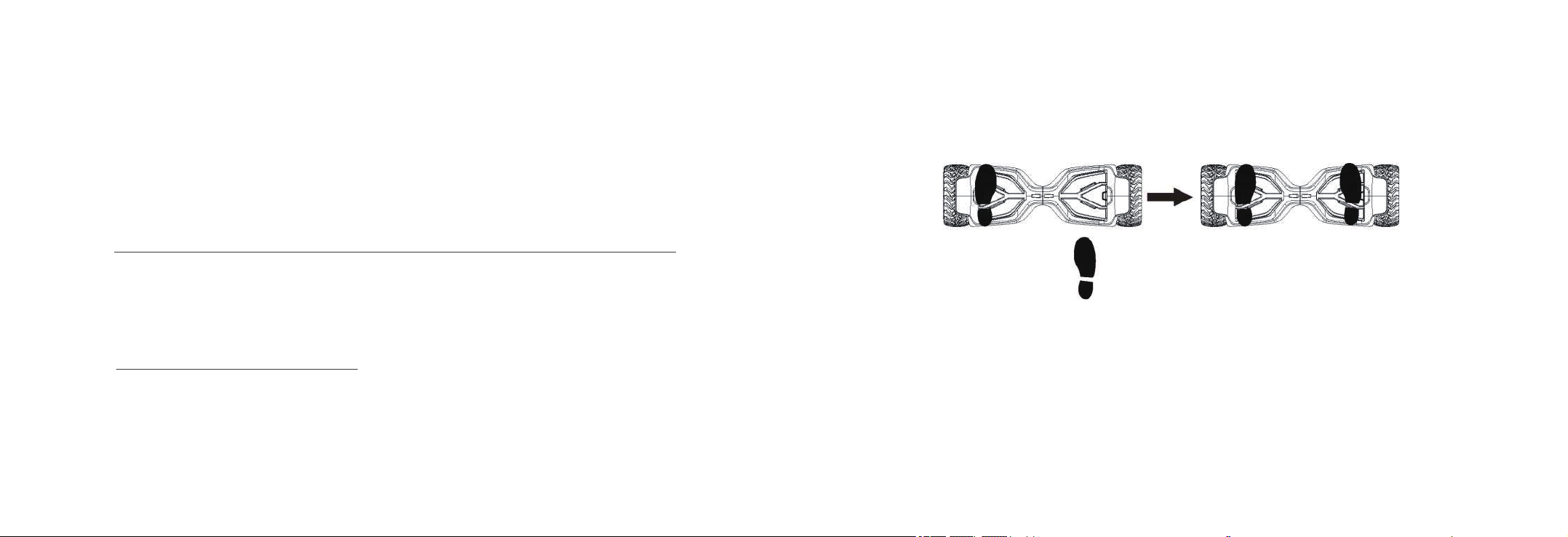
Stand directly behind your device and place one foot on the corresponding foot mat (as described
in the diagram below).
Keep all your weight on your back foot still on the ground, otherwise your device will begin to move,
making it difficult to step on evenly with your other foot. When you are ready, shift your weight to
the foot already placed on the device and step on with your second foot quickly and evenly (as
described in the diagram below).
3-1.OPERATING YOUR DEVICE
RIDING YOUR V2
Chapter 3
First, step on one pedal to trigger the footswitch. Second, step on with your other foot.
Find your center of gravity. If your weight is distributed correctly on the foot mats and your center of gravity is
level, you should be able to stand on your device just as if you were standing on the ground.
NOTE:Stay relaxed and step on quickly, confidently and evenly. Imagine climbing stairs, one foot, then
the other. Look up once your feet are even.
Indice
Altri manuali Tomoloo Hoverboard


