
Tooway KA-SAT Manuale utente
© Satellite Solutions Worldwide Ltd 2013
Tooway KA-SAT Installation Guide
© Satellite Solutions Worldwide Ltd 2013
1. Before you can proceed with the installation you must get the following information:
Spot beam colour for you location
Elevation Angle the dish needs to be set to
Azimuth degrees to know in which direction the dish should be pointing
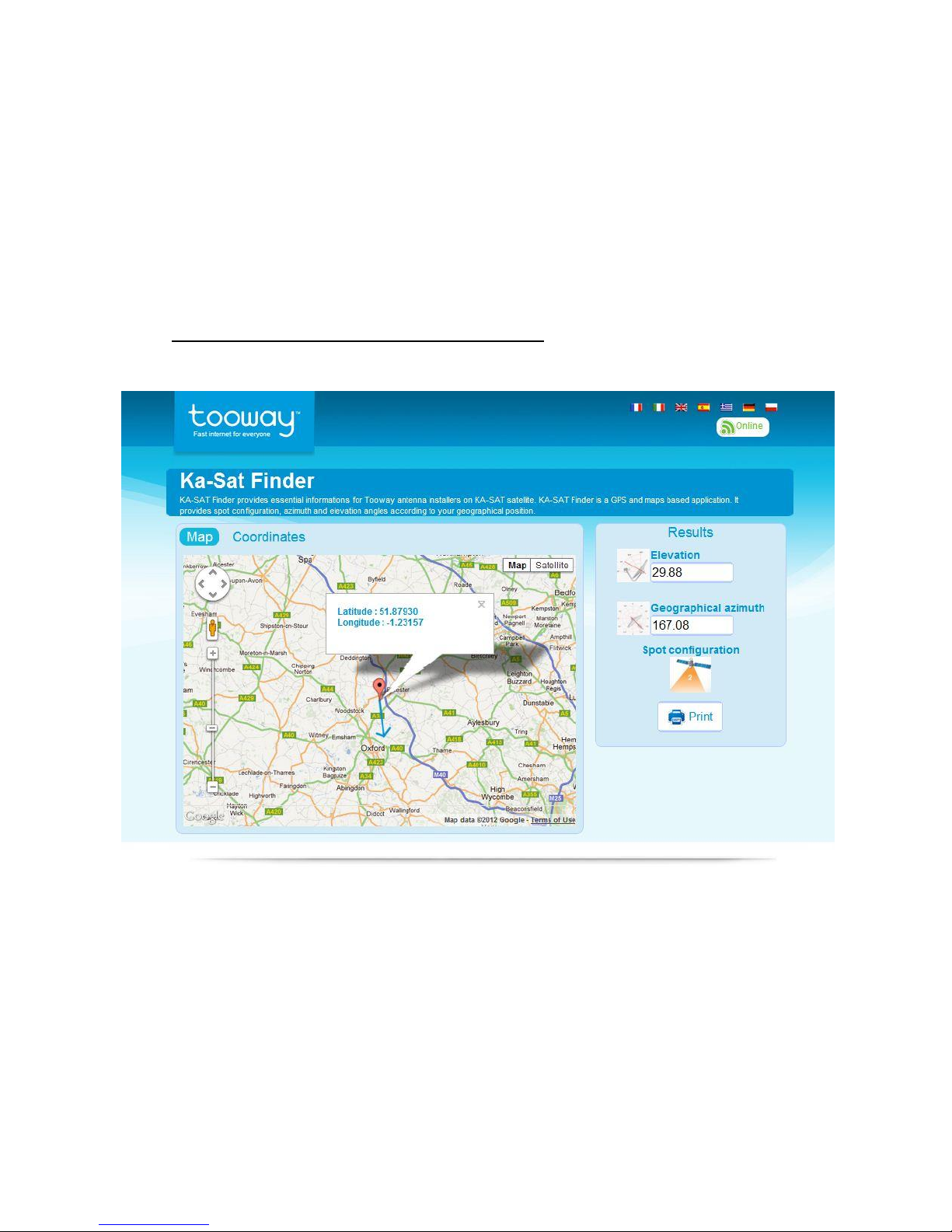
All of this information can be found at the following website or by using the iPhone App. (You can
get the iPhone app on the iTunes store by searching apps under Tooway, its free.)
http://finder.tooway-instal.com/fixe/pages/index.html
If at this point you have no internet access you can call the Europasat office and one of our friendly staff
members will be able to check this information for you.
Indicated on this website we have inserted our office location and the following information was
provided:
Elevation 29.88
Azimuth 167.08
Spot Beam Colour: No2 Orange
© Satellite Solutions Worldwide Ltd 2013
2. Assemble and mount the Tooway Satellite dish as per the instructions in the box.
Wall bracket must be perfectly upright/vertical, use a spirit level.
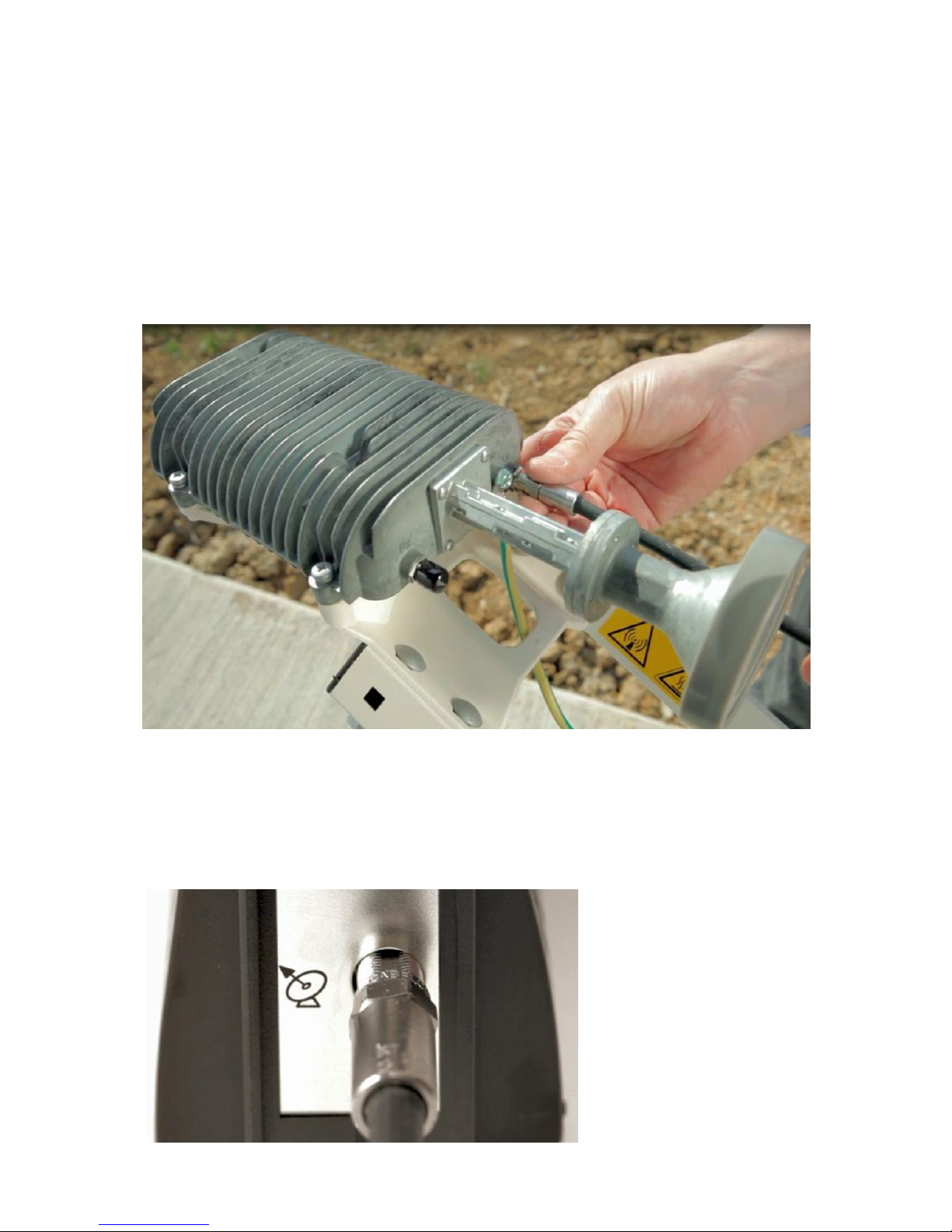
3. Once step 1 is completed attach the single coax cable to the TRIA. The TRIA has two ports, however
only one is needed. Connect the coax cable to the TX port, as per the image below.
This cable is called the Inter Facility Link (IFL) in the diagrams below.
Leave the black rubber grommet on the RX port to keep out any moisture.
4. Once the IFL is connected to the TRIA, connect the other end to the Tooway satellite modem.
Make sure the Tooway modem NOT powered.
© Satellite Solutions Worldwide Ltd 2013
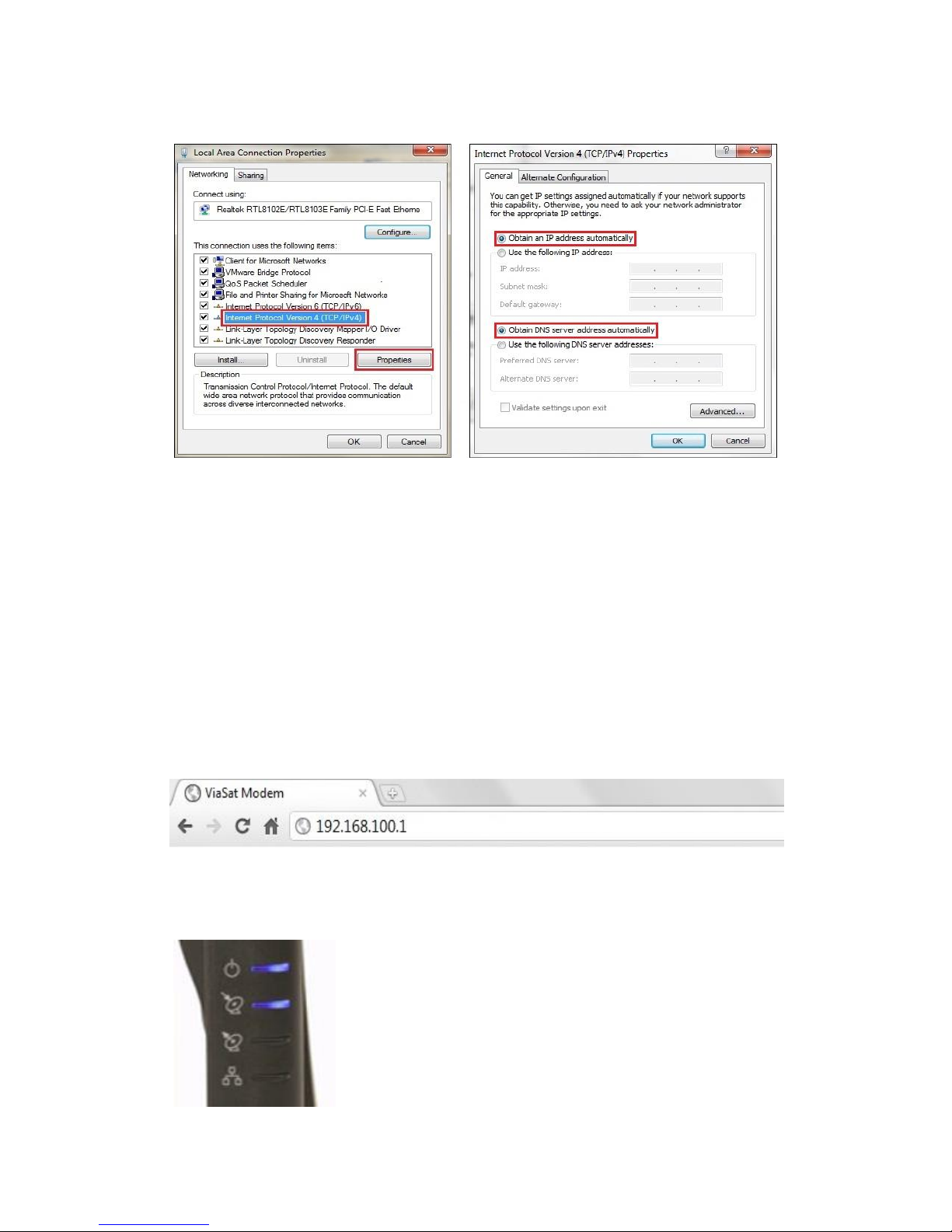
5. Confirm that you computer is set up for DHCP.
Not sure if your computer is setup for DHCP, please refer to our guide “Checking if your computer
is setup for DHCP”in the back of this manual.
6. Please complete the following steps before continuing.
Power up the Tooway modem by connecting the power cable. Four blue lights will lit up once
Tooway modem is powered.
Connect the Ethernet cable to the modem and to your PC once modem has booted up.
It is crucial before attempting any further steps to make sure step 4 has been completed.
For any Browser actions to be performed, we recommend either Google Chrome of Firefox.
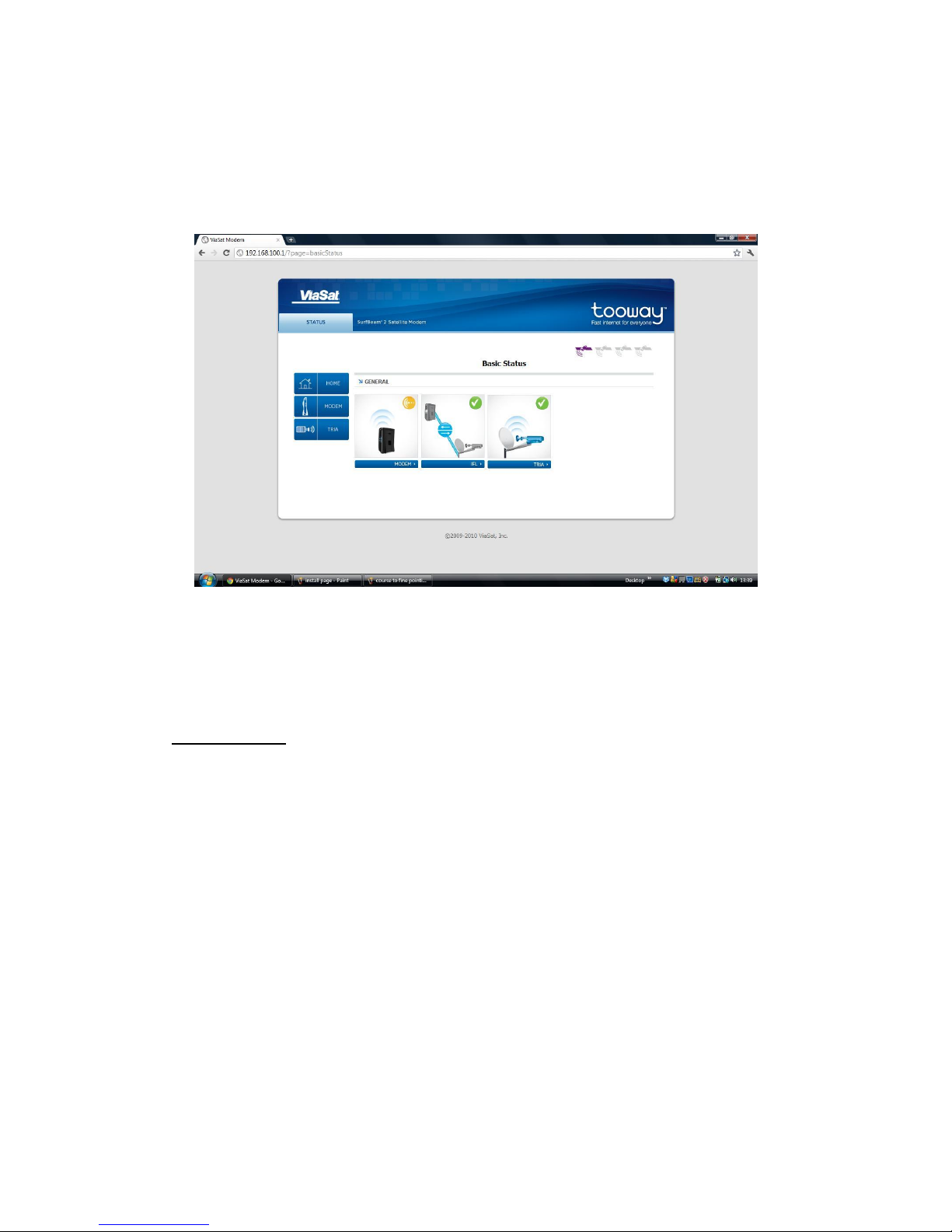
7. Open your preferred browser and in the URL bar type in 192.168.100.1 as shown below.
At this point the modem should have the top power light on steady and the second light down will
be flashing once every second.
© Satellite Solutions Worldwide Ltd 2013
NB: If you notice four lights flashing simultaneously please contact the Europasat office on
+44(0)1869 356 166.
8. Once step 6 is completed the basic status page will be displayed as shown below:
The Orange icon in the modem section indicates that it’s not online.
The IFL and TRIA should have green ticks next to them to indicate that the Tooway modem can
communicate with them, and that the dish is ready to be pointed.
Troubleshooting:
If the IFL has a red exclamation mark next to it, it’s indicating that there’s a fault with the cable
or with one of the F type end plugs. Please ensure the cable is connected on both ends
correctly.
Check the connections and the cable, and reboot the modem. If the TRIA has a red
exclamation mark on it, click on the TRIA logo on the page, it will tell you what the problem is,
please call us if this happens on +44 (0)1869 356 166.
Turn the page to continue
© Satellite Solutions Worldwide Ltd 2013
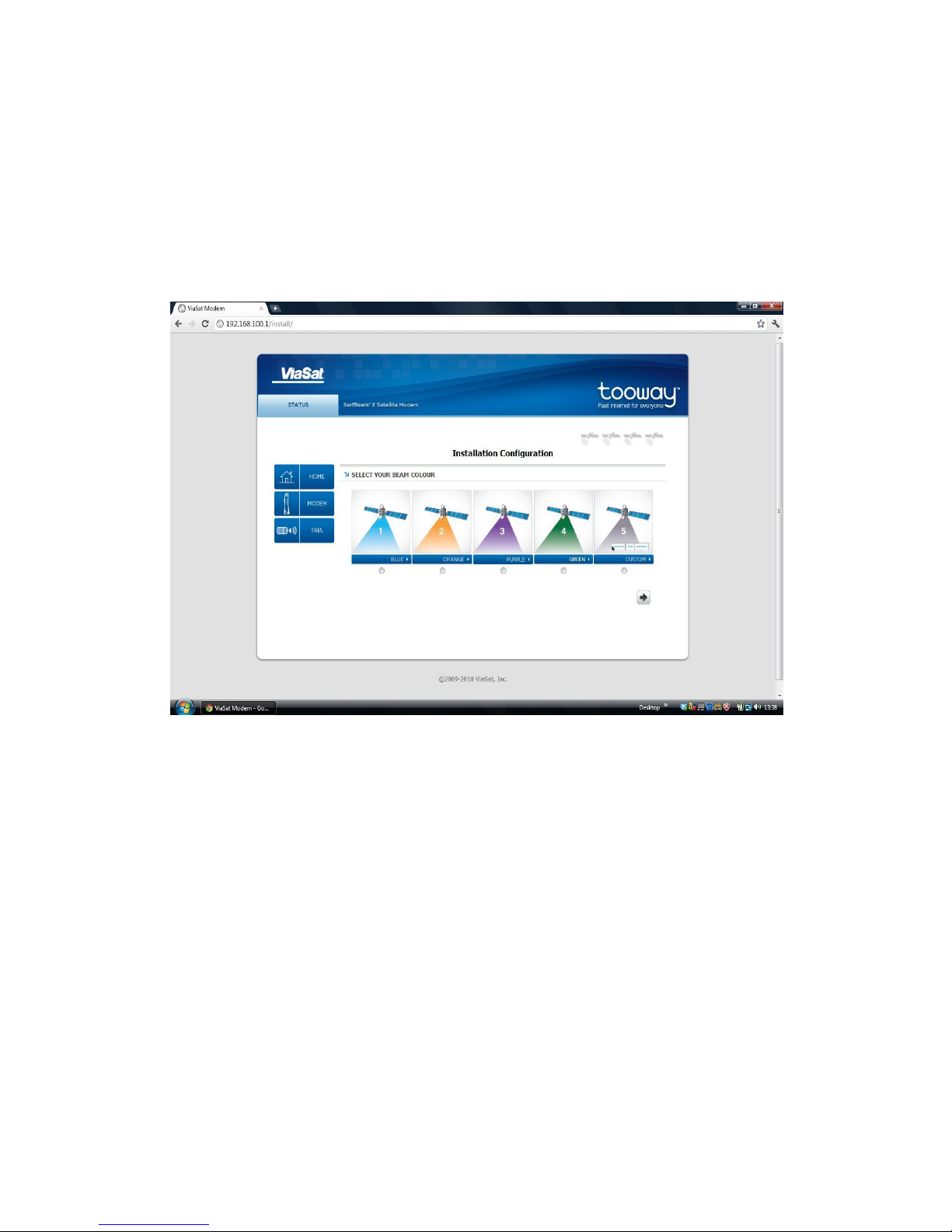
9. Once you have confirmed that the dish is ready to point, you need to browse to another part of the
modem to select the correct satellite beam for your modem to use:
192.168.100.1/install
This page will ask you to select a beam colour. We will select Orange Beam 2 we got from step 1.
Once you have selected the correct colour for your location click on the right arrow key.
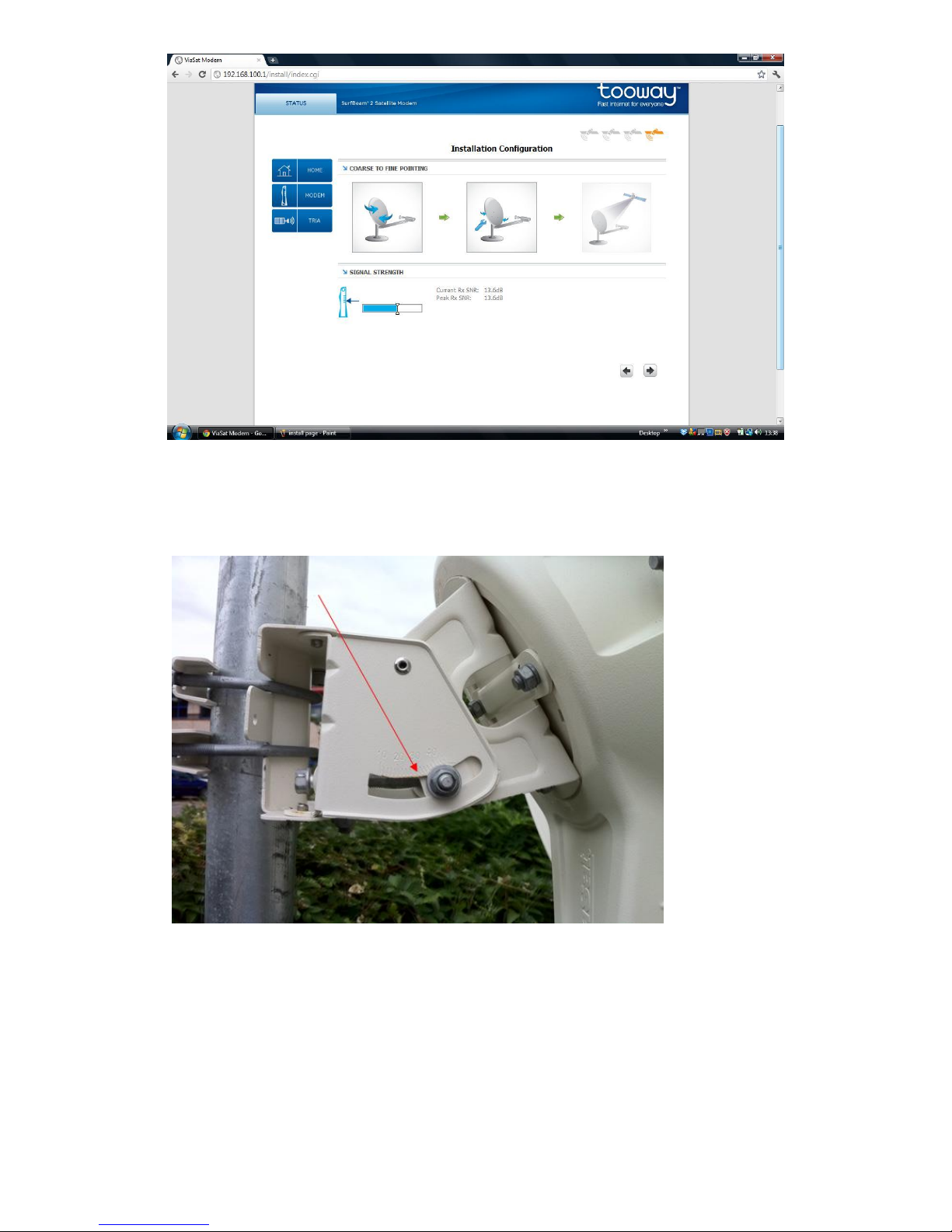
You will then be directed to the “Coarse to fine pointing” page as shown below:
© Satellite Solutions Worldwide Ltd 2013
10. When you have accessed this page the beeper on the TRIA will have activated, it is now time to point
the dish. Set the elevation to the suggested degrees, we will set to 30° as suggested in step 1.
Mid Pole Antenna
The elevation is read from the piece of metal to the left of the bolt and NOT the centre of the bolt
itself. For this scale to be accurate the wall bracket the dish is mounted on, must be absolutely
vertical.
Once the elevation is correctly set as shown in step 10, move the dish in a general southern
direction. If you have a compass you can use the Azimuth in Step 1 as a reference but this is not
necessary for the installation.
Also make sure the 4 bolts holding the dish in place on the wall bracket are still loose enough for
you to be able to move the dish horizontally for the manual pointing.
© Satellite Solutions Worldwide Ltd 2013
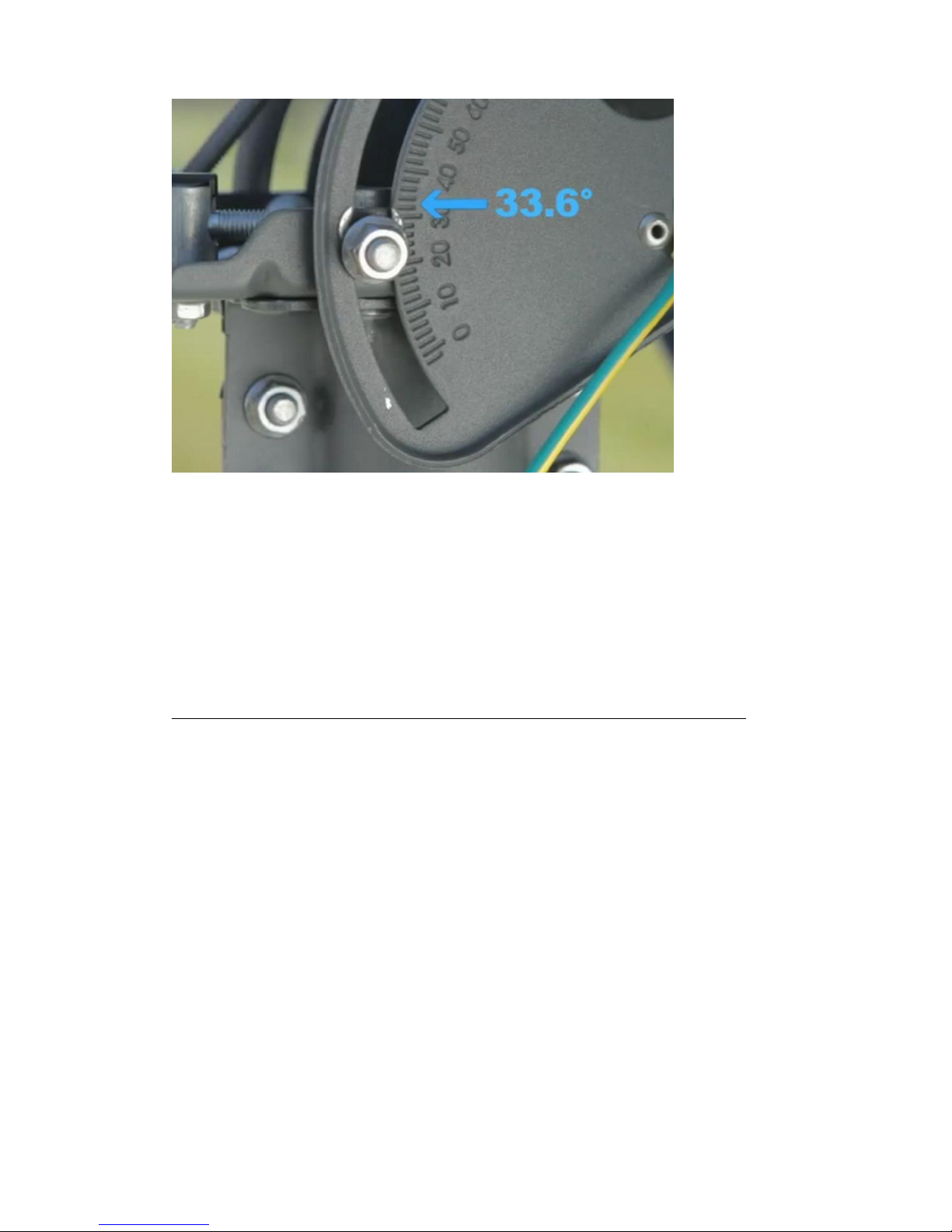
Top Pole Antenna
The elevation is read from the metal end as displayed in the picture and NOT the centre of the bolt
itself. For this scale to be accurate the wall bracket the dish is mounted on, must be absolutely
vertical. (Check this with a spirit level)
Once the elevation is correctly set as shown in step 10, move the dish in a general southern
direction. If you have a compass you can use the Azimuth in Step 1 as a reference but this is not
necessary for the installation.
Also make sure the 6 bolts holding the dish in place on the wall bracket are still loose enough for
you to be able to move the dish horizontally for the manual pointing.
11. Pointing Procedure for Mid Pole Antenna (For Top Pole Antenna continue to step 14):
Move the dish horizontally from left to right and right to left to pick up the signal from the
satellite. When the dish is not receiving any signal you will hear a “BEEP BEEP” every 3-4
seconds.
The TRIA will ring twice (like a telephone) when is has initially started to receive signal. You will
also notice a change in the beeping sound.
Once you have heard the change in tones, tighten the 4 bolts on the back of the dish holding it
to the wall bracket as shown below: (Make sure there is no drop in the tone)
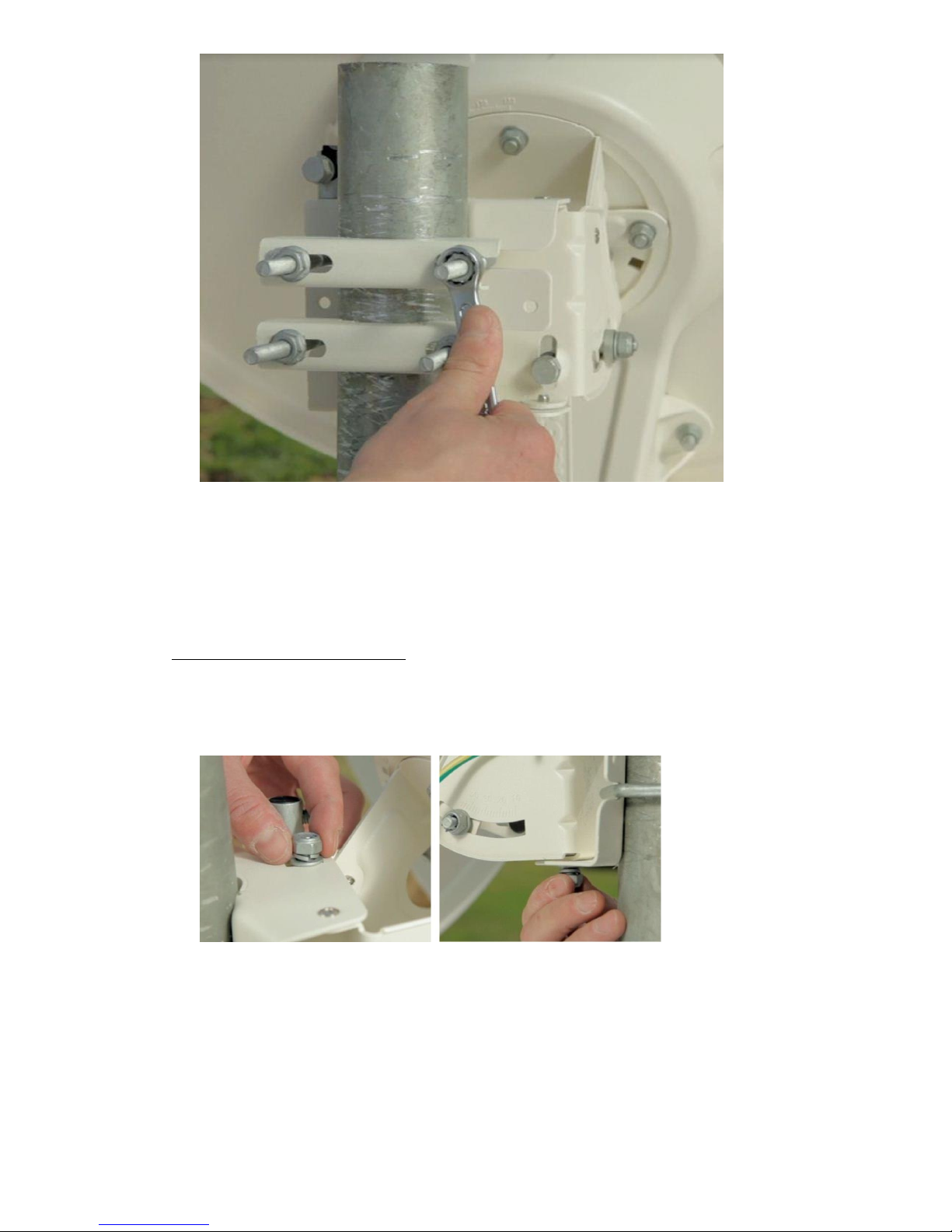
© Satellite Solutions Worldwide Ltd 2013
If you scan the sky left to right and do not pick up a signal, move the elevation up/down by 1
degree and repeat the horizontal scanning. Repeat this process until you have found the satellite.
12. Fine Pointing Procedure (Azimuth):
First fine tune the azimuth (horizontal movement). Make sure the top and bottom bolts on the
mount are both loose as shown below:
Start by moving the dish in one direction, if you hear the tone dropping, stop and move the dish
in the opposite direction until the tone increases to a higher pitched tone, continue until the
tone drops again, then stop and go back the opposite direction until best highest possible tone is
achieved.
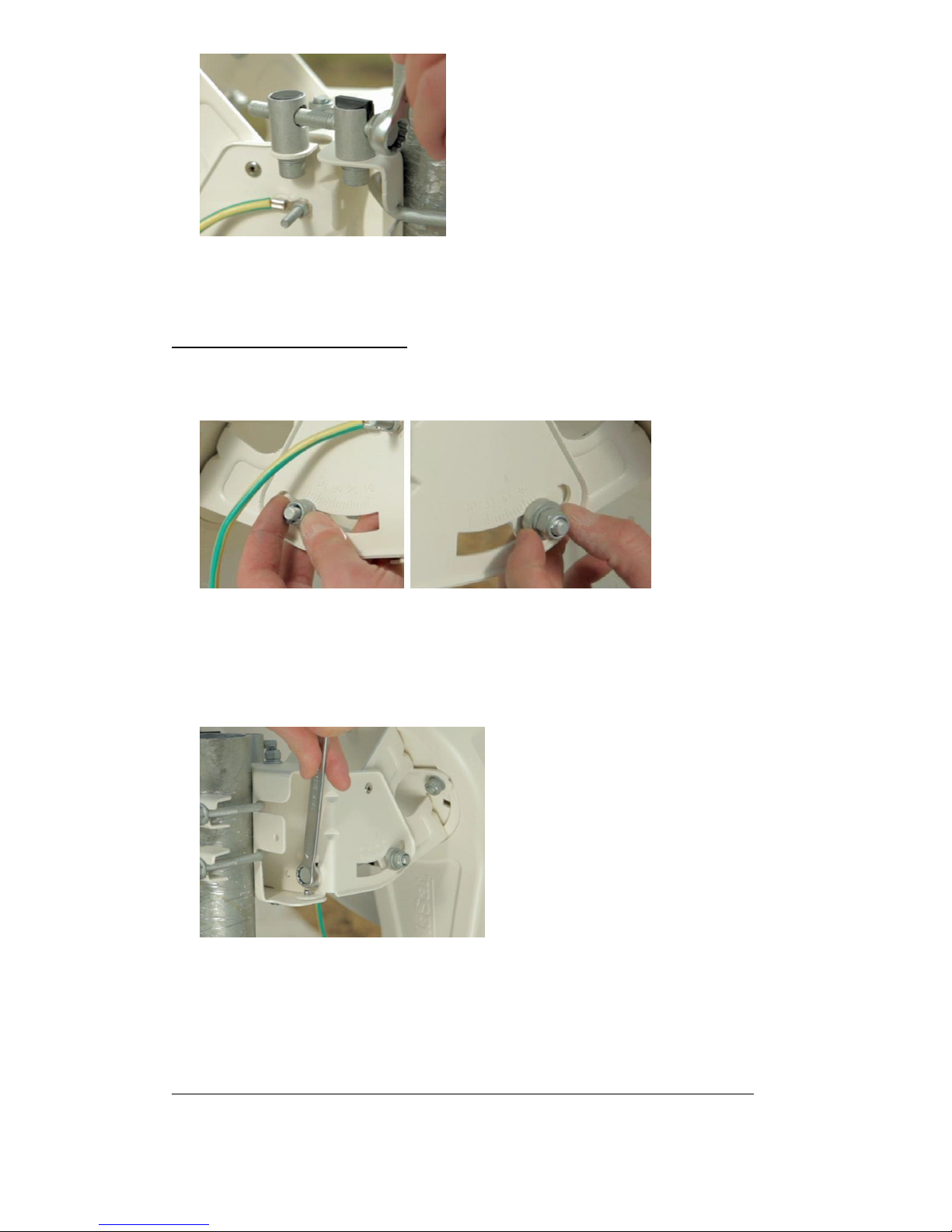
© Satellite Solutions Worldwide Ltd 2013
Once the azimuth adjustment is completed with the highest possible tone achieved, lock the top
and bottom bolts.
13. Fine Pointing Procedure (Elevation)
Make sure the side bolts for the elevation movement are both loose as shown below:
Start by moving the dish in one direction, if you hear the tone dropping, stop and move the dish
in the opposite direction until the tone increases to a higher pitched tone, continue until the
tone drops again, then stop and go back the opposite direction until best highest possible tone is
achieved.
Once the elevation adjustment is completed with the highest possible tone, lock both side bolts.
When the best possible tone is achieved it may only last for a minute or so and then return to fast
beeping, this is normal.
14. Pointing Procedure for Top Pole Antenna (For Mid Pole Antenna page back to step 11):
Altri manuali per KA-SAT
1
Indice
Altri manuali Tooway Antenna

Manuali Antenna popolari di altre marche

Alfa Network
Alfa Network APA-L01 Manuale utente

Naval
Naval PR-422CA Manuale utente

Feig Electronic
Feig Electronic ID ISC.ANTH200/200 Series Manuale utente

TERK Technologies
TERK Technologies TV44 Manuale utente

Directive Systems & Engineering
Directive Systems & Engineering DSE2324LYRMK Manuale utente

HP
HP J8999A Manuale utente


