
TP-Link Neffos X20 Manuale utente

1
Quick Start Guide

6 23
CONTENTS
English
Deutsch
Español
Català
Eλληνικά
Italiano
Português
Русский
Қазақша
Polski
Українська
1
3
5
7
9
11
13
15
17
19
21
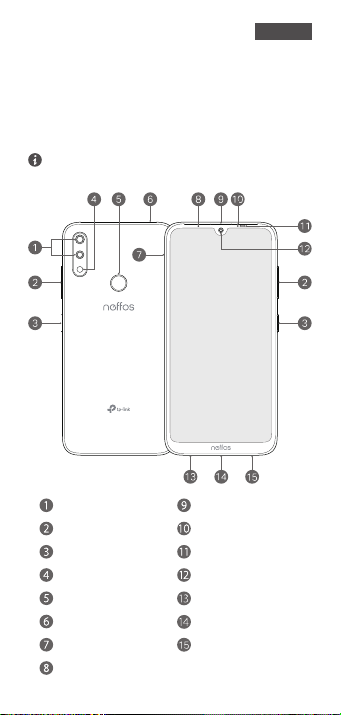
1 2
First glance
Press and hold the power button to turn your
phone on or o.
To manually restart your phone, press and hold the
power button until the Neos logo appears.
LED indicator
Earpiece
Front camera
Proximity sensor
SIM/SD card tray
Charging/data port
Ambient light sensor
Dual-lens camera
Volume buttons
Fingerprint sensor
Flash
Headphone jack
Microphone
Power button
Speaker
English
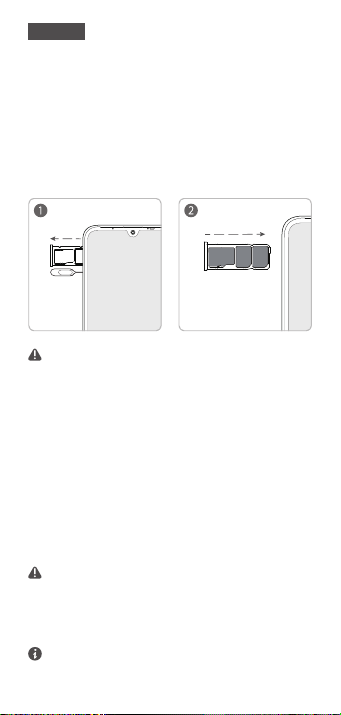
1 2 3
For User Guide and GPL source code, please visit
http://www.neos.com/en/support.
Your phone supports only dual card dual standby
single pass, which means you cannot use both SIM
cards for calls or data services simultaneously.
Put in the cards
Take care not to scratch your phone or harm yourself
when using the SIM ejector pin. Store the SIM ejector
pin out of the reach of children to prevent accidental
swallowing or injury.
Dual SIM Settings
Go to Settings > Dual-SIM & network, choose a
SIM card and then tap the on/o button to enable
or disable SIM1 or SIM2.
micro SD
nano-SIM
nano-SIM
The card tray can support two nano-SIM cards
and a mircoSD card.
Follow the following instructions to set up your
device.
English
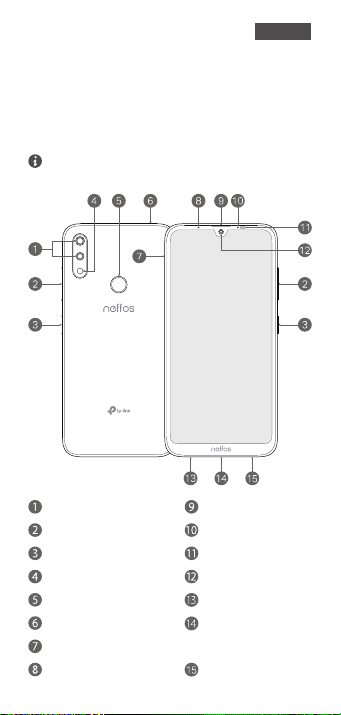
2 3 4
Auf einen Blick
Drücken Sie die Power-Taste, um Ihr Telefon ein-
oder auszuschalten.
Um das Smartphone neu zu starten, drücken Sie die
An/Aus-Taste bis das Neos Logo erscheint.
LED Indikator
Ohrmuschel
Frontkamera
Annäherungssensor
Einschub für SIM-/SD-Karte
Port zum Auaden
und für Datentransfers
Umgebungslichtsensor
Dual-Optik-Kamera
Lautstärketasten
Fingerabdrucksensor
Blitz
Kopfhöreranschluss
Mikrofon
Power-Taste
Lautsprecher
Deutsch
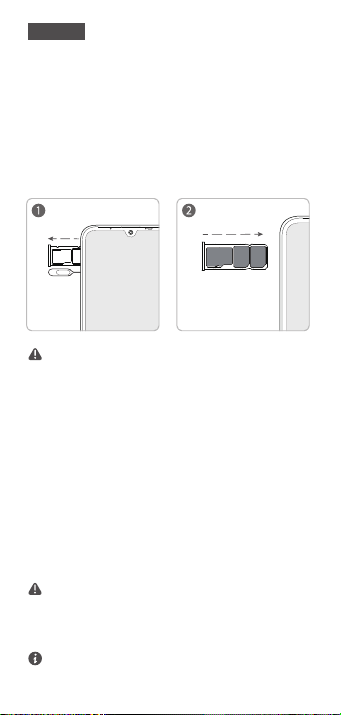
3 4
Ihr Telefon unterstützt nur Dual-Card-Dual-Stand-
by-Single-Pass, was bedeutet, dass Sie nicht
gleichzeitig über beide Karten telefonieren oder
Datenverbindungen nutzen können.
Das Handbuch und den GPL Quellcode nden Sie
unter: http://www.neos.com/de/support.
5
micro SD
nano-SIM
nano-SIM
Karten einlegen
Achten Sie darauf, dass Sie dabei Ihr Gerät nicht
zerkratzen und sich selbst nicht verletzen. Bewahren
Sie den SIM-Karten-Auswerfer außerhalb der
Reichweite von Kindern, um ein Verschlucken oder
Verletzungen zu vermeiden.
Dual-SIM-Einstellungen
Gehen Sie in das Menü Einstellungen > Dual-SIM
& Netz, wählen Sie eine SIM-Karte und tippen Sie
dann auf ON/OFF, um SIM1 oder SIM2 zu
(de)aktivieren.
Die Kartenhalterung unterstützt zwei
nano-SIM-Karten und eine microSD-Karte.
Befolgen Sie die folgenden Anweisungen, um Ihr
Gerät einzurichten.
Deutsch
4 5 6
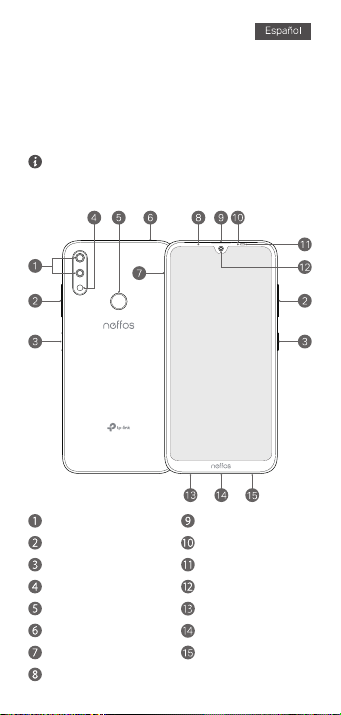
Primer vistazo
Pulse y mantenga presionado el botón de
encendido para encender o apagar su teléfono.
Para resetear su teléfono presione y mantenga
presionado el botón de encendido hasta que el logo
Neos aparezca.
Indicador Led
Botón de encendido Sensor de proximidad
Botones de volumen Sensor de luz ambiental
Flash Cámara frontal
Cámara Dual Auriculares
Sensor de huella dactilar Micrófono
Conector de auriculares Puerto de carga/datos
Ranura de tarjeta SIM/SD Altavoz
5 6
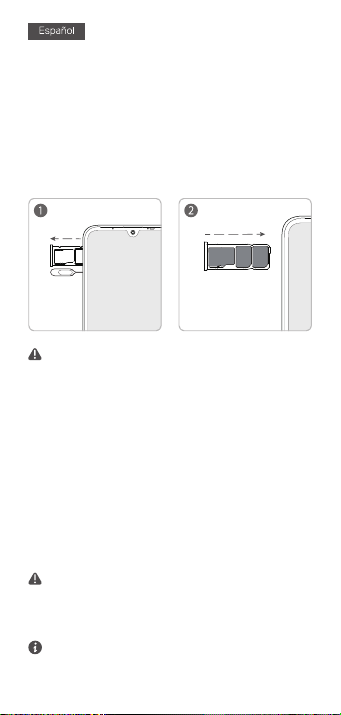
Su teléfono soporta solamente doble tarjeta con
doble modo de espera simple, lo que significa que no
puede utilizar ambas tarjetas SIM para llamar o
servicios de datos simultáneamente.
Para la Guía de Usuario y el código fuente GPL, por
favor visite http://www.neos.com/en/support.
micro SD
nano-SIM
nano-SIM
Introduzca las tarjetas
Tenga cuidado de no rallar su dispositivo o dañarse
cuando utiliza el extractor SIM. Guarde el pin extractor
fuera del alcance de los niños para prevenir la ingesta
o lesión.
Ajustes de SIM Dual
Vaya a Ajustes > Doble SIM & Red, seleccione
una tarjeta SIM y después pulse en el botón
on/o para habilitar o deshabilitar SIM1 o SIM2.
La bandeja de tarjetas puede soportar dos
tarjetas nano-SIM y una tarjeta microSD.
Siga las siguientes instrucciones para congurar
su dispositivo.
7 8
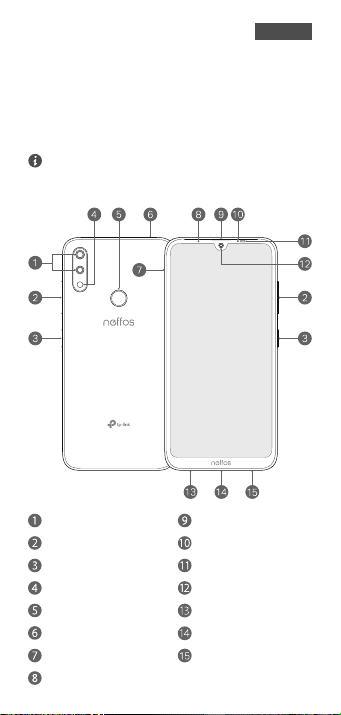
Primera vista
Manteniu premut el botó d'engegada per
encendre i apagar el dispositiu.
Per reiniciar el telèfon manualment, manteniu premut
el botó d'engegada ns que aparegui el logotip de
Neos.
Indicador LED
Sensor de proximitatBotó d'engegada
Sensor de llum ambiental
Botons de volum
Càmera frontalFlaix
Auricular
Càmera amb lent doble
Sensor d'empremtes Micròfon
Port de càrrega/dadesConnector dels auriculars
Safata de la targeta SIM/SD Altaveu
Català
7 8
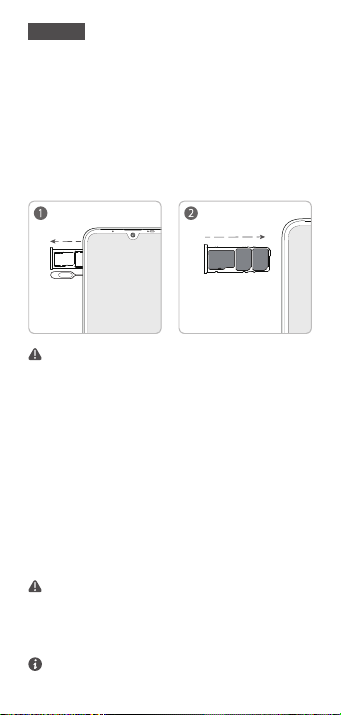
El vostre telèfon admet només el mode de targeta
doble, espera doble i un únic pas, la qual cosa significa
que no podeu utilitzar les dues targetes SIM per a
trucades o serveis de dades simultàniament.
Per obtenir la guia d'usuari i el codi font de GPL visiteu
http://www.neos.com/en/support.
9
micro SD
nano-SIM
nano-SIM
Introduïu les targetes
Aneu amb compte de no ratllar el dispositiu i de no
fer-vos mal quan utilitzeu l'agulla extractora de la SIM.
Emmagatzemeu l'agulla extractora de la SIM fora de
l'abast dels nens per evitar-ne la ingestió accidental i
el risc de ferides.
Conguració de SIM dual
Aneu a Conguració > SIM doble i xarxa, trieu
una targeta SIM i toqueu el botó d'engegada/apa-
gament per habilitar o inhabilitar la SIM1 o la
SIM2.
La safata de la targeta té capacitat per a dues
targetes nano-SIM i una targeta microSD.
Segueixi les instruccions següents per a
congurar el seu aparell.
Català
Questo manuale è adatto per i seguenti modelli
3
Indice
Lingue:
Altri manuali TP-Link Telefono


