
Transystem iBT-GPS Manuale utente

iBT-GPS Solar Bluetooth GPS Data Logger
User’s Manual
Published on 8-Feb-2007 Rev 1.1
8029504601A

2
Table of Contents
Chapter 1 Before you begin.........................................................................................4
1.1 Note and Warning..........................................................................................4
1.2 Introduction....................................................................................................5
1.3 Features...........................................................................................................5
1.4 Applications ....................................................................................................6
1.5 Appearance.....................................................................................................7
1.6 Power Switch and Push Button.....................................................................8
1.7 LED Display ...................................................................................................9
Chapter 2 Getting Started.........................................................................................10
2.1 Checking the package content ....................................................................10
2.2 Getting Started............................................................................................. 11
Step 1 Charging Your Battery................................................................... 11
Step 2 Turning on the power switch (NAV/ LOG)...................................12
Step 3 Connecting your handheld device with iBT-GPS........................12
Step 4 Loading your GPS mapping or routing software........................16
Step 5 Starting the application..................................................................16
2.3 Helpful Tips..................................................................................................17
Chapter 3 Using Logger ............................................................................................18
3.1 How to connect the iBT-GPS to your PC...................................................18
3.1.1 Driver installation.............................................................................18
3.1.2 Google Earth......................................................................................20
3.2 Software Utility --- iBT-GPS Logger Tool..................................................21
3.2.1Configuration .....................................................................................22
3.2.2 Satellite Information.........................................................................31

3
3.2.3 Data Log List --- way to download the data from logger!.................33
3.2.4 About..................................................................................................38
Appendix.....................................................................................................................39
Appendix A. Specifications................................................................................39
Appendix B. How to use the Solar Cell............................................................42
Appendix C. Certification.................................................................................43
Appendix D. Warranty Information ................................................................45

4
Chapter 1 Before you begin
1.1 Note and Warning
- iBT-GPS uses Lithium battery. If iBT-GPS is used in temperature
lower than -10℃or higher than 60℃, its battery charging capability
will decrease. Please leave the iBT-GPS far from heat or high
temperature environment. In addition, do not expose your iBT-GPS in
temperature higher than 140℉/60℃. If you do not follow these rules,
the battery inside iBT-GPS may overheat, explode or burn itself, and
this will lead to very serious damage. The Lithium battery inside the
iBT-GPS should be recycled.
- While in the hospital, turning off the iBT-GPS is recommended.
Wireless GPS receiver may interfere with medical equipments which
use radio frequency.
- For a long period not using iBT-GPS, take out the battery and store it
in dry/cool places.
- For safety, keep the iBT-GPS and all accessories out of children’s
reach.
- The manufacturer assumes no responsibility for any damages and loss
resulting from the use of this manual, or from deletion of data as a
result of malfunction, dead battery, or from misuse of the product in
any way.
- Use only the supplied and approved accessories. Unauthorized
accessories, modifications or attachments could damage the iBT-GPS,
and may violate regulations governing radio devices.

5
- Use a dry, clean soft cloth to clean the unit. Do not use harsh cleaning
solvents, chemicals, or strong detergents.
- Do not attempt to open the iBT-GPS yourself. Unauthorized hacking
may damage the unit, and void your warranty.
1.2 Introduction
This iBT-GPS logger features an all-in-one, cost-effective portable GPS
logging solution. With its on-board memory, it allows you to log your
routes by ways of time/ distance/ speed. Through user friendly software
utility, it shows your track on Google Earth. Thanks to the Solar energy
the receiver can be used for more than 100 hours in full operation or
permanent in standby mode. This data logger is small and robust, ideal
to carry everywhere for applications such as route tracking, mountain
climbing or fleet management.
1.3 Features
1. MTK GPS chipset 32 channels.
2. 100+ hrs operation time.
3. Embedded with 8Mb memory for saving up to 50,000 way points.
4. Dual modes for both route recording and navigation.
5. Smart power saving function and Solar energy for 100+ hours
operating continuously.
6. Smart auto sleep & wake up mode and Solar energy for permanent
power on standby.

6
7. Tracks can be shown on Google Earth.
8. WAAS and EGNOS supported for better accuracy.
9. Support NMEA-0183 GGA, GSA, GSV, RMC, VTG, GLL.
10. Fully compliant with Bluetooth V1.2
11. Support NMEA compliant mapping softwares like TomTom,
Route66…etc.
12. 3 recording methods: by time, by distance or by speed.
1.4 Applications
- Route recording
- Business trip expense management
- Fleet management
- Driving behavior monitoring
- Saving of Point of Interest
7
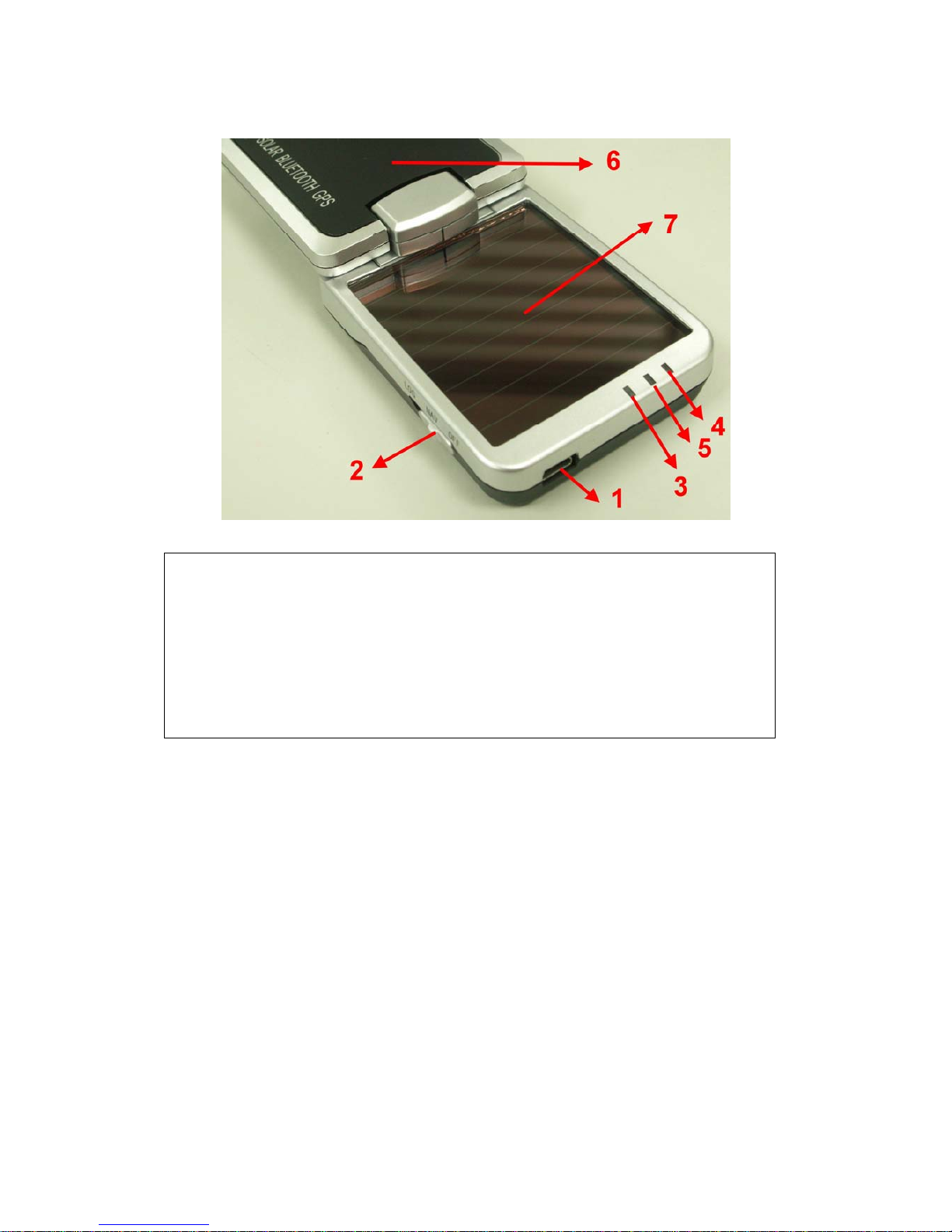
1.5 Appearance
1. DC jack (mini USB type)
2. Mode switch (Power off/ Navigation/ Log)
3. Battery status LED (red/green)
4. Bluetooth status LED (blue)
5. GPS status LED (orange) / Memory used LED (blue)
6. Internal GPS antenna
7. Solar Cell: Auxiliary power source

8
1.6 Power Switch and Push Button
Power Switch
Right (Off) Power off
Middle (NAV) Enable Navigation
Left (LOG) Enable log mode, navigation function is supported as
well.
Difference between NAV and LOG:
NAV You can use the iBT-GPS as a Bluetooth GPS receiver to
navigate when you have a Bluetooth enabled PDA/
Smartphone in your car. But the logging is off.
LOG In this mode iBT-GPS works as a logger, navigation function is
supported as well.

9
1.7 LED Display
The Bluetooth GPS data logger has three LED lights, one is Bluetooth
Status LED, the 2nd one is Battery Status LED, the 3rd one is GPS Status
LED/ Memory used LED. The status table of LED shows as follows:
Category SYMBOL COLOR STATUS Function
Always
on:
Bluetooth on, but not connected
to any Bluetooth devices yet
Slowly
blinking:
Sleeping mode (1 time / 5
seconds)
Bluetooth Status
LED
Blue
Quickly
blinking:
Bluetooth is connected and
ready for data transmission (1
time / 2 seconds)
Red Blinking: The battery is too low
Green Light On: The battery is charging
Battery Status
LED
Green Blinking: The battery is fully charged
Always
on:
Acquiring satellites, GPS
position not fixed
Orange
Quickly
Blinking:
GPS position is fixed,
Navigation
Slowly
Blinking:
The memory space is too low
(20% left now)
GPS Status LED
Blue
Solid The memory is full and stop

10
Chapter 2 Getting Started
2.1 Checking the package content
Congratulations on your purchase of the iBT-GPS with built-in solar
charger. Before you start using iBT-GPS, please make sure if your
package includes the following items. If any item is damaged or missing,
please contact your dealer at once.
- Solar Energy Bluetooth GPS Date Logger - iBT-GPS x 1
- USB to mini-USB cable x 1
- Traveler Power Adapter x 1 (optional)
- DC cigarette lighter adapter x 1
- Lithium rechargeable battery x 1
- CD Tool x 1 (user manual, software utility)
- Quick start guide x 1
*Unit package contents may vary depending on countries without prior
notice.
Indice
Altri manuali Transystem GPS


