
Trek Bicycle Computer Manuale utente

This manual explains the installa-
tion and use of the Trek Incite ACH
and ACH Digital bicycle computers.
Please read this manual carefully
and save it for future reference.
If you do not understand the
information in this manual, or you
have a question about your Incite
ACH computer that this manual
does not cover, consult your Trek
dealer. If you have a question or
problem that your Trek dealer can’t
handle, contact us at:
© Copyright Trek Bicycle Corporation
2006 All rights reserved
06 Incite ACH 07_13.indd 1 7/14/06 7:25:51 AM

Safety and general guidelines ......................................................... 1
Functions ......................................................................................... 2
Installation....................................................................................... 5
Placing the computer on the handlebar...................................... 6
Placing the magnet and sensors ................................................. 8
Positioning of the heart rate strap ........................................... 11
Easy setup (ReSet)..................................................................... 12
ReStart- Getting ready to ride....................................................... 17
Additional information................................................................... 18
Troubleshooting............................................................................. 19
Replacing the battery .................................................................... 20
Advanced features.......................................................................... 22
Units .......................................................................................... 23
Clock .......................................................................................... 24
Stopwatch .................................................................................. 25
Wheel size and setting a second wheel ..................................... 26
Speed.......................................................................................... 30
Odometer ................................................................................... 31
Cadence...................................................................................... 32
Altitude ...................................................................................... 33
Grade ......................................................................................... 35
Heart rate .................................................................................. 36
Heart rate zone.......................................................................... 37
Limited Warranty........................................................................... 38
06 Incite ACH 07_13.indd 2 7/14/06 7:25:52 AM
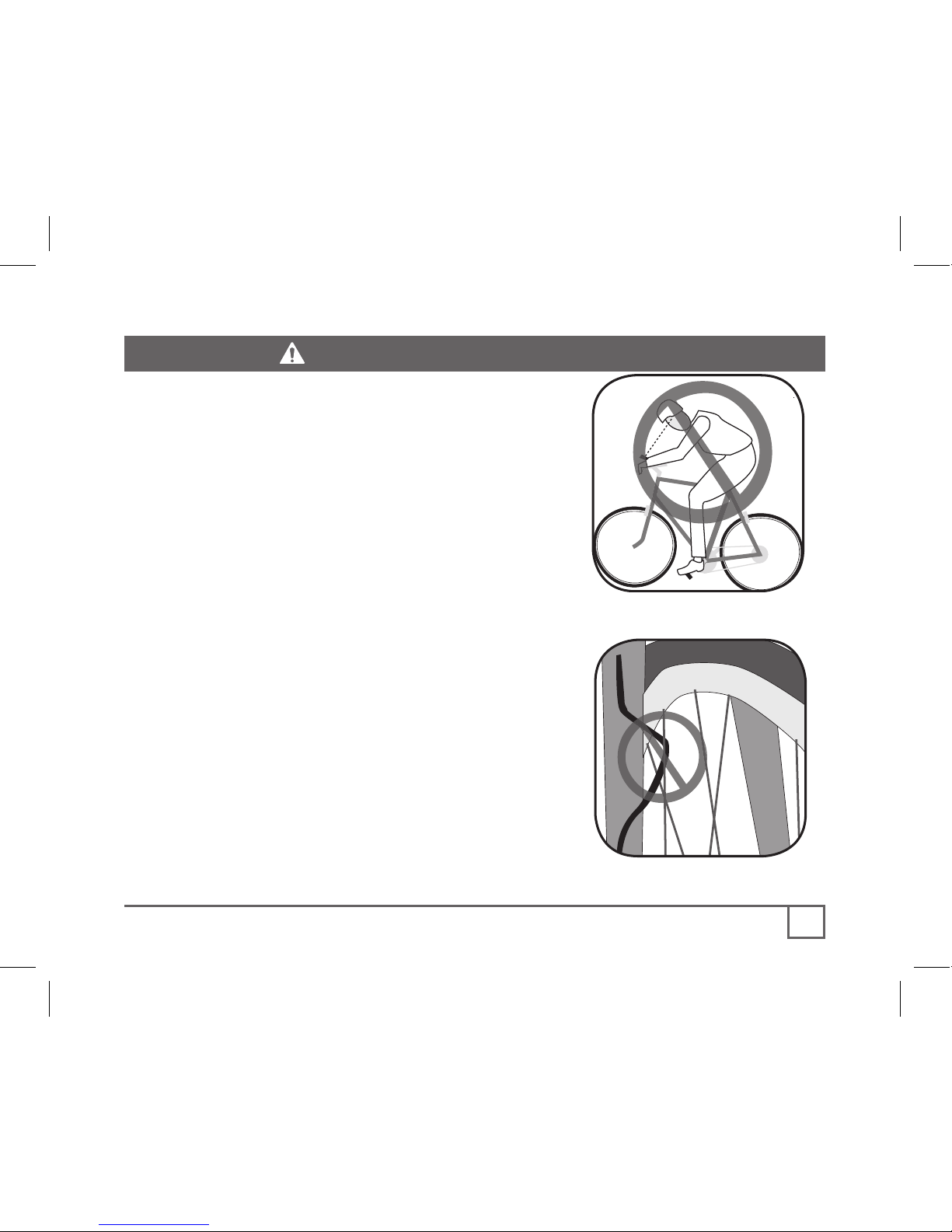
While riding your bicycle, do not stare
at the computer for long periods of time
(Figure 1). If you do not watch the road,
you could hit an obstacle, which may
cause you to lose control and fall.
Make sure the computer wire cannot
contact the tire or wheel spokes (Figure
2). The wire could be damaged causing
the computer to malfunction. Also, the
wire could get caught, causing you to lose
control and fall.
06 Incite ACH 07_13.indd 1 7/14/06 7:25:52 AM

06 Incite ACH 07_13.indd 2 7/14/06 7:25:53 AM

06 Incite ACH 07_13.indd 3 7/14/06 7:25:54 AM

06 Incite ACH 07_13.indd 4 7/14/06 7:25:55 AM

Stem mount
Handlebar
mount Speed sensor Cadence sensor
Tools needed:
• Electrical tape
• Slot-type screwdriver
• Phillips-type screwdriver
• Scissors
06 Incite ACH 07_13.indd 5 7/14/06 7:25:56 AM

The Trek Incite ACH computer can be
mounted on the handlebar or on the stem
(Figure 3).
1. Select the bar clamp that fits your bike.
31.8mm bars: large clamp
25.4mm and 26.0mm: small clamp
22.2mm bar: small clamp with rubber shim
2. Insert the handlebar clamp into the back of
the computer base (Figure 4) and slide it
towards the front of the base.
3. Insert the rubber friction pad into the computer base, aligned
across the computer base.
4. With the wire pointing toward the front of the bike, wrap the bar
clamp around the handlebar.
5. Insert the screw through the washer and into the computer base.
6. Tighten the screw until the computer base cannot rotate on the
handlebar.
7. Slide the computer into the computer base until the front of the
computer and computer base line up.
06 Incite ACH 07_13.indd 6 7/14/06 7:25:57 AM

Check that the computer base cannot be
rotated around the handlebar, and that the
computer cannot slide backwards on the
computer base (Figure 5).
1. Insert the rubber friction pad into
the computer base, aligned along the
computer base.
2. Insert two nylon ties through the
computer base (Figure 6).
3. Place the base on the stem and tighten
the nylon tie.
4. Slide the computer into the computer
base until the front of the computer and
computer base line up.
5. Check that the computer base cannot
be rotated around the stem and the
computer cannot slide backwards on the
computer base.
6. Tighten the nylon ties and trim the
excess length.
06 Incite ACH 07_13.indd 7 7/14/06 7:25:57 AM
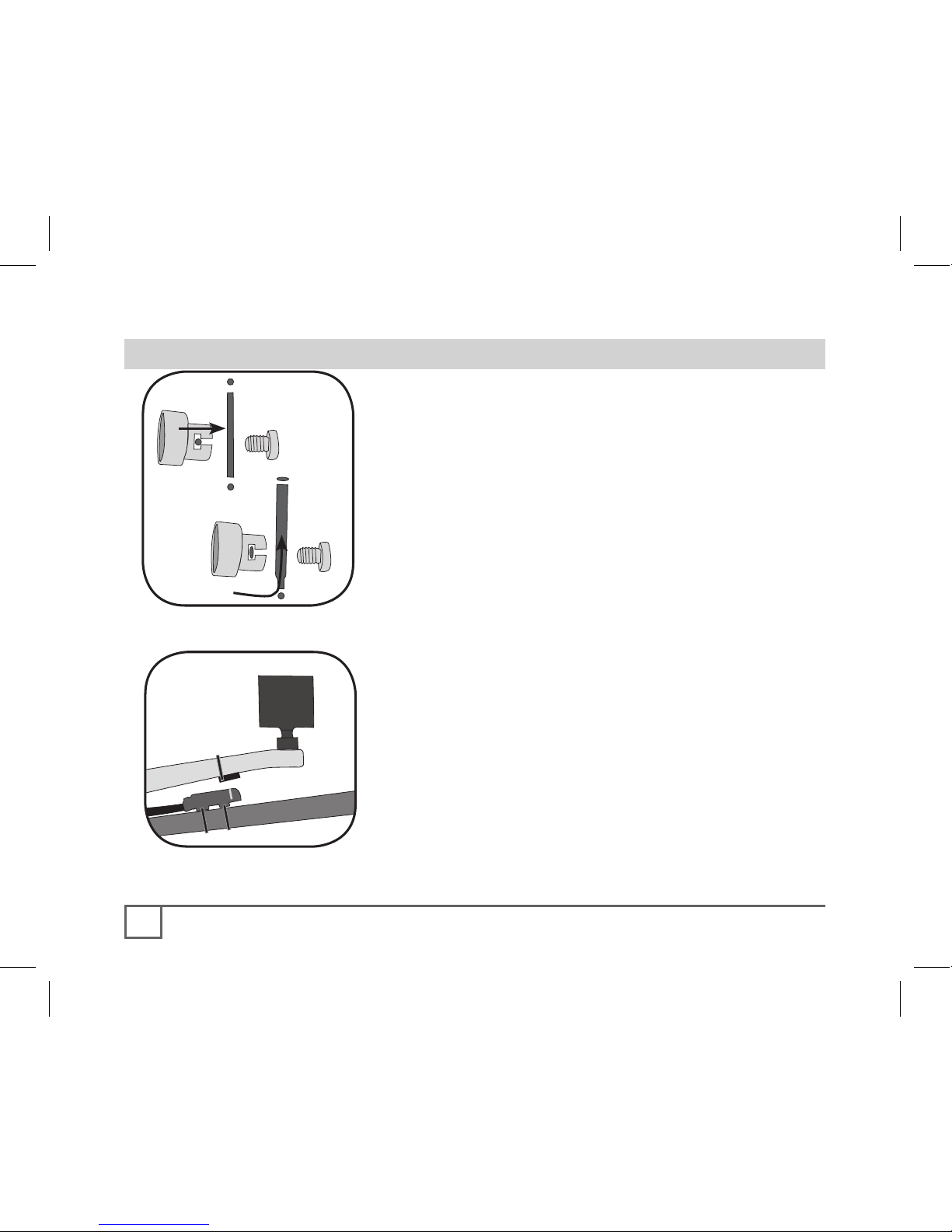
The wheel magnet must be aligned so that
it passes across the sensor. As the magnet
passes the sensor, it must be no further from
the sensor than 1 to 3mm (1/32 to 1/8 inch).
The wheel magnet has a ‘T’ shaped slot with
two configurations: round spokes and flat or
bladed spokes (Figure 7).
The cadence sensor, with the wire, mounts
near the crankset. It must be aligned so that
the magnet passes within 1-3mm, and in line
with the small line on the sensor (Figure 8).
1. Remove the screw from the magnet.
2. Slide the slot in the back of the magnet
over the spoke.
For a flat or bladed spoke, start the spoke near
the end where the spoke is round, and align the
top of the ‘T’ with the spoke as you slide the
magnet up the blade (Figure 7).
3. Thread the screw into the magnet until it
is snug against the spoke.
06 Incite ACH 07_13.indd 8 7/14/06 7:25:58 AM
Altri manuali per Bicycle Computer
4
Questo manuale è adatto per i seguenti modelli
1
Indice
Altri manuali Trek Accessori per biciclette

Trek
Trek INCITE 11i Manuale utente

Trek
Trek Fusion C Manuale utente

Trek
Trek 08 Manuale utente

Trek
Trek TQ Drive System Manuale utente

Trek
Trek Bicycle Computer Manuale utente

Trek
Trek INCITE 6i Manuale utente

Trek
Trek INCITE 6i Manuale utente

Trek
Trek TQ HPR50 Manuale utente

Trek
Trek RIDE+ R250 Manuale utente

Trek
Trek INCITE 6i Manuale utente


