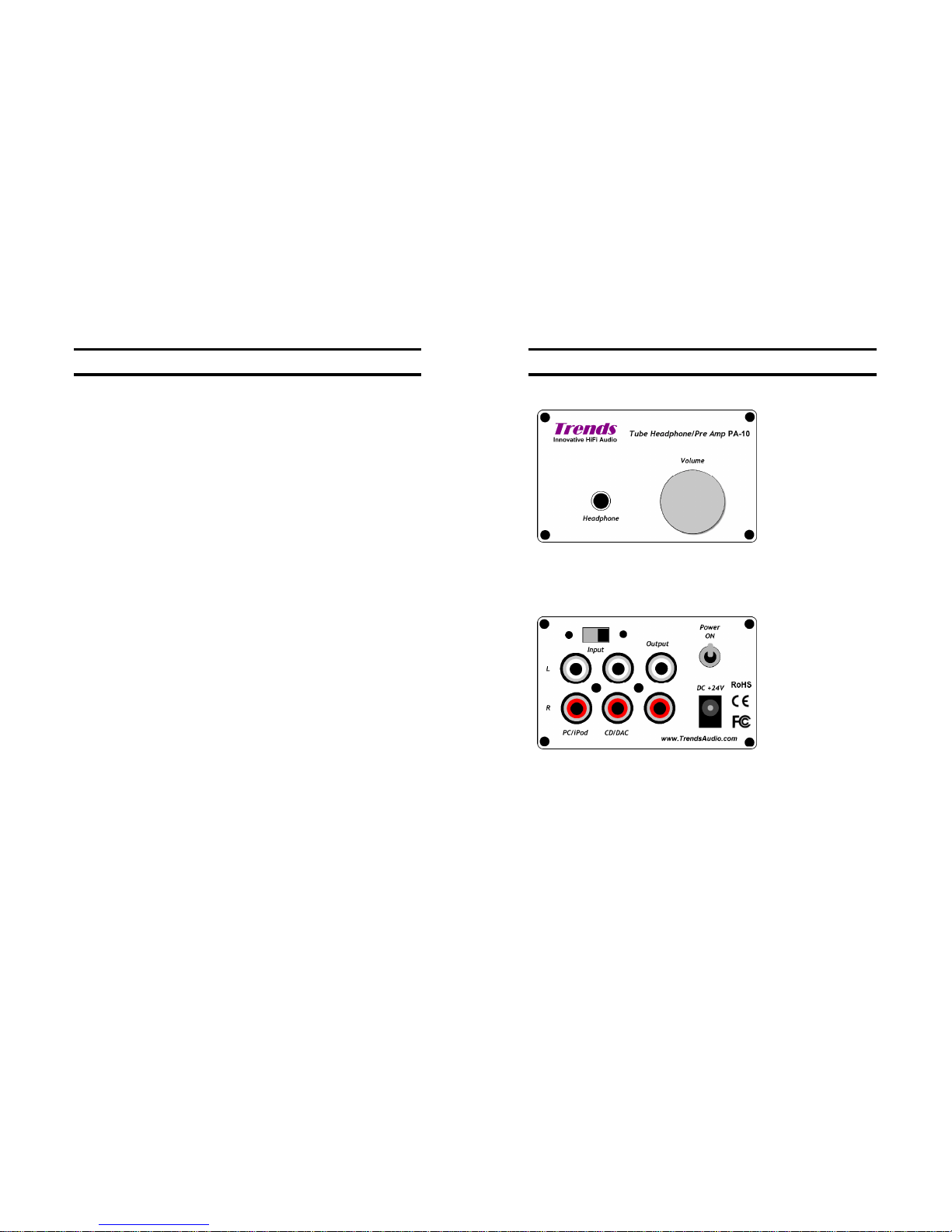
10.2 DC Bias Voltage Tuning
Since each tubemay derivate abit in parameters, especiallyfrom different series,it
needstore-tunetheDC biasvoltagestoguaranteethemachineis workinginthebest
point andperformingthebest sound quality.
Therearetwoblue preciseadjustable potentiometers (R3,R13) fortuningtheDCbias
voltage ofeachchannel.TheDCbias hasbeentuned infactory.Butafterrun-in for a
period orchanged another tube, it would be deviatedthat the fine-tuning isneeded.
Beforeyoutune these,youneedascrewdriver (take offthe case),asmallscrewdriver
(turn the screwofthepotentiometer)anda (digital)multi-meter to detecttheDCbias
voltage.
1. Use screwdriver totakeout thetwoupper levelscrewsinthefront panel&
another twoscrewsinthe back panel.Then,opentheuppercase.
2. PowerONthe machine with no audio signalinput.
3. Waitatleast5minutes for the machine torun in.
4. Use the multi-metertodetectthe DCvoltagebetweenthe testpoint A(L) [red]in
thePCB&the GND [black] (e.g. the ringofthe power switch or theouterringof
thoseRCAsockets) ofthe LEFTchannel.
5. Turnthe screwonthetopof the R3 potentiometer byasmall screwdriver
clockwise oranticlockwiseuntil thevoltage as closeasto +16.5V.
6. Then, repeatstep4and 5for the RIGHTchannel by changingthe testpointto
A(R) [red] andturning the screw on the top of the R13 potentiometer.
7. PowerOFFthe amplifier.
8. Cover backthe upper caseandtightenthe screws.
TrendsPA-10 User Guide
Section 11.RegulatoryCompliance/Section12. Contact Us 12
1
11
1.
.
R
Re
eg
gu
ul
la
at
to
or
ry
y
C
Co
om
mp
pl
li
ia
an
nc
ce
e
This device complieswithPart15oftheFCCRules. Operationissubjecttothe
followingtwoconditions:
(1) this devicemaynot cause harmfulinterference,and
(2) thisdevicemustaccept anyinterference received, including interferencethatmay
causeundesired operation.
Warning: Changes ormodifications to thisunit not expressly approvedby theparty
responsibleforcompliance could voidtheuser's authorityto operatetheequipment.
NOTE:This equipment has beentestedand foundtocomplywith the limitsforaClassB
digitaldevice,pursuant toPart15of theFCCRules. Theselimitsare designed toprovide
reasonable protection againstharmfulinterferenceinaresidentialinstallation.This
equipmentgenerates,uses andcanradiateradio frequency energyand, ifnotinstalled
and used in accordance withthe instructions, maycause harmfulinterference toradio
communications.
However,thereisnoguaranteethatinterferencewill notoccur inaparticular installation.
Ifthis equipment doescauseharmfulinterference toradioor televisionreception,which
canbe determinedbyturning the equipmentoffandon,the userisencouraged totry to
correctthe interference byone or moreofthe followingmeasures:
- Reorientor relocate thereceiving antenna.
- Increasetheseparation betweentheequipmentand receiver.
- Connect theequipment into anoutletonacircuitdifferent fromthattowhichthe
receiver is connected.
- Consultthedealer or anexperienced radio/TV technicianfor help.
1
12
2.
.
C
Co
on
nt
ta
ac
ct
t
U
Us
s
ITOKMediaLimited (Trends Audio)
Address: Unit E, 13/F., World TechCentre,
95HowMingStreet, KwunTong,Kowloon, HongKong
Phone: +852 23040730(9am-6pm, HKGTime)
Fax: +8522566-5740
Email: sales@TrendsAudio.com (Sales)
support@TrendAudio.com (Support)
Web:http://www.TrendsAudio.com