
Trotec IC085LV Manuale utente

TRT-BA-IC085LV-IC125LV-TC-002-EN
IC085LV / IC125LV
EN
OPERATING MANUAL
THERMAL IMAGING CAMERA
1 EN
Operating manual – thermal imaging camera IC085LV / IC125LV
Table of contents
Notes regarding the operating manual.................................1
Safety .....................................................................................1
Information about the device................................................3
Transport and storage...........................................................7
Operation ...............................................................................7
Software...............................................................................13
Emissivity.............................................................................22
Thermography terms...........................................................24
Errors and faults..................................................................25
Maintenance and repair ......................................................25
Disposal ...............................................................................26
Notes regarding the operating manual
Symbols
Warning of electrical voltage
This symbol indicates dangers to the life and health of
persons due to electrical voltage.
Warning of laser radiation
This symbol indicates dangers to the health of persons
due to laser radiation.
Warning
This signal word indicates a hazard with an average
risk level which, if not avoided, can result in serious
injury or death.
Caution
This signal word indicates a hazard with a low risk
level which, if not avoided, can result in minor or
moderate injury.
Note
This signal word indicates important information (e.g.
material damage), but does not indicate hazards.
Info
Information marked with this symbol helps you to carry
out your tasks quickly and safely.
Follow the manual
Information marked with this symbol indicates that the
operating manual must be observed.
You can download the current version of the operating manual
and the EU declaration of conformity via the following link:
IC085LV
http://hub.trotec.com/?id=39794
IC125LV
http://hub.trotec.com/?id=39795
Safety
Read this manual carefully before starting or using the
device. Always store the manual in the immediate vicinity
of the device or its site of use!
Warning
Read all safety warnings and all instructions.
Failure to follow the warnings and instructions may
result in electric shock, fire and/ or serious injury.
Save all warnings and instructions for future
reference.
This appliance can be used by children aged from
8years and above and persons with reduced physical,
sensory or mental capabilities or lack of experience
and knowledge if they have been given supervision or
instruction concerning use of the appliance in a safe
way and understand the hazards involved.
Children shall not play with the appliance. Cleaning and
user maintenance shall not be made by children
without supervision.
• Do not use the device in potentially explosive rooms.
• Do not use the device in aggressive atmosphere.
• Do not immerse the device in water. Do not allow liquids to
penetrate into the device.
• The device may only be used in dry surroundings and must
not be used in the rain or at a relative humidity exceeding
the operating conditions.
• Protect the device from permanent direct sunlight.
• Do not remove any safety signs, stickers or labels from the
device. Keep all safety signs, stickers and labels in legible
condition.
• Do not open the device with a tool.
EN 2
Operating manual – thermal imaging camera IC085LV / IC125LV
• Avoid looking directly into the laser beam.
• Never point the laser beam at people or animals.
• Observe the storage and operating conditions as given in
the Technical data chapter.
Intended use
Only use the device for visual or thermographic representation
of objects whilst adhering to the technical data.
To use the device for its intended use, only use accessories and
spare parts which have been approved by Trotec.
Improper use
Do not use the device in potentially explosive areas. Never use
the device on persons or animals. Trotec accepts no liability for
damages resulting from improper use. In such a case, any
warranty claims will be voided. Any unauthorised modifications,
alterations or structural changes to the device are forbidden.
Personnel qualifications
People who use this device must:
• have read and understood the operating manual, especially
the Safety chapter.
Residual risks
Hazardous electric current
Work on the electrical components must only be
carried out by an electrically skilled person or an
authorised specialist company.
Warning of electrical voltage
There is a risk of a short-circuit due to liquids
penetrating the housing!
Do not immerse the device and the accessories in
water. Make sure that no water or other liquids can
enter the housing.
Warning of electrical voltage
Work on the electrical components must only be
carried out by an authorised specialist company!
Warning of electrical voltage
Before any work on the device, remove the mains plug
from the mains socket and the battery from the device!
Hold onto the mains plug while pulling the power cable
out of the mains socket.
Warning of explosive substances
Do not expose the battery to temperatures above 45
°C! Do not let the battery come into contact with water
or fire! Avoid direct sunlight and moisture. There is a
risk of explosion!
Warning of laser radiation
Laser class2, P max.: < 1mW, λ: 650nm,
EN 60825-1:2014
Do not look directly into the laser beam or the opening
from which it emerges.
Never point the laser beam at people, animals or
reflective surfaces. Even brief eye contact can lead to
eye damage.
Examining the laser output aperture by use of optical
instruments (e.g. magnifying glass, magnifiers and the
like) entails the risk of eye damage.
When working with a laser of class2, observe the
national regulations on wearing eye protection.
Warning
Risk of suffocation!
Do not leave the packaging lying around. Children may
use it as a dangerous toy.
Warning
The device is not a toy and does not belong in the
hands of children.
Warning
Dangers can occur at the device when it is used by
untrained people in an unprofessional or improper way!
Observe the personnel qualifications!
Caution
Keep a sufficient distance from heat sources.
Note
To prevent damages to the device, do not expose it to
extreme temperatures, extreme humidity or moisture.
Note
Do not use abrasive cleaners or solvents to clean the
device.
3 EN
Operating manual – thermal imaging camera IC085LV / IC125LV
Information about the device
Device description
The thermal camera IC085LV / IC125LV creates a visible image
depicting infrared radiation which is otherwise invisible to the
human eye. The thermal image and temperature are displayed
on the screen in real time. To improve the view, you can select
various colour palettes for depicting the thermal image.
Furthermore, you can superimpose IR and digital images (IR
DuoVisionPlus) in order to obtain a higher-contract thermal
image.
For a measured result which is as precise as possible the
ambient temperature, reflected temperature, relative humidity,
distance and emissivity can be entered.
A list of emissivities for various surfaces is provided in the
chapter Emissivity. For a precise evaluation, the thermal image
on the screen can be frozen or, if the microSD memory card is
inserted, saved in the device. The saved images can later be
viewed either directly on the camera screen or on a PC using an
analysis software.
To edit the images, you can download the IR-Report 2.X STD
software from the download (or Service) section of
www.trotec.com.
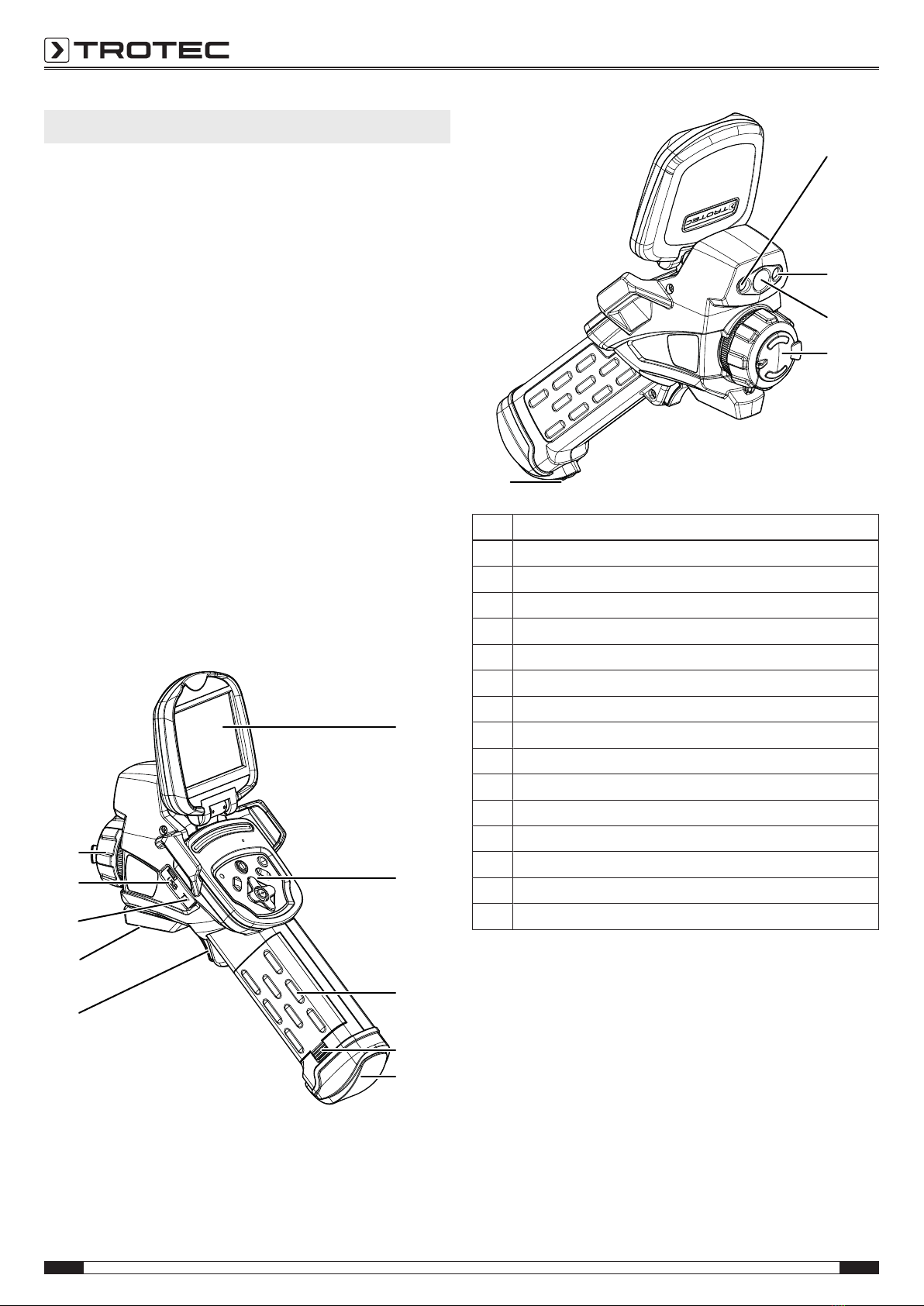
Device depiction
1
2
3
4
15
14
12
11
5
13
6
7
8
9
10
No. Designation
1 Display
2 Control panel
3 Battery
4 Battery locking mechanism
5 AV output with sealing cap
6 LED
7 Laser pointer
8 Camera
9 Infrared lens with protective cap
10 Wrist strap holder
11 Multifunction button
12 1/4" tripod thread
13 microSD memory card slot
14 Micro USB port
15 Focus ring
EN 4
Operating manual – thermal imaging camera IC085LV / IC125LV
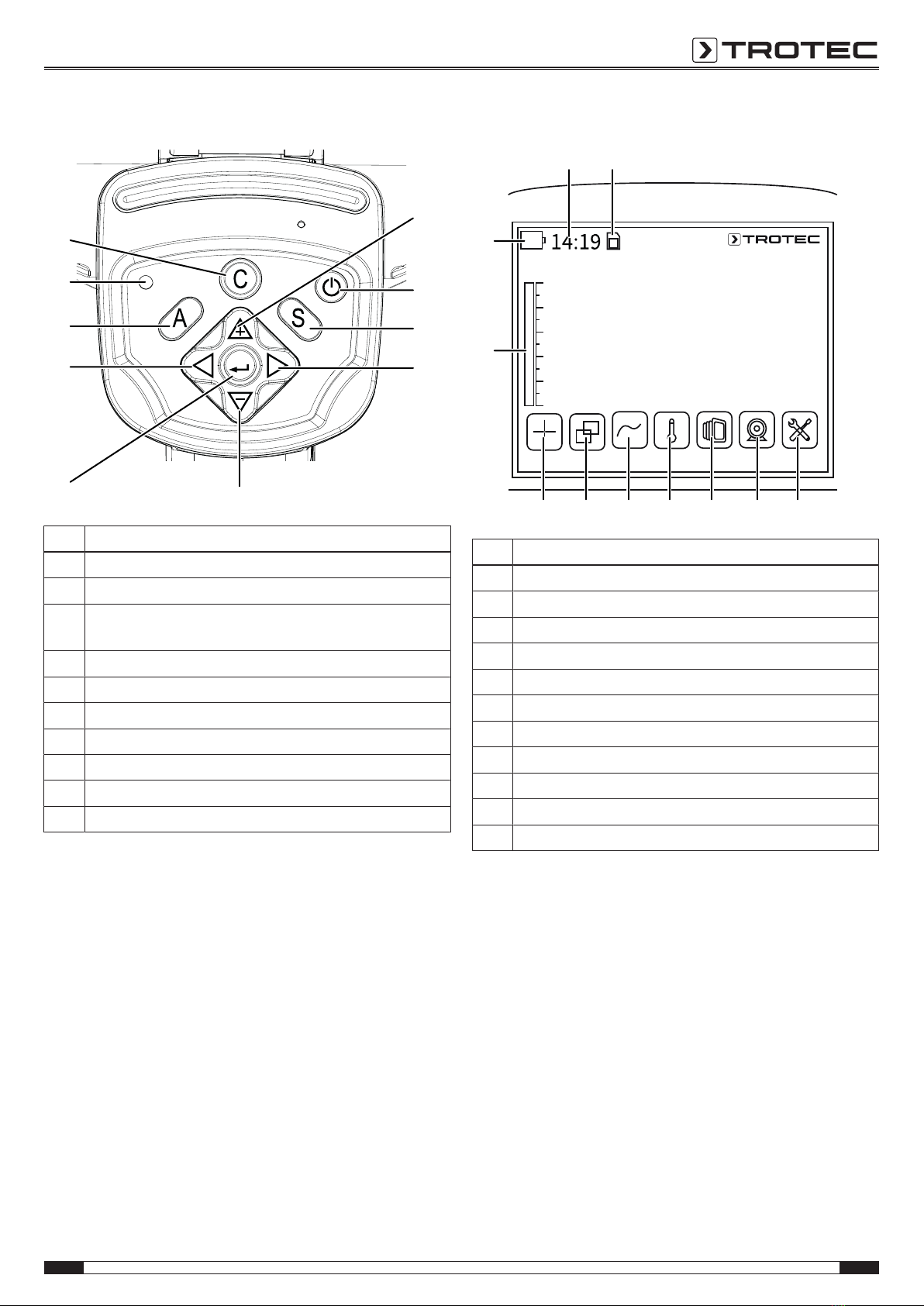
Control panel
16
17
18
19
25
24
23
22
20
21
No. Designation
16 Arrow button up / increase SPAN
17 Power button
18 S button: Freeze / Activate image or save (press and hold
for approx. 3s)
19 Arrow button right / LEVEL up
20 Arrow button down / decrease SPAN
21 Enter button
22 Arrow button left / LEVEL down
23 A button: Shutter button / Auto adjustment
24 Operating LED
25 C button: Main menu or Back button
Display
Spot Area Line ISO Image Media Settings
2831 30 29
26
35
36
34 3233
27
No. Designation
26 Time indication
27 SD memory card inserted indication
28 Settings menu
29 Media menu
30 Image menu
31 ISO mode menu
32 Line menu
33 Area menu
34 Spot menu
35 Temperature scale (dynamic)
36 Battery status indicator

5 EN
Operating manual – thermal imaging camera IC085LV / IC125LV
Technical data
Parameter Value
Model IC085LV IC125LV
Article number 3.110.003.014 3.110.003.023
Measurement Temperature range -20 °C to +600 °C -20 °C to +1,500 °C
Accuracy ± 2 °C, ± 2 % from the measured value
Radiometric image
performance
Detector type Focal Plane Array (FPA), uncooled microbolometer
Detector resolution 384 x 288 pixels
Spectral range 8 to 14 µm
Field of vision (FOV) 24° x 18°
Geometric resolution 1.3 mrad
Thermal sensitivity 0.05 °C at 30 °C
Refresh rate 50/60 Hz
Focus / min. focus distance Manual / 0.5 m
Visual image
performance
Digital photo camera 5 megapixels, integrated photo lamp
Video norm PAL / NTSC
Image representation Display 3.5-inch LCD touchscreen, capacitive
Image display Pseudo colours, 6 colour palettes
Image display options IR image, real image, DuoVisionPlus display (fusion of infrared and real image as contour
emphasizing detail-enhanced thermogram)
Measurement and
analysis
Measuring spots 8movable temperature measuring spots (can be freely configured)
Measuring functions Isotherm, line profile analysis, sector analysis (rectangle), alarm function for hot/cold spot,
differential measurements at up to 8 dynamic temperature measuring spots
Area measurement 2 areas
Emissivity User-defined variably adjustable from 0.01 to 1.0
Measurement correction Correction of the reflected object temperature; automatic correction based on user-defined
specifications for ambient temperature, distance, relative humidity
Data storage Memory 512 MB internal flash memory; microSD memory card slot
File format Radiometric image: 14 bit JPEG; visual image: JPEG; non-radiometric thermographic video:
MPEG-4; fully radiometric infrared video: 14-bit IR format
Data storage / transmission Storage of non-radiometric IR videos (MPEG-4) as well as radiometric and real images on
internal memory or SD card; storage of fully radiometric IR videos* on PC via USB 2.0
Voice recording Comments can be stored along with every IR image (optionally available Bluetooth headset
required)
Interfaces USB 2.0, analogue video (PAL / NTSC)
Laser Type Semiconductor AIGalnP diode laser class 2, 1 mw / 635 nm red
Power supply Battery type Standard lithium-ion; rechargeable, exchangeable
Operating time Approx. 3h
Mains power 4.2 - 4.8V DC
Energy saving mode User-defined

EN 6
Operating manual – thermal imaging camera IC085LV / IC125LV
Parameter Value
Surrounding
conditions
Temperature -20 °C to +50 °C (operation), -40 °C to +70 °C (storage)
Humidity 10% to 95 % RH (non-condensing)
Type of protection / shock /
vibration
IP54 / 25G / 2G
Impact resistance (falling from) 1.8 m
Physical
characteristics
Dimensions
(length x width x height)
230 x 80 x 195 mm
Weight 650 g
Tripod mounting 1/4 inch – 20
* Saving fully radiometric IR videos requires the optionally available real-time upgrade
Scope of delivery
• 1x Thermal imaging camera
• 1x Battery
• 1x Charger
• 1x Power adapter for charger
• 1x microSD memory card
• 1x Micro USB cable
• 1x Transport case
• 1x Lens hood
• 1x Cinch AV cable
• 1x USB SD memory card reader

7 EN
Operating manual – thermal imaging camera IC085LV / IC125LV
Transport and storage
Note
If you store or transport the device improperly, the
device may be damaged.
Note the information regarding transport and storage of
the device.
Transport
For transporting the device, use the transport case included in
the scope of delivery in order to protect the device from external
influences.
The supplied Li-ion batteries are subjects to the requirements of
dangerous goods legislation.
Observe the following when transporting or shipping Li-ion
batteries:
• The user may transport the batteries by road without any
additional requirements.
• If transport is carried out by third parties (e.g. air transport
or forwarding company), special requirements as to
packaging and labelling must be observed. This includes
consulting a dangerous goods specialist when preparing
the package.
– Only ship batteries if their housing is undamaged.
– Mask open terminals with tape and pack the battery in
a way that it cannot move inside the packaging.
– Please also observe any other national regulations.
Storage
When the device is not being used, observe the following
storage conditions:
• dry and protected from frost and heat
• in an upright position where it is protected from dust and
direct sunlight
• with a cover to protect it from invasive dust if necessary
• The storage temperature is the same as the range given in
the Technical data chapter.
• When storing the device for an extended period of time,
remove the batteries.
Operation
Inserting the microSD memory card
The microSD memory card can be used to extend the device's
internal memory in order to store images and videos.
Please proceed as follows to insert the microSD memory card:
1. Open the cover at the microSD memory card slot(13).
2. Insert the microSD memory card into the slot with the
contacts facing up until the microSD memory card clicks
into place.

EN 8
Operating manual – thermal imaging camera IC085LV / IC125LV
Inserting / Changing the battery
Note
Make sure that the surface of the device is dry and the
device is switched off.
1. Charge the battery as described in the section Charging
the battery in the Maintenance chapter.
2. If applicable, remove the empty battery. To do so, slide the
locking mechanism at the battery down.
3. Insert the fully charged battery into the holder with correct
polarity until the battery perceptibly clicks into place.
Switching the device on
1. Open the display.
2. Open the protective cap at the IR lens.
3. Press the Power button(17) for approx. 5 seconds.
ðThe operating LED (24) lights up in blue.
ðThe Trotec logo is displayed.
4. Wait a moment until the device has started up completely.
ðA current IR image and the start screen appear on the
display:
9 EN
Operating manual – thermal imaging camera IC085LV / IC125LV
Setting the language
Please proceed as follows to set the language for the menu
texts:
1. Press the C button (25).
ðThe main menu is displayed.
2. Select the Settings menu.
3. Select the System menu.
4. Press the Language button.
5. Swipe your finger through the list of available languages.
6. Swipe to select the desired language.
7. Confirm your selection with OK.
ðThe desired language has been selected and set.
Setting date and time
Please proceed as follows to set the date and time for the
system and the time stamp on the images/ videos:
1. Press the C button (25).
ðThe main menu is displayed.
2. Select the Settings menu.
3. Select the System menu.
4. Press the Date & Time button.
5. Press the Set date button.
6. Swipe to select the desired date.
7. Confirm your selection with OK.
8. Press the Set time button.
9. Swipe to select the desired time.
10. Confirm your selection with OK.
11. Press the Set timezone button.
12. Swipe to select the desired timezone.
13. Confirm your selection with OK.
ðDate and time have been selected and set.
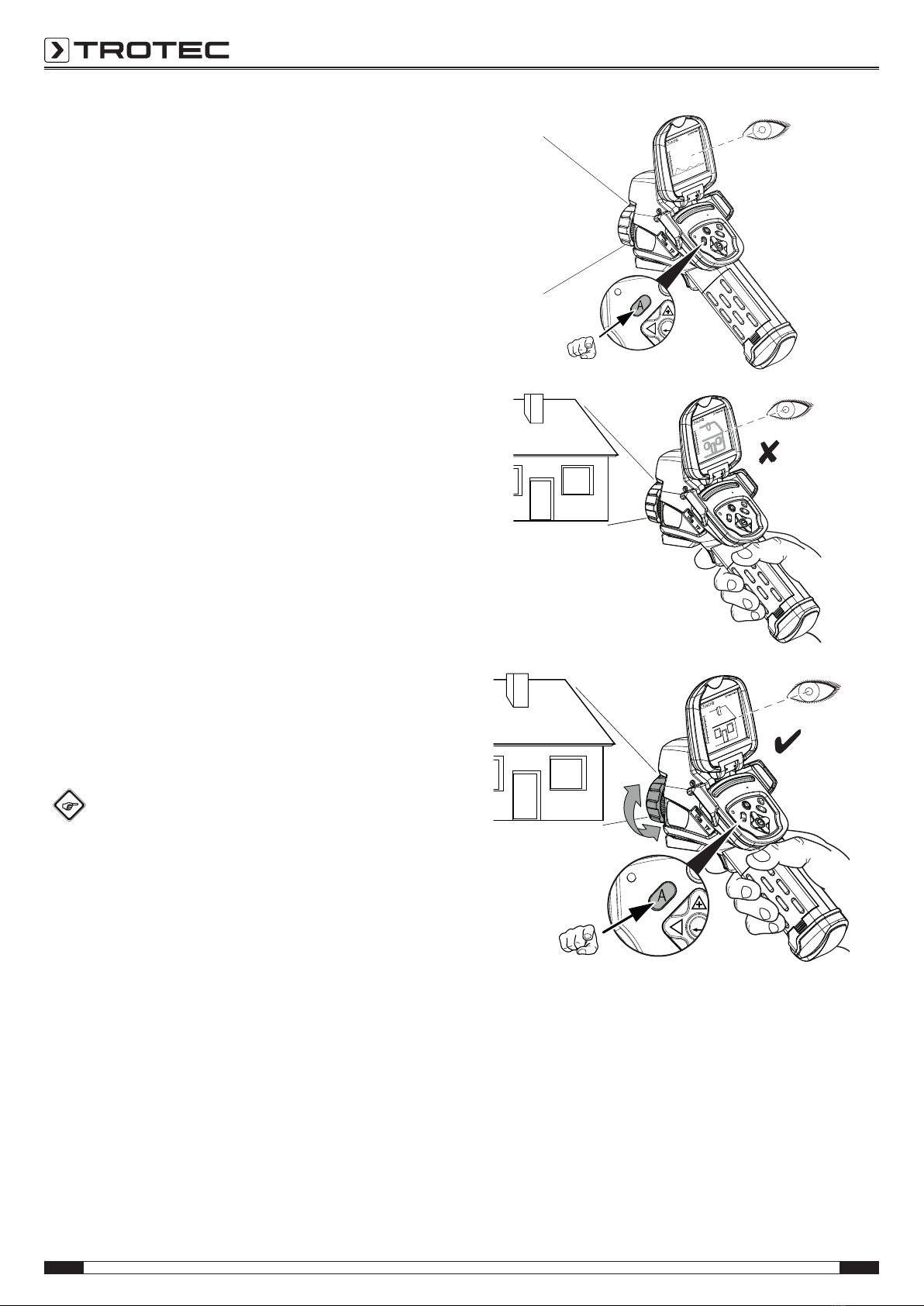
Focussing and calibrating the IR camera
Info
You can also assign this function to the multifunction
button. Further information on the multifunction button
is provided in the chapter Configuring the multifunction
button.
1. Turn the focus ring(15) to the left or right until the object
to be thermographed is sharply focussed. An image that is
not sharply focussed leads to deviations in the temperature
measurement!
2. Press the Shutter button(23).
ðThe internal shutter of the IR camera closes briefly and
an automatic adjustment (calibration) to the
temperatures in the image section is performed.
A.
B.
C.
1.
2.
Altri manuali per IC085LV
1
Questo manuale è adatto per i seguenti modelli
1
Indice
Altri manuali Trotec Telecamera termica


