
U-Reach PV Series Manuale utente
PV Series
M.2 SSD (NVMe/SATA)
Duplicator and Sanitizer
User Manual
v A.03

2
Index Table
Product Disclaimer.................................................................................................................3
Warranty................................................................................................................................3
Piracy Statement....................................................................................................................3
Before You Start.....................................................................................................................4
Notice Symbols ......................................................................................................................4
Functions Table......................................................................................................................5
Product Overview ..................................................................................................................8
Functions .............................................................................................................................11
1. Copy..........................................................................................................................11
2. Compare....................................................................................................................12
3. Copy+Compare..........................................................................................................12
4. Erase..........................................................................................................................12
6. Setup.........................................................................................................................15
How-to plug-in M.2 SSD.......................................................................................................22
Maintenance Guide .............................................................................................................23
v A.03

3
Product Disclaimer
U-Reach is not accountable for any incidental or consequential damages, including, but not
limited to property harm, loss of time or data from use of any U-Reach products or any
other damages attributable to product malfunction or failure of including without
limitation, those attributed to reliance of the materials provided, costs of product
replacement, loss of use, data or profits, delays or business interruptions, any principle of
legal responsibility arising from or in reference to the use, overall performance, delays in
servicing, or lack of ability to render service of any U-Reach product. U-Reach makes every
effort to ensure proper function of all products. However, the customer is responsible to
verify that the output of U-Reach product meets the customer’s quality requirement. The
customer further acknowledges that improper use of U-Reach products, software program,
and/or hardware issues can cause loss of data, defective formatting, or unreliable data
loading. U-Reach will make efforts to resolve or repair any issues recognized by customer
either within the warranty period or on a time and materials basis.
Specifications and features are subject to change without notice or obligation.
Warranty
U-Reach provides a basic one-year parts and labor warranty for all its products, excluding
cables, adapters, and other consumable items. An extended warranty may be purchased.
Telephone and email support is available for the life of the product as defined by U-Reach.
All warranties are specific to market region and will be defined per market region in which
the product was purchased.
Piracy Statement
U-Reach accepts no responsibility for copyright infringement or misuse of any U-Reach
equipment. Copying any form of data (audio, video, or software) without the permission of
the copyright holder is illegal. It is the sole responsibility of the user to ensure that the legal
copyrights of the copyright owners are respected.

4
Before You Start
Important Notice
⚫Carefully read the entire manual before operating.
⚫Make sure the source device is correct and functioning.
⚫Equal capacity of source and target is recommended for guaranteed data consistency.
⚫Using the Copy +Compare function provides the most flawless duplication.
⚫Damage incurred due to non-compliance with our operating instructions will void the
warranty.
⚫Store the equipment safely when not in use and keep out of the reach of children.
⚫Please turn off duplicator before replacing the socket.
⚫Never turn off the power while the firmware updating.
⚫Use only approved, stable power sources.
⚫The power supply has overload protection. When it is overloaded and shutdown,
please unplug the power cord for 2 minutes for discharge.
⚫Use product only in a clean, dry, dust free, and ventilated area. Liquids or foreign
debris can severely damage your duplicator.
⚫It is typical for the machine to heat up during operation.
⚫While in use, do not move the duplicator or remove HDDs.
⚫Static electricity may cause duplication error. Please pay attention to the duplicator’s
environment and while operating equipment. Purchasing electricity elimination
equipment helps avoid shock.
⚫Devices will operate at high temperatures during selected tasks.
⚫Wear protective gloves to prevent burns when handling devices.
⚫Ensure machine and operator are properly grounded to prevent ESD.
Notice Symbols
Special items, procedures, or notes to be observed prior to use.
Note
Refers to related duplicator operations, special details, tips, or
suggestions for operational effectiveness.
Caution
Refers to procedures that need to be adhered to or precautions.

5
Functions Table
Functions
Descriptions
1. Copy
Copies data from source device to targets. (There are four copy modes
in function "6.2 Copy Area")
2. Compare
Verifies the targets to the source device to ensure copy accuracy.
3. Copy+Compare
Automatically launches compare function after copy is completed.
4. Erase
4.1 Quick Erase
Erases device(s)’ index table.
4.2 Full Erase
Erases entire device(s) complying with NIST 800-88 Standards.
4.3 DoD Erase
Erases device(s) complying with DoD 5220.22-M Standards.
4.4 DoD EraseComp
Erase device(s) complying with DoD 5220.22-M Standards and verifies
complete erasure.
4.5 Secure Erase
Erases the non-loadable areas complying with NIST 800-88 Standards.
5. Utility
5.1 Show Device Info
Displays basic information such as device model, name, capacity, etc.
5.2 Update
System
5.2.1 Update BIOS
Updates system firmware through the rear SD port or
the source port.
5.2.2 Create Update HDD
Prepares by formatting the device to a 2GB FAT
partition to accept firmware file.
5.3 System Info.
Displays system information such as controller, model number,
software version, etc.
5.4 Read Speed (Available on PV400E and PV800.)
Calculate the device’s read speed by reading.
5.5 Write Speed (Available on PV400E and PV800.)
Calculate the device’s write speed by reading. This function will
change the device’s content and format.
5.6 Calc. CRC64
Calculates the CRC64 value of the source device.

6
6. Setup
6.1 Start-up Menu
Sets default function to display after equipment initialization.
6.2 Copy Area
6.2.1 System and Files
Copies data and skips empty space. Only supports
standard formats.
6.2.2 All Partitions
Copies or skips HPA, DCO, unknown partitions,
modified formats, etc. defined by settings.
6.2.3 Whole HDD
Copies all source data, bit-by-bit.
6.2.4 Percentage (%)
Sets percentage of source capacity to copy.
6.3 Copy GPT Backup Area
Enable this function to copy the end GPT format.
6.4 Skip Bad Sectors
Skips source bad sectors.
6.5 Language
Sets preferred language: English, Japanese, Spanish.
6.6 Advanced
Setup
6.6.1
Unknown Format
6.6.1.1Copy Unknown
Copies unknown format(s).
6.6.2.2 Skip Unknown
Skips unknown format(s).
6.6.2
Erase Master
6.6.2.1 Disabled
Source port will be unable to erase.
6.6.2.2 Enabled
Source port will be able to erase.
6.6.3
Erase Pattern
6.6.3.1 One Byte
Random character written per byte.
6.6.3.2 Big Random Data
Random character written in a set
of area.
6.6.4 Wait HDD Time
Sets device power-up buffer time when tasks are
initiated.
6.6.5 Lock Key
6.6.5.1 Do Not Lock Key

7
6.6.5.2 Do Lock Key
Only down/up buttons are
disabled. Reboot system for setting
to be in effect.
6.6.6 Stop Motor Time
Sets device power down buffer time when tasks are
completed.
6.6.7 Boot Password
Sets password for bootup.
6.6.8 Delete Disk
Signature After Copy
No
Yes
Do not copy the disk signature
onto target devices.
6.6.9 Target Tolerance
Sets the capacity tolerance range between the source
and target. The default setting is “No limit”.
6.6.10 Clean SSD
Before Copy
No
The default setting is “No”.
Yes
6.7 Restore Defaults
Reinstates manufacturer settings.
8
Product Overview
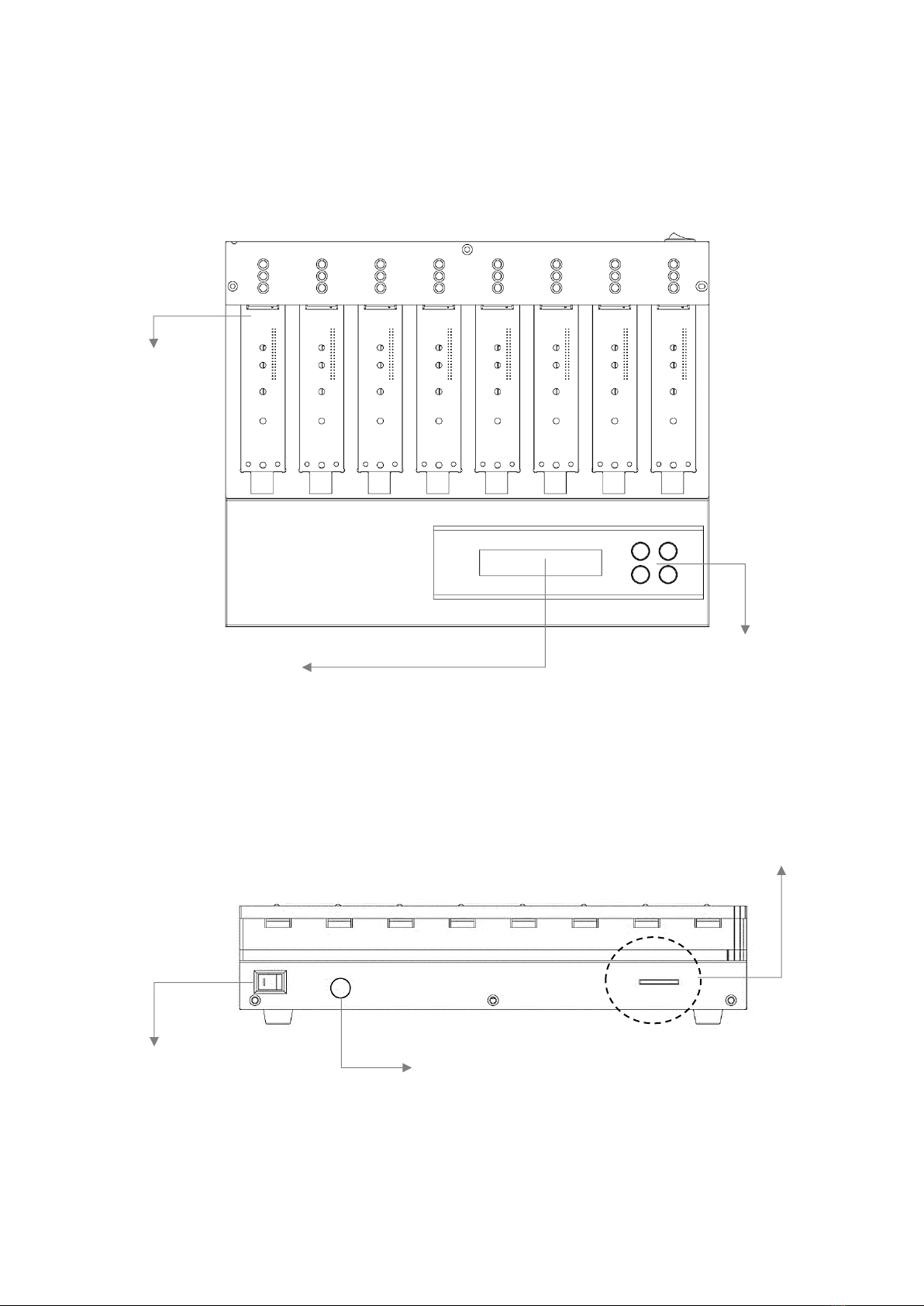
➢PV400E and PV800
Front View
Back View
Source Port
Control Buttons
LCD Display
12V Power Adapter
Power Switch
SD Slot for FW Update

9
➢PV1200 and PV2400
Front View
Back View
Source Port
Control Buttons
LCD Display
Power Input
Power Switch
OK Buttons
10
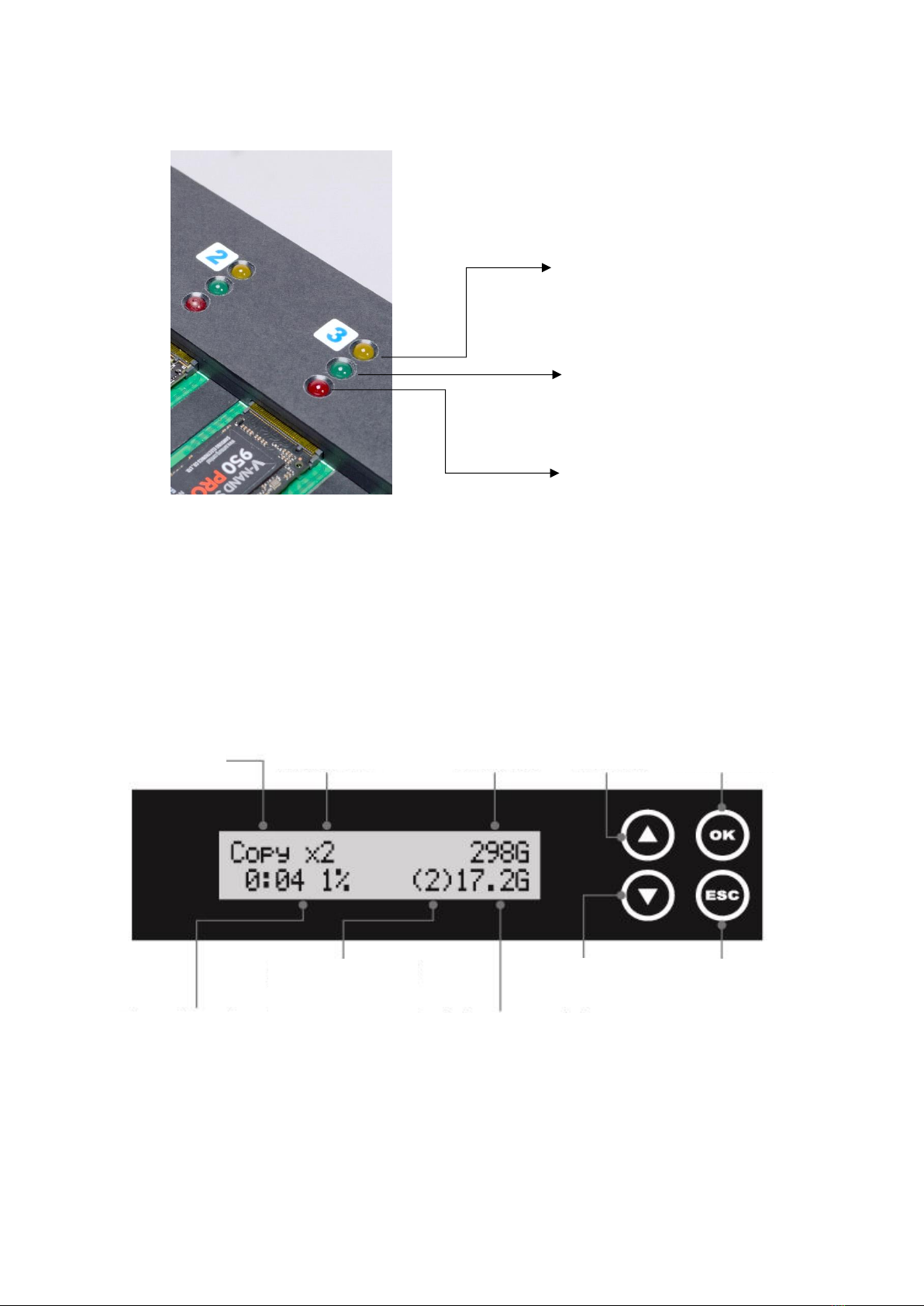
LED Status
LCD Configuration
Number of
Target Device
Function
Total Size
Forward
Confirm/OK
The slowest
Device
Time elapsed and
copy progress
Copied processed size
Backward
Cancel/Back
Yellow: Powered
Green: Pass
Red: Fail
Questo manuale è adatto per i seguenti modelli
4
Indice
Altri manuali U-Reach Accessori


