
Uniden UBC3300XLT Manuale utente
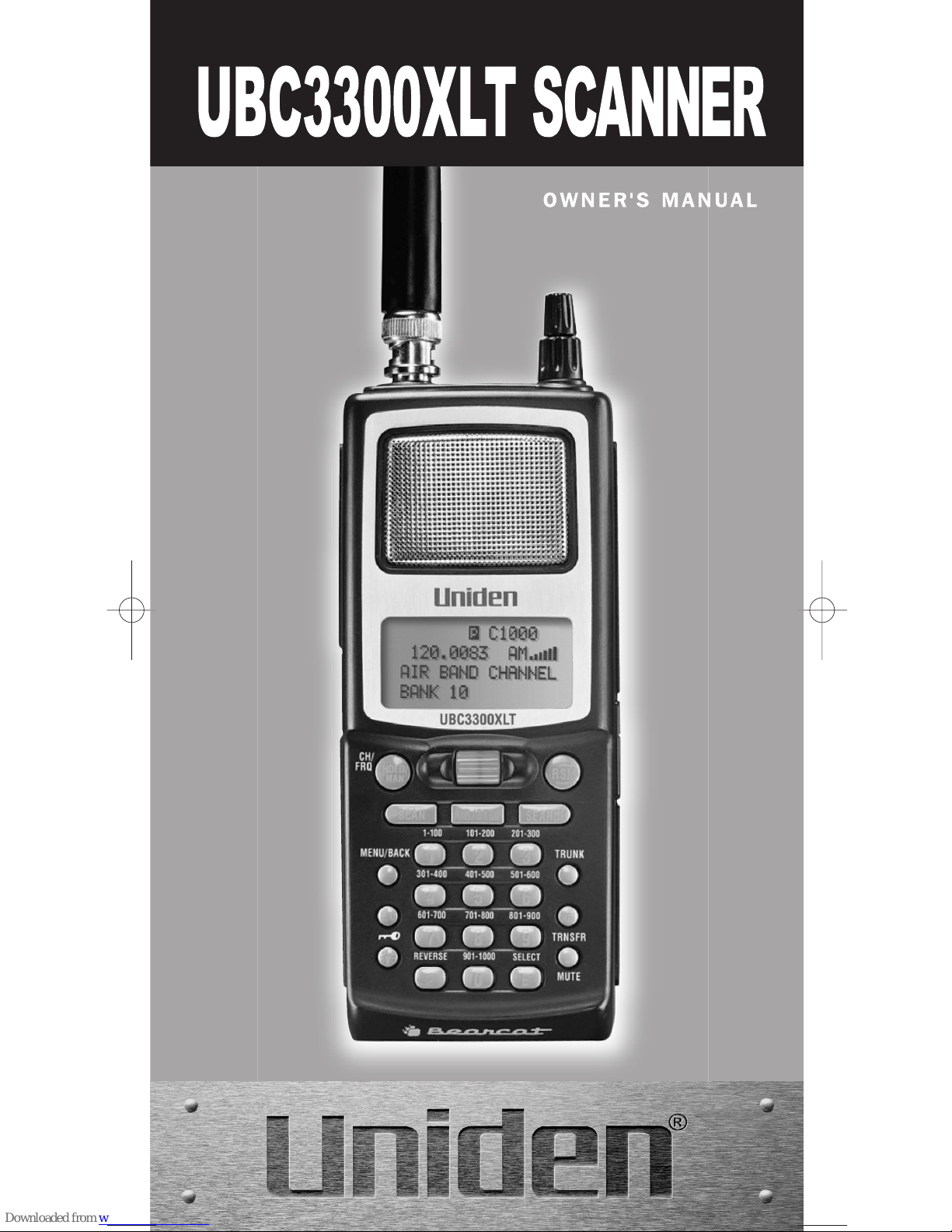
UBC3300XLT SCANNER
UBC3300XLT OM 5/14/04 3:28 PM Page i

UBC3300XLT OM 5/14/04 3:28 PM Page ii

Contents
Introduction...........................................................................................1
Front View ............................................................................................2
Icon Display ..........................................................................................3
UBC3300XLT SHORTCUTS ................................................................4
Important Notice ...................................................................................6
Terminology ..........................................................................................7
What is Scanning?............................................................................7
What is Searching?...........................................................................7
What is Trunk Tracking?...................................................................7
Feature Highlights ................................................................................9
Where to Obtain More Information .....................................................11
Information on the Internet .............................................................11
Included with Your Scanner Package ................................................12
Setup ..................................................................................................13
Installing the Battery Pack ..............................................................13
Charging the Battery Pack..............................................................13
Low Battery Indicator......................................................................13
Flexible Antenna .............................................................................14
Beltclip ............................................................................................14
Listening Safely ..............................................................................14
Connecting the (Optional) REMOTE Cable....................................14
Basic Operation ..................................................................................15
Turn the Scanner On ......................................................................15
Setting the Squelch ........................................................................15
Understanding the Menu System ...................................................16
Menu Description and Numeric Keypad Equivalents .....................17
Programming ......................................................................................26
Storing Frequencies into Channels in Menu Mode ........................26
Deleting a Stored Frequency..........................................................27
Editing a Stored Frequency ............................................................27
Duplicate Frequency Alert ..............................................................27
Transfer Frequencies......................................................................28
Storing Text Tags ...........................................................................28
Beep Alert .......................................................................................29
Programming Tips ..........................................................................30
Scanning.............................................................................................31
Storing Frequencies During Scanning............................................31
RF Attenuation Feature ..................................................................32
Setting the Delay Mode for Frequency...........................................32
Channel Lockout.............................................................................33
Restoring a Locked-out Channel ....................................................34
Restoring All Locked-out Channels ................................................34
Priority Scan ...................................................................................34
Changing the Priority Channel........................................................35
Priority Channel Plus Scan.............................................................35
Searching............................................................................................36
Setting a Search Range .................................................................36
Starting Chain Search.....................................................................37
Search Hold Feature.......................................................................37
Data Skip ........................................................................................37
Frequency Skip...............................................................................38
Storing Search Frequencies ...........................................................38
Auto Storing ....................................................................................39
Squelch (SQ) Mode ........................................................................40
Additional Menu Options for Searching .........................................42
Air Service Search..............................................................................43
Air Service Search Skip..................................................................43
UBC3300XLT OM 5/14/04 3:28 PM Page iii

Programming and Receiving Trunked Systems .................................45
STEP1: Selecting or Changing Trunking System Type..................45
STEP2: Programming Trunking Frequencies.................................46
STEP3: Programming ID Scan List Manually.................................47
Scan Lists .......................................................................................47
Setting the Squelch ........................................................................50
Receiving Trunked Systems...........................................................50
ID Scan Mode.................................................................................51
ID Scan Hold Feature .....................................................................52
Trunked Search ..............................................................................52
ID Monitor Mode .............................................................................52
ID Search Hold and Direct Entry ID Hold Mode.............................53
ID Lockout.......................................................................................53
Review ID Lockout..........................................................................54
Restoring Locked-out IDs ...............................................................54
Setting the Delay Mode for Trunking Mode....................................55
Setting Priority in Trunking Mode ...................................................56
Programming Scan Lists During Search ........................................56
Deleting a Stored ID .......................................................................56
Moving between Scan List Memories.............................................57
I-Call (Motorola/EDACS).................................................................57
Multi-Track ......................................................................................58
EDACS Reception ..............................................................................60
EDACS Tracking.............................................................................60
Programming EDACS System Frequencies...................................60
An EDACS Trunked system ...........................................................61
Special EDACS Features ...............................................................62
EDACS SCAT.................................................................................63
LTR Reception....................................................................................64
LTR Tracking ..................................................................................64
Motorola Reception ............................................................................65
Motorola Tracking ...........................................................................65
Fleet Map Programming .................................................................66
Selecting Preset Fleet Map ............................................................66
Programming a Fleet Map ..............................................................67
Programming a Hybrid System.......................................................67
Setting the Base, Spacing Frequencies and Offset Channel for
Motorola VHF/UHF Trunked Systems
...............................................68
Toggling the Status Bit ...................................................................69
Control Channel Only Mode ...........................................................69
Disconnect Tone Detect Option (End Code) ..................................71
Remote Interface ................................................................................72
PC Control Mode ............................................................................72
Clone Mode ....................................................................................73
Additional Features.............................................................................76
Care and Maintenance .......................................................................79
Troubleshooting..................................................................................80
Specifications......................................................................................82
Glossary of Terms ..............................................................................83
Appendix.............................................................................................86
Declaration of Conformity ...................................................................94
UBC3300XLT OM 5/14/04 3:28 PM Page iv
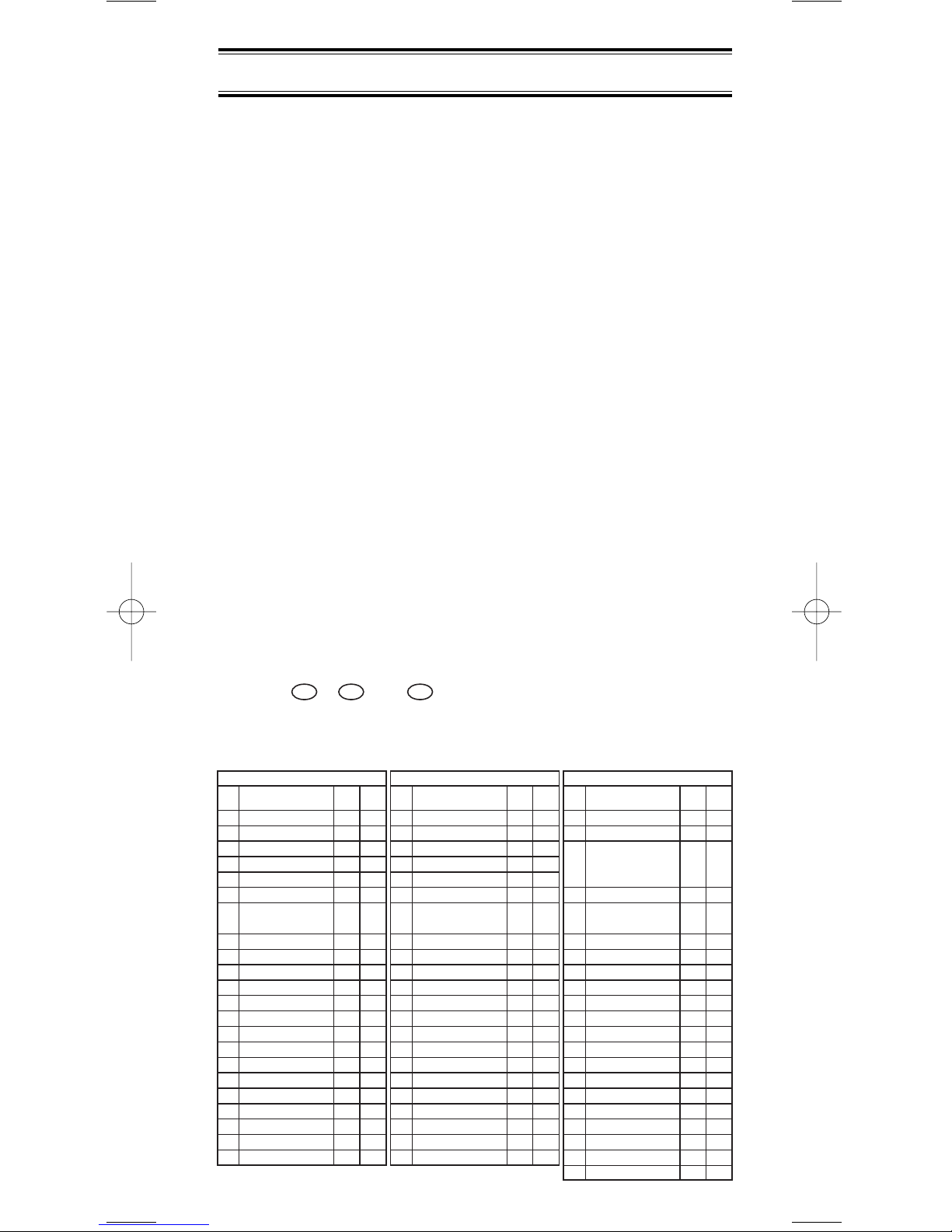
1 25.0000 - 29.9950 FM 5
2 30.0000 - 79.9875 FM 12.5
3 80.0000 - 82.9900 FM 10
4 83.0000 - 87.2875 FM 12.5
5 87.3000 - 87.9500 WFM 50
6 88.0000 - 107.9500 WFM 50
7108.0000 - 136.9875 AM 12.5/
108.0000 - 136.9916 8.33
8 137.0000 - 137.9950 FM 5
9 138.0000 - 157.9875 FM 12.5
10 158.0000 - 160.5900 FM 10
11 160.6000 - 162.5875 FM 12.5
12 162.6000 - 173.9900 FM 10
13 174.0000 - 215.9500 WFM 50
14 216.0000 - 224.9950 FM 5
15 225.0000 - 399.9500 AM 50
16 400.0000 - 405.9875 FM 12.5
17 406.0000 - 439.9875 FM 12.5
18 440.0000 - 465.9937 FM 6.25
19 466.0000 - 469.9900 FM 10
20 470.0000 - 512.0000 FM 12.5
21 806.0000 - 960.0000 FM 12.5
22 1240.0000 - 1300.0000 FM 12.5
1 25.0000 - 29.9950 FM 5
2 30.0000 - 79.9937 FM 6.25
3 80.0000 - 82.9875 FM 12.5
4 83.0000 - 87.2875 FM 12.5
5 87.3000 - 87.9500 WFM 50
6 88.0000 - 107.9500 WFM 50
7108.0000 - 136.9875 AM 12.5/
108.0000 - 136.9916 8.33
8 137.0000 - 137.9950 FM 5
9 138.0000 - 157.9875 FM 12.5
10 158.0000 - 160.5875 FM 12.5
11 160.6000 - 162.5875 FM 12.5
12 162.6000 - 173.9875 FM 12.5
13 174.0000 - 215.9500 WFM 50
14 216.0000 - 224.9950 FM 5
15 225.0000 - 399.9500 AM 50
16 400.0000 - 405.9875 FM 12.5
17 406.0000 - 439.9937 FM 6.25
18 440.0000 - 465.9937 FM 6.25
19 466.0000 - 469.9937 FM 6.25
20 470.0000 - 512.0000 FM 6.25
21 806.0000 - 960.0000 FM 12.5
22 1240.0000 - 1300.0000 FM 12.5
1 25.0000 - 49.9950 FM 5
2 50.0000 - 84.0125 FM 12.5
20 with
3 84.0150 - 87.2950 FM 15kHz
Offset
4 87.3000 - 107.9500 WFM 50
5108.0000 - 136.9875 AM 12.5/
108.0000 - 136.9916 8.33
6 137.0000 - 143.9875 FM 12.5
7 144.0000 - 145.9875 FM 12.5
8 146.0000 - 155.9900 FM 10
9 156.0000 - 157.4250 FM 12.5
10 157.4300 - 160.5900 FM 10
11 160.6000 - 162.0250 FM 12.5
12 162.0300 - 173.9900 FM 10
13 174.0000 - 215.9500 WFM 50
14 216.0000 - 224.9950 FM 5
15 225.0000 - 399.9500 AM 50
16 400.0000 - 440.0000 FM 12.5
17 440.0062 - 450.0000 FM 6.25
18 450.0100 - 469.9900 FM 10
19 470.0000 - 512.0000 FM 12.5
20 806.0000 - 960.0000 FM 12.5
21 1240.0000 - 1300.0000 FM 12.5
No. Range (MHz) Mode Step
(kHz)
Band Plan 1
No. Range (MHz) Mode Step
(kHz)
Band Plan 2
No. Range (MHz) Mode Step
(kHz)
Band Plan 3
1
Introduction
The UBC3300XLT is a state-of-the-art radio with TrunkTracker
III and automatic scanning capabilities. It can store
frequencies such as police, fire/emergency, marine, railroad,
air, amateur, and other communications into 10 banks of 100
channels for a total of 1000 channels.
Use your new scanner to monitor:
•
Police and Fire Departments (including rescue and paramedics)
Trunked for:
Motorola
Type I
Type II
Type I,II (Hybrid)
EDACS
Wide band
Narrow band
Scat
LTR
• Business/Industrial Radio
• Utilities
• Marine and Amateur (ham radio) Bands
• Air Band
• And much more...
The chart below identifies the scanner band numbers, the
frequency range, the modulation mode and the default step
size settings.
To change the Band Plan, press and hold the Band Plan
number , , or while turning ON the scanner.
Note: This scanner remembers the last Band Plan selected
in each mode.
3
2
1
UBC3300XLT OM 5/14/04 3:28 PM Page 1
2
Front View
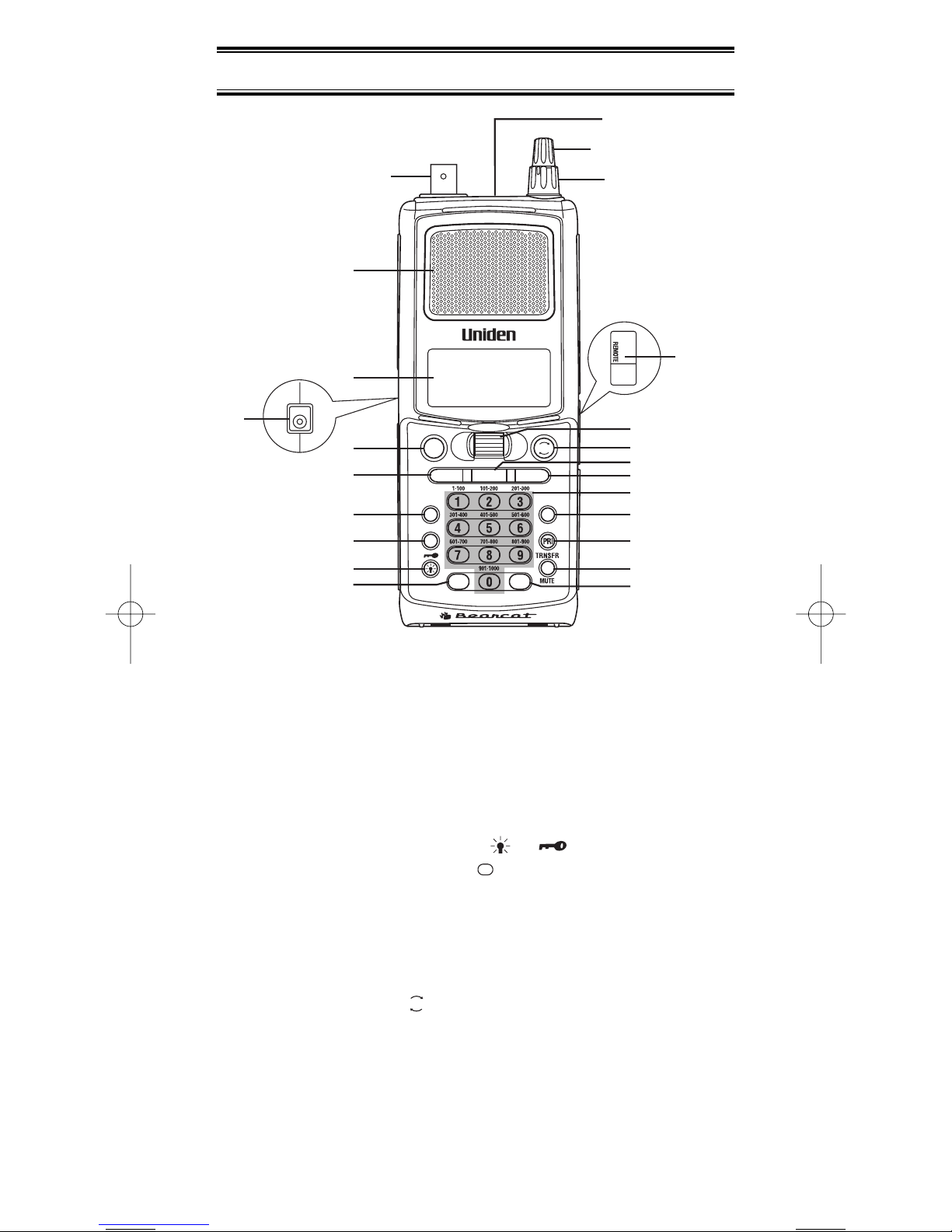
1. Antenna Connector
2. Speaker
3. Display
4. DC Power Jack
5. Hold/Manual/Channel/Frequency Key (HOLD/MAN)
6. Scan Key (SCAN)
7. Menu/Back Key (MENU/BACK)
8. Lockout Key (L/O)
9. Light/Keypad Lock Key (/ )
10. Decimal/Reverse Key ( )
11. Earphone Jack
12. Volume/ON/OFF Control
13. Squelch Control
14. Remote Jack
15. VFO Control
16. Resume Key ( )
17. AIR/STEP Key
18. Search Key (SEARCH)
19. Numeric Keypad
20. Trunk Key (TRUNK)
21. Priority Key (PRI)
22. Transfer/Mute Key (TRNSFR/MUTE)
23. Enter/Select Key (E)
RSM
.
2
1
3
4
5
6
7
8
9
10 22
23
21
20
19
18
17
16
15
14
13
12
11
SEARCH
SCAN
UBC3300XLT
AIR/STEP
CH/
FRQ
MENU/BACK
L/O
.
SELECT
REVERSE
TRUNK
RSM
E
HOLD/
MAN
UBC3300XLT OM 5/14/04 3:29 PM Page 2
Icon Display
Uniden®and Bearcat®are registered trademarks of Uniden
America Corporation.
TrunkTracker is a proprietary trademark of Uniden America
Corporation.
3
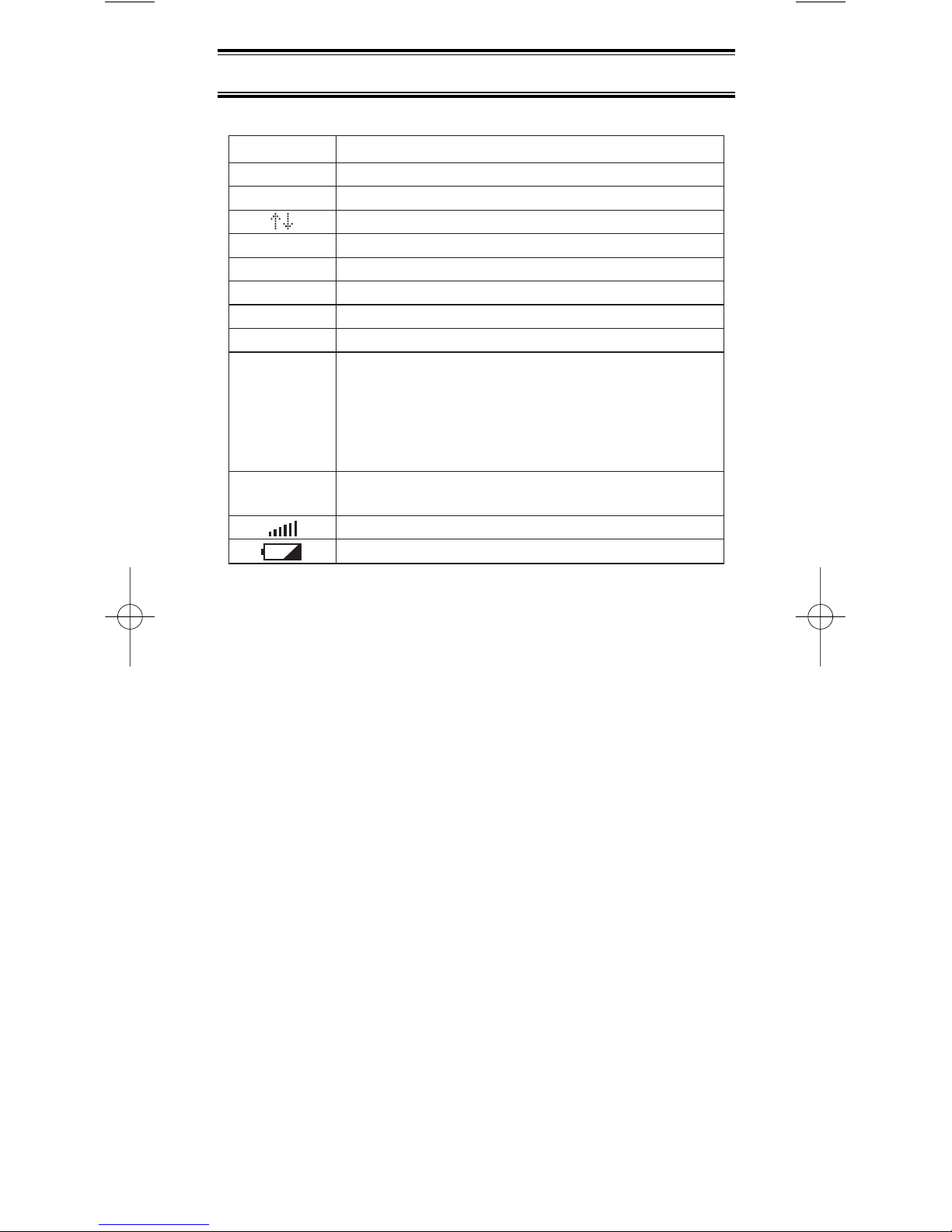
DESCRIPTION
Priority Channel Indicator
Lock Out Mode Indicator
Scan/Search Direction Indicator
Chain Search Mode Indicator
Air Service Search Mode Indicator
Scan Mode Indicator
ID Scan Mode Indicator
ID Search Mode Indicator
Channel Type
Conventional Type
Trunk Type
Morola Tracking Type
LTR Tracking Type
EDACS Tracking Type
Receiving Mode Indicators
Signal Meter
Battery Indicator
ICON
P
L/O
SRCH
SRVC
SCAN
ID SCAN
ID SEARCH
C
M
L
E
AM,FM
WFM,NFM
UBC3300XLT OM 5/14/04 3:29 PM Page 3
4
321 33 2
2
311
3
E
2 2
3
91
1
31
1
1
341
HOLD/
MAN HOLD/
MAN
5
155 .
4
21
1
ID MEMORY
select
3
MENU/
BACK
MENU/
BACK
MENU/
BACK
MENU/
BACK
MENU/
BACK
MENU/
BACK
MENU/
BACK
MENU/
BACK
E
E
E
SCAN
E
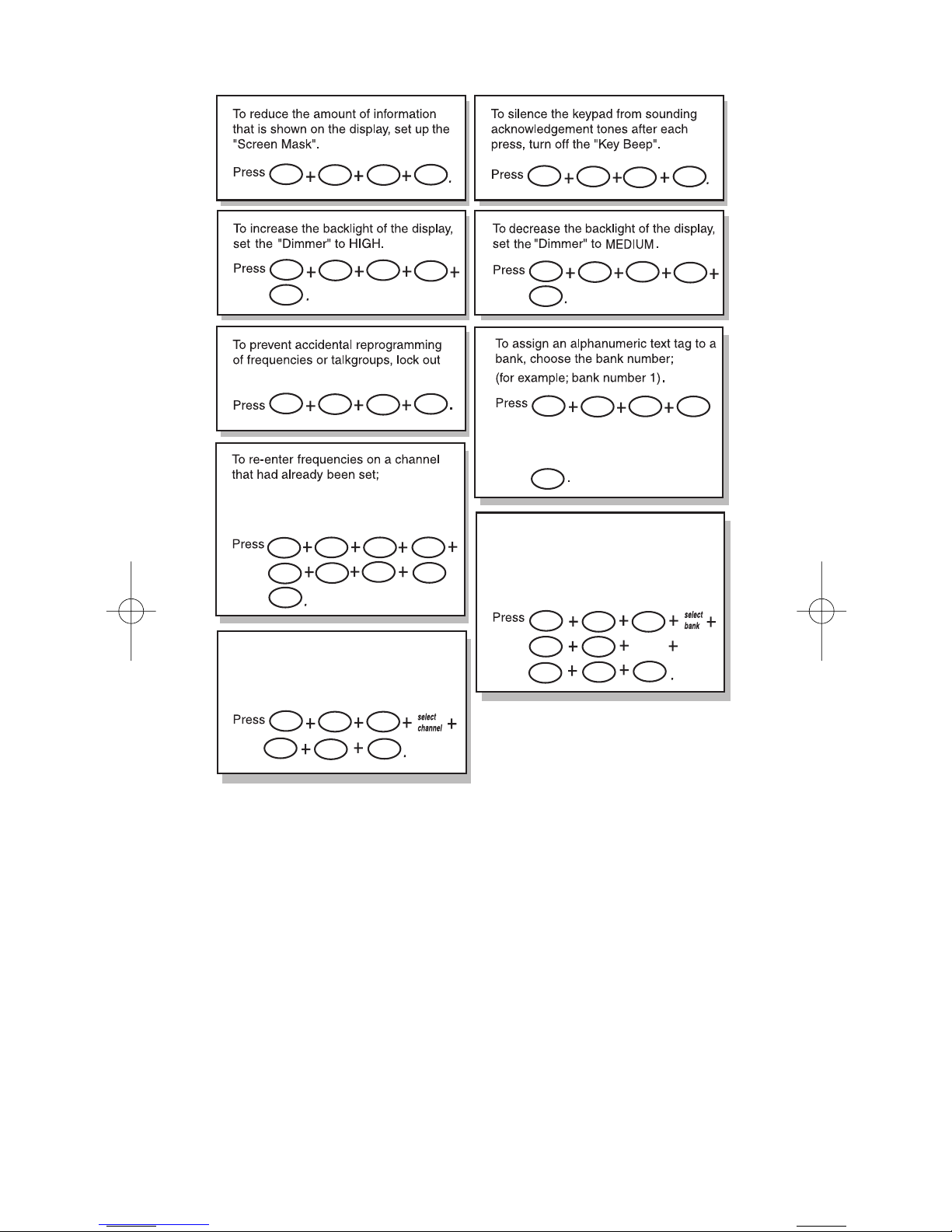
the neat entry Programming.
To receive an alert for activity on
specific IDs while trunk tracking,
turn on the "Beep Alert" for that
ID.
(for example; replace the frequency
on channel 5 to 155.000)
To receive an alert for activity on
a specific channel, turn on the
"Beep Alert" for that channel.
Rotate the VFO control to enter the text
and using RSM or HOLD/MAN to move
the cursor. After the text is entered,
press
UBC3300XLT SHORTCUTS
UBC3300XLT OM 5/14/04 3:29 PM Page 4
5
1 2
1
12
E
E
2
12
2
21
1
2
1 1
21
1
5
2
6
SEARCH
select
bank
select
range select
range
E
E
1
E
E
MENU/
BACK
MENU/
BACK
MENU/
BACK
MENU/
BACK
MENU/
BACK
MENU/
BACK
E
4
E
E
E
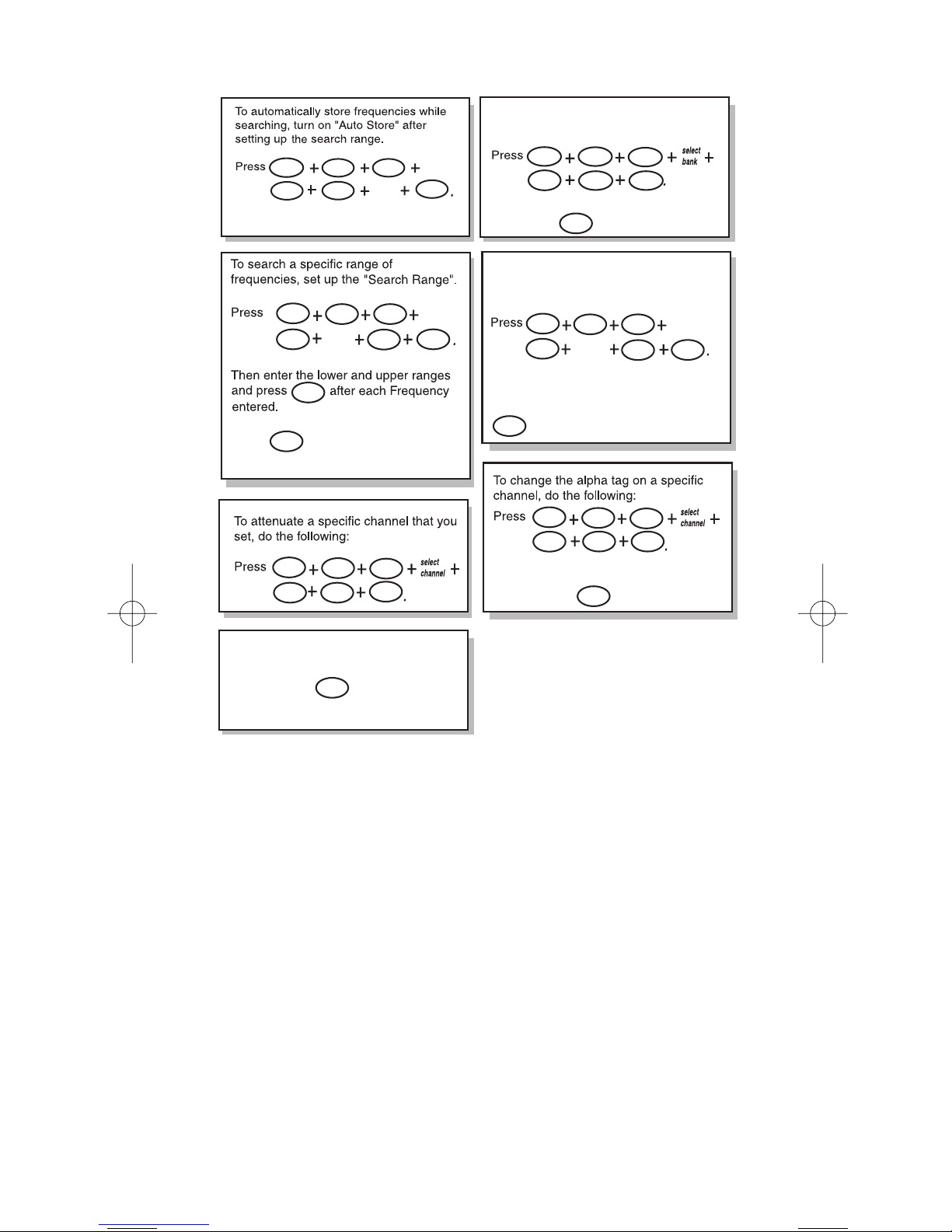
To set up a system for trunk tracking,
select a bank, then enter the trunk type.
Then enter the trunk type you want to
track. Press .
To silence the scanner's audio output,
set the scanner to "Mute On".
Press and hold .
Rotate the VFO control to enter the tag and
use RSM or HOLD/MAN to move the cursor
and then press .
MUTE
SEARCH
To begin searching between the Range
press .
To change the alpha tag on the specific
search range of frequencies that you set,
do the following:
Rotate the VFO control to enter the tag and
use RSM or HOLD/MAN to move the
cursor forward or back and then press
.
UBC3300XLT SHORTCUTS
UBC3300XLT OM 5/14/04 3:29 PM Page 5

6
Important Notice
• The installation, possession, or use of this scanning radio in
a motor vehicle may be prohibited, regulated, or require a
permit in certain states, cities, and/or local jurisdictions.
Your local law enforcement officials should be able to
provide you with information regarding the laws in your
community.
• Changes or modifications to this product are strictly
prohibited, or operation of this product in any way other
than as detailed by this Owner's manual. Could void your
authority to operate this product.
• The screen displays used in this manual are
representations of what might appear when you use your
scanner.
UBC3300XLT OM 5/14/04 3:29 PM Page 6
Indice
Altri manuali Uniden Scanner

Uniden
Uniden BC355C Manuale utente

Uniden
Uniden UBC800XLT Manuale utente

Uniden
Uniden BC244CLT Manuale utente

Uniden
Uniden SC200 Manuale utente

Uniden
Uniden BC60XLT-1 Manuale utente

Uniden
Uniden BC72XLT Guida utente

Uniden
Uniden BC780XLT Manuale utente

Uniden
Uniden UBCD396T Manuale utente

Uniden
Uniden UBC72XLT Manuale utente

Uniden
Uniden BC 245XLT Trunk Tracker II Manuale utente

Uniden
Uniden BCT7 Manuale utente

Uniden
Uniden BCT8 Manuale utente

Uniden
Uniden UBCT-9 Manuale utente

Uniden
Uniden UBC92XLT Manuale utente

Uniden
Uniden SC180 Manuale utente

Uniden
Uniden BC 80XLT Manuale utente

Uniden
Uniden BC246T Manuale utente

Uniden
Uniden BC860XLT Manuale utente

Uniden
Uniden BC 350C Manuale utente

Uniden
Uniden BC246T Manuale utente


