UniTraQ UD-731R Manuale utente

USB Dongle Series Model:UD-731R
UniTraQ International Corp. RoHS compliance.
2010,08, Version 1.0 1
User Manual
USB Dongle Series Model:UD-731R
UniTraQ International Corp. All right reserved, © 2010
2F., No.136, Ziqiang S. Rd., Zhubei City, Hsinchu County 30264, Taiwan (R.O.C.)
TEL:886-3-6578491 FAX:886-3-6578492
MADE IN TAIWAN

USB Dongle Series Model:UD-731R
UniTraQ International Corp. RoHS compliance.
2010,08, Version 1.0 2
Contents
1. Introduction....................................................................................................................... 3
2. Package Contents.............................................................................................................3
3. System Requirements....................................................................................................... 3
4. Features............................................................................................................................ 3
5. Specifications.................................................................................................................... 4
5.1 Electronic Characteristics ........................................................................................... 4
5.2 Physical Characteristics.............................................................................................. 5
6. Getting Started.................................................................................................................. 5
6.1 LED Status........................................................................................................... 5
7. Software Installation.......................................................................................................... 6
7.1 Overview.............................................................................................................. 6
7.2 Install USB Driver................................................................................................. 6
7.3 Install GPSView ..................................................................................................11
7.3.1 Install GPSView onto Windows 2000/XP or Vista .................................11
7.3.2 Install GPSView onto Pocket PC.......................................................... 14
8. Application Software Introduction................................................................................... 16
9. Trouble Shooting............................................................................................................. 18
10. APPROVED NMEA MESSAGE.................................................................................... 18
10.1 GGA – GLOBAL POSITIONING SYSTEM FIX DATA .......................................19
10.2 GLL - LATITUDE AND LONGITUDE, WITH TIME OF POSITION FIX AND
STATUS .......................................................................................................................... 20
10.3 GSA - GPS DOPAND ACTIVE SATELLITES...................................................... 21
10.4 GSV - GPS SATELLITE IN VIEW........................................................................ 22
10.5 RMC - RECOMMANDED MINIMUM SPECIFIC GPS/TRANSIT DATA................. 23
10.6 VTG - COURSE OVER GROUND AND GROUND SPEED................................ 25
10.7 ZDA -TIME AND DATA......................................................................................... 26

USB Dongle Series Model:UD-731R
UniTraQ International Corp. RoHS compliance.
2010,08, Version 1.0 3
1. Introduction
The UD-731R is a GPS USB Dongle and it is optimized for good performance and low cost.
Its 44 parallel channels and Venus 5 search bins provide short start-up time and fast signal
acquisition. Having fast time-to-first-fix and high sensitivity, the UD-731R offers good
navigation performance even in urban canyons.
It is compact and easily used with your laptop or mini notebook.
2. Package Contents
UD-731R ………….. ………..x 1
CD-ROM ……………………..x 1
USB EXTENDED CABLE…...x1
3. System Requirements
The UD-731R requires the minimum to run on a laptop:
Operating System: Windows 2000 / XP/Vista
CPU: 500 MHz, Pentium III
System Memory: 128MB RAM
Hard Disk: 50MB free space
4. Features
44 channel to acquire and track satellites simultaneously
Industry-leading TTFF speed
Signal detection better than -158 dBm
SBAS (WAAS/EGNOS) capable
Cold start < 45seconds
Hot start < 1second
USB Interface
Accuracy 5m CEP
Easy-plug-in Notebook
RoHS compliance

USB Dongle Series Model:UD-731R
UniTraQ International Corp. RoHS compliance.
2010,08, Version 1.0 4
5. Specifications
5.1 Electronic Characteristics
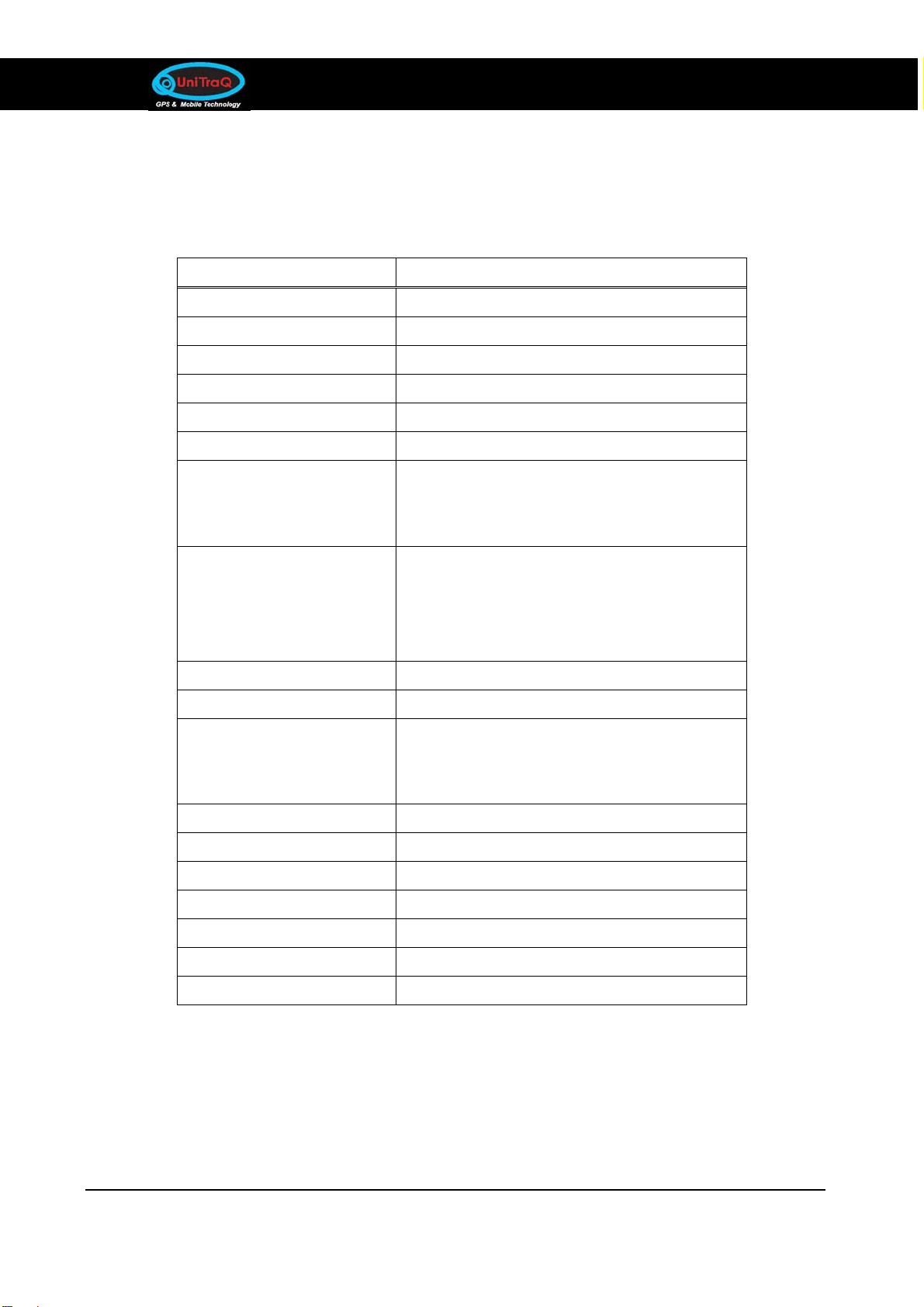
Parameter Specification
Receiver Type 44 channels
Re-acquisition sensitivity -155dBm
Tracking sensitivity -158dBm
Cold start sensitivity -135dBm
Receiver frequency 1575.42MHz
Code C/A code
Accuracy
(1) Position
(2) Velocity
5m CEP
0.1m/sec
Startup Time
hot start
warm start
cold start
< 1 sec
< 35 sec
< 45 sec
Signal Reacquisition <1s
Update Rate 1Hz
Operational Limits
(1) Altitude
(2) velocity
< 18,000m
< 500m/s
Dynamics 4G (39.2m/sec2)
Datum WGS-84
Protocol NMEA-0183 V3.01
Serial Interface USB interface
Input Voltage 5V ±5%
Power Consumption 180mW
Connector USB B-type 4P male

USB Dongle Series Model:UD-731R
UniTraQ International Corp. RoHS compliance.
2010,08, Version 1.0 5
5.2 Physical Characteristics
Parameter Specification
Physical dimension 78.62mm X 24.83mm X 11.15mm
Weight 22+-10%g
6. Getting Started
There are only a few simple steps that you need to follow before using your UD-731R:
Install the USB driver onto your laptop using the included CD-ROM .
Plug the GPS receiver into your laptop’s USB port.
NOTE: From within your mapping or navigation software (including the supplied GPS
Information utility), you will need to manually configure the COM port that was
assigned to the UD-731 GPS receiver so that proper communication between the
GPS receiver and a mapping program can occur. Most software requires that you
manually configure the COM port setting for any GPS device being used.
1. You must change the default baud rate setting of your mapping software‘s Baud
Rate to 4800, if this is not set then the GPS data cannot be received.
2. Set Baud Rate 4800, Data Bit: 8, Parity: None, Stop Bit: 1, Flow Control: None
6.1 LED Status
The LED flash status:
1. 1 second on/ 1 second off : GPS tracked
2. 1 second on/ 2 seconds off : while tracking

USB Dongle Series Model:UD-731R
UniTraQ International Corp. RoHS compliance.
2010,08, Version 1.0 6
7. Software Installation
7.1 Overview
USB Driver is necessary software which allows you to operate UD-731R on your
computer properly once the device is connected with the computer. USB Driver is different
depending on your operating system you connect to. Therefore, when you connect
UD-731R with your computer, you need to install an appropriate driver for the UD-731R
beforehand. Once you installed the driver properly, you do not need to install again from
the next time.
GPSView is multipurpose GPS utility. Please note that GPSView uses specific NMEA
sentences to display data graphically. For more information on NMEA, please see the
appendix 1. GPSView is a general purpose utility for monitoring the output of a GPS
receiver. Using the NMEA data from the GPS receiver, GPSView will display various
statuses for evaluating GPS which including latitude, longitude, altitude, speed, azimuth,
fix mode and TTFF time. And also can be used to upgrade UniTraQ flash version GPS
receiver.
7.2 Install USB Driver
You need to prepare a PC to install USB driver. The USB driver category depending on
your operating system and then please follow the procedure illustrated below to install
USB driver. Please note this procedure is only for windows XP.
A. Insert the CD into your CD-ROM disk. The installation program should automatically run. If,
the installation program does not initiate, double-click on GPS-Installation.EXE in the root
folder on the CD-ROM. When the main menu appears on the screen, just click on
USB-Driver for XP. If your operating system is vista, please click on USB-Driver for vista.
The installation will begin, and then the install wizard will navigate you to finish installation.

USB Dongle Series Model:UD-731R
UniTraQ International Corp. RoHS compliance.
2010,08, Version 1.0 7
B. Click on Next on the installation welcome dialogue to continue.

USB Dongle Series Model:UD-731R
UniTraQ International Corp. RoHS compliance.
2010,08, Version 1.0 8
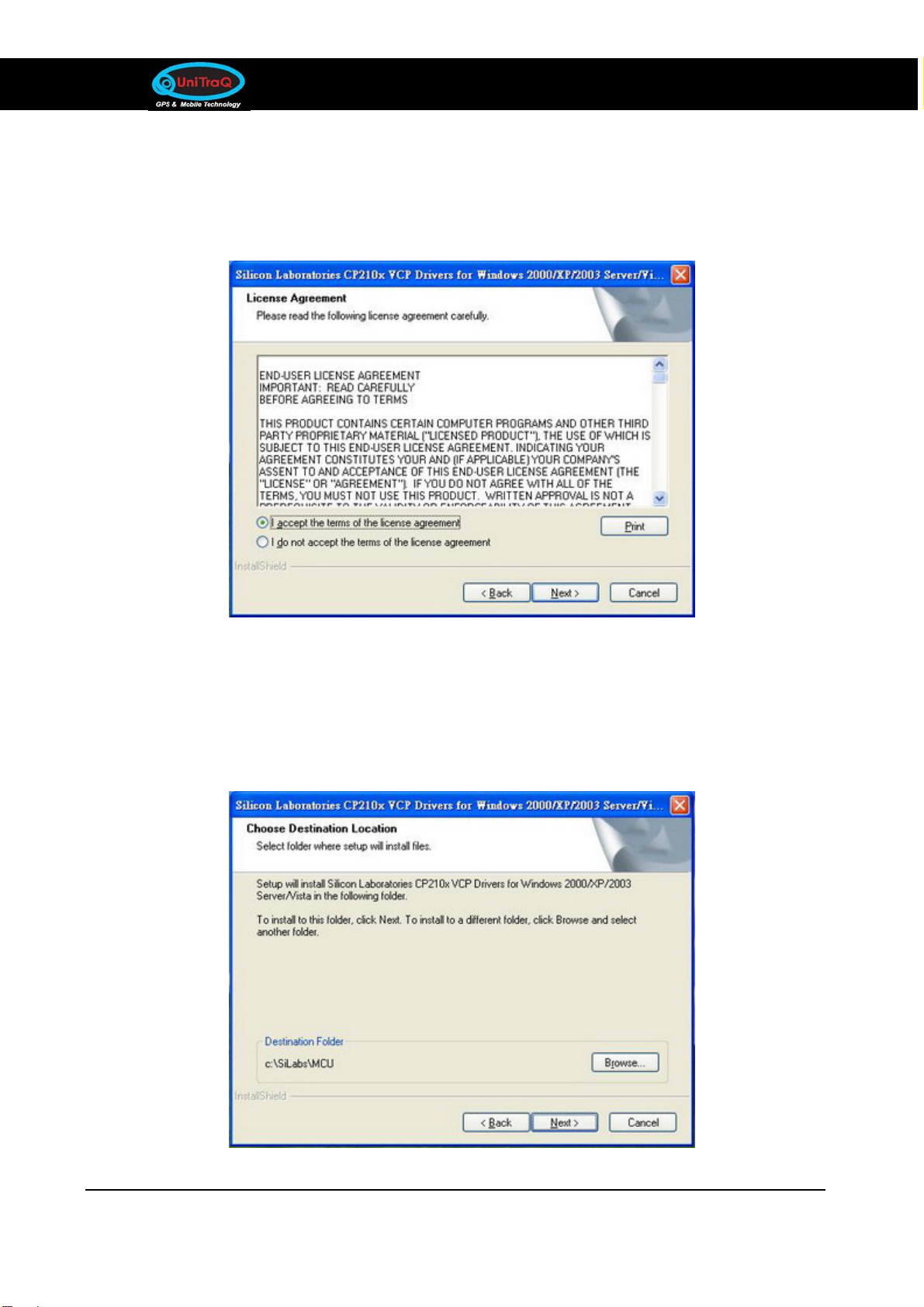
C. Review the license agreement information, and select I accept to accept the licensing
terms, and then click on Next to continue. You may click on Back to go to the previous step,
or Cancel to quit.
D. At this point the Installation allows you to change destination folder of CP210X VCP Drive
for XP, if you have a specific reason for doing so. Click on Next to continue. If you want to
install to a different folder, click on Browse. You may click on Back to go to the previous
step, and click on Cancel to quit.

USB Dongle Series Model:UD-731R
UniTraQ International Corp. RoHS compliance.
2010,08, Version 1.0 9
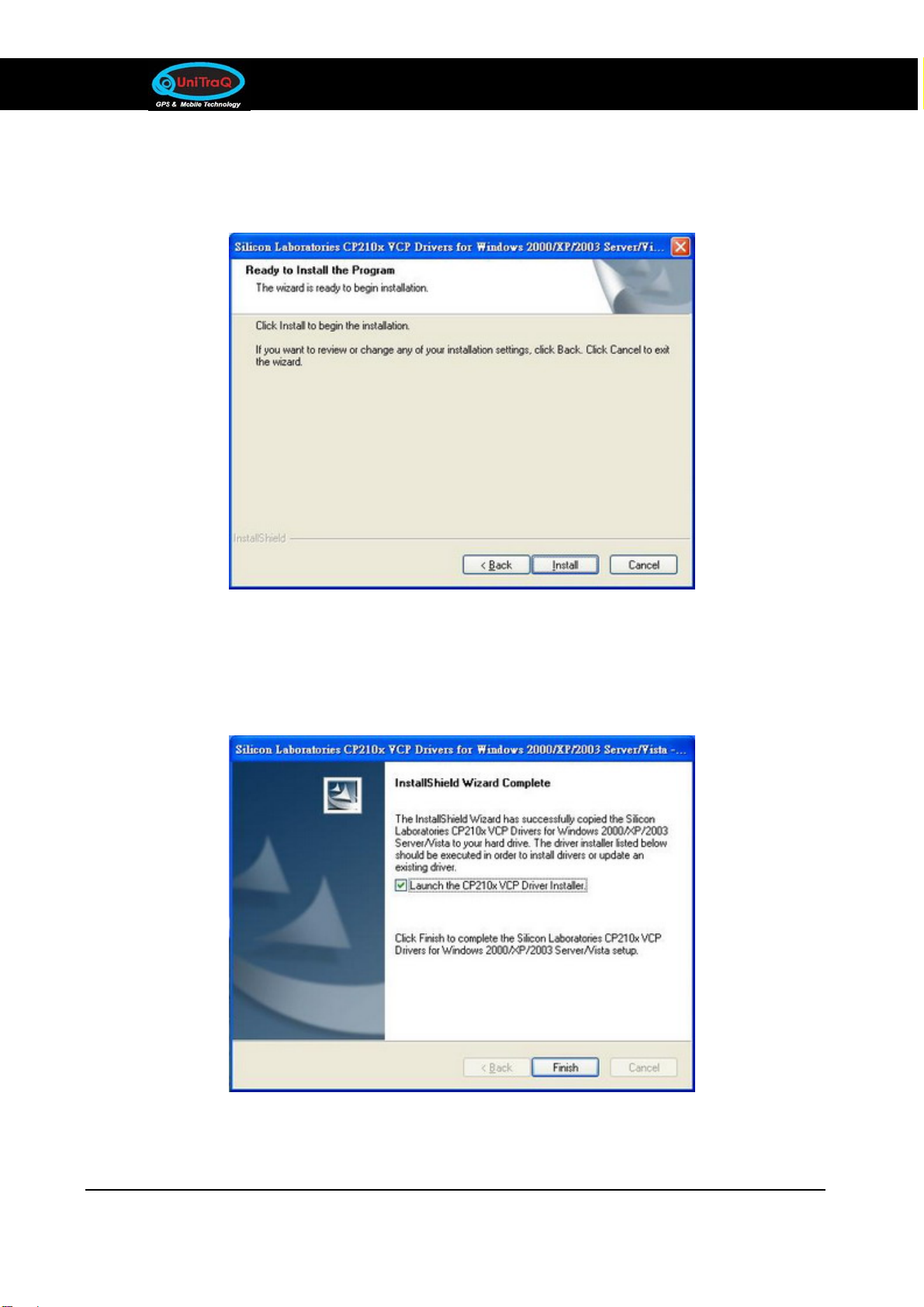
E. On the next dialogue, click on Install to start installation CP210X VCP drive. You may click
on Back to go to the previous step, and click on Cancel to quit.
F. Wait for a few seconds while installation is copying files to your computer. Select Launch
the CP210X VCP Driver installer and then click on Finish to complete the laboratories
CP210X VCP driver installation.

USB Dongle Series Model:UD-731R
UniTraQ International Corp. RoHS compliance.
2010,08, Version 1.0 10
G. On the next dialogue, click on Install to start installation CP210X USB to UART bridge
driver. If you want to install to a different folder, click on Change install location, and click
on Cancel to quit.
H. Wait for a few seconds while installation is copying files to your computer. Click on OK to
complete the laboratories USB to UART bridge driver installation.
I. Click on Next on the installation welcome dialogue to continue.
Indice
Manuali Hardware per computer popolari di altre marche

EMC2
EMC2 VNX Series Manuale del proprietario

Panasonic
Panasonic DV0PM20105 Manuale utente

Mitsubishi Electric
Mitsubishi Electric Q81BD-J61BT11 Manuale utente

Gigabyte
Gigabyte B660M DS3H AX DDR4 Manuale utente

Raidon
Raidon iT2300 Manuale utente

National Instruments
National Instruments PXI-8186 Manuale utente