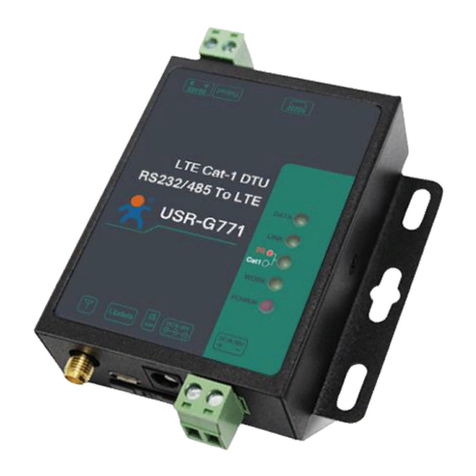
USR IOT USR-G786-G Manuale utente

USR-G786-G User Manual Technical Support: h.usriot.com
Jinan USR IOT Technology Limited www.usriot.com
2
USR-G786-G User Manual................................................................................................................................................. 1
1. Introduction..................................................................................................................................................................... 5
1.1. Overview............................................................................................................................................................... 5
1.2. Features.................................................................................................................................................................6
2. Get Started.......................................................................................................................................................................7
2.1. Specification......................................................................................................................................................... 7
2.2. Hardware...............................................................................................................................................................8
2.2.1. Dimensions..................................................................................................................................................9
2.2.2. Interface.................................................................................................................................................... 10
2.2.3. Indicators...................................................................................................................................................10
2.3. Connecting Hardware....................................................................................................................................... 11
2.3.1. Hardware Preparation...............................................................................................................................11
2.3.2. Installing SIM card and antenna................................................................................................................12
2.3.3. Serial Connecting...................................................................................................................................... 12
2.3.4. Power Supply.............................................................................................................................................12
3. Utility Configuration.....................................................................................................................................................13
3.1. Download the Utility......................................................................................................................................... 13
3.2. Starting the Configuration Utility....................................................................................................................13
4. Serial Port.......................................................................................................................................................................15
4.1. Basic Parameters................................................................................................................................................15
4.2. Frame forming mechanism................................................................................................................................16
4.2.1. Time Trigger...............................................................................................................................................16
4.2.2. Length trigger............................................................................................................................................ 16
4.2.3. Network Data Output Port........................................................................................................................17
5. Selecting an Operating Mode.................................................................................................................................... 17
5.1. Net Transparent Mode......................................................................................................................................17
5.1.1. TCP Client Mode........................................................................................................................................18
5.1.2. TCP Server Mode.......................................................................................................................................21
5.1.3. UDP Client Mode.......................................................................................................................................22
5.2. HTTPD Client Mode...........................................................................................................................................23
5.3. SMS Mode.......................................................................................................................................................... 26
6. General Function...........................................................................................................................................................29
6.1. Identity Package................................................................................................................................................ 29
6.2. Heartbeat Package............................................................................................................................................ 32
6.3. Base Station Position.........................................................................................................................................34
6.4. Modbus...............................................................................................................................................................35
6.5. FTP Upgrade.......................................................................................................................................................37
6.6. Restore to Factory Default Settings................................................................................................................ 38
6.7. Upgrade Firmware.............................................................................................................................................38
6.7.1. Upgrade by Serial Port.............................................................................................................................. 38
6.7.2. Remote Upgrade....................................................................................................................................... 42
7. AT Command Set.......................................................................................................................................................... 42
7.1. AT Command Examples....................................................................................................................................42

USR-G786-G User Manual Technical Support: h.usriot.com
Jinan USR IOT Technology Limited www.usriot.com
3
7.1.1. Serial AT Command................................................................................................................................... 43
7.1.2. Network AT Command.............................................................................................................................. 45
7.1.3. SMS AT Command..................................................................................................................................... 46
7.1.4. Command Format..................................................................................................................................... 46
7.2. AT Command Set...............................................................................................................................................48
7.2.1. AT............................................................................................................................................................... 50
7.2.2. AT+H.......................................................................................................................................................... 50
7.2.3. AT+Z........................................................................................................................................................... 50
7.2.4. AT+E........................................................................................................................................................... 51
7.2.5. AT+ENTM................................................................................................................................................... 51
7.2.6. AT+WKMOD...............................................................................................................................................51
7.2.7. AT+CMDPW............................................................................................................................................... 52
7.2.8. AT+STMSG................................................................................................................................................. 52
7.2.9. AT+RSTIM...................................................................................................................................................52
7.2.10. AT+CSQ.................................................................................................................................................... 52
7.2.11. AT+SYSINFO............................................................................................................................................. 53
7.2.12. AT+UCPIN.................................................................................................................................................54
7.2.13. AT+RELD...................................................................................................................................................54
7.2.14. AT+CLEAR.................................................................................................................................................55
7.2.15. AT+CFGTF.................................................................................................................................................55
7.2.16. AT+VER.....................................................................................................................................................55
7.2.17. AT+SN...................................................................................................................................................... 55
7.2.18. AT+ICCID.................................................................................................................................................. 55
7.2.19. AT+IMEI................................................................................................................................................... 55
7.2.20. AT+CIP......................................................................................................................................................56
7.2.21. AT+LBS..................................................................................................................................................... 56
7.2.22. AT+CCLK...................................................................................................................................................56
7.2.23. AT+PING...................................................................................................................................................56
7.2.24. AT+UART.................................................................................................................................................. 57
8. Contact Us..................................................................................................................................................................... 57
9. Disclaimer...................................................................................................................................................................... 58
10. Update History............................................................................................................................................................58

USR-G786-G User Manual Technical Support: h.usriot.com
Jinan USR IOT Technology Limited www.usriot.com
5
1. Introduction
1.1. Overview
USR-G786-G is the cellular product launched in 2020, high speed low latency and global band . It has perfect
functions and covers most common application scenarios. It can realize bidirectional data transparent
transmission between serial port and network by simple settings. And it supports HTTPD mode, SMS mode,
customized identity package, heartbeat package, supports 2 sockets, TCP Server, FTP upgrade and remote
self-upgrade.
Please open our official website(www.usriot.com):

USR-G786-G User Manual Technical Support: h.usriot.com
Jinan USR IOT Technology Limited www.usriot.com
6
1.2. Features
Supports global bands.
Supports 2 sockets, TCP Server, TCP Client and UDP Client.
Hardware watchdog.
Each socket supports buffering 5 packets of serial port data, each packet is up to 1000byte .
Supports identity package and heartbeat package.
Supports setting parameters by serial / SMS / network.
Supports Modbus RTU to Modbus TCP.
Supports base station positioning.
Supports multiple work modes: transparent (transmission) mode, HTTPD Client mode and SMS mode.
Supports basic commands.
Supports remote upgrade, keep the firmware up to date.
Supports sending English SMS.

USR-G786-G User Manual Technical Support: h.usriot.com
Jinan USR IOT Technology Limited www.usriot.com
7
2. Get Started
2.1. Specification
Parameter Item Index
Wireless
Parameters
Wireless standard FDD-LTE, TDD-LTE, UMTS, GSM
Standard frequency
range
FDD-LTE Band 2/4/5/12/ 13
Transmitting power
TDD-LTE +23dBm±2dB(Power class 3)
Technical
specifications
FDD-LTE Download 150Mbps, upload 50Mbps
Antenna SMA interface
Hardware
parameters
Data interface RS232:2400bps - 460800bps
RS485:2400bps - 230400bps
Power protection Anti-surge, ESD protection, anti-reverse connection
Serial protection RS485: Anti-surge, ESD protection RS232: ESD protection
RS485 Up and down
resistance
2.2KΩ
Working voltage DC 9V~36V
Working current 48.95mA-54.78mA
Working temperature -35℃ - 75℃
Storage temperature -40℃ - 90℃
Size(mm)111.51*94*25(L*W*H)

USR-G786-G User Manual Technical Support: h.usriot.com
Jinan USR IOT Technology Limited www.usriot.com
8
Software
parameters
Work mode
Transparent mode, HTTPD mode, SMS mode
Setting command
AT+Command
Network protocol
TCP/UDP/DNS/HTTP/FTP
Maximum TCP
connection number
2
User configuration
Serial AT command,Net AT command,SMS AT command
Customer application
software
Support customized application software
Software
function
Domain name
resolution DNS
Support
Modbus protocol
conversion
Support
Simple transmission
Support TCP Client/TCP Server/UDP Client
SMS functions
Support
HTTP transmission
Support
Heartbeat package
Support
Identity package
mechanism
Custom identity package/ICCID /IMEI
FTP upgrade
Support
Remote update
Support
2.2. Hardware

USR-G786-G User Manual Technical Support: h.usriot.com
Jinan USR IOT Technology Limited www.usriot.com
10
2.2.2.Interface
2.2.3.Indicators
There are four indicators on USR-G786-G, PWR,WORK,NET,LINKA.
Indicator
Function
Status
POWER
Power indicator
Always on when power supply
working normally
WORK
System operation indicator.
Flashing after system running
NET
Network status indicator
Always on after registering the
network
LINKA
Socket A indicator
Always on after socket A is
connected
Altri manuali per USR-G786-G
1
Indice
Altri manuali USR IOT Modem

USR IOT
USR IOT USR-G771-E Manuale utente

USR IOT
USR IOT USR-G786-G Manuale utente

USR IOT
USR IOT USR-G771-E Manuale utente

USR IOT
USR IOT USR-G806 Manuale di installazione e funzionamento

USR IOT
USR IOT USR-G760c Manuale utente

USR IOT
USR IOT USR-G781 Manuale utente

USR IOT
USR IOT USR-DR504-E Istruzioni per il montaggio

USR IOT
USR IOT USR-DR502-E Manuale utente

USR IOT
USR IOT USR-G761w Manuale utente

USR IOT
USR IOT USR-GPRS232-730 Manuale utente