
Valve COUNTER STRIKE Manuale utente

Get the strategy guide
primagames.com®
1003 Part No. X09-80647
IF YOU... YOU GET...
KILL AN ENEMY $300
KILL ALL ENEMIES $3000 (HOSTAGE-RESCUE)
$3250 (DEMOLITION)
Counter-terrorist only
CONTACT A HOSTAGE $150
RESCUE A HOSTAGE $1000
RESCUE ALL HOSTAGES $2500
DEFUSE A BOMB $3250
Terrorist only
STOP HOSTAGE RESCUE $2000
DETONATE A BOMB $3500
ONLINE ENABLED
Crouch
Movement
(Click) Buy Menu
Look around
Reload/use
Fire weapon
Cycle weapons
Alternate re
Jump
Cycle grenades
In-Game
Menu
More controls on page 4
Drop weapon

1
1
2
1
Safety Information
About Photosensitive Seizures
A very small percentage of people may experience a seizure when exposed to
certain visual images, including ashing lights or patterns that may appear in
video games. Even people who have no history of seizures or epilepsy may have
an undiagnosed condition that can cause these “photosensitive epileptic seizures”
while watching video games.
These seizures may have a variety of symptoms, including lightheadedness,
altered vision, eye or face twitching, jerking or shaking of arms or legs,
disorientation, confusion, or momentary loss of awareness. Seizures may also
cause loss of consciousness or convulsions that can lead to injury from falling
down or striking nearby objects.
Immediately stop playing and consult a doctor if you experience any of these
symptoms. Parents should watch for or ask their children about the above
symptoms—children and teenagers are more likely than adults to experience
these seizures.
The risk of photosensitive epileptic seizures may be reduced by sitting farther
from the television screen, using a smaller television screen, playing in a well-lit
room, and not playing when you are drowsy or fatigued.
If you or any of your relatives have a history of seizures or epilepsy, consult a
doctor before playing.
Other Important Health and Safety Information The Xbox Instruction Manual
contains important health and safety information that you should read and
understand before using this software.
Avoid Damage to Your Television
Do not use with certain televisions. Some televisions, especially front- or rear-
projection types, can be damaged if any video games, including Xbox games, are
played on them. Static images presented during the normal course of gameplay
may “burn in” to the screen, causing a permanent shadow of the static image to
appear at all times, even when video games are not being played. Similar damage
may occur from static images created when placing a video game on hold or
pause. Consult your television owner’s manual to determine if video games can be
played safely on your set. If you are unable to nd this information in the owner’s
manual, contact your television dealer or the manufacturer to determine if video
games can be played safely on your set.
Table of Contents
Your Mission 2
Lock and Load 2
Training 3
Controls 4
HUD 6
Single Player 8
Battle Operations 8
Rounds 8
Buy Menu 9
Spectator Mode 10
Scenarios 10
Multiplayer Games 12
System Link 12
Xbox
Live
13
Weapons and Gear 20
Warranty, Customer Support 32

1
1
3
3
2
4
4
Your Mission
Welcome.
The global arena is rife with con ict. Underground terrorist
organizations willing to risk their lives for political change
are at war with national and international peacekeeping
organizations in dozens of hot spots around the world.
Choose to defend the innocent as a counter-terrorist or
wreak havoc as a terrorist. Read on to get the knowledge
you need to be effective in the eld.
Get ready to move out. Your team needs you.
Lock and Load
First, identify yourself. Create a player pro le. Once you
create a pro le, you can access the Main Menu.
From the Main Menu, choose Training to learn how to play
Counter-Strike
™. Play a single-player game of
Counter-Strike
with computer-controlled players (bots), or play a multiplayer
game of
Counter-Strike
with your friends over Xbox
Live
™
or System Link. Choose options to adjust your controller
scheme, audio, and online settings. You can also select a
different player pro le or create a new one.
Counter-Strike
automatically signs in to Xbox
Live
with
your last gamertag (account name) at the game’s start.
Turn auto sign-in on or off from the Xbox Dashboard. To use
auto sign-in, your
account must not
have a pass code.
Training
Training familiarizes you with being a terrorist or counter-
terrorist, including tutorials on weapons purchase,
hostage rescue, and bomb placement and defusing. Some
additional tips follow.
Crouch Jump
Press A to jump. While in the air, hold the left trigger
to crouch. This move lets you reach certain ledges not
otherwise accessible.
Weapon Cycling
Pressing Y cycles among your primary and secondary
weapons and knife. If you have purchased grenades, cycle
through them by pressing b.
Alternate Fire
Some weapons have special features, such as a silencer,
scope, or burst- re mode. To trigger these alternate re
functions, press the B button.
Weapon Dropping and Swapping
Killed players drop their weapons. To swap your weapon for
one on the ground, look at the weapon while standing over
it and press X. To drop your current weapon, press b.
Radio Commands
Radio your teammates basic commands, such as orders
to back you up or hold position, using the D-pad. If you are
playing with bots, they acknowledge your commands and
follow them if they can.
23

3
3
5
4
4
6
6
Controls
Default controls are shown. To modify, select Options from the
Main Menu, select Control Options, and then press Y.
(Left) Report in.
(Right) Taking re.
(Up) Follow me.
(Down) Hold position.
Crouch
Movement
(Click) Buy Menu
(Click+hold) Quiet movement
Current scores
In-Game Menu
Radio commands (Click+hold) Fast look
Look around
Drop weapon
Cycle grenades
Jump
Alternate re
Cycle weapons
Reload/use
Fire weapon
45
5
5
7
7
6
6
8
8
7
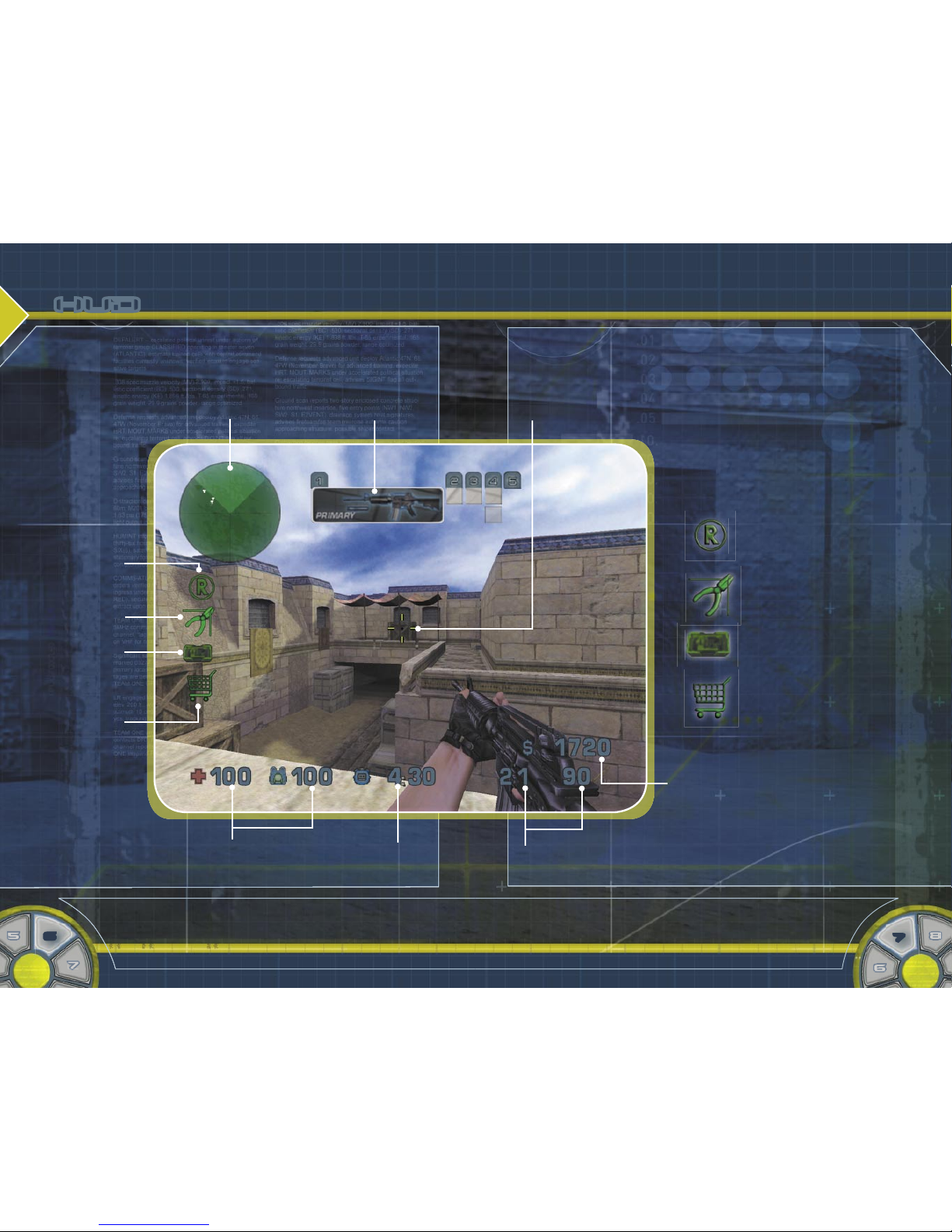
HUD
Your heads-up display (HUD) is your primary means of
keeping abreast of combat.
Radar dots show the positions of teammates
and objectives; T-shapes signify teammates
who are higher or lower than you.
Weapon selection bar
shows the weapon chosen
when you switch weapons.
Reticle represents your point of aim and your
accuracy; the larger the reticle, the larger your
spray of bullets.
Rescue icon appears in a
hostage-rescue zone, where
counter-terrorists bring
hostages for rescue.
Bomb-defuse kit icon appears
when you carry a bomb-defuse
kit.
Bomb icon appears when you
carry the bomb and blinks
when you can plant the bomb.
Shopping basket icon appears
in a buy zone, where you
can purchase weapons and
equipment.
Money buys weapons and
equipment (see page 9).
Ammunition meter shows your current weapon’s
ammo, and the ammo left to reload with.
Time remaining meter
shows time left in the
round.
Health and armor meters track your vitals. Once
your health hits zero, you’re dead. Armor helps
reduce damage to your body in battle.
Rescue icon
Bomb-defuse
kit icon
Bomb icon
Shopping
basket icon
6

7
7
9
9
8
8
10
10
9
Single Player
Play a single-player match to jump right into a battle with
computer-controlled opponents and teammates.
TO START A SINGLE-PLAYER MATCH
1. From the Main Menu, select Single Player.
2. To play a match with preset rules, select Beginner,
Standard, or Professional. Press A to select a map.
–or–
To play a custom match, select Custom, set your
match options, and then press A to select a map.
3. Press A to begin the match.
Battle Operations
When you begin a
Counter-Strike
match, you rst select
whether to join the counter-terrorist or terrorist team. You
can also choose to be automatically assigned to a team or
to watch the game rather than playing (see page 10).
Rounds
A
Counter-Strike
match is made up of timed rounds. The
number of rounds is set by the game host. Each round
represents a single attempt by terrorists and counter-
terrorists to ful ll their objectives. One team usually
emerges from a round with a victory. The team with the
most round victories at the match’s end wins the match.
Terrorists and counter-terrorists start a round at different
insertion points and get freeze time to safely buy weapons
and equipment for the upcoming battle. Once freeze time is
up, players begin combat.
Buy Menu
The Buy Menu appears at each round’s start. From it, you
can buy primary weapons (ri es, heavy, and SMGs), pistols,
and equipment, such as Kevlar armor. Each player starts
with some cash to buy items and earns more by achieving
objectives (see the back cover). To choose an item, move
your left thumbstick to it and press A.
When you select a weapon on the Buy Menu, a chart
shows how that weapon compares to others in repower,
rate of re, accuracy, and reload speed. On this chart,
the rst number listed for Ammo shows how much the
weapon’s ammo clip holds and the second shows how
much ammo you can have in reserve. Under Special, you’ll
nd capabilities used by pressing the alternate re button.
Buy primary weapon ammo by pulling the right trigger
repeatedly, and pistol ammo by pulling the left trigger
repeatedly. To close the Buy Menu, press B. To reopen it,
stand in a buy zone and click the left thumbstick.
Be aware—the game’s host sets a limited time period to
buy gear. You cannot buy items after this time has passed.
8

9
11
11
10
10
12
12
10
11
Spectator Mode
If you are killed, you enter spectator mode, where you
can observe the ght from different players’ perspectives.
Switch which player you watch by pressing B; switch
between rst-person and third-person view by pressing A.
In third-person view, you can move the camera with the
right thumbstick.
Scenarios
In
Counter-Strike
, you participate in two types of scenarios:
hostage-rescue and demolition.
Hostage-Rescue
In hostage-rescue scenarios, the terrorist team has taken
a group of civilians hostage.
§ Counter-terrorists succeed by bringing all living hostages
to the rescue zone or eliminating all of the terrorists.
§ Terrorists succeed by preventing the hostage rescue or
eliminating all of the counter-terrorists.
As a counter-terrorist, you see hostages on your radar as
blinking dots. Order hostages to follow you by approaching
them and pressing X. Lead hostages to the hostage-
rescue zone, which is marked and shows a rescue icon on
your HUD when you reach it.
Be aware—hostages are worth money. Counter-terrorists
gain money for contacting and extracting hostages, and
both sides lose money for injuring or
killing hostages.
Demolition
In demolition scenarios,
the terrorist team must
in ltrate a secure location
with a high-powered bomb
and detonate it.
§ Counter-terrorists succeed by defusing the bomb once
it has been planted, preventing the terrorists from
detonating the bomb until time runs out, or eliminating
all of the terrorists before the bomb is planted.
§ Terrorists succeed by planting the bomb at a bomb site
and preventing the counter-terrorists from defusing
it before it explodes, or eliminating all of the counter-
terrorists.
Each round, one of the terrorist team is randomly chosen
to carry the bomb. That person has a bomb icon on the
HUD. Teammates see the bomb as a red dot on their
radar, which blinks if the bomb is dropped. If you are at a
bomb site with the bomb, plant the bomb by pressing and
holding X. The bomb detonates after a delay. Evacuate
before it does—the blast radius is large.
As a counter-terrorist, you must defuse the bomb if you
nd it has been planted. Do this by pressing and holding X
while you are near and looking down at the bomb. A bomb-
defuse kit speeds the process (see page 30).

11
11
13
13
12
12
14
14
12
13
Multiplayer Games
If you’re ready to challenge your friends,
Counter-Strike
provides two ways to get the battle started: System Link
and Xbox
Live
.
System Link
With System Link play, you can connect two Xbox®
consoles that are physically linked with an Xbox System
Link cable, or up to 16 Xbox consoles using an Ethernet
hub and standard Ethernet cables plugged into a 10Base-T
or 100Base-TX network. For more information on how to
do this, see your Xbox Instruction Manual.
TO CREATE AND HOST A SYSTEM LINK MATCH
1. From the Main Menu, select System Link, and then
select Host a Match.
2. Select your match options, including whether you want
to host a dedicated server, and press A.
3. Select the map you want to play from the list, and
press A to begin the match.
When hosting either a System Link or Xbox
Live
match,
you can set up a dedicated server. If you do, you can have
up to 16 players in your match. However, if you set up a
dedicated server you cannot join the game as a player on
your own Xbox.
Without a dedicated server, you can have fewer players.
However, you can join the game on your own Xbox.
TO JOIN A SYSTEM LINK MATCH
1. From the Main Menu, select System Link, and then
select Join a Match.
2. From the list, select the match you want to play,
and then press A.
Xbox
Live
Take
Counter-Strike
Beyond the Box
The world is your battle eld with Xbox
Live
—a high-speed
or broadband Internet gaming community where you can
create a permanent gamer identity, set up a Friends List
with other players, see when they’re online, and join or
host
Counter-Strike
matches where you and your friends
can play and talk in real time. You can also check statistics
on your operations to see how you stack up against other
elite players online.
Downloadable
Counter-Strike
Content
If you are an Xbox
Live
subscriber, you can download the
latest content, such as new maps, to your Xbox console.
Connecting
Before you can play
Counter-Strike
online, you need to
connect your Xbox console to a high-speed or broadband
Internet connection and sign up for the Xbox
Live
service.
To determine if Xbox
Live
is available in your region
and for information about connecting to Xbox
Live
, see
www.xbox.com/connect
.

13
13
15
15
14
14
16
16
14
15
Signing In
To get connected, select Xbox
Live
from the Main Menu.
Select or create a new Xbox
Live
account. Once you have
an account selected, press A to enter your account pass
code and reach the Xbox
Live
Menu.
Using Xbox
Live
From the Xbox
Live
Menu, you can join or host matches,
manage your Friends List, download new content,
and track your progress with worldwide leaderboards
(scoreboards). Press B to return to the Main Menu but
remain signed in to receive game invites.
Play on Xbox Live
Find and join a game with Quick Match or OptiMatch™,
or host your own game.
Friends List
Change your Friend settings—for example, remove
a Friend.
Recent Players List
Access a list of players you’ve recently played with, to
leave feedback or add new Friends.
Leaderboards
Find out how you stack up against other
Counter-Strike
players around the globe.
Download Content
Download the latest content updates for
Counter-Strike
.
Sign Out
Sign out of Xbox
Live
and return to the Main Menu.
Playing Quick Match
If you want instant action, Quick Match nds and places
you in a game immediately.
TO USE QUICK MATCH TO JOIN A GAME
• From the Xbox
Live
Menu, select Play on Xbox Live,
and then select Quick Match.
You automatically join the rst available game with an
acceptable connection speed.
Using OptiMatch
If you want to specify search criteria for the type of game
you want to join, use OptiMatch.
TO USE OPTIMATCH TO JOIN A MATCH
1. From the Xbox
Live
Menu, select Play on Xbox Live.
2. Select OptiMatch. The screen shown below appears.
3. Select the options you want the match to have, and
press A. The screen displays the games that most
closely match the options you selected.
4. Select the game you want to join, and press A
to begin the game.
–or–
Press X to search again.
–or–
Press Y to create and
host a match of your own.
For more on hosting on
Xbox
Live
, see page 16.

15
15
17
17
16
16
18
18
16
17
Hosting Your Own Match on Xbox
Live
When you want to play by your own rules, start and host a
match of your own on Xbox
Live.
TO CREATE AND HOST A MATCH ON XBOX
LIVE
1. From the Xbox
Live
Menu, select Play on Xbox Live.
2. Select Host a Match.
3. Select your match options, including whether you want
to host a dedicated server, and press A.
4. Select the map you want to play, and press A.
For more information on hosting a dedicated server,
see page 12.
Keeping Track of Your Friends
Your Friends List can contain up to 100 other gamers who
you have designated as Friends. With the Friends List, you
can check on your Friends, invite them to join your game,
and accept invitations to their games. Each Friend is listed
with a pair of icons, showing their voice and Friend status.
Xbox
Live
Friends List Icons
Voice on Voice muted
Voice through TV
speakers
Friend is online
Friend request sent Friend request
received
Game invitation sent Game invitation
received
Friends can be added either during a game or from
the Recent Players List on the Xbox
Live
Menu. To add
a Friend, send a request. Players who accept your
requests are added to your Friends List, and you are
added to theirs.
TO ADD A FRIEND DURING A MATCH
1. During a multiplayer match, press START.
2. From the In-Game Menu, select Players List.
3. Select the player you want to add to your Friends List,
and press A.
4. Select Send Friend Request to send the request and
return to the In-Game Menu.
TO ADD A FRIEND YOU’VE RECENTLY PLAYED AGAINST
1. From the Xbox
Live
Menu, select Recent Players List.
2. Select the player you want to add to your Friends List,
and press A.
3. Select Send Friend Request to send the request and
return to the Recent Players List.
Indice
Manuali Videogioco popolari di altre marche

Disney
Disney Nintendo DS DGamer Manuale utente

Disney
Disney NTR-CI7E-USA Manuale utente

Microsoft game studios
Microsoft game studios INSIDE PITCH 2003 Manuale utente

Disney
Disney Ultimate Band NTR-CUBE-USA Manuale utente

Microsoft
Microsoft HALO Manuale utente

Bizarre Creations
Bizarre Creations PROJECT GOTHAM-RACING 2 Manuale utente


Microsoft game studios
Microsoft game studios HALO 2 Manuale utente

Activision
Activision TENCHU-RETURN FROM DARKNESS Manuale utente

PlayStation
PlayStation VirtuaTennis 3 061213 Manuale utente

Xavix
Xavix PowerBoxing Manuale utente

Tiger Electronics
Tiger Electronics Paperboy 2 78-508 Manuale utente

Sega
Sega NFL 2K1 Manuale utente