Velodyne HDL- 64E Manuale utente

HDL™-64E
USER’S
MANUAL
High Definition Lidar™Sensor

Caution
i
.www.velodyne.com HDL-64E User’s Manual

Table of Contents
ii
.www.velodyne.com HDL-64E User’s Manual
Introduction . . . . . . . . . . . . . . . . . . . . . . . . . . . . . . . . . . . . . . . . . . . . . . . . . . . . . . .1
Principles of Operation . . . . . . . . . . . . . . . . . . . . . . . . . . . . . . . . . . . . . . . . . . . . . . .2
Installation Overview . . . . . . . . . . . . . . . . . . . . . . . . . . . . . . . . . . . . . . . . . . . . . . . . .3
-Mounting . . . . . . . . . . . . . . . . . . . . . . . . . . . . . . . . . . . . . . . . . . . . . . . . . . . . .3
-Wiring . . . . . . . . . . . . . . . . . . . . . . . . . . . . . . . . . . . . . . . . . . . . . . . . . . . . . . .6
Usage . . . . . . . . . . . . . . . . . . . . . . . . . . . . . . . . . . . . . . . . . . . . . . . . . . . . . . . . . .6
-Output . . . . . . . . . . . . . . . . . . . . . . . . . . . . . . . . . . . . . . . . . . . . . . . . . . . . . . .6
-Correction Angles . . . . . . . . . . . . . . . . . . . . . . . . . . . . . . . . . . . . . . . . . . . . . . . .7
-Controlling the Spin Rate . . . . . . . . . . . . . . . . . . . . . . . . . . . . . . . . . . . . . . . . . . .7
Firmware Update . . . . . . . . . . . . . . . . . . . . . . . . . . . . . . . . . . . . . . . . . . . . . . . . . . .7
Troubleshooting . . . . . . . . . . . . . . . . . . . . . . . . . . . . . . . . . . . . . . . . . . . . . . . . . . . .8
Specifications . . . . . . . . . . . . . . . . . . . . . . . . . . . . . . . . . . . . . . . . . . . . . . . . . . . . .9
Appendix A — Laser Correction Factors and Data Packet Construction/Interpretation . .10
Appendix B — Connector Wiring Diagram . . . . . . . . . . . . . . . . . . . . . . . . . . . . . . . . .12
Appendix C — Angular Resolution . . . . . . . . . . . . . . . . . . . . . . . . . . . . . . . . . . . . . . .13

Introduction
1
.www.velodyne.com HDL-64E User’s Manual
Congratulations on your purchase of a Velodyne HDL-64E High Definition Lidar Sensor. This
product represents a breakthrough in sensing technology by providing exponentially more
information about the surrounding environment than previously possible.
This guide first covers installation and wiring, then addresses output packet construction and
interpretation, and finally discusses the serial interface to the unit and software updates.
This manual is undergoing constant revision and improvement – check
www.velodyne.com/lidar for updates.

2
.www.velodyne.com HDL-64E User’s Manual
The HDL-64E operates on a rather simple premise: instead of a single laser firing through a
rotating mirror, 64 lasers are mounted on upper and lower blocks of 32 lasers each and the
entire unit spins. This design allows for 64 separate lasers to each fire thousands of times per
second, providing exponentially more data points per second and a much richer point cloud than
conventional designs. The unit inherently delivers a 360-degree horizontal field of view (FOV) and
a26.8 degree vertical FOV.
Additionally, state-of-the-art signal processing and waveform analysis are employed to provide
high accuracy, extended distance sensing and intensity data. The HDL-64E is rated to provide
usable returns up to 120 meters.
Figure 1. HDL-64E design overview.
The HDL-64E employs a direct drive motor system — there are no belts or chains in the
drive train.
Housing
(Entire unit spins
at 5-15 Hz)
Laser
Emitters
(Groups of 16)
Laser
Receivers
(Groups of 32)
Motor
Housing
Principles of Operation

3
.www.velodyne.com HDL-64E User’s Manual
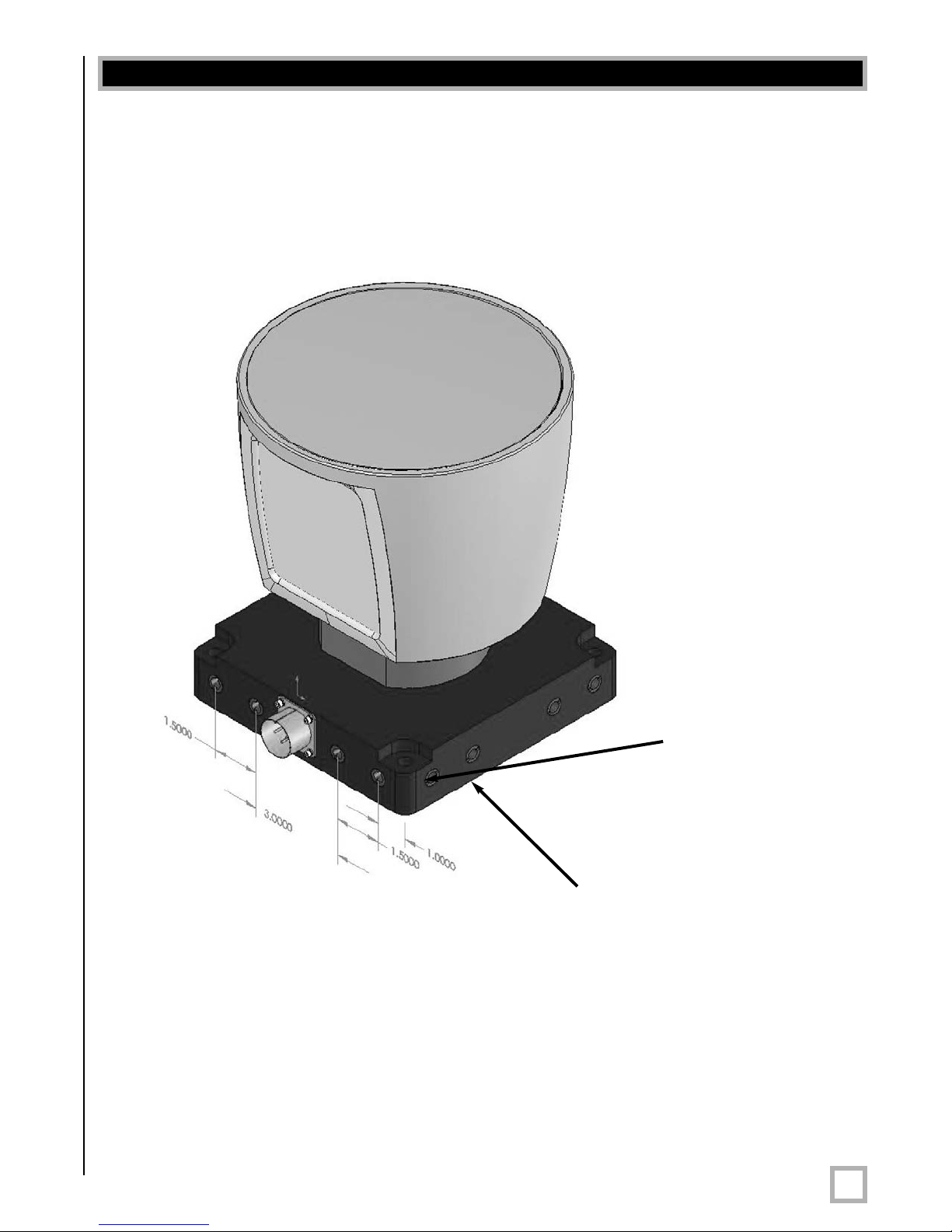
Front/Back Mounting
The HDL-64E base provides two mounting options: side mount and top mount. See Figure 2
for front/back mounting options, Figure 3 for side/side mounting, and Figure 4 for top
mounting instructions.
Figure 2.Front and back HDL mounting illustration.
See Figure2. This figure shows the HDL-64E’s base plate screw locations with threaded inserts
for standard M8 hardware.
Installation Overview
Four M8-1.25 x 12mm
deep mounting points.
(Four per side, for a
total of 16.)
Mounting
Base

4
.www.velodyne.com HDL-64E User’s Manual
Side Mounting
Figure 3. Side/side HDL mounting illustration.
Mounting
Base

5
.www.velodyne.com HDL-64E User’s Manual
Top Mounting
Figure 4. HDL top mounting illustration.
Figure 4 shows the location of four .406” thru holes for top mounting.
For all mounting options, be surethe HDL-64E is mounted securely to withstand vibration and
shock without risk of detachment. The unit need not be shock proofed — it is designed to
withstand standardautomotive G-forces.
The HDL-64E is weatherproofed to withstand wind, rain, and other adverse weather conditions.
The spinning nature of the HDL-64E helps the unit shed excess water from the front window
that could hamper performance. However, it is advisable to avoid exposing the HDL-64E to
extreme weather conditions such as driving rain.
Four .406” through
holes for top mount
option to secure the
HDL to the vehicle.

6
.www.velodyne.com HDL-64E User’s Manual
Wiring
The HDL-64E comes with a pre-wired connector, wired with power, DB9 serial, and standard
RJ-45 Ethernet connectors.The connector wires are approximately 25’ in length.
Power.Connect the red and black wires to vehicle power. Be sure red is positive polarity. THE
HDL-64E IS RATED ONLY FOR 12 VOLTS. Any voltage applied over 16 volts could damage the
unit. Expect the unit to draw 4-6 amps during normal usage.
NOTE: The HDL-64E does not have a power switch. It spins whenever power is applied.
The HDL-64E has a lockout circuit that prevents its lasers from firing at low RPMs.
Ethernet.This standard Ethernet connector is designed to connect to a standard PC. See the
next section on usage for UDP packet formats.
Serial Interface. The connector also features an RS-232 DB9 serial connector. This connector
allows for a firmware update to be applied to the HDL-64E (Velodyne may release firmware
updates from time to time). It also accepts commands to change the RPM of the unit.
Cable Diagram. If you wish to wire your own connector, refer to Appendix B for a layout of the
wiring pins.
Output
The HDL-64E outputs UDP Ethernet packets. Each packet contains a data payload of 1206
bytes that consists of 12 blocks of 100-byte firing data followed by six bytes at the end of each
packet that contains a spin counter and firmware version information. Each packet can be for
either the upper or lower laser banks (called “laser blocks”) - each bank contains 32 lasers.
The packet format is as follows:
2bytes of header info. This header indicates whether the packet is for the upper block
or the lower block. The upper block will have a header of 0xEEFF and the lower block
will have a header of 0xDDFF
.
2bytes of rotational info. This is an integer between 0 and 35999. Divide this
number by 100 to get degrees from 0.
32 laser returns broken into 3 bytes each. Each return contains two bytes of
distance information in .2 centimeter increments, and one byte of intensity information
(0 – 255, with 255 being the most intense return). A zero return indicates no return
up to 65 meters.
2bytes spin count (binary). This field is incremented for each revolution. After
65,535 revolutions, the counter resets to 0.
Note: The HDL-64E will ouput three upper block packets for every one lower block packet. This
provides more resolution when identifying objects at greater distances.
The minimum return distance for the HDL-64E is approximately three feet. Returns closer
than this should be ignored.
Usage

Correction Angles
Each HDL-64E laser is fixed with respect to vertical angle and offset to the rotational index data
provided in each packet. For each data point issued by the HDL-64E, rotational and horizontal
correction factors must be applied to determine the point’s location in 3-D space referred to by
the return. Appendix A shows correction factors for both the upper and lower laser blocks.
Controlling the Spin Rate
The HDL-64E can spin at rates ranging from 300 RPM (5 Hz) to 900 RPM (15 Hz). The default
is 600 RPM (10 Hz). Note that changing the spin rate does not change the data rate – the
unit will send out the same number of packets (at a rate of one million data points per second).
The image resolution will increase or decrease depending on rotation speed. See Appendix C
for angular resolution figures for various spin rates.
To control the HDL's spin rate, connect the serial cable to an available RS-232 COM port and
issue a serial command of the format #HDLRPMnnn$ where nnn is an integer between 300
and 900. The characters are case sensitive and must be CAPS. The HDL64E will adopt the
new spin rate. Use the following serial parameters: Baud 9600, Parity: None, Data bits: 8,
Stop bits: 1. The HDL-64E has no echo back feature, so no serial data will be returned from
the HDL-64E.
Velodyne may issue firmware updates from time to time. To apply the update, connect the
DB9 RS-232 cable to a standard Windows-compatible PC’s serial port. The HDL-64E must
be powered up and spinning during the update.
Execute the file supplied by Velodyne – all the software and firmware is included to update the
unit. Once the file is executed, the following screen will appear:
Press update and the unit will update. If the update was successful, the unit will begin to spin
down for a few seconds then power back up with the new firmwarerunning. If the first update
is not successful, it is recommended to try the update again several times before seeking
assistance from Velodyne.
NOTE: The entire new firmware is uploaded and checksummed before being applied to the flash
memory inside the HDL-64E. If the checksum is corrupted, no software update occurs. This
protects the unit in the event of power or data loss during the firmware update.
7
.www.velodyne.com HDL-64E User’s Manual
Firm ware Update
Questo manuale è adatto per i seguenti modelli
1
Indice
Altri manuali Velodyne Sensore di sicurezza