Verizon Wireless MOTOROLA LAPDOCK Manuale utente

USER
GUIDE
MOTOROLA LAPDOCK for
TM


1
MOTOROLA LAPDOCK™ for DROID BIONIC
Be even more productive with your DROID BIONIC with this QWERTY keyboard, gorgeous display, and instant
access to the webtop app.
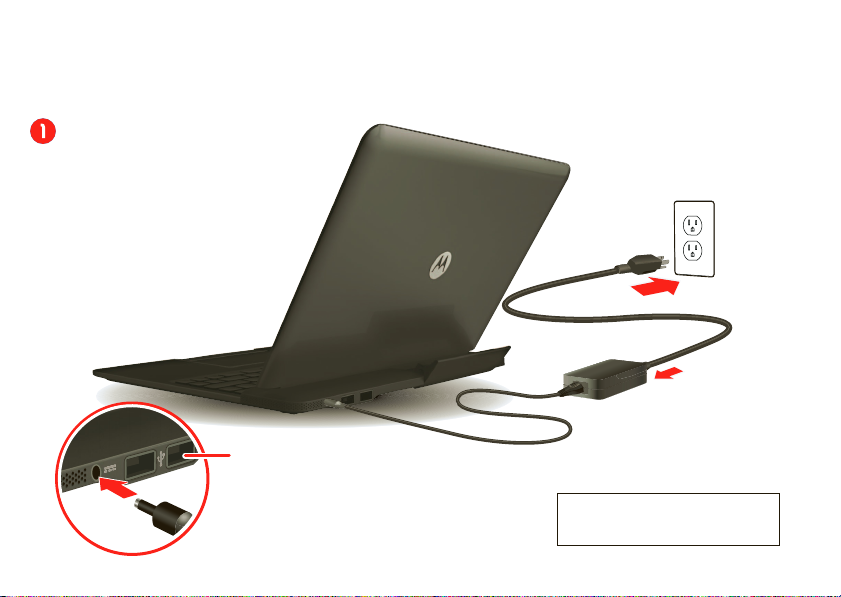
Plugin
Note: Just like your phone, your
dock supports data-intensive
apps and services.You can use aWi-Fi
connection when available. However,
it is strongly recommended that
you purchase adataplanfor your
phone that meets your needs.
Contact your service provider
for details.
Note: USB mass storage devices
must be formatted with the FAT32 file system.
Caution: Please read the important
safety, regulatory and legal information
at the back of this guide.
Use the USB ports for a
mouse, flash drive, or
whatever you would normally
connect to your phone.

2
11:23
Attach phone
1. Flip up the cradle.
2. Slide the phone into
the cradle. (Make sure
it’s seated properly.)
Monday, September 5 Note: Make sure your phone
is fully connected to both the
USB and HDMI connectors.
®

3
Dock battery indicator
(on back right):
• Flashing white = charging
• Solid white = fully charged
When your phone is docked:
• Flashing red = battery is low
• Solid red = battery must be charged
Turn on
After you attach the phone, just open the
dock and you’re ready to go.
Press to see the battery charge
level. 5 light dots mean fully charged.
Note: Your phone starts to charge
when you attach it even if your dock
is not plugged into a wall outlet.
BatteryTip:When you close your dock,
it turns off the display but continues
to charge your phone.To save dock
battery power when you’re not using
it, remove your phone.

4
The battery should only be replaced by a Motorola-approved service facility.(See
“How to Obtain Warranty Service or Other Information
” on page 9
.) Any
attempt to remove or replace your battery may damage the product.
Warning:
For indoor use only. Not designed or intended for use in a vehicle. To avoid injury, do not use this product as a vehicle cradle/mount.
Special keys & touchpad tips
Double-tap to enable/
disable the touchpad.
Press the fn key on the
lower left corner of the keyboard,
then press function keys for
brightness & volume.
Calls: If you receive a call while your
phone is in the dock, your phone
automatically goes into speakerphone
mode.You don’t need to lean toward your
phone—your caller will hear you just fine.
Airplane mode: On an airplane, you can
close your wireless connections by
choosing Airplane Mode in the
“mobile view” display within the webtop
app (or choose Airplane Mode on your
phone before you plug it into the dock).
For details, see your phone's help app.
More: To learn about all the really cool
features of the webtop app, see the
webtop help app.
Tip:Press F11 to toggle
full screen mode.

5
Safety, Regulatory & Legal
Battery Use & Safety
DON’Ts
• Don’t let theproduct comein contact withliquids.*
Liquids can get into the product’s
circuits, leadingto corrosion.
• Don’tplace your product near a heat source.*
High temperaturescancausethebattery
toswell, leak,ormalfunction.
• Don’tdry a wet ordamp product with an appliance or heat source
, such as a hair
dryer or microwave oven.
DOs
• Do avoid leaving your product in your car in high temperatures.*
• Do avoid dropping the product.*
Dropping your product, especially on a hard surface, can
potentially cause damage.*
• Do contact your retailer orMotorola if your product has been damaged by
dropping, liquids or high temperatures.
Warning:
Never dispose of battery powered products in a fire because they may explode.
Battery Charging
Battery Charging
Notes for charging your product’s battery:
•
During charging, keep your battery and charger near room temperature for efficient battery
charging.
•
New batteries are not fullycharged.
•
New batteries or batteries stored for a long time may take more timeto charge.
•
Motorola batteries and charging systems have circuitry thatprotects the battery from
damage from overcharging.
Third Party Accessories
Use ofthird party accessories, including butnot limited tobatteries,chargers, headsets,covers,
cases, screen protectorsand memory cards, may impact your product’s performance. In some
circumstances, third party accessories can be dangerousand may void your product warranty.
For a list of Motorola accessories, visit
www.motorola.com/products
Caution About High Volume Usage
Warning:
Exposure to loud noise from any source for extended periods of
time mayaffect your hearing. The louder the volume sound level, the less
time is required before your hearing could be affected. To protect your
hearing:
•
Limit the amount oftime you use headsets or headphones at high volume.
•
Avoid turning up the volume to blockout noisy surroundings.
•
Turn the volume down if you can’t hear people speaking near you.
Ifyouexperiencehearingdiscomfort, includingthesensation ofpressureor fullness in yourears,
ringing in your ears, or muffled speech, you should stop listening to the device through your
headset or headphones and have your hearing checked.
For more information about hearing, see our website at
direct.motorola.com/hellomoto/nss/AcousticSafety.asp
(inEnglish only).
Children
Keep your product and itsaccessories away from small children.
Theseproducts arenot
toys and may be hazardous to small children. For example:
•
A choking hazard may exist for small, detachable parts.
•
Improper use could result in loud sounds, possibly causing hearing injury.
•
Improperly handled batteries could overheat and cause a burn.
Symbol Key
Your battery, charger, or accessoryproduct may contain symbols, defined as follows:
Symbol Definition
Important safetyinformation follows.
Do notdispose of your product orbattery in a fire.

6
European Union Directives Conformance
Statement
EU Conformance
This product complies with the applicable EU requirements and carries the CE mark.
FCC Declaration of Conformity
FCC DoC
Per FCC CFR 47 Part 2 Section2.1077(a)
ResponsibleParty Name: MotorolaMobility,Inc.
Address: 8000 West Sunrise Boulevard, Suite A,
Plantation, FL 33322 USA
Phone Number: 1 (800) 453-0920
Your product or battery may require recycling in accordance with local
laws. Contact your local regulatory authorities for more information.
Do not dispose of your product or battery with your household waste.See
“Recycling” formoreinformation.
Do not use tools.
For indoor use only.
Symbol Definition
032375o
Hereby declaresthat theproduct(asdefined bytheProduct Name, Model Numberand FCC IDon
the product label), conforms to the following regulations: FCC Part 15, subpart B, section
15.107(a), 15.107(d) and section 15.109(a)
FCC Notice to Users
FCC Notice
The following statement applies to all products that bearthe FCC logo on the product
label.
This equipment has been tested and foundto complywith the limits for aClassB digital device,
pursuant to part 15of the FCC Rules.See 47 CFR Sec. 15.105(b). These limits are designed to
provide reasonable protection against harmful interference in a residential installation. This
equipment generates, usesand canradiate radiofrequency energy and, if notinstalledand used
in accordancewith the instructions, may causeharmful interference toradio communications.
However, thereis no guaranteethat interferencewill not occurin aparticularinstallation. If this
equipment does cause harmful interference to radio or television reception, which can be
determined by turningthe equipment off and on, the user is encouraged to try to correct the
interference by one or more of the following measures:
•
Reorientorrelocatethe receiving antenna.
•
Increase the separation between the equipment and the receiver.
•
Connect the equipment to an outlet on a circuit different from that to which the receiver is
connected.
•
Consult the dealer or an experienced radio/TV technician for help.
This device complies with part 15 of the FCC Rules. Operation is subject to thefollowing two
conditions: (1) This device may not cause harmful interference,and (2) this device must accept
any interference received, including interference that may cause undesired operation. See 47
CFR Sec. 15.19(a)(3).
Motorolahasnotapprovedanychanges or modifications to thisdevicebytheuser.Anychanges
or modifications couldvoid the user’s authority to operate the equipment. See 47 CFR Sec.
15.21.
For products that support W-Fi 802.11a (as defined in the product specifications available at
www.motorola.com
), the followinginformationapplies.Thisequipmenthasthecapability
to operateWi-Fi in the 5GHzUnlicensed National InformationInfrastructure (U-NII) band.
Because this band is shared with MSS (Mobile Satellite Service), the FCChas restricted such
devices toindoor useonly(see 47CFR 15.407(e)). Since wireless hot spotsoperating in this band
havethe samerestriction, outdoorservices arenot offered. Nevertheless,pleasedonotoperate
this device in Wi-Fi mode when outdoors.

7
Industry Canada Notice to Users
Industry Canada Notice
Operationissubject tothefollowing twoconditions: (1) Thisdevice may not cause interference
and (2) This device must accept any interference, includinginterference that may cause
undesired operationof the device. See RSS-GEN 7.1.5. This Class B digital apparatus complies
with Canadian ICES-003.
Privacy & Data Security
Motorola understands that privacy and data security are important to everyone. Becausesome
features of your product may affect your privacy or data security, please follow these
recommendations to enhance protection of your information:
• Monitor access
—Keep your product with you and do not leave it where others may have
unmonitoredaccess.Useyourproduct’ssecurityandlockfeatures,whereavailable.
• Keep software up to date
—IfMotorolaora software/applicationvendorreleases apatch
or software fix for your product that updates the device’s security, install it as soon as
possible.
• Secure Personal Information
—Your product can store personal information in various
locationsincludingaSIMcard,memorycard,andbuilt-inmemory.Besuretoremoveorclear
all personal information before you recycle, return, or give away your product.
Note:
For information on how to backup or wipe data fromyour product, go to
www.motorola.com/support
• Online accounts
—Someproducts provide a Motorola online account. Go to your account
for information on how to manage the account, and how touse security features.
• Applications and updates
—Choose your apps and updates carefully, and install from
trusted sources only. Some apps can impact your product’s performance and/or have access
to private information including account details, call data, location details and network
resources.
• Wireless
—For products with Wi-Fi features, only connect totrusted Wi-Fi networks. Also,
when using your product as a hotspot (where available) use network security. These
precautionswillhelppreventunauthorizedaccesstoyourdevice.
If you have further questions regarding howthe use of your product may impact your privacy or
datasecurity,pleasecontact Motorolaat
,orcontactyour service
provider.
Use & Care
To care for your Motorolaproduct, please keep it away from:
liquids of any kind
Don’t expose your product towater, rain, extreme humidity, sweat, or other
moisture. If it does getwet, don’ttry to accelerate dryingwith the useof anoven
or dryer, as this may damage the product.
extreme heat or cold
Avoid temperatures below -10°C (14°F) or above 60°C(140°F). For battery
poweredaccessories, do not recharge your accessory intemperaturesbelow 0°C
(32°F) or above 45°C (113°F).
microwaves
Don’t try to dry your product in amicrowave oven.
dust and dirt
Don’t expose your product to dust, dirt, sand, food, or other inappropriate
materials.
cleaning solutions
To clean your product, use only a dry soft cloth. Don’t use alcohol or other
cleaning solutions.
shock and vibration
Don’tdropyourproduct.
Recycling
Recycling
Products & Accessories
Please do not dispose of products or electrical accessories (suchas chargers,
headsets, or batteries) with your household waste, or in a fire. These items should
be disposed of in accordance with the national collection and recycling schemes
operatedbyyourlocalorregionalauthority.Alternatively,youmayreturnunwanted
products and electrical accessories to any Motorola Approved Service Center in your region.

8
Details of Motorola approved national recycling schemes, and further information on Motorola
recycling activities can be found at:
www.motorola.com/recycling
Packaging & Product Guides
Product packaging and product guides should only be disposed of in accordance with national
collection and recycling requirements. Please contact your regional authorities for more details.
Software Copyright Notice
Software Copyright Noti ce
Motorola productsmay include copyrighted Motorola and third-party software stored in
semiconductormemoriesorothermedia.LawsintheUnited Statesandothercountries preserve
for Motorola andthird-party software providers certain exclusive rights for copyrighted
software, such as the exclusive rights to distribute or reproducethe copyrighted software.
Accordingly, any copyrighted software contained in Motorola products may not be modified,
reverse-engineered, distributed, or reproduced in any manner to the extent allowed by law.
Furthermore, the purchase of Motorola products shall not be deemed to grant either directly or
by implication, estoppel, or otherwise, any license underthe copyrights, patents, or patent
applications of Motorola or any third-party software provider, except for the normal,
non-exclusive, royalty-freelicense to use that arises by operationof law inthe sale of a product.
Content Copyright
Content Copyright
The unauthorized copying of copyrighted materials is contrary to the provisions of the Copyright
Laws of the United States and other countries. This device is intended solely for copying
non-copyrightedmaterials,materialsinwhichyouownthe copyright,or materialswhichyouare
authorized or legallypermitted tocopy.Ifyouareuncertainaboutyourrightto copyany material,
pleasecontact your legaladvisor.
Export Law Assurances
Export Law
This product is controlled under the export regulations of the United States of America and
Canada. The Governments of the UnitedStates of Americaand Canada may restrict the
exportation or re-exportationof this product to certain destinations. For further information
contact the U.S.Department of Commerce or the Canadian Department of Foreign Affairs and
International Trade.
Product Registration
Registration
Online Product Registration:
www.motorola.com/us/productregistration
Product registration is animportant step toward enjoying your new Motorola product.
Registering permits usto contact you for productor software updates andallows you to
subscribe to updates on new products or special promotions. Registration is not required for
warranty coverage.
Please retain your original dated sales receipt for your records. For warranty service of your
MotorolaPersonal Communications Productyouwillneedtoprovidea copyofyourdatedsales
receipt to confirm warranty status.
Thank youfor choosing a Motorola product.
Motorola Limited Warranty for the United
States and Canada
Warran ty
What Does this Warranty Cover?
Subject to the exclusionscontainedbelow, MotorolaMobility,Inc. warrants its mobile
telephones (“Products”), Motorola-branded or certified accessories sold for use with these
Products (“Accessories”), and Motorola software contained onCD-ROMs or other tangible
mediaandsoldfor usewiththeseProducts(“Software”)to befreefromdefectsinmaterialsand
workmanship under normal consumer usage for the period(s) outlined below. This limited
warranty is a consumer's exclusive remedy, and applies as follows to new Motorola Products,
Accessories, and Software purchased by consumers in the United States or Canada, which are
accompanied by this written warranty:
Products and Accessories
Products Covered Length of Coverage
Products and Accessories
as
definedabove,unlessotherwise
providedforbelow.
One (1) year
from the date of purchase by the
first consumer purchaser of the product unless
otherwise provided for below.
Decorative Accessories and
Cases.
Decorative covers, bezels,
PhoneWrap™ covers and cases.
Limited lifetime warranty
for the lifetime of
ownership by the first consumer purchaser ofthe
product.
Monaural Headsets.
Ear buds and
boom headsets that transmit mono
sound through a wired connection.
Limited lifetime warranty
for the lifetime of
ownership by the first consumer purchaser ofthe
product.
Indice