Vertex VX-510 Manuale utente

VX-510
VHF/UHF Hand-Held Portable
Land Mobile Transceiver
OPERATING MANUAL
YAESU MUSEN CO., LTD.
1-20-2 Shimomaruko, Ota-Ku, Tokyo 146-8649, Japan
YAESU U.S.A.
17210 Edwards Rd., Cerritos, CA 90703, U.S.A.
YAESU EUROPE B.V.
Snipweg 3, 1118DN Schiphol, The Netherlands
YAESU UK LTD.
Unit 12, Sun Valley Business Park, Winnall Trading Estate
Winchester, Hampshire, SO23 0LB, U.K.
YAESU GERMANY GmbH
Am Kronberger Hang 2, D-65824 Schwalbach, Germany
YAESU HK LTD.
11th Floor Tsim Sha Tsui Centre, 66 Mody Rd.,
Tsim Sha Tsui East, Kowloon, Hong Kong

NOTICE
There are no user-serviceable points inside this transceiver. All
service jobs must be referred to your Authorized Service Center
or Network Administrator.
Congratulations!
You now have at your fingertips a valuable communications tool - a
two-way radio! Rugged, reliable and easy to use, your
radio will keep you in constant touch with your colleagues
for years to come, with negligible maintenance down time.
Please take a few minutes to read this manual carefully. The informa-
tion presented here will allow you to derive maximum performance
from your radio. After reading it, keep the manual handy for quick
reference, in case questions arise later on.
We’re glad you joined the team. Call on us any time, because
ourbusinessiscommunications.Letushelpyougetyourmessageacross.

1
VX-510 OPERATING MANUAL
VX-510 Series
VHF/UHF Hand-Held Portable
Land Mobile Transceiver
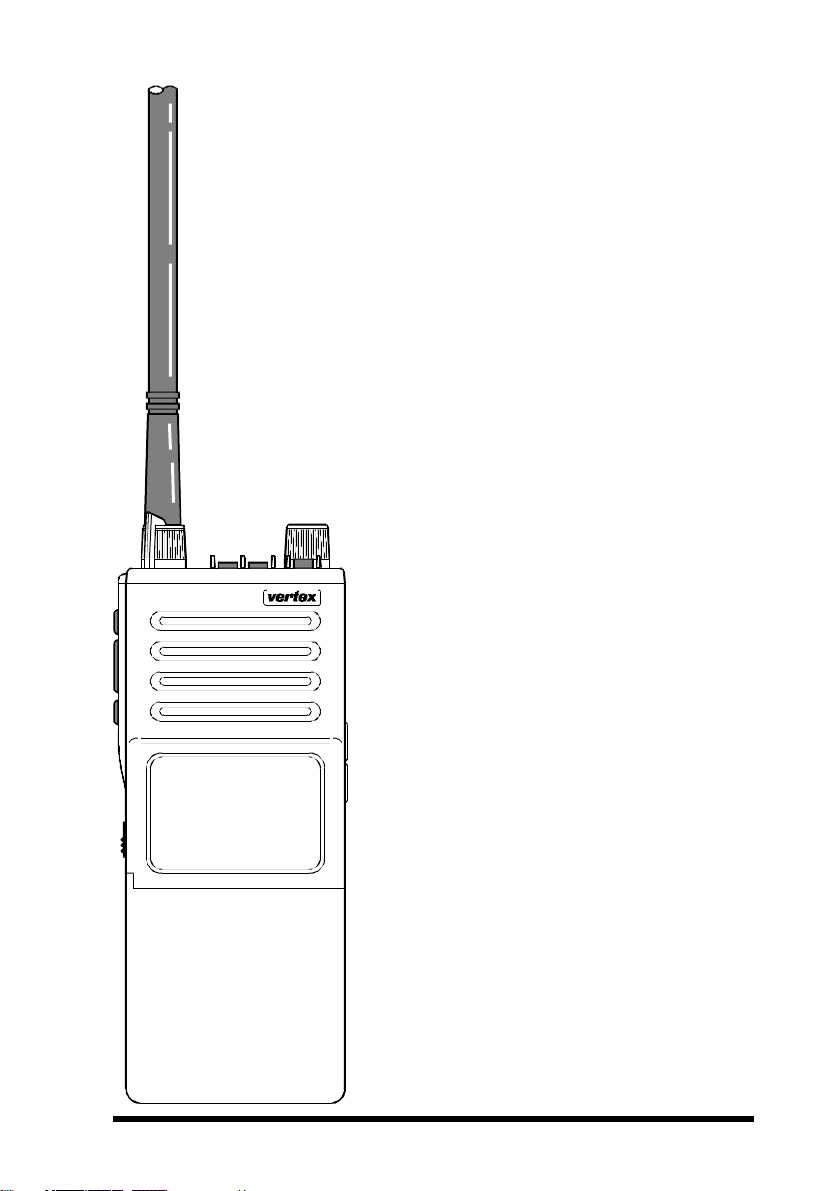
The VX-510 is a frequency-synthesized, mi-
croprocessor-controlled FM hand-held por-
table transceiver providing up to five watts
of power output on up to 32 channels in the
VHF or UHF Land Mobile Bands. Designed
specifically for commercial and professional
applications, the VX-510 is housed in high-
strength die-cast aluminum alloy, sealed to
MIL-810 C, D & E intrinsically safe (I/S)
and weather-tight specifications*.
User selectable features include a four-mode
display with channel name or number, up-
right or inverted for easy viewing when on
your belt; selective channel scanning, ad-
justable-pause priority scanning, and vari-
able transmitter power output.
Other user-selectable features include push-
button display illumination, 2-tone decoder
enable/disable (with optional F2D-5 Unit
installed), and manual squelch override. The
VX-510 is easily programmed by your
dealer using a Yaesu Service Kit with an
IBM PC-compatible computer.
Please read this manual carefully to become
familiar with the features of the VX-510.
*approval pending

2
VX-510 OPERATING MANUAL
SPECIFICATIONS
General VHF (Low Band) VHF (High Band) UHF
Frequency range (MHz): 29.8 – 38 MHz (vers.A) 146 – 174 MHz 450 – 488 MHz
38 – 50 MHz (vers.B)
Channels: Up to 32 Up to 32 Up to 32
(simplex or semi-duplex) (simplex or semi-duplex) (simplex or semi-duplex)
Maximum Channel Spread: 8.3 MHz (vers. A) 28 MHz 20 MHz
12 MHz (vers. B)
Minimum Channel Spacing: 20 kHz
(12.5 kHz optional)
15/30 kHz 12.5/25 kHz
Programming Channel Step: 5/6.25 kHz 5/6.25 kHz 10/12.5 kHz
Emission Type: 16K0F3E
(11K0F3E optional)
11K0F3E/16K0F3E 11K0F3E/16K0F3E
Supply Voltage: 7.2 V DC 10% 7.2 V DC 10% 7.2 V DC 10%
Current Consumption: 50 mA (stby, saver off) 50 mA (stby, saver off) 50 mA (stby, saver off)
19 mA (stby, saver on) 19 mA (stby, saver on) 19 mA (stby, saver on)
200 mA (receive) 200 mA (receive) 200 mA (receive)
2000 mA (transmit) 2000 mA (transmit) 2000 mA (transmit)
Case Size(WxHxD): 59x149x39mm 59x149x39mm 59x149x39mm
Weight (approx.): 570 grams 570 grams 570 grams
Receiver
Receiver Circuit Type: Double-conversion Double-conversion Double-conversion
Superheterodyne Superheterodyne Superheterodyne
Intermediate Frequencies: 21.6 MHz (ver. A) 21.6 MHz & 455 kHz 47.9 MHz & 455 kHz
16.9 MHz (vers.B)
& 455 kHz
12-dB SINAD Sensitivity: better than 0.20µV better than 0.25µV better than 0.25µV
20-dB Noise Quieting: better than 0.30µV better than 0.35µV better than 0.35µV
Squelch Threshould: better than 0.18µV better than 0.20µV better than 0.20µV
Adjacent Channel Selectivity: 75 dB 65/75 dB 65/75 dB
Image Rejection: 80 dB 75 dB 75 dB
Intermodulation Response: 70 dB 72 dB 72 dB
Hum & Noise: 50 dB 44/50 dB 40/45 dB
Audio Response:
+3/–8 dB from the 6 dB/oct. +3/–8 dB from the 6 dB/oct. +3/–8 dB from the 6 dB/oct.
De-emphasis curve De-emphasis curve De-emphasis curve
AF output (for 5% THD): 0.5 watts @16 Ω0.5 watts @16 Ω0.5 watts @16 Ω
Transmitter
Power Output: 5W/1W 5W/1W 5W/1W
Frequency Stability: ±10 ppm ±2.5 ppm ±2.5 ppm
Modulation System: variable reactance variable reactance variable reactance
Maximum Deviation: ±5 kHz
(±2.5 kHz optional)
±2.5/±5 kHz ±2.5/±5 kHz
Audio Response: TIA/EIA-603 3.2.6 TIA/EIA-603 3.2.6 TIA/EIA-603 3.2.6
FM Hum and Noise: better than
–
50 dB better than
–
45/50 dB better than
–
45/50 dB
Spurious Emissions: 60 dB below carrier 60 dB below carrier 60 dB below carrier
AF Distortion (@ 1 kHz): < 5% @60 % modulation < 5% @60 % modulation < 5% @60 % modulation
Microphone Type: 2-k Ωcondenser 2-k Ωcondenser 2-k Ωcondenser
Specifications may be subject to change without notice or obligation.

3
VX-510 OPERATING MANUAL
ACCESSORIES & OPTIONS
MH- 30A2B Speaker/Microphone
FNB-29A 7.2 V/1700 mAh Ni-Cd Battery Pack
CD-8 Desktop Battery Rapid-Charger (used w/PA-14B/C)
PA-14B 120 V AC Mains Adapter
PA-14C 230 – 240 V AC Mains Adapter
CS-500 Overnight Desktop Charger
ATL-1A VHF Low Band Helical Flex Antenna (30 – 36 MHz)
ATL-1B VHF Low Band Helical Flex Antenna (36 – 42 MHz)
ATL-1C VHF Low Band Helical Flex Antenna (42 – 50 MHz)
ATV-3B VHF Helical Flex Antenna (148 – 155 MHz)
ATV-3C VHF Helical Flex Antenna (150 – 162 MHz)
ATV-3D VHF Helical Flex Antenna (155 – 164 MHz)
ATV-3E VHF Helical Flex Antenna (162 – 174 MHz)
ATU-5D UHF Helical Flex Antenna (450 – 470 MHz)
ATU-5F UHF Helical Flex Antenna (470 – 512 MHz)
FVP-22 Encryption Unit
F2D-5A/B Two-Tone Sequential Decoder
FTT-7 DTMF Keypad Tone Generator (16 keys)
FTT-7D DTMF Keypad Tone Generator w/Decoder
FTE-19 ANI (Auto Numbering Identification) Unit
CE-21 Programming Software
VPL-1 Programming Cable
VTP-20 VX-Trunk II VX-Trunking Portable Logic Board
CLIP-4 Belt Clip
SBC-1 Swivel Belt Adaptor (Requires LCS-2)

4
VX-510 OPERATING MANUAL
CONTROLS & CONNECTORS
Top panel
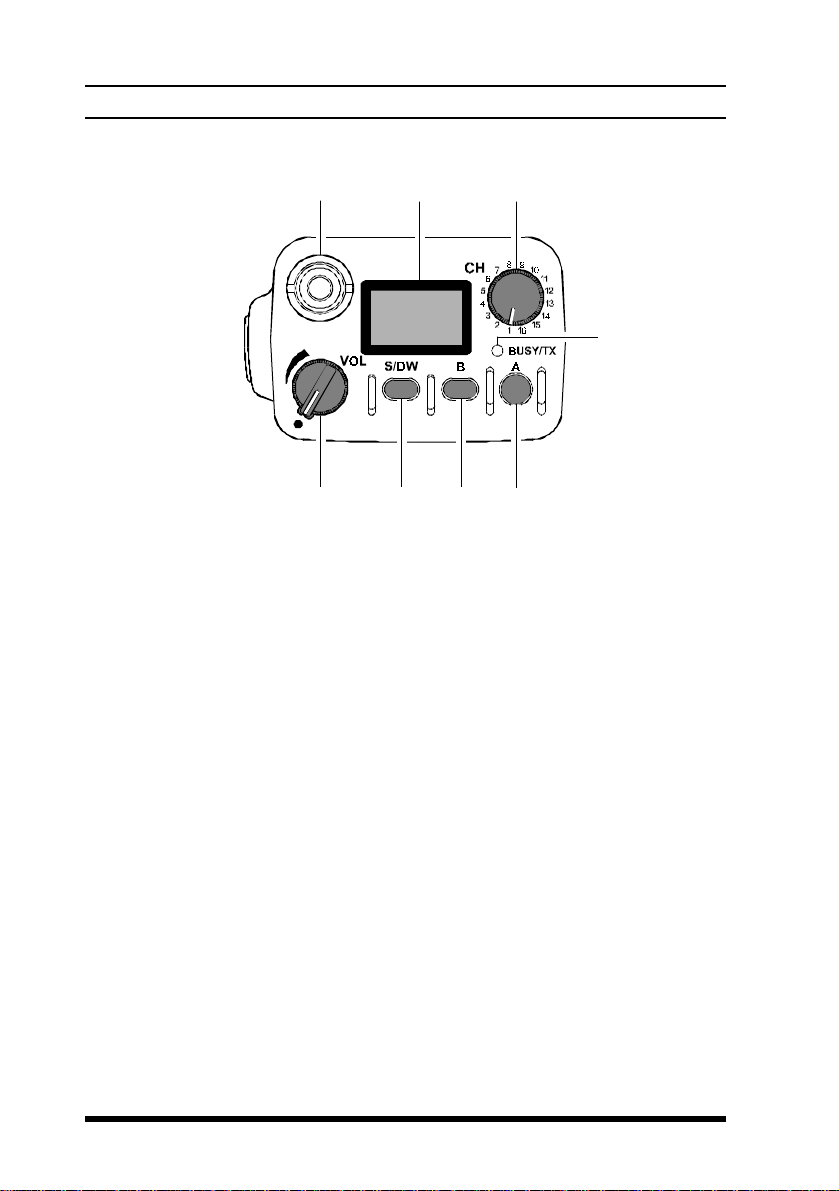
(1)VOL Control
This control adjusts the volume of the receiver, and turns the radio off
when rotated fully counterclockwise to the click-stop
(2)S/DW Button (Scan/Dual Watch)
Momentarily (< 1sec.) pressing this button turns the channel scanner on
and off. Pressing and holding (> 1 sec.) this button activates the Dual
Watch feature (explained later).
(3)B Button
Pressing and holding this button more than 2 seconds (but less than 4
seconds) activates functions as programmed by your dealer and determined
by your system requirements (See “PRE-PROGRAMMED FUNCTIONS”, page
13). Pressing and holding this button more than 4 seconds inverts the
LCD display to either frontward or backward facing readout (the back-
ward display is convenient for viewing when wearing the transceiver on
your belt).
‡B ‡C
‡D
‡E‡F ‡G
‡@ ‡A

5
VX-510 OPERATING MANUAL
(4)A Button
Pressing and holding this button more than 2 seconds (but less than 4
seconds) also activates an assigned function (programmed by your dealer).
Pressing and holding this button more than 4 seconds causes the selected
channel to be assigned as the Priority Channel for use with Priority Scan-
ning and Dual Watch functions (explained later).
(5)BUSY/TX Indicator
This lamp blinks green when a signal is being received (or the squelch is
opened by pressing the MON RES button) and red when transmitting. To
avoid interference, do not transmit if the lamp is glowing green. When the
battery almost depleted, this lamp blinks red, indicating that the battery
needs recharging or replacement very soon.
(6)CH Rotary Selector
This rotary switch selects the operating channel. If a channel is selected
that is not available for operation, “ """"” is displayed, accompa-
nied by a rapid warning beeper (2 beeps/sec.).
(7)Antenna Jack
This threaded-type jack accepts the supplied flexible antenna. Any other
antenna types used here must be designed for the programmed operating
frequencies.
(8)Liquid Crystal Display
In addition the channel number name, the display includes some operating
status symbols, indicated in the diagram below.
CONTROLS & CONNECTORS

6
VX-510 OPERATING MANUAL
Side Panel Buttons
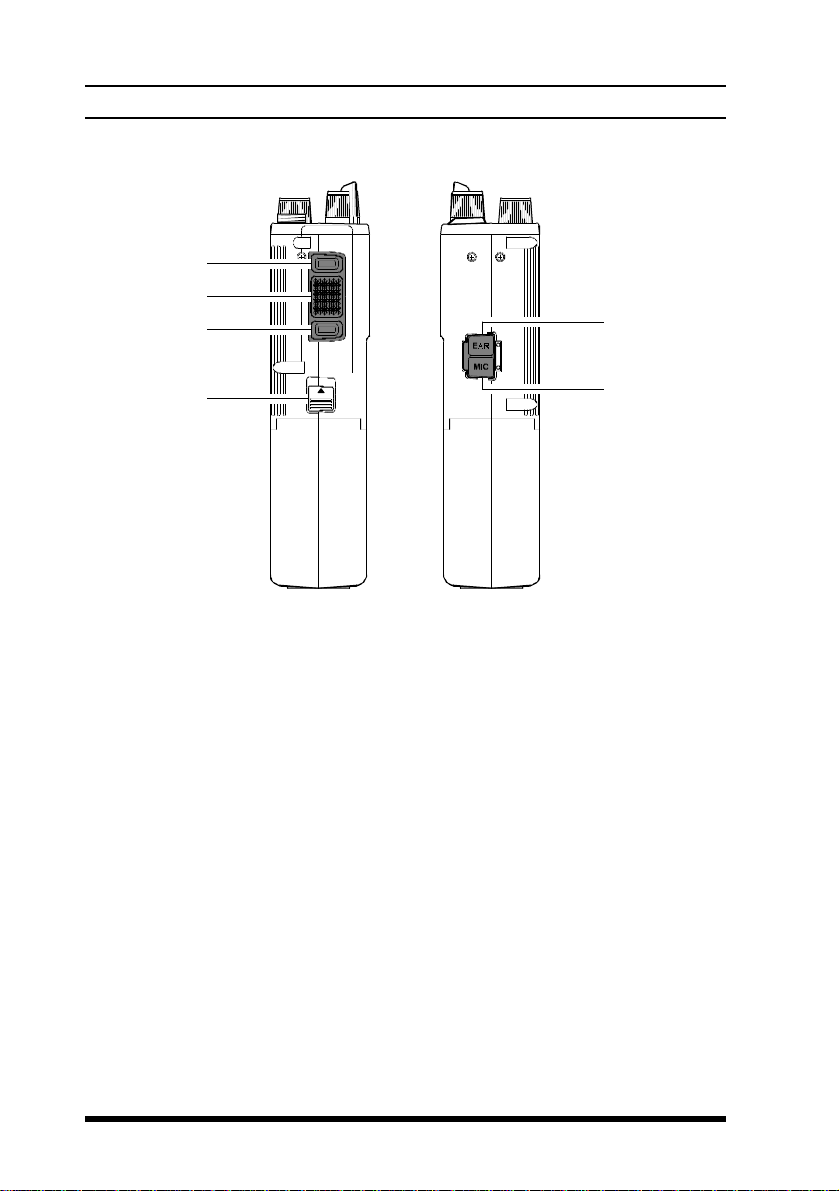
(1)MON RES (Monitor/Reset)Button
Pressing and holding this button more than 2 seconds (but less than 4
seconds) disables the tone squelch, and permits monitoring of stations
transmitting on the selected channel while still keeping your receiver quiet
from noise (“
MO
” will appear at the top right of the LCD). Press it again
to only hear calls within your network.
Pressing and holding this button more than 4 seconds toggles the tone and
noise squelch override, allowing all stations (and noise) on the channel to
be heard. This may be used to hear weak stations whose signals would not
normally open the squelch. Do this to pre-adjust the VOLume control
before receiving calls.
(With Selective Calling Option)
When the two-tone sequential decoder unit (F2D-5) is installed, and a
selective call has been received (“
CALL
” indicator on), pressing and
holding this button more than 2 seconds (but less than 4 seconds) will
reset the call function on the current channel and silence the receiver,
otherwise pressing and holding this button more than 4 seconds resets the
call function on ALL channels.
‡@
‡A
‡B ‡D
‡C ‡E
CONTROLS & CONNECTORS

7
VX-510 OPERATING MANUAL
(2)PTT (Push-To-Talk)button
Hold this button to transmit (the “BUSY/TX” indicator glows red).
(3)LAMP/LOCK button
Press this button momentarily (<1 sec.) to illuminate the display for five
seconds. Pressing and holding (>1 sec.) this button locks top-panel push-
buttons (S/DW, B, A, and the optional DTMF keypad); this can be en-
abled to prevent radio settings from being disturbed.
(4)Battery Release button
Slide this button in the direction of the arrow (upward) for battery re-
moval.
(5)EAR Jack
This provides audio output for an earphone or the optional MH-30A2B
External Speaker/Microphone here. The internal speaker is disabled when
a plug is inserted into this jack.
(6)MIC Jack
Connect the optional MH-30A2B Speaker/Microphone here, the internal
microphone is disabled when this jack is used.
CONTROLS & CONNECTORS

8
VX-510 OPERATING MANUAL
OPERATION
Preliminaries
If the transceiver has not been used since leaving the factory, fully charge
the battery using CD-8 unit (with PA-14B or C) before using it.
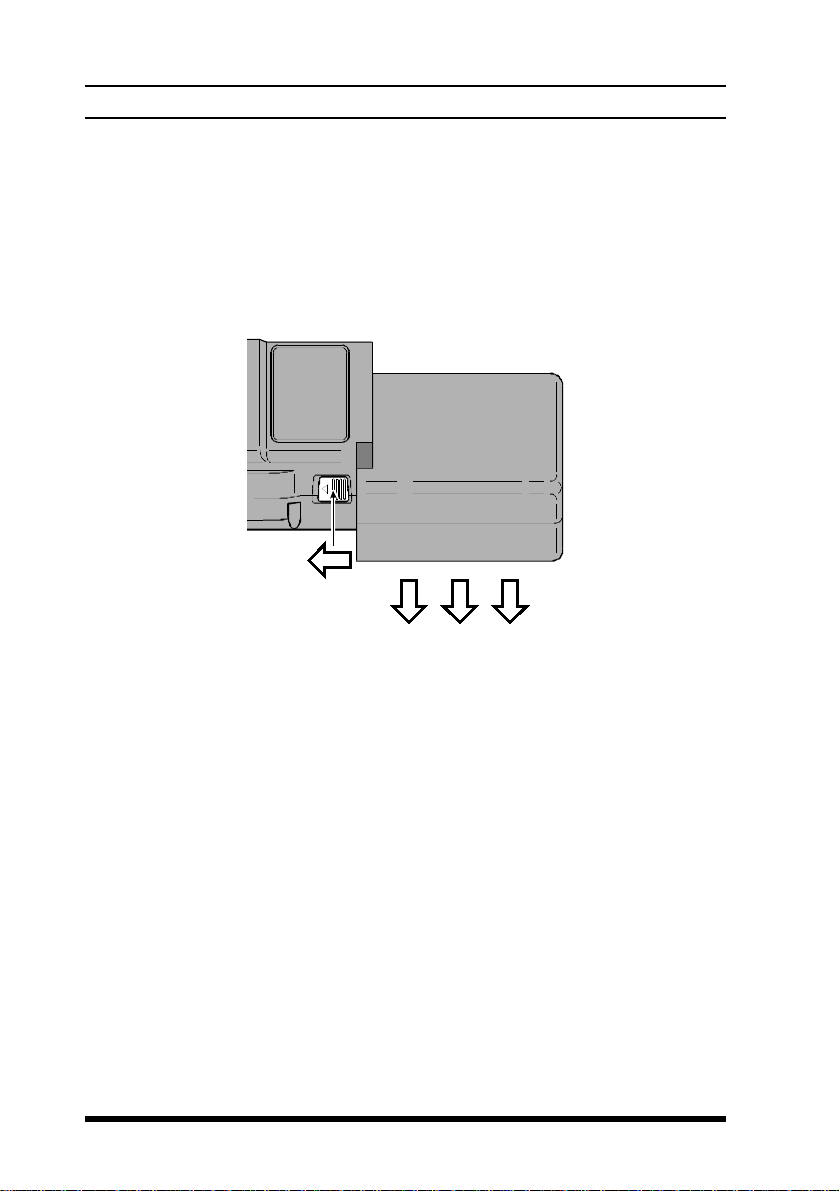
Mount the battery on the transceiver as described and shown in the photo
below. Also, install the antenna on the jack on top of the transceiver by
screwing the connector into the jack until it is finger-tight.
Battery Removal & Replacement
¦Make sure that the VOL control is set into the off click-stop, and
remove the protective soft or hard case, if used.
¦Grasp the transceiver with your left hand, so your palm is over the
speaker and your thumb is on the Battery Release Button.
¦Move the button in the direction indicated by the arrowhead, while
using your right hand to slide the battery pack toward the side with
the button. The battery pack should slide smoothly out of its track.
¦To replace the Ni-Cd pack, repeat the second and third steps above,
simply sliding the battery case in the other direction after aligning
the shorter side of the battery pack with the track below the Battery
Release Button.
Indice
Altri manuali Vertex Ricetrasmettitore

Vertex
Vertex VX-2100 series Manuale utente

Vertex
Vertex FT-817 Manuale

Vertex
Vertex VX-1210 Manuale utente

Vertex
Vertex VX-410 series Manuale utente

Vertex
Vertex VX-1700 Manuale utente

Vertex
Vertex VX-7200 Manuale utente

Vertex
Vertex VX-3R/E Manuale

Vertex
Vertex VX-6E Manuale

Vertex
Vertex VX-8GR Manuale

Vertex
Vertex VX-7R Manuale

Vertex
Vertex VX-6R Manuale

Vertex
Vertex evx-534 Manuale utente

Vertex
Vertex FT-817 Manuale

Vertex
Vertex FTL-1011 Manuale utente

Vertex
Vertex VX-160EU Manuale utente

Vertex
Vertex VX-4500 Series Manuale utente

Vertex
Vertex FTL-1014 Manuale utente

Vertex
Vertex VX-230 Series Manuale utente

Vertex
Vertex VX-5R Manuale

Vertex
Vertex HX370S Manuale utente