ViewCast OSPREY 240E Manuale utente

Osprey®240e/450e User Guide
AVStream Driver Version 4.6

© 2012 ViewCast Corporation. All rights reserved.
Osprey® and SimulStream® are registered trademarks of ViewCast Corporation Microsoft®, Windows®, Windows Server ®2003, AVStream®,
DirectShow®, Intel® CoreDuo®, and Windows Media® Encoder are trademarks or registered trademarks of Microsoft Corporation. Any other
product names, trademarks, trade names, service marks, or service names owned or registered by any other company and mentioned herein
are the property of their respective companies.
No part of this specification may be reproduced, transcribed, transmitted or stored in a retrieval system in any part or by any means without
the express written consent of ViewCast Corporation. ViewCast Corporation reserves the right to change any products herein at any time and
without notice. ViewCast Corporation makes no representations or warranties regarding the content of this document, and assumes no
responsibility for any errors contained herein.
UL Statement
Underwriters Laboratories Inc. has not tested the performance or reliability of the security or signaling aspects of this product. UL has only
tested for fire, shock and casualty hazards as outlined in UL’s standard for safety UL 60950-1. UL certification does not cover the performance
or reliability of the security or signaling aspects of this product. UL MAKES NO REPRESENTATIONS, WARRANTIES OR CERTIFICATIONS
WHATSOEVER REGARDING THE PERFORMANCE OR RELIABILITY OF ANY SECURITY OR SIGNALING RELATED FUNCTIONS OF THIS PRODUCT.
To maintain UL compliance, this product to be used only with UL Listed computers that include instructions for user installed accessories.
FCC Notice:
WARNING: Use shielded cables to connect this device to peripherals in order to maintain compliance with FCC radio emission limits.
WARNING: Modifications to this device not approved by ViewCast Corporation could void the authority granted to the user by the FCC to
operate the device.
The Osprey 240e video capture card has been tested and found to comply with the limits for a Class B digital device, pursuant to Part 15 of the
FCC Rules. These limits are designed to provide reasonable protection against harmful interference in a residential installation. This equipment
generates uses and can radiate radio frequency energy and, if not installed and used in accordance with the instructions, may cause harmful
interference to radio communications. However, there is no guarantee that interference will not occur in a particular installation. If this device
does cause harmful interference to radio or television reception the user is encouraged to try to correct the interference by one or more of the
following measures:
Reorient or relocate the receiving antenna.
Increase the separation between the equipment and receiver.
Connect the computer into an outlet on a circuit different from that to which the receiver is connected.
Consult the dealer or an experienced radio/TV technician for help.
If the above measures are unsuccessful, please consult the dealer or manufacturer of your radio or television receiver, or speak with an
experienced radio/TV technician.
Note: This reminder is provided to call to the CATV installer’s attention Section 820-40 of the NEC, which provides guidelines for proper
grounding and, in particular, specifies that the cable ground shall be connected to the grounding and, in particular, specifies that the cable
ground shall be connected to the grounding system of the building, as close to the point of cable entry as practical.
The Osprey 450e video capture card has been tested and found to comply with the limits for a Class A digital device, pursuant to Part 15 of the
FCC Rules. These limits are designed to provide reasonable protection against harmful interference when the equipment is operated in a
commercial environment. This equipment generates, uses, and can radiate radio frequency energy and, if not installed and used in accordance
with the instruction manual, may cause harmful interference to radio communications. Operation of this equipment in a residential area is
likely to cause harmful interference in which case users will be required to correct the interference at their own expense.
Shielded Cables: Connections between this device and peripherals must be made using shielded cables in order to maintain compliance with
FCC radio emission limits.
Modifications: Modifications to this device not approved by ViewCast Corporation could void the authority granted to the user by the FCC to
operate the device.
Note to CATV Installer: Section 820-40 of the NEC provides guidelines for proper grounding and, in particular, specifies the cable ground shall
be connected to the grounding system of the building, as close to the point of cable entry as practical.
Product Disposal Information
Dispose of this product in accordance with local and national disposal regulations (if any), including those governing the recovery and
recycling of waste electrical and electronic equipment (WEEE).
RoHS Compliant: ViewCast Corporation is committed to compliance with the European directive on the Restriction of the Use of Certain
Hazardous Substances in Electrical and Electronic Equipment, Directive 2002/95/EC, the RoHS directive.
For current RoHS statement, visit www.viewcast.com.
ViewCast Corporation 3701 W. Plano Parkway, Suite 300, Plano, TX 75075-7840 USA

Osprey 240e/450e User Guide
ViewCast iii
Contents
Overview............................................................................................................................. 1
Warranties .......................................................................................................................... 1
System requirements.......................................................................................................... 2
Minimum system requirements ......................................................................................... 2
Installation Steps ............................................................................................................... 3
Installing the driver ............................................................................................................. 3
Custom installing AVStream ............................................................................................... 4
Installing the video capture card ........................................................................................ 4
Setting Driver Properties................................................................................................... 7
OspreyConfig’s initial processing sequence ....................................................................... 8
Understanding the device properties window ................................................................. 11
Devices and global controls ........................................................................................ 13
Input tab............................................................................................................................ 14
Osprey 450e AV option hardware add-on-device ...................................................... 16
Video input.................................................................................................................. 17
Video standard............................................................................................................ 18
Input Format: analog inputs ....................................................................................... 19
VideoCheck ................................................................................................................. 20
VideoGraph ................................................................................................................. 20
VbiGraph ..................................................................................................................... 21
Video Proc Amp tab .......................................................................................................... 22
Video Decoder tab ............................................................................................................ 24
RefSize tab......................................................................................................................... 26
Horizontal Format....................................................................................................... 27
Horizontal Delay.......................................................................................................... 28
Source Width .............................................................................................................. 29
Reference Size for Crop and Logo Placement............................................................. 30
525-Line (NTSC) Vertical Format................................................................................. 31
Filters tab .......................................................................................................................... 32
SimulStream................................................................................................................ 33
Deinterlace.................................................................................................................. 36
Currently Using group................................................................................................. 38
Adaptive Deinterlace window..................................................................................... 39

Contents
iv ViewCast
Device tab ......................................................................................................................... 42
No-Video Test Pattern ................................................................................................ 43
Buffers Requested....................................................................................................... 43
Diagnostic logging....................................................................................................... 44
Device Info .................................................................................................................. 46
Board Numbering........................................................................................................ 46
Extras........................................................................................................................... 49
Captions tab ...................................................................................................................... 50
Pin Select..................................................................................................................... 51
Render NTSC Closed Captions On Video..................................................................... 52
Render Logical White As ............................................................................................. 52
CC Pin .......................................................................................................................... 53
Logo tab ............................................................................................................................ 54
Pin Select..................................................................................................................... 56
File and Color .............................................................................................................. 56
Enable Key Color ......................................................................................................... 57
Weighting.................................................................................................................... 58
Position and Size ......................................................................................................... 58
Size and Crop tab .............................................................................................................. 60
Pin Select..................................................................................................................... 61
Reference Size............................................................................................................. 61
Granularity .................................................................................................................. 62
Enable Cropping.......................................................................................................... 63
Default Output Size..................................................................................................... 65
AVStream driver reference information...........................................................................67
Post-Processing mode....................................................................................................... 69
Efficient Video Rendering ................................................................................................. 71
Preview Pin to Video Renderer................................................................................... 71
Preview Pin to Overlay Mixer to Video Renderer....................................................... 71
Preview Pin to VMR7 .................................................................................................. 72
Preview Pin to VMR9 .................................................................................................. 73
Some Data Points........................................................................................................ 73
Video standards and sizes................................................................................................. 75
Color formats .............................................................................................................. 75
YUV format details ...................................................................................................... 76
Closed captioning (CC) ................................................................................................ 77
Captioning via CC or VBI pins...................................................................................... 77
Direct CC rendering on video...................................................................................... 78
CC streaming interface................................................................................................ 79
Vertical Interval Timecode (VITC) ............................................................................... 79
Vertical Blanking Interval (VBI) capture...................................................................... 80

Osprey 240e/450e User Guide
ViewCast v
Audio driver.......................................................................................................................81
Selecting the audio source and input volume .................................................................. 81
Audio properties page ...................................................................................................... 83
Audio formats ............................................................................................................. 84
Audio playback............................................................................................................ 84
Audio configuration .................................................................................................... 84
Mono Source Mode .................................................................................................... 84
Dual Mono .................................................................................................................. 84
Audio level .................................................................................................................. 86
Appendix A: Osprey hardware specifications.................................................................87
Osprey 240e ...................................................................................................................... 87
Environmental specifications...................................................................................... 87
Osprey 450e ...................................................................................................................... 89
Appendix B: Osprey 450e audio cable.............................................................................91
Appendix C: Troubleshooting..........................................................................................93
Color bars on video screen ............................................................................................... 93
Scrambled video image..................................................................................................... 93
Poor video quality at large frame sizes............................................................................. 94
Multiple horizontal lines across video image ................................................................... 94
Cannot play back recorded audio ..................................................................................... 94
Audio recording control comes up with wrong device and wrong inputs ....................... 94
Index ..................................................................................................................................97


Osprey 240e/450e User Guide
ViewCast 1
Overview
Thank you for purchasing the ViewCast Osprey 240e/450e video capture card. This user guide provides
step-by-step instructions for installing and using your new video capture card. For the latest ViewCast
product information and news, visit our website at www.viewcast.com.
Warranties
For complete warranty details, refer to the specific warranty included with each product. General
warranty information includes the following:
Limited Warranty
ViewCast warrants its hardware products against
defects in material and workmanship under normal use
for the period of one year (12 months) from date of
sale. Where specific warranties exist that provide more
substantial coverage, notwithstanding the warranty
provisions herein, such product warranties control and
preempt or supersede the warranty provisions herein.
Reseller Pass Through of
Standard Limited Warranties.
Resellers pass the ViewCast standard limited warranties
for the products through to the customer without
modification. Any modification of a product voids the
ViewCast warranties or any other existing or available
warranty.

Overview
2 ViewCast
System requirements
The following system requirements relate to your Osprey® video capture card only. The video capture or
encoding applications you use will likely require a much more powerful system than that which is listed
below. Please consult your software documentation for applicable system requirements.
Minimum system requirements
Direct Mode: 2 GHz Intel® Pentium® 4 processor or equivalent
PostProcessing Mode and SimulStream®: 2 GHz Intel® Pentium® 4 processor or equivalent, 3
GHz recommended
Microsoft® Windows® Professional or Home Edition, Windows Server® 2003
Up to 7.5 MB of available hard disk space
256 MB of RAM, 512 MB recommended
One available PCI Express® slot

Osprey 240e/450e User Guide
ViewCast 3
Installation Steps
In all cases, use the setup.exe program on the product CD or in the web package if you downloaded it.
The setup program automates the Plug and Play steps needed to install the drivers and ensures they are
performed correctly. It also installs the bundled applets and User’s Guide. If you have multiple Osprey
capture cards in the system it configures all of the boards at the same time.
We recommend this method especially if Osprey software does reside on your host computer. After the
install is run, the software detects the card and its drivers initiate automatically.
If you are updating Osprey software, first uninstall the previous software version, reboot your computer,
and then install the update.
Installing the driver
Insert the Osprey Software CD into your CD-Rom drive. The main menu for the Osprey software appears
if you enable autoplay. If the main menu does not automatically appear, click on the Window’s
computer icon and select the CD-Rom and the setup.exe icon. The Osprey A/VStream –Install Shield
Wizard engages and guides you through the installation process.

Installation Steps
4 ViewCast
Custom installing AVStream
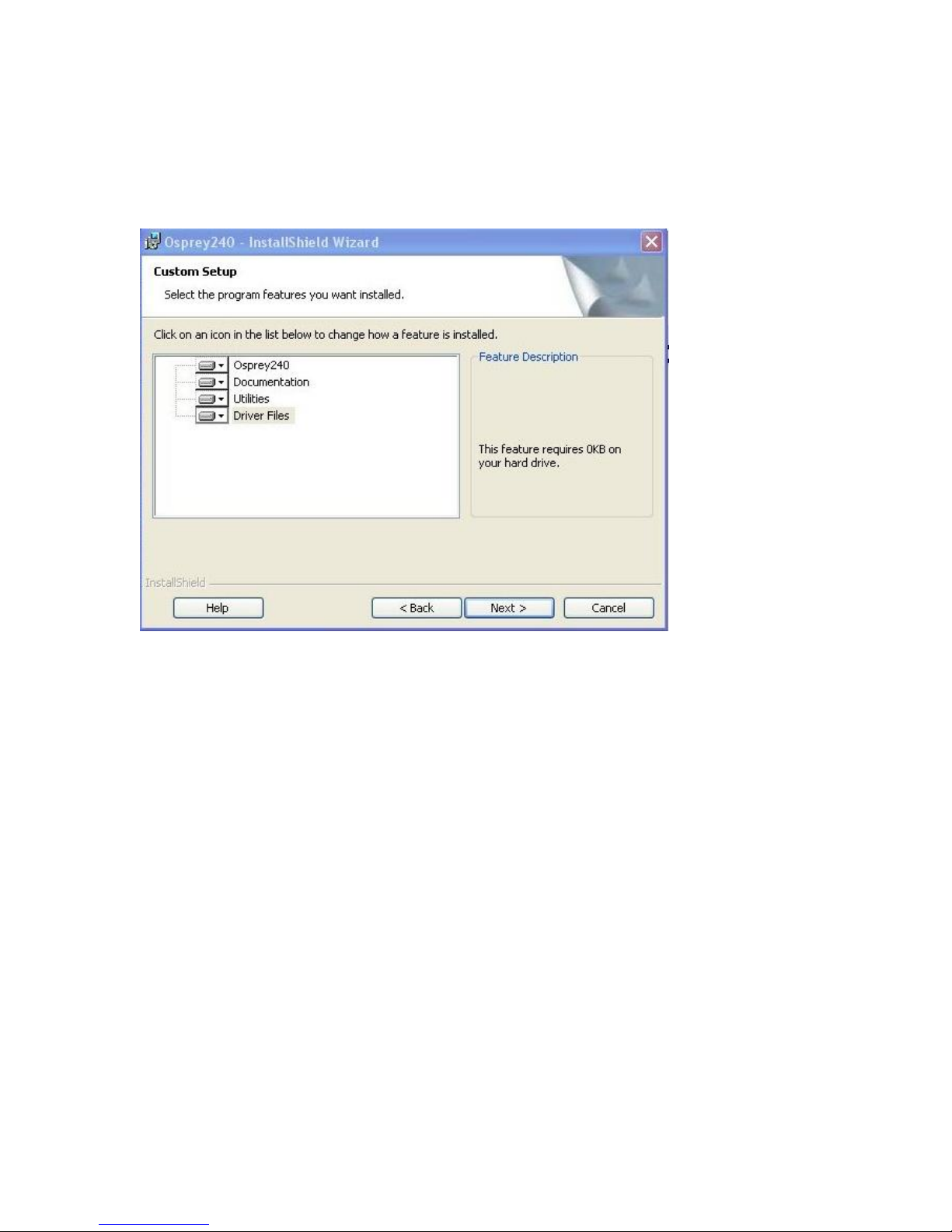
During the installation process, if you choose a Custom installation, your options are limited (Figure 1).
Figure 1. Osprey 240e Custom Setup screen
This window allows you to choose individual components you may want to install. You can also change
the location where components install.
Installing the video capture card
This manual covers one class of Osprey devices that include two PCI Express cards.
Class 6: o-240e, o-450e and related non-DSP PCI Express products
Both cards use the same driver. If you add a card from a different class, then you need to install the
driver for that card.
When you add or move boards after the AVStream 4.6 driver is already installed, there are two
possibilities:
You add a board of a different class from what is already in the machine. For example, an
Osprey 240e is already in the machine with the current driver installed, and you want to add
an Osprey 530. For this case, you have to obtain and install the driver install package for the
new board.
You move a board from one slot to another, or if you add another board of the same type.
For example, you might have an Osprey 240e in the machine, and want to add another
Osprey 240e. In this case, the following sequence begins.
Questo manuale è adatto per i seguenti modelli
1
Indice
Altri manuali ViewCast Hardware per computer
Manuali Hardware per computer popolari di altre marche

EMC2
EMC2 VNX Series Manuale del proprietario

Panasonic
Panasonic DV0PM20105 Manuale utente

Mitsubishi Electric
Mitsubishi Electric Q81BD-J61BT11 Manuale utente

Gigabyte
Gigabyte B660M DS3H AX DDR4 Manuale utente

Raidon
Raidon iT2300 Manuale utente

National Instruments
National Instruments PXI-8186 Manuale utente