
Viglen BX130 Manuale utente
®
®
C O M P U T E R S N E T W O R K S S O L U T I O N S
Minds
Think
Great
..
Viglen
BX13
0
User Manual
VIG385P
ViglenBX130 –VIG385P User Manual 1
Viglen,EMCandthe‘CE’mark
CE Marking
European standards are being harmonised across borders. If products comply with the same standards in all
European countries, product exporting and importing is made simple -paving our way to a common market. If
you buy a product with a 'CE' mark on it (shown below), on the box, in the manual, or on the guarantee -it
complies with the currently enforced directive(s).
Introduction to EMC
EMC (Electromagnetic Compatibility) is the term used to describe certain issues with RF (Radio Frequency)
energy. Electrical items should be designed so they do not interfere with each other through RF emissions. E.g.
If you turn on your microwave, your television shouldn't display interference if both items are CE marked to the
EMC directive.
If emitted RF energy is not kept low, it can interfere with other electrical circuitry -E.g. Cars Automatic Braking
Systems have been known to activate by themselves while in a strong RF field. As this has obvious
repercussions ALL electrical products likely to cause RF related problems have to be 'CE' marked from 1st
January 1996 onwards.
If a product conforms to the EMC directive, not only should its RF emissions be very low, but its immunity to RF
energy (and other types) should be high. The apparatus has to resist many 'real world' phenomena such as
static shocks and mains voltage transients.
Viglen’s Environment laboratory
To gain a 'CE' mark, the Viglen computer range has had to undergo many difficult tests to ensure it is
Electromagnetically Compatible. These are carried out in the in-house 'Environment lab' at Viglen Headquarters.
We have made every effort to guarantee that each computer leaving our factory complies fully with the correct
standards. To ensure the computer system maintains compliance throughout its functional life, it is essential you
follow these guidelines.
?Install the system according to Viglen’s instructions
?If you open up your Viglen:
?Keep internal cabling in place as supplied.
?Ensure the lid is tightly secured afterwards
?Do not remove drive bay shields unless installing a 'CE' marked peripheral in its place
?The clips or ‘bumps' around the lips of the case increase conductivity -do not remove or damage.
?Do not remove the ferrite ring from the L.E.D cables.
?Only use your Viglen computer with 'CE' marked peripherals
This system has been tested in accordance with European standards for use in residential and light industrial
areas-this specifies a 10 meter testing radius for emissions and immunity. If you do experience any adverse
affects which you think might be related to your computer, try moving it at least 10 meters away from the affected
item. If you still experience problems, contact Viglen’s Technical Support department who will put you straight
through to an EMC engineer -s/he will do everything possible to help. If modifications are made to your Viglen
computer system, it might breach EMC regulations. Viglen take no responsibility (with regards to EMC
characteristics) of equipment which has been tampered with or modified.
This symbol on the product or on its packaging indicates that the product shall not be treated as
household waste. Instead it shall be handed over to the applicable collection point for recycling of
electrical and electronic equipment. By ensuring this product is disposed of correctly, you will help
prevent potential negative consequences for the environment and human health, which could
otherwise be caused by inappropriate waste handling of this product. The recycling of materials will
help to conserve natural resources. For more detailed information about recycling of this product,
please contact your local city office, your household waste disposal service or Viglen Ltd.

ViglenBX130 –VIG385P User Manual 2
CopyrightsandTrademarks
Please Note
The material in this manual is subject to change without notice.
Trademarks
Microsoft, Windows, Windows XP Pro,Windows 2000 Pro and MS-DOS are
registered trademarks of Microsoft Corporation. IBM PC, XT, AT and PS/2 are
trademarks of International Business Machines Corporation. Pentium and Pentium
Pro are registered trademarks of Intel Corporation. AMIBIOS is a registered
trademark of American Megatrends. All other trademarks are acknowledged. JAC-
UP, Genie, Contender, Dossier, Vig, Viglen, and Envy are trademarks of Viglen
Limited.
Copyright and Patents
This manual and all accompanying software and documentation are copyrighted and
all rights reserved. This product, including software and documentation, may not, in
whole or in part, be copied, photocopied, translated or reduced to any electronic or
machine-readable form, without prior written consent except for copies retained by
the purchaser for backup.
© Copyright 2004Viglen Limited
All Rights Reserved
VIG385P Manual Version 1.0
Printed in the United Kingdom
Liability
No warranty or representation, either expressed or implied, is made with respect to
this documentation, its quality, performance, merchantability or fitness for a particular
purpose. As a result the documentation is licensed as is, and you, the licensee, are
assuming the entire risk as to its quality and performance. The vendor reserves the
right to revise this operation manual and all accompanying software and
documentation and to make changes in the content without obligation to notify any
person or organisation of the revision or change.
In no event will the vendor be liable for direct, indirect, special, incidental or
consequential damages arising out of the use or inability to use this product or
documentation, even if advised of the possibility of such damages. In particular, the
vendor shall not have liability for any hardware, software or data stored or used with
the product, including the costs of repairing, replacing or recovering such hardware,
software or data.

ViglenBX130 –VIG385P User Manual 3
Contents
Viglen, EMC and the 'CE' mark 1
Copyrights and trademarks 2
Chapter 1 -System Overview 5
Introduction 5
System Board Components 6
Chassis Overview 6
Controls, Connectors and Indicators 8
Control Panel Buttons 9
Control Panel LED’s 9
Back Panel Connectors 10
Feature Summary 11
Microprocessor 13
Main Memory 13
DDRII Memory 13
Chipset 14
Universal Serial Bus 14
IDE Support 14
Real-time Clock, CMOS SRAM and Battery 15
I/O Interface controller 15
Management Extension Component 18
Chapter 2 -System Board Options 20
Overview of jumper settings 21
Jumper settings 22
Motherboard Connectors 24
Front Panel Connectors 25
Upgrading the CPU 26
Installing and RemovingDIMMs 30
Replacing the Clock/CMOS Battery 31-32
Chapter 3 -Solving Problems 33
Troubleshooting Procedure 33
Problems Operating Add-in Boards 34
Problems and Suggestions 35
Error and Information messages 36
Bios error messages 38
Port 80h post codes 38

ViglenBX130 –VIG385P User Manual 4
Chapter 4 -System BIOS 45
What is the bios?45
The Power on Sequence 45
Overview of bios features 45
Configuring the Motherboard using BIOS Setup 49
BIOS Setup Program 50
Main Menu 50 -51
Advanced Menu 53
Security Menu 59
Boot Menu 60
Exit Menu 61
Upgrading BIOS 62
Chapter 5 -Technical Information 64
IDE Controller 64
Operating Systems and IDE hard drives 64
Network Controllers 65
Serial ATA 65
Connector Pin Signal Details 66
Jumper Settings -Explanation of Jumpers 71
Other Information-Reliability 76
Other Information-Power Management 76
ACPI 76
Chapter 6 -Glossary 78
Notes 80
Suggestions 81

ViglenBX130 –VIG385P User Manual 5
Chapter 1:System Overview
Introduction
This manual describes the chassis and Motherboard level features of the Viglen
BX130. This pedestal system consists of a medium tower chassis and a 775-pin Intel
Pentium 4 D processor supported Motherboard.
Table 1: Motherboard Features
Features Description
Microprocessor Pentium 4 –LGS775
Chipset Intel 945G
Memory Capacity 4GB Maximum
PCI Bus ?4 x 32 BIT PCI
?PCI-e x16 VGA Only
?PCI-e x8 VGA Only
ISA Bus ?PS2 Keyboard and Mouse
?Floppy Drive
IDE ?Single EIDE port supportsUltra DMA 100MB/s of Burst data
transfer rate, supports UDMA Mode 5, PIO Mode 4 and ATA/100
SATA Supports up to Four SATA hard drives.(Non RAID)
LAN Support Integrated Intel 82573V GB LAN Controller
Chassis 522mm (height) x 205mm (width) x 473mm (depth)
Weight 11.5 kg without PSU
Power Supply Single 350W power supply
Cooling Two Chassis mounted 120 mm Rear and 80 mm Front fans
Hard disk bay Support for four hard drives
Other External Drive Bays Two standard 3.5” diskette drive bays (one occupied)
Four 5 1/4” Drive bays (one occupied)
ViglenBX130 –VIG385P User Manual 6
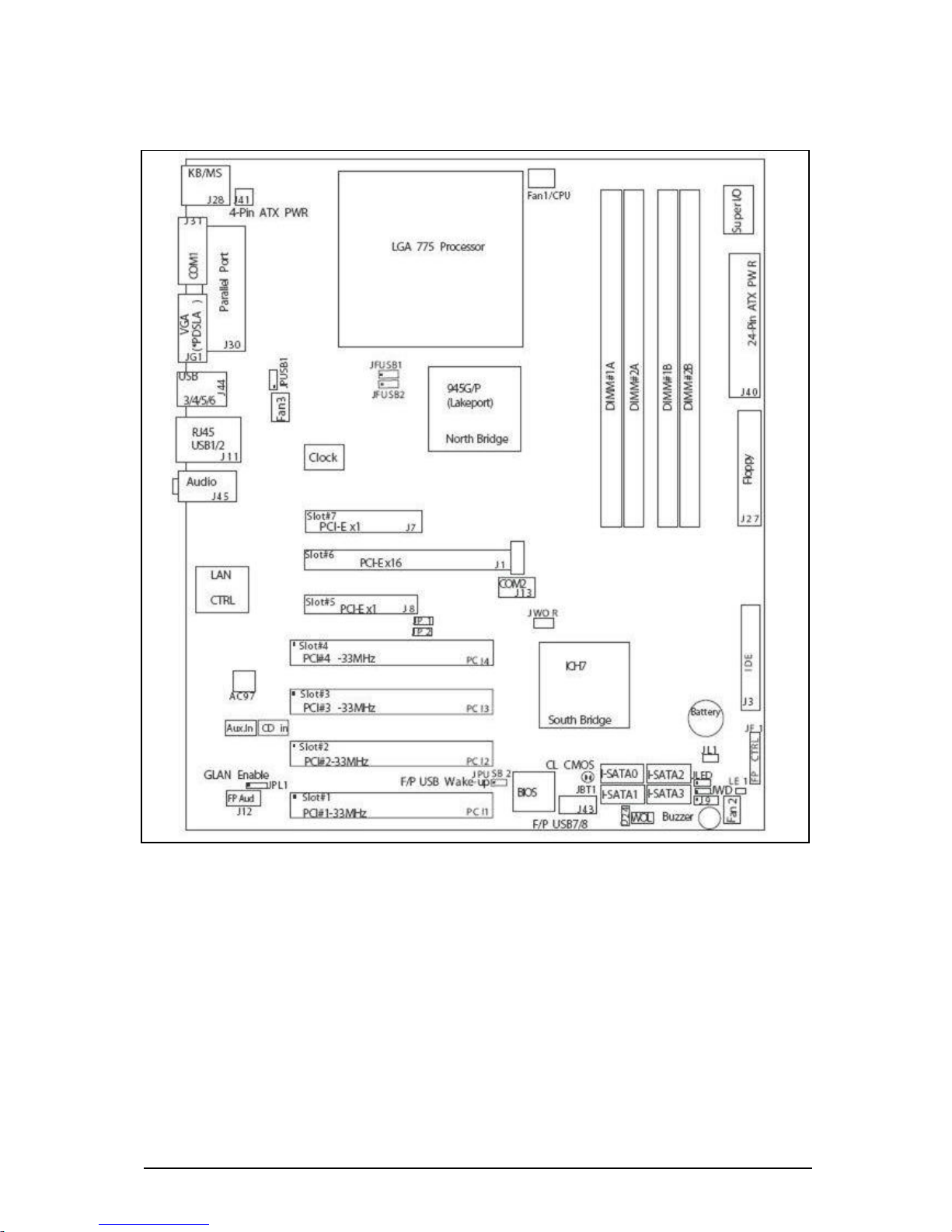
SystemBoardComponents
Figure 1: System Board Components
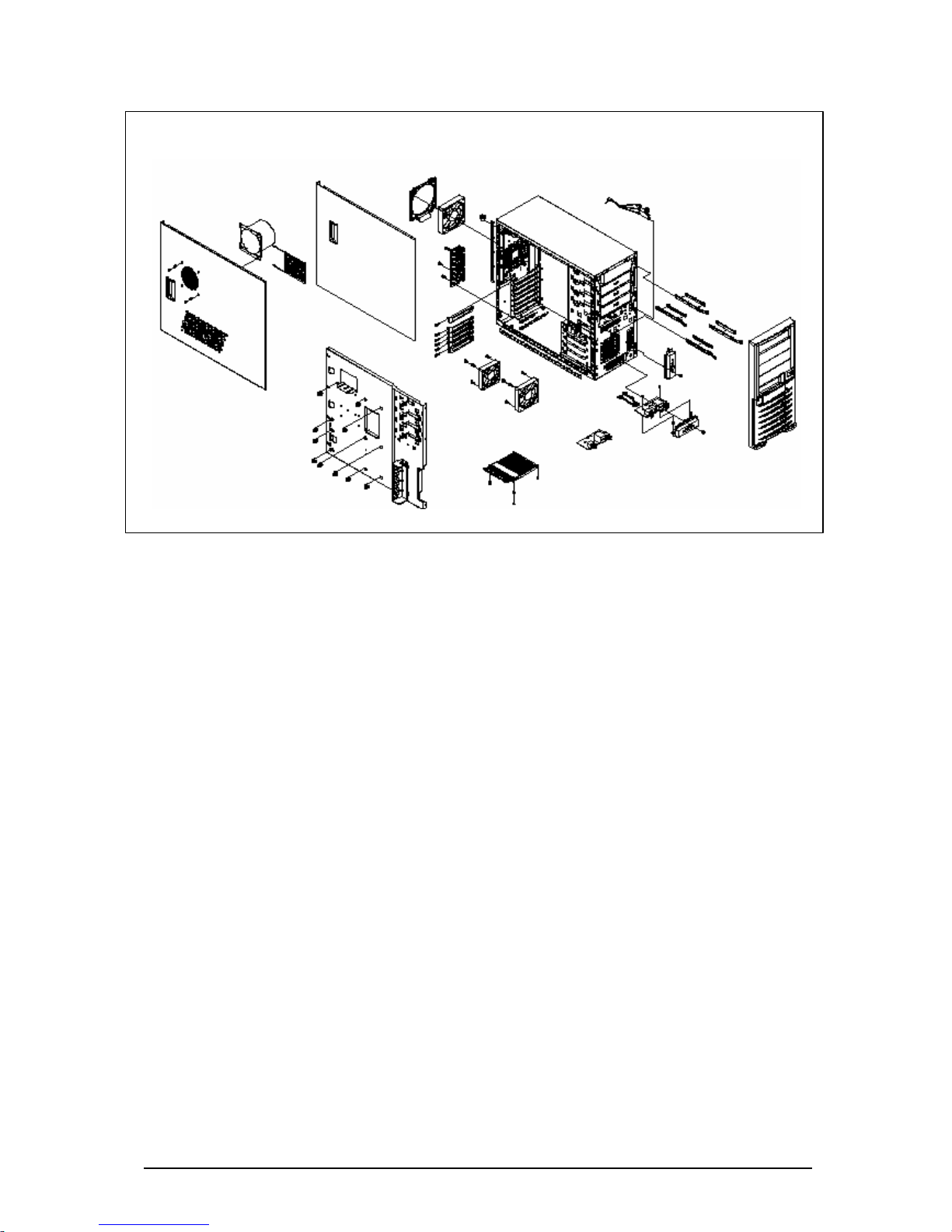
ChassisOverview
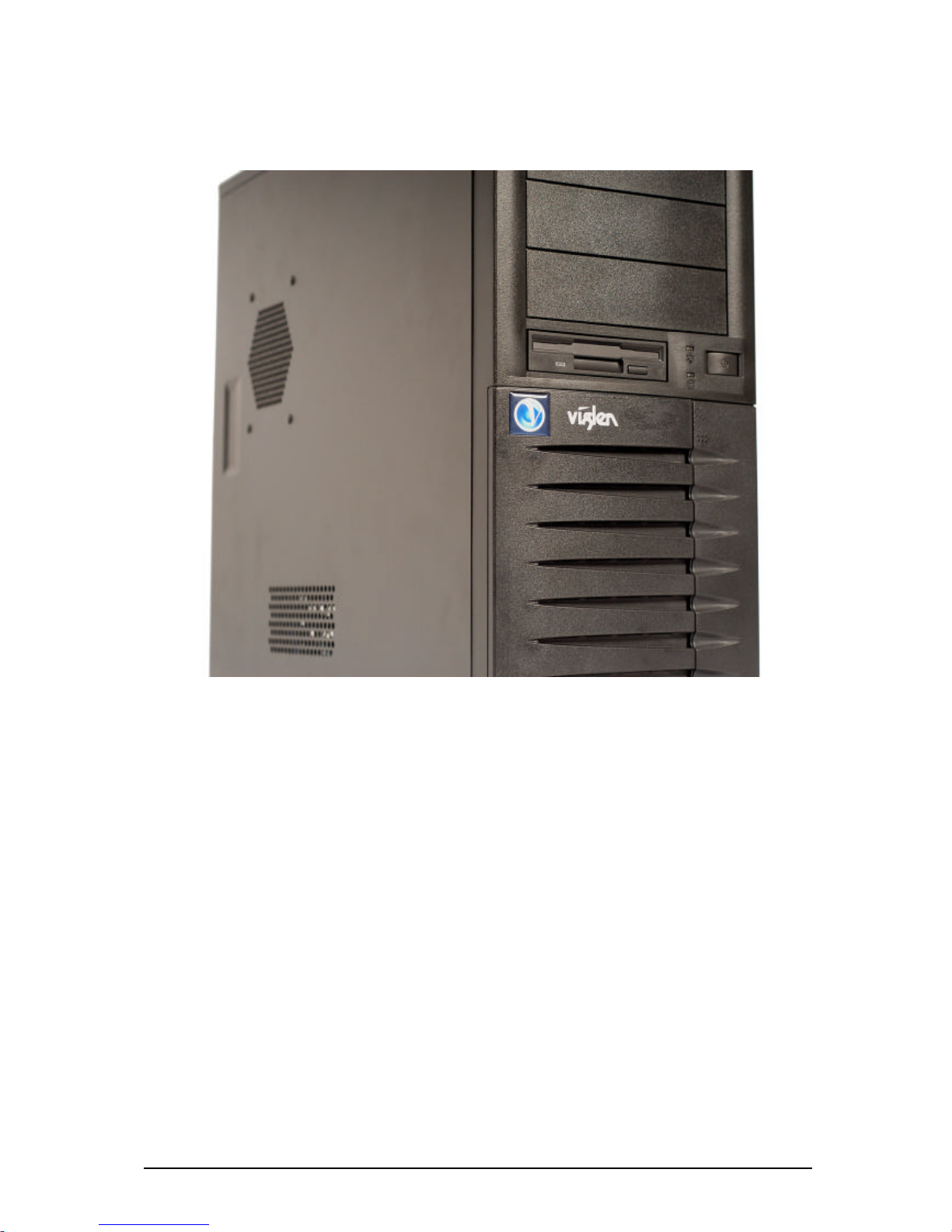
The galvanised metal chassis minimises EMI and radio frequency interference (RFI).
The removable access cover is attached to the chassis with two screws (can be
secured with locking handle) and provides easy access to the VIG385P Motherboard
and power supply.
ViglenBX130 –VIG385P User Manual 7
Figure 2: Chassis Overview
ViglenBX130 –VIG385P User Manual 8
Controls,Connectors,andIndicators
Figure 3: Front Panel
Note: The Front Panel on the BX130 has a Mini Door which when opening has Two
Front USB ports. The Front Audio is not available.

ViglenBX130 –VIG385P User Manual 9
ControlPanelButtons
There is one push-button located on the front of the chassis; which is a power on/off
button, shown in figure4.
POWER: This is the main power switch, which is used to apply or turn off the main
system power. Turning off system power with this button removes the main power
but keeps standby power supplied to the system.
Figure 4: Main Power Button
ControlPanelLEDs
The control panel provides system activity information. LEDs indicate power on and hard
disk drive activity. The control panel also includes a main power button.
Questo manuale è adatto per i seguenti modelli
1
Indice
Altri manuali Viglen Scrivania


