
Viking Components IntelliFlash Manuale utente
Manual No. 1005304
Release 11.2000, Rev. A
©
2000, Viking Components, Inc. All Rights Reserved.
USER’S GUIDE

Table of Contents
1 Introduction 1
IntelliFlash Features 1
IntelliFlash Specifications 2
2 Package Contents 3
3 Installation
Windows Me, 2000, 98:
Hardware Installation 4
Software Installation
Windows Me & 2000 5
Windows 98 6-10
Mac OS 8.6 or Later:
Software Installation 11-13
Hardware Installation 14
4 Using the Viking IntelliFlash
Operation Indication 15
Inserting & Removing a Memory Stick 16
Reading & Writing to a Memory Stick 17
5 Support
Frequently Asked Questions 18
Contacting Technical Support 19
6 Warranty & Disclaimer Information 20
VIKING COMPONENTS INTELLIFLASH USB MEMORY STICK READER USER’S GUIDE

1 Introduction
Congratulations on purchasing your Viking Components IntelliFlash™ USB
Memory Stick™ Reader for your computer. IntelliFlash utilizes USB technology,
the latest advancement in the PC industry, bringing you convenient, high-speed
access to Memory Stick cards.
IntelliFlash Features
• Compact external design for portability
• Hot swappable for card insertion and removal
• Up to 5 times faster than digital cameras with a
USB connection
• Image transfer rate up to 1.5 MB per second with USB
technology - up to 50 times faster than standard serial port
Chapter 1
1
VIKING COMPONENTS INTELLIFLASH USB MEMORY STICK READER USER’S GUIDE

IntelliFlash Specifications
• Supports Windows Me, 2000, 98, Mac OS 8.6 or newer
(with USB support)
• Host computer requirements:
586/686 level CPU
USB port
Windows 2000, 98 & Mac OS 8.6 or later
• Power Supply: +5V from USB port directly
• Data Transfer Rate: 1.5 MB/sec (max)
• Environment:
Operating temperature: 0˚C - 70˚C
Storage temperature: - 40˚C - 70˚C
Relative humidity: 95% (max. without condensing)
Chapter 1
2
VIKING COMPONENTS INTELLIFLASH USB MEMORY STICK READER USER’S GUIDE

2 Package Contents
In the Viking Components IntelliFlash box, you should find the following contents:
Contact your local dealer if this package does not contain the above contents.
Chapter 2
3
VIKING COMPONENTS INTELLIFLASH USB MEMORY STICK READER USER’S GUIDE
Viking IntelliFlash
(with USB Cable)
Software Installation
CD
This User’s Guide
3 Installation
Windows Me, 2000, 98 (Hardware Installation)
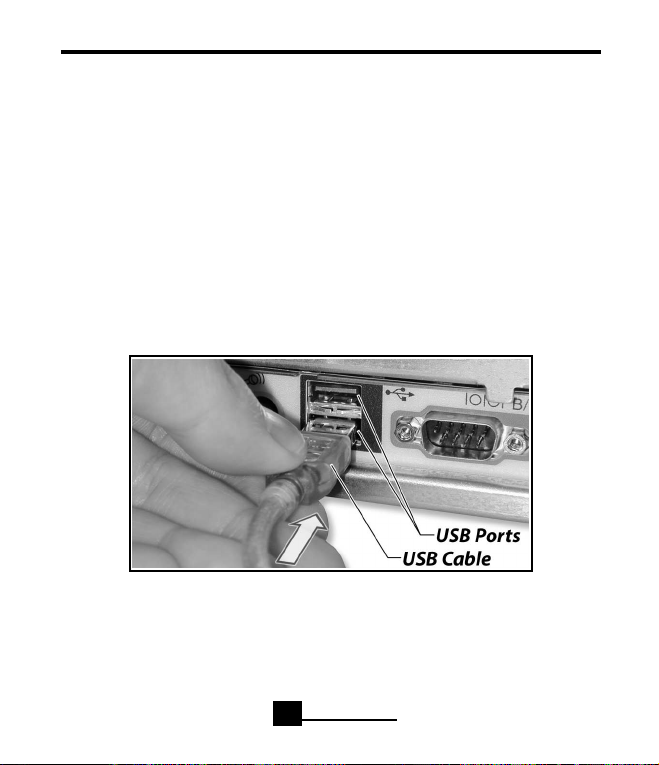
1. With your computer on, locate an available USB port on your computer and
connect it with the USB cable on the back of the Viking IntelliFlash USB
Memory Stick Reader. This port is usually located on the back of your system.
If you are not familiar with the location of the USB ports on your computer,
please refer to your systems “Owner’s Guide” for detailed instructions.
Note: The Viking Components IntelliFlash USB Memory Stick Reader must be
connected to a USB port on your computer or to a powered USB hub.
Your hardware installation is now complete. Proceed to the“Windows Me,2000,98
(Software Installation)” on page 5 to complete your installation process.
Chapter 3
4
VIKING COMPONENTS INTELLIFLASH USB MEMORY STICK READER USER’S GUIDE

Windows (Software Installation)
Windows Me & 2000 page 5
Windows 98 page 6-10
Windows Me & 2000 (Software Installation)
1. Once the reader has been inserted into the USB port, a“Found New Hardware”win-
dow will appear. The “New Hardware Wizard” will locate a generic driver already
installed on your system for the Viking IntelliFlash USB Memory Stick Reader.
2. In the“Found New Hardware” window,“USB to Memory Stick Reader”should appear.
3. Your software installation is now complete. For information on how to use the
Viking IntelliFlash, proceed to the section “Using the Viking IntelliFlash”on page 15.
Chapter 3
5
VIKING COMPONENTS INTELLIFLASH USB MEMORY STICK READER USER’S GUIDE
Windows 98 (Software Installation)
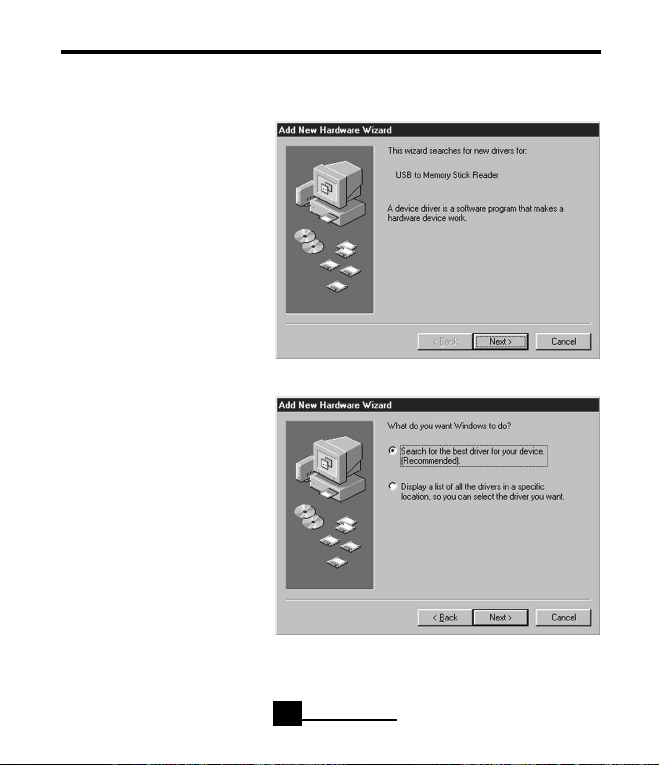
1. Once the reader has been
inserted into the USB port, a
“Found New Hardware”win-
dow will appear. Then the
“Add New Hardware Wizard”
window will appear to assist
you in the software installa-
tion process. Click the “Next”
button to continue.
2. When asked “What do you
want Windows to do?,” select
“Search for the best driver for
your device.
(Recommended).” Then click
the “Next” button. Insert the
supplied “Viking IntelliFlash
USB Memory Stick Reader”
CD into your system’s CD-
ROM drive at this time.
Chapter 3
6
VIKING COMPONENTS INTELLIFLASH USB MEMORY STICK READER USER’S GUIDE
Windows 98 (Software Installation) Continued
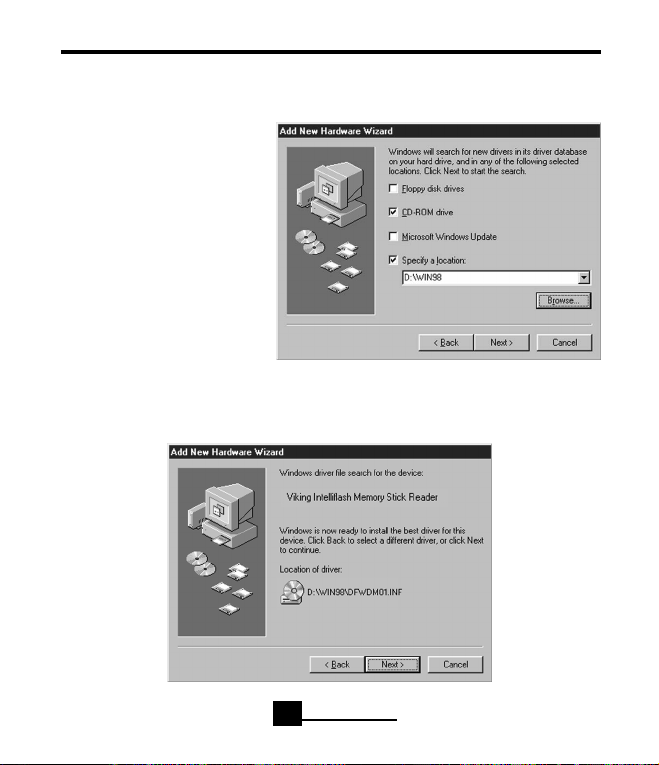
3. To direct the “Add New
Hardware Wizard”to the loca-
tion of the correct drivers for
the Viking IntelliFlash reader,
select “CD-ROM drive” and
“Specify a location:.” Click the
“Browse...” button and locate
your CD-ROM drive with the
Windows 98 drivers. Then
click the “Next” button.
4. To locate the driver for the “Viking IntelliFlash Memory Stick Reader” device on
the supplied CD-ROM, click the “Next” button.
Chapter 3
7
VIKING COMPONENTS INTELLIFLASH USB MEMORY STICK READER USER’S GUIDE
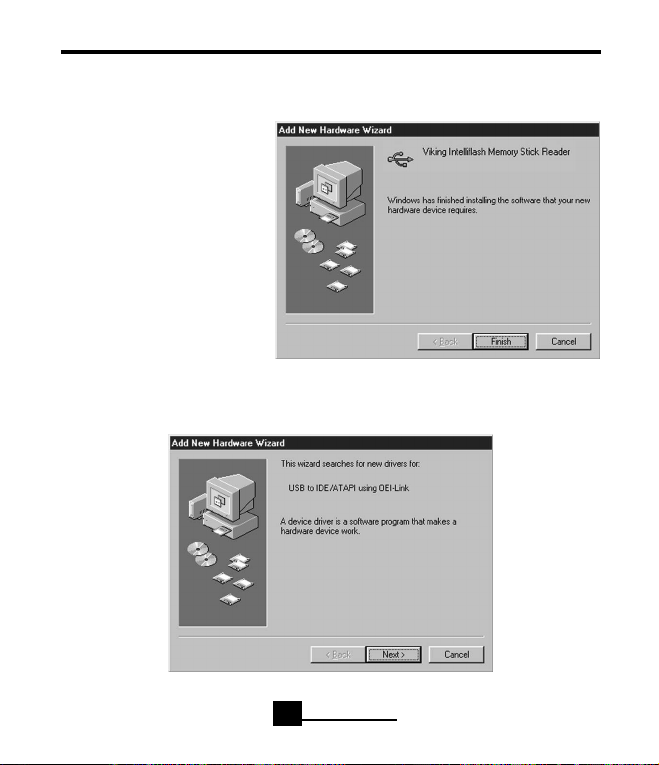
Windows 98 (Software Installation) Continued
5. The driver has been located
for the “Viking IntelliFlash
Memory Stick Reader”
device. Click the “Finish”
button to continue.
6. To locate the driver for“USB to IDE/ATAPI using OEI-Link,“ click the“Next” button.
Chapter 3
8
VIKING COMPONENTS INTELLIFLASH USB MEMORY STICK READER USER’S GUIDE
Indice


