
Vision HDIP01_02 Manuale utente

Model No.: HDIP01_02
Operating Instructions
Thanks for purchasing our product.
Please be sure to read this instruction manual
Carefully before using our product.

Introduction
The HDMI-IP Extender allows you to simultaneously send out an HDMI 1.3
Signal (including 1080p video with 5.1 audio) to one or more HDMI video
projectors or LCD Panels and return an IR control Signal to the source using
CAT5/6/7 Cable over a standard Ethernet infrastructure. Can be used to
distribute HD digital content from multiple Sources to up 200 remore
distribute on a LAN by cascading Managed Ethernet switches up to 3 levels,
allowing the display very far away from the 1080p source devices while
sustaining picture & sound quality. Each device is installed using 1 piece of
twisted pair cable. AV signals are transmitted digitally over the CAT5/6/7
cable without any signal loss. Internal JPEG video compression adapts to
available network bandwidth if needed. The integrated Scalar function allows
different input and output resolutions (different displays can be at different
resolutions). The IR TX / RX function can be used to remotely control the
HDMI source device from any receiver location.

Contents
HDMI-IP Extender............................................................................................ 1
Product Overview ............................................................................................ 1
Safety and Notice ............................................................................................ 1
Features........................................................................................................... 1
Package Contents............................................................................................ 3
Specifications................................................................................................... 3
Panel Descriptions........................................................................................... 3
Hardware Installation ....................................................................................... 5
Typical use....................................................................................................... 6
Product Service ............................................................................................... 7
●Maintenance ................................................................................................. 7
●Provided Service .......................................................................................... 7
●Mail-In Service.............................................................................................. 8
●Warranty ....................................................................................................... 8
●Warranty Limits And Exclusions.................................................................... 9


Page 1
HDMI-IP Extender
■Product Overview ( Model Number: HDIP01_020 )
■Safety and Notice
The HDMI extender has been tested for conformance to safety regulations
and requirements, and has been certified for international use. However, like
all electronic equipments, the HDMI extender should be used with care.
Please read and follow the safety instructions to protect yourself form
possible injury and to minimize the risk of damage to the unit.
}Follow all instructions and warnings marked on this unit.
}Do not attempt to service this unit yourself, except where explained in this manual.
Provide proper ventilation and air circulation and do not use near water.
}Keep objects that might damage the device and assure that the placement of this unit is
on a stable surface.
}Use only the power adapter and power cords and connection cables designed for this unit.
}Do not use liquid or aerosol cleaners to clean this unit. Always unplug the power to the
device before cleaning.
■Features
zHDMI 1.3 compliant.
zExtend the transmission distance to at least 100 meters from the sources
at 1080p.
zHDCP compliant.

Page 2
"Notice
Grandbeing Inc. reserves the right to make changes in the hardware,
packaging and any accompanying documentation without prior written notice.
Warning
To reduce the risk of fire, electric shock or product damage:
1. Do not expose this apparatus
to rain, moisture, dripping or
splashing and that no objects
filled with liquids, such as vases,
shall be placed on the apparatus.
6. Clean this apparatus
only with dry cloth.
2. Do not install or place this unit
in a bookcase, built-in cabinet or
in another confined space.
Ensure the unit is well ventilated.
3. To prevent risk of electric
shock or fire hazard due to
overheating, do not obstruct
the unit’s ventilation openings
with newspapers, tablecloths,
curtains, and similar items.
4. Do not install near any heat
sources such as radiators, heat
registers, stoves, or other
apparatus (including amplifiers)
that produce heat.
5. Do not place sources of naked
flames, such as lighted candles,
on the unit.
7. Unplug this apparatus
during lightning storms or
when unused for long
periods of time.
8. Protect the power cord
from being walked on or
pinched particularly at
p
lu
g
s.
9. Only use attachments /
accessories specified by
the manufacturer.
10. Refer all servicing to
qualified service
personnel.

Page 3
■Package Contents
1. HDMI transmitting unit
2. HDMI receiving unit
3. 5V 1A power adaptor
4. User manual
■Specifications
Video Bandwidth: 2.25 Gbps (HDMI 1.3)
Input TMDS signal: 1.2 volts (peak-to-peak)
Input DDC signal: 5 volts (peak-to-peak)
HDMI Connector: 19 pin type female connector
Power Supply: 5V 1A
RJ-45 Connector
Dimensions: 13 0x 137 x 30mm (Lx W x H)
Weight: 1.6kg
■Panel Descriptions
Front Panel
→Front View - Transmitting Unit HDoIP01-001
zLink LED: Connect
zData LED: Data transmission
zPower LED: Power on

Page 4
Rear Panel
→Rear View –Transmitting Unit HDoIP01-001
zHDMI IN: Connect a HDMI source with a HDMI M-M cable here
zIR TX: Plug IR Emitter – stick onto the front of the device you want to
control
zETHERNET: Plug in a CAT5/5e/6 cable that needs to be linked to
HDIP01-002
zDC/5V: Connect to 5V DC power supply
Front Panel
→Front View - Receiving Unit HDoIP01-002
zLink LED: Connect
zData LED: Data transmission
zPower LED: Power on

Page 5
Rear Panel
→Rear View –Receiving Unit HDIP01-002
zHDMI OUT: Connect a HDMI display with a HDMI M-M cable here
zIR RX: Plug IR Receiver – picks up the infrared signal from your remote
control just like a TV or VCR
zETHERNET: Plug in a CAT5/5e/6 cable that needs to be linked to
HDIP01-001
zDC/5V: Connect to 5V DC power supply
■Hardware Installation
1. Connect your HDMI source (such as a DVD player) to the transmitting unit
HDIP01-001
2. Connect your HDMI display (such as a plasma TV) to the receiving unit
HDIP01-002
3. Connect your CAT-5/5e/6 cables between the transmitting and receiving
units
4. Make sure your CAT-5/5e/6 cables are tightly connected and not loose
5. Plug in 5V DC power cord to the power jack of HDIP01- 001 and
HDIP01-002
Page 6
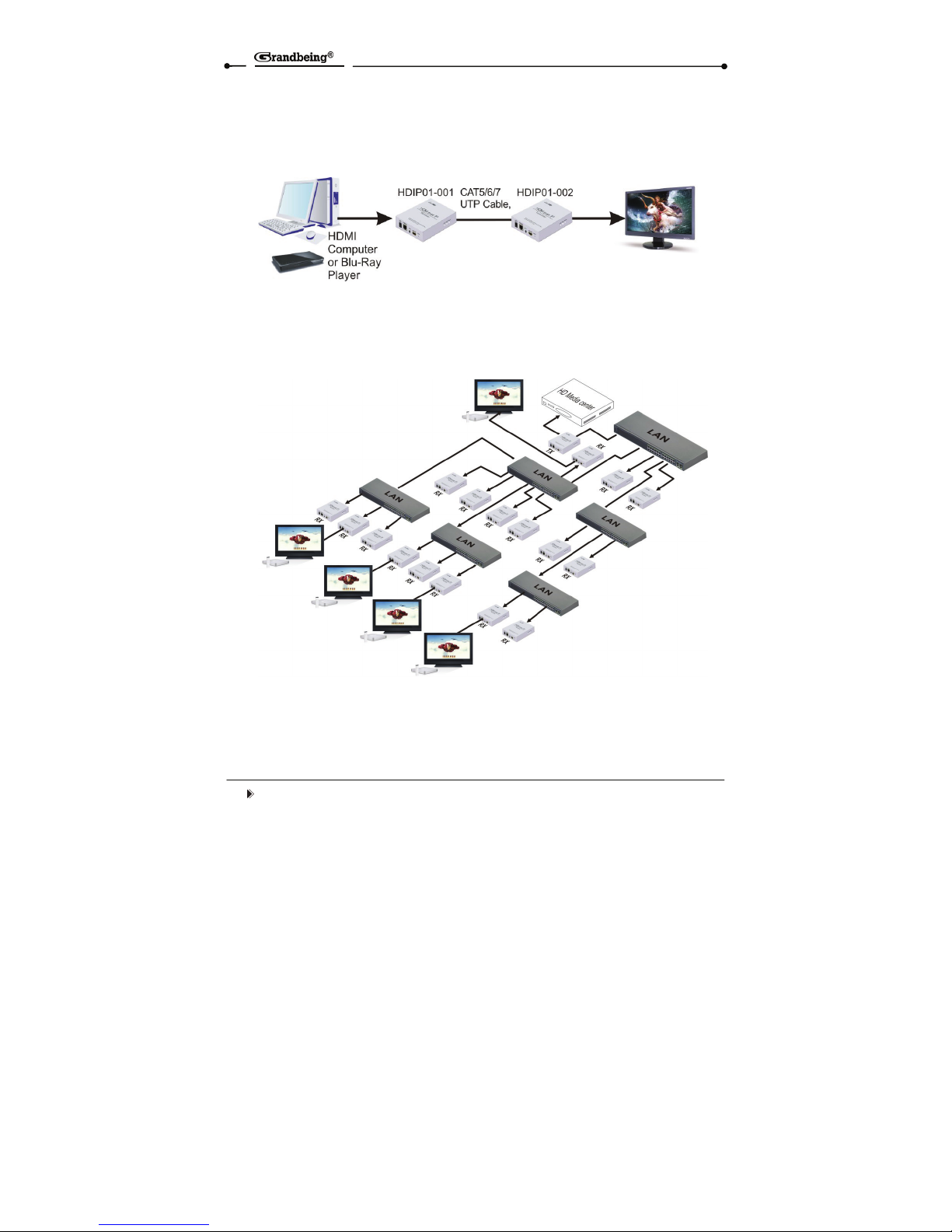
■Typical use
①Point-to-point Example
②Point-To-Many Example Over Standard Ethernet LAN
(TX—HDIP01-001, RX—HDIP01-002)
Indice
Altri manuali Vision Estensione

Vision
Vision EX0101-W50 Manuale utente

Vision
Vision TECHCONNECT HDBT Manuale utente

Vision
Vision TECHCONNECT TC-HDMIW30C Manuale utente

Vision
Vision TECHCONNECT TC2-HDMIAUD Manuale utente

Vision
Vision TECHCONNECT TC2-HDBT100Tx Manuale utente

Vision
Vision Techconnect TC2-HDMIW7 Manuale utente

Vision
Vision TECHCONNECT TC3 USBTP Manuale utente

Vision
Vision TC-HDMIIP/3 Manuale utente


