Vivo 108IP Manuale utente

Vivo 108IP
www.hotel-tech.com
Vivo 108IP Hotel Guest Room Telephone
User Manual

Vivo 108IP
www.hotel-tech.com
Tables of Contents
1.Getting Started...............................................................................................................................1
Technical Features..................................................................................................................... 1
2.Phone overview .............................................................................................................................2
3. Basic Call Handling ........................................................................................................................3
Do Not Disturb (WEB set >SIP account>Account 1> Do Not Disturb ) ......................................4
4. Web Settings .................................................................................................................................5
Configure Guide ........................................................................................................................5
SIP Account................................................................................................................................8
Audio......................................................................................................................................... 9
Advance...................................................................................................................................10
Phone Setting ..................................................................................................................10
VLAN Setting ...................................................................................................................12
VPN Setting .....................................................................................................................12
Dial Plan setting...............................................................................................................13
Global SIP ........................................................................................................................14
Phone Maintenance................................................................................................................15
Log...................................................................................................................................15
Password .........................................................................................................................16
Default Setting.................................................................................................................16
Auto Provision .................................................................................................................17
FTP Upgrade ....................................................................................................................19
TFTP Upgrade ..................................................................................................................20
HTTP Upgrade..................................................................................................................21
Reboot.............................................................................................................................22
Phone Status ...........................................................................................................................22
System Info..............................................................................................................................23
Tips:Please check IP address by pressing the button “*1*1*2” in the
on hook status.

Vivo 108IP
www.hotel-tech.com
1.Getting Started
Technical Features
Tips: The following functions in the unit cannot operation, only operate under the WEB.
Item
Technical Features
Language
WEB support Multi-language, e.g. Chinese, English, Russian, French etc.
Line
1
Function
Keys
Flash key, Redial key, Number Keys
VoIP Protocol
SIP 2.0
Network
Protocol
HTTP、BOOTP、FTP、TFTP、IEEE 802.1Q
Codec
G.723.1 (5.3K 6.4K b/S)、G.729 A (8Kb/s)、G.711 A/U (64Kb/S)、G.722(64Kb/S)
QoS
TOS, Jiffer Buffer, VAD, CNG, G.168 (32ms)
Network
1*RJ45 10/100M Ethernet interfaces(LAN)
IP Assignment: Static IP or DHCP
Speech
Handset
Call
Processing
Call Waiting, Call Forward, Call Holding, Call Pickup, Callback
Security
Password Login Web
Management
Upgrade: HTTP/TFTP/PnP auto-provision
Configurations: Phone/Web/auto-provision
Debug: Telnet/Phone/Web
Power
Supply
PoE(IEEE 802.af)
Specification
Storage Temperature: 0℃~ 60℃
Operating Humidity: 10%~90%
Size: 205mm*67mm*65mm
Net weight: 0.274kg
G.W/CTN: 0.373 kg
Operating Humidity::10% ~ 90%

Vivo 108IP
www.hotel-tech.com
2.Phone overview
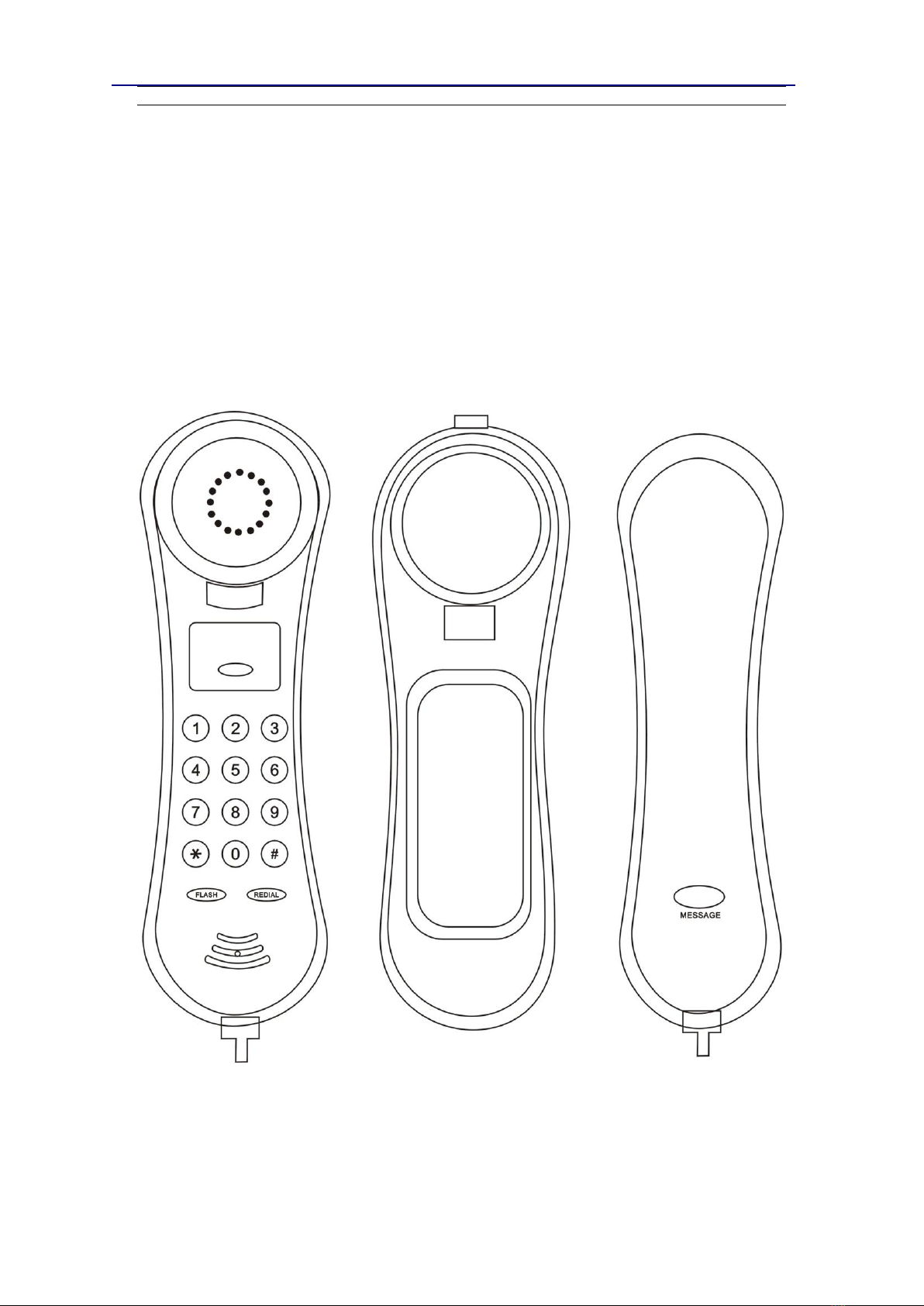
The unit keys and hardware

Vivo 108IP
www.hotel-tech.com
3. Basic Call Handling
You can perform basic call-handling tasks using a range of features and services. Feature
availability can vary; see your system administrator for more information.
Note: The bold type of the following text in table signifies the phone's button.
Placing a Call
Here are some easy ways to place a call on the Vivo 108IP Phone:
If you want to...
Then…
Place a call using the
handset
Pick up the handset
--1) You can hear dial tone;
--2) Enter a number;
--3) Press #button (default) ,-or wait 5s
(default), then it send the number
automatically.
Redial
-- press “Dialed ”
Flash a call
>During a call, press the flash key to enter the transferred pattern with
dial tone. The call will be holding.
>When transferring the dialing, pressing the flash key can cancel the tra
nsferred function.
The call still be held
>Pressing the flash key can recover the on holding call
Answering a Call
You can answer a call by simply lifting the handset, or you can use other options if they are
available on the 108IP
If you want to...
Then...
Answer with a
handset
--1) Your phone ring;
--2) Light strip is Red
and flashing;
--Pick up the handset
Auto-answer
--1) WEB>Advance Phone Setting> “Auto answer”;
--2) Select “Enable”;
--3) Your phone answers incoming calls automatically after a few rings.

Vivo 108IP
www.hotel-tech.com
Ending a Call
To end a call, hang up. Here are some more details.
If you want to...
Then...
Hang up while using the
Handset
-- Return the handset to its cradle
Do Not Disturb (WEB set >SIP account>Account 1> Do Not Disturb )
To end a call, hang up. Here are some more details.
If you want to...
Then...
Turn on DND
-- web>SIPaccount>do not disturb>on
Shut down DND
-- web>SIPaccount>do not disturb>off

Vivo 108IP
www.hotel-tech.com
4. Web Settings
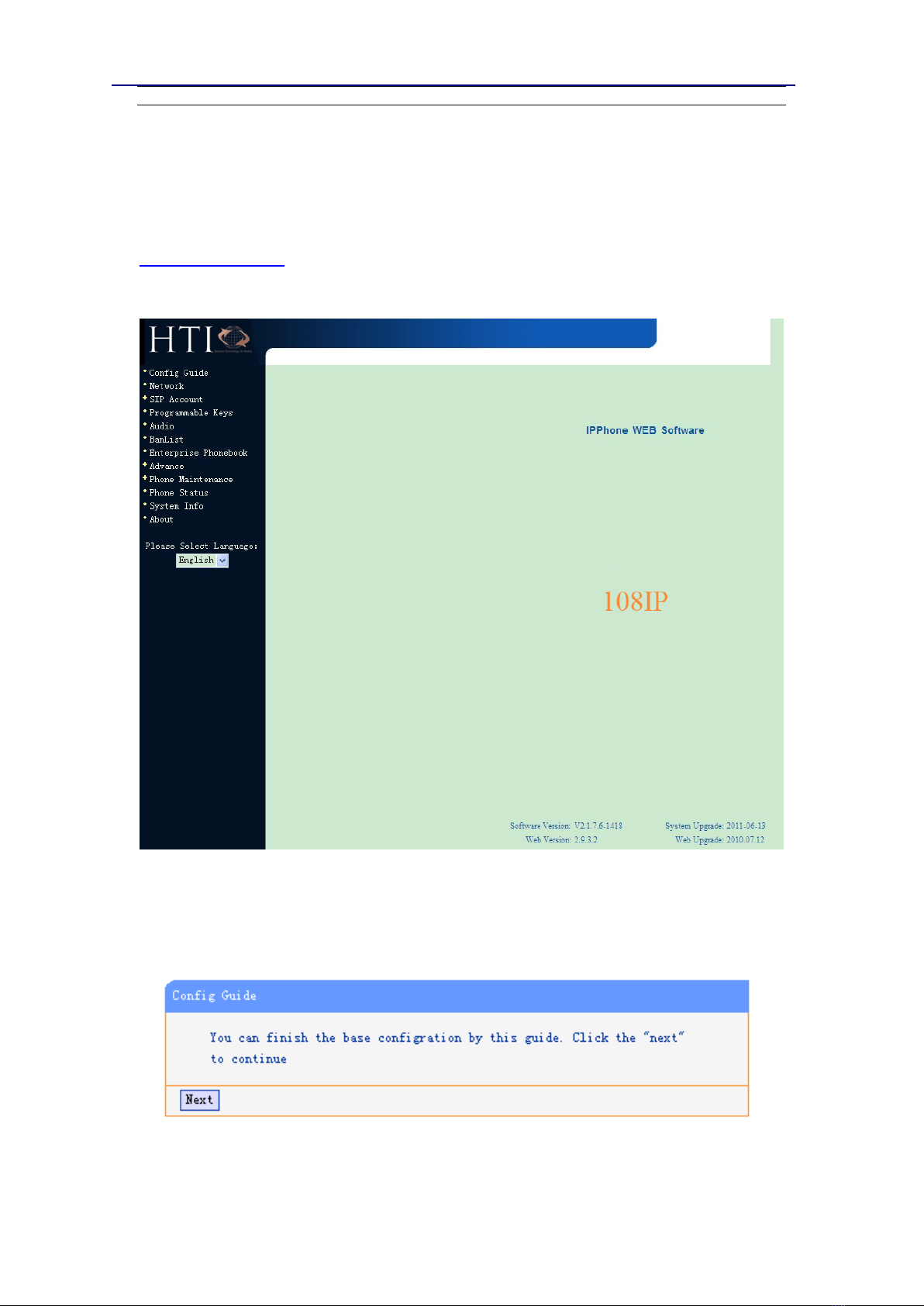
We can configure IP Phone more easily through web setting... Enter it (for example
http://192.168.0.200) into the address bar of web browser...Tips: Please check IP address by
pressing the button ‘*1*1*2’in the on hook status. The default login name and password are
both “root”.
Configure Guide
You can finish the base configuration step-by-step by this guide.
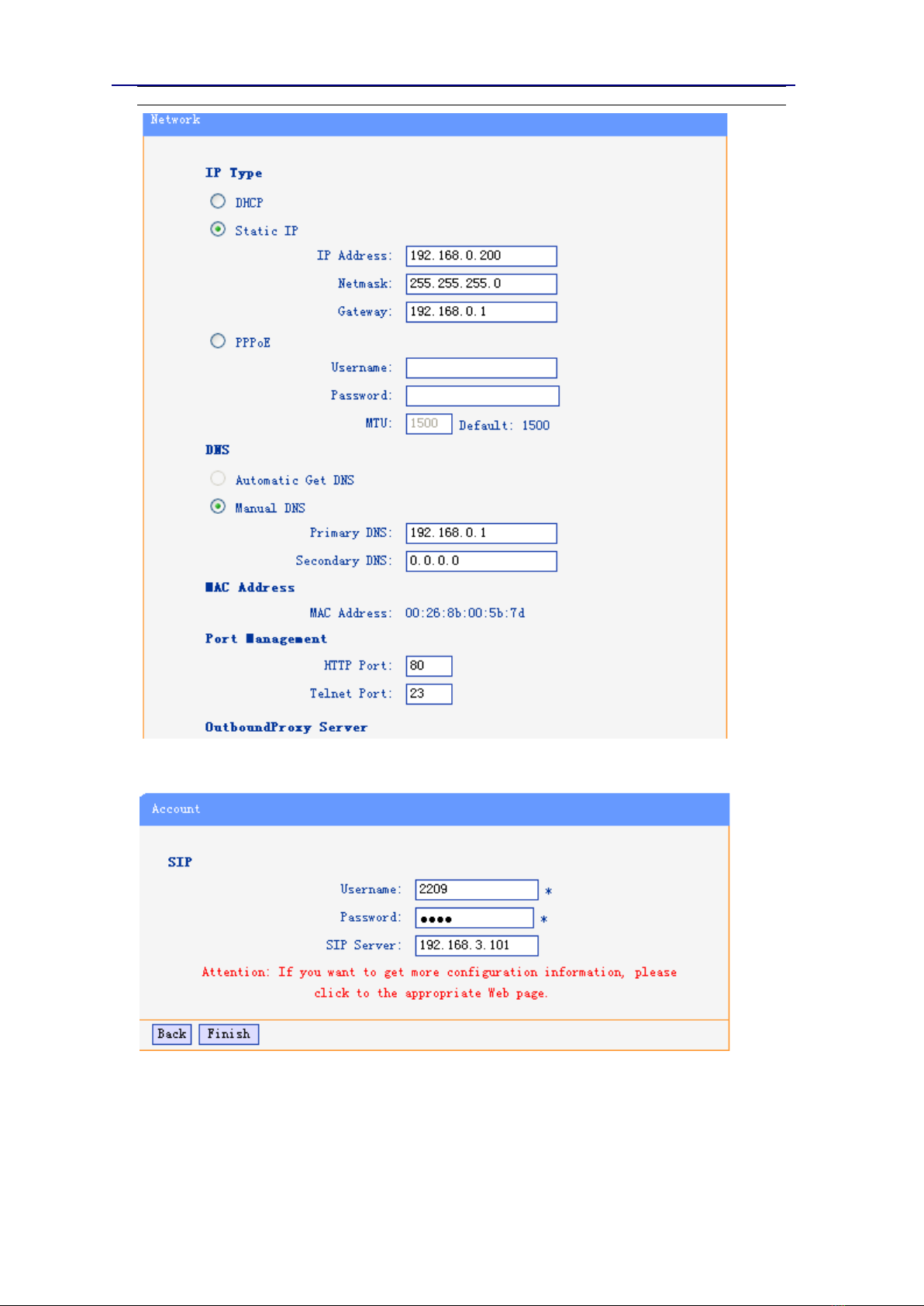
When press ‘next’, you can configure the Network parameters for the phone,

Vivo 108IP
www.hotel-tech.com
After configure the network parameter, press next, then you can configure sip account for the
phone.
Press Finish, the base configuration of the phone is complete, now you can use the phone to call
with sip.

Vivo 108IP
www.hotel-tech.com
Network
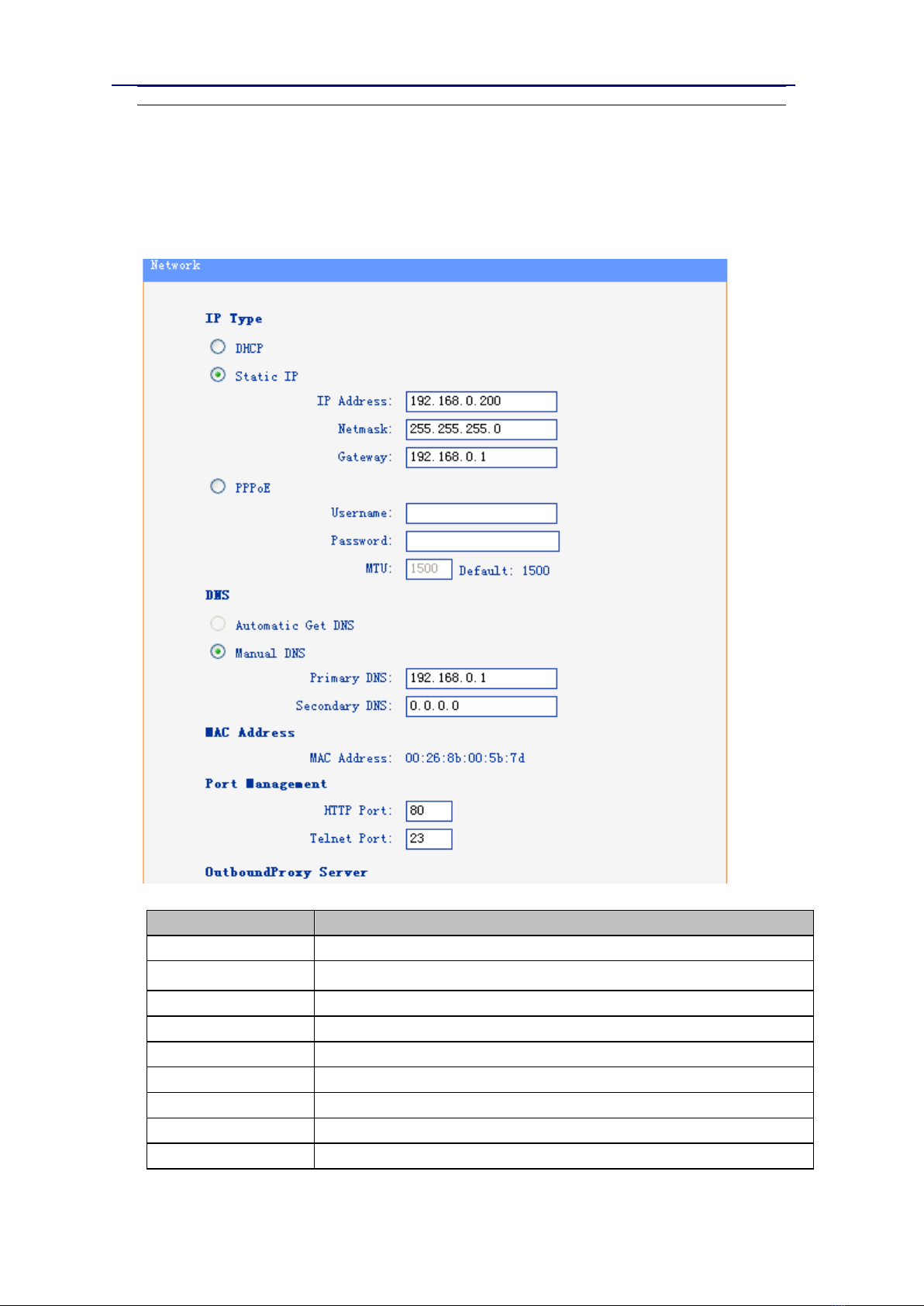
You can configure the network parameters for the phone on the web page.
Choose network, you will find the following parameters:
Field
Description
DHCP
Configure the phone get IP info from DHCP server
IP Address
Configure the IP manual for phone
Netmask
Configure the netmask manual for phone
Gateway
Configure the gateway manual for phone
Username (pppoe)
The pppoe username
Password (pppoe)
The pppoe password
MTU (pppoe)
The mtu for pppoe, default is 1500
Primary DNS
The primary DNS server
Secondary
The secondary DNS server

Vivo 108IP
www.hotel-tech.com
MAC Address
Display the MAC of the phone
HTTP Port
The default web port is 80,if you change it(for example change it to88),
You must use IP and Web port to login the web page (for example
http://192.168.0.200:88). It will take effect on next reboot.
Telnet Port
The default Telnet port is 23, if you change it (for example change it to
2003), you must use IP and Telnet port to login the manage page (for
example telnet 192.168.0.200:2003).It will take effect on next reboot.
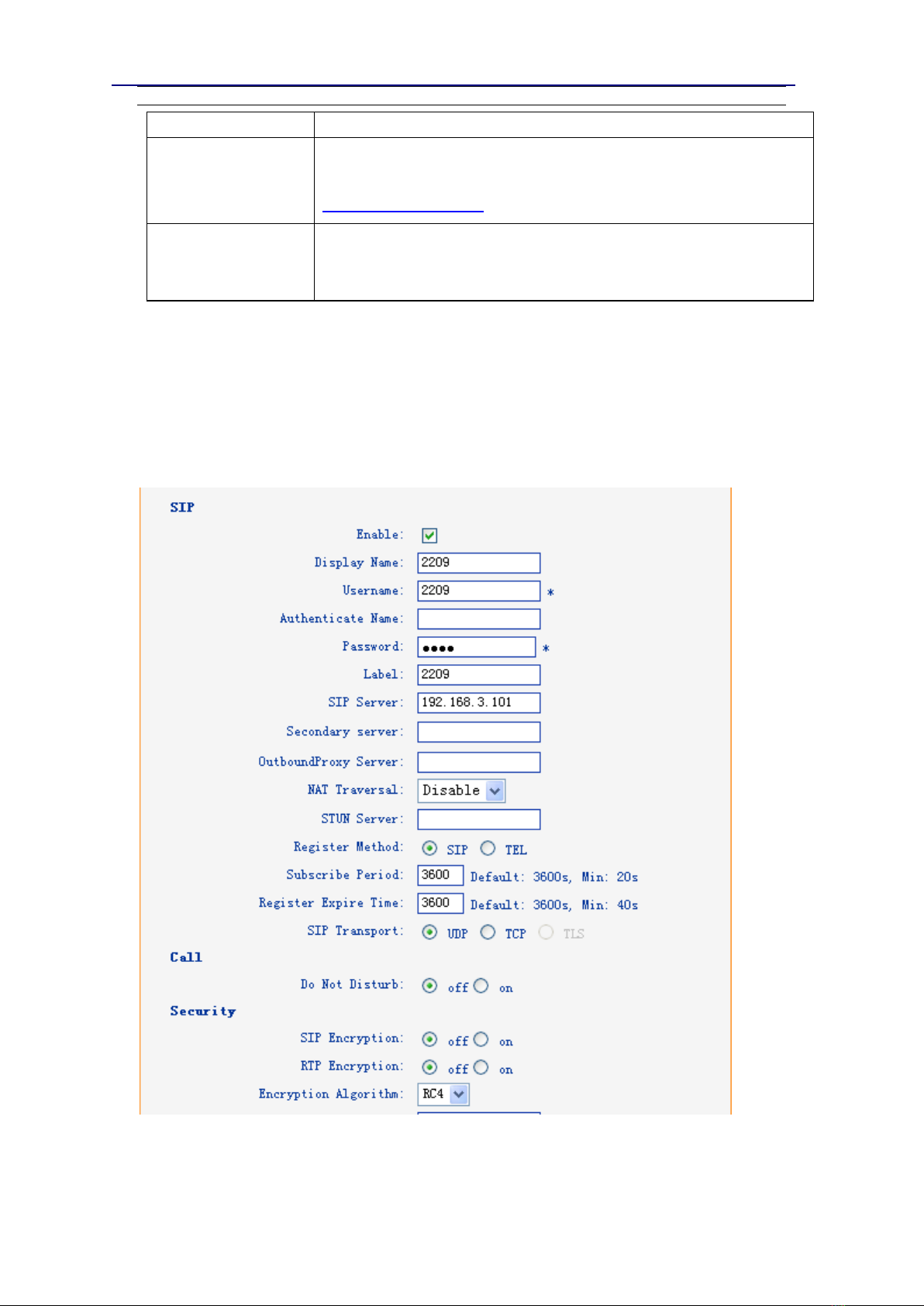
SIP Account
The phone attempts to register to the SIP server using the account/registrar data provided by
the automatic or manual initialization.
Indice
Altri manuali Vivo Telefono