
Vivotek IP Surveillance Guida all'installazione


Welcome to
Planet VIVOTEK
About VIVOTEK:
VIVOTEK Inc., founded in 2000, has quickly taken its place as a leading manufacturer
in the IP surveillance industry. VIVOTEK specializes in the integration of audio-visual
components into network operation. Using sophisticated codec technologies, VIVOTEK's
innovative R&D team develops a wide range of multimedia communication products.
In 2006, VIVOTEK became a publicly traded company in the Taiwan Stock Exchange
offering sales, support, and other services in over 70 countries through a wide network of
distributors and system integrators.

Table of Contents
Chap.1 IP Surveillance Overview 01
1.1 Overview 01
1.2 Network Cameras 01
1.2.1 Introduction 01
1.2.2 Camera Types 03
1.3 Video Servers 04
1.4 Network Video Recorders 05
1.5 Central Management Software 05
1.6 Evolution of Video Surveillance 06
Chap.2 Lens and Image Sensor Technology 07
2.1 Lens 07
2.1.1 Focal Length 07
2.1.2 Iris 08
2.1.3 Lens Mount Types 09
2.2 Image Sensor 11
2.2.1 Sensor Types 11
2.2.2 Resolutions 11
2.2.3 Sensor Scan Modes 13
2.2.4 Wide Dynamic Range 14
2.3 Lens and Image Sensor Considerations 14
2.3.1 Lens Form Factors for Image Sensor 14
2.3.2 View Angle 15
2.3.3 Day and Night 15
Chap.3 Video and Audio Compression 19
3.1 Video Compression 19
3.1.1 MJPEG 19
3.1.2 MPEG-4 20
3.1.3 H.264 21
3.2 Audio Compression 22
3.2.1 G.711 22
3.2.2 AMR 22
3.3.3 AAC 22
3.3 Video and Audio Streaming 23
3.3.1 Multiple Streams 23
3.3.2 Two-way Audio 23

Table of Contents
Chap.4 IP Network 25
4.1 Network Types 25
4.2 Network Devices 25
4.3 IP Address 26
4.4 Network Protocols 27
4.4.1 Device Connection 27
4.4.2 Transmission Protocols 30
4.4.3 Video Transmission Methods 30
4.4.4 EventNotication 31
4.4.5 Timing Correction 31
4.4.6 Video Quality Control 31
4.5 Wireless Networks 32
4.5.1 WiFi 32
4.5.2 3GPP 32
4.5.3 WiMAX 32
4.6 Security 33
4.6.1 IP Filtering 33
4.6.2 Username and Password 33
4.6.3 Security Protocols 33
4.6.4 Security Wireless Transmission 34
4.7 PoE 35
Chap.5 Camera Housing and Mounting 37
5.1 Housing 37
5.1.1 Vandal-proof 37
5.1.2 Weather-proof 37
5.1.3 Covering 38
5.2 Mounting 39
5.3 Scanner 40
Chap.6 Bandwidth and Storage 41
6.1 Bandwidth Management 41
6.1.1 Assessing Demands 41
6.1.2 Calculation 41
6.2 Storage 41
6.2.1 Assessing Demands 41
6.2.2 Storage Media 42
6.3 Redundancy 43
6.3.1 Cables 43
6.3.2 RAID 43

Table of Contents
Chap.7 Video Management 45
7.1 Video Management Platforms 45
7.1.1 PC-based 45
7.1.2 NVR-based 46
7.2 Basic Features of Software 47
7.2.1 Monitoring 47
7.2.2 Recording 48
7.2.3 Playback 48
7.2.4 Management 49
7.3 Advanced Features 49
7.3.1 E-map 49
7.3.2 Auto-backup 49
7.3.3 Failure Report 49
7.4 Digital I/O Devices 49
7.4.1 Digitial Input Devices 49
7.4.2 Digital Output Devices 50
7.5 Managing Large Systems 50
Chap.8 Applications 51
Chap.9 System Design 53
9.1 Identifying Customer Needs 53
9.1.1 Viewing Considerations 53
9.1.2 Environmental Considerations 54
9.2 System Planning 58
9.2.1 Camera Considerations 58
9.2.2 Hardware Considerations 58
9.2.3 Software Considerations 58
9.3 Installation and Checks 58
9.3.1 On-site Installation 58
9.3.2 Post-installation Checks 58
9.4 Operational Training 59
9.5 System Maintenance 60
Chap.10 Intelligent Video Systems 61
10.1 Introduction 61
10.2 Architecture 61
10.2.1 Centralized Platform 61
10.2.2 Distributed Platform 62
10.3 Advantages of Distributed Architecture 63
10.4 Detection 63
10.4.1 Tamper Detection 63
10.4.2 Intelligent Motion Detection 64
10.4.3 Loitering Detection 65
10.4.4 License Plate Recognition 65
10.4.5 People Counting 66
Glossary 67

Chap.1 IP Surveillance Overview
1
1.1 Overview
Increasing penetration of the Internet and the development of innovative technologies have encouraged rapid
growth of the IP surveillance industry, driving changes in the video surveillance market. It is expected that IP
surveillance will be dominating the video surveillance market in the near future, with network cameras and video
servers being major trends.
An IP surveillance digitizes video streams and transmits them over networks, allowing users to view and manage
the video and images remotely with a networked device, such as a PC, anytime and anywhere. Key components
of an IP surveillance system consist of network cameras, video servers, network video recorders and central
management software. VIVOTEK provides a full range of products mentioned above to help customers build a
reliable and high performance IP surveillance system that meets their needs.
IPsurveillanceproductsarebeingusedinavarietyofapplicationelds,whichgenerallyfallintothefollowingfour
categories:
●Professional applications: transportation, government, industrial, construction, health care, etc.
●SMB applications: banking, education, retailing, recreation, etc.
●Home applications: residential surveillance, digital home, etc.
●3GPP applications: mobile surveillance, elder care, baby or pet viewing, etc.
1.2 Network Cameras
1.2.1 Introduction
A network camera, also known as Internet camera, IP camera or Internet video camera, transmits live digital video
over an Ethernet network to back-end devices such as a PC or 3G phone. With a dedicated IP address, a built-in
web server and audio/video streaming protocols, it can work independently for real-time monitoring.
Images from network cameras can be viewed with a web browser such as Internet Explore, Firefox, Mozilla and
Opera, enabling customers to perform live viewing on different networked devices. In addition, customers can
control and manage multiple cameras at the same time in any places where network connection is available.
Therefore, an IP surveillance system is easier and more convenient to use compared with a CCTV system.
IP Surveillance Overview
Chap.1

Chap.1 IP Surveillance Overview
2
A network camera mainly consists of a lens, an image sensor, an image processor, a video compression SoC
(System on Chip) and an Ethernet chip that offers network connectivity for data transmission (Figure 1.2).
When light passes through the lens to the sensor, it is converted to digital signals and then processed by a built-in
digital signal processor. The processed video data is then compressed by a multimedia SoC to achieve a smaller
data size for optimal transmission. Finally, the video images are sent through the Internet to back-end devices to
allow for viewing and storage. Apart from video compression, the SoC is built with a RISC CPU for processing
system and network data.
The general interface of a network camera includes a power cord socket, an Ethernet socket, audio I/O ports and
digital I/O ports (Figure 1.3).
Router
Lens Image
Sensor
DSP for Image
Processing
SoC for
Video/audio
Compression
Flash
ROM DRAM
WLAN or
Ethernet/PoE LAN/Internet
Power Cord
Socket
Ethernet 10/100
RJ45 Socket
Indented Reset
Button
General I/O
Terminal Block
Audio Out
External/Internal
MIC Switch
Microphone In
Status LED
SD/SDHC
Card Slot
Figure 1.3 General interface of network camera
Figure 1.2 Network camera composition
Figure 1.1 Network camera connection

Chap.1 IP Surveillance Overview
3
In addition to a full-range IP surveillance product lineup, VIVOTEK has achieved competitive advantages over
other rivals in terms of multimedia SoC design, EE & ME integration and multimedia SDK. With these capabilities,
VIVOTEK is able to provide highly integrated products with superior image quality, comprehensive customer
services and versatile application solutions.
1.2.2 Camera Types
Generally,networkcamerascanbedividedintofourtypesfordifferentapplications,includingxed,pan/tilt/zoom,
xeddomeandspeeddome.
Fixed Type
A fixed network camera points in a fixed direction to monitor a specific area, such as hallways, staircases or
corridors. Because people can be aware of the camera’s shooting direction, in some cases, it can deter vandalism
and crimes.
AxednetworkcamerausuallycomeswithaRS-232/422/485interfacethatconnectsthecamerastoapan/tilt
scanner for wider coverage.
Manyxednetworkcameras has exchangeable C/CS-mountlensdesign,givinguserstheability to change the
lens to adapt for different monitoring conditions. For more information on C/CS-mount, please refer to Chapter 2.
Figure 1.4 Fixed network camera
Figure 1.5 PTZ network camera
Pan/Tilt/Zoom Type
Capableofchangingshootingdirectionhorizontallyandverticallytoachieveawideeldofview,apan/tiltnetwork
camera is used in many spacious areas, such as lobbies or parking lots.
Some pan/tilt network cameras are integrated with zoom capability so as to provide close-up images of distant
objects. Users can easily control PTZ functions through a web browser.

Chap.1 IP Surveillance Overview
4
Figure 1.8 Video server
1.3 Video Servers
A video server is a device that converts analog signals to digital, allowing users to migrate to a digital surveillance
system without replacing existing CCTV systems.
A video server mainly includes a compression chip and an Ethernet chip, with two main types available: one port or
four ports.
Speed Dome Type
Comparedwithxeddometype,aspeeddomenetworkcameraisintegratedwithpan,tiltandzoomcapabilities,
enablingafargreatereldofview.Withahighzoomcapability,imagestabilizationand360-degreeendlesspan,a
speed dome camera is mainly used for professional applications, such as airports, banks or city security.
Fixed Dome Type
A fixed dome network camera, mostly designed for indoor surveillance, has a housing to make the object of
interest less aware of where the camera is pointing at. With a 3-axis mechanism, images can remain in an upright
orientationwhenitisinstalledeitheragainstthewallorontheceiling.Furthermore,thedesignofaxeddome
networkcameracanbettertinwiththe decor.
Axeddomenetworkcameracanbefurnishedwithaweather-orvandal-proofhousingforoutdoorapplications.
Figure 1.7 Speed dome network camera
Figure 1.6 Fixed dome network camera
Chap.1 IP Surveillance Overview
5
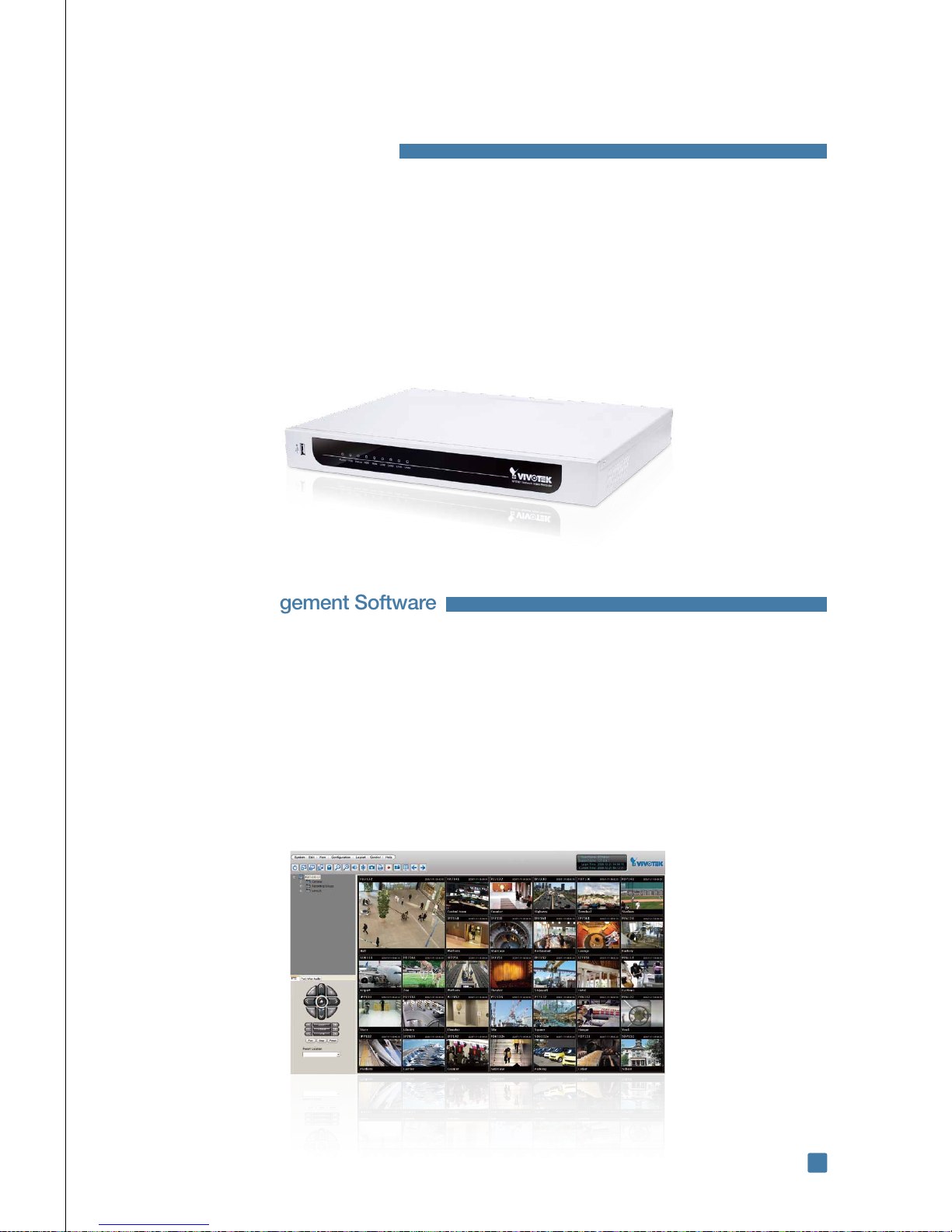
1.5 Central Management Software
Central management software, often provided by the camera vendors or individual software vendors, enables
customers to manage and control cameras from remote site. Typically, central management software is windows-
based, and thus can be installed in almost any PC.
Central management software employs client-server architecture where server software,client viewing software
and playback software is installed in separate PCs. Customers can perform live viewing, event-triggered recording
or playback on the client PC while managing cameras and performing constant recording with the server PC. Each
server PC can be scaled up to include several subordinate server PCs, and thus expand the number of managed
cameras.
VIVOTEK ST7501 central management software works seamlessly with VIVOTEK’s full-range network cameras
and video servers, helping customers establish a robust, flexible and efficient platform for centralized video
management.
Figure 1.10 Central management software
1.4 Network Video Recorders
An NVR (Network Video Recorder) is an IP-based recorder that operates independently from a PC or other
operation systems. Aimed to store digital video streams from network cameras, an NVR is usually incorporated
with a large-volume hard disk to allow for a long period of recording.
An NVR differs from a traditional DVR in its network connectivity, which allows digital data to be transmitted to other
networked devices over the Internet. Another difference is that an NVR can be directly connected to a network
camera while a DVR is usually be connected to an analog camera.
VIVOTEK’sNR7401helpsyoubuildahigh-efciencysurveillancesystem,whereyoucansimultaneouslyrecord,
monitor and manage video data through the Internet. NR7401 works seamlessly with all VIVOTEK network
cameras.
Figure 1.9 Network video recorder
Indice
Altri manuali Vivotek Sistema di sicurezza

Manuali Sistema di sicurezza popolari di altre marche


EDM
EDM Solution 6+6 Wireless-AE Manuale utente

Highway Safety Group
Highway Safety Group EA401 Manuale utente

Siren
Siren LED GSM Manuale utente

Detection Systems
Detection Systems 7090i Istruzioni per il montaggio

Se-Kure Controls
Se-Kure Controls MicroMini SK-4841 Manuale utente

Siemens
Siemens FDM273 Manuale utente