IMPORTANT SAFETY INSTRUCTIONS
• OnlypowerofthemarkedvoltagecanbeusedforyourTV.Anyothervoltagethanthespeciedvoltagemaycausereor
electricshock.
• Donottouchthepowercordduringlightning.Toavoidelectricshock,avoidhandlingthepowercordduringelectricalstorms.
• UnplugyourTVduringalightningstormorwhenitwillnotbeusedforlongperiodoftime.ThiswillprotectyourTVfrom
damageduetopowersurges.
• DonotattempttorepairorserviceyourTVyourself.Openingorremovingthebackcovermayexposeyoutohighvoltages,
electricshock,andotherhazards.Ifrepairisrequired,contactyourdealerandreferallservicingtoqualiedservicepersonnel.
• WARNING:KeepyourTVawayfrommoisture.DonotexposeyourTVtorainormoisture.IfwaterpenetratesintoyourTV,unplug
thepowercordandcontactyourdealer.Continuoususeinthiscasemayresultinreorelectricshock.
• DonotuseyourTVifanyabnormalityoccurs.Ifanysmokeorodorbecomesapparent,unplugthepowercordandcontactyour
dealerimmediately.DonottrytorepairyourTVyourself.
• Avoidusingdroppedordamagedappliances.IfyourTVisdroppedandthehousingisdamaged,theinternalcomponentsmay
functionabnormally.Unplugthepowercordimmediatelyandcontactyourdealerforrepair.ContinueduseofyourTVmaycause
reorelectricshock.
• DonotinstallyourTVinanareawithheavydustorhighhumidity.OperatingyourTVinenvironmentswithheavydustorhigh
humiditymaycausereorelectricshock.
• FollowinstructionsformovingyourTV.EnsurethatthepowercordandanyothercablesareunpluggedbeforemovingyourTV.
• WhenunpluggingyourTV,holdtheAC/DCpoweradapter,notthecord.Pullingonthepowercordmaydamagethewiresinside
thecordandcausereorelectricshock.WhenyourTVwillnotbeusedforanextendedperiodoftime,unplugthepowercord.
• Toreduceriskofelectricshock,donottouchtheconnectorwithwethands.
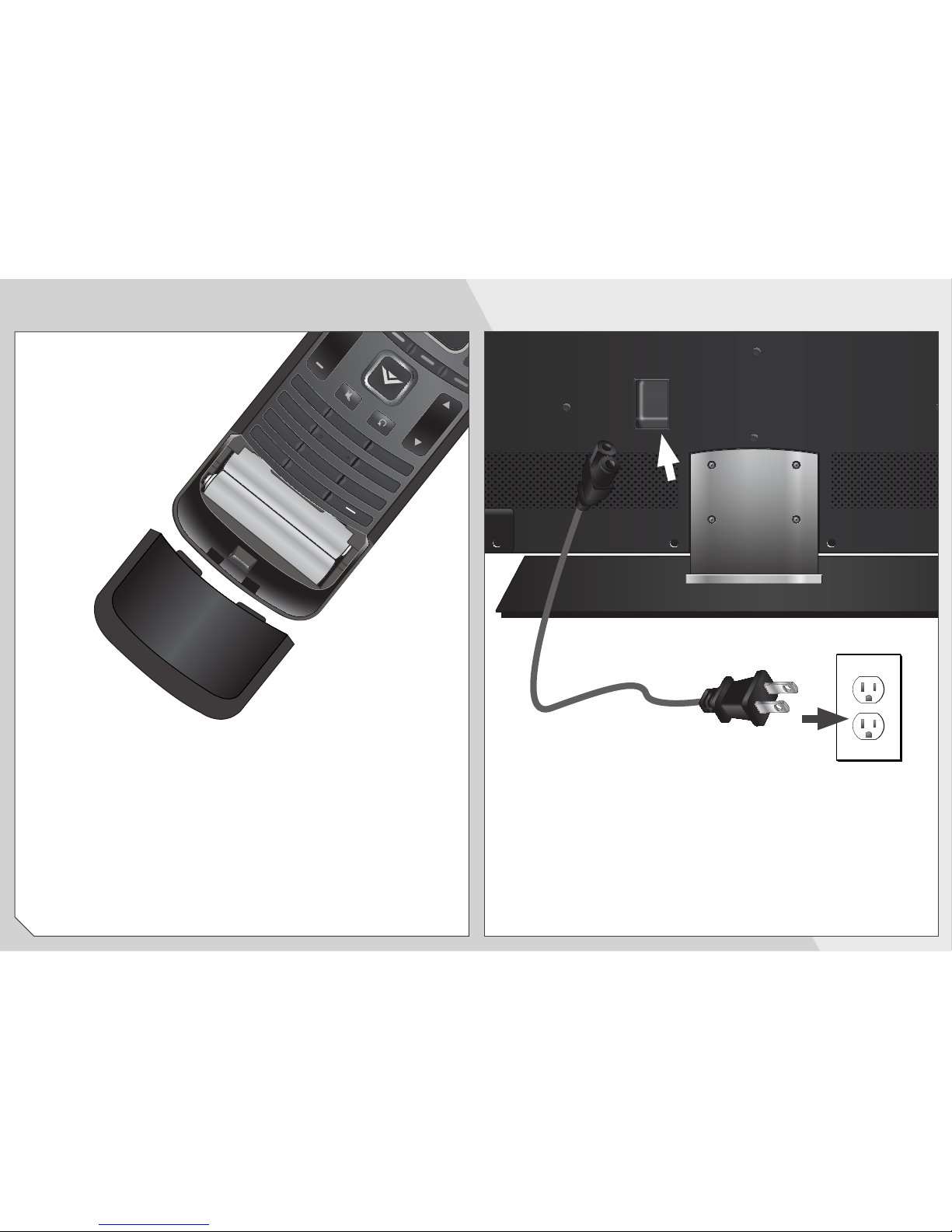
• Insertbatteriesinaccordancewithinstructions.Incorrectpolaritiesmaycausethebatteriestoleakwhichcandamagethe
remotecontrolorinjuretheoperator.Donotexposebatteriestoexcessiveheatsuchassunshine,reorthelike.
• Ifanyofthefollowingoccurs,contactthedealer:
-Thepowercordfailsorfrays.
-LiquidspraysoranyobjectdropsintoyourTV.
-YourTVisexposedtorainorothermoisture.
-YourTVisdroppedordamagedinanyway.
-TheperformanceofyourTVchangessubstantially.
• Thisapparatusshallnotbeexposedtodrippingorsplashingandnoobjectsllwithliquids,suchasvases,shallbeplacedon
theapparatus.
• Themainsplugorappliancecouplerisusedasthedisconnectdevice,thedisconnectdeviceshallremainreadilyoperable.
• CAUTION-Theseservicinginstructionsareforusebyqualiedservicepersonnelonly.Toreducetheriskofelectricshock,do
notperformanyservicingotherthanthatcontainedintheoperatinginstructionsunlessyouarequaliedtodoso.
Thelightningashwitharrowheadsymbolwithinanequilateraltriangleis
intendedtoalerttheusertothepresenceofuninsulatedDANGEROUSVOLTAGE
withintheproduct’senclosurethatmaybeofsufcientmagnitude
toconstituteariskofelectricalshocktopersons.
Theexclamationpointwithinanequilateraltriangleisintendedtoalerttheuser
tothepresenceofimportantoperatingandmaintenance(servicing)instructions
intheliteratureaccompanyingtheproduct.
YourTVisdesignedandmanufacturedtooperatewithindeneddesignlimits.Misusemayresultinelectricshockorre.Toprevent
yourTVfrombeingdamaged,thefollowinginstructionsshouldbeobservedfortheinstallation,use,andmaintenanceofyourTV.
ReadthefollowingsafetyinstructionsbeforeoperatingyourTV.Keeptheseinstructionsinasafeplaceforfuturereference.
Toreducetheriskofelectricshockorcomponentdamage,switchoffthepowerbeforeconnectingothercomponentstoyourTV.
• Readtheseinstructions.
• Keeptheseinstructions.
• Heedallwarnings.
• Followallinstructions.
• Donotusethisapparatusnearwater.
• Cleanonlywithadrycloth.
• Donotblockanyventilationopenings.Installinaccordancewiththemanufacturer’sinstructions.
• Donotinstallnearanyheatsourcessuchasradiators,heatregisters,stoves,orotherapparatus(includingampliers)that
produceheat.
• Protectthepowercordfrombeingwalkedonorpinched,particularlyatplugs,conveniencereceptacles,andthepointwhere
theyexitfromtheapparatus.
• Onlyuseattachments/accessoriesspeciedbythemanufacturer.
• Useonlywiththecart,stand,tripod,bracket,ortablespeciedbythemanufacturer,orsoldwiththeapparatus.
Whenacartisused,usecautionwhenmovingthecart/apparatuscombinationtoavoidinjuryfromtip-over.
• Unplugthisapparatusduringlightningstormsorwhenunusedforlongperiodsoftime.
• Referallservicingtoqualiedservicepersonnel.Servicingisrequiredwhentheapparatushasbeendamagedinanyway,
suchaswhenthepower-supplycordorplugisdamaged,liquidhasbeenspilledorobjectshavefallenintotheapparatus,the
apparatushasbeenexposedtorainormoisture,doesnotoperatenormallyorhasbeendropped.
• UnplugthepowercordbeforecleaningyourTV.
• WhenmovingyourTVfromanareaoflowtemperaturetoanareaofhightemperature,condensationmayforminthehousing.
WaitbeforeturningonyourTVtoavoidcausingre,electricshock,orcomponentdamage.
• AdistanceofatleastthreefeetshouldbemaintainedbetweenyourTVandanyheatsource,suchasaradiator,heater,oven,
amplieretc.DonotinstallyourTVclosetosmoke.OperatingyourTVclosetosmokeormoisturemaycausereorelectric
shock.
• Slotsandopeningsinthebackandbottomofthecabinetareprovidedforventilation.ToensurereliableoperationofyourTV
andtoprotectitfromoverheating,besuretheseopeningsarenotblockedorcovered.DonotplaceyourTVinabookcaseor
cabinetunlessproperventilationisprovided.
• NeverpushanyobjectintotheslotsandopeningsonyourTVcabinet.DonotplaceanyobjectsonthetopofyourTV.Doingso
couldshortcircuitpartscausingareorelectricshock.NeverspillliquidsonyourTV.
• YourTVshouldbeoperatedonlyfromthetypeofpowersourceindicatedonthelabel.Ifyouarenotsureofthetypeofpower
suppliedtoyourhome,consultyourdealerorlocalpowercompany.
• DonotapplypressureorthrowobjectsatyourTV.Thismaycompromisetheintegrityofthedisplay.Themanufacturer’s
warrantydoesnotcoveruserabuseorimproperinstallations.
• Thepowercordmustbereplacedwhenusingdifferentvoltagethanthevoltagespecied.Formoreinformation,contactyour
dealer.
• Whenconnectedtoapoweroutlet,powerisalwaysowingintoyourTV.Tototallydisconnectpower,unplugthepowercord.
• Thelightningashwitharrowheadsymbolwithinanequilateraltriangleisintendedtoalerttheusertothepresenceof
un-isolated,dangerousvoltagewithintheinsideofyourTVthatmaybeofsufcientmagnitudetoconstituteariskofelectric
shocktopersons.
• Donotoverloadpowerstripsandextensioncords.Overloadingcanresultinreorelectricshock.
• ThewallsocketshouldbeinstallednearyourTVandeasilyaccessible.
h