
VOO evasion Manuale utente

Operating instructions

Safety information
Your box has been manufactured to meet the safety standards in force. However, the instructions below should be respected to
ensure safe use. Keep these instructions in a safe place for future reference.
- The box contains no parts you can repair yourself. Any repair must be performed by qualied personnel, otherwise the usual
warranties will no longer apply.
- During thunderstorms, disconnect the box.
- To prevent the risk of re or electric shock, do not expose the device to rain or moisture.
- It is important to place the box on a stable surface. The ventilation openings must never be obstructed by objects such as
newspapers, tablecloths, curtains, etc.
- The box must not be installed near radiators, stoves or other heat-producing equipment. The box must not be exposed to
direct sunlight.
- Allow a clearance of at least 2 cm around the box to allow circulation of air and protect the unit from overheating.
- Do not place any combustible object, such as a candle, on the box.
- Do not place objects containing liquid on the device. The box must not be exposed
to any projection. If necessary, unplug the box from the mains supply and contact
your dealer.
- Make sure no objects are inserted into the various device openings.
- Clean the device with a soft damp (but not wet) cloth. Do not use an abrasive cloth or an
aerosol cleaner.
Your box is made from recyclable materials and components. The presence of the “crossed bin” symbol on a
device or its packaging means that this device complies with the European Directive 2012/19/EU. Find out about
the local regulations regarding the disposal of electronic devices. We invite you to comply with these regulations
and not to dispose of your old devices with your normal household waste in order to protect the environment and
human health.
The presence of the “recyclable material” symbol on the packaging or in the operating instructions means that
these items are recyclable. Do not dispose as household waste.
The presence of the “recyclable material” symbol on plastic parts means that these parts are recyclable. Do not
dispose as household waste.
The presence of the “Green Dot” on the packaging means that CISCO makes a nancial contribution to the organ-
isation “Avoidance and recovery of packaging waste”.
This device meets the requirements
of the European Directives.
- 2006/95/EC
- 2006/95/EC
- 2006/95/EC

3
Congratulations
You are holding the operating instructions of the .évasion
box, the latest generation of the VOO decoder.
Follow the instructions step by step and discover
awhole new TV experience.
Easier to user, unprecedented freedom and ultimately
more fun for the whole family.
So, ready to embark on
a new adventure?

4
chapter 1 Installation 6
1.1 Box contents 6
1.2 Hardware description 7
The .évasion box 7
The remote control 8
The hard drive 9
1.3 Connection diagrams 10
Connecting the box using an Ethernet cable 10
Connecting the box with Powerline Ethernet adapters 11
Connecting the box with a Wi USB stick 12
1.4 Remote control 13
Pairing the remote control with the .évasion box 13
Pairing the remote control with the television 14
chapter 2 Interface overview 16
2.1 How to navigate using the remote control 16
Central pad 16
Shortcuts 16
2.2 Main menu 17
Upper part 17
Lower part 17
2.3 How to navigate in the interface 19
Mini guide 19
Action menu 19
Transition screen 20
chapter 3 TV features 21
3.1 Channel hopping 21
Normal channel hopping 21
Fast channel hopping 21
Direct access to a channel 21
3.2 Timeshift 22
Pause 22
Fast forward and rewind 22
3.3 Tv guide 24
Navigating in your television programme 24
The grid 24
The listing 25
The video wall 25
3.4 Replay 26
Timeshift 26
On demand channels 26
Restart 26
3.5 Recording a programme 27
Automatic recording 27
Manual recording 28

5
Protecting a recording 28
Locking a recording 29
Managing a recording conict 29
Cancelling a recording 29
Remote recording 30
Accessing your recorded programmes 30
Failed recording 30
3.6 Library 31
Your recordings 31
Your purchases 31
Your personal content (DLNA) 31
3.7 VOD 32
Offer 32
How to order your lms? 33
Your selection 34
3.8 Radio 34
3.9 Teletext 35
3.10 Applications 35
3.11 Search 35
Keyword search 36
Advanced search 36
3.12 Subscription 36
How to subscribe to new channels/
new bundles from your .évasionbox?
36
chapter 4 Settings 37
4.1 Settings 37
Usage parameters 37
4.2 System settings 39
Installation 39
PIN codes and locking 39
Audio outputs 40
Video outputs and TV formats 41
Media center 42
Hard drive 42
Standby 43
Reset 43
4.3 Diagnosis of the .évasion box 43
4.4 Messages 44
chapter 5 Annexes 45
5.1 FAQs 45
5.2 Summary of the interface icons 47
5.3 List of the remote control codes 48
5.4 Structure of the menus of the .évasion box 50
Caption Tip Note Warning More information

Manuel d’utilisation
6
chapter 1 Installation
1.1 Package contents
.évasion box
remote control
+ 2 AAA batteries
operating instructions
HDMI cable
power cable
coaxial cable
adapter
Ethernet cable
The cables and adapters are certied by VOO and intended for connecting the box.
Use only these accessories to avoid failure and/or connection problems.

7
1.2 Hardware description
The .évasion box: front panel
1Serial number
2 RF IN connector: to connect your box to the wall cable television socket or the network interface unit (NIU)
using the coaxial cable
3RF OUT connector: to connect your box to a television set (for analogue television) or a recorder using
acoaxial cable
4IR connector: to integrate an extension of the Infra Red receiver for remote control
5Ethernet connector: to connect your box to your VOO modem via an Ethernet cable
6USB connector: to connect a Wi USB stick (Dongle) or an external storage unit
7HDMI connector: to connect your HD Ready or Full HD television using the HDMI cable
8Video Out: analogue video connector to plug your box into an external device
9Digital S/PDIF audio connector: to plug your box into a home cinema
10 RCA analogue audio connectors: to plug your box into an analogue amplier
11 Slot for smart card: not required on your box
12 Scart connector: to connect your box to your television if the latter has no HDMI port
13 Reset button
14 Power connector
15 ON/OFF button
16 Remote pairing button: to pair your box with a remote control
1
3
5
7
108 11
12 14 15
16
4 1392 6
134 2
1Standby button
2Navigation and conrmation keys
3LED showing the channel or box status
4USB connectivity
The .évasion box: back panel

8
1.2 Hardware description
The remote control
26 1
3
5
7
10
8
11
12
14
15
16
25
21
4
13
9
24
23
22
20
19
18
17
2
6
1Switching your box on and off
2Red LED
3Saving or programming a recording either live on
achannel or from the ‘TV guide’
4Start, resume or pause the playback of a recording
or a VOD programme.
Also allows you to pause and resume the live
programme if in ‘timeshift’ mode
5Fast forward
6Access to the ‘TV guide’ in grid format
7Access to more information about the selected item
8Going back through your channel list/upward
navigation in the menu choices
9Validating in the menus
10 Navigation to the right / skip forwards
11 Continuing down through your list of channels /
downward navigation
12 Access to the main menu of your box
13 Sound off / on
14 Turning up the volume
15 Keypad to change channels, enter a code or
advance by percentage
16 Direct access to Be 1 HD
17 Red button to access certain content specic to
certain channels
18 Turning down the volume
19 Access to the previous screen of your interface
20 Navigation left / backwards skip
21 Access to the ‘VOO catalogue’ (video on demand)
22 Exiting the menus or applications
23 Rewind
24 Stopping the programme on demand, a recording
orpersonal content
25 Changing the source of your television set
26 Switching off your television set see p.14
The remote control is connected to your box via radio signal. This connection is established
automatically during installation. Connection by radio signal means that you do not have to
aim at your box with your remote control when you use it. This also allows you to keep your
box in a cupboard while allowing remote control operation.

9
1.2 Hardware description
The hard drive
With its built-in 250 GB hard drive, the box offers advanced features such as triple
simultaneous recording and timeshift (the ability at any time to pause or rewind the
current programme).
Your hard drive is removable. You can use a new .évasion hard drive if yours has
reached its maximum capacity. If you need to replace your box, you can keep your
original hard drive and thus keep all your recordings.
Your hard drive does not allow you to record lms on demand.
Your hard drive is limited to your personal .évasion box.
You can purchase additional 500GB hard drives in your VOO shop.
If inserting a new hard drive, never eject/insert a hard drive if the box is not switched off
atthe mains (power cut off).
Refer to the instructions supplied in the packaging of your new hard drive.
10
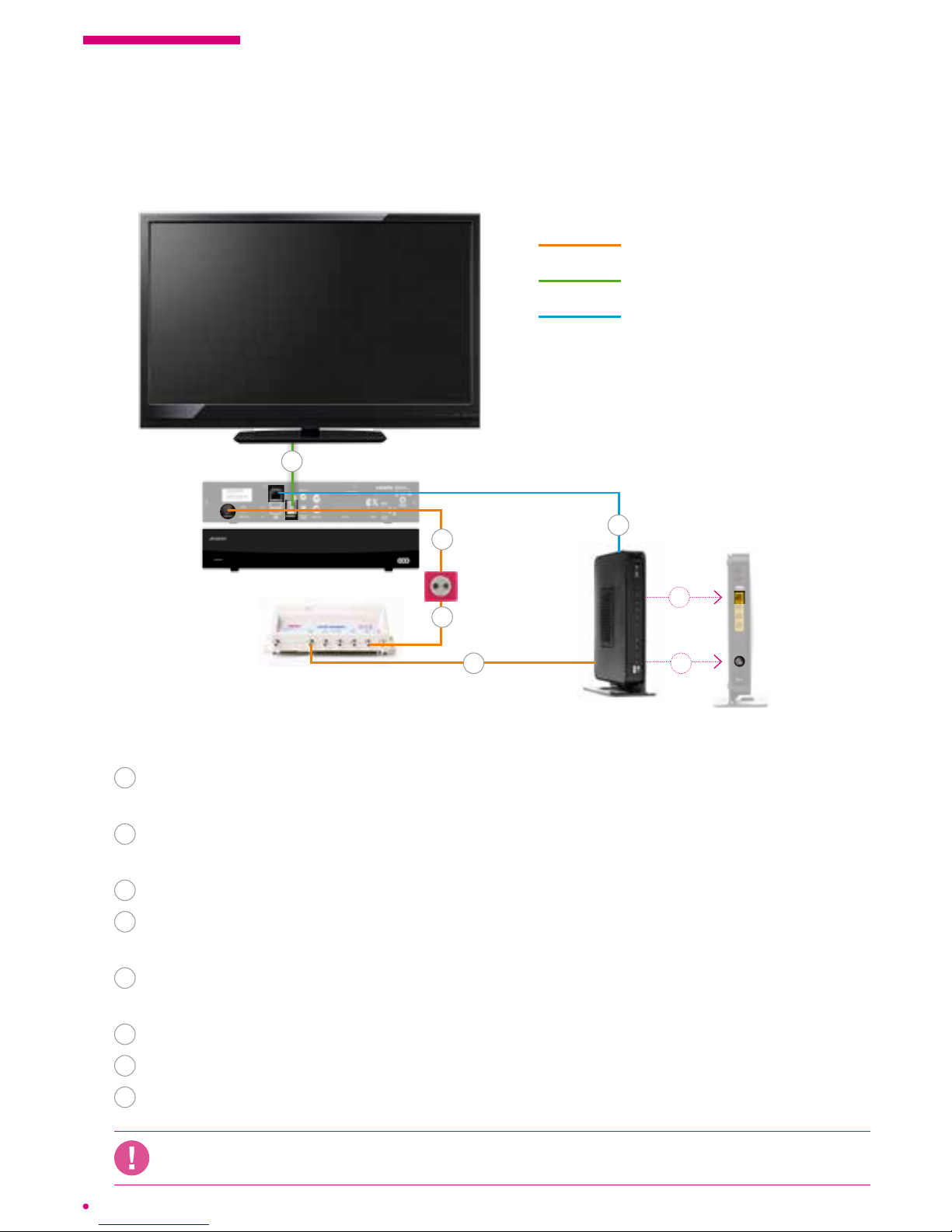
1.3 Connection diagrams
Connecting the box using an Ethernet cable
Follow these steps:
1Connection between the Network Interface Unit (NIU) and the socket,
performed bythe installer.
2Plug the coaxial cable from the TV output of the network interface unit (NIU)
intotheRF IN connector of the box.
3Plug the box into the power outlet.
4Connect the box to your television set using the HDMI cable or a scart cable
(depending on your TV model).
5Plug the coaxial cable from the DATA output of the network interface unit (NIU)
intothe cable port of your VOO modem.
6Plug the modem into a power outlet and switch it on.
7Turn on your television set.
8Plug the box into the modem using the Ethernet cable and switch it on.
If you have installed your own router, you must connect your box on this router to ensure
the proper functioning of your services.
coaxial cable
HDMI cable (supplied) or
Scart cable (not supplied)
Ethernet cable
modem
* It is possible that your model is not identical to the model shown but remains compatible.
.évasion box
Network Interface
Unit (NIU)*
cable tv
socket
5
1
2
4
8
5
8
Altri manuali per evasion
1
Indice


