
Wavlink AERIAL D4X Manuale utente

WAVLINK(@WavlinkOfficial)
WAVLINKSUPPORT(@WavlinkTechSupport)
Wi-Fi 6 Extender/AP
QUICK START GUIDE
AERIAL D4X
01
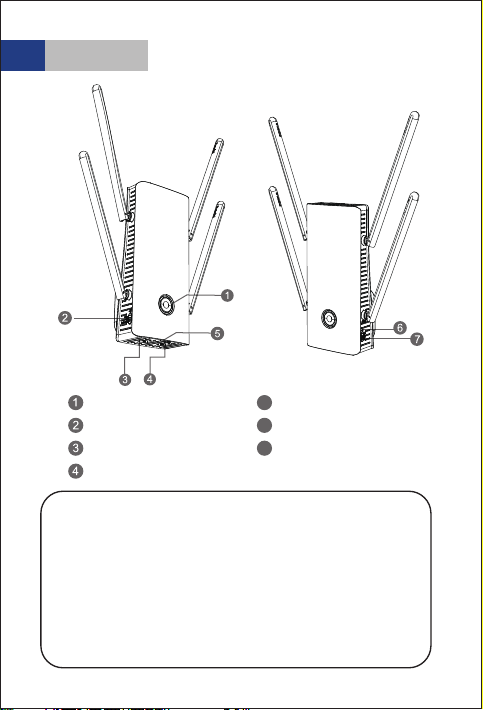
WPS button
LAN/Backhaul
WAN
Night light
Reset port
Power button (O/On)
Night light Auto/O
WPS Button:
Hold the WPS button on your router for few seconds,
then press and hold WPS on this device for 8 seconds,
the pairing process is established in 2 mins.
Press and hold the WPS button for 2 to 6 seconds to
get paired with your phone.
Reset Button:
Press and hold for 6seconds until LED light turns solid
pink (or purple).
Overview
5
6
7
02
2.4G SSID: WAVLINK-AX_XXXX
5G SSID: WAVLINK-AX_5G_XXXX
Default IP: 192.168.10.1
Login: http://wifi.wavlink.com
Default login password: admin
Ocial website: www.wavlink.com
LED Indicators
Default Parameters
Light color Light status Description
Purple Solid The device is being activated.
(Repeater mode)
The device is connected but
doesn’t have access to the Internet.
Red
Fast blinking
Slow blinking
Blue
Fast blinking Pairing with the WPS of an
upstream router.
Slow blinking The phone is pairing with WPS.
Solid 1) The internet is connected and
stable.
2) AP Mode.
(Repeater mode)
The device is not connected to
the upstream router.
03
2. Turn on the power button, then you can either configure
the device wirelessly or via cable by connecting the device
to your laptop.
1. Plug the extender in a power outlet.
Configuration
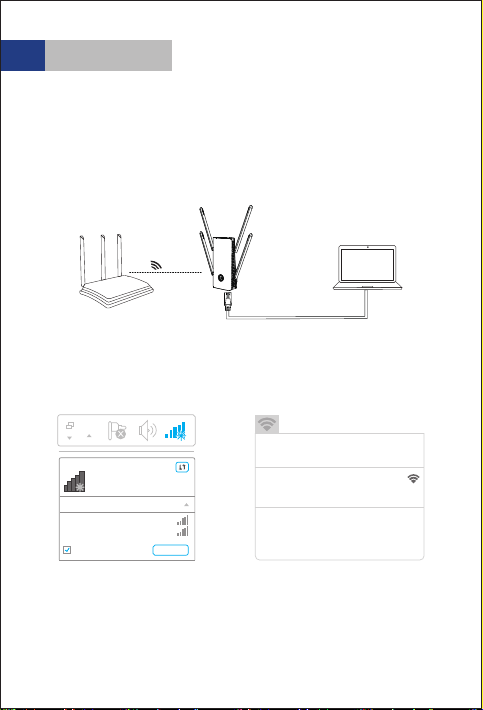
2.2 Wireless Connection
2.1 Cable Connection
Power up the product and search SSID of this product on
your wireless devices (smart phone, tablet PC, laptop, etc.)
then connect to it.
Not connected
Connections are available
Wireless Network Connection
WAVLINK-AX_XXXX
WAVLINK-AX_5G_XXXX
ConnectConnect automatically
Wi-Fi:On
Turn Wi-Fi O
WAVLINK-AX_XXXX
WAVLINK-AX_5G_XXXX
Join Other Network....
Create Network....
Open Network Preferences...
For Windows users For Mac users
Router
LAN
Cable
04
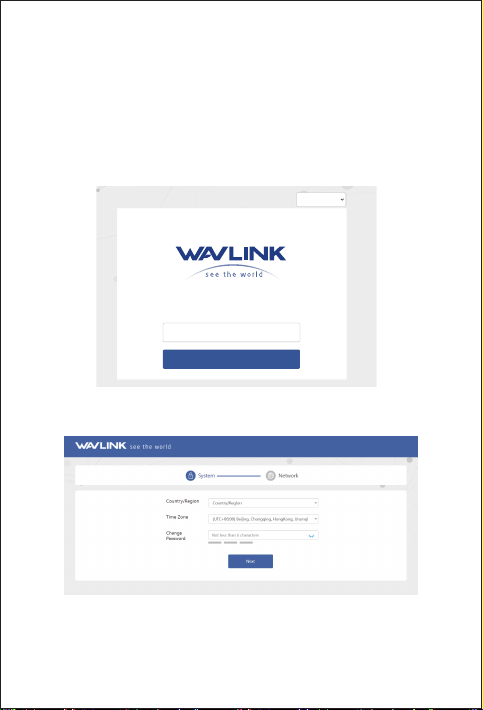
3. Technically speaking, the product web UI will guide you
to the “login” page once you chave connected to the device
successfully in your first time. but if it doesn’t, please manually
input 192.168.10.1 or wifi.wavlink.com in the address bar of your
browser on PC/laptop or phone, the default password is admin.
4. Select your Country/Region and Time Zone. For your network
security, we suggest that you set a new login password.
Note: The three colored bars in "Password strength"
area indicates the strength of the login password.
English
Welcome to Wavlink
Please set up this device first!
Please enter your password
Login

05
5. Mode Selection
This product has four modes.
5.1 Repeater Mode
For Repeater mode, we recommend you choose “WISP”, and
the setted Password needs to be the same as the connected
WiFi password.
Wireless-AC
Wireless-N
WAVLINK-Mesh
WAVLINK-AX_XXXX
WAVLINK_XXXX
System
WISP-Recommend
Select WI-FI Manual Input
Mode selection
Connect to
Password
2.4G
Connect
5G/2.4G Choose
5G
Network

06
5.2 Easymesh Agent Mode
If you have a router that supports Easymesh function, then
you can build a mesh system with this mode.
1. Log in to 192.168.10.1 or wifi.wavlink.com.
2. In Mode Selection, please choose “EasyMesh Agent Mode”.
3. Click on the “Start Pairing” button.
Please configure according to the following steps:
4. Now please start pairing process on the Easymesh controller,
if you are not sure how to start, please ask manufacturer for help.
If you want to set up this device as an access point, you can
follow the steps below:
6.3 LAN Bridge (AP Mode)
AP Mode
Router
Ethernet Cable

07
If you want to set up the device as Router, please select the
Router Mode and follow the steps below:
6.4 Router Mode

08
When you need to change your Wi-Fi password, please
click on “Wireless”.
Which WAN Type am I supposed to choose?
If you use DSL line and you are only provided an account
name and a password by your ISP, choose PPPoE. If you
use cable TV or fiber cable, choose DHCP(Dynamic IP). If
you are provided information such as IP address, Subnet
Mask and Default Gateway, choose Static IP.
Wi-Fi Password Management
09
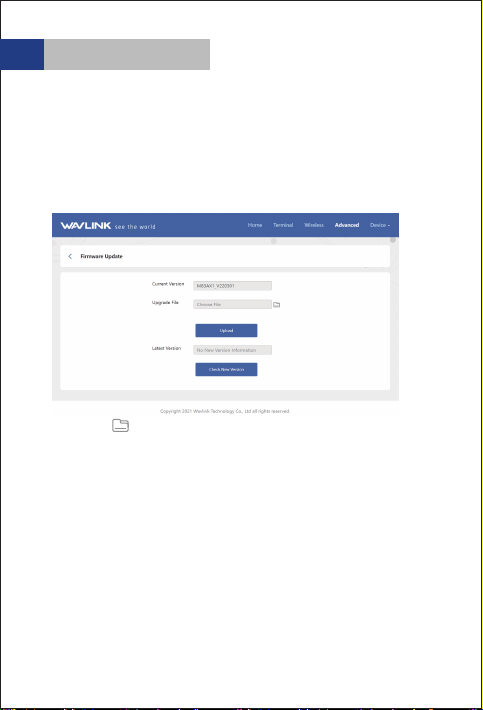
4. Click on to locate the firmware file.
5. Click on “Upload” and choose “Apply”, and wait for the
firmware upgrade process to complete.
If you need to update firmware, please proceed as the
following steps:
1. Download the latest firmware file on Wavlink website
(www.wavlink.com->SUPPORT->Firmware).
3. Log in to wifi.wavlink.com or 192.168.10.1, then choose
“Advanced” and select “Firmware Update”.
2. Extract the firmware from the downloaded file.
Firmware Upgrade
Indice
Altri manuali Wavlink Estensione


