
WDR M062-VDW101-003 Manuale utente
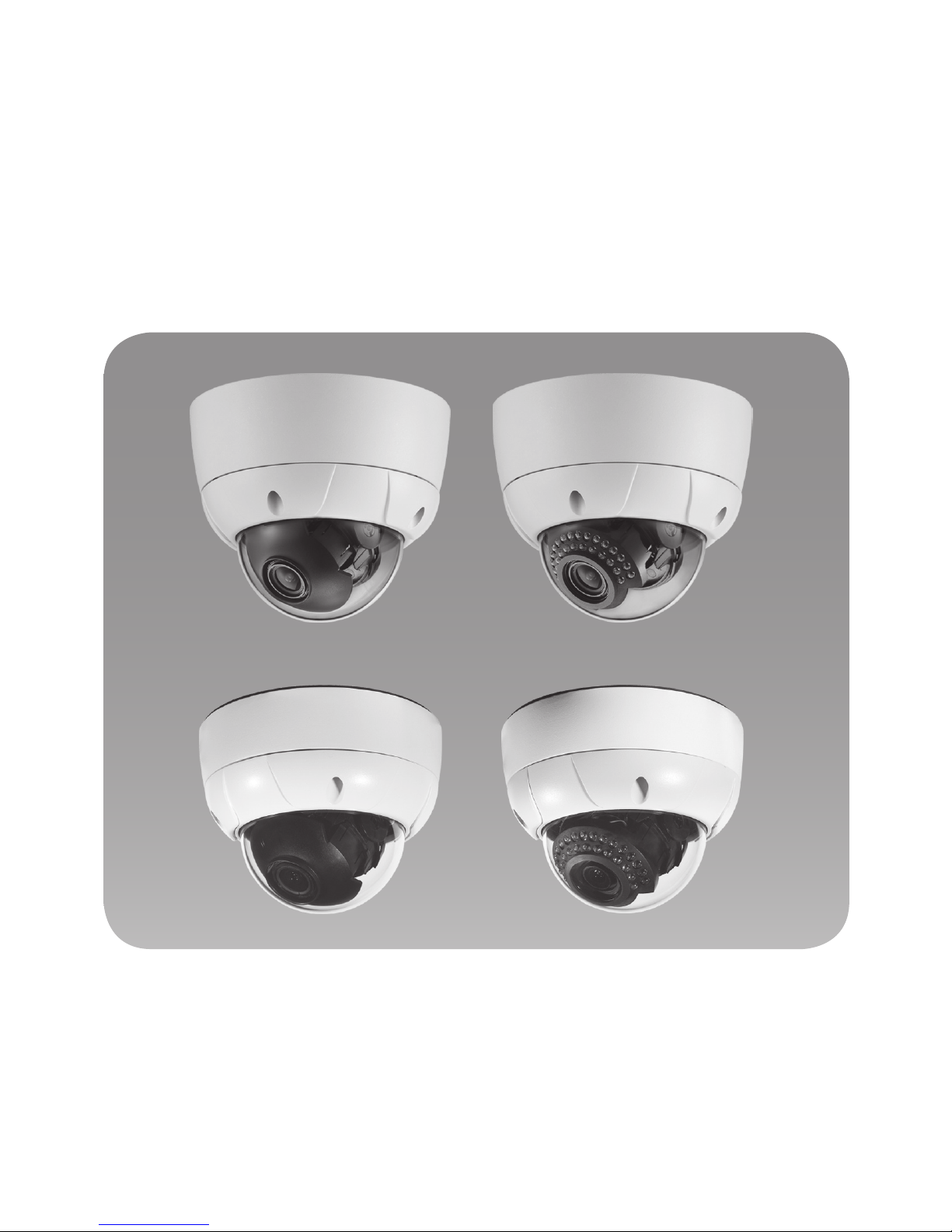
Thank you for choosing our high quality camera.
Before attempting to connect or operate, please read and follow
these instructions.
WDR
HIGH RESOLUTION
VANDAL DOME CAMERA
OPERATION MANUAL
M062-VDW101-003

CONTENTS
1. Cautions
2. Features
3. Equipment and Accessories
4. Overview and function
5. Installation
6. Connection
7. Dimensions
8. Specifications
9. OSD Menu
•MENU DESCRIPTION
•GENERAL STRUCTURE
•OSD FUNCTION DESCRIPTION
•FACTORY DEFAULT
•EXIT
10.Communication Protocol
2

This device complies with Part 15 of the FCC Rules.
Operation is subject to the following two conditions:
1. This device may not cause harmful interference.
2. This device must accept any interference received, including
interference that may cause undesired operation.
Note - This equipment has been tested and found to comply with limits for a Class
B digital device, pursuant to part 15 of the FCC Rules. These limits are
designed to provide reasonable protection against harmful interference in a
residential installation.
This equipment generates, uses, and can radiate radio communications.
However, there is no guarantee that interference will not occur in a particular
installation. If this equipment off and on, the user is encouraged to try to
correct the interference by one or more of the following measures:
• Reorient or relocate the receiving antenna.
• Increase the separation between the equipment and receiver.
• Connect the equipment into an outlet on a circuit different from that to
which the receiver is connected.
• Consult the dealer or an experienced radio / tv technician for help.
Caution - Any changes or modications in construction of this device which are not
expressly approved by the party responsible for compliance could void
the user’s authority to operate the equipment.
1. A regulated DC12V 1.5A power supply is recommended for use with this camera
for the best picture and the most stable operation.
An unregulated power supply can cause damage to the camera.
When unregulated power supply is applied, product warranty will be
out of subject.
2. It is recommended that the camera is used with a monitor that has a CCTV quality
75 video impedance level.
If your monitor is switched to high impedance then please adjust accordingly.
3. Do not attempt to disassemble the camera to gain access to the internal
components. Refer servicing to your dealer.
4. Never face the camera towards the sun or any bright or reective light, which may
cause smear on the picture and possible damage to the CCD.
5. Do not remove the serial sticker for the warranty service.
1.Cautions
3

1.Cautions
4
WEEE
(Waste Electrical & Electronic Equipment)
This marking shown on the product or its literature, indicates that it should
not be disposed with other household wastes at the end of its working life. To
prevent possible harm to the environment or human health from uncontrolled
waste disposal, please separate this from other types of wastes and recycle it
responsibly to promote the sustainable reuse of material resources. Household
users should contact either the retailer where they purchased this product, or
their local government ofce, for details of where and how they can take item
for environmentally safe recycling.
Business users should contact their supplier and check the terms and
conditions of the purchase contract.
This product should not be mixed with other commercial wastes for disposal.
CAUTION
RISK OF ELECTRIC SHOCK DO NOT OPEN
CAUTION: TO REDUCE THE RISK OF ELECTRIC SHOCK, DO NOT
REMOVE COVER (OR BACK). NO USER SERVICEABLE
PARTS INSIDE. REFER SERVICING TO QUALIFIED
SERVICE PERSONNEL
This symbol is intended to alert the user to the presence
of un-insulated “dangerous voltage” within the product’s
enclosure that may be of sufcient magnitude to constitute a
risk of electric shock.
This symbol is intended to alert the user to the presence of
important operating and maintenance (servicing) instructions
in the literature accompanying the appliance.

• Sony Vertical double-density interline CCD image sensor
• 550TV Lines
• WDR (Wide Dynamic Range), OSD Function
• Digital slow shutter, Manual shutter
• Privacy Zone
• Motion Detection
• IR LED : 30ea, Max 30M
• Manual Pan & Tilt Control for easy installation
- Horizontal 360˚, Pan 360˚, Tilt 140˚
Minute Angle Control ±10˚
• Vandalproof
OPTION
• AC24V / DC12V Dual Voltage
• Fan(standard type)
How WDR makes better image?
WDR allows every detail to be captured accurately even if one
portion is bright while other portions are dark.
(The difference of two portions could be more than 64 time)
2.Features
5
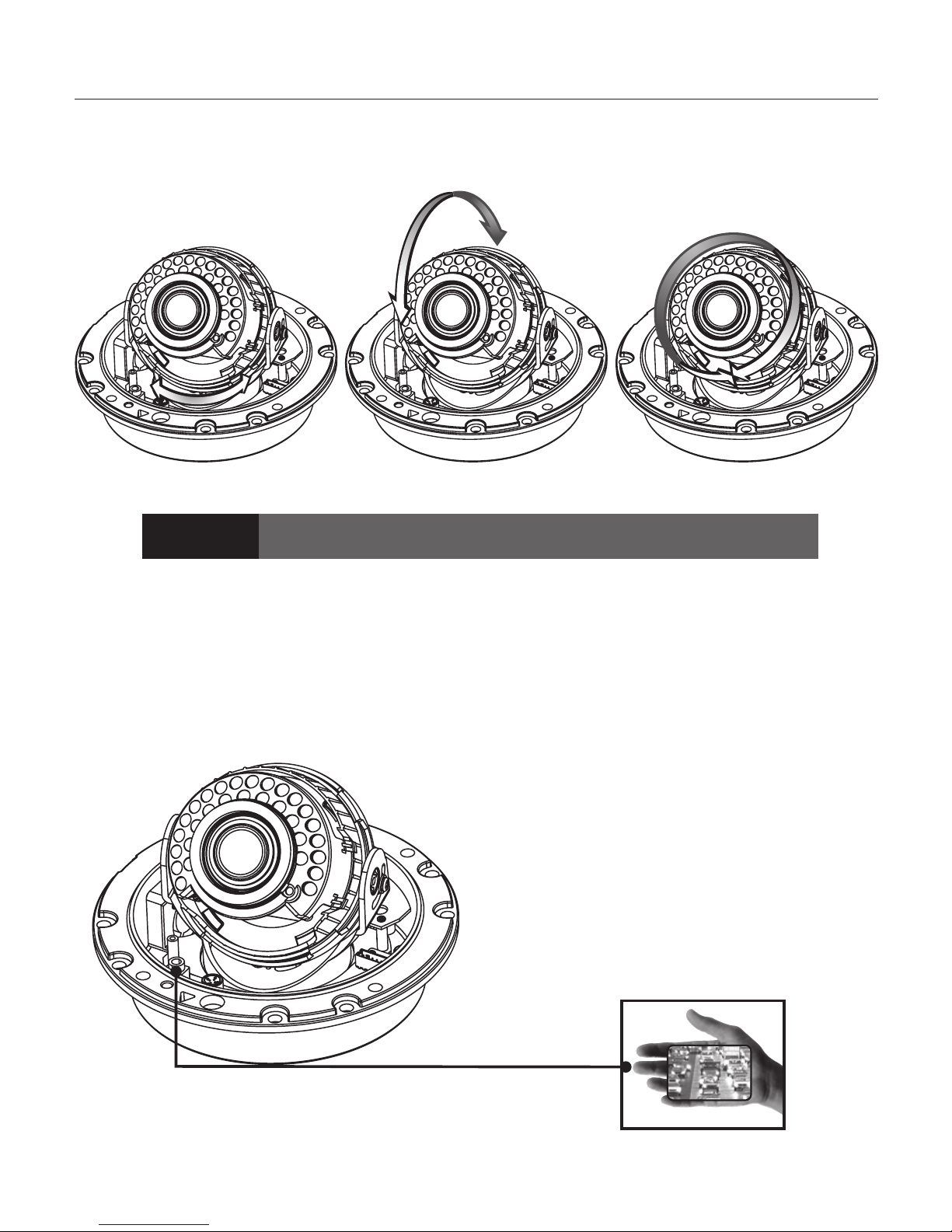
• 3-Axis Gimbal
The Service Video Connector also provides the installer with an
easy way of configuring the camera.
• Service Video connector
Pan Rotation Horizontal RotationTilt Rotation
CAUTION panning the bracket in excess of 3 rotations in one direction may
cause damage to the cable.
2.Features
6

1 VANDAL DOME CAMERA
2SURFACE MOUNT
3VIDEO OUTPUT TEST CABLE
4OPERATION MANUAL
5
SCREW(M4x10) - 4ea
SCREW(5x30) - 4ea
SCREW(M4x40.SUS) - 4ea
L WRENCH - T20
6MOUNT GUIDE
3. Equipment and Accessories
7
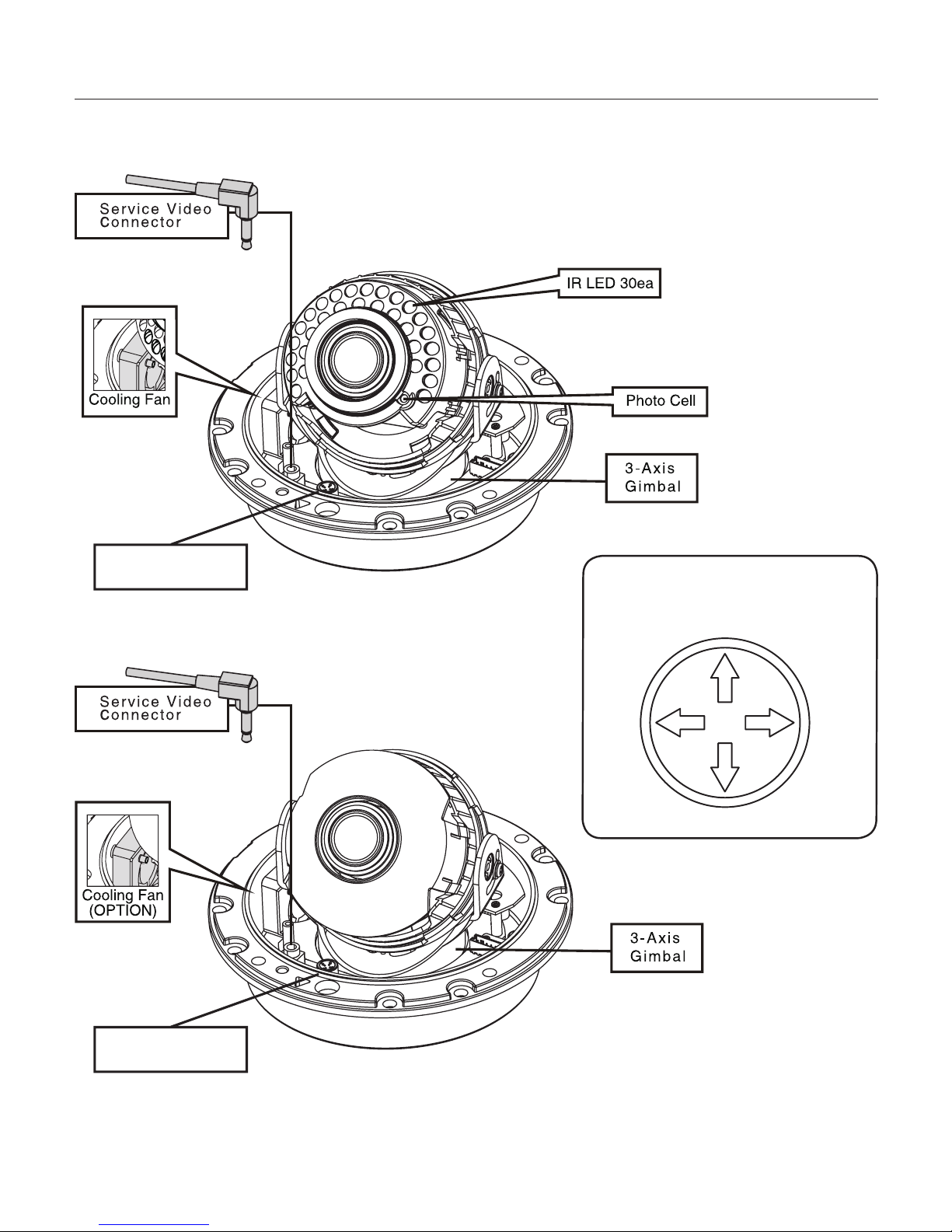
• Name (Led Type)
• Name (Standard)
4.Overview and function
8
OSD Joystick
OSD Joystick
• CONTROL FUNCTION
(OSD JOYSTICK)
LEFT
UP
RIGHT
DOWN
Standard TypeLED Type
Mount Guide
5. Installation
9
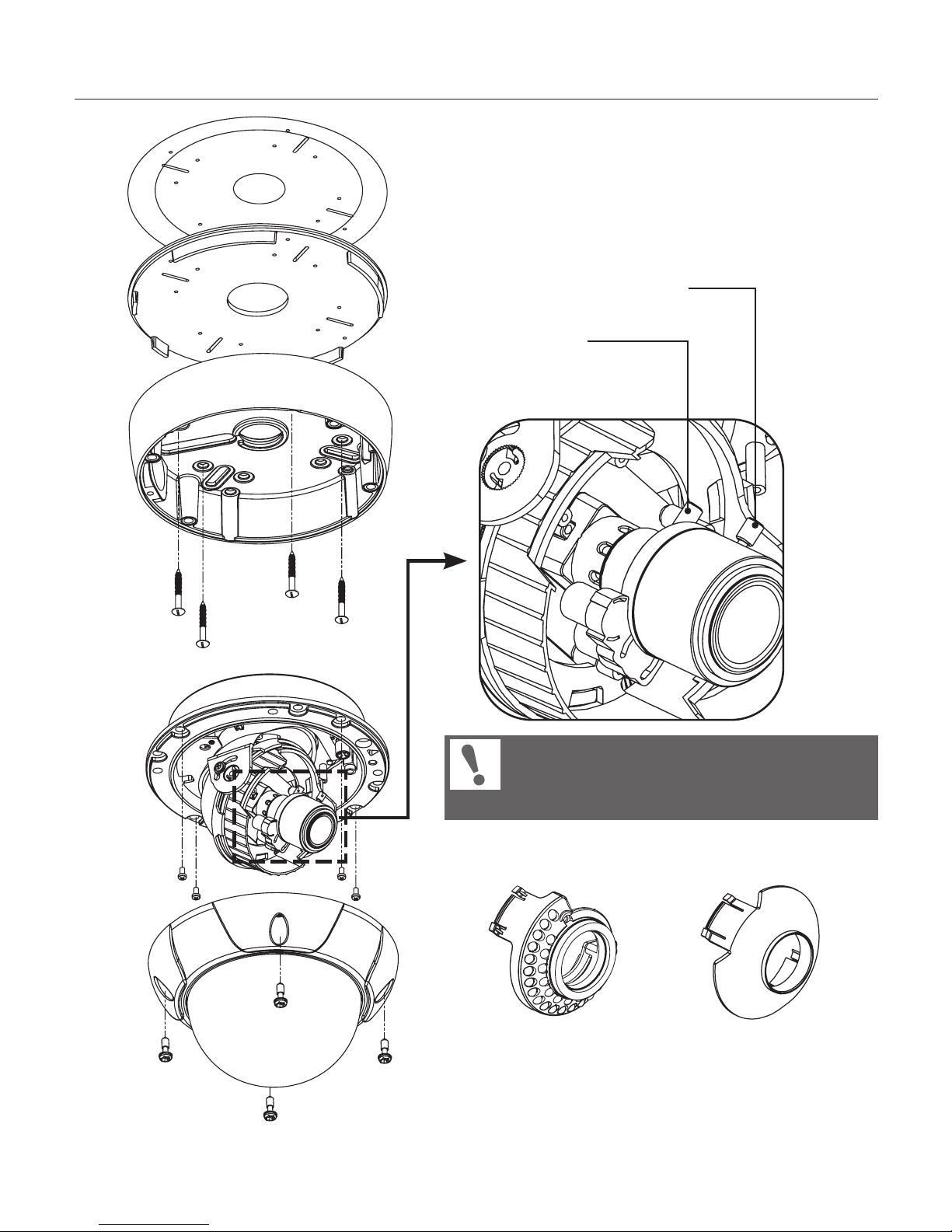
Lens Zoom Knob
Lens Focus Knob
Separate LED Cover (Sunshield Cover)
and adjust LENS ZOOM / FOCUS KNOB
After setting the LENS, assemble the
LED Cover (Sunshield Cover).

1. Installation of Flush Mount
2. Installation of Surface Mount
PIPE
PIPE
① Installation of the camera with SURFACE
CASE(using M4x40)
② Installation of the camera with SCREWS
③ Installation of the camera with JUNCTION BOX
① Installation of the camera on the wall
② Installation of the camera on the 3/4” NPT PIPE
③ Installation of the camera on the JUNCTION BOX
Check the safe wire which
should be entirely inserted into camera
housing during locking the dome cover to
maintain Weatherproof condition.
When using the camera
without LEDs take off the rubber.
NOTE
5. Installation
10
Indice
Altri manuali WDR Telecamera di sicurezza


