
Wenglor B60 Series Manuale utente
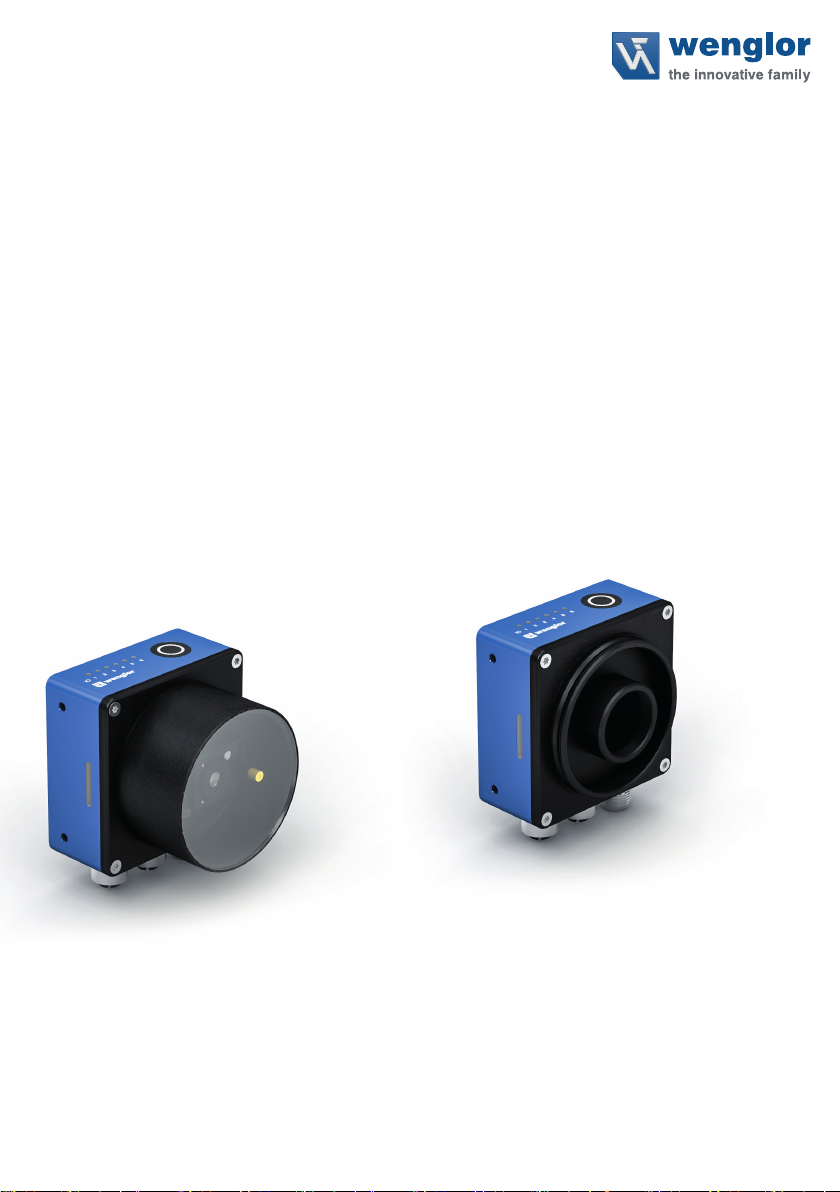
B60xxxx
Smart Cameras and Vision Sensors
Operating instruction
EN
Subject to change without notice
Available as PDF file only
Version 1.0.0
Revision level: 27.06.2023
www.wenglor.com

2Table of Contents
Table of Contents
1. General ......................................................................................................................................4
1.1 Information Concerning these Instructions...............................................................................................4
1.2 Explanations of Symbols..........................................................................................................................4
1.3 Limitation of Liability.................................................................................................................................5
1.4 Copyrights................................................................................................................................................5
2. For Your Safety .........................................................................................................................6
2.1 Use for Intended Purpose ........................................................................................................................6
2.2 Use for Other than the Intended Purpose ................................................................................................6
2.3 Cybersecurity ...........................................................................................................................................6
2.4 Personnel Qualifications ..........................................................................................................................7
2.5 Laser/LED Warnings................................................................................................................................7
2.6 Modification of Products...........................................................................................................................8
2.7 Repair.......................................................................................................................................................8
2.8 General Safety Precautions .....................................................................................................................9
2.9 Conditions for specified protection class..................................................................................................9
2.10 Approvals ...............................................................................................................................................9
3. Technical Data ........................................................................................................................ 10
3.1 General Data..........................................................................................................................................10
3.2 Dimensional Drawings ...........................................................................................................................11
3.3 Connection Diagram ..............................................................................................................................12
3.4 Complementary Products.......................................................................................................................14
3.5 Layout ....................................................................................................................................................14
3.6 Control Panel / Button / Indicator elements............................................................................................15
3.6.1 I/O-Status LEDs .........................................................................................................................15
3.6.2 Button.........................................................................................................................................15
3.6.3 Device Status LEDs ...................................................................................................................16
3.7 Scope of Delivery...................................................................................................................................16
4. Transport and Storage ...........................................................................................................17
4.1 Transport................................................................................................................................................17
4.2 Storage...................................................................................................................................................17
5. Installation and Electrical Connection..................................................................................18
5.1 System overview...................................................................................................................................18
5.2 Mounting and General Installation Instructions......................................................................................18
5.3 Electrical Connection .............................................................................................................................19
5.4 Connection to external illumination and trigger sensor ..........................................................................20
6. Software................................................................................................................................... 21
6.1 wenglor Discovery Tool.........................................................................................................................21
6.2 wenglor uniVision 3................................................................................................................................21
7. Maintenance Instructions ......................................................................................................21
8. Proper Disposal ......................................................................................................................21

3uniVision Software
9. Change Index of Operating Instruction ................................................................................22
10. Appendix .................................................................................................................................22
10.1 Declarations of Conformity.................................................................................................................. 22
4General
1. General
1.1 Information Concerning these Instructions
• These instructions enable safe and efficient use of:
– B60xxx1 & B60xxx2 (autofocus variants)
– B60xxx3 (c mount variants)
• These instructions are an integral part of the product and must be kept on hand for the entire duration of its
service life.
• Local accident prevention regulations and national work safety regulations must be complied with as well.
• The product is subject to further technical development, and thus the information contained in these operat-
ing instructions may also be subject to change. The current version can be found at www.wenglor.com in the
product’s separate download area.
NOTE!
The operating instructions must be read carefully before using the product and must be kept
on hand for later reference.
1.2 Explanations of Symbols
• Safety precautions and warnings are emphasized by means of symbols and attention-getting words.
• Safe use of the product is only possible if these safety precautions and warnings are adhered to.
The safety precautions and warnings are laid out in accordance with the following principle:
ATTENTION-GETTING WORD!
Type and Source of Danger!
Possible consequences in the event that the hazard is disregarded.
• Measures for averting the hazard.
The meanings of the attention-getting words, as well as the scope of the associated hazards, are listed below:
DANGER!
This word indicates a hazard with a high degree of risk which, if not avoided, results in death
or severe injury.
Warning!
This word indicates a hazard with a medium degree of risk which, if not avoided, may result in
death or severe injury.
CAUTION!
This word indicates a hazard with a low degree of risk which, if not avoided, may result in minor
or moderate injury.
ATTENTION!
This word draws attention to a potentially hazardous situation which, if not avoided, may result
in property damage.
NOTE!
A note draws attention to useful tips and suggestions, as well as information regarding effi-
cient, error-free use.

5uniVision Software
1.3 Limitation of Liability
• The product has been developed taking into account the state of the art as well as the applicable standards
and guidelines.
• We reserve the right to make technical changes.
• A valid declaration of conformity can be found at www.wenglor.com in the download area of the product.
• wenglor sensoric elektronische Geräte GmbH (hereinafter „wenglor“) accepts no liability for:
– Failure to observe the operating manual,
– Unsuitable or improper use of the product,
– Excessive use, incorrect or negligent treatment of the product,
– Incorrect installation or commissioning,
– Use of untrained personnel,
– Use of unauthorized spare parts or
– Improper or unauthorized changes, modifications or repair work to the products.
• This operating manual does not contain any guarantees/warrantees from wenglor with regard to the pro-
cesses described or certain product properties.
• wenglor assumes no liability with regard to printing errors or other inaccuracies contained in this operating
manual, unless it can be proven that wenglor was aware of the errors at the time the operating manual was
created.
1.4 Copyrights
• The contents of these instructions are protected by copyright law.
• All rights are reserved by wenglor.
• Commercial reproduction or any other commercial use of the provided content and information, in particular
graphics and images, is not permitted without previous written consent from wenglor.

6For Your Safety
2. For Your Safety
2.1 Use for Intended Purpose
This wenglor product is intended for use in accordance with the following functional principle:
The Smart Camera B60 is an industrial image capture and processing sensor used for non-contact inspection
of specific objects. The sensor combines image acquisition and evaluation in one housing and operates with a
CMOS color or monochrome image sensor.
With the wenglor uniVision image processing software (version 3.0.0 or higher) and a PC or laptop, the image
processing functions of the corresponding uniVision license pack-age (e.g. “dimensional accuracy inspection”,
“object counting”, “presence check”, “pixel comparison”, “shape analysis”, “pattern matching”,
“Plain text reading”, “Reference image comparison” and 1D and 2D code reading”) can be configured.
These image processing functions can be executed in trigger mode as well as in continu-ous monitoring mode,
where objects can be detected regardless of their position thanks to tracking. Six switchable I/O switching out-
puts are available, which can be used as input or output as required. In addition, external illumination and/or a
screw-on illumination module (for autofocus units only) can be connected.
The product is primarily designed for use in industrial and logistic areas and meets the requirements for indus-
trial robustness, interfaces as well as data processing.
2.2 Use for Other than the Intended Purpose
• The product is not a safety component in accordance with the EC Machinery Directive.
• The product is not suitable for use in potentially explosive atmospheres.
• The product may be used only with accessories supplied or approved by wenglor, or in combination with
approved products. A list of approved accessories and combination products can be found at
www.wenglor.com on the product detail page.
Warning!
Risk of personal injury or property damage in case of use for other than the intended
purpose!
Use for other than the intended purpose may lead to hazardous situations.
• Instructions regarding use for intended purpose must be observed.
2.3 Cybersecurity
Protection against cybersecurity threats is not the responsibility of wenglor and requires a comprehensive con-
cept that must be continuously reviewed and maintained by the customer / operator. This consists of organi-
zational, procedural, technical, electronic and physical levels of defense and takes into account appropriate
measures for different types of risk. The measures implemented in this product can only support protection
against cybersecurity threats if the product is used as part of such a concept. It is recommended to use the
latest firmware version.
7uniVision Software
2.4 Personnel Qualifications
• Suitable technical training is a prerequisite.
• In-house electronics training is required.
• Trained personnel who use the product must have (uninterrupted) access to the operating instructions.
DANGER!
Risk of personal injury or property damage in case of incorrect initial start-up and main-
tenance!
Personal injury and damage to equipment may occur.
• Adequate training and qualification of personnel.
2.5 Laser/LED Warnings
Observe the safety and warning instructions listed here to avoid dangerous situations and reduce health haz-
ards.
NOTE!
Due to the normal human reactions of turning away from bright sources of light and withdraw-
ing from thermal discomfort, lamps/luminaires do not represent any danger.
Warning!
Risk of personal injury or property damage due to electric current
Voltage-carrying parts may cause damage to personnel and equipment.
• Only qualified electricians may work on electrical systems.
• Make and disconnect electrical connections only in a de-energized state.
• Only connect the product to a power supply that meets the requirements of the operating
instructions.
• Observe national and local regulations.
• Observe the safety regulations for working on electrical systems.
Warning!
Risk of personal injury or property damage due to equipotential bonding currents
Improper grounding can result in dangerous equipotential bonding currents and thus danger-
ous voltages on metallic surfaces (e.g. the housing). Damage to personnel and equipment is
possible due to voltage-carrying parts.
• Only qualified electricians may work on electrical systems.
• Observe the instructions in the operating manual.
• Ground the product and the system in accordance with national and local regulations.
8For Your Safety
LED radiation of the status LEDs
NOTE!
Use of controls or adjustments or performance of procedures other than those specified herein
may result in hazardous radiation exposure.
Temporary irritating optical effects (e.g. glare, flash blindness, afterimages, photoepilepsy or
impairment of color vision) cannot be completely ruled out, especially at low ambient bright-
ness.
Risk group 0…1
• Color of I/O status LED’s: Orange (visible)
• Color of device status LED’s: Blue, Yellow, Red (visible)
• Color of test object status LED’s: Green, Red (visible, only for autofocus devices)
ATTENTION!
Optical radiation LED risk group 1, visible radiation, 400…780 nm
Possible risk to eyes if not used as intended.
• Do not intentionally stare into the light source.
• Do not open the housing. Opening does not switch off the light source. The hazard may be
increased by opening the housing.
• Observe applicable national regulations on the photobiological safety of lamps and lamp
systems.
Operation with external lighting can lead to the risks described here being exceeded and must be considered by
the user on a case-by-case basis.
2.6 Modification of Products
DANGER!
Risk of personal injury or property damage if the product is modified!
Personal injury and damage to equipment may occur. Non-observance may result in loss of
the CE and/or UKCA mark and the guarantee may be rendered null and void.
• Modification of the product is impermissible.
• Unauthorized opening of the device is not permitted.
2.7 Repair
Trained and authorized wenglor personnel may only carry out repairs to the device. Interventions and modifica-
tions to the device by the customer will void the warranty claim against wenglor.

9uniVision Software
2.8 General Safety Precautions
NOTE!
• These instructions are an integral part of the product and must be kept on hand for the
entire duration of its service life.
• In the event of possible changes, the respectively current version of the operating instruc-
tions can be accessed at www.wenglor.com in the product’s separate download area.
• Read the operating instructions carefully before using the product.
• The sensor must be protected against contamination and mechanical influences.
DANGER!
Danger due to possibly dangerous optical or infrared radiation of the illumination (not
included in the scope of delivery)!
Damage to the eyes possible.
• Do not look directly into the illumination during operation.
2.9 Conditions for specified protection class
To maintain the specified degree of protection of the device during operation, the following specifications apply.
In case of non-compliance, the device does not comply with any specified degree of protection.
• The connected cables at the electrical connections are screwed.
• Any unused electrical connections are sealed with a screwed-on protective cap.
• The protective tube is screwed tightly to the device.
ATTENTION!
Risk of damage to the product if the conditions are not complied with
In case of non-compliance, the device does not comply with any specified protection class.
2.10 Approvals

10 Technical Data
3. Technical Data
3.1 General Data
The B60 is available in 3 different software packages:
• B60Mxxx: uniVision
• B60Exxx: uniVision Extended
• B60Pxxx: uniVision Script
All currently associated modules can be found at:
Produkthighlights Bildverarbeitungssoftware uniVision 3 | wenglor
B60 C Mount
B60M103 B60M113 B60M203 B60M213
Optical Data
Lens thread C-Mount
Resolution 1440 x 1080 Pixel 2448 x 2048 Pixel
Resolution 1,6 MP 5 MP
Image Chip monochrome color monochrome color
Image chip size 1/2,9’’ 1/1,8’’
Pixel size 3,45 x 3,45 μm 2,74 x 2,74 μm
Light source External lighting
Frame rate ≤ 60 fps
Electrical Data
Supply Voltage 21,6...26,4 V DC
Current Consumption (Ub = 24 V) ≤ 300 mA ≤ 400 mA
Temperature range * 0...40 °C
Inputs/outputs 6
Switching Output Voltage Drop < 2,5 V
Switching Output/Switching Current 100 mA
Short circuit protection yes
Reverse polarity protection yes
Interface Ethernet
Protection class III
RAM 2 GB
Storage Capacity 16 GB
Mechanical Data
Setting Method Ethernet
Housing material Aluminium, anodised
Degree of protection IP67
Connection M12 x 1; 12-pin
Type of connection Ethernet M12 x 1; 8-pin, X-coded (2x)
General Data
Web server yes
License package uniVision
Output
PNP NO yes
Illumination output yes
Ethernet yes
* Temperature range: The internal temperature is approx. 10...30° C above the ambient temperature. Use in areas with ambient
temperatures above the specified ones may result in CPU throttling (depending on the computing intensity). Use the sensor
only in the specified temperature range to avoid damage and shortening of the service life.
Altri manuali per B60 Series
1
Questo manuale è adatto per i seguenti modelli
5
Indice
Altri manuali Wenglor Macchina fotografica digitale


