WePresent WiPG-1500 Manuale utente

Version: 5.1
Date: November 19, 2013
User’s Manual
WiPG-1500

2
Table of Contents
1 Overview............................................................................................................... 5
2 Package Contents .............................................................................................. 7
3 USB Token Contents.......................................................................................... 8
4 Physical Details ................................................................................................... 9
5 What You Might Need ....................................................................................12
6 Quick Installation .............................................................................................13
7 WiPG-1500 Receiver Device .........................................................................15
7.1 PC-List ..................................................................................................................15
7.2 Setup Page .........................................................................................................16
7.3 Remote Touch Control (UST/UoIP).............................................................17
7.4 Whiteboard ........................................................................................................17
7.5 Pen Menu Function.........................................................................................18
8 DoWiFi for Windows........................................................................................19
8.1 Install the application.....................................................................................19
8.2 Start the application .......................................................................................20
8.3 Quick Connect...................................................................................................21
8.4 Connect to WiFi Network ..............................................................................21
8.5 Connect to Receiver Device.........................................................................22
8.6 Login.....................................................................................................................22
8.7 Main User Interface .........................................................................................23
8.8 Screen Projection.............................................................................................23
8.9 Audio Projection ..............................................................................................24
8.10 Menu ....................................................................................................................24
8.10.1 Show Receiver Information..........................................................................25
8.10.2 Web Admin.........................................................................................................25
8.10.3 Search Receiver Device..................................................................................25
8.10.4 Launch SidePad ................................................................................................26
8.10.5 Enable WebSlides.............................................................................................27
8.10.6 Select Projection Desktop ............................................................................27
8.10.7 Projection Quality............................................................................................28
8.10.8 Select Projection Mode..................................................................................28
Table of Contents

3
Table of Contents
8.10.9 Resolution Settings .........................................................................................28
8.10.10 Projection Aspect Ratio .................................................................................28
8.10.11 Enable USB IWB Bridge ..................................................................................29
8.10.12 Advanced Screen Capture ............................................................................29
8.10.13 Send Audio to Display....................................................................................30
8.10.14 Auto Power Manager......................................................................................30
8.10.15 Auto WiFi Connect...........................................................................................30
8.10.16 Make wePresent WiPG-1500 Token ...........................................................31
8.10.17 Copy Application to desktop.......................................................................32
8.10.18 Hot Key ................................................................................................................32
8.10.19 About....................................................................................................................32
8.10.20 Exit.........................................................................................................................32
9 DoWiFi for Mac..................................................................................................33
9.1 Install the application.....................................................................................33
9.2 Start the application .......................................................................................33
9.3 Quick Connect...................................................................................................34
9.4 Connect to WiFi Network ..............................................................................34
9.5 Connect to Receiver Device.........................................................................35
9.6 Login.....................................................................................................................36
9.7 Main User Interface .........................................................................................36
9.8 Screen Projection.............................................................................................37
9.9 Audio Projection ..............................................................................................37
9.10 Menu ....................................................................................................................38
9.10.1 Show Receiver Information..........................................................................39
9.10.2 Web Admin.........................................................................................................39
9.10.3 Search Receiver Device..................................................................................39
9.10.4 Launch SidePad ................................................................................................39
9.10.5 Enable WebSlides.............................................................................................40
9.10.6 Select Projection Desktop ............................................................................40
9.10.7 Projection Quality............................................................................................41
9.10.8 Select Projection Mode..................................................................................41
Table of Contents

4
Table of Contents
9.10.9 Resolution setting............................................................................................41
9.10.10 Projection Aspect Ratio .................................................................................42
9.10.11 Send Audio to Display....................................................................................42
9.10.12 Auto WiFi Connect...........................................................................................42
9.10.13 Hot Key ................................................................................................................42
9.10.14 About....................................................................................................................43
9.10.15 Exit.........................................................................................................................43
10 Web Management...........................................................................................44
10.1 Home Page.........................................................................................................44
10.2 Download ...........................................................................................................45
10.3 Conference Control .........................................................................................45
10.4 WebSlides ...........................................................................................................46
10.5 Admin...................................................................................................................47
10.5.1 System Status ....................................................................................................48
10.5.2 Device Setup......................................................................................................49
10.5.3 System Status ....................................................................................................49
10.5.4 OSD Setup ..........................................................................................................53
10.5.5 Change Passwords...........................................................................................53
10.5.6 Reset to Default................................................................................................54
10.5.7 Firmware Upgrade...........................................................................................55
10.5.8 WebSlides Setup ..............................................................................................56
10.5.9 Reboot System..................................................................................................57
10.5.10 Logout..................................................................................................................57
11 Appendix ............................................................................................................58
11.1 Wall-mount Instructions................................................................................58
Table of Contents

5Chapter 1
Overview
→Back
Overview 1
1.
wePresent WiPG-1500 is professional wireless presentation gateway. By enabling
the Revolutionary “interactive” and“UST/UoIP” functions, you can throw your
presentations wirelessly from a PC, Mac, iPad, iPhone, or Android devices to a
projector/display, and use the touch screen/IWB, mobile phone or Pad to control the
presentation remotely.
» WiPG-1500 Features Highlight:
Icon Feature Description
DoWiFi
Wireless Display-over-WiFi for Windows and Mac
WiFi-Doc
High quality presentation via iPhone/iPad or Android
devices (Word, Excel, PPT,PDF , Photo , Screenshot)
SidePad
Control the presentation on PC or Mac via
iPhone/iPad or Android devices
WebSlides
Broadcast slides to your devices with WiFi and web browser
Drawing /
Whiteboard
Free drawing on projecting content or interactive whiteboard
4-to-1 projection
Project four PC/Mac screens to one projector/display at once.
Conference
Control / PC-List
Control projection from WiPG’s web page, or use mouse/
keyboard to select a PC from the standby screen.
SNMP V3
Manage WiPG devices across the corporate network
through enhanced SNMP V3 protocol

6Chapter 1
Overview
→Back
• Basic Features
▪High performance screen/audio projection for Windows/Mac (Windows8 and
Mac Mountain Lion)
▪Remote desktop control from USB, Touch Screen or Mouse/Keyboard for
Windows/Mac
▪Plug&Show: launching the projection application from a USB thumb drive
without installation
▪High performance 4-to-1 Quadrant Screen Projection
▪Support up to 64 concurrent login users
▪Conference Control: Mediator function through the device web page or
standby screen
▪Support Wireless Multi-touch control (Win7/8 standard HID compatible
device)
▪Support drawing feature for projecting sender screen, or drawing on
whiteboard without PC
▪SNMP V3: manage/congure multiple WiPGs through SNMP V3 protocol
▪Security design: Session Login Code, WEP/WPA/WPA-Enterprise WiFi Security,
and GateKeeper
▪HDMI and VGA dual video interfaces
▪WiFi AP and AP-Client mode support
▪WiFi 802.1b/g/n information

7Chapter 2
Package Contents
→Back
Package Contents 2
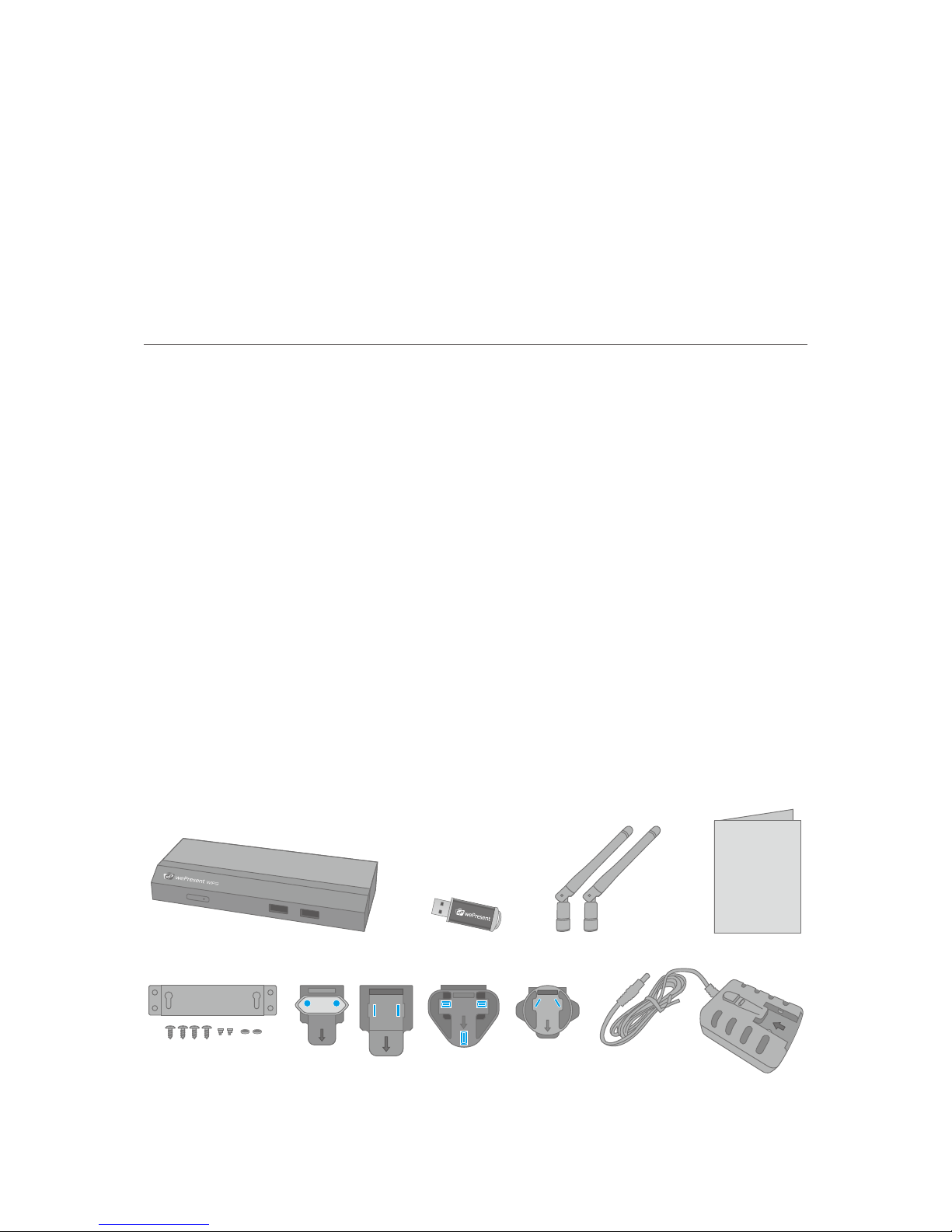
2.
• wePresent WiPG-1500 Box
• wePresent WiPG-1500 USB Token
• Power Adapter (DC +5V, 2.5A)
• 2 WiFi Antenna
• Quick Installation Guide
• Wall Mount Kit
• Warranty Card
APD-G-1
APD-K-1
APD-U-1 APD-N-1
WiPG-1500
Quick Installation Guide

8Chapter 3
USB Token Contents
→Back
USB Token Contents 3
3.
• Windows Installer (WiPG-1500 Windows Installer)
• MAC Installer (WiPG-1500 Mac Installer)
• VAC Driver (For Windows XP Audio Projection)
• VDD Driver (For Windows XP/Vista Virtual Extended Screen)
• USBoIP Driver (For USB IWB Bridge)
• Utility
• PtG Converter (For MobiShow PtG function)
• SNMP Manager (For SNMP Management)

9Chapter 4
Physical Details
→Back
Physical Details 4
4.
• Front Panel
Description
Power Button and LED
Power on/o button.
LED Indicator: System Loading (Red), Ready (Yellow)
USB Port (Front)
USB port for USB mouse and keyboard
Power Button and LED USB Port

10 Chapter 4
Physical Details
→Back
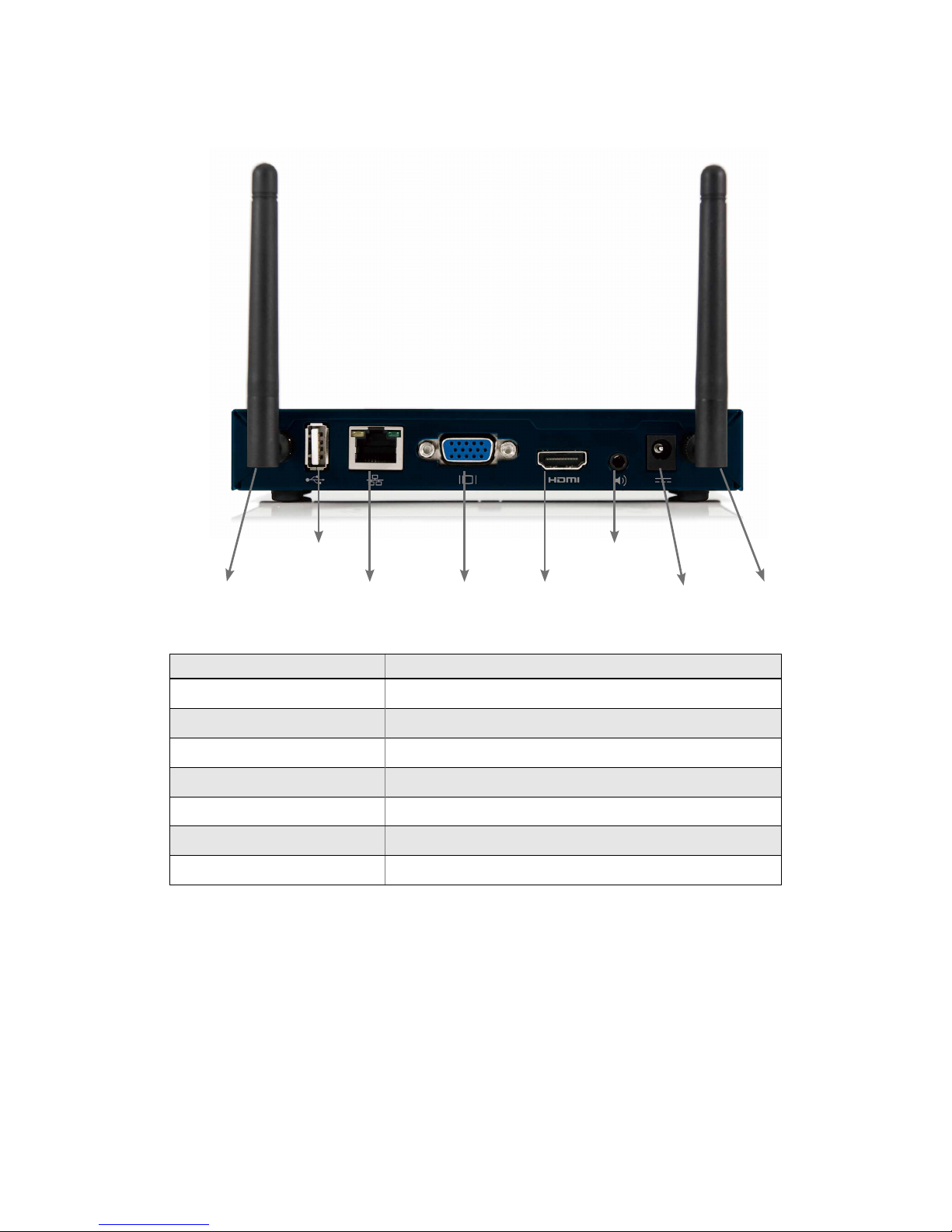
• Rear Panel
Description
Antenna WiFi Antenna
USB Port (Rear) USB port for USB IWB device (HID type)
RJ-45 10/100M RJ-45 port
VGA Connector VGA connector
HDMI HDMI Connector
Audio Jack Audio Jack (3.5mm)
Power Jack Power Jack (5V/2.5A)
Antenna AntennaPower Jack
Audio Jack
HDMI
USB Port
RJ-45 VGA Connector
Altri manuali per WiPG-1500
4
Indice
Altri manuali WePresent Portale

WePresent
WePresent WiPG-1000 Guida di riferimento rapido

WePresent
WePresent WiPG-1000 Manuale utente

WePresent
WePresent WiPG-1000 Manuale utente

WePresent
WePresent WiPG-1600 Manuale utente

WePresent
WePresent SharePod Manuale utente

WePresent
WePresent WiPG-1000 Manuale utente

WePresent
WePresent WiPG-1500 Manuale di installazione e funzionamento
Manuali Portale popolari di altre marche

LST
LST M500RFE-AS Manuale utente

Kinnex
Kinnex Media Gateway Manuale utente

2N Telekomunikace
2N Telekomunikace 2N StarGate Manuale utente

Mitsubishi Heavy Industries
Mitsubishi Heavy Industries Superlink SC-WBGW256 Manuale utente

ZyXEL Communications
ZyXEL Communications ZYWALL2 ET 2WE Manuale utente

Telsey
Telsey CPVA 500 - SIP Manuale utente