
Wharfedale Pro LT19R1BW Manuale utente

USER'S MANUAL
HD Ready LCD TV
MODEL:
L1511W-A, L1911W-A
Customer helpline:0845 604 0105
Please read thismanual carefully before
using your televisionand keep thismanual
for future reference.
Customer helpline:0845 604 0105
Customer helpline:0845 604 0105

To users:
Thank you for using our LCD-TV.
Before connecting the LCD-TV and turning the power on, please
read this book carefully. Please keep this book for later use. When it
was loss of function by electrostatic shock, please switch the on/off
button for restoring the function.
CONTENT
Safety Notice .......................................................................................
Front Panel Controls.............................................................................
Connection ..........................................................................................
Remote Control Key Functions..............................................................
Remote Control .............................................................................
Installing Batteries............................................................................
Connection Instructions........................................................................
Grounding.........................................................................................
External equipment connections.........................................................
Antenna Connection........................................................................
VGA Input.......................................................................................
YPbPr Input....................................................................................
S-VIDEO Input................................................................................
SCART Input..................................................................................
HDMI Input.....................................................................................
Wall Mounting.................................................................................
Basic Operating Instructions..................................................................
Turn on the LCD-TV............................................................................
Audio Control.....................................................................................
Mute.................................................................................................
Select the TV Channel ........................................................................
Picture Mode......................................................................................
Menu Operations..................................................................................
Picture Menu Options..........................................................................
Audio Menu Options............................................................................
Audio Menu Options Continued............................................................
Function Menu Options........................................................................
Adjust Menu Options..........................................................................
Tuning Menu Options..........................................................................
TELE TEXT..........................................................................................
Troubleshooting Guide.........................................................................
Specifications......................................................................................
PRODUCT GUARANTEE.......................................................................
1
2
3
4
5
5
6
6
6
6
7
7
8
9
9
9
10
10
10
10
11
11
12
12
13
14
15-16
17
18-19
20-21
22
23-24
25
Customer helpline:0845 604 0105

Safety Notice Items
To prevent fire or electric shocks please read the instruction before
installing, using and cleaning the television.
lPlease read all the instructions before operation;
lPlease keep themanual for future reference ;
lDo not use any accessories that are not recommended by the manufacturer:
lBefore operation, make sure the operating voltage of this unit is corresponds
with your houseelectrical supply;
lDo not placethe unit on unstable or industy and humidplaces;
lNever put theunit in direct sunlight or near heat sources;
lAllow enough space for proper ventilation;
lPlease keep water away from the LCD-TV . If water comes in to contact with
the LCD-TV, disconnect the power cord from the power source, then wipe the
set with a dry soft cloth;
lDo not removethe back cover. If servicing is required, please refer to
customer helpline.
Customer helpline:0845 604 0105
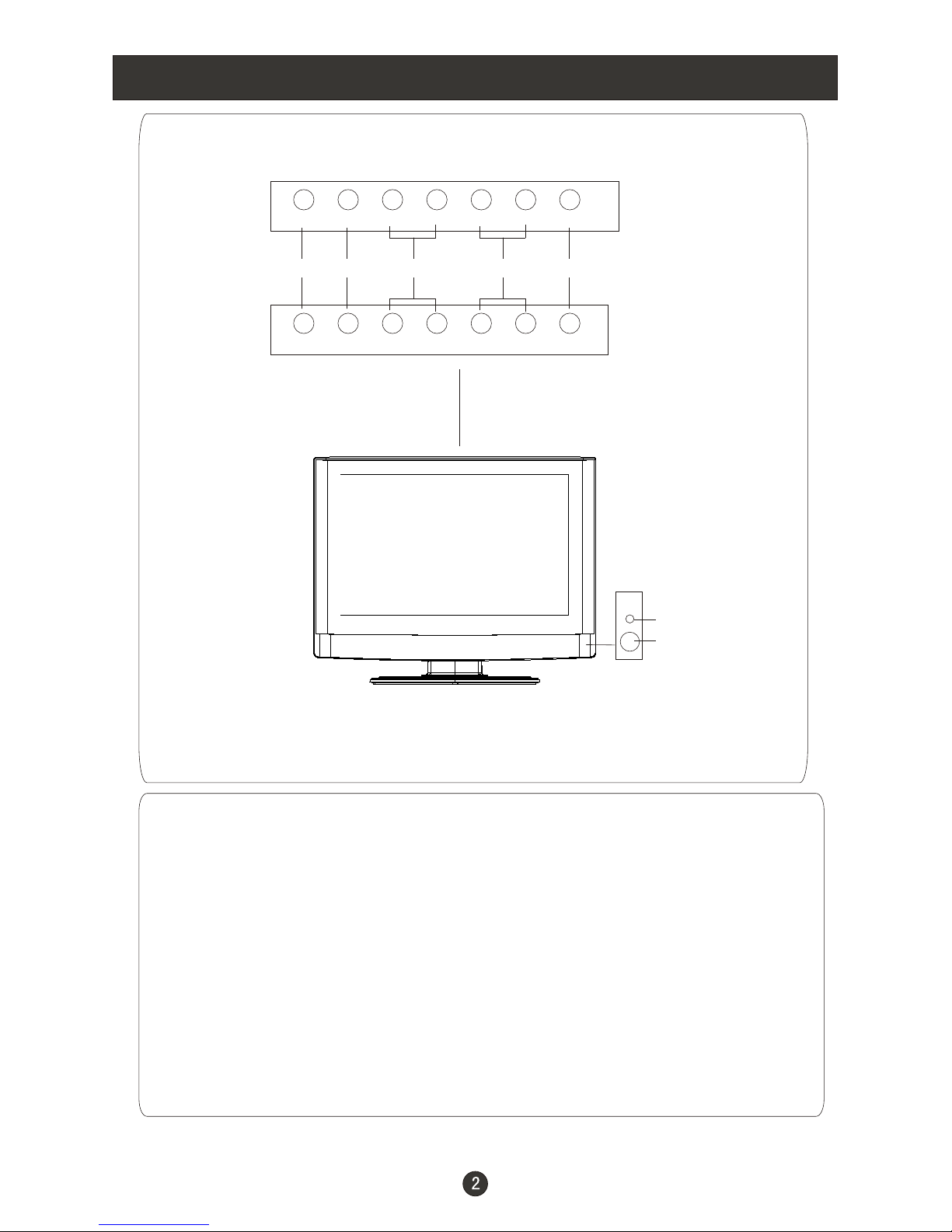
Front Panel Controls
Control Panel Function
1. Standby switch
2.SOURCE Select theinput signals: TV
3. MENU Press to select the main menu
4. VOL- Volume down/ Left orientation to adjust the item inthe OSD
VOL+ Volumeup / Right orientation to adjustthe item/Press to enter
5. CH- TV channel down / to select the item in the menu
CH+ TV channel up / to select the item in the menu
6. Power indicator
Illuminates red in standby mode, illuminates green when the display is
turned on
7.Remote Sensor
PC/COMPONENT/HDMI/ /SCART/
S-VIDEO
6
7
SOURCE MENU VOL- VOL+ CH- CH+ POWER
23451
SOURCE MENU VOL- VOL+ CH- CH+ STANDBY
Customer helpline:0845 604 0105
L1911W-A
L1511W-A
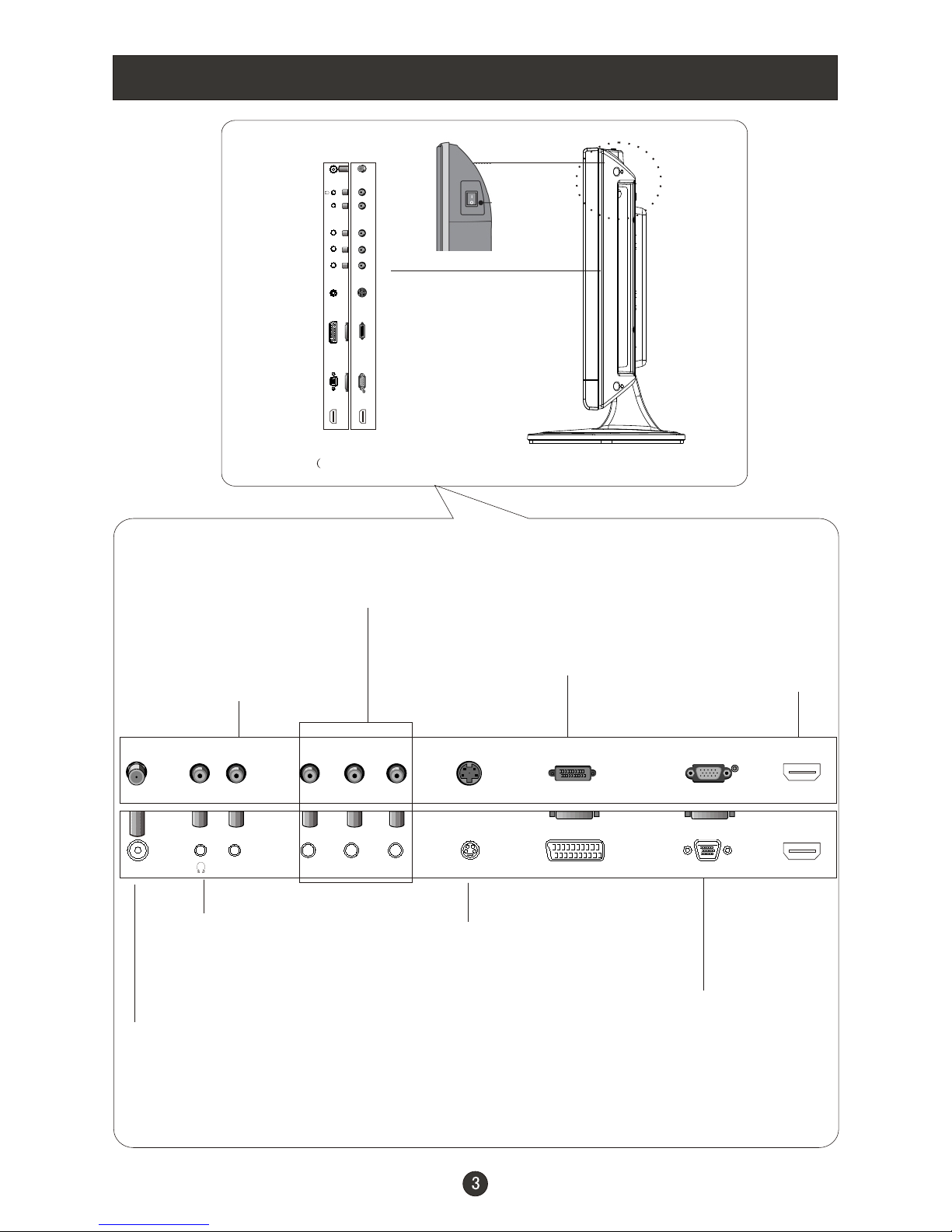
COMPONENT Input
Connect a component
video/audio
device to thesejacks
VGA Input
Connect to theVGA
15PIN analog output
connector of thePC
display card forPC
display purpose
S-Video Input
Connect S-Video out
from an S-Video device
to the jacks.
Antenna Input
Connect cable or
antenna signals to
the TV, either direc-
tly or through your
cable box.
Connection Options
Earphone port
COMPONENT/
SVIDEO /VGA
Audio Input
Connect the PC output
connector from aPC to
the audio input port
SCART
Connect to the DVD/
VCR/broadcasting
receiver or other
equipment
The figure is just for reference, please see the actual product.)
ANT IN Y
Pr S-VIDEO TV SCART VGA IN
AUDIO IN Pb HDMI
HDMI
Connect to HDMI
output of other
equipment
ANT IN Y
Pr S-VIDEO TV SCART VGA IN
AUDIO IN Pb HDMI
Customer helpline:0845 604 0105
AC power
switch
(Only available inL1911W-A)
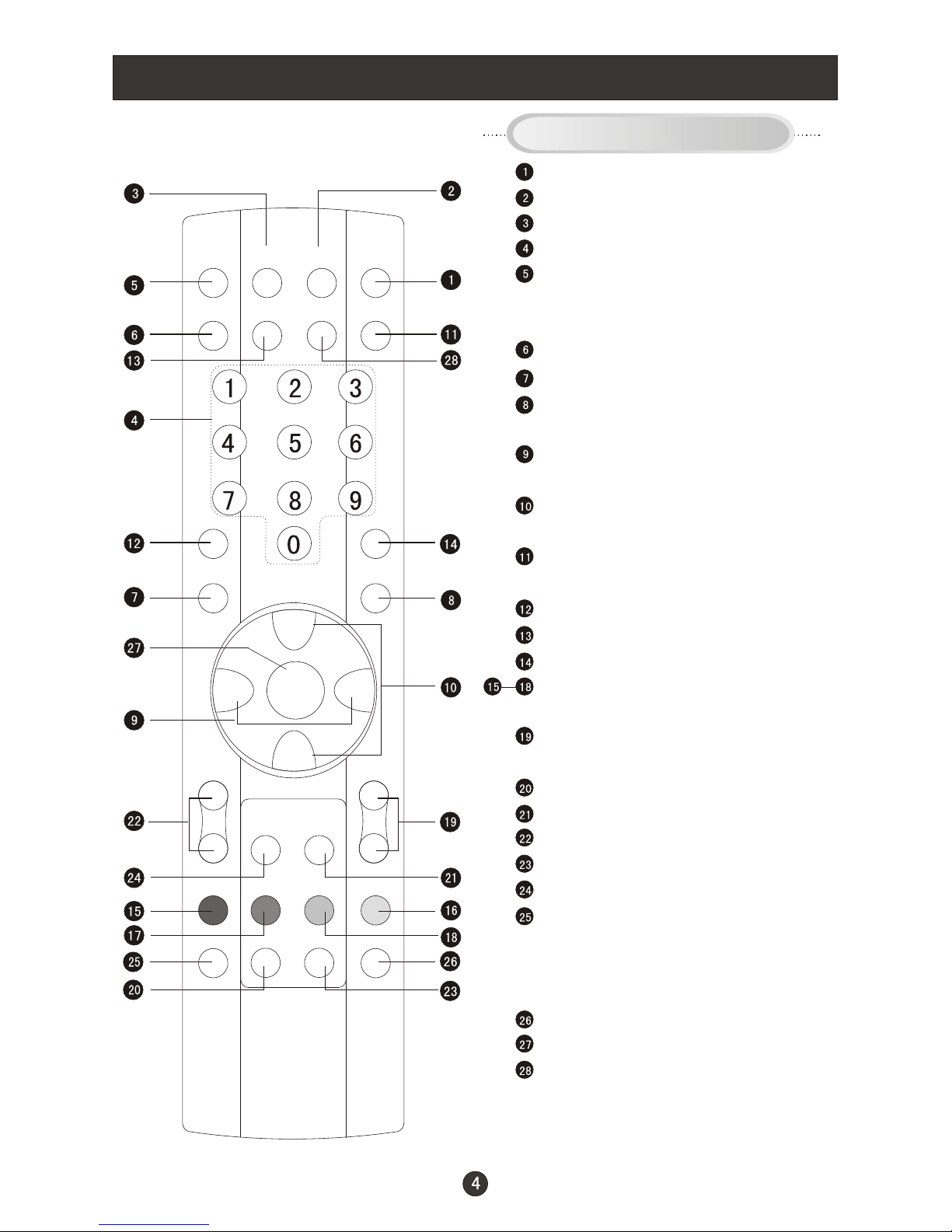
Remote Control Key Functions
When using the remote control, aim it
towards the remotesensor on the TV
Stand By
MUTE
Display current input signal information
TV channel number select
Set time to change the TV into the
standby status after a period of preset
time.
NICAM/A2 Stereo select
EXIT
Quick TV channel switch(return to the
last channel)
Volume down/up Left/right orientation to
adjust the item in the OSD
TV channel up/down or select the item
of the menu
Select TV
Select picture mode
PC system select
Select sound mode
Correspond to the differently colored
subjects
Switch to the Teletext with text mode/turn
off Teletext and switch to TV mode
Hold on or off for current page display
Switch to the Teletext with mix mode
Request index page
Change display size
Sub coded page access
Reveal or hidden the hidden words
Press to select the main menu
Auto adjust (PC mode)
PC/COMPONENT/HDMI/ /SCART/
S-VIDEO
While in normal TV mode only, pressing
the button TIME will display the teletext
time in the top right corner for a few
seconds.(only available in teletext mode)
Buttons on the remote control
P+
P-
V- V+
SLEEP DISPLAY MUTE STANDBY
NICAM PC AUTO AD SOURCE
PSM
OK Q.VIEW
MENU
INDEX TEXT
TIME HOLD SIZE REVEAL
SUBCODE MIX
SSM
Customer helpline:0845 604 0105
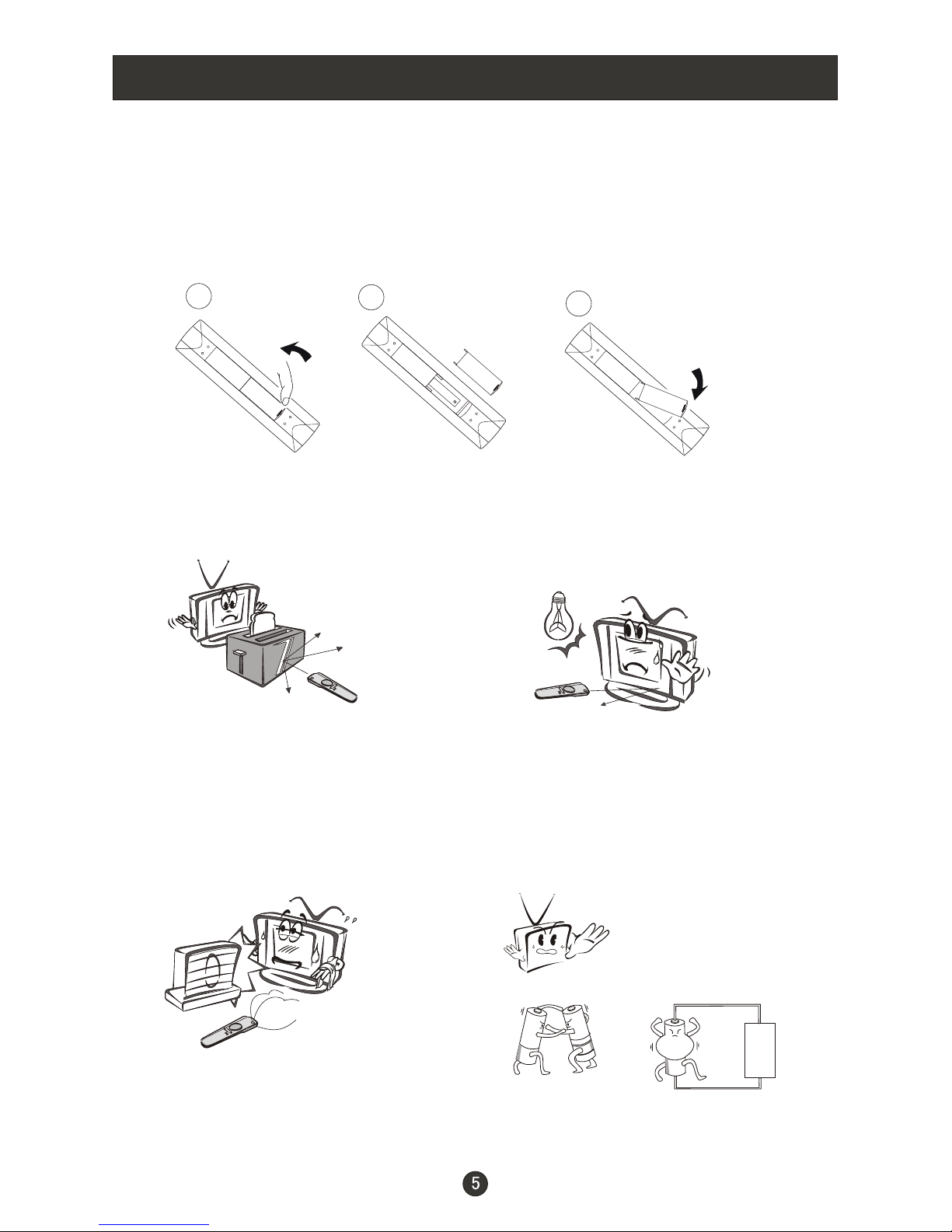
Remote Control
Installing Batteries
3
2
1
1.Open the coverof the battery compartment at the back of the remote
control.
2.Insert twoAA alkaline batteries in the compartment. (plus and minus poles to
respective mark)
3.Replace the coverof the battery compartment.
Precautions
Make sure that there is no
obstacle between theremote
controller and televisionset.
As strong light may interfere the
signals, change yourposition to
operate the remote controller if
the television cannot be turned
on or off as youexpect.
Keep the remote controller
away from heat source or
humid area toensure
effective performance of
the remote controller.
Make sure that two 5# 1.5V alkaline
batteries are loaded. The batteries
must be of the same type. The batteries
must be located properly. The batteries
are not rechargeable. If your TV is to be
stored for a period of time, remove the
batteries from the remote control.
Customer helpline:0845 604 0105
Connection Instructions
Ensure that you connect the grounding / earth wire to prevent possible
electric shock. If grounding methods are not possible, have a qualified
electrician install a separate circuit breaker. Do not try to ground the
unit by connectingit to telephone wires, lightening rods, or gaspipes.
Grounding
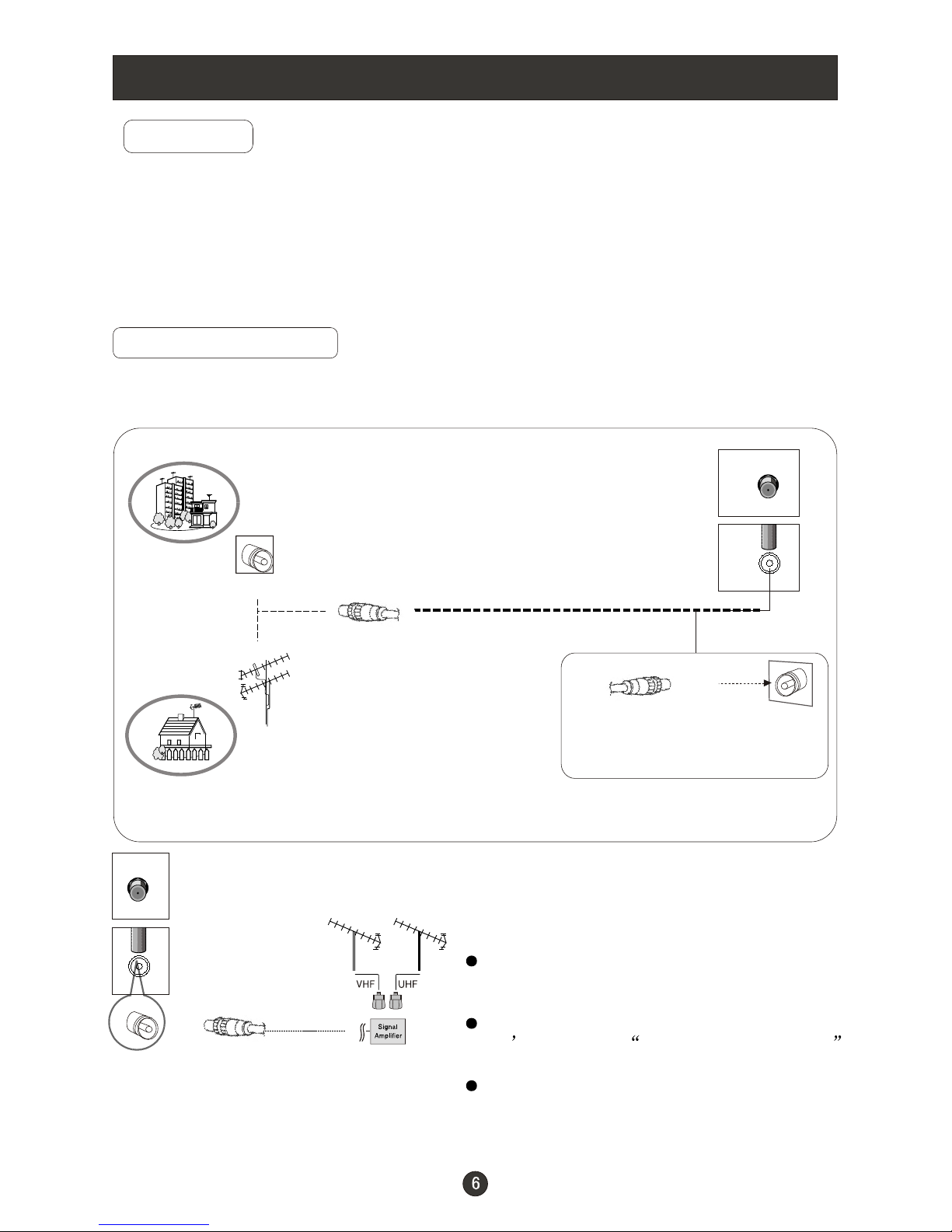
External Equipment Connections
Antenna Connection
- Antenna or Cable Service with a Cable Box Connections
- For optimum picture quality, adjust antenna direction if needed.
Multi-family Dwellings/Apartments
(Connect to wallantenna socket)
wall antenna
socket
VHF antenna
UHF antenna
outdoor
antenna
Single-family Dwellings /Houses
(Connect to walljack for outdoorantenna)
Be careful notto bend thebronze
wire when connectingthe antenna.
To improve picture quality in a poor
signal area, purchase and install a
signal amplifier.
If the antenna needs to be split for two
TV s, install a 2-Way SignalSplitter
in the connections.
If the antenna is not installed properly,
contact your dealer for assistance.
RF coaxial wire(75 ohm)
ANT IN
ANT IN
Note:All cables shownare just for example.
Customer helpline:0845 604 0105
Questo manuale è adatto per i seguenti modelli
3
Indice
Altri manuali Wharfedale Pro TV LCD


