
WI AUDIOSTREAM JM-WAL45 Manuale utente
Wi AudioStream
USER GUIDEJM-WAL45
Professional Stereo Digital Wireless Audio Dongles
STEREO
DIGITAL WIRELES

CONGRATULATIONS!
Thank You For Choosing Jangus Music!
Congratulations on your purchase of the Wi-AudioStream Professional Stereo Digital Wireless Audio Dongles.
In this manual, you’ll nd information designed to help you understand the capability of your
Wi-AudioStream as well as step-by-step explanation on how to install and operate your
Wi-AudioStream professional stereo digital wireless audio dongles.
Wi-AudioStream
CONGRATULATIONS

Getting Answers!
We want you to get the most from your new Wi-AudioStream professional stereo digital wireless audio
dongles! Simply logon to www.jangusmusic.com and access the powerful resources available online including
instructional manuals and frequently asked questions.
Our customer service support staff are ready to assist you with any question you may have.
Your Wi-AudioStream comes with 90 days of telephone support and one year of service coverage.
There are may ways to contact Jangus Music customer service support.
Website: https://www.jangusmusic.com/support
Technical support: (949) 526-4877 [949-JANGUS7]
Wi-AudioStream
3
TECHNICAL SUPPORT
ENGLISH

Making Great Musical Gear Better!
Jangus Music’s Wi-AudioStream JM-WAL45 professional stereo digital wireless audio dongles solution is the
smallest, most advanced cable replacement technology available today that ts on the palm of your hand!
This full function 2.4GHz point-to-point digital wireless audio solution provides up to 300 feet of secure,
simultaneous un-compressed stereo 48KHz/16bit CD quality wireless audio connectivity without radio
frequency (RF) interference with other wireless devices, signal loss, crackle or AC hum making it the best
wireless solution for live performances and studio recording environments.
This Patents-Pending, plug-and-play digital wireless audio solution replaces the traditional audio wire cable
and provide easy and user friendly way to connect professional musical gear such as Mono and Stereo Ear-
worn or Clip-on Microphones, Acoustic and Wind Instruments Microphones, In-ear Monitors, Studio
Monitors Headphones and other analog audio devices to remote and hard to reach equipment such as
Mixers, Ampliers, Speakers, Samplers, Hard Disk Recorders, Computers and more. Simply connect the
audio source to the dongle size transmitter audio input jacks then connect the dongle size receiver to the
In-ear monitors, Headphones, Mixer, Amplier, Speaker or computer audio input jacks and you are done!...
INTRODUCTION
Wi-AudioStream
4
Meeting The Specs!
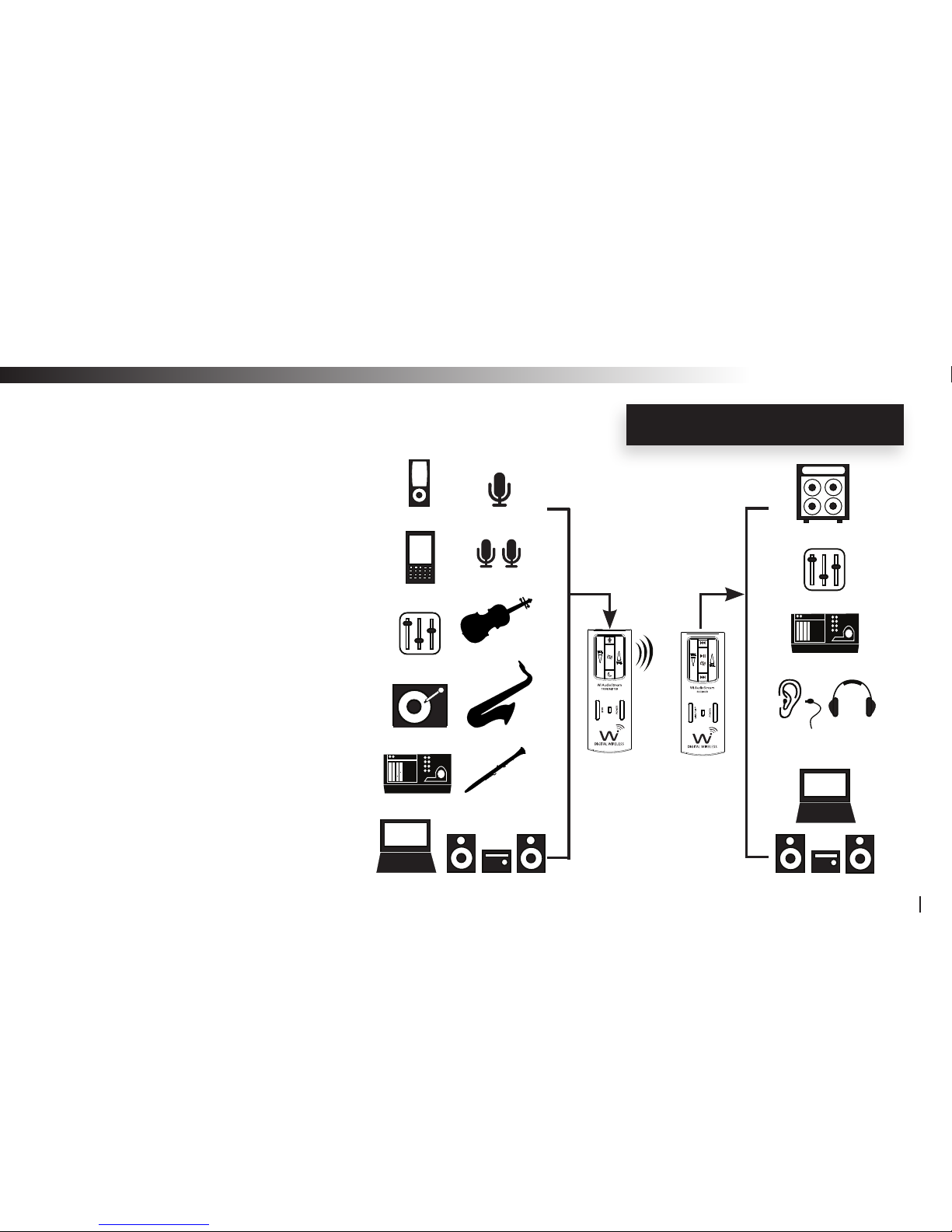
The Wi-AudioStream transmitter small and
rugged design, boasts three (3) different
power up modes to support the following
instruments connections:
• Line-in (Stereo)
• Stereo Microphones
• Mono Microphones
Each of the power up modes are
congured to apply the appropriate
input impedance and input voltage
levels to best match the electrical
characteristics of the instrument
connected to the transmitter dongle.
INTRODUCTION
Wi-AudioStream
5
Transmitter
(Tx)
Receiver
(Rx)
Mono MIC
Stereo MIC
Stringed
Instruments
Brass
Instruments
Woodwinds
Instruments
Stereo System
MP3
Smart Phone
Mixers
DJ Gear
Digital Recorders
Computers
Ampliers
Mixers
Stereo System
Digital Recorders
Headphones &
In-ear Monitors
Extreme Flexibility!
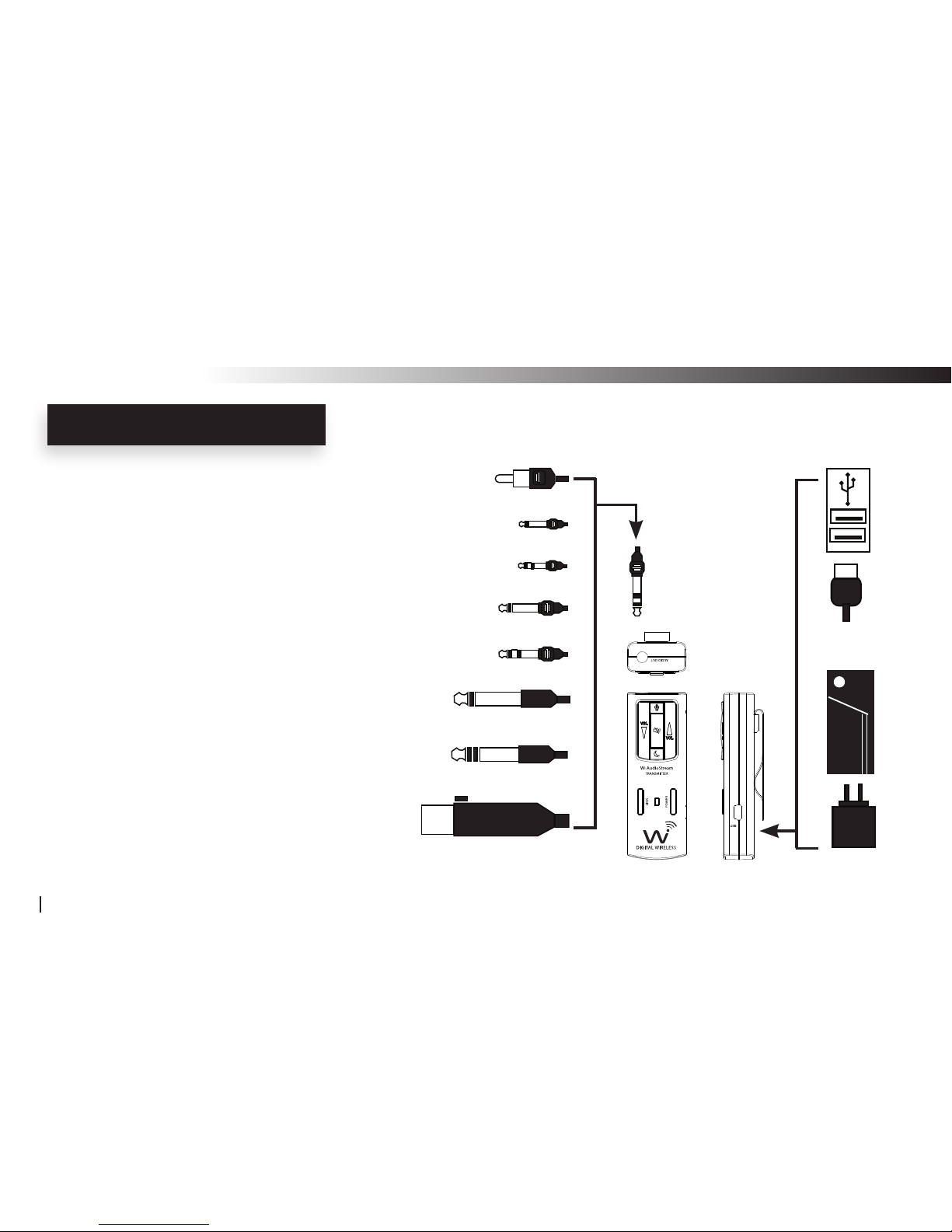
The Wi-AudioStream boasts an interchangeable
1/4” (6.35mm) TRS stereo connector jack, 1/8”
(3.5mm) stereo miniature jack, 2.5mm
subminiature jack and XLR connectors for
maximum connectivity with audio devices.
The Wi-AudioStream power source exible
design boasts an internal rechargeable battery
for 6.5 hours of battery operations, powerful
USB bus power connectivity to any USB
equipped devices and optional ON-THE-GO
AA battery power booster adapter for 19 hours
of extended battery operations.
INTRODUCTION
Wi-AudioStream
6
XLR Unbalanced
6.3mm TSR Stereo
6.3mm TSR Mono
3.5mm Stereo
3.5mm Mono
2.5mm Stereo
2.5mm Mono
RCA
Charger
USB
Bus Power
3.5mm Stereo
AA Battery
Power Booster
Creating Your Audio Matrix!
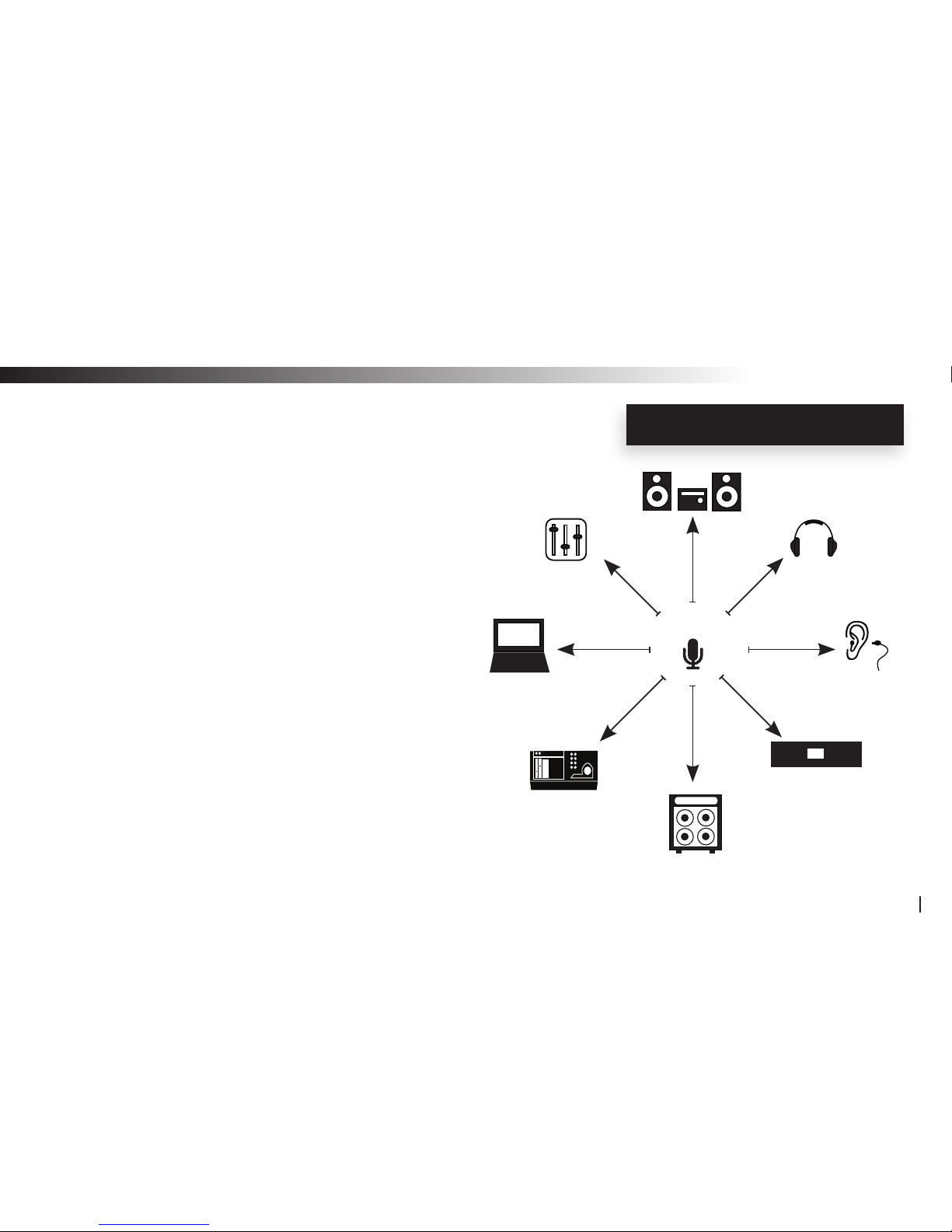
Jangus Music’s built-in digital wireless audio signal
patch routing feature allows users to re-rout the audio
output signal from their instruments to up to 8 different
Rx digital wireless receivers including Jangus Music’s
JM-WHM01 digital wireless headphone audio
monitoring system for private listening and
performance monitoring with a simple press of the
Link button located on the transmitter dongle.
No more removing the patch-bay devices,
disconnecting cables, and ipping I/O circuit boards!
INTRODUCTION
Wi-AudioStream
7
Tx 1
In-ear Monitor
Rx 1
Headphone
Rx 2
Mixer
Rx 4
Computer
Rx 5
Rx 7
Rx 3
Digital Recorder
Rx 6
Compressor/Limiter/
Gate/FX
Rx 8
Amplier
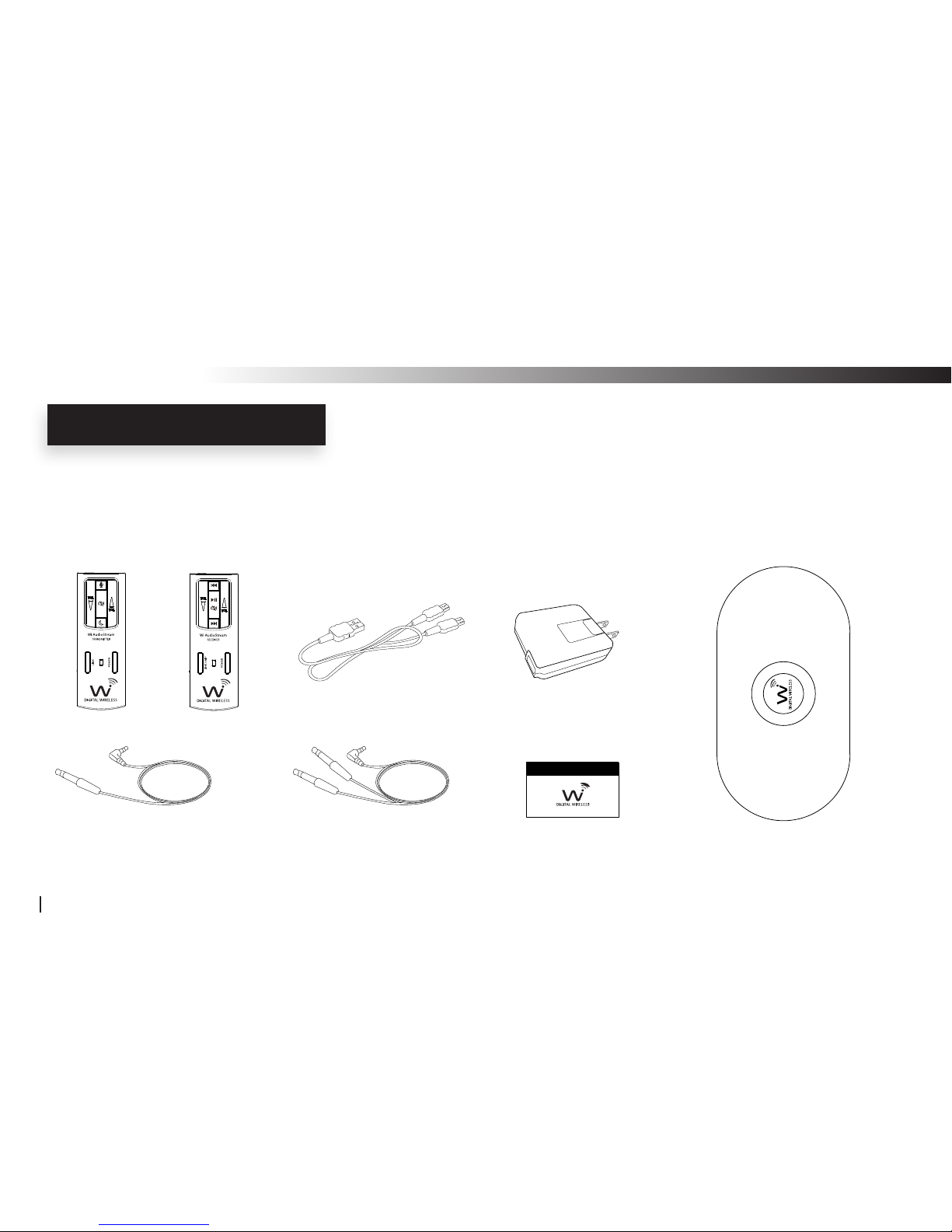
What is included in the package?
Verify that you have received all of the items listed below.
Please visit our web site at www.jangusmsuic.com for additional accessories.
PACKING LIST
Wi-AudioStream
8
Wi-Transmitter Wi-Receiver Universal AC Charger
(QTY 2) 1/4” Mono Male to
1/8” Stereo Male Cable
(QTY 2) 1/4” Stereo Male to
1/8” Stereo Male Y-split Cable Carrying Bag
USB Y-Split Power Cable
User Manual
www.jangusmusic.com
11
12
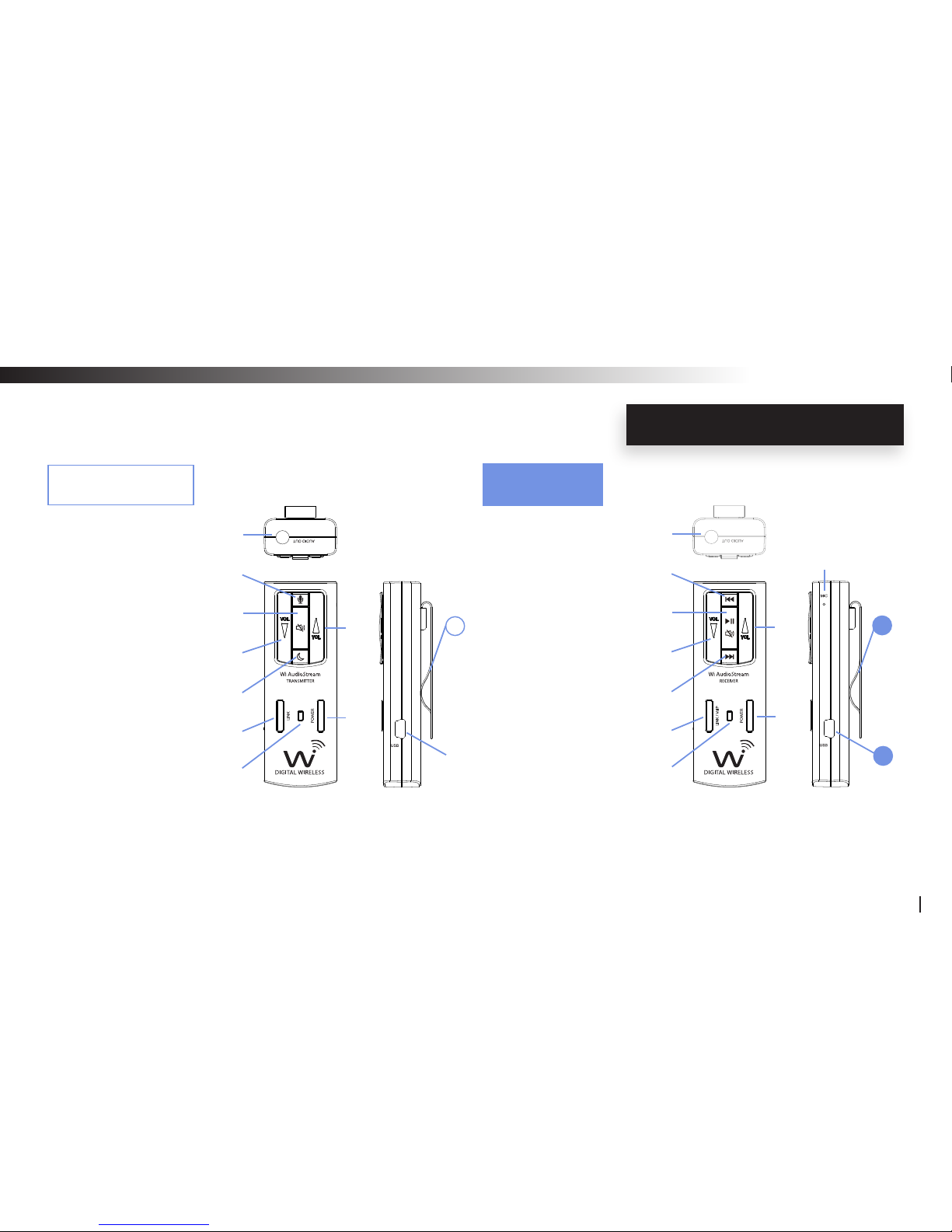
1. Audio OUT Jack
2. Power ON/OFF
3. Link / Paring / VoIP
4. Power/Status LED
5. Volume UP
6. Volume Down
7. Mute/ Play/Pause
8. Previous Track
9. Next Track
10. (VoIP) Microphone
11. USB Charging Port
12. Belt Clip
~
s
ABOUT YOUR JM-WAL45
Wi-AudioStream
9
1. Audio IN Jack
2. Power ON/OFF
3. Link / Paring
4. Power/Status LED
5. Volume UP
6. Volume Down
7. Mute
8. Sleep
9. MIC Mode
10. USB Charging Port
11. Belt Clip
11
j
r
o
n
q
p
l
m
k
u
|
}
y
{
z
w
x
v
Wi Transmitter
Wi Receiver

Transmitter Dongle Controls and Connections
jAudio IN Jack: Provide stereo and mono connection for professional vocal and instruments
capacitive microphones and any analog devices such as monitoring systems
MP3 players, cell phones, stereo systems, computers and more...
kPower ON/OFF: Press and hold the Power button for 2 seconds to turn ON or OFF the transmitter
lPower/Status LED: The Power/Status LED display the status of six functions, ON/OFF, Battery
Charging, Paring, Microphone Power, Mute and Sleeping mode statuses
F
Please refer to the “Function Matrix Table” section of this manual for more details
mVolume UP: Press and hold the Volume UP for auto increments of the volume level
Press the Volume UP once for step increments of the volume level
nVolume DOWN: Press and hold the Volume DOWN for auto increments of the volume level
Press the Volume DOWN button once for step increments of the volume level
TRANSMITTER CONTROLS
Wi-AudioStream
10
Altri manuali per JM-WAL45
1
Indice
Altri manuali WI AUDIOSTREAM Hardware per computer

Manuali Hardware per computer popolari di altre marche

EMC2
EMC2 VNX Series Manuale del proprietario

Panasonic
Panasonic DV0PM20105 Manuale utente

Mitsubishi Electric
Mitsubishi Electric Q81BD-J61BT11 Manuale utente

Gigabyte
Gigabyte B660M DS3H AX DDR4 Manuale utente

Raidon
Raidon iT2300 Manuale utente

National Instruments
National Instruments PXI-8186 Manuale utente


