
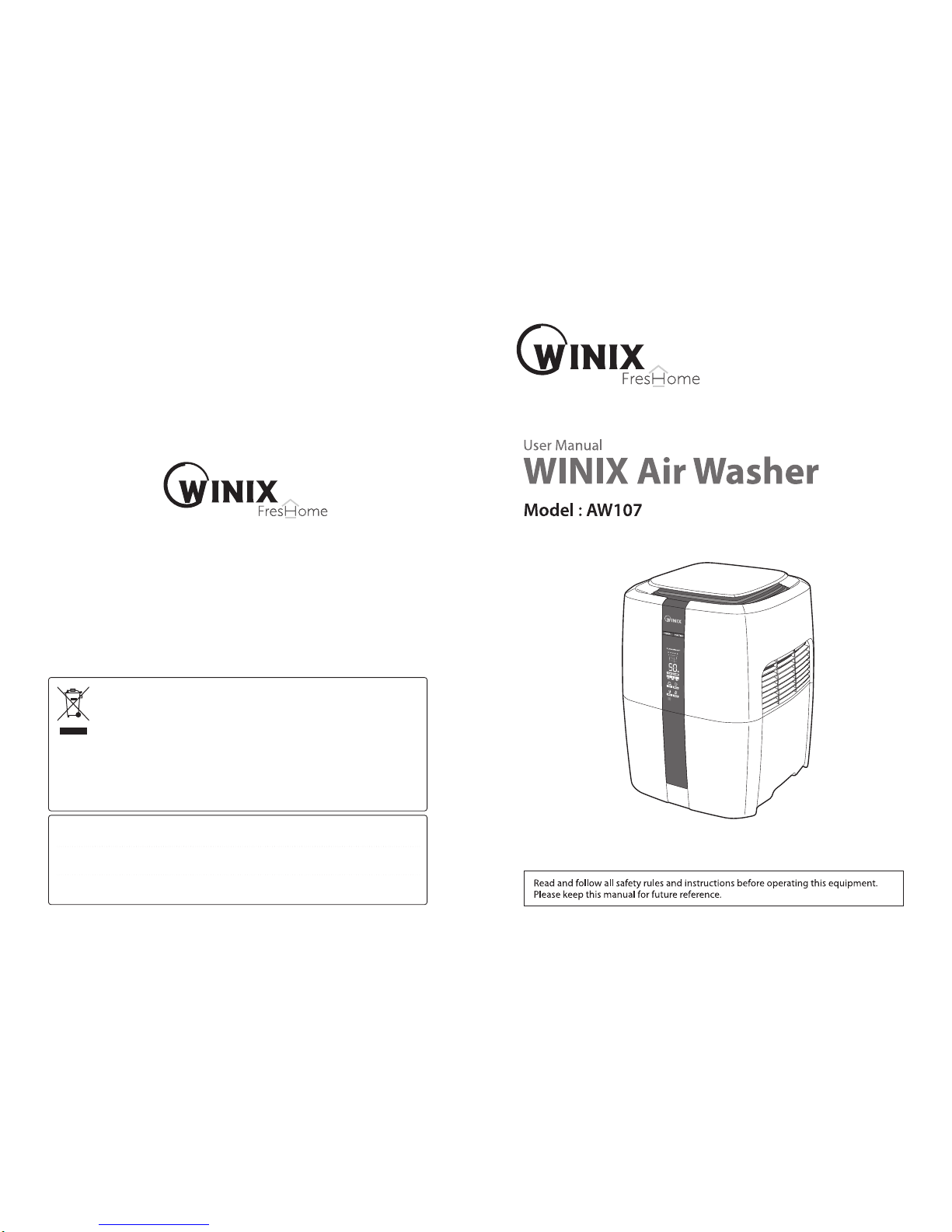
Winix AW107 Manuale utente
WINIX Korea 35-1, Unjung-Dong, Bundang-gu, Seongnam-si, 463-440, South Korea
WINIX Inc 120 Prairie Lake Road, Unit E East Dundee, lllinois 60118
WINIX Europe 14 Cours de l'Intendance, 33000 Bordeaux, France
Thank you for purchasing this WINIX product
This marking shown on the product or its literature, indicates that it should not
be disposed with other household wastes at the end of its working life. To
prevent possible harm to the environment or human health from uncontrolled
waste disposal, please separate this from other types of wastes and recycle it
responsibly to promote the sustainable reuse of material resources.
Household users should contact either the retailer where they purchased this
product, or their local government office, for details of where and how they can take this
item for environmentally safe recycling.
Business users should contact their supplier and check the terms and conditions of the
purchase contract. This product should not be mixed with other commercial wastes for
disposal.
Sep. 2012
To buy: Contact Sylvane at 800-934-9194 or visit www.sylvane.com
For product support: Contact Winix at 877.699.4649
1 2
Introduction Installation Operation Maintenance
TABLE OF CONTENTS
FEATURES 1
Read all instruction 1
INTRODUCTION 3
SAFETY INSTRUCTIONS 3
PRODUCT AND PARTS VIEWS 7
PRODUCT INSTALLATION 9
SETTING UP YOUR AIR WASHER 9
PRODUCT OPERATION 10
BEFORE TURNING ON 10
AUTO MODE 12
SLEEP MODE 13
ADJUSTING FAN SPEED 13
EMPTYING WATER TANK 14
CARE AND MAINTENANCE 15
OUTER SURFACE 15
CLEANING PRE-FILTER 15
CLEANING ANTIMICROBIAL DISK AND WATER BUCKET 16
CLEANING THE UNIT 17
FAQs & TROUBLESHOOTING 19
SPECIFICATIONS 21
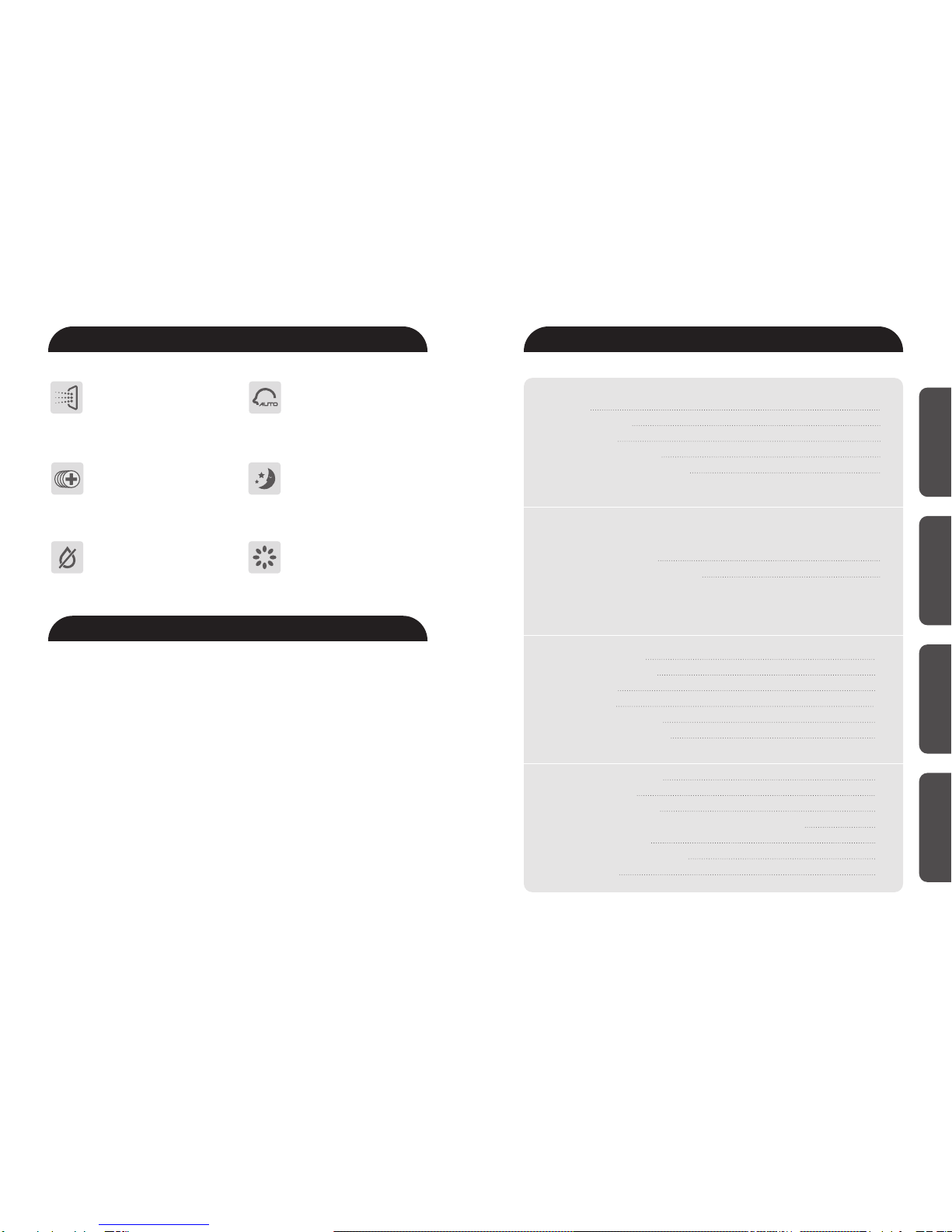
FEATURES
2-in-1 Air Treatment
The Winix FresHome Air Washer
gently and safely captures odors
and impurities while gently
humidifying the air.
CleancelTM Anti-Microbial Coating
The Winix Air Washer is treated with
CleancelTM to prevent the growth of
odor causing bacteria and microbes
on the cleanable humidifying
collection discs.
Auto Sleep Mode
The Winix Air Washer will
automatically dim the display
lights and operate at lowest speed
to not disturb sleep.
Auto Mode
A sensor continually monitors the
environment and adjusts the
performance for optimal humidity
levels.
Auto Shut-Off
WINIX Air Washer shuts off
automatically when the water
bucket is low.
Plasma WaveTM Technology
Attacks pollutants at the molecular
level to neutralize viruses, bacteria,
chemical vapors, odors and gases in
the air leaving the Air Washer.
Read all instruction: Important Safeguards
When using electrical appliances, especially when children are present basic safety
precautions should always have followed, including the following:
1. Always have water in the water tank when operating unit.
2. Use only clean, cool tap water to fill tank.
3. Use only 100~120V AC outlet. As with any electrical device, plug and unplug unit with
dry hands only. Turn unit off prior to unplugging it. Unplug unit when not in use and
before you clean or move the unit.
4. This unit shuts off automatically when water tank is empty.
5. Never operate unit with a damaged coed or plug. Keep cord straight.
6. Always place unit on an elevated (at least one(1)foot off the ground), flat, level surface
away from direct sunlight. Keep cord away from heated surface and areas where it could
be walked on or tripped over. Do not place on objects that are not resistant to water
damage from spillage or moisture.
7. Do not titt or tip unit or attempt to empty or fill it while it is operating.
8. The unit should not be left unattended in closed rooms as air could become saturated
and leave condensation on walls or furniture. Always leave room door partially open.
9. Do not tilt or tip unit or attempt to empty or fill while it is operating.
10. Replace demineralization cartridge every 2~3 months or more frequently as needed.
▶
Power Cord
Warning
43
INTRODUCTION
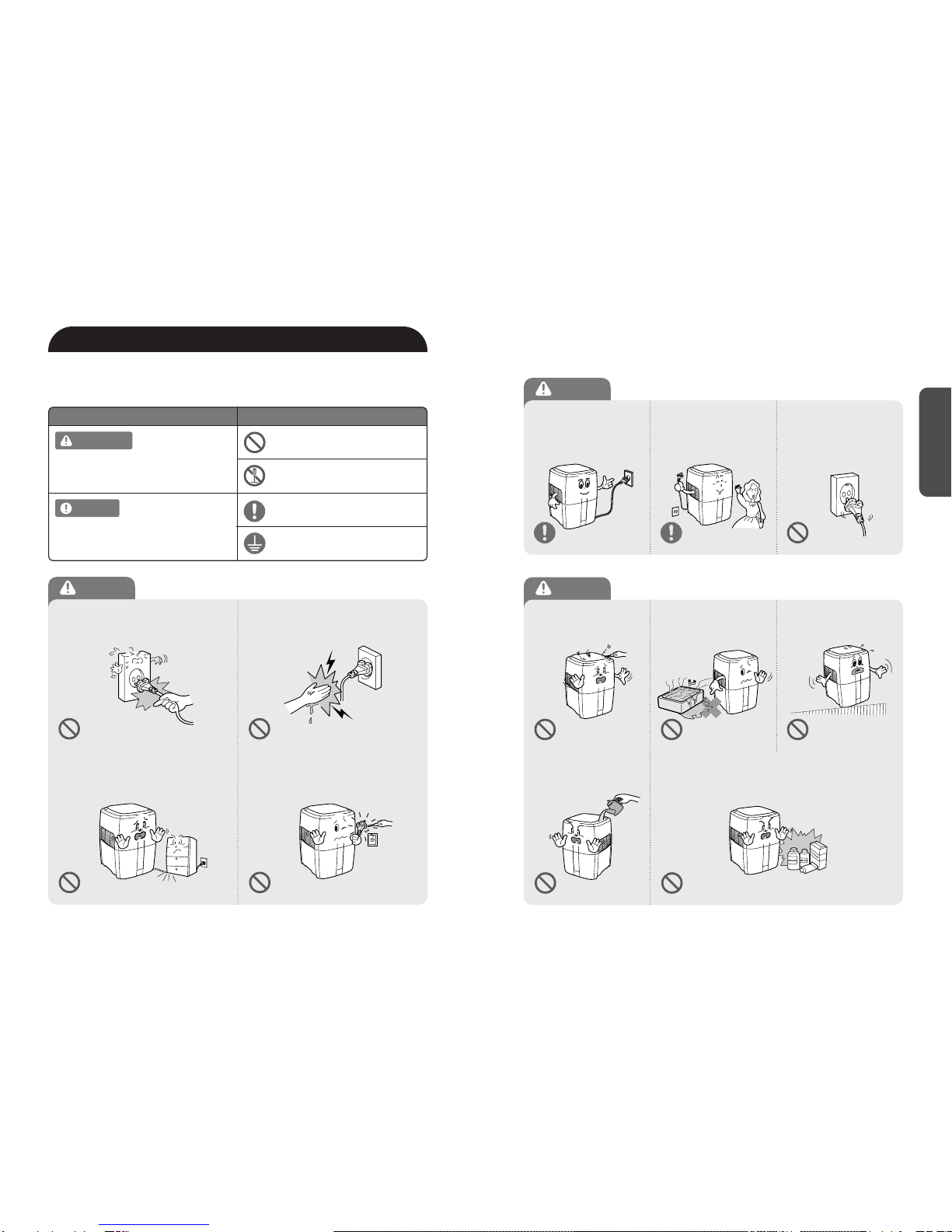
DON'T unplug the unit by pulling on its
power cord. DON'T touch the plug with wet hands.
DON'T bend or place heavy object(s) on
the power cord.
DON'T replace or modify the power cord.
If the power cord/plug is damaged, it must be
replaced by the manufacturer or a qualified
technician.
Follow these instructions to avoid any risk of
personal injury, property damage, electrical
shocks or fire hazards.
WARNING
Failure to follow the safety instructions can
lead to personal injury or property damage.
NOTICE
WARNING / NOTICE DIRECTION
PROHIBITED
DO NOT DISASSEMBLE
Introduction
WARNING:SAFETY INSTRUCTIONS Warning
▶
Power
Warning
▶
Operation
DO connect the power cord
to outlets with a ground
connection ONLY.
DO unplug air washer when
not in use to save energy
consumption.
DON'T
plug power cord
into loose or damaged
electrical outlet.
(Can lead to overheating or
electrical shock.)
DO NOT
attempt to repair,
alter or disassemble the
air washer.
DON'T
operate the air
washer if standing water is
present.
DON'T
operate air washer
on an uneven surface.
DON'T pour water into the
top of the air washer, only
place in water tank as
directed.
DON'T operate air washer near flammable materials.
Must Follow
Ground connection protecting
from electrical shock
Note
▶
Operation
65
Note
▶
Power
Note
▶
Operation
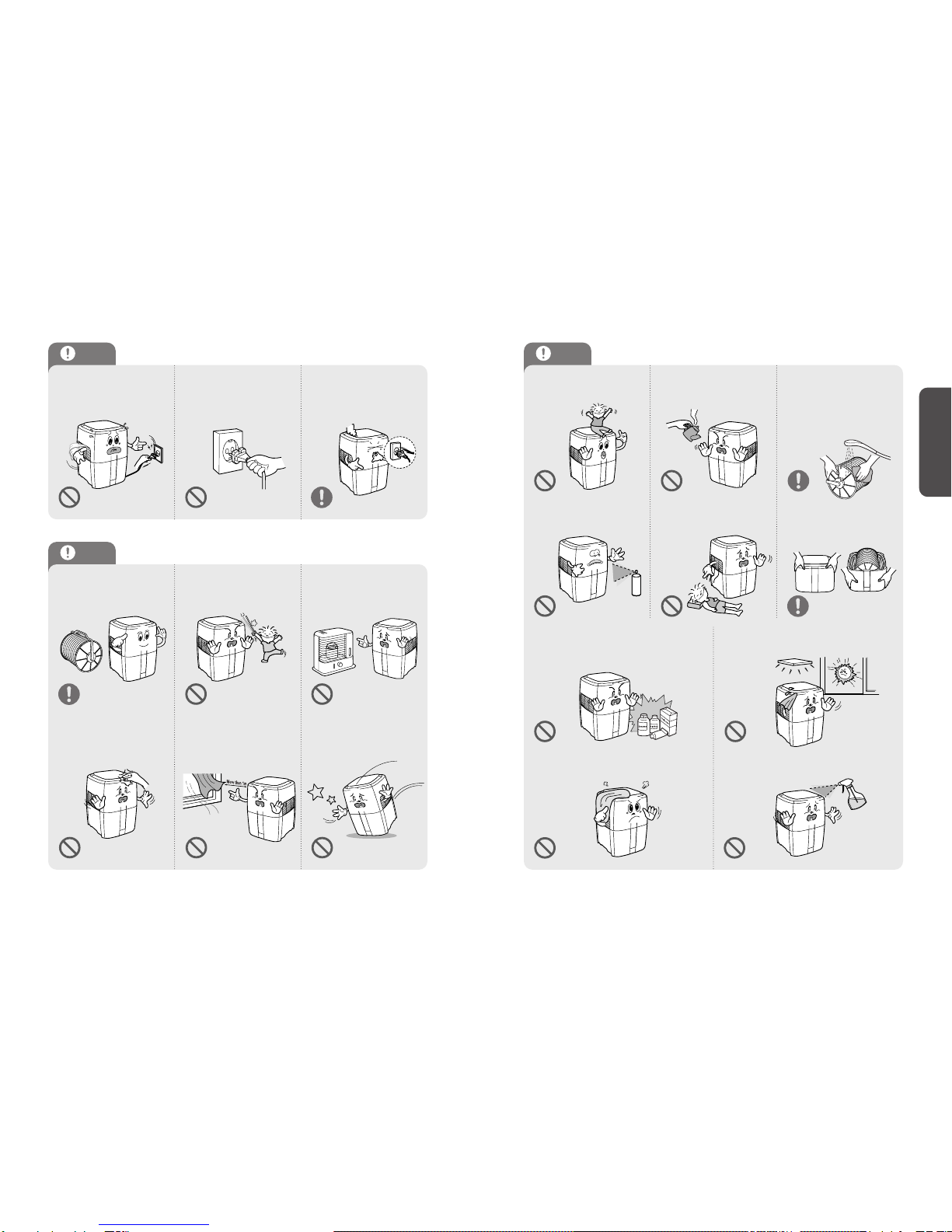
DON'T disconnect the
power cord during
operation.
DO unplug the appliance
during filling and cleaning. DO unplug the unit and
contact your service dealer
if any irregular noise or
smoke occurs.
DO use the air washer after
assembling the Antimicrobial
Disk.
DON'T insert ANYTHING
into the air inlet or outlet. DON'T place the
air washer near a heat
source.
DON'T place hands or
body parts near the air
outlet during operation.
DON'T place the air washer
near curtains or other
materials that can cover the
vents of the unit.
DON'T strike or drop the
air washer.
DON'T allow children to
play on or near the air
washer.
DON'T use hot water in the
water tank. DO clean Antimicrobial disk
regularly with warm tap
water and allow to air dry.
Discs are top-rack dishwasher safe.
Follow directions in the Care and
Maintenance section.
DON'T spray flammable
liquids or gases into the unit.
DON'T place air washer
near your head when you
sleep.
DO move the top cover
and water bucket of the
unit separately when
moving air washer.
DON'T
use flammable material
(such as benzene or alcohol) to clean
the air washer.
DON'T
cover the top of the air washer
during operation.
※This appliance intended for adult use only.
DO NOT
spray liquids directly into
air washer during cleaning.
DON'T install the unit in direct sunlight
or near inverter lighting or automatic
sensor lights.
Introduction
87
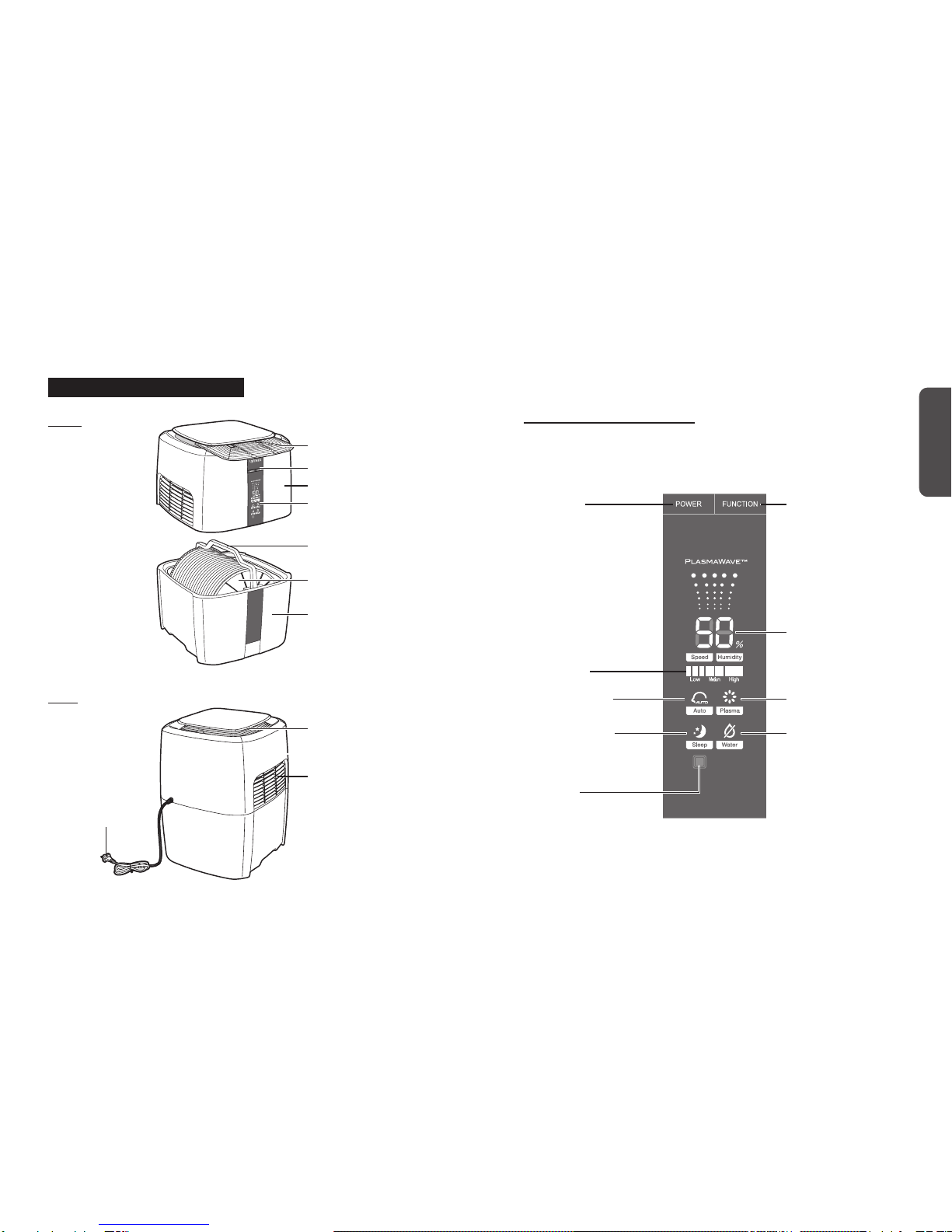
Display Panel
Power / Function Button
Disk Assembly Handle
Air outlet
CleancelTM Antimicrobial Disks
Water Bucket
Power Cord
Air Inlet
Power Button
Current Humidity Level
Fan/Disk Speed
PlasmaWaveTM
On/Off Indicator
Low Water Indicator
Function Button:
Fan/Disk Speed (LOW
MEDIUM
HIGH), Sleep Mode, Auto Mode.
Front Display Panel and Controls
Back
Introduction
PRODUCT AND PARTS VIEWS
Top Cover
Pre-Filter
Light Sensor
Sleep Mode Indicator
Auto Mode Indicator
9 10
PRODUCT INSTALLATION PRODUCT OPERATION
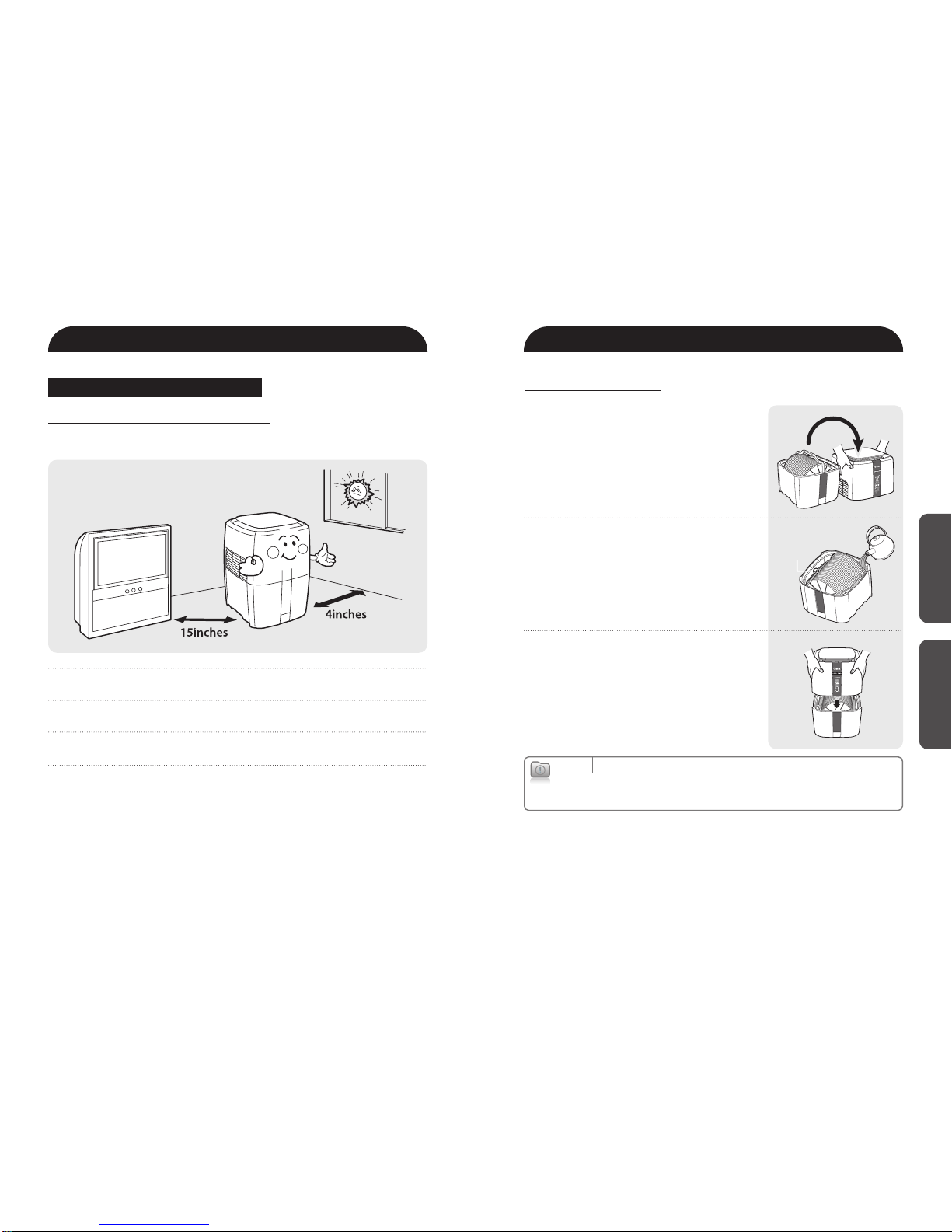
Do not install the unit under direct sunlight.
Long Exposure to direct sunlight can cause defects.
Air Washer must be installed and operated on an even surface.
Vibrations and noise can occur on soft or non-flat surfaces.
Products must be installed approximately 4 inches away from the wall and
15 inches from other electronic appliances.
Before operating the air washer, remove any plastic bags and polyfoams from
outside and inside of the unit.
SPACE SELECTION & INSTALLATION
For better performance and longer product life, please select an adequate space to
install the unit.
Installation Operation
❷Fill the water tank with cool tap water
up to the indicator line on inside of the
water tank. For optimal performance do
not overfill.
❸Replace the top section of the air cleaner.
Make sure that it is seated properly and
lines up correctly.
❶Lift and remove top section of the
air washer to open.
Water Line
Cautions
▶
Make sure to unplug the power cord before filling the water tank.
▶
Hard water may cause operation defects. Please use filtered water if necessary.
▶
Use caution when moving air washer with a full water tank, as it will be heavy.
SETTING UP YOUR AIR WASHER BEFORE TURNING ON
1211
Operation
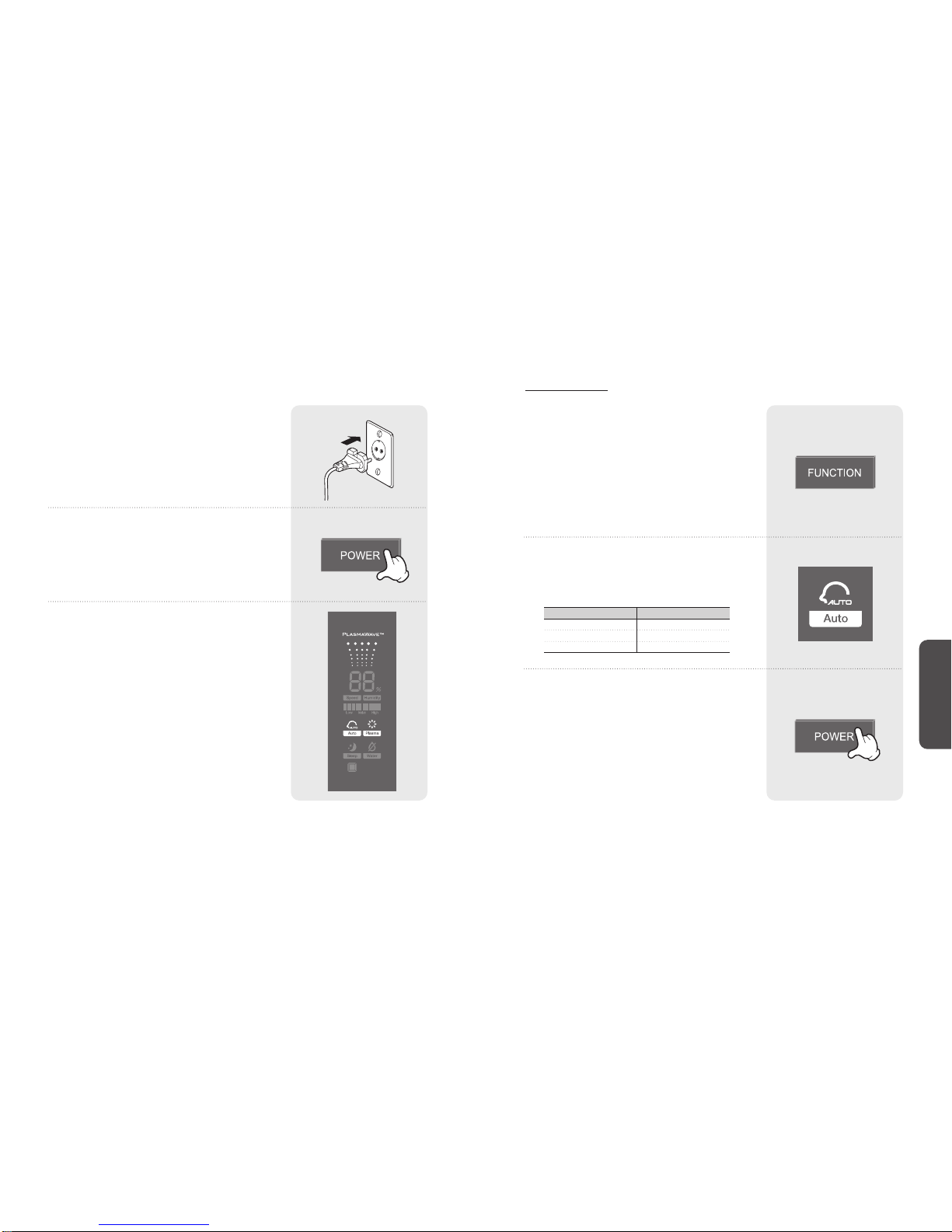
❺Push POWER button.
❹Plug the power cord into a power outlet.
❻The air washer will start in Auto Mode
and the PlasmaWaveTM function will be
ON. If the Low Water Indicator is on,
refill the water bucket.
AUTO MODE
❶Push FUNCTION button to select Auto
mode.
The FUNCTION button will cycle the unit between
the following: LOW MEDIUM HIGH
SLEEP MODE AUTO MODE.
❷AUTO Mode Indicator will illuminate.
Fan and disk speed will automatically adjust,
according to chart below, for optimal humidity
level of around 50%.
❸Push the POWER button to turn off.
All lights will be off.
Fan speedHumidity Range
More than 60% LOW
MEDIUM
HIGH
From 50% to 59%
Less than 50%
1413
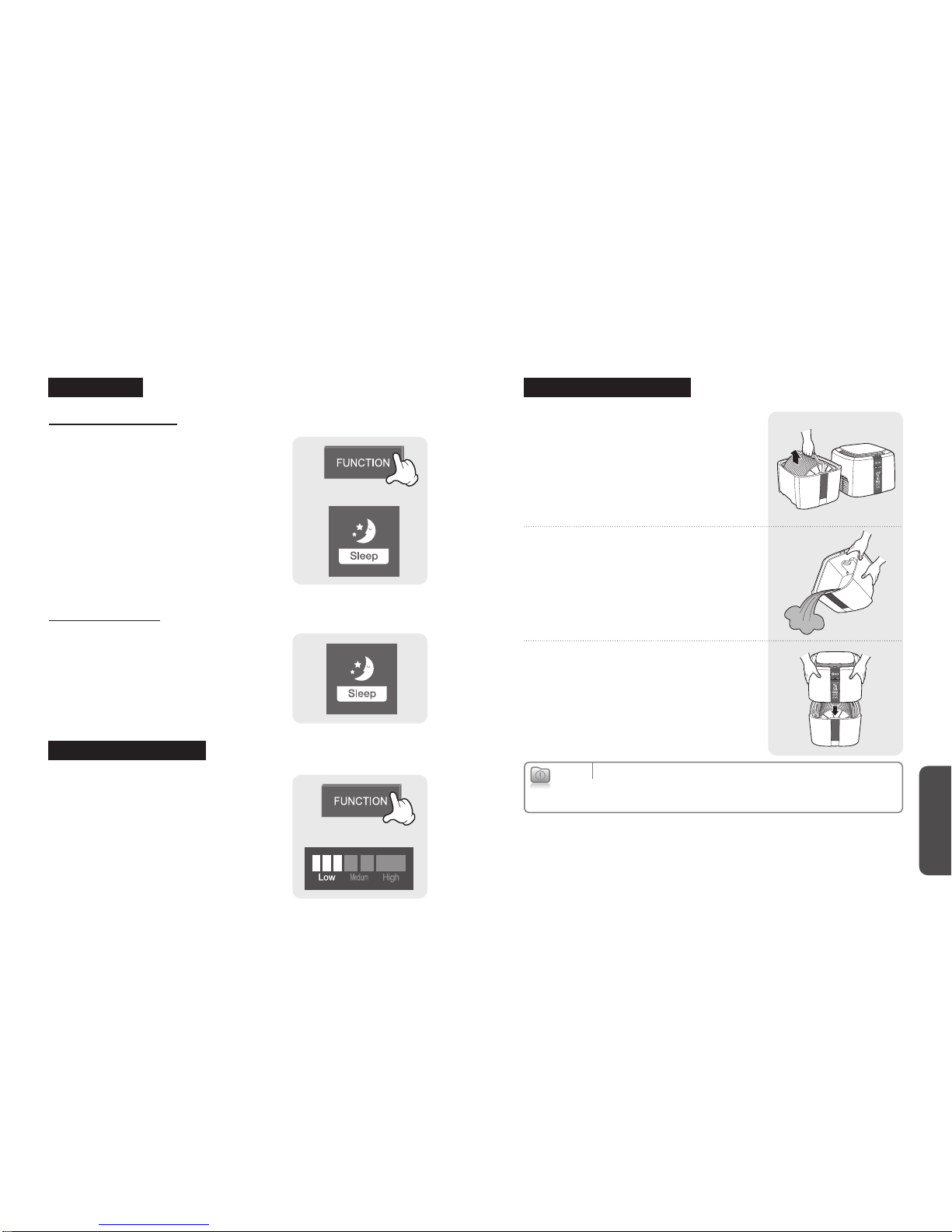
Manual Sleep Mode
❶Push FUNCTION button.
❷Select Sleep Mode.
(Indicator light will illuminate)
❸Sleep Mode will dim the display lights.
(Fan speed :low)
Auto Sleep Mode
●When in Auto Mode (see previous
section), the light sensor will detect the
light in the room and will turn on Sleep
Mode when external light sources are
dimmed.
Maintenance
SLEEP MODE EMPTYING WATER TANK
●Push FUNCTION button to change
Fan/Disk speed.
The FUNCTION button will cycle the unit between
the following: LOW MEDIUM HIGH
SLEEP MODE AUTO MODE
❷Remove the use water left in the water
tank and dispose of in an appropriate
manner. Refill water tank. (do not fill
past indicator line as directed)
❸Replace the disk assembly. Lay handle
down flush with water tank. Carefully
replace top section of air washer and
assure proper alignment.
❶Remove the top cover the unit. Lifet the
disk assembly by the handle and carefully
remove it.
Cautions
▶
Allows unplug the power cord when removing or adding water to the water tank.
▶
If the air washer has not been used for an extended period of time, use fresh water
to avoid performance issues.
Adjust Fan/Disk Speed
15 16
Maintenance
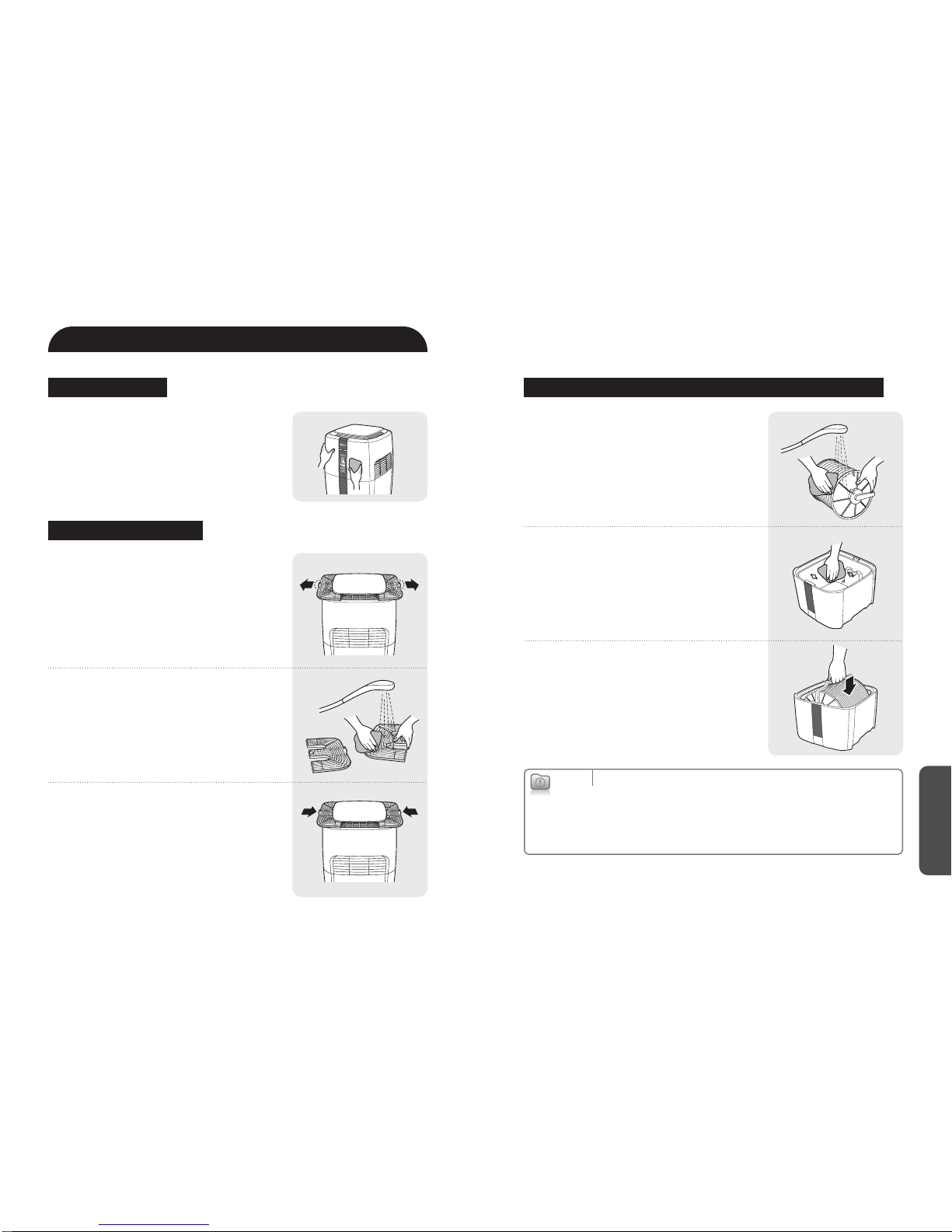
❷Clean the inside of water bucket with a
soft cloth and mild detergent.
Clean the water bucket every week to prevent
the growth of mold, germs, and bacteria.
Refill the bucket with clean tap water.
❸Place CleancelTM Antimicrobial Disk back
into the bucket aligning with grooves
and with handle laid flat.
❶Clean Antimicrobial Discs with warm
tap water.
Cautions
▶
Before cleaning air washer, unplug the power cord.
▶
Don’t use flammable materials such as benzene and alcohol to clean air washer.
▶
If the air washer has not been used for more than two days, unplug the power cord
and refill the water bucket with new water.
▶
Always clean the antimicrobial discs and water bucket of the unit has not been
used for an extended period of time to prevent contamination.
CARE AND MAINTENANCE
❷Rinse pre-filter clean with warm tap
water.
❸Use tabs and slide pre-filter back into
original position.
❶Use the tab on each side of the prefilter
and gently pull up and out from both
sides.
●Clean the outside of the unit with a soft
cloth and mild detergent. Wipe clean
with a dry cloth.
OUTER SURFACE CLEANING ANTIMICROBIAL DISK AND WATER BUCKET
CLEANING PRE-FILTER
17 18
Maintenance
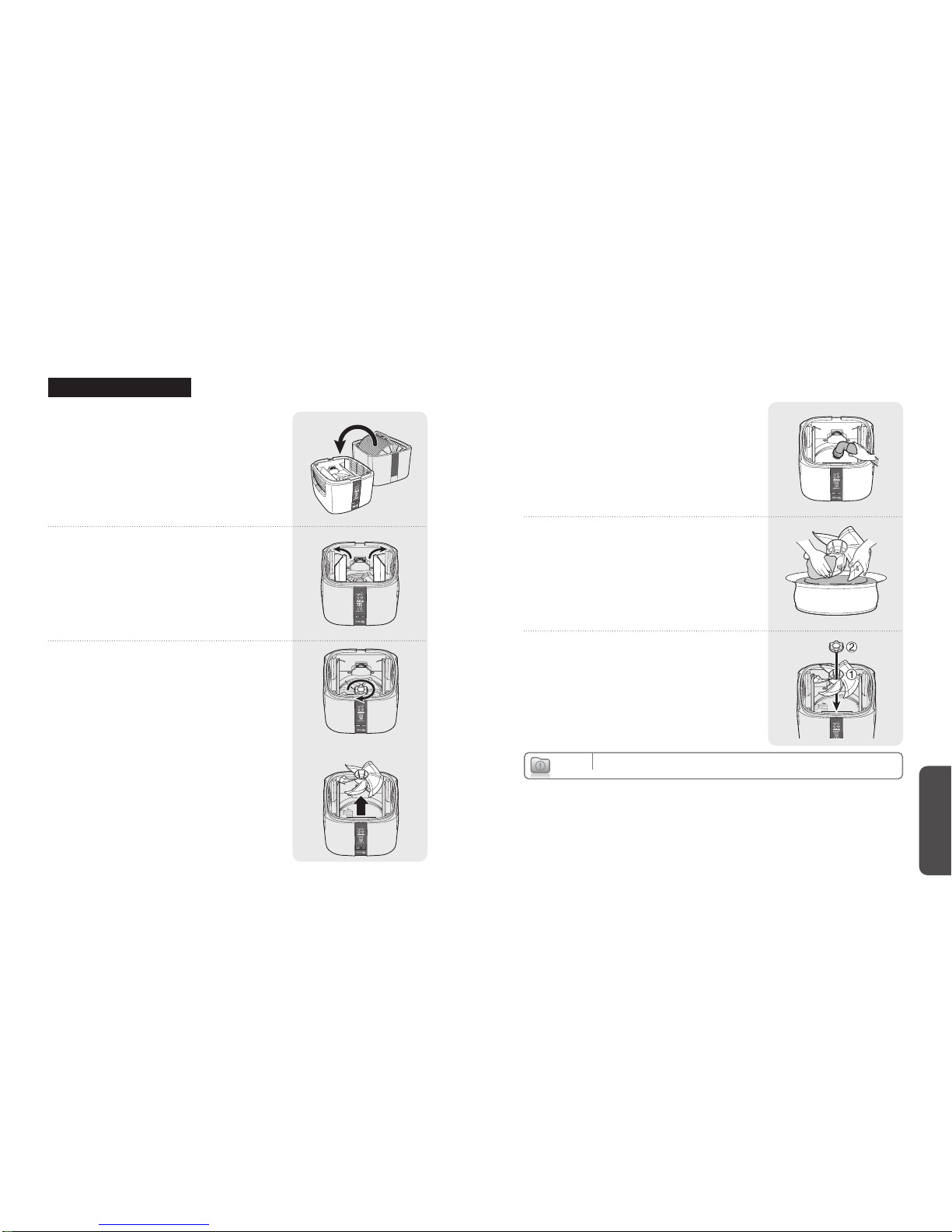
❺Wash the fan with warm water.
Use a soft cloth to wipe dry.
❻Reassemble in reverse order after
cleaning.
❹Gently clean the inside of the housing
with a soft cloth or vacuum cleaner
attachment.
Cautions
▶
Only the fan should be washed with water.
❷Open venting guides until you hear
them 'click'
❸Remove the fan cover by turning the
locking nut clockwise and lifting the
fan up.
❶Remove the top cover and place it
upside down on an even surface.
CLEANING THE UNIT
Indice
Altri manuali Winix Purificatore d'aria

Winix
Winix Zero AUS-1050AZBU Manuale utente

Winix
Winix ZERO+ WiFi Manuale utente

Winix
Winix 9500 Manuale utente

Winix
Winix ZERO Pro Manuale utente

Winix
Winix NK305 Manuale utente

Winix
Winix C545 Manuale utente

Winix
Winix Zero S Scheda tecnica

Winix
Winix T1 Manuale utente

Winix
Winix PlasmaWave 5300 Manuale utente

Winix
Winix ZERO Manuale utente

Winix
Winix AAPU500-JLE Manuale utente

Winix
Winix QS Manuale utente

Winix
Winix HR1000 Manuale utente

Winix
Winix PlasmaWave WAC-9000 Manuale utente

Winix
Winix 5300-2 Manuale utente

Winix
Winix AAPU450-JDE Manuale utente

Winix
Winix AAPU500-JLE Manuale utente

Winix
Winix 5300-2 Manuale utente

Winix
Winix Air Cleaner Manuale utente

Winix
Winix 9500 Manuale utente


