Wintal MICRO2+ Manuale utente

MICRO2+
COMPACT HDMI MEDIA PLAYER
User Manual

2
HDTV Media Player
1. Features ................................................................................................... 3
2. Exterior View and Instruction for Remote Control ..................................... 4
3 Technical Standard .................................................................................... 5
4. Host physical connection diagram ............................................................ 6
5. Function Operation................................................................................... 7
5.1 System Operation.............................................................................. 7
5.2 Select the storage \smart card\CDROM............................................. 7
5.3 Copy function .................................................................................... 8
5.4 Movie playing .................................................................................. 10
5.5 Music playing..................................................................................... 8
5.6 Picture play...................................................................................... 12
5.7 system personalized Settings.......................................................... 13
5.8 System Upgrade.............................................................................. 15

USER MANUAL V1.0
3
1. Features
Video Decoding:H.263、H.264、VC-1、Mpeg1/2/4、WMV
Audio Decoding:DTS、AC3、FLAC、AAC
HD Video:SupportVC-1(WMV9-HD)、H.264、Meg2-HD(1920*1080P)
Video play:Support RM/RMVB-HD,MKV、AVI、TS-TP、M2TS、MOV、VOB、
RM/RMVB、FLV、WMV etc video format ;
Music Play:Support MP3, WMA, Ogg, AAC etc
Photo Browse:Support JPEG、GIF、PNG、BMP and other commonly used image
format,Can support slide play,Support the rotation 、Scaling 、Moving Pictures;
Card Reader Function:SD/MMC Card, Support files play function;
Output Interface:AV、HDMI1.3 、DC 5V、USB 、SD/MMC;
USB Function:Support external USB storage devices, Such as U disk、Card Reader、
mobile hard dish etc
Mobile HDD:Support external removable hard disk storage
DVD Play:Playback the DVD disk by means of USB ports , External USB-DVD
hard drive
Subtitles:Support ass、ssa、sub format
No limit hard disk Capacity:Support FAT32/NTFS format;
Support Multi-sound track video:MKV、TS、TP、WMV

USER MANUAL V1.0
4
2. Exterior View and Instruction for Remote Control
Button
Function
Enter standby status
Press standby again, starting to enter operating
conditions
Mute
Mute control
Menu
Return to Main Menu
Browse file :Page turning
Playing the previous file
Browse file,;down forwarder to next page
Playing the next file
Press this button, the playing files to be draw
back
Press this button, the playing files to be faster
forward
VOL-
Decrease the Volume
VOL+
Increase the Volume
Upward
Downward
Left
Right
Playing : Stop/Play;
Select menu : OK
Play movie /music/photo files : Stop/Play
Back to previous one eject dialog box, Cancel
the current display
AV
Setup AV/HDMI mode
HDMI
Setup AV/HDMI mode
Movie
To enter movie review homepage
Music
To enter music review homepage
Photo
To enter photo review homepage
File
To enter file review homepage
Zoom
Zoom operation for the photo, movie ;
Setup
System setting
ROTATION
Rotate the browse file
AUDIO
Switchover TRK
16:09/4:3
Choose the suitable proportion of the screen
Subtitle
Display the subtitle or not
GOTO
Time fixing files for the current movie files
playing
Repeat
Repeat playing mold for current playing files
Display
Display the operation menu;
Stop playing , back to the playing list

USER MANUAL V1.0
5
3 Technical Standard
Video
Decoding Format
Max resolution
Max Stream
Max Frames
MPEG1
1920*1080
100Mbps
30fps
MPEG2
100Mbps
MPEG4-XVID
100Mbps
H.264
70Mbps
H.263
100Mbps
WMV9/VC1
100Mbps
RMVB
1920*1080
30Mbps
Video Format:MKV、AVI、TS、TP、MP4/M4V、MOV、VOB、PMP、RM/RMVB、
MPG、M2TS、FLV、WMV
Audio
Bit Rate 32Kb/s ~ 320Kb/s
MP3 、WMA、OGG、FLAC、APE、AAC、AC3、DTS
Stereo Audio Output:2.0V ± 0.2Vp
Frequency Range:20Hz-20KHz ≤2db(1KHz Odb)
SNR:More than 80dB(1kHz0dB)
Dynamic Range:Greater than 80 dB(1kHz0dB)
THD:0.04%
Audio Distortion:Lower than test level
Crosstalk:More than 80 dB(1kHz0dB)
Photo
JPG、JPEG、BMP、GIF、PNG
Interface
(*) AV
(*)HDMI
Storage
USB for USB host to external storages and PC copy
SD/MMC
Size
Naked player:63(L)*75(W)*14(H)mm(MAX)
Weight
NW:About 0.07KG GW:About 0.38 KG
Power
Input:100-240V,50/60Hz,Output:5.2V 2A
Standard
Accessories
Power Adapter、Remote control 、User manual、AV cable
(Subject to the real accessories and any changed without notice)

USER MANUAL V1.0
6
4. Host physical connection diagram

USER MANUAL V1.0
7
5. Function Operation
5.1 System Operation
Plug in and show the initialized information. After a second it accesses to the main menu,
show as below picture 1
Note: Please attempt the following operation if you can not access the regular interface:
Switch over the mold between AV and HDMI by remote control in line with the connecting
mold on your TV, until the regular menu turn up.
Press“ ” key to access movie/music/photo/explorer/setting; choose the media file from
the HDD and SD card. It will stream the video from media file; choose the media file you
want to play. Press “ ”, press “EXIT” to step back the last step, Press “MENU” back to
the Main interface.
5.2 Select the storage \smart card\CDROM
USB Device: It shows that it is external HDD and mobile device
Smart card: It shows that you insert the memory card
CDROM: It show that you plug in DVD drive
1
2

USER MANUAL V1.0
8
Press “ ”/“ ” key you can page turning in the file list
Press “EXIT” key back to the last catalog
When it read the HDD and memory card, access to a file, you will access to a disc, you will
see all the files in the disc .Refer to picture 3
5.3 Copy function
5.3.1 Access to Movie/MUSIC/picture file, press “ ”/“ ”, choose the file you want to copy.
5.3.2 Press “OSD”, it will display the operation menu on the right screen, press “ ”/“ ”
choose copy item;
5.3.3 Press “EXIT”, go to the place where you want to copy. press “OSD”button,it will
display the operation menu on the right screen. Press “ ”/“ ” choose the paste item,
press “ ”
5.3.4 It will display the progress bar, it means copy completely when the progress bar
display 100%
Warm reminder: it will display the file after you exit the current file and access to the
file again.
5.4 Music playing
5.4.1 Choose the “MUSIC”, it will display the first 9 songs at the first page; go to the next
page to find the other songs. Show as below picture 8
3

USER MANUAL V1.0
9
5.4.2 Press“ ”/“ ” to move the cursor, choose the music file you want to play. It will show
single, title, name, size information at the left side and show the file address at the
bottom. Show as below picture 9
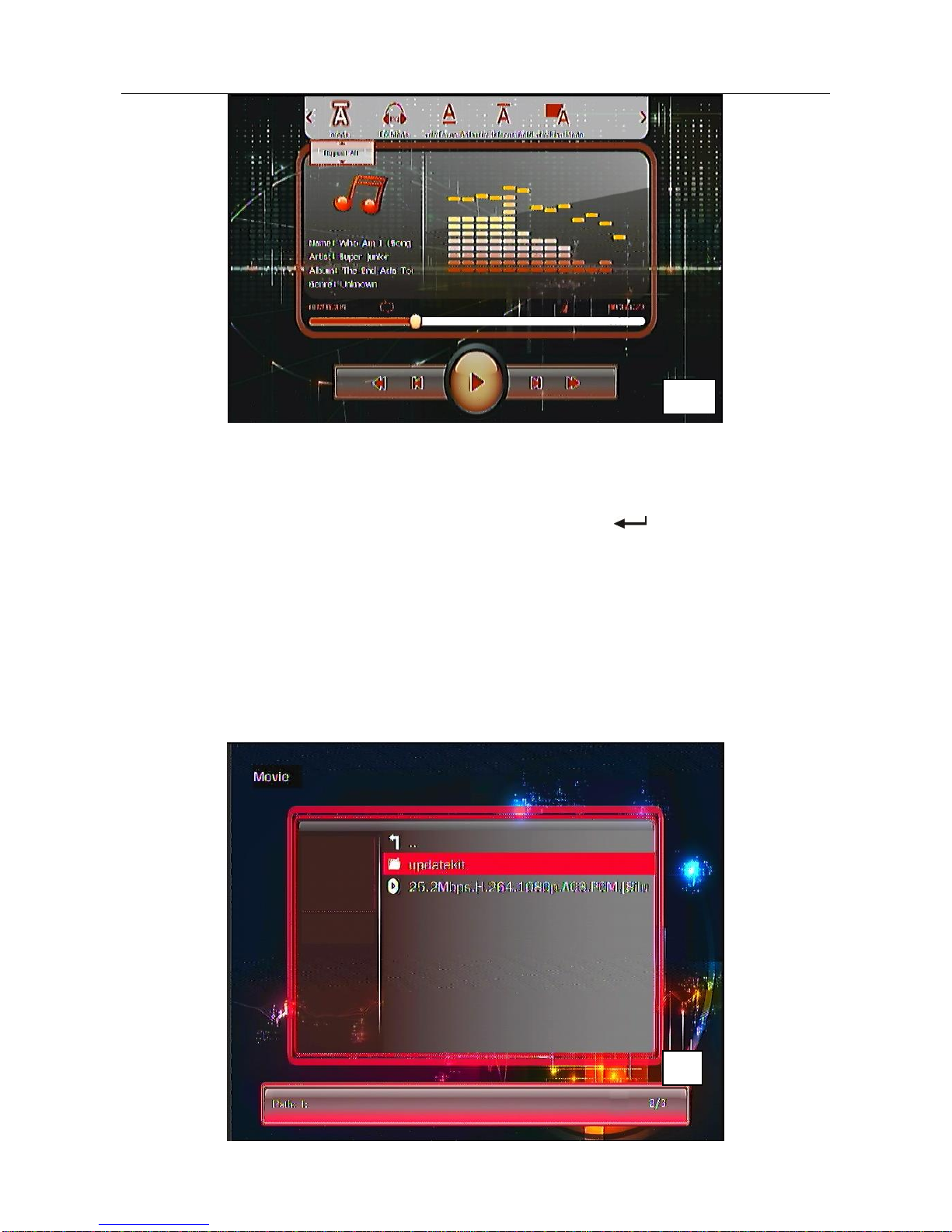
5.4.3 Press“ ” to confirm which music you choose. It will show the play bar at the middle
of the display. And also display the lyric. The music name, singer information is
shown at the left side. There is operation menu at the bottom like picture 10.
5.4.4 Press Volume -/+ button, you can adjust the volume for the music file:
5.4.5 Press OSD button. it will show the operation information status bar on the top
screen ,including the EQUALIZER/LRC/color /display mode, press “ ”/“ ”,
press“ ” button choose the item ,press exit button quit the current status
8
9

USER MANUAL V1.0
10
5.4.6 Press “REPEAT”button setup the playing mode, for example, Order of play, random
play, single play, single cycle, all cycle
5.4.7 Press “EXIT”button back to the previous step, press “MENU” button System is still
running in the background, press “play/pause” button or “ ” button;
5.4.8 Also can press the “explorer” button to enter, also can press “MUSIC” button to
Switch directly to music option
5.5 Movie playing
5.5.1choose the “movie” item ,it lists all the movie media files according to the file
structure ,press “OK”, It will list all the file .If the media file is up to 9 file, It will be
automatically shown next page. Refer to picture 4.
10
4
Altri manuali per MICRO2+
2
Indice
Altri manuali Wintal Lettore multimediale