
Wintime Paint Pal Deluxe Manuale utente

User’s Manual
Version 1.0

Limited Warranty
Wintime warrants that the enclosed Hardware Device will be free from defects
in materials and workmanship under normal use and service for a period of
oneyearfromthedateofpurchase. AnysupportservicesprovidedbyWintime
shall be substantially as described in applicable written materials provided to
you by Wintime. Some states and jurisdictions do no allow limitations on dura-
tion of an implied warranty, so the above limitation may not apply to you. To
the extent allowed by applicable law, implied warranties on the Hardware De-
vice, if any, are limited to one years.
Should you have any questions concerning this Warranty, please contact your
dealer or you may visit the Wintime web site at http://www.wintime.com.tw
Trademarks Information
Wintime and Paint Pal Deluxe are the trademarks of Wintime Electronics Inc.
IBMisatrademarkof theInternationalBusiness MachineCorporation.Microsoft
and the Windows Logo are registered trademarks and Windows is a trade-
mark of Microsoft Corporation. All brand names and trademarks are proper-
ties of their respective owners.

Chapter 1 Introduction .......................................... 1
Suggested uses for Paint Pal Deluxe .....................1
System Requirements .......................................... 2
Package Contents ............................................... 2
Chapter 2 Installing the Hardware ......................... 3
Getting familiar with Paint Pal Deluxe ................... 3
Connecting to Desktop system ............................ 4
Connecting to Notebook Computer ...................... 6
Chapter 3 Installing the Software ......................... 7
Installing the Driver .............................................. 7
Chapter 4 Customizing the Pen Tablet .................. 10
Finding the Pen Table icon ................................... 10
Appendix A. Taking care of your Tablet ............... 13
B. Questions & Answers ...................... 14
C. Specifications .................................. 15
D. FCC Compliance Statement ............. 16
Table of Contents

Introduction
Chapter 1
CongratulationsonyourpurchaseofPaint Pal Deluxe!
Paint Pal Deluxe is the perfect tool for creating art on
your computer. Paint Pal Deluxe replaces a traditional
Mouse with a flexible pen tablet, giving you a more
natural way to draw, trace, write, and design. Paint Pal
Deluxe alsocomesbundledwithadvanceddrawing soft-
ware that will get you started right away.
Suggested uses for Paint Pal Deluxe
Paint Pal Deluxe is a powerful aid in creating com-
puter graphics and for any application that requires
the accuracy of hand held writing tools. Possible uses
for Paint Pal Deluxe include:
uDrawing and graphic design
uHandwriting
uSignatures
uComputer-aided design
uImage Editing
uCAI
uPicking commands on a template
Welcomw !
- 1 -
System requirements
uIntel Pentium level computer or compatible.
uWindows 95/98 operating system.
u32MB RAM
u80 MB hard disk space
u256 color VGA display adapter(Hi-color or True-
color preferred)
uSerial port
uCD-ROM drive
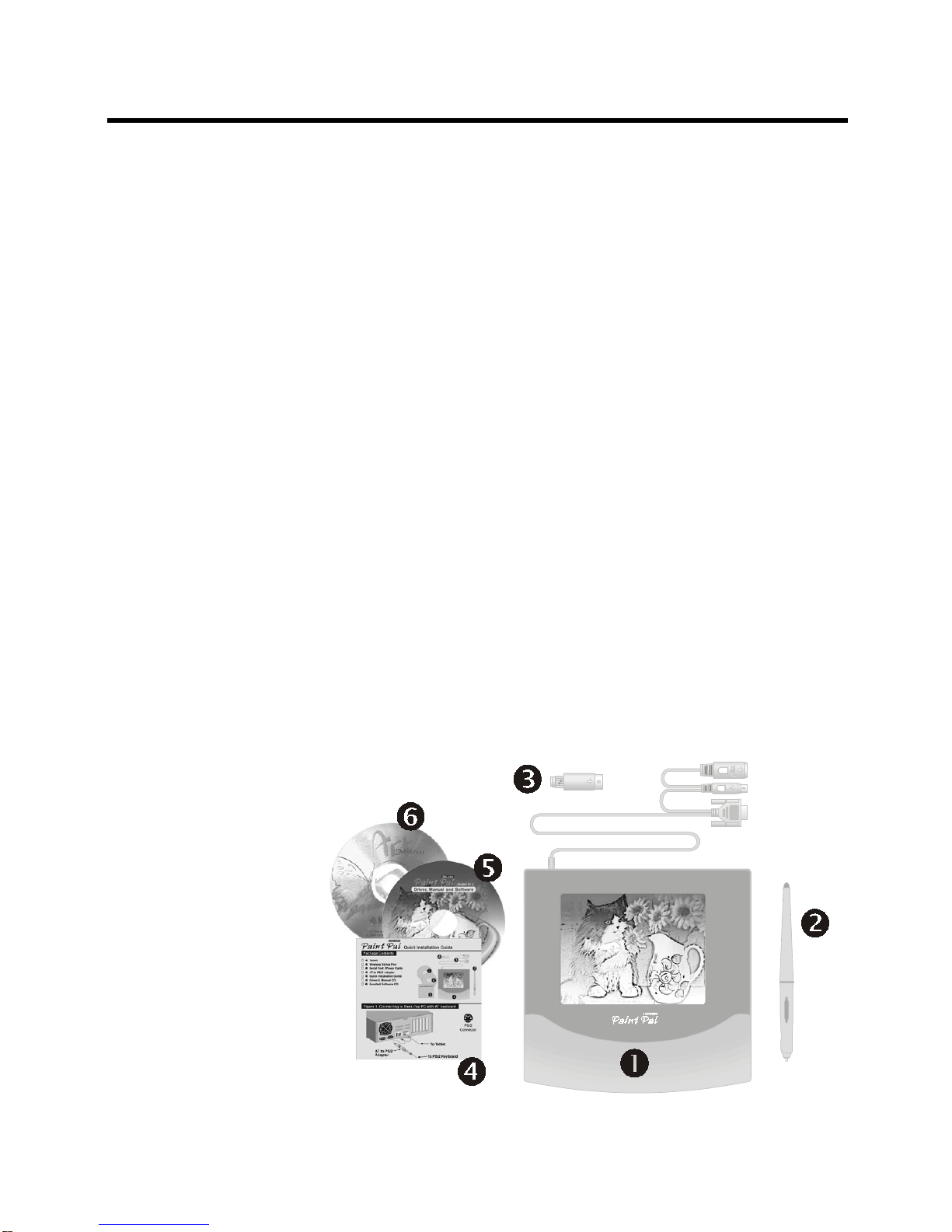
Package contents
After you open the box, please check the package
contents carefully. You should have the following
items:
Tablet with Serial port/Power cable
Wireless Stylus Pen
AT to PS/2 Adapter
Quick Installation Guide
Driver & Manual CD
Art Dabbler CD
Introduction
- 2 -
Installing the Hardware
Chapter 2
Getting familiar with Paint Pal Deluxe
Before you install Paint Pal Deluxe, take a few minutes
to inspect the parts and get familiar with how Paint Pal
Deluxe connects to your computer (see the diagrams
below).
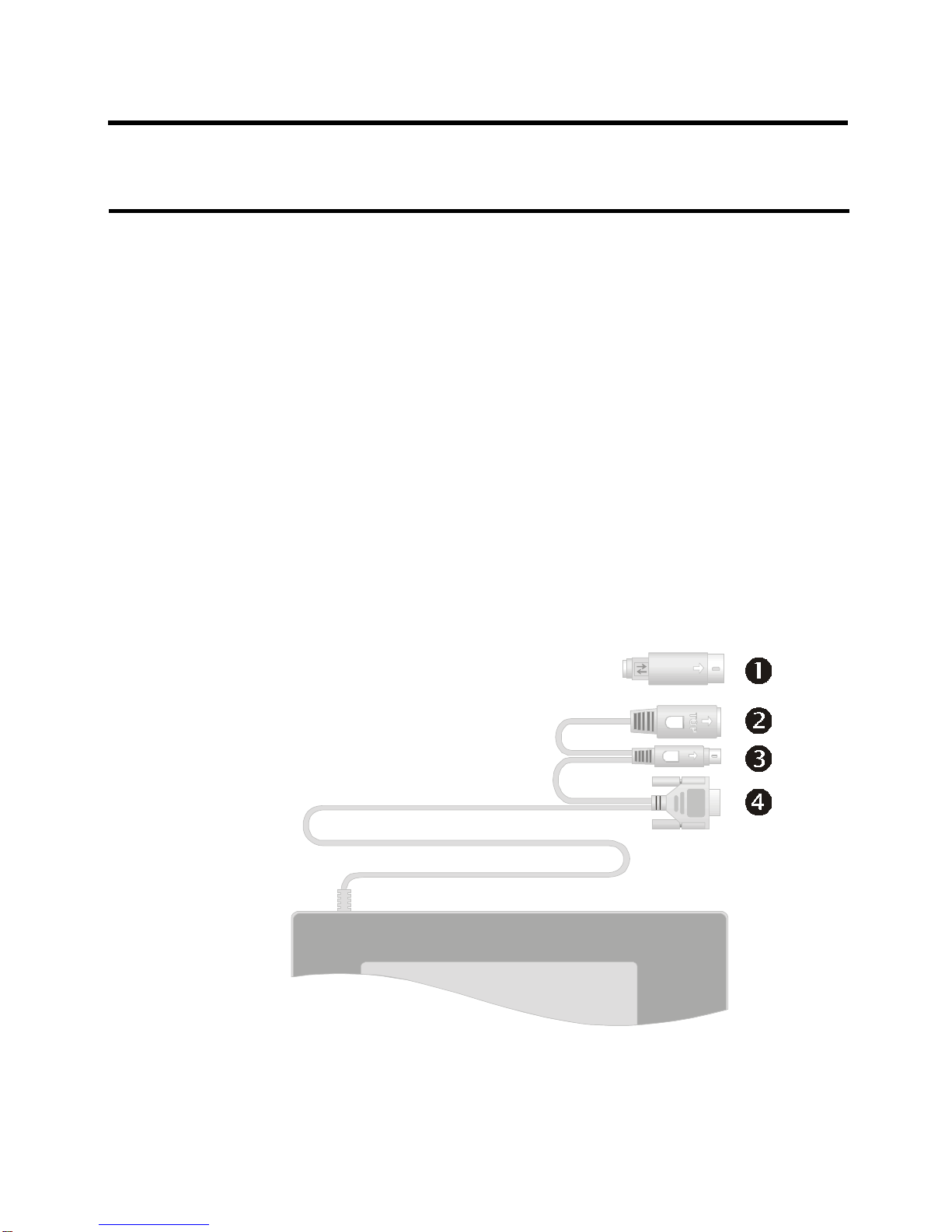
Conntors descriptions :
AT to PS/2 Adapter
AT Type Keyboard Connector
PS/2 Type Keyboard Connector
Serial Port (COM Port) Connector
- 3 -
To Tablet
To Keyboard
AT to PS/2
Adapter
Connecting to a desktop system
Follow these simple procedures to connect Paint Pal
Deluxe to a desktop system:
1. Turnoffyoursystemandany otherdevicesconnected
with the system.
2. Paint Pal Deluxe needs to connect keyboard and
gets power from keyboard connector. Please
identify your keyboard type before you first, there are
two type of keyboards, AT and PS/2 type (see
diagram below).
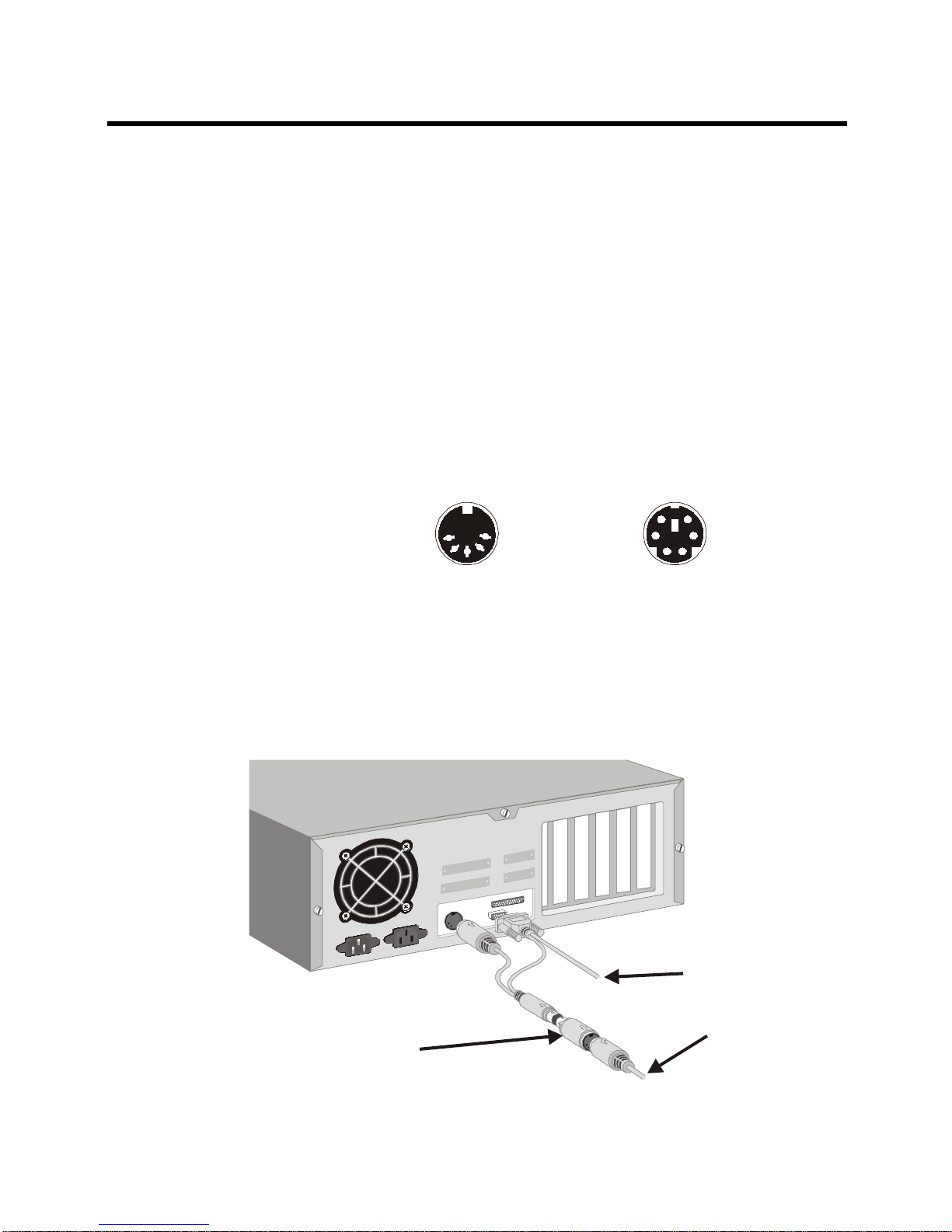
3. If your keyboard is AT type, you may connect Paint
Pal Deluxe to your system and to an available serial
port and AT keyboard connector according to
diagrams below :
- 4 -
PS/2 Connector
AT Connector
InstallingtheHardware
To Tablet
To Keyboard
AT to PS/2
Adapter
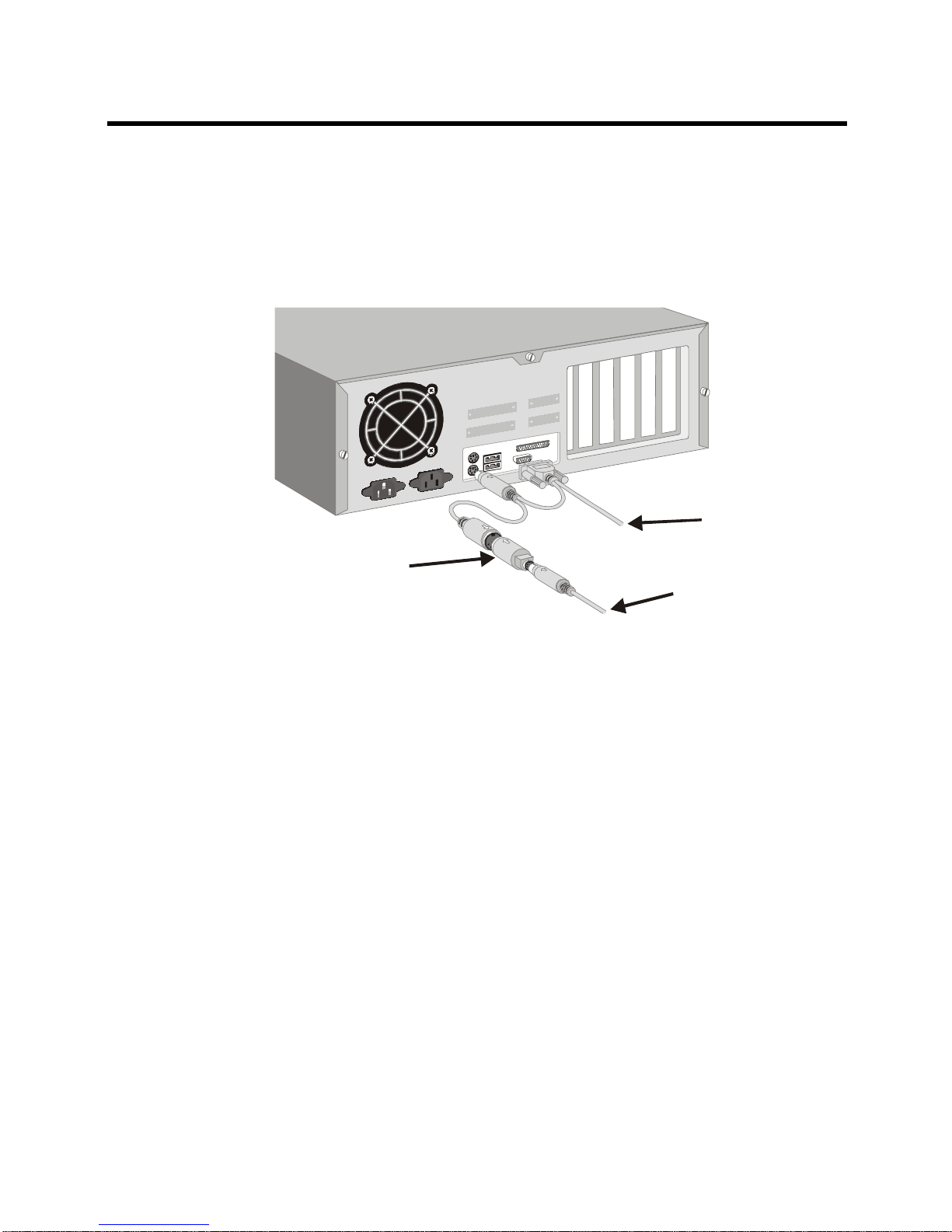
4. If your keyboard is PS/2 type, you mayconnect Paint
Pal Deluxe to your system and to an available serial
port and PS/2 keyboard connector according to dia
grams below :
- 5 -
InstallingtheHardware
To Tablet
To Other PS/2
Device
AT to PS/2
Adapter
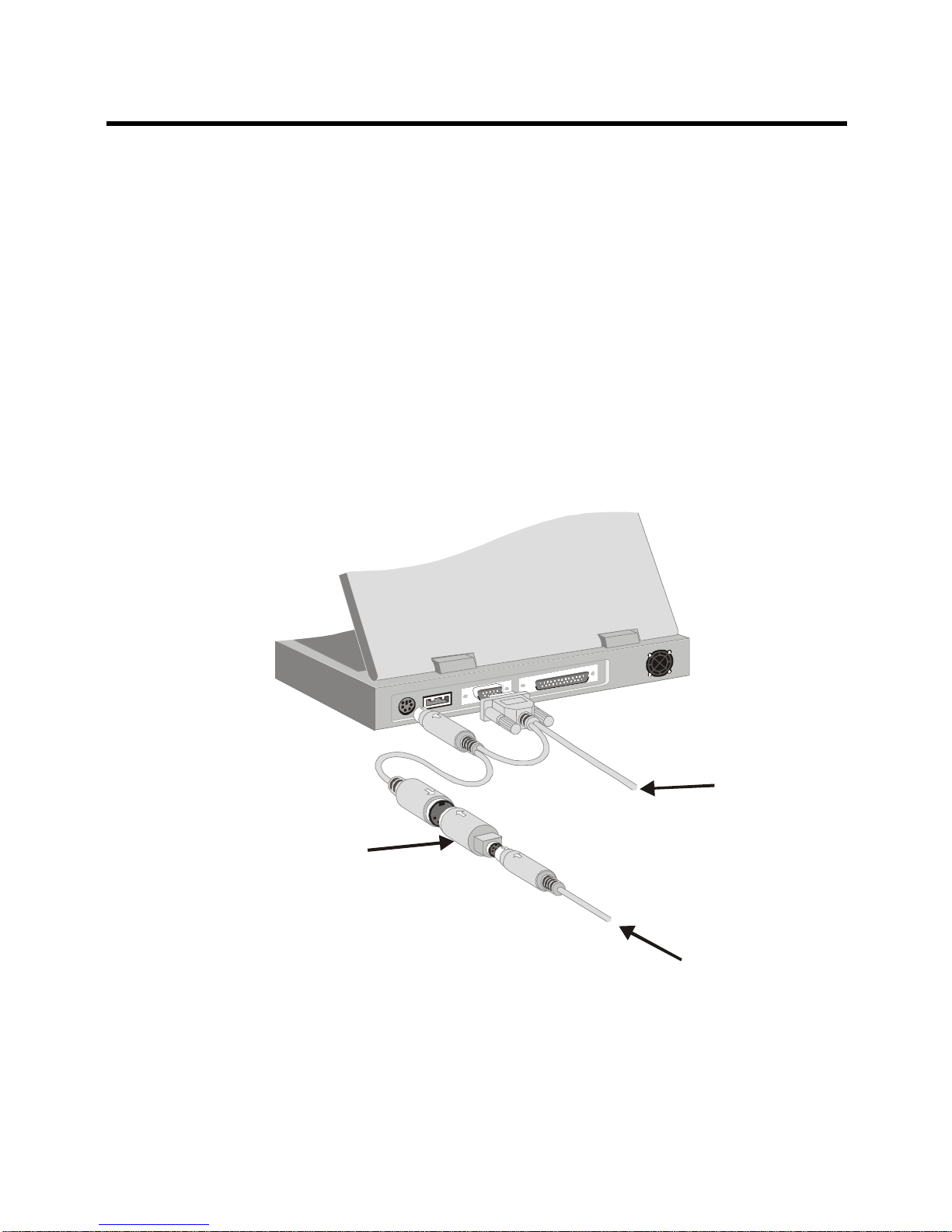
Connecting to a Notebook computer
Follow these simple procedures to connect Paint Pal
Deluxe to a Notebook computer:
1. Turn off your Notebook and any other devices
connected with the Notebook.
2. Connect Paint Pal Deluxe to an available serial port
and PS/2 keyboard connector according to the
diagram below.
- 6 -
InstallingtheHardware
Installing the Software
Chapter 3
Installing the Driver
After you have successfully installed the hardware, you
may turn on the power to install the software driver. If
you have previously installed any pen tablet’s driver,
please first remove the old driver from your system
before installing the Paint Pal Deluxe driver.
Follow these procedures to install Paint Pal Deluxe :
1. Poweronyour computer.
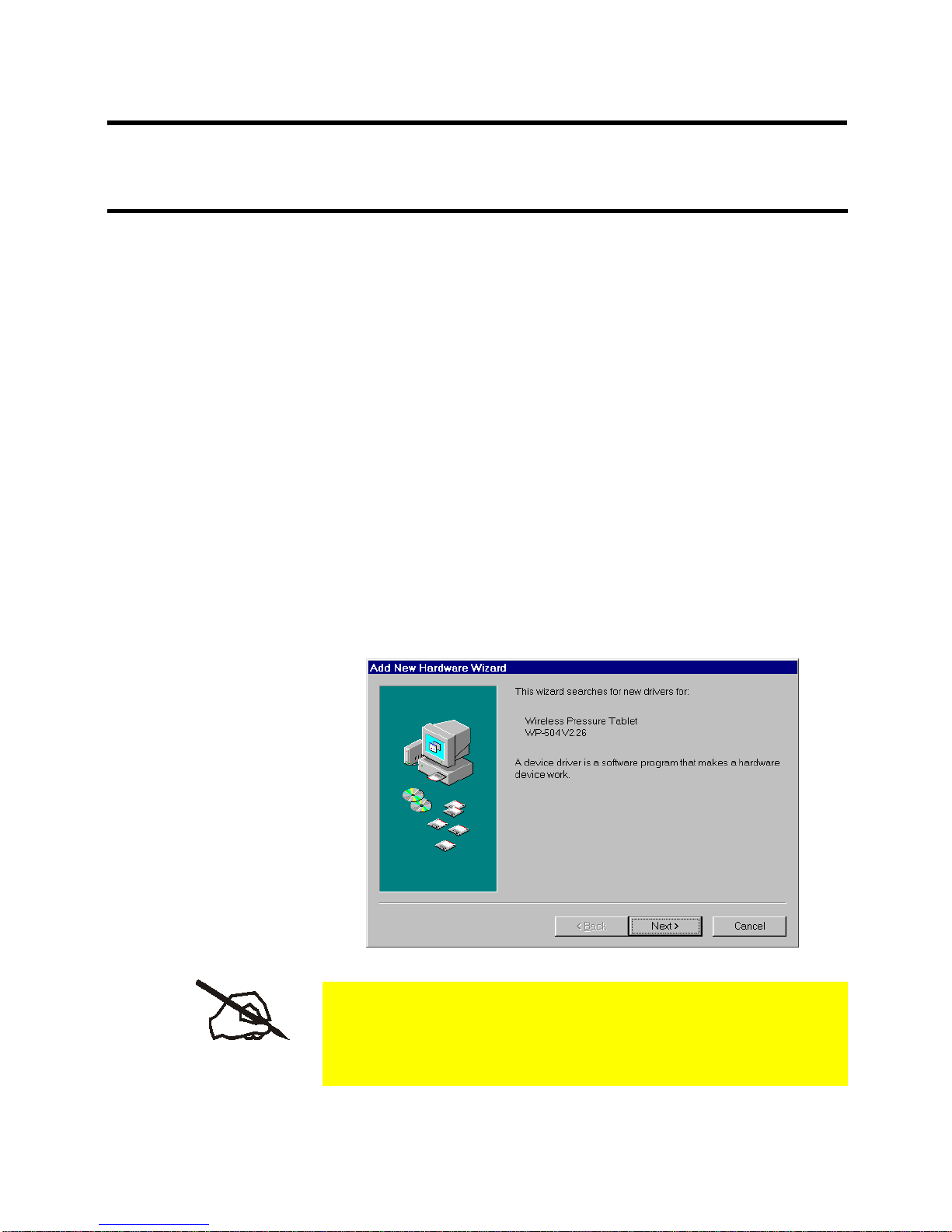
2. Paint Pal Deluxe is a Plug & Play (PnP) device, your
system will detect the new hardware and activate the
newdeviceinstallation procedures automatically.
Follwoingwindowwillappearson screen :
- 7 -
Some systems do not support PnP, you may go to
Start,andclickonRun.ThenselectCD-ROMdrive
and run Setup.exe
Indice
Altri manuali Wintime tavoletta grafica


