
WolfPack HDTV-B08 Manuale utente
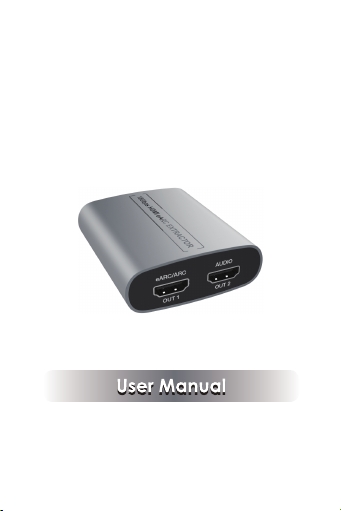
18Gbps HDMI eARC Extractor
VER 1.0

Thank you for purchasing this product
For optimum performance and safety, please read
these instructions carefully before connecting, operating
or adjusting this product. Please keep this manual for
future reference.
Surge protection device recommended
This product contains sensitive electrical components
that may be damaged by electrical spikes, surges,
electric shock, lighting strikes, etc. Use of surge
protection systems is highly recommended in order
to protect and extend the life of your equipment.
Table of Contents
1. Introduction............................................................
2. Features...................................................................
3. Package Contents.................................................
4. Specifications.........................................................
5. Operation Controls and Functions.......................
5.1. Left Panel.......................................................
5.2. Right Panel.....................................................
6. Application Example.............................................
1
1
2
2
4
4
5
6

1. Introduction
The 18Gbps HDMI eARC audio extractor supports
dedicated HDMI output for extracting audio only. It
allows user to use the existing AV Receiver to receive
4K2K@60Hz, HDCP 2.3 content audio. The product
also supports HDMI loop out, as well as 10bits HDR
(High Dynamic Range) pass-through and eARC/ARC.
1/6
2. Features
☆HDMI 2.0b and HDCP 2.3 / 1.x compliant
☆Support 18Gbps video bandwidth
☆Support video resolution up to 4K2K@60Hz with
24bit RGB/YCBCR 4:4:4
☆Support VESA format up to QSXGA@60Hz
☆HDR, HDR10, HDR10+, Dolby Vision pass-through
☆Support PCM 2.0, LPCM 5.1 / 7.1, Dolby Digital,
Dolby digital plus, Dolby True-HD, DolbyAtmos,
DTS 5.1, DTS ES 6.1, DTS HRA, DTS HD Master,
DTS:X
☆ Built-in Equalizer, Retiming and Driver
☆Dedicated HDMI output for audio only with 720p
black screen
☆Support eARC/ARC audio (from TV) extract to
HDMI audio output
☆Support CEC function and advanced EDID
management
☆HDMI 2.0b and HDCP 2.3 compliant
☆Support 18Gbps video bandwidth
☆Support resolution up to 4K2K@60Hz with 24bit
RGB/YCBCR 4:4:4
☆Support VESA format up to QSXGA@60Hz
☆ARC Enabled: Extract audio signal from ARC
(Audio Return Channel) enabled HDTV to analog
stereo output, for audio receiver/amplifier/head-
phone applications
☆Support PCM 2.0, Dolby 5.1, DTS 5.1 audio
downmix to 2 channel stereo audio output
☆Support CEC function (TV remote can control the
volume)

3. Package Contents
①1× 18Gbps HDMI eARC Extractor
②1× USB Cable (USB-A to Micro USB)
③1× User Manual
2/6
4. Specifications
Technical
HDMI Compliance
HDCP Compliance
HDMI 2.0b
HDCP 2.3 / 1.x
Video Bandwidth 18 Gbps
Video Resolution Up to 4k2k@60Hz 4:4:4
Color Depth
8-bit, 10-bit, 12-bit (1080p@60Hz)
8-bit (4K2K@60Hz YUV4:4:4)
8-bit,10-bit,12-bit (4K2K@60Hz
YCbCr 4:2:2/4:2:0)
Color Space RGB 4:4:4, YCbCr 4:4:4/4:2:2/4:2:0
HDMI Audio Formats
PCM 2.0, LPCM 5.1 / 7.1,
Dolby Digital, Dolby Digital plus,
Dolby TrueHD, Dolby Atmos,
DTS 5.1, DTS ES 6.1, DTS HRA,
DTS HD Master, DTS:X
ESD Protection
Human body model —
±8kV (air-gap discharge) &
±4kV (contact discharge)

Connection
Input 1x HDMI Type A [19-pin female]
Output 2x HDMI Type A [19-pin female]
Mechanical
Housing Aluminium Enclosure
Color Silver
Dimensions 65mm[W] x 70mm[D] x 27mm[H]
Weight 83g
Power Supply USB 5V / 500mA
Power Consumption 1.75W (Max)
Operation
Temperature 32 - 104°F / 0 - 40°C
Storage temperature -4 - 140°F / -20 - 60°C
Relative Humidity 20 - 90% RH (no condensation)
3/6
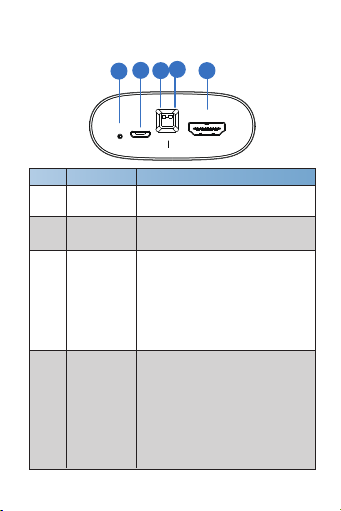
5. Operation Controls and Functions
5.1 Left Panel
No. Function DescriptionName
1
DC 5V 1) DC 5V power supply port;
2) Firmware update port
2
Power LED Red LED will be on when the
device is powered on.
3eARC switch
4EDID switch
The switch is used to turn on/off
the eARC function: Switch to “ON”
position, the AUDIO OUT2 port
will output the eARC/ARC audio;
Switch to “OFF” position, the
AUDIO OUT2 port will output the
audio from HDMI IN port.
4/6
The switch is used to select
EDID setting: Switch to “OUT1” /
“OUT2” position, the product will
copy the corresponding EDID from
the device connected to OUT1/
OUT2 port. If the copy fails, it will
use the internal EDID of the
default 1080p 2CH.
OUT2 OUT1
OFF ON
INPUT
eARC EDIDDC 5V
PWR
12 3 45

HDMI signal input port. Connect
to HDMI source device.
INPUT port5
5.2 Right Panel
No. Function DescriptionName
1
2
eARC/ARC
OUT 1
TV eARC/ARC audio output port.
Connect to TV with ARC function.
AUDIO
OUT2
HDMI Audio output port (720p
audio only). Connect to amplifier
or speaker.
5/6
OUT 2
AUDIO
OUT 1
eARC/ARC
12
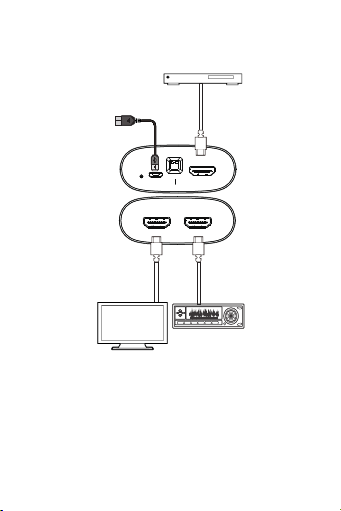
6. Application Example
6/6
TV with ARC function
USB Power Cable
DVD or Blu-ray Player
OUT2 OUT1
OFF ON
INPUT
eARC EDIDDC 5V
PWR
OUT 2
AUDIO
OUT 1
eARC/ARC
Audio Amplifier
Indice


