
Wolki WW1.57 Manuale utente

User Manual
WOLKI Smartwatch
WW1.57
Please read this manual carefully before using the product and keep it
properly
product description
Packing list: Smartwatch (including strap) X 1, magnetic charging cable
X 1, product manual X 1
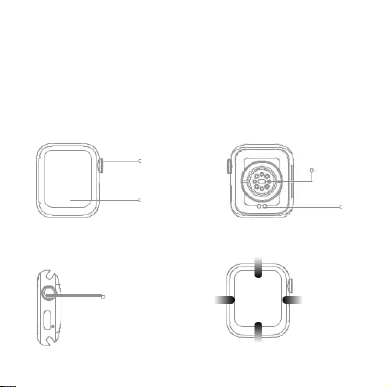
Product overview
Knob button
Full touch display
Buttons and touch
Knob button
Swipe right: Split
screen function
1. Long press the switch;
2. Short press on the dial page to enter the
menu, short press to return to the dial;
3. Double-click on the menu page to switch menus;
4. Rotate the button to zoom icons, turn pages, etc.;
5. Short pr ess on the remai ning pages t o return t o the dial pag e;
Heart rate sensor
Charging port
Down: shortcut button
Sliding left:
Smart components
Swipe up: message
notification
Connect the watch
Open perm issions
Enableself-starting permission
Backg r ou nd power consu m pt i on protect i on
Clean up back g rou nd protec tion
Turn on m ess a g e notifi cat i on
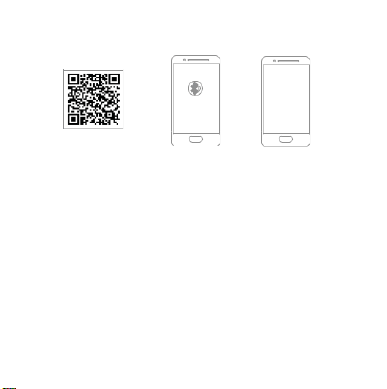
Scan code to download Weatfit PRO
1. Download the "Wearfit Pro" APP to your mobile phone and install it, you candirectly
search for "W earfit Pro" in the APP store to download, or scan the following QR code to
jump to the link to download (scan code in browsers, WeChat, etc.)
2. Connect the watch
1) Scan code connection: After the watch is turned on and enter the dial page, slide right to
enter the split screen function, click the "scan code connection" shortcutbutton,the
connection QR code will pop up, and you can directly scan the code connectioninWearfit
Pro.
2) Manual connection: After the mobile phone turns on Bluetooth, enter the APP to directly
search for the device to manually connect.
3) Connect and call Bluetooth
In the initial state of the watch, the Bluetooth for calls is turned off, and the call and music
functions cannot be used at this time. Scroll down to open the shortcut menu, and click the
call Bluetooth switch. After turning it on, you can find the call Bluetooth in the mobile phone
system (when the mobile phone Bluetooth is turned on), find the corresponding Bluetooth
name, and click connect. After successful connection, you can use the call function and
music function.

Watch operating instructions
1.Split screen function: Swipe right to appear on the dial page, slide left to return.
2. Swipe left on the dial page to enter smart components. The system presets 3
components. Click "Add component" at the right end to add components, up to 5
components. Long press the component to enter the "Delete component" page.
3. Dial switching: Long press the screen on the dial page, the dial selection
appears, select the corresponding dial and return to the main dial page.
Note: The system presets five dial pages, and the last dial is named "Custom".
This dial will change with the dial market on the APP side and the download
settings of the custom dial.
4. Menu page: On the dial page, single press the side key to enter the menu page,
after entering the menu page, double press the side key to switch between menus,
and single press the side key to return to the main dial page.
5. Function page: In the menu page, click each application icon to enter the
corresponding function, slide right to return, and press the side button toreturnto
the main dial page.

Features
Contacts: Connect to the mobile phone to synchronize contacts on the mobile phone and set
emergency contacts;
phone
Dial-up: connect to the mobile phone to dial out, and you can call on the watchside
Call record: Connect the mobile phone to synchronize the call record of the mobile phone;
Exercise
Record the exercise data of the day, including: calories, activity time, number
record
of activities, steps and distance.
Sleep
Check your sleep status every night
Put the watch close to your wrist, and the best place to wear it is the wrist bone above your arm. The real-time heart rate
Heart
can be measured. The normal value of the average person is 60-90 beats/min. The watch records the last 7
measurement records, and records the highest and lowest values.
rate
blood
Put the watch close to your wrist, and the best place to wear it is on the upper arm of the wrist bone.
Blood pressure can be measured. The watch records the last 7 measurement records.
pressure
Blood
Put the watch close to your wrist, and the best wearing position is on the wrist bone
and above the arm. The blood oxygen value can be measured. The watch records the
oxygen
last 7 measurement records and records the highest and lowest values.
Indoor
It includes 6 regular sports including indoor running, indoor cycling, pool
activities
swimming, sit-ups, push-ups, and free training.
Includes 7 sports such as outdoor running, outdoor cycling, open water, sit-ups,
Outdoor
hiking, mountaineering, and other sports; 5 major sports data are recordedduring
exercise: steps, calories, heart rate, cadence, pace, and can be set Sportsgoals,a
sports
comprehensive breakdown of your sports details.
Breathing training can quickly relax oneself, relieve stress and quickly replenish
Breath
oxygen to the body. Three frequency options are provided: slow, normal, and slightly
training
faster; breathing time options: 1~5min.

Music
Connect APP to control music playback.
control
the
Connect to the APP to synchronize the weather.
weather
Stopwatch
The watch supports stopwatch timing.
Timer
The watch turns into a timer every second.
The watch realizes the function of Mett, converts all daily exercise volume into Mett value and
Mett
displays it on the watch and APP, records the energy metabolism equivalent of one week of
exercise, and forms a visual icon to let users clearly understand their exercise volume.
The watch supports continuous pressure monitoring, monitors the user's 24 -hour
pressure
pressure changes, and uses scientific health algorithms to display the pressure as an
icon, allowing users to adjust their status at any time. The pressure range shows: 1-29
relaxed; 30-59 normal; 60-79 medium; 80-99 high.
Including brightness settings, constant on time, often off screen, phone settings, raise the
Set up
wrist to turn on the screen, do not disturb mode, sound and vibration, language switching,
phone connection, password, about watch, restart, factory reset, shutdown.
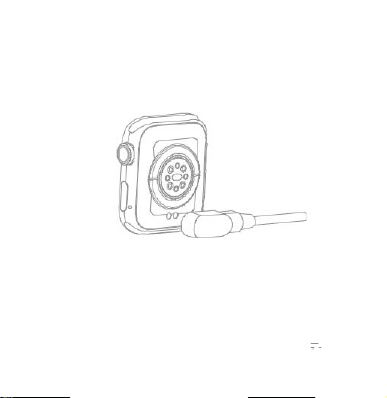
Recharge
Please align the metal contacts of the magnetic charging cable and be close to the charging contacts of the
watch. The magnetic charging cable will automatically be attached to the charging contacts of the watch to
start charging, and the charging instructions will be displayed on the watch screen.
note:
1. Do not charge in a humid environment;
2. Make sure that the metal contacts on the watch body and the magnetic charging cable are not dirty
or corroded;
3. Please clean the metal contacts on the back of the watch and the magnetic charging cable with a clean
flannel regularly. Ensure that the contacts of the watch and the magnetic charging cable are in full contact
to ensure normal charging;
4. This product is not equipped with a power adapter. To ensure the safety of your family and property, you
can use a computer USB port or choose a power adapter with an output not exceeding 5V 1A when
charging. Please purchase power adapters through formal channels, and avoid using low-quality, fake
power adapters to avoid bursting or fire.

Bluetooth data transmission
When connected to a mobile phone, the watch will instantly synchronize somedatawiththemobile
phone via Bluetooth, including weather, notification messages, sports health data, etc. After the
connection is disconnected or Bluetooth is turned off, the data will not be synchronized.
Precautions
1. The measurement results of this product are for reference only, not for any medical purposes or basis. Please follow
the doctor's instructions and never make self-diagnosis and treatment based on the measurement results.
2. The waterproof grade of this product is IP67, and it cannot be used for deep diving and long-term soaking in water. In
addition, this product is not resistant to hot water, because water vapor will affect the hand ring.
3. The company reserves the right to modify the contents of this manual without any notice. Some functions are different
in the corresponding software version, which is normal.
Basic parameters
Product name: WW1.57 smart watch Size: 41*34.5*10.5mm
Body material: zinc alloy + IML injection process Strap material: liquid silicone
Battery capacity: 200mAh Bluetooth: Blueteeth5.2
Screen size: 1.57inch Resolution: 320*384
Equipment requirements: Android 5.0 or iOS 10.0 and above.

FCC Warning
This device complies with Part 15 of the FCC Rules. Operation is subject to the following two
conditions:
(1) This device may not cause harmful interference, and (2) this device must accept any interference
received, including interference that may cause undesired operation.
NOTE 1: This equipment has been tested and found to comply with the limits for a Class B digital
device, pursuant to part 15 of the FCC Rules. These limits are designed to provide reasonable
protection against harmful interference in a residential installation. This equipment generates uses
and can radiate radio frequency energy and, if not installed and used in accordance with the
instructions, may cause harmful interference to radio communications. However, there is no
guarantee that interference will not occur in a particular installation. If this equipment does cause
harmful interference to radio or television reception, which can be determined by turning the
equipment off and on, the user is encouraged to try to correct the interference by one or more of the
following measures:
- Reorient or relocate the receiving antenna.
- Increase the separation between the equipment and receiver.
-Connect the equipment into an outlet on a circuit different from that to which the receiver is
connected.
-Consult the dealer or an experienced radio/TV technician for help.
NOTE 2: Any changes or modifications to this unit not expressly approved by the party responsible
for compliance could void the user's authority to operate the equipment.
Indice
Altri manuali Wolki Orologio


