
Wowitoys CICADA H4824 Manuale utente
INSTRUCTIONS FOR USE
EN | CZ | SK | HU | DE
H4824

1.0 Disclaimer & Warnings 1
3.0 Packing list 4
2.0 Safety Guidelines 2-4
11.0 App Operation Instruction 18
5.0 Transmitter Functions 6
6.0 Joystick Mode 7
4.0 Drone’s Details 5
7.0 Installation 7-10
9.0 Operation Guide
9.2 Download APP 13
9.3 Connect to the APP 13
8.0 Charging 11
9.1 Pairing 12
9.4 Calibrating the Gyro 14
10.6 Auto Return 17
9.5 Taking-Off / Landing Method 14
10.0 Function Details
1610.4 Headless Mode
1510.2 Emergency Stop
1510.1 LED ON/OFF
17
10.5 Speed Switch
16
10.3 Trimming
1710.7 360 Flips
CONTENT

1
WARNINGS
1. Please read this disclaimer, warnings and safety guidelines carefully before
using our product. This product is not recommended for people under the
age of 14. By using this product, you hereby agree to this disclaimer and
signify that you have read it fully. You agree that you are responsible for your
own conduct and any damage caused while using this product, and its
consequences. You agree to use this product only for purposes that are
proper and in accordance with local regulations, terms and all applicable
polices and guidelines we may make avaliable.
2. When using this product, please be sure to strictly abide by the specification
requirements and safety guidelines stated in this document. Any personal
injury property damage, legal disputes and all other adverse events caused
by the violation of the safety instructions or due to any other factor, will not be
our responsibility.
(1). The drone is designed for age 14+.
(2). Adult supervision is always advisable with any from of flying toy.
(3). Always ensure your flight area is free of any obstacle before taking off, and
ensure the drone is always flown in excess of 1.5 meters from yourself and
others.
(4). Remove all batteries from the drone and transmitter when not in use.
(5). Never overcharge battery.
(6). Never leave to charge battery unattended.
(7). Never touch the drone’s motors during or after flight as they can get hot.
(8). Never touch the propellers when they are in rotating.
(9). If the drone becomes damaged, stop using it immediately.
(10). Do not dispose of any parts of the drone or transmitter in the normal
rubbish, all parts should be taken to your local recycling centre.
(11). The battery in the drone should never be exposed to any form of high
temperature or disposed in a fire.
1.0 DISCLAIMER & WARNINGS

2
2.0 SAFETY GUIDELINES
2.1 Check Before Use
(1). This product is not a toy, but a high precision drone that integrates various
electronic stability and control mechanisms. Please be sure to set up this
drone carefully and correctly to ensure safe, accident-free operation.
(2). Please be sure that the batteries of the drone and transmitter are clean,
undamaged and have enough power.
(3). Please be sure that all the propellers are undamaged and are installed in
the right orientation.
(4). Please do a thorough check of the product before each use. Check for
firmness of the parts, any signs of cracks and wear of the propeller, battery
power and effectiveness of the product until all the issues have been
checked completely.
2.2 Safe Flight Environment
1. Make sure the surrounding area is free of any people, pets or other obstacles
before you start to fly your drone.
2. Your drone is designed for indoor or outdoor use. However, it is not
recommended to fly the drone indoor if there is a limited space, or outdoor if
there is strong wind.
3. Keep a safe flight distance between you and the drone at all times.
Fly in Open Areas Fly in Sight Line Fly Below 50m

3
(1) Please ensure the batteries are fitted in the correct orientation as shown in
the instruction manual.
(2) Avoid short circuits by fitting the batteries incorrectly, and do not crush the
batteries as this may cause the risk of an explosion.
(3) Do not mix new and old batteries as this can lead to a poor performance of
the product.
(4) Dispose used batteries carefully.
(5) Please keep dead batteries away from heat and fire.
(6) If the device is not going to be used for a long time, remove batteries to
prevent potential damage from battery leakage.
(7) It is recommended to only use the original USB charging cable that comes
with the drone to charge the battery.
(8) Don't connect the battery directly to wall outlets or car cigarette-lighter
sockets.
(9) Don't attempt to disassemble or modify the battery in any way.
(10) Don't use the battery if it gives of an odor, generates heat, becomes
discolored or deformed, or appears abnormal in any way. If the battery is in
use or being charged, remove it from the device or charger immediately
and discontinue use.
2.3 Use of Battery
Li-Po Battery Disposal & Recycling
Waste Lithium-polymer batteries must not be placed with household trash.
Please contact local environmental or waste agency or the supplier of your
model or your nearest Li-Po battery recycling center.
Notes: Please ensure the batteries for the drone and the transmitter
are fully charged before flight.
4
1. Clean the product after each use with a clean, soft cloth.
2. Avoid prolonged exposure to direct sunlight and avoid the buildup of heat on
the drone or batteries.
3. This device is not waterproof and must not be submerged or subjected to
water under any circumstance. Failure to keep the device completely dry will
result in failure and permanent damage to the unit. Be aware that although it
might be dry where you are, droplets of rain or mist from a river or waterfall
could damage your drone where it is flying.
4. Frequently check the charging plug and other accessories for signs of
damage. If any part of the device or cables is damaged, avoid the use or
charging until the device can be serviced.
2.4 Maintenance
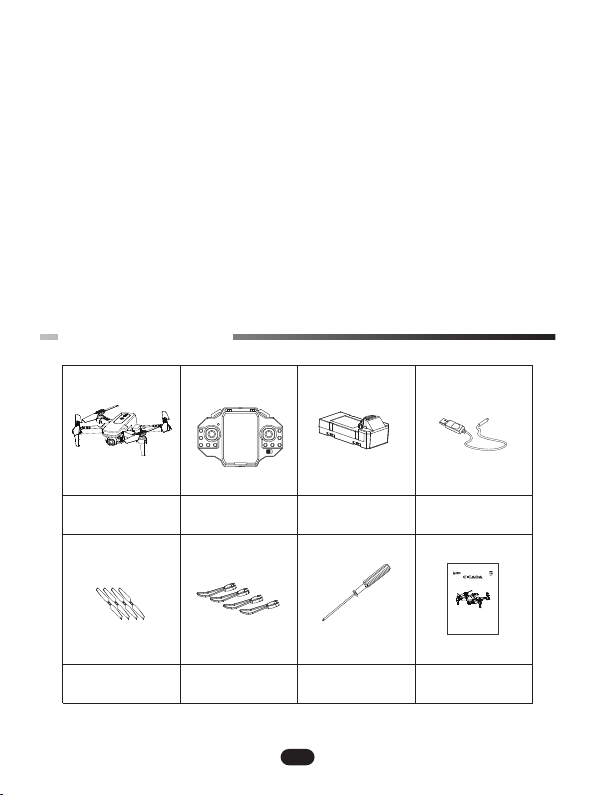
3.0 PACKING LIST
USB ChargerTransmitterDrone
x 1 x 1 x 1 x 1
x 1 x 1 x 1 x 1
Drone Battery
Propellers Protective Rings User ManualScrewdriver
FORBIDDEN:
Specialdesign for indoor & outdoor, please keep it away from obstacle.
Thisproduct is suitable for indoor (the wind grade should be not more than 4),
pleasechoose a place without obstacle, and keep distance from crowd and
pets,don’t play it under unsafety, for instance, heat source, wire or electronic
powersource in order not to be damaged by collision landing, entanglement
andlead to a fore, electric shock and cause losses of lives and property.
INSTRUCTIONS FOR USE
H4824

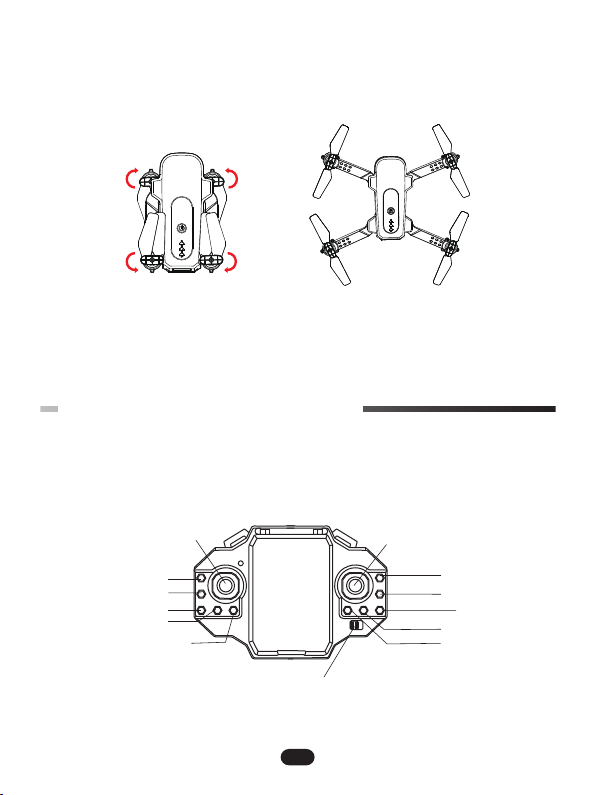
4.0 DRONE’S DETAILS
5
It is crucial that all the propellers are installed in the correct position
(Pay attention to the letter A or B printed underneath each propeller).
Camera
Indicator Light
Power Switch
Propeller A
Propeller A
Propeller B
Propeller B
Camera
6
Foldable
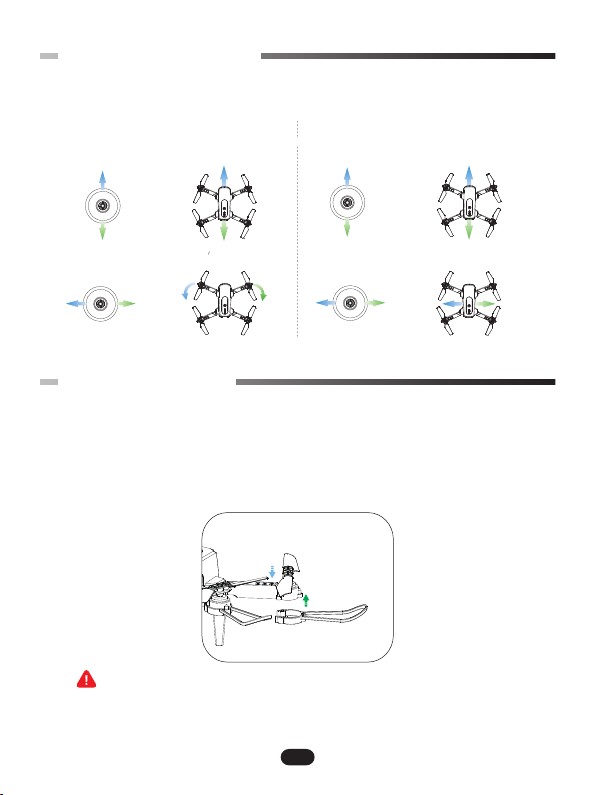
5.0 TRANSMITTER FUNCTIONS
Right Joystick
Trim
Trim
Flip
Headless Button
One Key Return
LED
One Key Take-off
One Key Land
(Short Press)
Emergency Stop
(Long Press)
Speed Switch
Left Joystick
Power Switch
6.0 JOYSTICK MODE
7
Turn
Left
Turn
Right
Descend
Ascend
Up
Down
Up
Down
Left Right Left Right
Fly to
Left
Fly to
Right
Backward
Forward
Left Joystick Right Joystick
7.0 INSTALLATION
7.1 Protective Rings
Note: Operators are strongly advised to install protective rings before
flight. It can protect the safety of the drone propellers and the motors.
WARNING
Installation: Align the protective guard with the bottom of the motor and press
it into place.

8
Removal: Press the lock button on the battery and pull it back to remove the
battery from the compartment.
7.2 Drone Battery
The battery should be installed firmly, failure to do it may affect
the flight safety of your drone.
Installation: Push the battery correctly into the drone battery compartment.
Make sure that you hear a click sound indicating the battery is firmly installed.
Indice
Altri manuali Wowitoys Drone


