
WowWee RS Media Manuale utente

User
Item No. 8061 | Ages 8+
A Fusion of technology and Personality
CAUTION - ELECTRICAL TOY:
NOT RECOMMENDED FOR CHILDREN UNDER 4
YEARS OF AGE.
AS WITH ALL ELECTRICAL PRODUCTS,
PRECAUTIONS SHOULD BE OBSERVED DURING
HANDLING AND USE TO PREVENT ELECTRICAL SHOCK.
INPUT: AC100-240V, 50/60HZ OUTPUT: DC 7.5V 3.1A

3
RS Media™, Robosapien™, Robosapien™ V2,
Roboreptile™, Robopet™, and Roboraptor™
are copyright and trademarked by Wowwee Ltd.
Sun Microsystems and Java are registered
trademarks of Sun Microsystems, Inc.
All other copyrights are hereby acknowledged.
Minimum system requirements for running
RS Media Editing Suite.
Microsoft® Windows® XP SP2 or higher (English Edition)
(Compatible with German, Spanish, French, and Italian
Windows® XP SP2 or higher)
PC with PIII 1.5GHz equivalent or higher processor
256 MB of system RAM
16 MB video card recommended
200 MB available hard disk space
CD-ROM drive
Supply of this product does not convey a license nor imply
any right to distribute content created with this product in
revenue-generating broadcast systems (terrestrial, satellite,
cable and/or other distribution channels), streaming
applications (via Internet, intranets and/or other networks),
other content distribution systems (pay-audio or audio-on-
demand applications and the like) or on physical media
(compact discs, digital versatile discs, semiconductor chips,
hard drives, memory cards and the like). An independent
license for such use is required.
For details, please visit http://mp3licensing.com.
3
RS Media is a complete multimedia robotic experience with the unique ability to be fully customized.
The perfect fusion of cutting-edge technology and personality modeling software, RS Media allows
you to take total control.
Before using this product, take a few moments to read this manual and retain it for future reference.
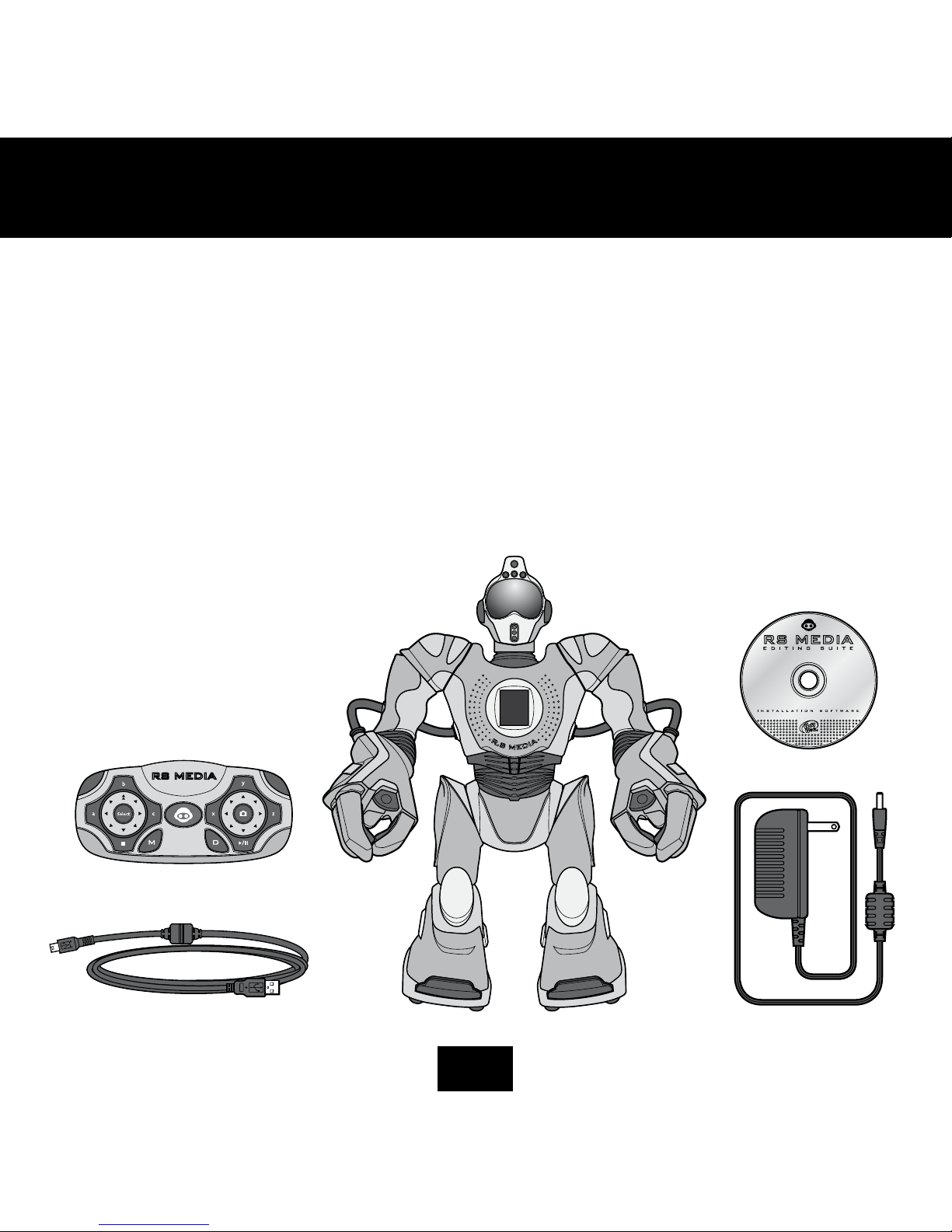
This package contains:
1 x RS Media
1 x Controller
1 x USB Cable
1 x CD RS Media software
1 x AC/DC power adapter
WELCOME

4
5
CONTENTS

4
5
CONTENTS

6
7
QUICK START
Mode Change Button
Left Shift
SeLeCt Button
deMo Button
Stop Button
SignaL indiCator Light
Stop pad
pLay / pauSe Button
CaMera Button
right Shift
pLay/pauSe pad
Left direCtion pad right direCtion pad

6
7
QUICK START
ControL Mode -
ControLLer LeVeL 1
arM Mode -
ControLLer LeVeL 2
Media Mode -
ControLLer LeVeL 3

8
9
This section describes the battery and power requirements for RS Media.
RS Media tells you when his batteries are running low, after which he will
shut down. When he does this, you will need to replace all the batteries
in the robot.
If RS Media is not responding well to controller commands, you might
need to replace the batteries in the controller.
Your RS Media is powered by 6 x “D” size batteries (not included) and 4 x
“AA” size batteries (not included). We recommend using only top-quality
alkaline batteries.
RS Media can be powered by an Output 7.5V AC/DC, 3.1 Amp,
center-positive adapter.
To operate RS Media using an adapter:
1. Insert the jack of the adapter into the AC/DC socket in RS Media’s
right foot (see RS Media Overview p.10)
2. Plug the adapter into a wall socket.
3. Turn RS Media on by setting the power button to the ON position.
Examine the AC/DC adapter regularly for damage to the cord, plug, enclo-
sure and other parts.
The AC/DC adapter is not a toy.
The toy must only be used with the recommended transformer.
If you wish to clean RS Media ensure that the power is disconnected rst.
Wipe only with a soft dry cloth.
To install or change batteries in RS Media:
1. On RS Media, locate the battery compartments
(on the underside of each foot).
2. Using a Phillips screwdriver (not included), remove the battery
compartment covers.
3. Insert batteries into the RS Media battery compartments as illustrated
in the diagram.
4. Replace the battery compartment covers and then replace the screws.
POWER AND BATTERY DETAILS
aC/dC adapter input
BottoM View of the rS Media

8
9
Your RS Media remote controller is powered by 3 x “AA” size batteries
(not included). We recommend using only top-quality alkaline
batteries.
To install or change batteries in RS Media remote controller:
1. Locate the battery compartment on the underside of the
remote controller.
2. Using a Phillips screwdriver (not included), remove the battery
compartment cover.
3. Insert batteries into the remote controller as illustrated in the
diagram.
4. Replace the battery compartment covers and then replace
the screw.
• Use only fresh batteries of the required size and recommended type.
• Do not mix old and new batteries, different types of batteries
[standard (Carbon-Zinc), Alkaline or rechargeable] or rechargeable
batteries of different capacities.
• Rechargeable batteries are only to be charged under adult supervision.
• Respect the correct polarity, (+) and (-) as indicated.
• Do not try to recharge non-rechargeable batteries.
• Do not dispose of batteries in re. Batteries might explode or leak.
• Do not use different type/brand of batteries at the same time.
• The supply terminals are not to be short-circuited.
• Remove exhausted batteries from the toy.
• Batteries should be replaced by adults.
• Remove batteries if the toy is not going to be played with for
some time.
• The packaging should be kept since it contains important information.
• Rechargeable batteries are to be removed from RS Media and the
controller before being charged.
POWER AND BATTERY DETAILS
BaCk View of the ControLLer
10
11
RS MEDIA OVERVIEW
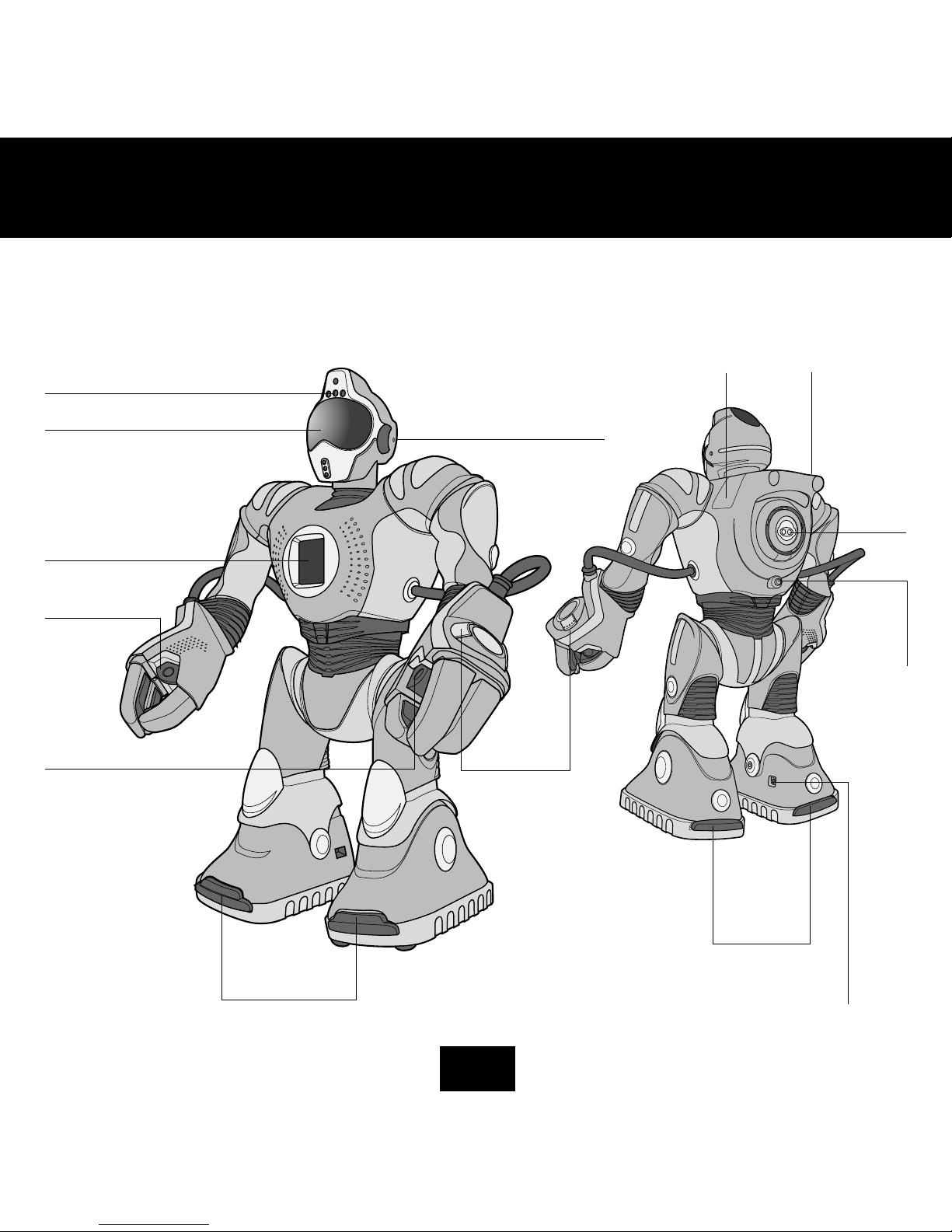
ir ViSion SenSorS and CaMera eyeS
eyeS
LCd SCreen
right hand
Speaker
Left hand
Speaker
Line in / uSB
CoMpartMent
Sd Card
CoMpartMent
BaCk foot
SenSorS
front foot
SenSorS
aC/dC power point
woofer
on/off
Button
SoniC SenSor
hand ControLS
RS Media is equipped with a multitude of features that really makes him a multi-media experience contained in a robot.
Refer to the illustration for an overview of his features.
Altri manuali per RS Media
1
Indice
Altri manuali WowWee Robotica

WowWee
WowWee ROBOPANDA 8068 Manuale utente

WowWee
WowWee Dog-E Manuale utente

WowWee
WowWee DOG-E Manuale utente

WowWee
WowWee ROBOQUAD Manuale utente

WowWee
WowWee Roboscooper Manuale utente

WowWee
WowWee miP 0821 Manuale utente

WowWee
WowWee BUILD UP RC MINI ROBOSAPIEN Guida per l'amministratore

WowWee
WowWee Miposaur 0890 Manuale utente

WowWee
WowWee 2535 Manuale utente

WowWee
WowWee MiP Arcade Manuale utente


