Xirrus Wi-Fi Array XS-3500 Manuale utente

June 2008 Edition
1725-36061-001
Version C
VIEW Certified Configuration Guide
Xirrus Wi-Fi Array
XS-3500/3700/3900

Configuration Guide
2 PN: 1725-36061-001_C.doc
Trademark Information
Polycom® and the logo designs
SpectraLink®
LinkPlus
Link
NetLink
SVP
Are trademarks and registered trademarks of
Polycom, Inc. in the United States of America
and various countries. All other trademarks
used herein are the property of their respective
owners.
Patent Information
The accompanying product is protected by one
or more US and foreign patents and/or pending
patent applications held by Polycom, Inc.
Copyright Notice
Copyright © 2007 to 2008 Polycom, Inc.
All rights reserved under the International and
pan-American copyright Conventions.
No part of this manual, or the software
described herein, may be reproduced or
transmitted in any form or by any means, or
translated into another language or format, in
whole or in part, without the express written
permission of Polycom, Inc.
Do not remove (or allow any third party to
remove) any product identification, copyright or
other notices.
Every effort has been made to ensure that the
information in this document is accurate.
Polycom, Inc. is not responsible for printing or
clerical errors. Information in this document is
subject to change without notice and does not
represent a commitment on the part of Polycom,
Inc.
Notice
Polycom, Inc. has prepared this document for
use by Polycom personnel and customers. The
drawings and specifications contained herein
are the property of Polycom and shall be neither
reproduced in whole or in part without the prior
written approval of Polycom, nor be implied to
grant any license to make, use, or sell equipment
manufactured in accordance herewith.
Polycom reserves the right to make changes in
specifications and other information contained
in this document without prior notice, and the
reader should in all cases consult Polycom to
determine whether any such changes have been
made.
No representation or other affirmation of fact
contained in this document including but not
limited to statements regarding capacity,
response-time performance, suitability for use,
or performance of products described herein
shall be deemed to be a warranty by Polycom
for any purpose, or give rise to any liability of
Polycom whatsoever.
Contact Information
Please contact your Polycom Authorized
Reseller for assistance.
Polycom, Inc.
4750 Willow Road,
Pleasanton, CA 94588
http://www.polycom.com

Xirrus Wi-Fi Array: XS-3500/3700/3900
PN: 1725-36061-001_C.doc 3
Introduction
Polycom’s Voice Interoperability for Enterprise Wireless (VIEW)
Certification Program is designed to ensure interoperability and high
performance between SpectraLink Wireless Telephones and Xirrus
Wi-Fi Array infrastructure products.
The products listed below have been thoroughly tested in Polycom’s
lab using the VIEW Certification Test Plan. This document details
how to configure the XS-3500, XS-3700 and XS-3900 Wi-Fi Arrays with
SpectraLink Wireless Telephones.
Certified Product Summary
Manufacturer: Xirrus, Inc www.xirrus.com
Approved products: Wi-Fi Arrays XS-3500, XS-3700, XS-3900 †
RF technology: 802.11b/g
Radio: 2.4 – 2.484 GHz
Security: WPA-PSK and WPA2-PSK
AP firmware version certified: 3.1 - 0515
SVP Server software version certified: 17x.027
SpectraLink handset models certified: ** e340/h340/i640 8020/8030
SpectraLink handset software certified: 089.127 122.010 or greater
SpectraLink radio mode: 802.11b 802.11b
Maximum telephone calls per AP: 12 12
Recommended network topology: Switched Ethernet
†Denotes products directly used in VIEW Certification testing
** SpectraLink handset models 8020/8030, e340/h340/i640 and their OEM derivates are VIEW Certified
with the WLAN hardware and software identified in the table. Throughout the remainder of this
document they will be referred to collectively as “SpectraLink Wireless Telephones”.
Service Information
If you encounter difficulties or have questions regarding the
configuration process, please contact Xirrus technical support at

Configuration Guide
4 PN: 1725-36061-001_C.doc
Known Limitations
Voice quality may be impaired in an environment with heavy
wireless TCP traffic, such as FTP data transfers.
Access Point Capacity and Positioning
Please refer to the Polycom Deploying Enterprise-Grade Wi-Fi Telephony
white paper. This document covers the security, coverage, capacity
and QoS considerations necessary for ensuring excellent voice quality
with enterprise Wi-Fi networks.
For more detailed information on wireless LAN layout, network
infrastructure, QoS, security and subnets, please see the Best Practices
Guide for Deploying SpectraLink 8020/8030 Wireless Telephones. This
document identifies issues and solutions based on Polycom’s
extensive experience in enterprise-class Wi-Fi telephony, and
provides recommendations for ensuring that a network environment
is adequately optimized for use with SpectraLink 8020/8030 Wireless
Telephones.

Xirrus Wi-Fi Array: XS-3500/3700/3900
PN: 1725-36061-001_C.doc 5
Network Topology
The following topology was used for VIEW Certification testing.

Configuration Guide
6 PN: 1725-36061-001_C.doc
Configuration Settings
Xirrus Arrays initially boot with all radios disabled except for the
monitor radio. The monitor radio may be left enabled and in no way
interferes with the SpectraLink Wireless Telephones; however it was
disabled for the certification process for simplicity.
Disabling the monitor radio
If you wish to disable the monitor radio, use the following CLI
commands:
Xirrus_WLAN_Array# configure
Xirrus_WLAN_Array(config)# interface iap
Xirrus_WLAN_Array(config-iap)# abg2 down
Xirrus_WLAN_Array(config-iap)# show
IAP Summary Table
Cell TX RX
IAP State Channel Antenna Size Power Threshold Stations WDS MAC address
--------- ------- -------- ---------------------- -------- --- -----------------
a1 down 36 int-dir manual 8dBm -75dBm 0 00:0f:7d:03:63:11
a2 down 52 int-dir manual 8dBm -75dBm 0 00:0f:7d:03:63:31
a3 down 149 int-dir manual 8dBm -75dBm 0 00:0f:7d:03:63:41
a4 down 40 int-dir manual 8dBm -75dBm 0 00:0f:7d:03:63:51
a5 down 56 int-dir manual 8dBm -75dBm 0 00:0f:7d:03:63:71
a6 down 157 int-dir manual 8dBm -75dBm 0 00:0f:7d:03:62:81
a7 down 44 int-dir manual 8dBm -75dBm 0 00:0f:7d:03:62:91
a8 down 60 int-dir manual 8dBm -75dBm 0 00:0f:7d:03:62:b1
a9 down 153 int-dir manual 8dBm -75dBm 0 00:0f:7d:03:62:c1
a10 down 48 int-dir manual 8dBm -75dBm 0 00:0f:7d:03:62:d1
a11 down 64 int-dir manual 8dBm -75dBm 0 00:0f:7d:03:62:f1
a12 down 161 int-dir manual 8dBm -75dBm 0 00:0f:7d:03:63:01
abg1 down 11 int-dir medium 11dBm -81dBm 0 00:0f:7d:03:63:21
abg2 down monitor int-omni manual 20dBm -95dBm 0 00:0f:7d:03:63:61
abg3 down 1 int-dir medium 11dBm -81dBm 0 00:0f:7d:03:62:a1
abg4 down 6 int-dir medium 11dBm -81dBm 0 00:0f:7d:03:62:e1

Xirrus Wi-Fi Array: XS-3500/3700/3900
PN: 1725-36061-001_C.doc
7
The monitor radio may also be disabled with the Web Management
Interface (WMI) as shown below.
1. In the navigation pane, click IAP Settings.
2. In the IAP Settings screen, clear the Enabled check box for IAP abg2.
3. Click the Apply button.
Figure 1: Disabling the Monitor Radio

Configuration Guide
8 PN: 1725-36061-001_C.doc
Setting Radio Channels
With the SpectraLink Wireless Telephones operating in 802.11b mode,
at least one of the Wireless LAN Array’s Integrated Access Points
(IAPs) must be set to the 2.4 GHz band. Any of the Array’s four abg
radios may be used, and up to three may be used simultaneously.
However, the radios must be set to the non-overlapping channels 1, 6,
and 11. This may be done using the following CLI commands:
Xirrus_WLAN_Array# configure
Xirrus_WLAN_Array(config)# interface iap
Xirrus_WLAN_Array(config-iap)# abg1 channel 11
Xirrus_WLAN_Array(config-iap)# abg3 channel 1
Xirrus_WLAN_Array(config-iap)# abg4 channel 6

Xirrus Wi-Fi Array: XS-3500/3700/3900
PN: 1725-36061-001_C.doc 9
Configuring an SSID
An SSID for the phones must be set on the Array. The following CLI
commands show how to implement an SSID called ‘spec’.
Xirrus_WLAN_Array(config)# ssid
Xirrus_WLAN_Array(config-ssid)# add spec
Xirrus_WLAN_Array(config-ssid-spec)# broadcast on
Xirrus_WLAN_Array(config-ssid-spec)# show
SSID "spec" Settings
=================================================
State Enabled
Active Yes
Encryption None
VLAN Name
VLAN Number -
QoS Level 2
Active Band 802.11bg
Broadcast On
DHCP Pool none
Traffic Limit Unlimited
Traffic/Station Unlimited
Time on Always
Time off Never
Days on All
Xirrus_WLAN_Array(config-ssid-spec)# exit
Xirrus_WLAN_Array(config-ssid)# show
SSID Summary Table
SSID Name Active Encryption QoS Band Broadcast
--------------------------- ------ -------------- --- ---- --------
spec Yes None 2 11bg On

Configuration Guide
10 PN: 1725-36061-001_C.doc
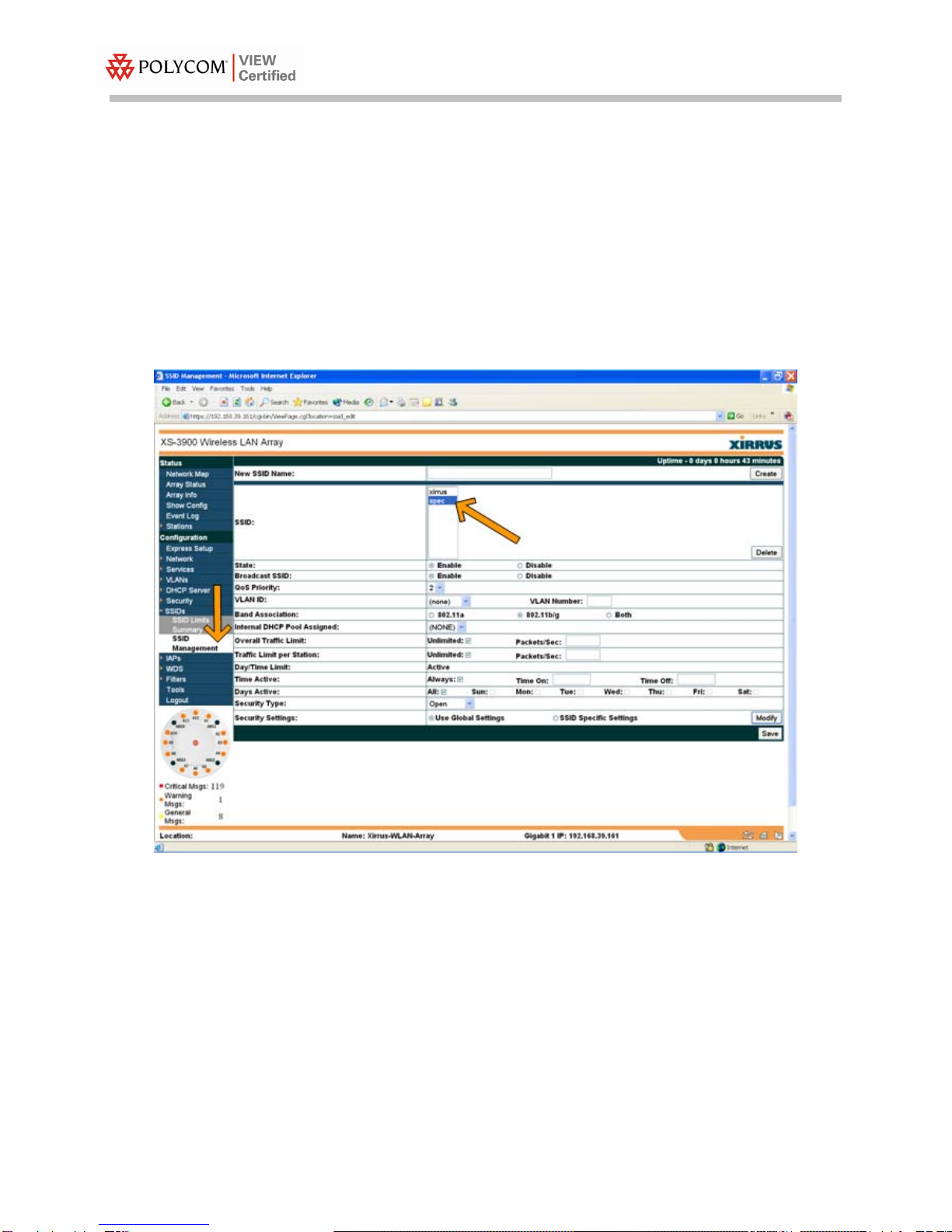
This screen shows how to set up the SSID in the WMI.
1. In the navigation pane, click SSID Management.
2. Type the name in the New SSID Name: field near the top of the SSID
Management screen.
3. Click the Create button in the upper right corner of the screen.
4. The name appears in the SSID list toward the center of the page.
5. Click the name and select the appropriate features below.
6. Be sure to click the Enable option on the Broadcast SSID line.
Figure 2: Configuring an SSID
Questo manuale è adatto per i seguenti modelli
2
Indice
Manuali Hardware di rete popolari di altre marche

Matrix Switch Corporation
Matrix Switch Corporation MSC-HD161DEL Manuale utente

B&B Electronics
B&B Electronics ZXT9-IO-222R2 Manuale utente

Yudor
Yudor YDS-16 Manuale utente

D-Link
D-Link ShareCenter DNS-320L Manuale utente

Samsung
Samsung ES1642dc Istruzioni per l’uso

Honeywell Home
Honeywell Home LTEM-PV Istruzioni per il montaggio