
XPRIT Beach Seal Manuale utente

1/16
Instructions to Set Up Your Beach Seal E-bike
Diagram

2/16
We know you are excited about getting going but please:
✓Reseat and charge the battery before the first ride
✓Make sure the pedals are tight
✓Make sure the front wheel is installed properly and tight
✓Inflate the tires properly
✓Check that all screws are properly torqued
✓Carry out a fine adjustment of the gears and brakes
✓Learn how to use the LCD display
✓Wear a helmet before riding
Please Note: Your bike may need further adjustments after assembly.
________________________________________________________
If you have any trouble with setup, please contact us online or
through our email address: support@xprit.com

3/16
Assembling Your E-Bike
1) Read all of the instructions carefully. Be familiar with the proper operation of all items.
2) This quick guide is intended to list the steps needed to assemble your bike with some
mechanical skills. It is not a complete manual or training. If you do not feel comfortable or lack
some of the skills to assemble it yourself, reach out to a cyclist friend, a local bike mechanic or
one of our support technicians for guidance.
3) Our QA mechanics have assembled and tested your bike beforehand.
4) To assemble your bike, work on a clean area with enough space to maneuver.
5) If installed, remove the battery from the bike to start the assembly。
6) Inspect the bike completely to be sure no damage occurred during shipping.
7) The kickstand is designed to support the bicycle only. Not the rider mounted。
8) You can adjust your saddle position and the tilt on your handlebar items for comfort.
9) Check all screws and parts are tight and properly fixed. We recommend a pre-trip inspection
before your first rides.
10) Before riding, make sure battery is properly assembled and tightly locked on the bike in case
of any dropping.
4/16
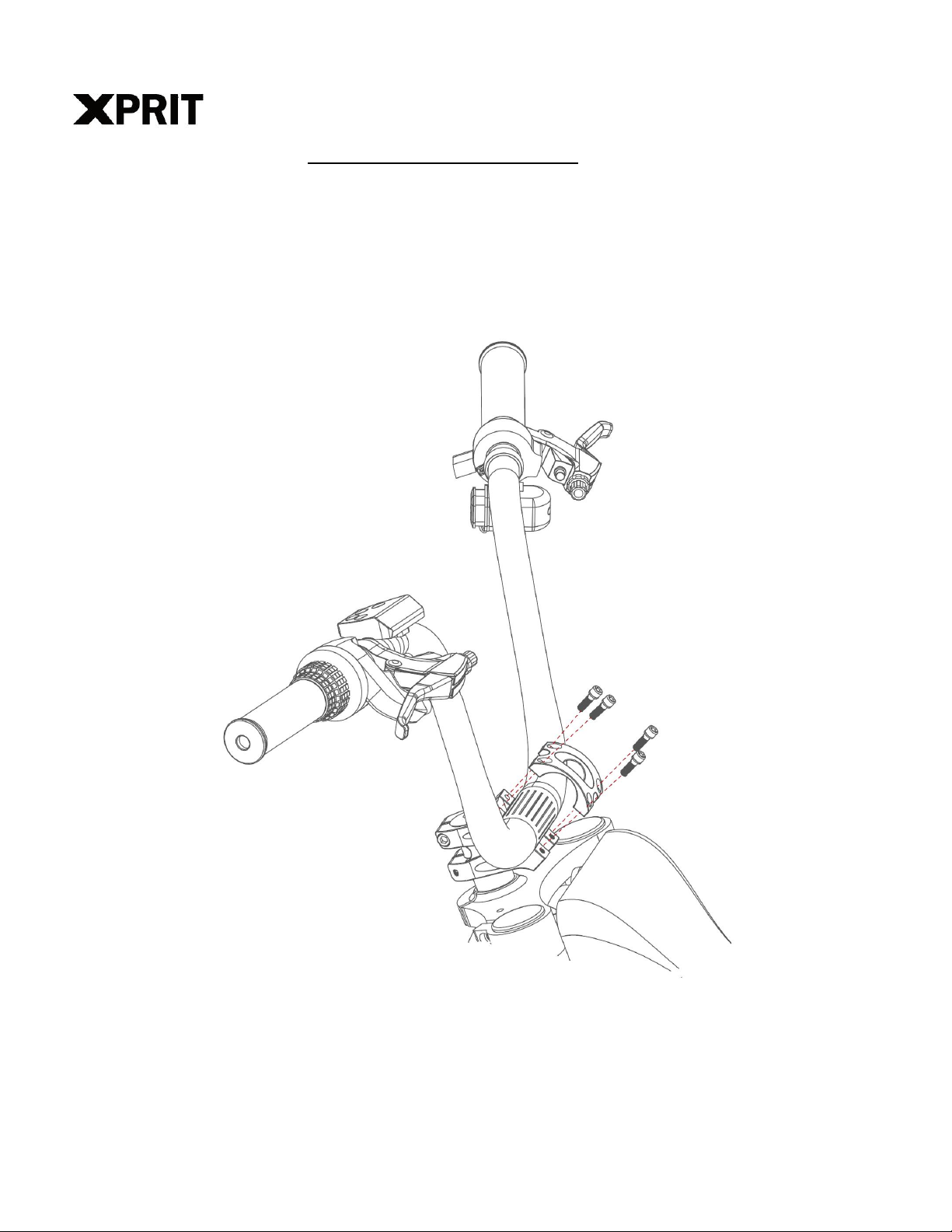
Installing Your Handlebars
1) Place the handlebar in the handlebar mount being careful with the wires.
2) Face the mounting brackets on the front end of the mount with the round edges facing outward.
Adjust the handlebar angle to your comfortable riding posture.
3) Secure the mounting brackets with four screws. (Screws shall be tightened with 6N.m torque)
4) Verify your front tire lines up with your headset.
5) Check whether all headset items are tight.
5/16
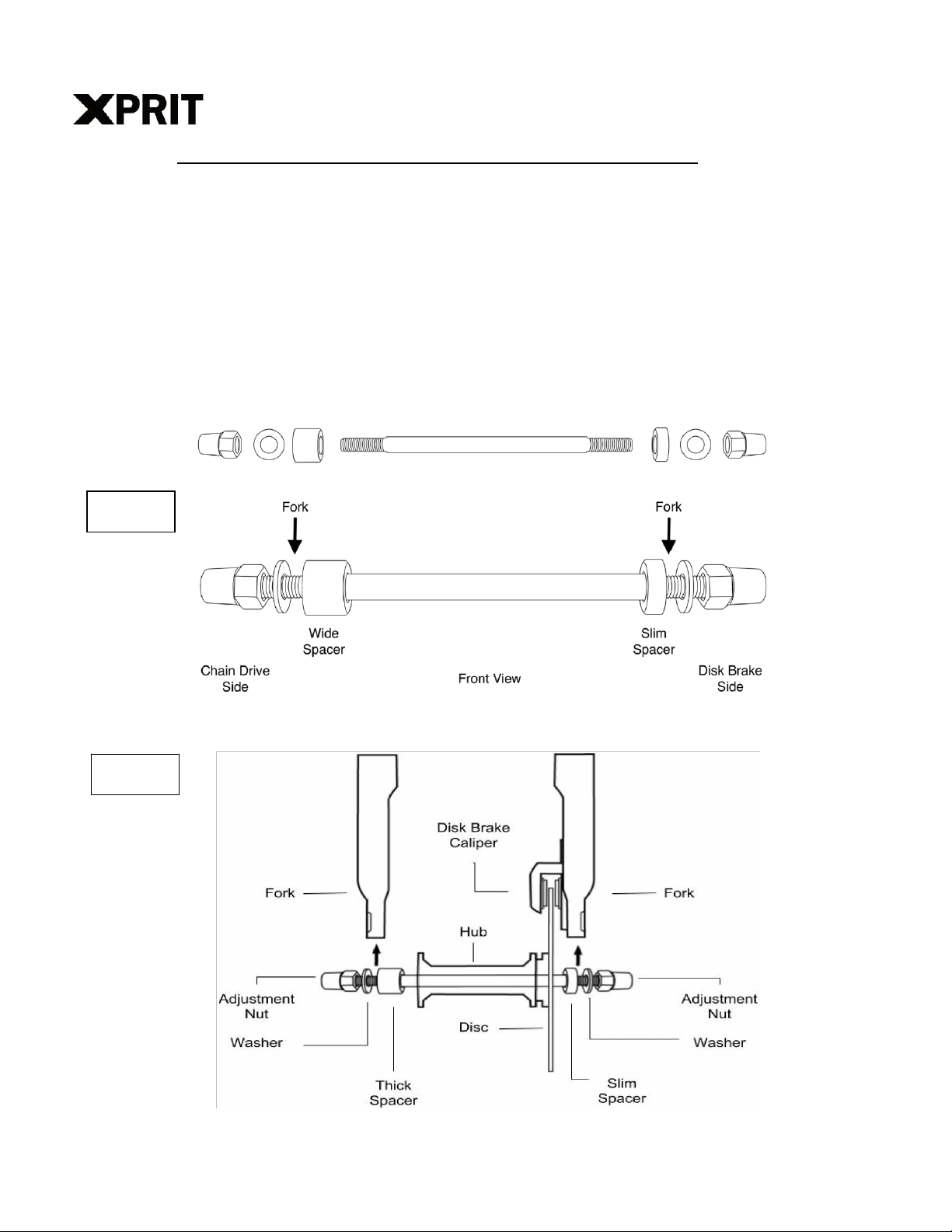
Installing Your Front Wheel - Through Axle Version
1) Insert the axle into the wheel hub as shown. Add the Slim Spacer on the LEFT side
(Brake Disk) and the Wide Spacer on the RIGHT side.
2) Insert the front wheel with the spacers in between the front fork on the bike. Be sure to
align the disk between the brake caliper as shown in Figure 2.
3) Now on the outside add the washer and nut on each side and hand turn until snug
4) Using your wrench, tighten each side alternatively until snug (you might need to secure
the opposite nut slightly so the whole axle doesn’t turn)
5) Now tighten each nut putting your weight into the wrench. Your front wheel is now
installed.
6) The Adjustment Nut needs to be very tight, be sure to retighten after your first couple
rides.
Figure 1
Figure 2
6/16
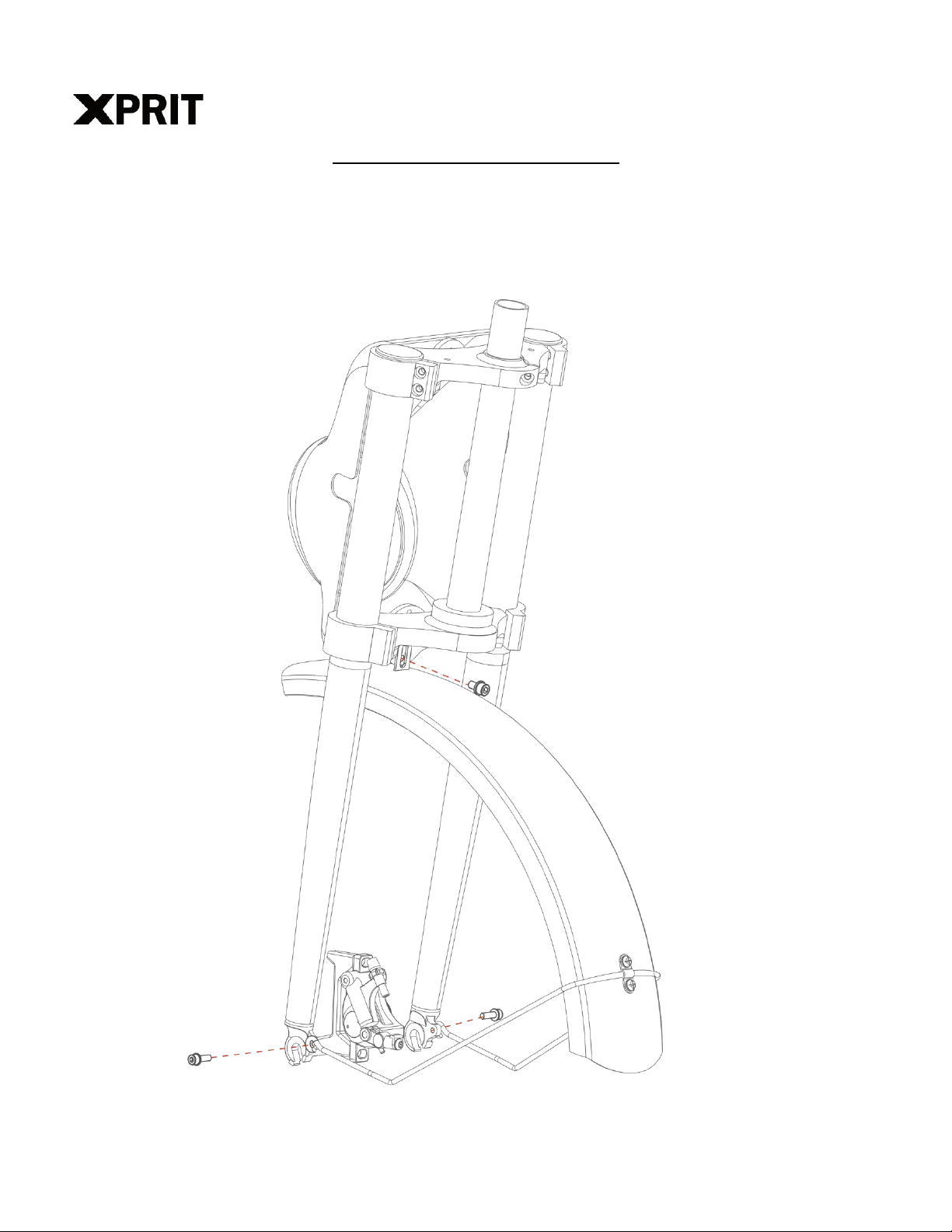
Installing Your Front Fender
1) Align the fender clamps on the left and right legs of the fork with fender stay to enable
fender in the line with the wheel. Fix the stay with screws (M5 screw) provided on the
clamp.
2) Put the lifting lug of the fender behind fork gantry installing hole. Link and secure these two
pieces with the fixing screw (M6 screw) and washer.
7/16
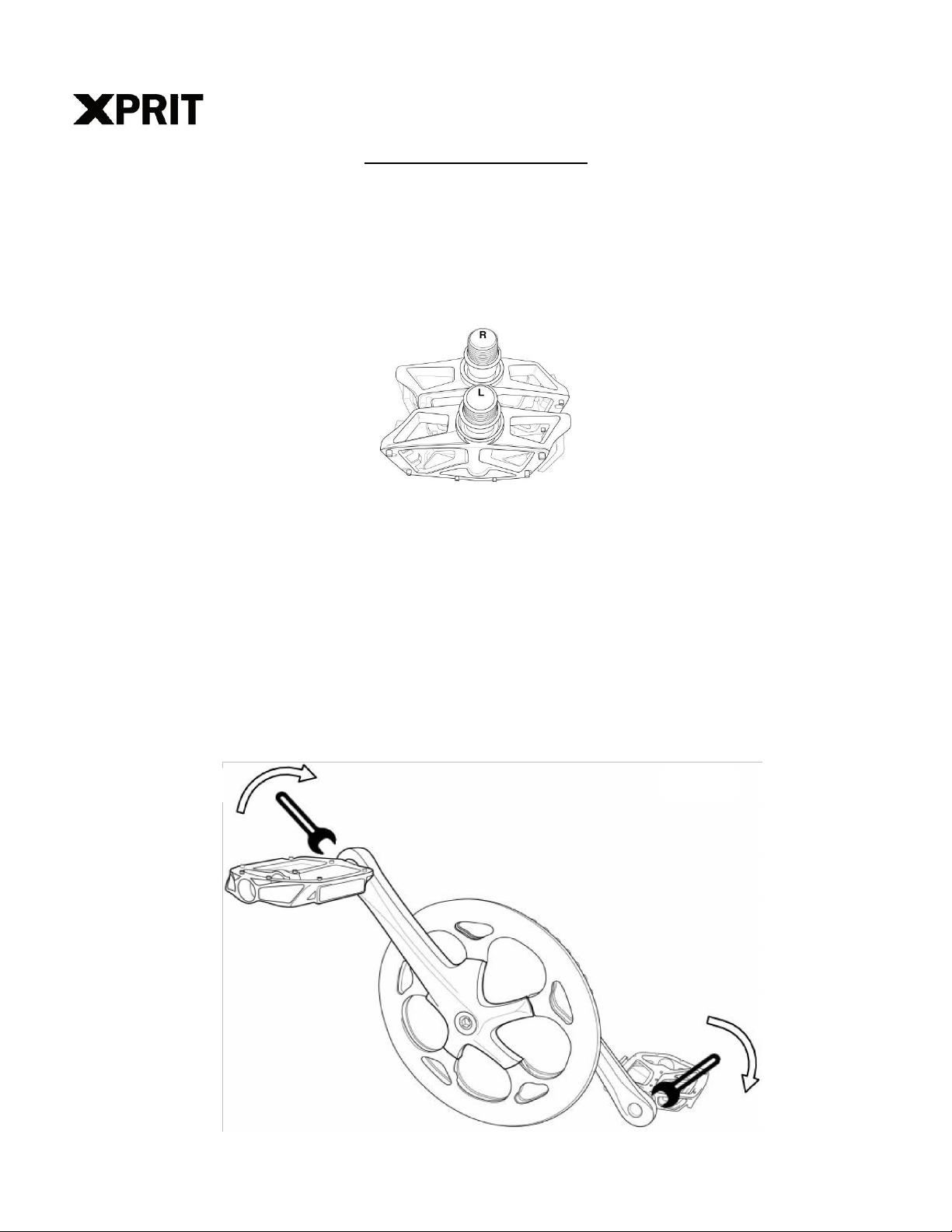
Installing Your Pedals
1) Warning: Incorrect installation will cause damage. Please read the instructions and watch our
videos if needed.
2) Identify the Left and Right markings on the pedals. They can only be installed in their
respective side.
a. L is for the Left Pedal and it goes on the Left Crank Arm.
b. R is for the Right pedal and it goes on the Right Crank Arm (Chain Side).
3) Sitting on your bike the pedals go on the Left and Right side respectively.
4) Keep the pedal Horizontal while hand screwing to get the thread started. Then Use your 15mm
wrench to tighten them.
5) Both pedals tighten towards the front of the bike. The left pedal is reverse threaded to allow
this.
6) The pedals need to be very tight(at least 25-35N.m torque), be sure to retighten after
your first couple rides.
Use your 15mm
wrench to properly
tighten the pedals
Right Pedal /
Chain Side
Left Pedal /
Key Side
Both pedals
tighten towards
the front
Rear
Front
8/16
Preparations Before Riding
1) Read all instructions carefully, be familiar with the proper operation of all items. Check for
detailed information and guidance on our product page.
2) Warning: Basic electric precautions should always be followed to avoid issues or malfunction.
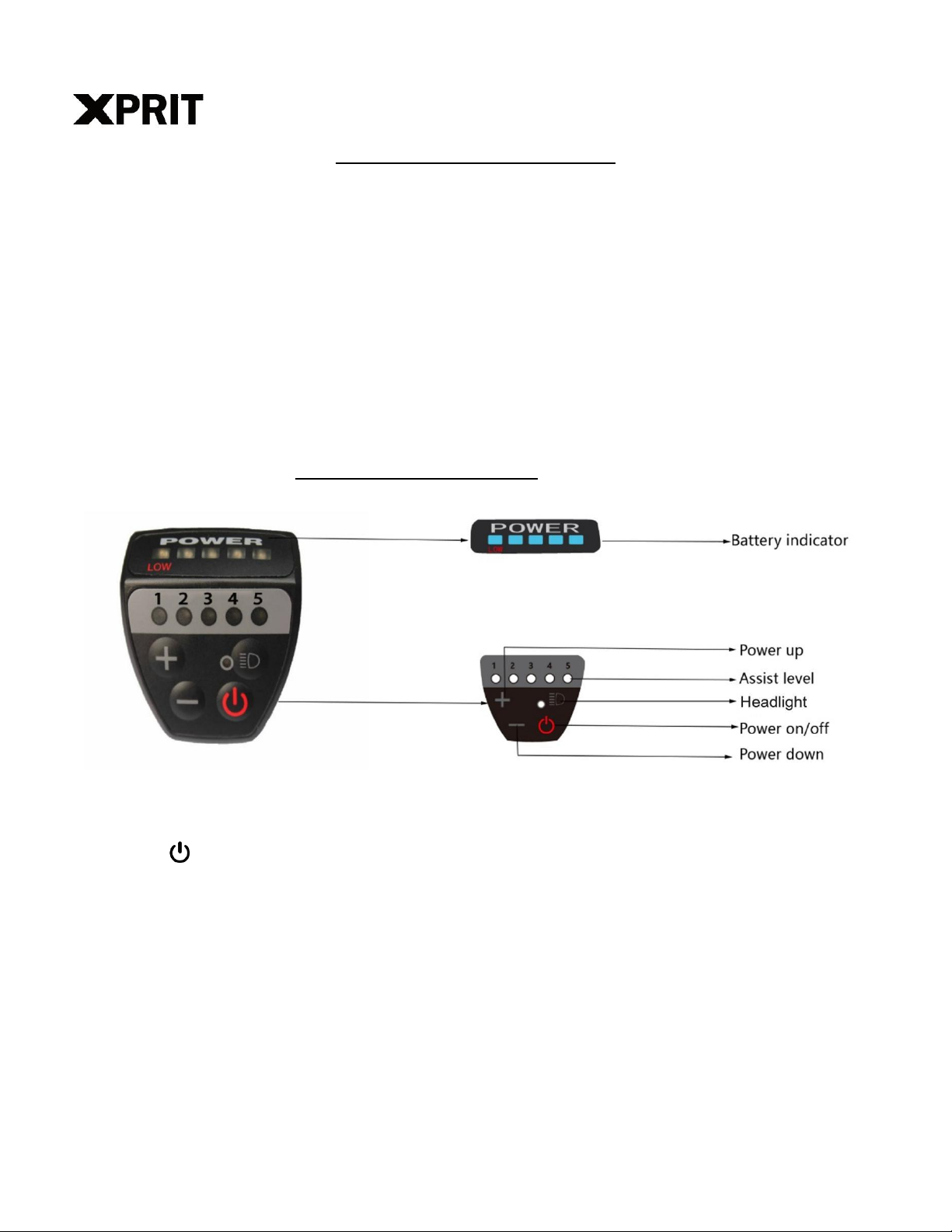
How to Use the Display
1) Power on/off
Press the button to turn on the display. Your bike will be ON. Press again to turn it off. The
display will automatically shut down when there is no operation or riding for 10 minutes.
2) Adjust the assist level
Short press “+” or “-” button to change the assist level from 0 to 5. 0 is without assist. 5 is the
max assist level.
3) Walking mode
Press and hold “-” button for 2 seconds to shift into walking mode; release the button to exit the
walking mode. The walking mode function can only be used when the user pushes the e-bike,
please do not use it when riding.

9/16
4) Headlight on/off
Press the HEADLIGHT button to turn on the front light. Pressing the HEADLIGHT button again
to turn off the headlights
5) Battery indication
When the battery voltage is high, the five LED power indicators are all on. When the battery is
under voltage, the last power indicator flashes for a long time, indicating that the battery is
seriously under voltage and needs to be charged immediately.
USB port
For some version, there is USB charge port on the left side of handlebar which you can
connect to charge your cellphone.
Cruiser Control Function
The cruise control feature can be used to maintain a desired speed without using the Throttle
or Pedal Assist.
To activate the Cruise Control function:
Use the throttle or pedal assist to reach your desired speed. While holding the throttle in a
stable speed (speed should be over10mph) over 5 seconds, it will enter into cruise mode.
Under cruise mode, the current speed will be maintained without the need to use the throttle or
pedal assist.
Deactivating the Cruise Control
To discontinue the use of the cruise control function you can do the following actions:
•Use the brakes by squeezing the brake lever
•Use the throttle
Removing the Battery
To Remove the Battery
1) Turn off LCD display, turn off battery switch on the top of battery.
2) Use your left hand to turn the key clockwise to unlock the battery.
3) Use your right hand to push the battery backward and take out the battery.

10 /16
Note: the battery weighs heavy and should be handled with care.
When the Battery is Removed
Do not touch the “+” and “-” terminal contacts on the top of the battery when the battery is
removed from the bike.
Be careful not to drop or damage the battery when loose from the bike.
Avoid damaging the exposed connector terminals and keep them clear of debris.
Indice
Altri manuali XPRIT Bicicletta


