
XRPlus XRS 2004 Series Manuale utente
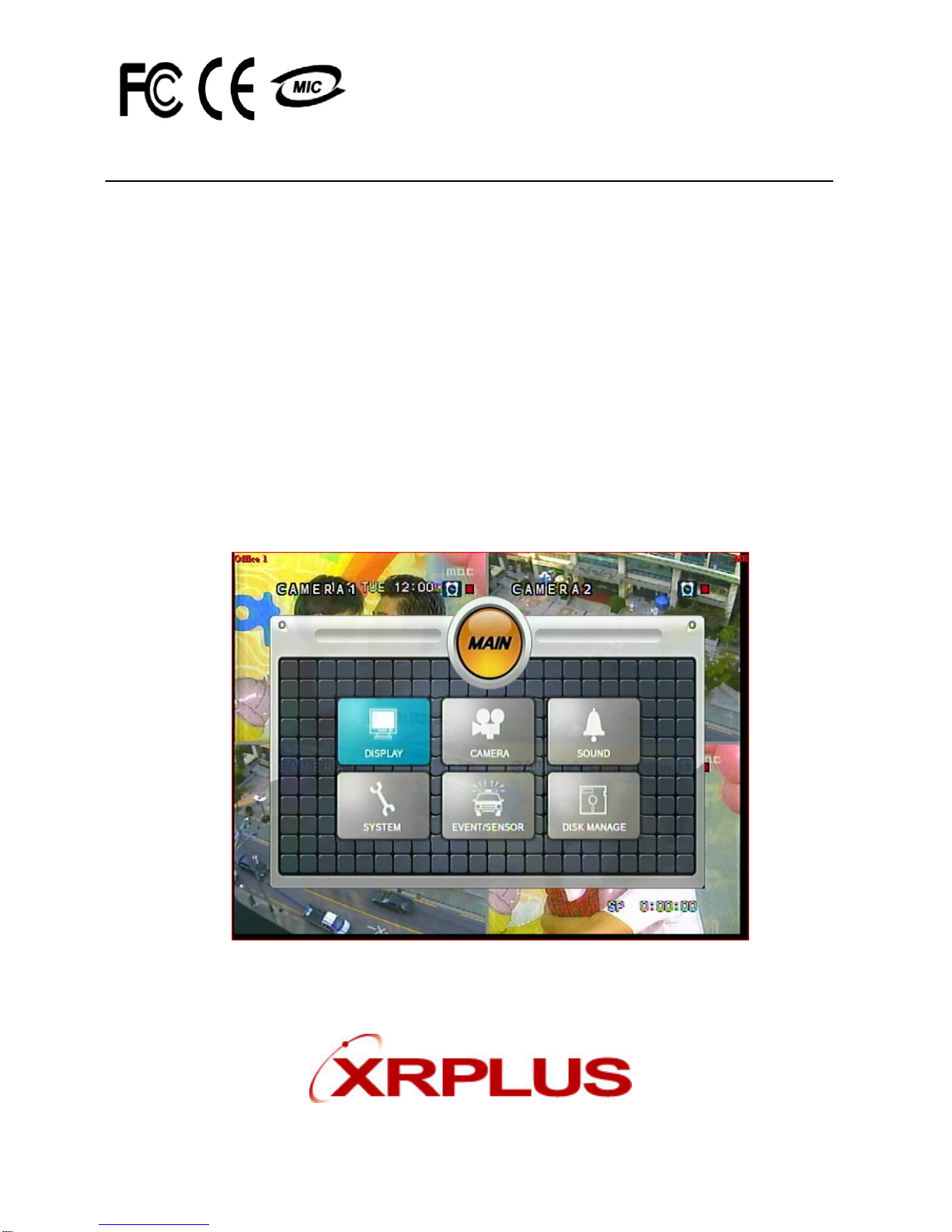
USER’S MANUAL
(XRS 2004 Series)
Stand Alone Type
DVR SYSTEM
XRPLUS Incorporated

•INDEX
• CHAPTER 1. Specification & System organization
1. Specification -------------------------------------------------------------- 4
2. Product Contents List -------------------------------------------------------- 6
3. System Organization --------------------------------------------------------- 7
•CHAPTER 2. Description
1. Front Panel --------------------------------------------------------------- 8
2. Rear Panel --------------------------------------------------------------- 10
3. Remote Controller ---------------------------------------------------------- 11
• CHAPTER 3. Installation
1. Hard Disk Installation ------------------------------------------------------- 12
2. CD-RW & Hard Disk Installation ----------------------------------------------- 14
3. Camera Connection -------------------------------------------------------- 16
4. Monitor Connection -------------------------------------------------------- 16
5. Computer Connection ------------------------------------------------------- 16
6. Network Connection -------------------------------------------------------- 16
7. Alarm/Relay/PTZ Connection ------------------------------------------------- 17
8. Power Connection --------------------------------------------------------- 17
9. Finishing Installation -------------------------------------------------------- 18
※ Hard Disk Format ---------------------------------------------------------- 18
•CHAPTER 4. Display
1. System Power ON ---------------------------------------------------------- 19
2. Screen View Selection ------------------------------------------------------ 20
3. Screen Rotation Mode (SCR MODE) -------------------------------------------- 20
4. PTZ/FOCUS Control -------------------------------------------------------- 21
5. System Power OFF --------------------------------------------------------- 21
•CHAPTER 5. Search
⊙ Go to Search Mode --------------------------------------------------------- 22
1. Search by Date/Time ------------------------------------------------------- 22
2. Search by Event ----------------------------------------------------------- 23

•INDEX
• CHAPTER 6. MENU
⊙ Go to Menu -------------------------------------------------------------- 25
⊙ Go to System Setup -------------------------------------------------------- 25
1. Display ------------------------------------------------------------------ 26
2. Camera ----------------------------------------------------------------- 27
3. Audio ------------------------------------------------------------------- 30
4. System ------------------------------------------------------------------ 30
5. Event/Sensor ------------------------------------------------------------- 36
6. Disk Management ---------------------------------------------------------- 39
⊙ Go to Record Menu -------------------------------------------------------- 40
1. Recording Operation -------------------------------------------------------- 40
2. Continuous/Motion Record Schedule -------------------------------------------- 41
3. Alarm Record Schedule ----------------------------------------------------- 42
⊙ Go to Archiving ----------------------------------------------------------- 43
1. CD-RW and USB Back up --------------------------------------------------- 43
• CHAPTER 7. CLIENT
⊙ Remote Program Install ----------------------------------------------------- 44
1. Function Introduction ------------------------------------------------------- 46
2. Setting ------------------------------------------------------------------ 47
3. Monitoring --------------------------------------------------------------- 54
4. Search ------------------------------------------------------------------ 58
5. Web Client --------------------------------------------------------------- 65

4
1. Specification
Video standard PAL/NTSC
Audio 2-way Audio conference
Monitor display Real time:25 Fps (PAL), 30Fps(NTSC) per camera
Covert camera operation Programmable
Event/Log search Up to 1,000,000 for user login/out, config changes, remote access,
connects/disconnects
Record Scheduling Daily, Weekly adjust specific Hr per channel
Remote Access TCP/IP, View, Search, Recording & Control by Client Program or I.E.
Playback Single and quad picture
Pre/Post alarm recording 5 secs(Pre), 3 mins(Post), programmable per camera
VGA For monitors with Multi Sync Function only(1024 X 768(60Hz))
Activity detection 12x12 grid, Sensitivity levels: 10
Back-up file formats AVI, JPG, BMP
Simplex/Duplex operation Triplex
Video inputs 4 x 1Vp-p, CVBS, 75ohms, BNC, looping inputs
Monitor outputs 1 x CVBS/S-VHS, VGA
Spot output 1 x 1Vp-p, CVBS, 75ohms, BNC
Audio inputs 4 x line-in, RCA sockets
Audio output 1 x line-out, RCA socket
Resolution 352x240,704x240,704x480(NTSC), 352x288,704x288,704x576(PAL)
Compression standard Mpeg4
Recording speed 352x240 : 120/100 (NTSC/PAL) , 704x240 : 60/50 (NTSC/PAL)
704x480 : 30/25 (NTSC/PAL)
Image size 3-5 Kbyte (352x240, 352x288), 5-10 Kbyte (704x240, 704x288)
6-16 Kbyte (704x480, 704x576)
Hard disk capacity 2 X HDD, 1 X CD-RW (STANDARD DC SUPPLY USE)
Secondary Storage USB default (USB memory stick, USB HDD), CD-RW
Alarm inputs 4 x TTL, programmable as NC/NO
Alarm outputs 1 x Relay with NO/NC contact; 30VDC/1A, 125VAC/0.5A resistive
1. Specification & Organization

5
Network Speed Control 8 levels
Power consumption Approx. 60watts
Temperature range 5℃to 50℃
Pre-alarm recording Up to 5 sec., programmable per camera
OSD languages English, Spanish, Chinese, Dutch, Portuguese, French, Russian, Japanese,
Polish, Romanian, German
Ethernet interface 10/100-Base-TX, RJ-45
Remote Function Live View, Live Recording, Search, Set-up, Back-up
PTZ Control RS-485 interface
Supply voltage 100VAC-240VAC, 5A, 60/50Hz
1. Specification & Organization

6
2. Product contents List
Please Confirm the Contents When open Package.
①Basic Contents
Remote Controller
Remote Client
Program Install CD /
user manual
AAA Battery X 2
12V Adaptor Power Cable
② Option Contents
HDD CD-RW USB MOMORY
XRS 2004
1. Specification & Organization
7
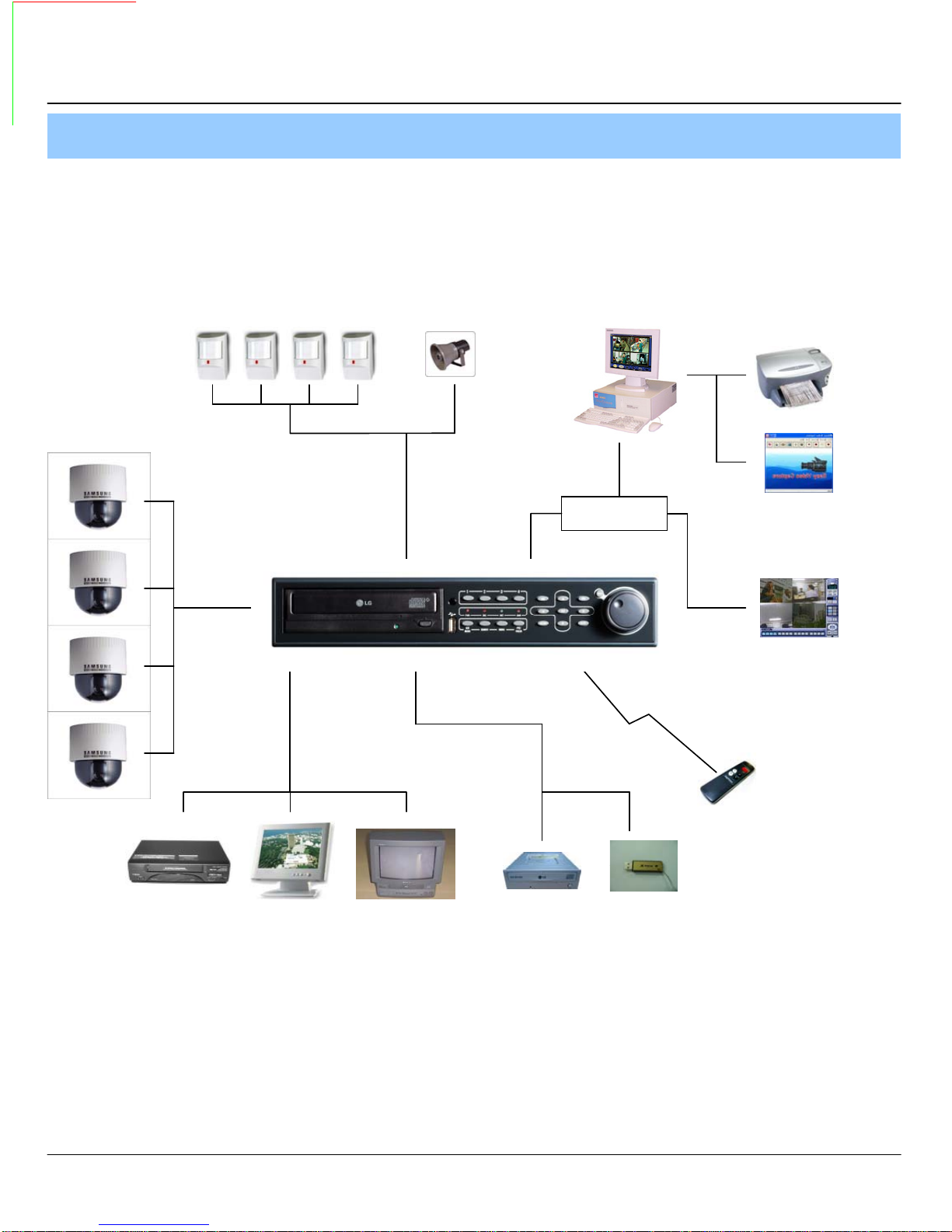
3. System Organization
NETWORK
Camera #1-4
Alarm Sensor #1-4 Remote Client PC
XRS 2004
Video In
Video Out
Relay Out
VCR VGA
Monitor AV Monitor
Image Printer
TCP/IP
Alarm Input/Out
Remote
Controller
CD-RW
(It is not supported)
Backup
AVI Backup
WEB Client
USB
1. Specification & Organization

8
① Power : System Power On/Off.
② Remote Controller Sensor Input.
③ CD-RW : CD-RW Device for Backup.
④ USB Port: USB port for use the USB memory stick and USB HDD Backup
⑤ Led Indicator : Indicate Present System Status Information.
( POWER: System On/Off , RECORD: Record On/Off , NETWORK: Client Network Connection
Status, ALARM: Alarm Sensor Detection Status )
⑥ Channel Selection Button : Select Channel or Input Password.
⑦ SCR MODE : Select Screen Division Mode or Rotation Mode.
⑧ SEARCH : Go to Search Mode for Searching Data.
⑨ MENU : Go to System Menu.
⑩ PTZ/FOCUS : Go to Camera PTZ/FOCUS Control.
⑪ Search Controller : Searching Recorded Data or Control Menu & PTZ/FOCUS.
⑫ ENTER : Apply Changing Setup.
⑬ RETURN : Cancel Setup or Return to Previous Mode.
⑭ JOG SUTTLE : Search Mode for Searching Data
1. Front Panel (XRS 2004)
• Power Button is Soft Style to Prevent System Failure by Wrong Operation.
• Channel Selection Button is Prior to SCR Mode.
• When Remote Controller Sensor Input is Blocked by Something, it Cause
1Remote Controller do NOT Work Properly.
• When Press any Button, it Operate with Beep Sound.
•In Case of CD-RW, the Real Appearance will be Differ from the above Picture
1Depends on its Model.
2. Description
Tip
①②③
④⑤
⑥
⑦⑧⑨⑩
⑪
⑫⑬
⑭

9
① Video In : BNC Port for Connection of DVR & Camera. (4 Camera Connectable)
② Loop Back : Output DVR Camera Video to Loop Back Port. (4 BNC Port)
③ Monitor Out : Output DVR Video to AV Monitor.
④ Spot Out : Output Spot-out Video to AV Monitor.
⑤ NTSC/PAL : Select NTSC or PAL Type.
⑥ VGA OUT : Output Video to a Computer Monitor by Connected VGA (Option)
⑦ SVHS : Output Video by Connected SVHS.
⑧ Audio Out : Output Audio Data.
⑨ Audio In : Audio Input Terminal Related with #1~4 Camera.
⑩ Ethernet (TCP/IP) : Port for Cross cable. (Possible to Remote Surveillance.)
⑪ Alarm/Relay/RS-485 : Connect Port for Sensor, Relay, & PTZ.
⑫ RS-232C : Connect Port for Program Debug.
⑬ DC Power Input : Power Supply by DC 12V Adaptor.
• When System Installation, Please Install under System Power OffStatus.
• Please Use Specific Adaptor when Power Supply.
2. Rear Panel
2. Description
Tip
①③
④⑤
⑥⑨
⑧⑩
⑪
⑬② ⑦⑫
10
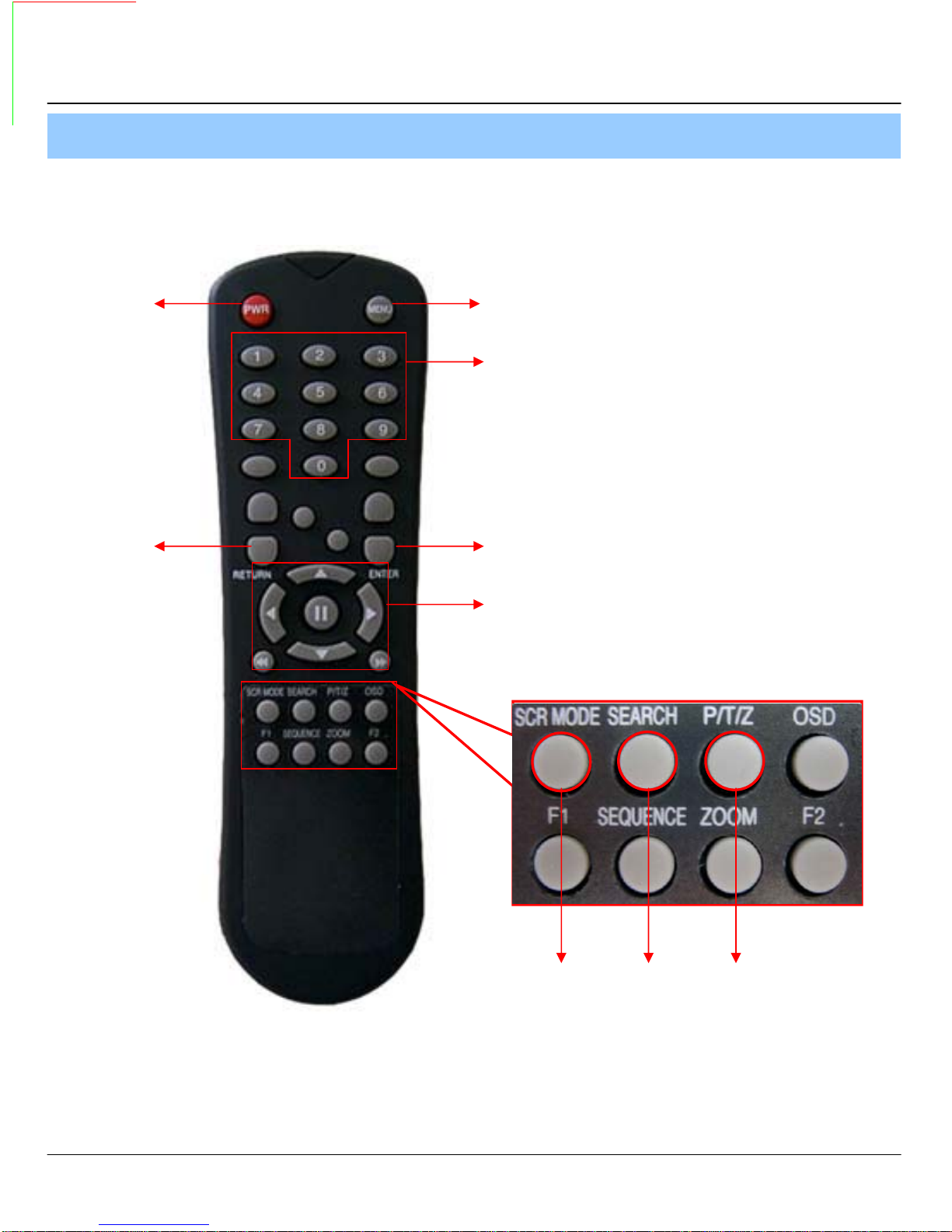
POWER
System
ON/OFF
MENU: Open Menu
RETURN
Cancel Setup
or Return to
Previous
ENTER: Apply Setup Change
Channel Selection Button
(4ch Available, #1~4 Button)
Change
Screen Mode
Open
Search Mode
PTZ/IRIS Mode
• Unused Button’s Description is Omitted.
• Every Button is Operated Same as Front Panel Button.
• Remote Controller can Operate when Remote Controller Sensor Input Part Reacted Each Other.
※ If there are many DVR at the same place, they are reacted together when press remote controller.
Search Controller : Control Playback Option,
Menu Movement, PTZ/Focus Control
3. Remote Controller
2. Description
Indice
Altri manuali XRPlus Registratore digitale


