Xtramus LES-5160 Manuale utente

LES-5160
Cat-5e Simulator
USM Ver 1.2

2
Foreword
Copyright
Copyright © 2019 Xtramus Technologies, all rights reserved. The information contained in this document is the property of Xtramus
Technologies. No part of this publication shall be reproduced, stored in a retrieval system, or transmitted, in any form or by any
means, without the prior written permission of Xtramus Technologies.
Disclaimer
The information contained in this document is subject to change without notice and does not represent a commitment on the part of
Xtramus Technologies. The information in this document is believed to be accurate and reliable. However, Xtramus Technologies
assumes no responsibility or liability for any errors or inaccuracies that may appear in the document.
Trademarks
LES-5160 is a trademark or registered trademark of Xtramus Technologies. All other trademarks and registered trademarks are
the property of their respective owners.
Warranty
Xtramus Technologies warrants for the hardware provided along with this document under proper usage and conditions in normal
environment; any improper operation or in irregular environment may possibly cause this product NOT function well. For detailed
terms, please contact your local dealer.
Contact Information
Xtramus Technologies
Website: www.xtramus.com
Tel: +886-2-8227-6611
Fax: +886-2-8227-6622

3
Revision History
Date
Version
History
2014/07/23
1.0
First version.
2014/12/03
1.1
Add the description of the three length simulation modes.
2019/05/05
1.2
1. Change header and footer pictures.
2. Modify the description about cable length setting.

4
Table of Contents
Foreword........................................................................................................................................2
Revision History............................................................................................................................3
1. LES-5160 Overview ...................................................................................................................5
1.1. General Descriptions of LES-5160 ..................................................................................5
1.2. Features, Key Advantages, and Main Applications of LES-5160...................................6
1.3. LES-5160 Functions Overview.........................................................................................7
1.3.1. LES-5160 Chassis........................................................................................................7
1.3.2. LES-5160 Front Part ....................................................................................................8
1.3.3. Modules........................................................................................................................9
1.3.3.1. System Module–XLE-SFAN ...............................................................................10
1.3.3.2. System Module–XLE-M667................................................................................11
1.3.3.3. System Module Card –XLE-CASC.....................................................................12
1.3.3.4. Cat-5e Simulation Module –XLE-C5E................................................................13
1.3.4. LES-5160 Back Part ...................................................................................................14
1.3.4.1. XLE-RFAN............................................................................................................15
1.3.4.2. XCP-A1W-300 ......................................................................................................16
2. LES-5160 Installation ..............................................................................................................17
2.1. Choices of UTP Cable.....................................................................................................17
2.2. Hardware Installation .....................................................................................................18
2.2.1. Bracket installation....................................................................................................18
2.2.2. Modules Installation ..................................................................................................20
2.2.3. Power Module ............................................................................................................22
2.2.4. Fan Module.................................................................................................................23
3. LES-5160 Management ...........................................................................................................24
3.1. Managing LES-5160 with Management Webpage.........................................................24
3.1.1. Accessing LES-5160 Management Webpage...........................................................25
3.1.1.1. Access with IP address ......................................................................................25
3.1.1.2. Access with UPnP service..................................................................................25
3.1.3. LES-5160 Management Webpage –System.............................................................28
3.1.3.1. System Information.............................................................................................28
3.1.3.2. Module Information.............................................................................................29
3.1.3.3. IP settings............................................................................................................29
3.1.4. LES-5160 Management Webpage –Management....................................................31
3.1.4.1 Chassis Overview ................................................................................................31
3.1.4.2. Cable Length Settings ........................................................................................32
3.1.4.3. Characteristic Chart............................................................................................32
3.1.5. LES-5160 Management Webpage –Maintenance....................................................33
3.1.5.1. Update Firmware.................................................................................................33
3.1.5.2. Save Changes .....................................................................................................34
3.1.5.3. Factory Defaults..................................................................................................35
3.1.5.4. System Reboot....................................................................................................35
4. LES-5160 General Specifications...........................................................................................36

5
1. LES-5160 Overview
1.1. General Descriptions of LES-5160
LES-5160 is a 16-slot Ethernet cable Cat-5e
simulator. Upon different commands, it can
simulate different network cable lengths,
including 3 modes: Bypass, Short and100m. It
can be used independently or jointly with other
devices.
Combined with XLE series modules, LES-5160 cable length simulator provides RJ45 interfaces, which can
support the protocols such as 10Base-T, 100BASE-TX, and 1000BASE-T, thus making your network
verification system more complete.
All XLE series modules are equipped with real-time LEDs which display the status of the system and the
simulating cable length, thus allowing users to view network status easily.
LES-5160 cable length simulator provides an easy-to-access Management Webpage, allowing users to
view system status, set the simulating length for the XLE series modules and upgrade firmware.
Moreover, XLE-CASC modules allow you to cascade multiple LES-5160 chassis for managing these
chassis simultaneously.

6
1.2. Features, Key Advantages, and Main Applications of LES-5160
Features
Simulate Ethernet cable Cat-5e in different lengths
Support easy-to-access Management Webpage, allowing users to view system status, set the
simulating length and upgrade firmware/FPGA
Multiple LES-5160 chassis can be cascaded for system management
Replaceable redundancy power modules for AC & DC power
Key Advantages
Provide the network environments under various cable lengths, saving the cable deploying work
in practical
Provide reliable long-distance connection
Provide cable simulation function of a very long distance, saving plenty of space for placing the
real cables
Web management
Main Applications
Test for different cable length simulations in laboratories
Test for multiple DUTs with long cables simultaneously in production
Provide simple and convenient mass production software by Xtramus technologies.
Provide the API & Library files for development of other applications.

7
1.3. LES-5160 Functions Overview
1.3.1. LES-5160 Chassis
LES-5160’s chassis consists two parts: Front Part and Back Part.
LES-5160 Chassis Overview
Front Part
LES-5160 has 16 slots for installation of modules. Each module card provides the
simulation of one cable Cat-5e line. Besides, the Front Part provides 3 slots for
installing the fan module, CASC module and management module. Please see
“1.3.2. LES-5160 Front Part” for more information.
Back Part
LES-5160’s back part includes 3 different slots. Please see “1.3.4. LES-5160
Back Part” for more detailed information.

8
1.3.2. LES-5160 Front Part
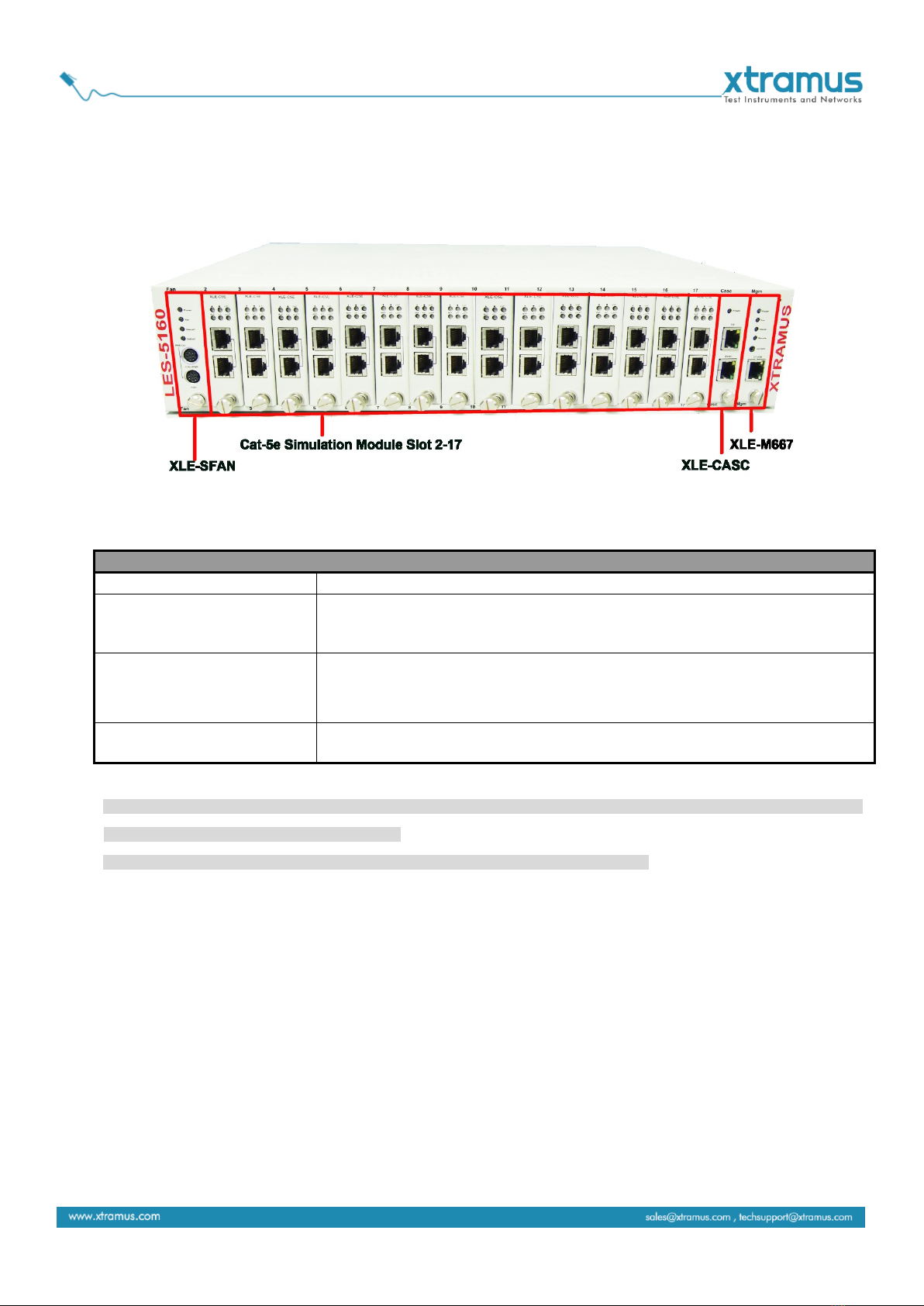
As mentioned in “1.3.1. LES-5160 Chassis”, LES-5160 has 16 slots for installing cable Cat-5e simulation
modules and 3 slots for installing the Fan, CASC and management module. Please see the sections
down below for more detailed information/specification for LES-5160 and the modules.
LES-5160 Front Part
XLE-SFAN
It is a fan module pre-installed in the front part of LES-5160 chassis.
XLE-M667
It is a module card pre-installed in LES-5160 chassis with 1
management port for accessing the Management Webpage and 1
console port for accessing the terminal settings.
XLE-CASC
It is a module pre-installed in LES-5160 with 2 ports where each port
can connect another LES-5160, providing simultaneous access to the
Management Webpage.
Cable Cat-5e simulation
module
Cable Cat-5e simulation modules can be inserted in slot 2-17.
WARNING1: XLE-SFAN, XLE-M667 and XLE-CASC do not support hot swap. Please do not pull out the XLE-SFAN, XLE-M667 and
XLE-CASC modules when the system is power on.
*WARNING2: Do not insert the XLE-M667, XLE-CASC or XLE-SFAN module to the wrong slot.

9
1.3.3. Modules
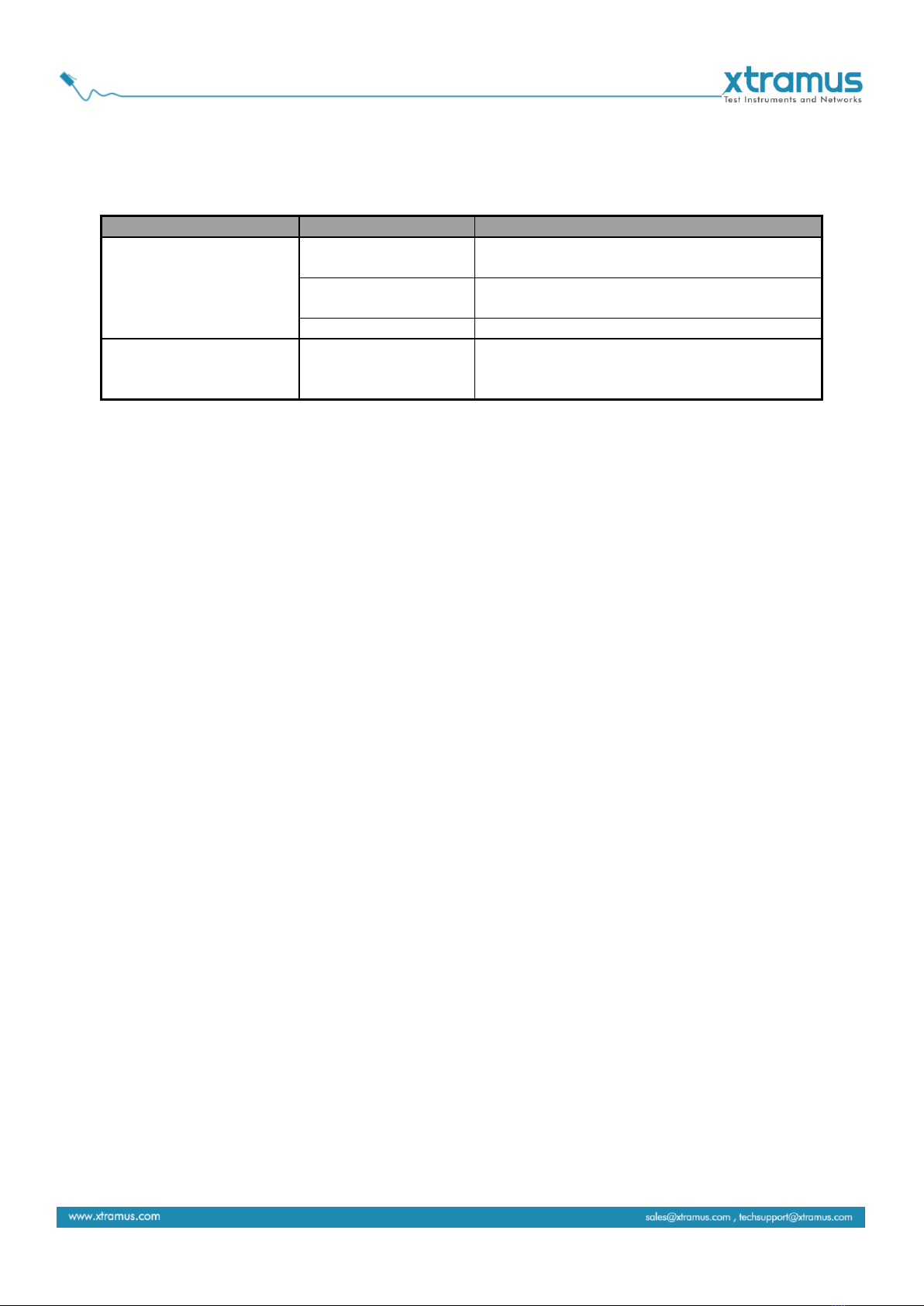
LES-5160’s modules can be divided into two categories: System Modules and Cat-5e Simulation
Modules.
Module Card Type
Module Card
Description
System Modules
XLE-SFAN
Provide ventilation for the LES-5160
chassis
XLE-M667
Allow users to view counters/perform
system maintenance
XLE-CASC
Cascade multiple LES-5160 chassis
Cat-5e Simulation
Modules
XLE-C5E
Modules for Cat-5e simulation. These
Cat-5e simulation modules can be installed
in slot 2~17 and support hot-swap.
Please see the sections down below for more detailed information regarding to LES-5160 modules.

10
1.3.3.1. System Module–XLE-SFAN
The XLE-SFAN is delivered with the LES-5160 chassis, and shall be installed on the Fan slot located on
the far left side of LES-5160 chassis. This module provides ventilation for the LES-5160 chassis.
Interface Ports
CTRL + PWR
Reserved for future use
PWR
Reserved for future use
LED
Power
Green ON
XLE-SFAN is power on.
Green OFF
XLE-SFAN is power off.
Sys
Green ON
XLE-SFAN is powering up properly.
Green OFF
XLE-SFAN is power off.
Status 0
Reserved for future use
Status 1
Reserved for future use
*Note: XLE-SFAN does not support hot-swap. Please do not draw the XLE-SFAN module out of the LES-5160 chassis
when the system is power on.
Indice
Manuali Hardware per computer popolari di altre marche

EMC2
EMC2 VNX Series Manuale del proprietario

Panasonic
Panasonic DV0PM20105 Manuale utente

Mitsubishi Electric
Mitsubishi Electric Q81BD-J61BT11 Manuale utente

Gigabyte
Gigabyte B660M DS3H AX DDR4 Manuale utente

Raidon
Raidon iT2300 Manuale utente

National Instruments
National Instruments PXI-8186 Manuale utente