Yaesu FTA-310 Manuale utente

Operating Manual
AIR BAND TRANSCEIVER

Contents
Important Notice! .......................................................... 1
Introduction ................................................................... 2
Accessories & Options ................................................ 3
Control & Connectors .................................................. 5
Top Panel ........................................................................... 5
Front Panel ......................................................................... 6
Side Panel .......................................................................... 7
Keypad ............................................................................... 8
LCD Display ...................................................................... 9
Before You Begin ........................................................ 10
Precautions ....................................................................... 10
Belt Clip Installation ........................................................ 10
Battery Installation and Removal .................................... 11
Battery Charging .............................................................. 12
Low Battery Indication .................................................... 13
Installing the FBA-25A Alkaline Battery Case ............... 13
Basic Operation .......................................................... 14
Preliminary Steps ............................................................. 14
Operation Quick Start ...................................................... 14
Squelch Adjustment ......................................................... 15
Accessing the 121.5 MHz Emergency Frequency ........... 16
Transmission .................................................................... 16
Advanced Operation .................................................. 17
Tuning Methods ............................................................... 17
Reception of Weather Channel Broadcasts ...................... 18
Monitor Switch ................................................................ 19
ANL (Automatic Noise Limiter) Feature ........................ 19
Temperature/battery Voltage Display .............................. 20
LOCK Function ............................................................... 21
Beep On/Off ..................................................................... 21
Receive Battery Saver Setup ........................................... 22
Changing the Channel Steps ............................................ 23
Pitch Control .................................................................... 24
VOX Operation ................................................................ 25
PA Operation .................................................................... 26
Timer Operation ............................................................... 28
Memory Operation ...................................................... 30
Memory System Operation .............................................. 30
Memory Storage .............................................................. 30
Recalling the Memories ................................................... 31
Scanning Operation ................................................... 32
Dual Watch Operation ................................................ 34
Priority Dual Watch Operation .................................. 35
VOR Navigation .......................................................... 36
To Select the DVOR Mode .............................................. 37
Flying to a VOR Station .................................................. 38
Entering a Desired Course ............................................... 40
Position Cross-checking .................................................. 41
Split Operation ................................................................. 42
Programming the USER Key Assignment ................ 43
Field Programming Mode .......................................... 44
CPU Resetting ............................................................. 45
Menu (“Set”) Mode ..................................................... 46
Specications ............................................................. 54
Troubleshooting ......................................................... 56
Book Memory Channel List ....................................... 57
NOTICE
There are no user-serviceable points inside this
transceiver. All service jobs must be referred to
your Authorized Service Center.

FTA-310 OperATing MAnuAl 1
Important notIce!
FCC RF Exposure Compliance Requirements for Occupational Use Only:
The FTA-310 has been tested and complies with the Federal Communications Commission (FCC) RF exposure lim-
its for Occupational Use/Controlled Exposure Environment. In addition, it complies with the following Standards and
Guidelines:
FCC 96-326, Guidelines for Evaluating the Environmental Effects of Radio-Frequency Radiation.
FCC OET Bulletin 65 Edition 97-01 (1997) Supplement C, Evaluating Compliance with FCC Guidelines for Hu-
man Exposure to Radio Frequency Electromagnetic Fields.
ANSI/IEEE C95.1-1992, IEEE Standard for Safety Levels with Respect to Human Exposure to Radio Frequency
Electromagnetic Fields, 3 kHz to 300 GHz.
ANSI/IEEE C95.3-1992, IEEE Recommended Practice for the Measurement of Potentially Hazardous Electromag-
netic Fields - RF and Microwave.
This radio is NOT approved for use by the general population in an uncontrolled environment. This radio is
restricted to occupational use, work related operations only where the radio operator must have the knowl-
edge to control its RF exposure conditions.
When transmitting, hold the radio in a vertical position with its microphone 1 to 2 inches (2.5 to 5 cm) away
from your mouth and keep the antenna at least 1 inch (2.5 cm) away from your head and body.
The radio must be used with a maximum operating duty cycle not exceeding 50%, in typical Push-to-Talk
congurations. DO NOT transmit for more than 50% of total radio use time (50% duty cycle). Transmitting
more than 50% of the time can cause FCC RF exposure compliance requirements to be exceeded.
The radio is transmitting when the red LED on the upper right corner of the front panel of the radio is illu-
minated. You can cause the radio to transmit by pressing the P-T-T button.
Always use Yaesu authorized accessories.

FTA-310 OperATing MAnuAl
2
IntroductIon
The YAESU FTA-310 is a compact, stylish, solid hand-held transceiver providing communication (transmit and re-
ceive) capability on the International Aircraft Communication Band (“COM” band: 118 ~ 136.975 MHz), and it addi-
tionally provides VOR and CDI navigation features on the “NAV” band (108 ~ 117.975 MHz).
The FTA-310 boasts 0.8 Watt of clean audio output from its 1.4” (36-mm) diameter loudspeaker, and it also provides
8.33 kHz synthesizer steps for the receiving of the new narrow-band channel plan. The FTA-310 includes both Tem-
perature and Supply Voltage displays with our exclusive Omni-GlowTM display back-lighting for minimal degradation
of your night vision, NOAA weather band monitoring, 8-character Alpha/Numeric Display, 150 Memory Channels, and
up to 100 “Book Memory” Channels. The channel congurations are can be easily reprogrammed in minutes using the
optional PC Programming Kit and your PC.
We recommend that you read this manual in its entirety, so as to understand the many features of the FTA-310 com-
pletely. Keep this manual handy, so you may use it for reference.
NOTE: The FTA-310’s VOR and CDI Navigation features are supplemental aids to navigation only, and are not in-
tended to be a substitute for accurate (primary) VOR/CDI or landing service equipment.
Congratulations!
You now have at your ngertips a valuable communications tool, a YAESU two-way radio! Rugged, reliable and
easy to use, your YAESU radio will keep you in constant touch with your friends and colleagues for years to come,
with negligible maintenance or down-time.
Please take a few minutes to read this manual carefully. The information presented here will allow you to derive
maximum performance from your radio, in case questions arise later on.
We’re glad you joined the YAESU team. YAESU products cover the entire spectrum of radio communications ap-
plications, and our worldwide support network is here to serve you. Let us help you get your message across.

FTA-310 OperATing MAnuAl
3
accessorIes & optIons
Supplied Accessories
Ni-MH Battery Pack (7.2V) FNB-83
Overnight Charger PA-48B/C
Charger Cradle CD-28
12 V DC Charging Cradle CD-59
Helical Antenna YHA-73
Quick Draw Belt Clip CLIP-14
Headset Cable CT-96
Alkaline Battery Case FBA-25A
Operating Manual
Warranty Card
“B” suffix is for use with 100-240 VAC, Type-A
plug or “C” suffix is for use with 100-240 VAC,
Type-C plug.
Available Options
MH-44B4B Speaker Microphone
E-DC-5B DC Cable w/Noise Filter
E-DC-6 DC Cable; plug and wire only
VAC-370 Desktop Rapid Charger
PC Programming Kit
Availability of accessories may vary. Some accessories
are supplied as standard per local requirements, while
others may be unavailable in some regions. Consult
your YAESU Dealer for details regarding these and any
newly-available options.
Connection of any non-YAESU-approved accessory,
should it cause damage, may void the Limited Warranty
on this apparatus.

FTA-310 OperATing MAnuAl
4
accessorIes & optIons
PTT Switch (not supplied)
An external PTT switch is
required for use with an avia-
tion headset.
Headset
(not supplied)
E-DC-5B
DC Cable w/Noise Filter (Option)
CT-96
Headset Cable

FTA-310 OperATing MAnuAl
5
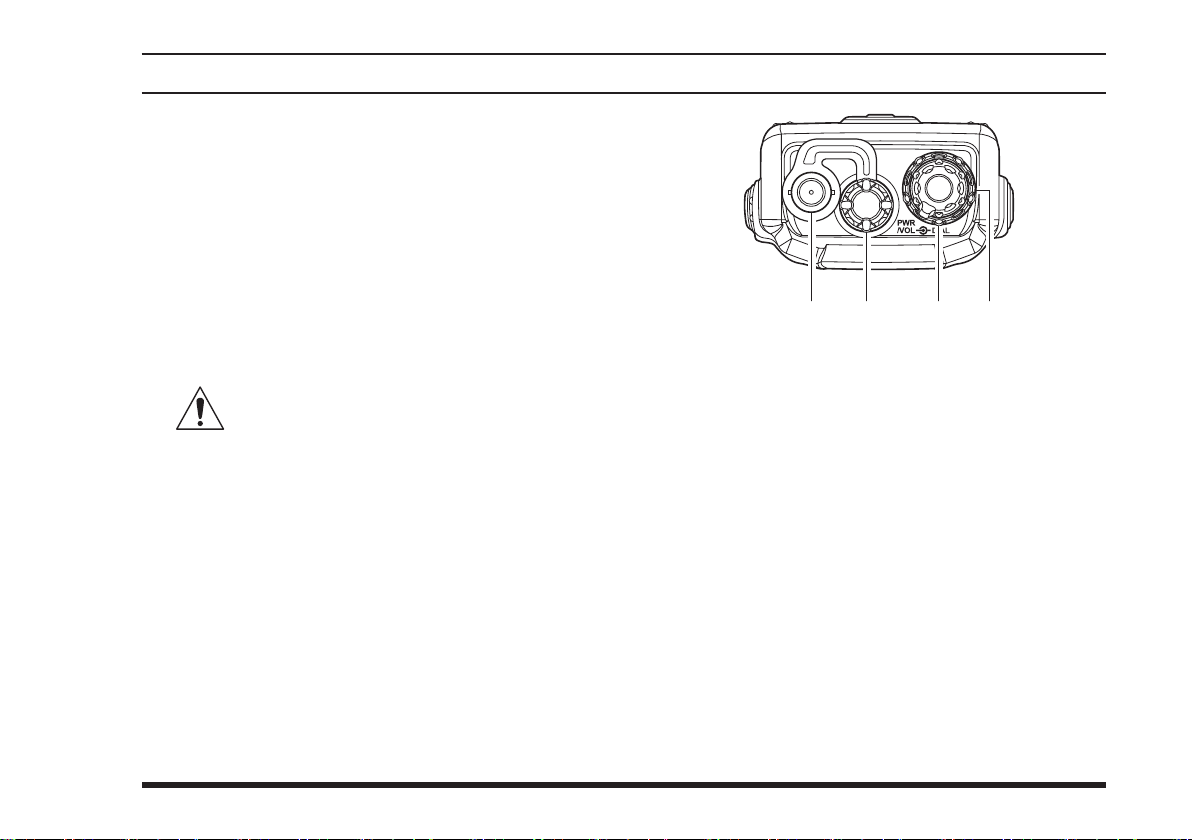
controls & connectors (top panel)
Antenna Jack
This BNC connector accepts the supplied flexible
antenna, or another antenna designed to provide 50
impedance on the Aircraft Communication Band.
MIC/EAR Jack
You may connect the supplied CT-96 Headset Cable
or the (optional) MH-44B4B Speaker/Microphone
to this jack. To use this jack, you must rst remove
the plastic cap by rotating it counter-clockwise, then
lifting it away from the transceiver body.
Do not allow the FTA-310 to become sub-
merged in water while the plastic cover
over the MIC/EAR jack is removed.
POWER/VOLUME (Inner) Knob
Turn this (inner) control clockwise to turn the radio
on and to increase the volume. Counterclockwise
rotation into the click-stop will turn the radio off.
Pressing this knob downward momentarily selects
the tuning methods among the VFO (Variable Fre-
quency Oscillator), MR (Memory Recall), BOOK
(Pre-Programmed Memories), and WX (Weather
Channel Memories) modes.
Note: The WX mode is available in the USA ver-
sion only.
DIAL Selector (Outer) Knob
This (outer) 20-position detented rotary switch tunes
the operating frequency or selects the memory chan-
nels.

FTA-310 OperATing MAnuAl
6
controls & connectors (Front panel)
BUSY/TX Indicator Lamp
This lamp glows green when a signal is being re-
ceived, and red when transmitting.
Loudspeaker
The internal speaker is located in this position.
Microphone
Speak across this opening in a normal voice level,
while pressing the PTT switch, to transmit.
LCD (Liquid Crystal Display)
The display shows selected operating conditions, as
indicated on the next page.
Keypad
The keypad is used for most radio command opera-
tions. Several keys have triple functions.
The primary functions are activated by simply
pressing the key momentarily.
The secondary functions are activated by pressing
the key followed by [F] key.
The third functions are activated by pressing and
holding in the key for 2 seconds.
These functions are described in detail on page 8.
Battery Pack Latch
Open this latch for battery removal.

FTA-310 OperATing MAnuAl
7
controls & connectors (sIde panel)
PTT (Push To Talk) Switch
Press this button to transmit when you are operating
in the COM band. Release this button to return to
the “Receive” mode. See page 16 for details.
MONITOR Switch
This button may be pressed to “open” the squelch
manually, allowing you to listen for very weak
signals. Press and hold this button for 2 seconds
to “open” the squelch continuously. Press this but-
ton again to resume normal (quiet) monitoring. See
page 15 for details.
EXT DC Jack
When an external 12-Volt DC power source is avail-
able, you may connect the (optional) E-DC-5B Ex-
ternal DC Cable here.
1) Do not allow the FTA-310 to become
submerged in water while the rubber cover
is removed.
2) Do not connect any wire to this jack if that wire
is connected directly to a 28-Volt DC source. Con-
necting the FTA-310 directly to a source which
exceeds 15.0 Volts DC will result in damage to the
unit, and this type of damage is not covered by the
Limited warranty on this product.

FTA-310 OperATing MAnuAl
8
controls & connectors (Keypad)
Primary Function
(Press Key)
Secondary Function
(Press [F] + key)
Third Function
(Press and Hold key)
Primary Function
(Press Key)
Secondary Function
(Press [F] + key)
Third Function
(Press and Hold key)
Primary Function
(Press Key)
Secondary Function
(Press [F] + key)
Third Function
(Press and Hold key)
Primary Function
(Press Key)
Secondary Function
(Press [F] + key)
Third Function
(Press and Hold key)
Frequency Entry Digit 1
Activates DVOR mode.
None
Frequency Entry Digit 4
Activates Deviation
Indicator mode.
None
Frequency Entry Digit 7
Activates Split (Duplex)
mode.
None
None
Split-Memory
“Write” Command.
Memory “Write”
Command.
Frequency Entry Digit 2
Activates “TO” VOR
mode.
None
Frequency Entry Digit 5
Activates Pitch Control
feature.
None
Frequency Entry Digit 8
Activates the Stop Watch
Timer.
None
Frequency Entry Digit 0
Adjusts the Squelch
threshold level.
None
Frequency Entry Digit 3
Activates “FROM” VOR
mode.
None
Frequency Entry Digit 6
Displays the Battery Voltage and Current
Temperature inside the transceiver’s case.
None
Frequency Entry Digit 9
Allows Skipping of
Channel during Scan.
None
Swiches the VFO mode
“A” and “B.”
Activates the Dual Watch
feature.
Activates Scanning.
Select Memory Display
Type.
Activates the Key Lockout
feature.
Selects DVOR Display
Type
Selects Emergency
Channel (121.5 MHz).
None
None
Activates the Automatic Noise
Limiter during AM reception.
None
Activates the Public
Address feature.
Activates “Secondary” key
mode.
Cancel the “Secondary”
key mode of the [F] key.
None
Indice
Altri manuali Yaesu Ricetrasmettitore

Yaesu
Yaesu VX-8DE Manuale utente

Yaesu
Yaesu FT-80C - SERVICE Manuale utente

Yaesu
Yaesu FT-470 Manuale utente

Yaesu
Yaesu VX-5500L Manuale utente

Yaesu
Yaesu FT-707 Manuale utente

Yaesu
Yaesu VX-1000 Series Manuale utente

Yaesu
Yaesu FT-2400H Manuale

Yaesu
Yaesu FT-250R Manuale utente

Yaesu
Yaesu FTM-400DR Manuale utente

Yaesu
Yaesu FTM-7250DR Manuale

Yaesu
Yaesu FTA-720 Manuale utente

Yaesu
Yaesu VX-6R Manuale utente

Yaesu
Yaesu FTM-400XDR Manuale utente

Yaesu
Yaesu FT-277R Manuale utente

Yaesu
Yaesu FT-990 Manuale utente

Yaesu
Yaesu FTDX101MP Manuale utente

Yaesu
Yaesu FT-757GX II Manuale utente

Yaesu
Yaesu FTM-3200DR Manuale utente

Yaesu
Yaesu FT-8900R Manuale utente

Yaesu
Yaesu VX-5R Manuale utente