
YOSHINO B2000 SST Manuale utente

User Manual
Solid-State Portable Power Station
B2000 SST

Tech support based in the USA!
Operating hours are 8:00 am - 4:30 pm PST (M-F).
DISCLAIMER
The information contained in this manual is subject to change without notice.
Read all safety tips, warning messages, terms of use, and disclaimers carefully. This user manual
contains instructions and notes on the operation and use of this unit. Users take full responsibility
for all usage and operations. You are solely responsible for being aware of all relevant regulations
and using Yoshino products in a way that is compliant.
Yoshino recommends that you use genuine Yoshino accessories. Yoshino shall not be responsible
for any damage or expense that might result from the use of parts other than genuine Yoshino
parts.
If you are not going to use the unit for an extended period of time, power off the unit and discon-
nect AC adapter from the outlet. Recommended storage temperature: 32-104°F / 0-40°C, storage
humidity: 90% Max. To protect the battery, charge the unit to 80% every 3-6 months during
long-term storage.
For your safety, please read this manual carefully before using and keep handy for future reference.
YOSHINO APP
You can use the Yoshino app to monitor, control or customize your
portable
power station.
Download at https://YoshinoPower.com
Yoshino APP
Google Play
1. Add device 3. Connect to the Internet
Internet setup
Remember password
Password
Loading . . .
Wi-Fi name
Start binding
2. Search with Bluetooth
Searching for units
1
2 3 4
App Store

Tech support based in the USA!
Operating hours are 8:00 am - 4:30 pm PST (M-F).
CONTENT
01
11
6. UPS
13-148. Warranty
15
16
17
9. Troubleshooting
10. FAQ
11. FCC Warning
09
09
09
10
10
10
11
5.1 Power Button
5.2 APP Connectivity
5.3 LED Light Bar
5.4 AC Output
5.5 USB Output
5.6 DC Output
5. Operation
1. What’s in the Box 02
03-05
06-07
08
08
08
09
12
2. Safety Instructions
3. Overview
4. Recharging Your Portable Power Station
4.1 AC Charging
4.2 Car Charging
4.3 Solar Charging
7. Specifications
02
Tech support based in the USA!
Operating hours are 8:00 am - 4:30 pm PST (M-F).
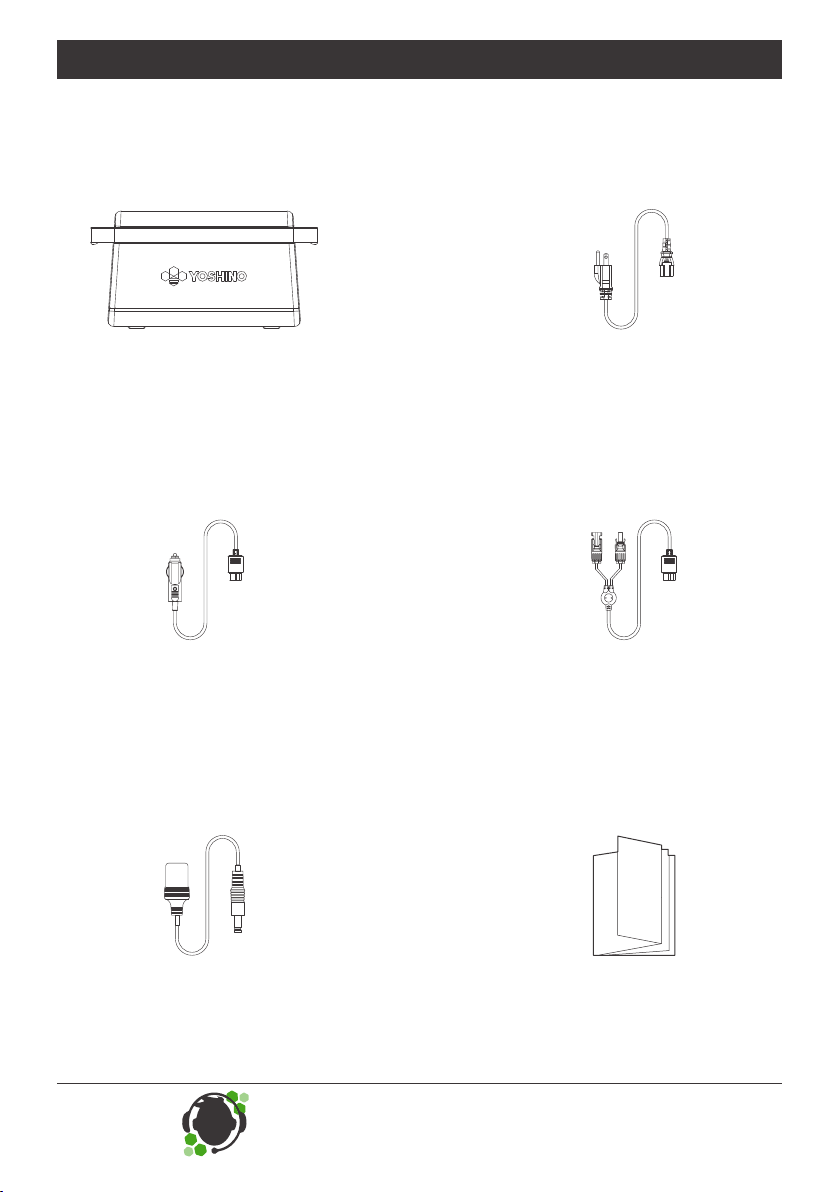
1. What’s in the Box
B2000 SST
Portable Power Station
DC5521 to Cigarette Car
Female Output Cable
( 1.6 ft / 0.5 m )
Cigarette Car
Charging Cable
( 9.8 ft / 3 m )
User Manual,
Thank You Card,
Warranty Registration Card
Solar Charging Cable
MC4 to XT60
( 9.8 ft / 3 m )
AC Recharge Cable
( 5.9 ft / 1.8 m )

03
Tech support based in the USA!
Operating hours are 8:00 am - 4:30 pm PST (M-F).
2. Safety Instructions
Important Safety Instructions
WARNING – When using this product, basic precautions should always be followed, including the
following:
a) Read all the instructions before using the product.
b) To reduce the risk of injury, close supervision is necessary when the product is used near children.
c) Do not put fingers or hands into the product.
d) Use of an attachment not recommended or sold by Yoshino Technology may result in a risk of fire,
electric shock, or injury to persons.
e) To reduce risk of damage to the electric plug and cord, pull the plug rather than the cord when
disconnecting the portable power station.
f) Do not use a portable power station or appliance that is damaged or modified. A damaged or
modified portable power station may exhibit unpredictable behavior resulting in fire, explosion or risk
of injury.
g) Do not operate the portable power station with a damaged cord or plug, or a damaged output
cable.
h) Do not disassemble the portable power station, contact Yoshino customer service when service is
required. Incorrect disassembly or reassembly may result in a risk of fire or electric shock.
i) To reduce the risk of electric shock, unplug the power pack from the outlet before attempting any
instructed servicing.
j) When charging the internal battery, work in a well ventilated area and do not restrict ventilation in
any way.
k) Do not expose a portable power station to fire or excessive temperature. Exposure to fire or
temperature above 130°C (265°F) may cause explosion.
l) Have servicing performed by a qualified repair person using only identical replacement parts. This
will ensure that the safety of the product is maintained.
m) Do not get the product wet or immerse it in water. If water is found inside the product, it must not
be turned on or used again. Take all precautions against shock before touching the product. Move the
product to a safe open area. Once the product is safley moved, contact Yoshino customer service
immediately.

04
Tech support based in the USA!
Operating hours are 8:00 am - 4:30 pm PST (M-F).
n) Do not use the product in an environment with strong static electricity/magnetic fields.
o) Do not drop or allow the product to fall. If the product has any kind of severe external impact, turn
the power off immediately and stop using the product. Dispose of the product properly.
p) Do not put heavy objects on top of the product.
q) Do not block the fan during use.
r) This product is not recommended for powering medical emergency equipment such as medical
grade ventilators and artificial lungs. Please consult with your doctor and the manufacturer for
instructions on the safe use of portable power station with medical equipment.
s) Please keep a safe distance between medical implants and this product while the product is in
use. This portable power station will generate electromagnetic fields which can affect the normal
operation of pacemakers, hearing aids, cochlear implants and other medical equipment. Please
contact the manufacturer for information on the safe use of this product around these devices.
Grounding Instructions
This product must be grounded. If it should malfunction or breakdown, grounding provides a path of
least resistance for electric current to reduce the risk of electric shock. This product is equipped with
a cord having an equipment grounding conductor and a grounding plug. The plug must be plugged
into an outlet that is properly installed and grounded in accordance with all local codes ordinances.
WARNING – Improper connection of the equipment grounding conductor is able to result in a risk
of electric shock. Check with a qualified electrician if you are in doubt as to whether the product is
properly grounded. Do not modify the plug provided with the product – if it will not fit the outlet, have
a proper outlet installed by a qualified electrician.
Storage and Maintenance Instructions
1. Keep this product out of reach of children and pets.
2. Only use a clean dry cloth to remove dirt from the product ports.
3. If the portable power station is not going to be used for extended periods of time, power off the unit
and disconnect the AC to DC recharge adapter from the outlet.
4. Store the product at 32-104°F / 0-40°C. Every 3-6 months charge the product to 80% to protect
battery life.
5. Store the product in a dry and well ventilated place.

05
Tech support based in the USA!
Operating hours are 8:00 am - 4:30 pm PST (M-F).
Disposal Guide
1. If possible, fully discharge the battery before disposal in a designated battery recycling bin. It is
strictly prohibited to dispose of this product in regular trash bins. Batteries contain chemicals that
could be dangerous if not disposed of properly. Please consult your local laws and regulations on
battery recycling and disposal.
2. Do not dispose of the battery in a battery recycling box if the battery cannot be fully discharged.
Please contact a professional battery recycling company for help in disposing of the battery.
3. Batteries that cannot be recharged should be disposed of properly.

06
Tech support based in the USA!
Operating hours are 8:00 am - 4:30 pm PST (M-F).
3. Overview
Main Power Button
APP Connectivity Button
USB Power Button
AC Outlet Ports
Wireless Charging Pad
DC Output Ports
LCD Screen
USB-C Output Ports
USB-A Output Ports
AC Input Port
Overload Protection
Solar/Car Input Port
DC Power Button
AC Power Button
LED Light Button
LED Light Bar

07
Tech support based in the USA!
Operating hours are 8:00 am - 4:30 pm PST (M-F).
LCD Screen Guide
Wireless Charging
Recharging Time
Remaining Time
Battery Percentage
APP Connectivity
Low Temp Warning
High Temp Warning
Overload Warning
Output Power
Input Power
AC Input
AC Output
DC Output
USB-A Output
USB-C PD Output
USB-C Output
Car/Solar Input Battery Failure Warning

08
Tech support based in the USA!
Operating hours are 8:00 am - 4:30 pm PST (M-F).
4. Recharging Your Portable Power Station
Note
Before use or storage, recharge your portable power station to full charge. If the LCD screen indicates
less than 20% charge, recharge using available power input methods as soon as possible.
Users can recharge the product through the use of 12V/10A car chargers.
Before use, check to see that the car charging cable is well connected.
Please make sure the car is started before using car charging. Yoshino takes no responsibility for
any losses or damages caused by failure to follow instructions.
4.1 AC Charging
4.2 Car Charging
Note:
1
2
3
Please use the AC Charging Cable included in the package for fast charging. Plug directly into AC wall
outlet and make sure that the wall outlet output voltage is 110-125V. Yoshino takes no responsibility for
any consequences caused by failure to follow instructions, including but not limited to charging with
other AC charging cables.
*Overload Protection
When AC recharging is not available, check to see if the overload protection switch is switched on. If
so, press it down to reset.
1500W AC
Can charge to 80% capacity
in approximately 45 minutes
*Overload
Protection
120W Car Charging
Can charge to 80% capacity
in approximately 9 hours
Indice
Altri manuali YOSHINO Alimentazione elettrica


