
Yuzu Audio 87 FET Mic Kit Manuale utente

Yuzu Audio
DIY Audio Electronics
Made Easy
Build Guide v1.0
. . . . . . . . . . . . . . 3
. . . . . . . 4
. . . . . . . 5
. . . . . . . . . . . . 5
. . . . . . . . . . . . 6
. . . . . . . 7
. . . . . . . 9
. . . . . . . . . 10
. . . . . . 11
. . . . . . . . . . 12
. . . . . . . 13
. . . . . . . . . 14
. . . . . . . . 15
. . . . . . 16
. . . 18
. . . . . . . 20
. . . . . . . . 22
. . 22
. . . . . . . 23
. . . . . 25
. . . . . 27
. . . . . . . . . 28
Introduction
Chapter 1: Getting Started
Chapter 2: PCB Assembly
Ground Pins
Zener Diode
Resistors & Inductors
Tantalum Capacitors
Film Capacitors
Electrolytic Capacitors
JFET Transistor
Styroflex Capacitors
Toggle Switches
Chapter 3: PCB Wiring
Chapter 4: Switch Wiring
Chapter 5: Transformer Wiring
Chapter 6: XLR Wiring
Chapter 7: Calibration
Drain Voltage Measurement
THD Measurement
Chapter 8: Capsule Wiring
Chapter 9: Troubleshooting
Acknowledgements
Table of Contents
2

Thank you for purchasing the Yuzu 87 FET Microphone Kit from Yuzu Audio. We hope you are
excited to build our faithful recreation of the classic German large-diaphragm condenser
microphone from the late 1960s.
Arguably the most famous microphone in the recording industry after the SM57, the U87 has
been a staple in studios across the world since its inception, capturing vocal and instrument
performances on countless hit records.
Through history, the circuit design of the U87 has been through many iterations including U87i,
U87p and U87a designations but in this kit, we have decided to focus on the vintage U87i circuit
to retain the original sonic characteristics of the microphone.
To help you focus on the important parts of DIY audio projects, which we believe is the
understanding and building of the microphone itself, we have provided a full kit with all the
parts needed to complete the project while covering any questions you may have along the
journey.
This build guide will take you step by step through the wiring process in detail in order to help
you assemble the full microphone with ease. Along the way, you will learn about how this
microphone works and the important steps to follow in order to make your microphone sound
as best as possible.
Let’s get started!
3

Double-check the box contents using the bill of materials
provided:
1 x Microphone Body - with XLR connector
1 x Shock Mount - with thread adapter
1 x K87 Capsule (Heiserman HK87)
1 x BV13 Transformer (AMI T13)
3 x PCBs - 2 x main PCBs and 1 x switch PCB
3 x Toggle Switches - 2 x two-way and 1 x three-way
All other semiconductors and passive components
Recommended tools for a smoother build:
Desoldering Wick or Pump:
You may find it useful to have a wick or pump in case
you misplaced a component or wish to rework a
mediocre solder joint.
Wire Strippers:
The wires included in this kit are provided
unstripped and therefore you may find it useful to
have wire strippers to expose the leads.
Isopropyl Alcohol:
Rubbing some isopropyl alcohol with a toothbrush or
a cotton swab can be an effective way to clean flux
and solder residue from PCBs after soldering all the
components.
For maximum effectiveness, please use pure
isopropyl above 91%, preferably 99%.
Required tools to complete this build:
Soldering Iron:
A good-quality soldering iron with temperature control
is necessary to get clean solder joints on this build.
For PCB work, a chisel tip with an iron that can go up to
350ºC is preferable.
Solder:
The choice of solder can be quite subjective but we
recommend a 63/37 leaded solder with a relatively
small diameter for durable solder joints in this build.
Needle Nose Pliers:
Essential for handling small parts and bending
component legs in neat beautiful shapes.
Wire Cutters:
Essential for cutting all excess leads from components
after soldering.
Screwdrivers:
Chances are you probably have a set of these at home
already but you will need a small Phillips head
screwdriver to fasten the capsule and PCBs to the
microphone body.
Multimeter:
You will need to use the voltmeter, ammeter and
ohmmeter capabilities of your multimeter for various
steps in this build including calibration, component
matching and troubleshooting.
You do not need an expensive one to complete this kit.
Microphone Preamp:
Hopefully you should have a good preamp if you are
attempting this build in order to send a healthy
phantom power of +48V to calibrate the JFET and
measure voltages when troubleshooting the circuit.
Getting Started
1
4
If a component is missing, please
send us an email right away!

Ground Pin
PCB A
Ground Pin
PCB B
~ Components List ~
PCB Assembly
Ground Pins
2
Previous Steps
Ground Pins
Solder Joints
Components
Now is a good time to sort
through all the components to
organize your workspace before
tackling the next steps.
Using a three-band or four-band
resistor color code chart, assess
the resistance value of all the
components.
~ Build Notes ~
5
First, let's start the PCB assembly by soldering each
component one by one:
Insert the isolation turrets into insertion point
GG on PCB A and G on PCB B.
Trim some of the excess from the back of the
PCB while still mainting some room to solder a
wire later on.

!
PCB Assembly
Zener Diode
2
6
Previous Steps
Ground Pins
Solder Joints
Components
Zener Diode
PCB A
R7 1G
PCB B
~ Components List ~
Next, we can focus on diodes and resistors:
Solder the zener diode onto PCB A.
Solder resistor R7 onto PCB B by lifting one of
the resistor legs towards ground pin G.
Trim any excess with wire cutters after
soldering.
Double-check the orientation of
the diode against the PCB
marking.
Diodes can be sensitive to static
electricity so make sure you are
wearing cotton and discharged
before handling it.
Do not use the through-hole on
the PCB when lifting the resistor
leg and solder directly onto the
isolation turret.
~ Build Notes ~

PCB Assembly
Resistors & Inductors
2
7
Previous Steps
Ground Pins
Solder Joints
Components
R13
R14
R15/R16
R17
R18/R19
330k
10k
150k
56k
2.2k
L1/L2
R8
R9
R10
R12
47uH
1M
6.8k
560r
47k
PCB A
R1
R2
R3/R6
R4/R5
300k
150k
1G
68M/60M
PCB B
~ Components List ~
Learn how to match resistors with a
method described on the next page!
In this step, we finish soldering the resistors along
with the inductors:
Solder all the remaining resistors to their
corresponding locations.
Solder inductors L1/L2 onto PCB A.
Trim any excess with wire cutters after
soldering.
Use a bender tool or some needle
nose pliers to bend the resistors
in shape for a nice finish.
Make sure the component rests
vertically on the side marked by
a larger circle on the PCB.
~ Build Notes ~

Connect 4 resistors by forming a rhombus pattern as
shown.
Connect the positive side of the battery to R1 and R2.
Connect the negative side of the battery to R3 and R4.
Connect one voltmeter probe to R1/R3 and the other to
R2/R4.
Set the voltmeter to the 20mV DC range.
Read the bridge balance value by swapping R1 until you
find two resistors showing the same balance value.
Place this pair of resistors as R1 and R3 to form a new
reference.
Read the new bridge balance by swapping R2 and R4
until you find two resistors showing a reading of 0mV.
You now have R2 and R4 matched!
~ Method ~
You may find that some circuits require resistors to be
matched to a high degree of precision. In fact, the U87 circuit
falls into that category where R18 and R19 must be matched to
less than 0.4% of each other. Most ohmmeters are not up to the
task and this is where the wheatstone bridge comes into play.
This classic circuit can be used to find matched pairs of
resistors even with a cheap multimeter. You will need a 9V
battery and a bunch of resistors with the same resistance value
and a tolerance of 1% to start with.
Thankfully, the resistors in your kit have already been
matched but you may find it useful to know how to do it.
!
Pro Tip!
Wheatstone Bridge
8

PCB Assembly
Tantalum Capacitors
2
9
Previous Steps
Ground Pins
Solder Joints
Components
PCB A
C7
C8
C10
1uF
22uF
4.7uF
~ Components List ~
Next, we will start working on the capacitors, starting
with the tantalum kind:
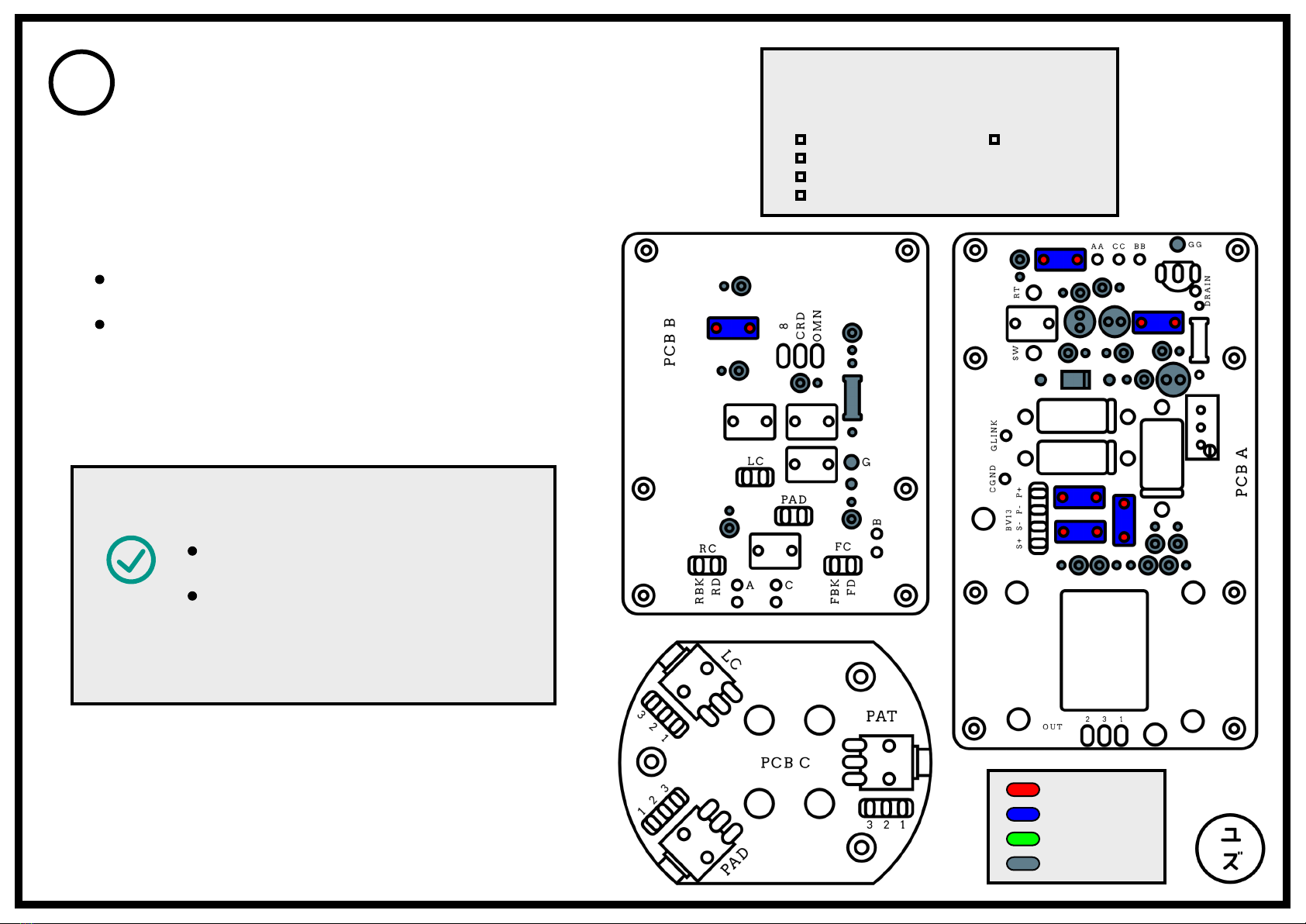
Solder all the tantalum capacitors onto PCB A.
Trim any excess with wire cutters after
soldering.
Double-check the orientation of
the capacitors against the PCB
marking.
The positive leg of the tantalum
capacitor should be marked with
a line and a plus sign.
~ Build Notes ~
PCB Assembly
Film Capacitors
2
10
Previous Steps
Ground Pins
Solder Joints
Components
C5
C9
C14
C16/C17
0.033uF
0.47uF
0.01uF
330pF
PCB A
C2 0.01uF
PCB B
~ Components List ~
It's time for the film capacitors in this step:
Solder all the film capacitors except for the
Styroflex which will be soldered later on.
Trim any excess with wire cutters after
soldering.
The orientation of the capacitors
does not matter here.
Double-check that the capacitors
are completely flush with the
PCB before soldering for a nice
finish.
~ Build Notes ~
Indice


