
ZACO A10 Pro Manuale utente
Find more information at
www.zaco.eu
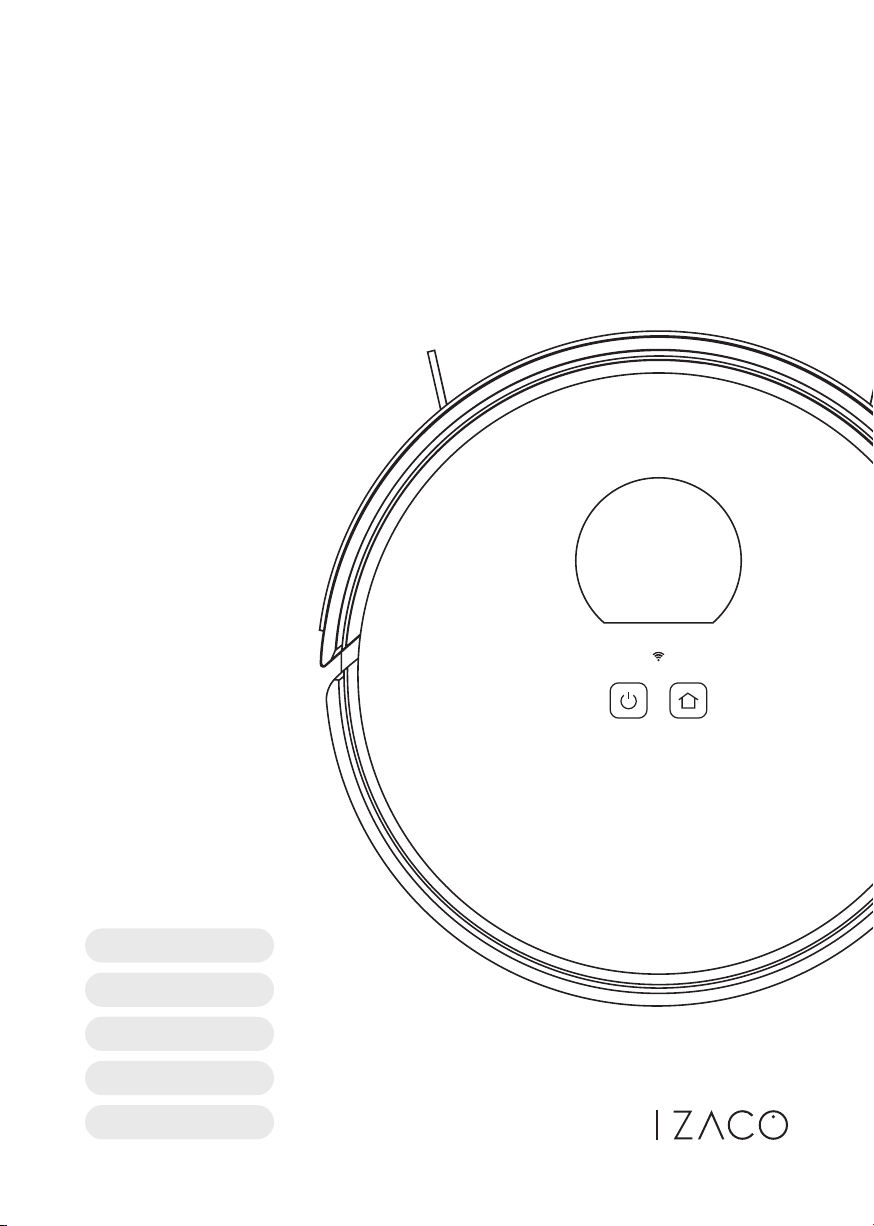
Auto-Empty Robot
Vacuum Cleaner
User Manual
A10 Pro
DE Deutsch
EN English
FR Français
ES Español
IT Italiano
2 Find more information at www.zaco.eu
EN English
ZACO Customer Service
Customer Service Number
00800-42377961 (European Free Call)
0209-513038-38 (Direct Line - DE)
Dear Customer,
thank you for choosing the ZACO A10 Pro robot vacuum cleaner!
You are now among the millions of people who clean with robots -
the smarter way to get things done.
Please take a few minutes to read this manual and familiarize
yourself with your robot so you can get the best performance out
of it. If you have a problem, please contact the ZACO customer
service first or visit our website www.zaco.eu for more information.
Best regards,
ZACO Customer Service
Robovox Distributions GmbH
Hamburger Straße 11 | 45889 Gelsenkirchen | Germany
Social Media
RobovoxZACO zaco_robot ZACO Robot
3
Find more information at www.zaco.eu
EN English
Safety Instructions 5
Product Overview 8
List of accessories 8
Main device 9
lndicator status 9
Sensors and structure 10
Self-emptying charging station 11
Dustbin & water tank 11
Installation 12
Precautions 12
Mopping function 18
App download & user instructions 20
Product Operation 22
Operating instructions 22
Intelligent cleaning (default mode) 24
Spot-mode cleaning 25
Room-specific cleaning 26
Cleaning of defined areas 27
Setting up restricted areas (no-go-areas) 28
Scheduled cleaning 29
Do-not-disturb mode (DND) 29
Other app functions 29
Table of Contents
4 Find more information at www.zaco.eu
EN English
Routine Maintenance 30
Main brush 30
Side brushes 31
Dustbin and filter 32
Wash the dustbin 33
Clean the infrared obstacle avoidance sensor 34
Clean the cliff sensors 34
Clean the charging contacts 34
Clean the signal output range the self-emptying charging station 35
Battery 35
Firmware update 35
Change the dust bag 36
Clean the suction shaft of the self-emptying charging station 38
Clean the infrared sensor & charging contacts of the
self-emptying charging station 39
Product Specification 40
Main device 40
Self-emptying charging station 40
ErP information 41
Common Problems 42
Troubleshooting 44
Frequency Band 45
EU Declaration of Conformity 45
Table of Contents

5
Find more information at www.zaco.eu
EN English
Use Restrictions
• The product is for home use only. Please do not use it in outdoor (such as an open
balcony), non-ground (such as a sofa), commercial or industrial environments. This
can affect the warranty.
• Do not use the robot in suspended environments (such as open balconies or on top
of furniture) without protective rails or barriers.
• Pick up any cables from the floor before using the robot to prevent it from dragging
them while cleaning.
• Please remove fragile objects from the floor to prevent damage and hinderance
while the robot is cleaning.
• This product may not be used by people with physical, sensory, or intellectual
disabilities, or people without relevant experience and knowledge (including chil-
dren), unless there is an adult present to ensure that they can use the product
safely.
• Children must not use the robot vacuum cleaner as a toy. Please ensure that
children and pets are not in the vicinity while the robot is cleaning.
• Keep the cleaning tool out of reach of children.
• Do not place any objects (including children and pets) on the stationary or moving
robot.
• Make sure to keep your fingers and hair away from the suction inlet of the robot.
Safety instructions

6 Find more information at www.zaco.eu
EN English
Safety instructions
• Do not use the robot to clean high pile carpets. Some dark carpets might not be
cleaned normally as it can be difficult for the sensors to distinguish it from the
ground.
• Ensure the robot does not vacuum around fragile or sharp objects (e.g., decoration
wastes, broken glass, iron nails, etc.
• Do not use the protective cover of the laser sensor or bumper as a handle to carry
the robot.
• Only clean and maintain the robot and the charging station when the power is off.
• Do not use wet cloths or liquids to clean the robot.
• Follow the instructions in the manual and Quick Start Guide to ensure proper use of
the robot. In case of improper use, the user is liable for all damages or injuries
caused.
• Do not use the mopping function on carpets or on top of furniture.
• Make sure there is no more residual water in the water tank and remove it before
charging the robot.

7
Find more information at www.zaco.eu
EN English
Battery and Charging
• Do not use any third-party spare batteries, charging stations or charging devices.
• Do not disassemble, repair, or refit the battery or charging station yourself.
• Do not place the charging station near heat sources such as radiators.
• Do not use a damp cloth or wet hands to clean the charging contacts of the
charging station.
• Before scrapping the robot, turn it off and remove the battery. Properly dispose of
used batteries and send them to professional recycling companies.
• If the power cord is damaged or broken, stop using it immediately and replace it
with a new one.
• When transporting the device, make sure that the robot is switched off. It is
recommended to use the original packaging for transport.
• If you do not use the robot for a long time, charge it fully and store the product in a
dry and shaded place. It is recommended to charge the robot at least once every
three months to avoid battery damage due to overcharging or discharging.
Safety instructions
8 Find more information at www.zaco.eu
EN English
Product Overview
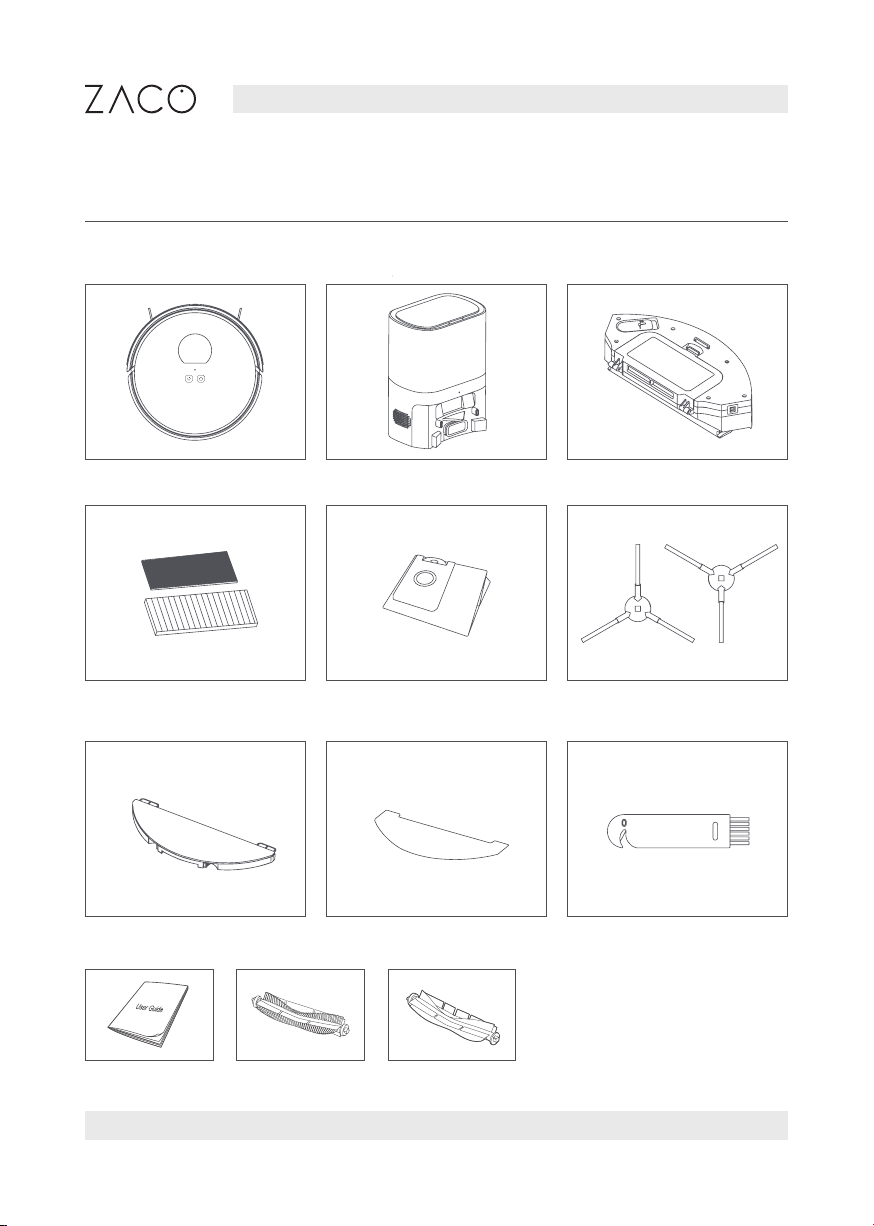
List of accessories
Robot
High-performance filter +
sponge filter
Mopping plate
User manual Main Brush Rubber brush
Mop cloth Cleaning tool
Dust bag 2x Side brush
Self-emptying station 2 in 1 Dustbin & water tank
9
Find more information at www.zaco.eu
EN English
Product Overview
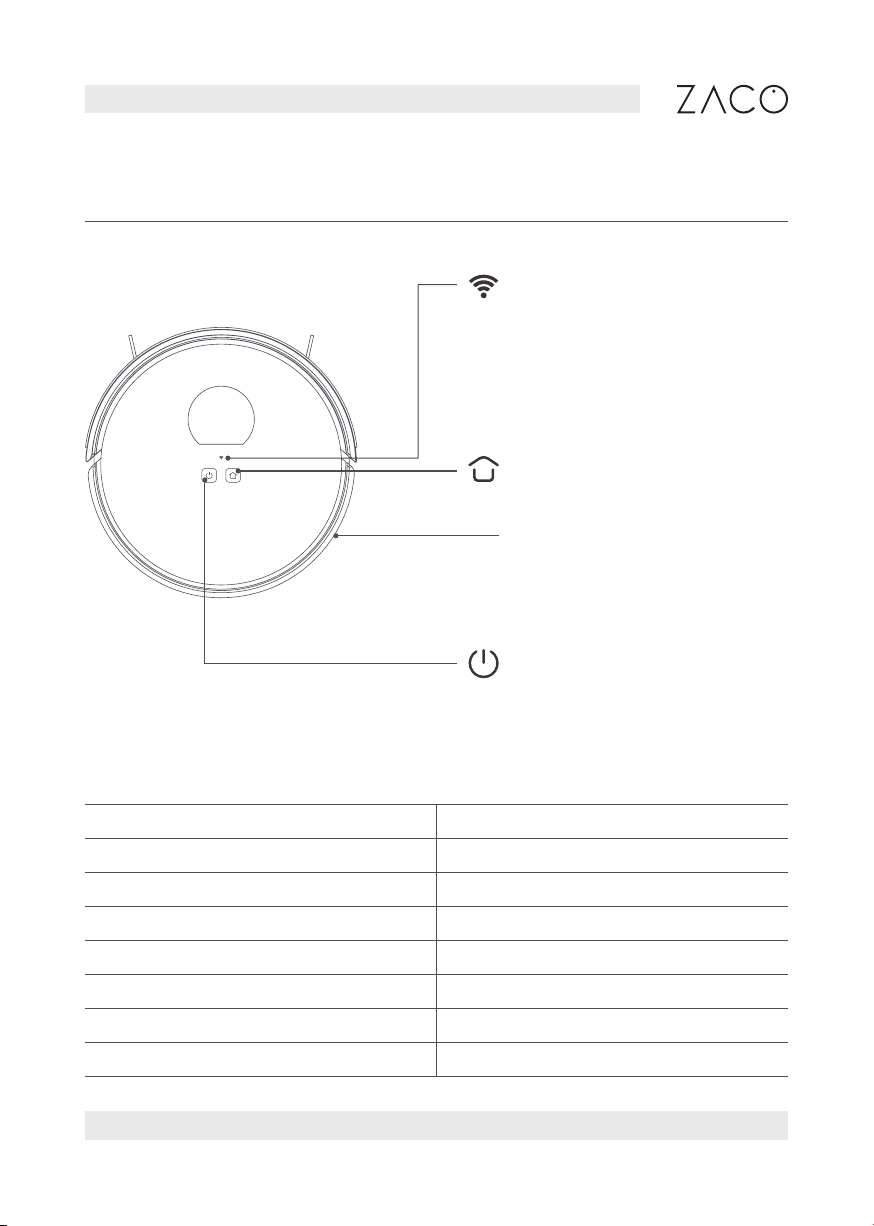
Main device
Recharge / Pause
Press to recharge/pause
Wi-Fi status light
• Off: Wi-Fi not connected
• Flashing: Connecting to Wi-Fi
• On: Wi-Fi is connected
System reset button
Use a needle to press the
button (inside the small hole).
It will reset the robot.
Power / Clean / Pause
• Press the button to start
cleaning/pause
• Press and hold the button for
3 seconds to power on/off
lndicator status
Status Light
Cleaning Blue light on
Recharging Blue light on
Charging Blue light flashing
Low power Red light flashing
Fully charged Blue light on
Alarming Red light flashing
Standby Off
10 Find more information at www.zaco.eu
EN English
Product Overview
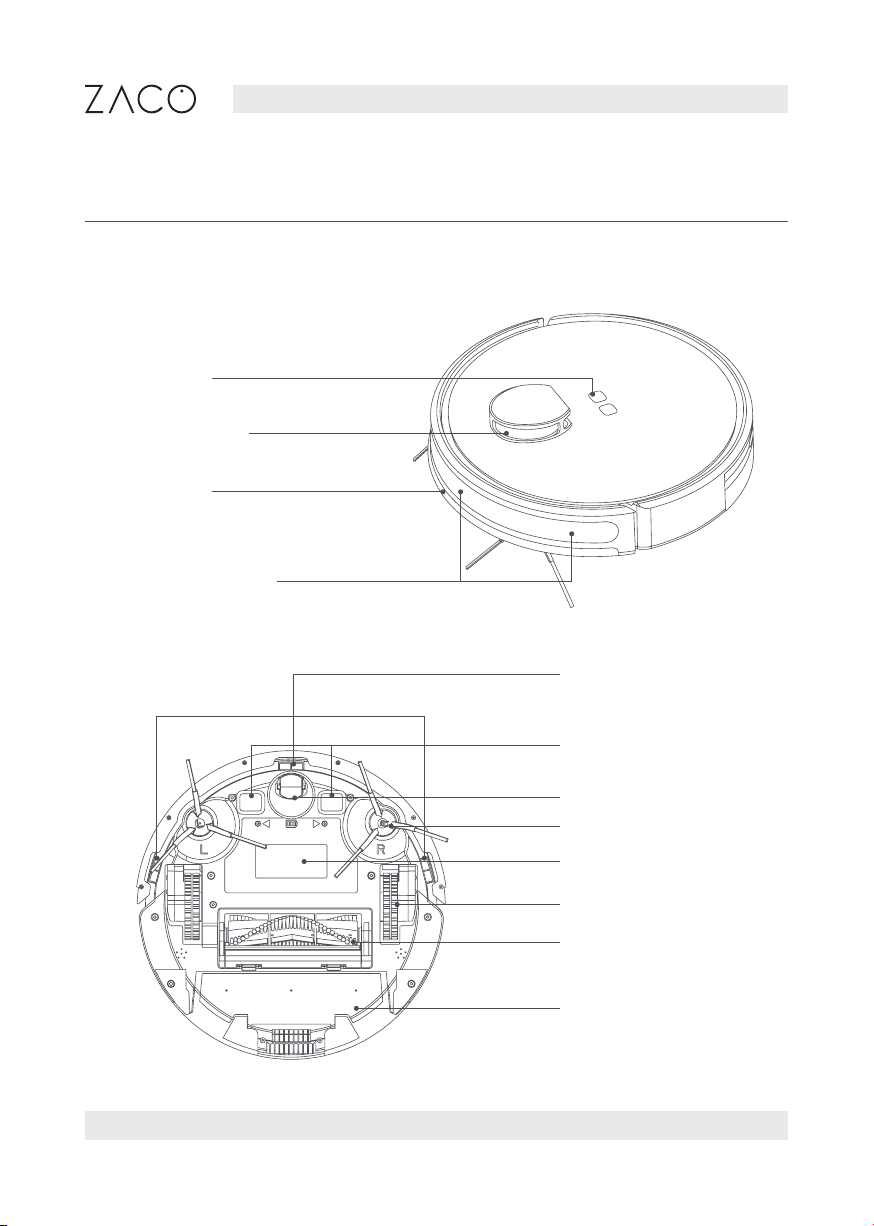
Sensors and structure
Buttons
Laser sensor
Bumper
lnfrared sensors
Cliff sensors
Charging contacts
Nose wheel
Side brushes
Battery cover
Drive wheels
Main brush
Dustbin
Questo manuale è adatto per i seguenti modelli
1
Indice
Altri manuali ZACO Aspirapolvere


