ZENEC ZE-NC3131D Manuale utente

USER MANUAL
ENGLISH/ GERMAN
USER MANUAL
BEDIENUNGSANLEITUNG
ZE-NC3131D
CAR SPECIFIC NAVICEIVER FOR
AUDI A3 VEHICLES

2
CONTENTS
SAFETY INSTRUCTIONS ..................................................................................... 3
FRONT PANEL BUTTONS.................................................................................4-5
OPERATION OF STEERING WHEEL CONTROLS...........................................6-7
BASIC OPERATION ...........................................................................................8-9
RADIO MODE .................................................................................................10-13
PLAYBACK OF A/V SOURCES .....................................................................14-19
BLUETOOTH MODE ......................................................................................20-27
NAVIGATION MODE.......................................................................................28-29
SYSTEM SETUP.............................................................................................30-39
REMOTE CONTROL MAIN ............................................................................40-41
REMOTE CONTROL M-ZONE .......................................................................42-43
EXTERNAL PLAYBACK AND SOURCES .....................................................44-45
GLOSSARY.......................................................................................................... 46
TROUBLESHOOTING....................................................................................47-48
SPECIFICATIONS................................................................................................ 49
WARRANTY....................................................................................................98-99
EC DECLARATION OF CONFORMITY ............................................................ 102
Navigation manual is separate.

3
ZE-NC3131D
SAFETY INSTRUCTIONS
1. Read these instructions entirely.
2. Keep these instructions within reach. Whoever uses the unit should have access to this manual.
3. Heed all warnings. Follow the instructions.
4. This unit is designed to be used in a vehicle with 12V DC battery and negative ground.
5. Do not operate the unit in any other way than described in this manual. Failure to follow the
instructions within this manual may void your warranty.
6. Do not disassemble or alter the unit in any way, because it will void your warranty. Do not attempt to
repair or to service the unit yourself, but contact an authorized ZENEC dealer instead.
7. Use only original accessories which are designed and manufactured for the unit, otherwise you
will risk damage. Install the unit according to the mounting manual, using the supplied mounting
accessories. The forces of acceleration for accidents are sometimes huge. Incorrect mounted units
are a big risk for the driver and the car passengers, during an accident.
8. Protect the unit from water and other liquids, which can enter the casing. A short circuit or even fire
could be the result.
9. To prevent a short circuit, never insert or stick any metallic objects (such as coins or metal tools) into
the unit.
10. Before you replace a defective fuse, try to find the cause for the short circuit. Please pay attention
to the cables of the power supply! If the short circuit doesn't result from a failure of the power supply
or wiring, you can replace the defective fuse with a new one (same values). If the short-circuit is still
existing, please contact an authorized ZENEC dealer.
11. When connecting to any other device, read its user's guide for detailed safety instructions. Do not
connect incompatible products.
12. Be careful not to drain the car battery while using the unit when the car engine is turned off. Because
the unit uses a considerable amount of energy and the battery will be charged only while the engine
is running, it might happen that the battery will discharge to a point where it's not longer possible to
start the engine.
13. According to the law in different European countries, driving with monitors which are showing
movies in the viewing range of the driver is not allowed, because the driver might be distracted from
the traffic. Please respect the traffic regulations of your country, or you might face penalties in case
of an accident or even loose your insurance coverage. Please pay attention to the volume inside
your vehicle, because you are obliged to notice exterior sounds like police sirens etc.
14. Don't expose the unit to hard impacts. A mechanical or electrical malfunction of the unit could be the
result.
15. Should any problems or questions occur during installation, please consult your ZENEC dealer/
importer.
16. This unit utilizes a class 1 laser. Use of controls or adjustments or performance of procedures other
than those specified herein may result in hazardous exposure to coherent light. Do not open covers
and do not repair yourself. Refer servicing to qualified personnel.

4
FRONT PANEL BUTTONS
Front Panel

5
ZE-NC3131D
1. IR RECEIVER
2. DISC INDICATOR
3. DISC SLOT
4. EJECT
Eject disc
5. HOME
Press to open Main Menu,
hold to open EQ page
6. FM/AM
Press to switch to FM/AM source
Press and hold to de- and activate
TA function
7. DVD
Press to switch to DVD source
8. NAV
Press to switch between Navigation
and playback page
Press and hold to fade in/out the
infobars manually
9. PWR/VOL
Rotate to increase/decrease volume,
press and hold to switch device
ON/OFF
10. INTERNAL MICROPHONE
11. SD CARD SLOT
12. FRONT A/V-In
13. RESET
Press to initiate a hardware reset
14. SMART DIAL
Rotate to move a cursor up and
down
Press to confirm a selection
15. BT
Press to switch to BT source
16. NEXT
Press to choose next
Track|Chapter|Station
Press and hold to fast forward
17. PREVIOUS
Press to choose previous
Track|Chapter|Station
Press and hold to fast rewind
18. ALT
Funktion can be set in Setup
Press and hold to open the Video
setup
FRONT PANEL BUTTONS
FRONT PANEL BUTTONS

6
OPERATION OF STEERING WHEEL CONTROLS

7
ZE-NC3131D
OPERATION OF STEERING WHEEL CONTROLS
1. NEXT
Rotate up to choose next
Track | Chapter | Station
2. SCAN | FAST FORWARD
Press to scan for next FM station
Press and hold for fast forward action
3. PREVIOUS
Rotate down to choose previous
Track | Chapter | Station
4. MODE
Press to choose next playback source
5. TELEPHONY
Press to answer or hang up a call
Press and hold to reject an incoming call
6. VOL/MUTE
Rotate to increase/decrease volume
Press to mute/unmute audio

8
BASIC OPERATION
SELECT A SOURCE
Enter main menu:
- Via Touchscreen:
Touch the icon in the upper left corner of the screen.
- Via "HOME" button:
Push "HOME" button to enter main menu.
Operation at main menu:
The main menu consists of three pages: 2 main pages and 1 M-Zone page.
There are two basic ways to get there:
- Slide You can slide the two main pages back and forth.
Just slide your fingertip onscreen in the respective direction.
The M-Zone page (backseat area) cannot be accessed
via sliding.
- Bar Tap on any of the three rectangular markers in the top area of the
screen to navigate through all three main menu pages. M-Zone
included.
Entering the main menu you have access to all playback sources and settings.
ADJUST LOCAL LANGUAGE
Tap center header button or slide to second main menu page. Choose SETUP
> GENERAL > LANGUAGE and adjust to your likings. You might want to adjust
some other basic settings. See chapter "Setup".
POWER ON/OFF
Main menu 1 Main menu 2 M-Zone page
Correctly installed, your device will power on together with the ignition of the vehicle.
Ignition off: Device does not receive power. When the ignition is activated, you may
also switch the device On and Off using the front panel power button.

9
ZE-NC3131D
BASIC OPERATION
BASIC OPERATION
Display & control elements:
Indicates current source
- Tap to enter main menu
Indicates when NAV infobar is available
- Tap to display NAV infobar
- Tap again to hide it
Connected mobile phone battery
status.
Mobile phone GSM reception fi eld
strength
Basic elements (for all playback sources)
Three infobar styles:
NAV infobar Playback infobar BT infobar
NOTE:
■Press and hold the NAV button to fade in/out the infobars manually.
Touch the icon to fade out the infobars manually.
■NAV infobar is only available during active route guidance.
■An incoming call or new playback information triggers the automatic
pop-up of the other infobar types at NAV screen. They will fade out after
fi ve seconds.

10
RADIO MODE
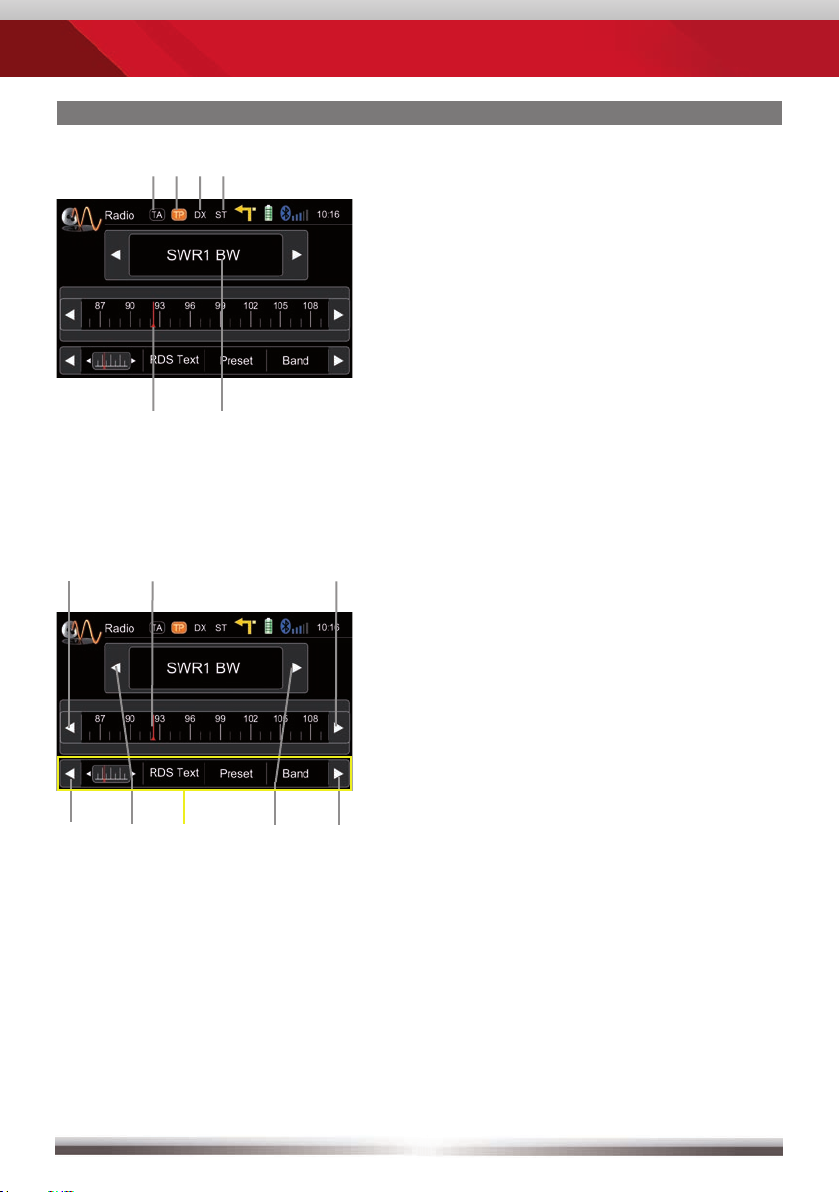
Display elements:
Red line marks current frequency
Frequency or station name
Traffi c announcement status
Traffi c announcements on carrier
LOC/DX status
Stereo reception indicator
Control elements:
Scroll left
Previous station
Tap to select center display content
Next station
Scroll right
100 kHz down
Drag to adjust frequency
100 kHz up
Altri manuali per ZE-NC3131D
1
Indice
Lingue: