Zhone 12000E Manuale utente

Zhone Technologies
@Zhone Way
7001 Oakport Street
Oakland, CA 94621
USA
Copyright © 2005
Zhone Technologies, Inc.
1
12000E IP Broadband Loop Carrier
Installation Instructions
Document Number IPD1-A2-ZZ40-20
October 2005
Contents
End User License Agreement (Zhone and Affiliates) 2
Introduction 4
Unpacking and Inspecting the Equipment 4
Installation Options 5
Installing Your Management Module 7
Installing Your Interface Module(s) 10
Establishing Your Uplink Connections 14
Connecting Your Subscriber Lines 15
Configuration and Management 18
Fan Module 19
Specifications 20
Important Safety Instructions 20
EMI Notices 22
Notice to Users of the Canadian Telephone Network 23
CE Marking 23
Product Documentation Online 23
Contacting Global Service and Support 23
Technical Support 24
Service Requirements 24

212000E IP Broadband Loop Carrier Installation Instructions IPD1-A2-ZZ40-20
End User License Agreement (Zhone and Affiliates)
License. Zhone Technologies, Inc. and/or an affiliate ("Zhone") hereby grants
you ("User")—either an individual or a single business entity—the
non-exclusive right to install, access, run, or interact with ("Use") one copy of
the enclosed software (which may have been, or may be, provided on media,
as part of a hardware platform, through download, or otherwise) and
associated documentation ("Software") on the first computer system on which
User installs the Software ("System") solely for internal business purposes
(including, without limitation, providing products and services to User's
customers) and subject to the restrictions below). Zhone may, in its sole
discretion, make available future updates or upgrades to the Software each of
which is also Software subject hereto. Title to and all patent rights, copyrights
and other intellectual property rights in the Software are retained by Zhone
and its direct and indirect suppliers and licensors ("Licensors").
Restrictions. The Software may not be (a) Used on or from any system other
than the System; (b) Used with more than any maximum number of
subscribers stated in the documentation accompanying the Software; (c) Used
so as to circumvent any technological measure included therein or provided
by Zhone from time to time to control access to or limit use of the Software;
(d) sublicensed, rented, leased or lent to third parties; (e) imported or exported
into any jurisdiction except in compliance with all applicable laws of the
United States and such jurisdiction; (f) transferred to a third party unless (A)
User transfers the original and all surviving copies to a third party who has
agreed in writing to be bound hereby and (B) such third party pays to Zhone
such reasonable additional fee as Zhone may impose from time to time with
respect to such transfer; or (g) made available to third parties as part of any
time-sharing or service bureau arrangement. User shall not have the right to
use the Software or any portion thereof for a use other than that contemplated
by its documentation. User will not copy all or any part of the Software or
attempt, or encourage or permit any third party, to modify, adapt, make
derivative works from, reverse engineer, reverse compile, disassemble or
decompile the Software or any portion thereof except and only to the extent
that such activity is expressly permitted by law notwithstanding this
limitation. Violation of any of the foregoing shall be deemed a material breach
hereof. User may make a reasonable number of copies solely for archival or
disaster recovery and subject to the restrictions imposed by copyright law, but
may not modify or otherwise copy the Software. User agrees to reproduce
product identification, copyright and other proprietary notices of Zhone and
Licensors on all copies. User's rights are only as expressly stated herein.
Zhone may immediately terminate your rights if you violate the provisions
hereof.
Do not install this Software unless you agree to these provisions.
Return the Software promptly for a refund if you do not agree.

End User License Agreement (Zhone and Affiliates)
IPD1-A2-ZZ40-20 12000E IP Broadband Loop Carrier Installation Instructions 3
Limited Warranty. Zhone warrants that the media containing the Software is
free from defects in material and workmanship for ninety (90) days following
your purchase of the Software. You may provide written notice of such defect
(addressed to Zhone Technologies, Inc., Attention: Customer Service, 7001
Oakport Street @ Zhone Way, Oakland, CA 94621) no later than ten (10) days
following expiration of such period and, as your sole and exclusive remedy,
Zhone will provide replacement media. NEITHER ZHONE NOR ITS
LICENSORS MAKE ANY OTHER WARRANTY, EXPRESS, IMPLIED
OR STATUTORY. ZHONE AND ITS LICENSORS DISCLAIM ALL
WARRANTIES OF FITNESS FOR PARTICULAR PURPOSE,
MERCHANTABILITY AND NON-INFRINGEMENT. Some states or other
jurisdictions do not allow the exclusion of implied warranties on limitations
on how long an implied warranty lasts, so the above limitations may not apply
to you. This warranty gives you specific legal rights, and you may also have
other rights which vary from one state or jurisdiction to another.
Limit of Liability. In case of any claim hereunder or related to the Software,
neither Zhone nor its Licensors shall be liable for direct damages exceeding
the price paid by User for the Software or for special, incidental,
consequential or indirect damages, even if advised in advance of the potential
thereof.
U.S. Government Users. The Software is a "commercial item" as defined at
48 C.F.R. 2.101, consisting of "commercial computer software" and
"commercial computer software documentation" as such terms are used in 48
C.F.R. 12.212. Under 48 C.F.R. 12.212 and 48 C.F.R. 227.7202-1 to
227.7202-4, U.S. Government Users acquire the Software only with the rights
set forth therein.
Third Party Licensors. This Zhone End User License Agreement may be
accompanied by differing or additional provisions applicable to portions of
the Software provided by one or more Licensors ("Licensor Provisions").
User acknowledges and agrees that its Use of such portions of the Software is
subject to the Licensor Provisions.

412000E IP Broadband Loop Carrier Installation Instructions IPD1-A2-ZZ40-20
Introduction
The 12000E IP Broadband Loop Carrier (BLC) provides a high capacity and
native IP Ethernet foundation for a variety of feature-rich multi-service access
multiplexer modules.
The 12000E BLC is engineered for efficient, high-speed IP data transport in a
compact, fully fault-tolerant chassis. It features a high capacity backplane
delivering up to 48 Gbps throughput and providing a non-blocking
architecture for even the highest bandwidth broadband access technologies,
such as ADSL2+.
The 12000E BLC supports single or dual redundant uplink, management, and
switching modules. In redundant mode, both modules can be connected to the
dual backplanes with redundant modular backhaul/uplink ports to support 10/
100 Ethernet, GigE (Copper or fiber), T1/E1, and dual bonded T1/E1 uplink
modules.
For flexibility of installation the 12000E has removable mounting brackets
that can be placed in increments of 1.45” up to 9.28” from the front of the
chassis, allowing for multiple installation options in either 19" or 23"
equipment racks.
Unpacking and Inspecting the Equipment
HANDLING PRECAUTIONS FOR
STATIC-SENSITIVE DEVICES
This product is designed to protect sensitive components from
damage due to electrostatic discharge (ESD) during normal
operation. When performing installation procedures, however, take
proper static control precautions to prevent damage to equipment. If
you are not sure of the proper static control precautions, contact your
nearest sales or service representative.
The following components should be included in the shipping container:
z1 – 12000E with 1 fan module and 12 slot covers
z4 – Rubber Bumper Screws
z2 – Rack Mount Brackets (either 19" or 23", as ordered)
z10 – #6 Phillips Bracket Screws
z8 – #10 Phillips Rack Screws
z8 – #12 Phillips Rack Screws
If there is visible damage, do not attempt to connect the device. Contact your
sales representative.
!

Installation Options
IPD1-A2-ZZ40-20 12000E IP Broadband Loop Carrier Installation Instructions 5
Installation Options
The 12000E BLC is designed for installation in a Restricted Access area
where admittance is limited to trained and authorized service personel. It may
be installed on a tabletop or in a rack.
Installation on a Tabletop
Insert the four provided rubber bumper screws into the mounting holes at the
bottom of the 12000E chassis for surface grip and airflow. Position and secure
all connecting cables such that they will not become a tripping hazard or pull
loose from the chassis. Ensure that the air supply vents around the top and
bottom edges of the chassis are not blocked.
Front Rear
Side Top
12000E Bottom View
Rubber Bumper
Screw
05-17800

612000E IP Broadband Loop Carrier Installation Instructions IPD1-A2-ZZ40-20
Installing in a Rack
1Using a Phillips screwdriver, attach the two provided rack mount brackets
to the sides of the 12000E with eight of the ten provided bracket screws.
There are seven position options for the rack brackets; position them as
best suited to the space available for your chassis on the rack being
utilized.
2Mount the chassis onto the rack and secure the rack mount brackets to the
sides of the rack using one of the two provided sets of eight rack screws
(whichever size fits the rack being utilized).
12000E Side View Rack Mount
Bracket
Front Rear
05-17802

Installing Your Management Module
IPD1-A2-ZZ40-20 12000E IP Broadband Loop Carrier Installation Instructions 7
3Check the rack for stability, ensuring that installation of the 12000E has
not caused the rack to become top-heavy. Position and secure all
connecting cables such that they will not become a tripping hazard or pull
loose from the chassis.
Installing Your Management Module
A management module provides the functional control for the 12000E BLC;
the BLC cannot function without one. There are several different models
available for purchase. Refer to www.zhone.com for further information, or
contact your sales representative.
Installing a Management Module
An uplink module provides the upstream network connection for the12000E
BLC; a management module cannot function without one. Depending on the
management module model that you plan to install in your 12000E, you will
need either a Media Interface Module (MIM) or an Uplink Interface Module
(UIM). Only one uplink module is required for operational purposes, however
two uplink modules may be installed, one in each port of the management
module, if redundancy is desired. Refer to your management module and/or
uplink module installation instructions for further information.
CAUTION:
If a slot cover is removed from a management module uplink port, it must
be replaced with an uplink module. DO NOT OPERATE A 12000E BLC
WITH A MANAGEMENT MODULE THAT HAS AN OPEN UPLINK
PORT.
12000E Front View
05-17802
1 2 3 4 5 6 8 9 10 11 12 U1 U2
12000E

812000E IP Broadband Loop Carrier Installation Instructions IPD1-A2-ZZ40-20
1Select a slot for installation. The 12000E is a fourteen slot chassis: slots
1–12 are reserved for interface modules and slots U1–U2 are reserved for
management modules. Although the 12000E is shipped with Port U1
open, your management module can be installed in either Port U1 or Port
U2. Only one management module is required for operational purposes.
However, two management modules may be installed if redundancy is
desired: one in Slot U1 and one in Slot U2.
CAUTION:
If the slot cover is removed from Slot U2, it must be replaced with a
management module. DO NOT OPERATE YOUR 12000E WITH
AN EMPTY MODULE SLOT.
05-17803
1 2 3 4 5 6 8 9 10 11 12 U1 U2
12000E
Management Module Slots

Installing Your Management Module
IPD1-A2-ZZ40-20 12000E IP Broadband Loop Carrier Installation Instructions 9
2With the management module printed circuit board (PCB) facing right
and the management module model name upright, align the upper and
lower edges of the PCB with the slot module guides.
3Slide the management module firmly into the chassis. Tighten the
fastening screws on the management module faceplate.
05-17804
1 2 3 4 5 6 8 9 10 11 12 U1 U2
12000E
Management
Module
MUM
Slot Module Guides
05-17805
1 2 3 4 5 6 8 9 10 11 12 U1 U2
12000E
Fastening Screws
MUM

10 12000E IP Broadband Loop Carrier Installation Instructions IPD1-A2-ZZ40-20
Installing Your Interface Module(s)
Interface modules provide the subscriber connections for an 12000E; up to
twelve interface modules may be installed in the 12000E (slots 1–12). There
are a variety of models available for purchase; contact your sales
representative for further information or visit www.zhone.com for a list of
available products. Any combination of interface module models may be
installed in an 12000E as long as they are supported by the model type and
version number of your management module; refer to the Release Notes for
your particular management module model for compatibility information.
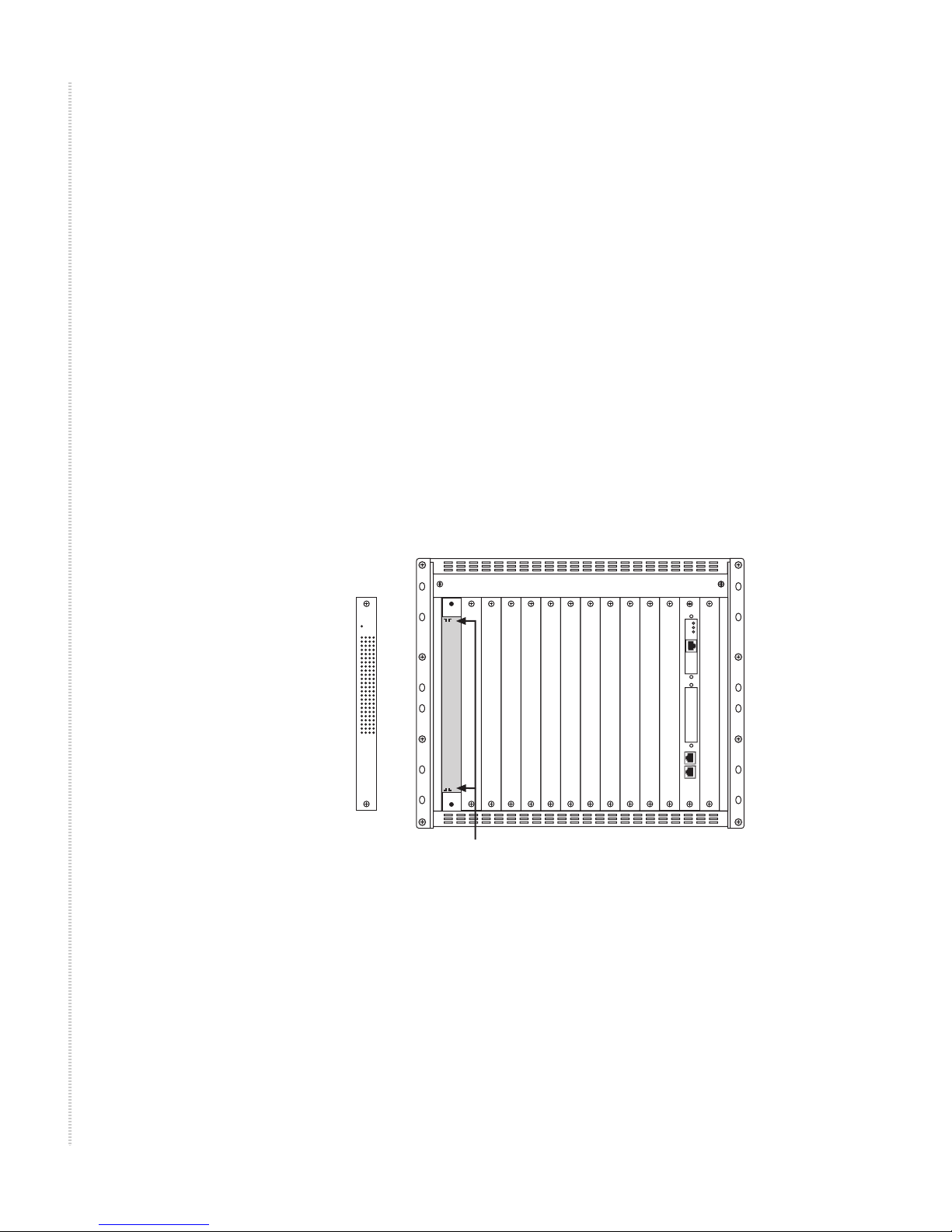
1Select a slot for installation. Although the 12000E is factory shipped with
Slot 1 open, interface modules may be installed in any slot, 1–12.
CAUTION:
If a slot cover is removed from slot 2–12, it must be replaced with an
interface module. DO NOT OPERATE YOUR 12000E WITH AN
EMPTY MODULE SLOT.
2With the interface module PCB facing right and the interface module
model name upright, align the upper and lower edges of the PCB with the
slot module guides.
05-17806
1 2 3 4 5 6 8 9 10 11 12 U1 U2
12000E
Interface
Module
MUM
PWR
TIM
Slot Module Guides
Indice
Altri manuali Zhone Hardware di rete

Zhone
Zhone LCM Manuale utente

Zhone
Zhone 4929 DSLAM Manuale utente

Zhone
Zhone 4800 EXPRESS 4800 Express Manuale utente

Zhone
Zhone 6211 Istruzioni operative originali

Zhone
Zhone 4929 4929-A1-520 Manuale utente

Zhone
Zhone 4300 Manuale utente

Zhone
Zhone zPON Manuale utente

Zhone
Zhone 4000E Manuale utente

Zhone
Zhone IMACS Network Device Manuale utente

Zhone
Zhone IPD 12000E Manuale utente
Manuali Hardware di rete popolari di altre marche

Matrix Switch Corporation
Matrix Switch Corporation MSC-HD161DEL Manuale utente

B&B Electronics
B&B Electronics ZXT9-IO-222R2 Manuale utente

Yudor
Yudor YDS-16 Manuale utente

D-Link
D-Link ShareCenter DNS-320L Manuale utente

Samsung
Samsung ES1642dc Istruzioni per l’uso

Honeywell Home
Honeywell Home LTEM-PV Istruzioni per il montaggio